This tutorial shows you how to configure and deploy a Kafka autoscaler
as a Cloud Run service. This autoscaler performs scaling logic for a Kafka consumer
workload, such as a Cloud Run worker pool deployment. The Kafka autoscaler reads metrics from your
Kafka cluster, and uses manual scaling for a Cloud Run [worker pool](https://docs.cloud.google.com/run/docs/configuring/workerpools/manual-scaling) or [service](https://docs.cloud.google.com/run/docs/configuring/workerpools/(/run/docs/configuring/services/manual-scaling))
to scale a Kafka consumer workload based on the Kafka consumer lag metric.
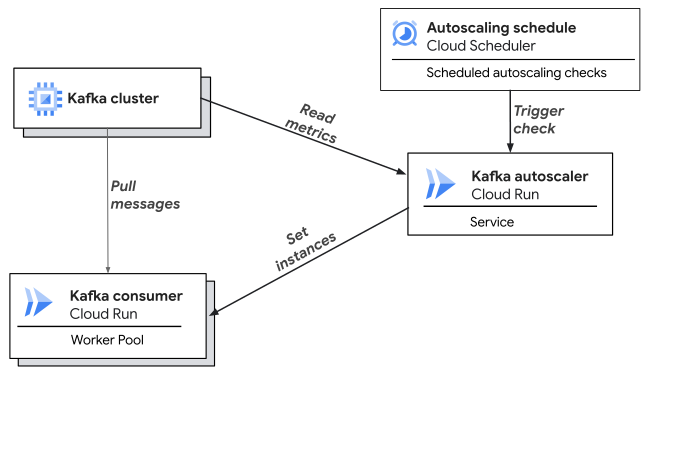
The following diagram shows how a Kafka autoscaler service reads metrics from a Kafka cluster to autoscale a Kafka consumer worker pool.
## Required roles
To get the permissions that you need to deploy and run this service, ask your administrator to grant you the following
IAM roles:
- [Cloud Run Developer](https://docs.cloud.google.com/iam/docs/roles-permissions/run#run.developer) (`roles/run.developer`)
- [Service Account User](https://docs.cloud.google.com/iam/docs/roles-permissions/iam#iam.serviceAccountUser) (`roles/iam.serviceAccountUser`)
- [Artifact Registry Reader](https://docs.cloud.google.com/iam/docs/roles-permissions/artifactregistry#artifactregistry.reader) (`roles/artifactregistry.reader`)
- [Cloud Scheduler Admin](https://docs.cloud.google.com/iam/docs/roles-permissions/cloudscheduler#cloudscheduler.admin) (`roles/cloudscheduler.admin`) to create the Cloud Scheduler job to trigger autoscaling checks
- [Cloud Tasks Queue Admin](https://docs.cloud.google.com/iam/docs/roles-permissions/cloudtasks#cloudtasks.queueAdmin) (`roles/cloudtasks.queueAdmin`) to create the Cloud Tasks queue for autoscaling checks
- [Security Admin](https://docs.cloud.google.com/iam/docs/roles-permissions/iam#iam.securityAdmin) (`roles/iam.securityAdmin`) to grant permissions to service accounts
## Before you begin
To configure and use the Kafka autoscaler, you need the following resources in place.
- Kafka cluster
- Deployed consumer
### Kafka cluster
- A Kafka cluster must be running either on Compute Engine, Google Kubernetes Engine, or the [Managed Service for Apache Kafka](https://cloud.google.com/products/managed-service-for-apache-kafka).
- A [Kafka Topic that's configured](https://kafka.apache.org/documentation/#basic_ops_add_topic), with events that are being published to that topic.
### Deployed Cloud Run consumer
- A Kafka consumer workload must be deployed to Cloud Run as a service or worker pool. It must be configured to connect to your Kafka cluster, topic, and consumer group. For an example Kafka consumer, see [Cloud Run Kafka Autoscaler Example Consumer](https://github.com/GoogleCloudPlatform/cloud-run-kafka-scaler/tree/main/examples).
- Your consumer workload must be in the same Google Cloud project as your Kafka cluster.
> [!IMPORTANT]
> **Important:** This guide assumes the Kafka consumer workload is deployed as a Cloud Run worker pool, but it also works for a Cloud Run service.
## Best practices
- Connect your Kafka consumers to your VPC network by using [Direct VPC](https://docs.cloud.google.com/run/docs/configuring/vpc-direct-vpc). Direct VPC lets you connect to your Kafka cluster by using private IP addresses, and also lets you keep traffic on your VPC network.
- Configure a [liveness health check](https://docs.cloud.google.com/run/docs/configuring/worker-pools/healthchecks) for your Kafka consumers that checks whether the consumer is pulling events. The health check helps ensure that unhealthy instances automatically restart if they stop processing events, even if the container doesn't crash.
## Build the Kafka autoscaler
You can use using Cloud Build to build a container image of Kafka autoscaler from its [source code](https://github.com/GoogleCloudPlatform/cloud-run-kafka-scaler/).
1. Clone the repository:
git clone https://github.com/GoogleCloudPlatform/cloud-run-kafka-scaler.git
2. Navigate to the repository folder:
cd cloud-run-kafka-scaler
To specify the output image name, update `%ARTIFACT_REGISTRY_IMAGE%` in the included `cloudbuild.yaml` file, for example: `us-central1-docker.pkg.dev/my-project/my-repo/my_kafka_autoscaler`.
gcloud builds submit --tag us-central1-docker.pkg.dev/my-project/my-repo/my_kafka_autoscaler
This command builds the container image and pushes it to Artifact Registry. Record the full image path (`SCALER_IMAGE_PATH`) because you will need it later.
Note that the resulting image won't run locally. It is intended to be layered on top of a Java base image. For more information, including how to reassemble the container image to run locally, see [Configure automatic base image updates](https://docs.cloud.google.com/run/docs/configuring/services/automatic-base-image-updates).
## Define the Kafka autoscaler configuration
You can configure the Kafka autoscaler by using secrets. The autoscaler refreshes its configuration periodically, which means that you can push new secret versions to change the configuration without needing to redeploy the autoscaler.
### Configure Kafka client properties
You can configure the connection to the Kafka Admin API by mounting a secret
as a volume when you deploy the Kafka autoscaler.
Create a file named `kafka_client_config.txt` and include any Kafka
[Admin client configuration](https://kafka.apache.org/documentation/#adminclientconfigs)
properties that you want to add. The `bootstrap.servers` property is required:
bootstrap.servers=BOOTSTRAP_SERVER_LIST
Replace BOOTSTRAP_SERVER_LIST with the `HOST:PORT` list for the Kafka cluster.
#### Configure Kafka authentication
If your Kafka server requires authentication, include the necessary
configuration properties in the `kafka_client_config.txt` file. For example, to
[connect to a Managed Service for Apache Kafka](https://github.com/googleapis/managedkafka?tab=readme-ov-file#kafka-java-auth-client-handler)
cluster by using
[application default credentials](https://docs.cloud.google.com/docs/authentication/provide-credentials-adc)
with Google OAuth, this secret should include the following properties:
bootstrap.servers=BOOTSTRAP_SERVER_LIST
security.protocol=SASL_SSL
sasl.mechanism=OAUTHBEARER
sasl.login.callback.handler.class=com.google.cloud.hosted.kafka.auth.GcpLoginCallbackHandler
sasl.jaas.config=org.apache.kafka.common.security.oauthbearer.OAuthBearerLoginModule required;
Replace BOOTSTRAP_SERVER_LIST with the `HOST:PORT` list for the Kafka cluster.
Using application default credentials with a Managed Service for Apache Kafka cluster
also requires granting the [Managed Kafka Client](https://docs.cloud.google.com/iam/docs/roles-permissions/managedkafka#managedkafka.client)
(`roles/managedkafka.client`) role to the Kafka autoscaler service account:
gcloud projects add-iam-policy-binding PROJECT_ID \
--member="serviceAccount:SCALER_SERVICE_ACCOUNT@PROJECT_ID.iam.gserviceaccount.com" \
--role="roles/managedkafka.client"
Replace the following:
- SCALER_SERVICE_ACCOUNT: the name of the Kafka autoscaler service account.
- PROJECT_ID: the project ID for the Kafka autoscaler service.
To create the secret, which will be mounted as a volume at deployment, use the
`kafka_client_config.txt` file:
gcloud secrets create ADMIN_CLIENT_SECRET_NAME --data-file=kafka_client_config.txt
Replace ADMIN_CLIENT_SECRET_NAME with the name of the [Kafka authentication secret](https://docs.cloud.google.com/run/docs/configuring/workerpools/kafka-autoscaler#kafka-auth).
### Configure scaling
The Kafka autoscaler reads its scaling configuration from the `/scaler-config/scaling` volume. The contents of this volume should be formatted as YAML. We recommend mounting a secret volume for this configuration.
Create a file named `scaling_config.yaml` with the following configuration:
```yaml
spec:
scaleTargetRef:
name: projects/PROJECT_ID/locations/REGION/workerpools/CONSUMER_SERVICE_NAME
metrics:
- type: Resource
resource:
name: cpu
target:
type: Utilization
averageUtilization: TARGET_CPU_UTILIZATION
activationThreshold: CPU_ACTIVATION_THRESHOLD
tolerance: CPU_TOLERANCE
windowSeconds: CPU_METRIC_WINDOW
- type: External
external:
metric:
name: consumer_lag
target:
type: AverageValue
averageValue: LAG_THRESHOLD
activationThreshold: LAG_ACTIVATION_THRESHOLD
tolerance: LAG_TOLERANCE
```
Replace the following:
- PROJECT_ID: the project ID of the Kafka consumer workload to be autoscaled.
- REGION: the region of the Kafka consumer workload to be autoscaled.
- CONSUMER_SERVICE_NAME: the name of the Kafka consumer workload to be autoscaled.
- TARGET_CPU_UTILIZATION: the target CPU utilization for autoscaling calculations, for example: `60`.
- LAG_THRESHOLD: the threshold for the `consumer_lag` metric to trigger autoscaling, for example: `1000`.
- *(Optional)* CPU_ACTIVATION_THRESHOLD: the activation threshold for the CPU. When all metrics are inactive, the target consumer is scaled to zero. Defaults to `0`.
- *(Optional)* CPU_TOLERANCE: a threshold that prevent scaling changes if it's within specified range. Expressed as a percent of the target CPU utilization. Defaults to `0.1`.
- *(Optional)* CPU_METRIC_WINDOW: a period of time, in seconds, over which the average CPU utilization is calculated. Defaults to `120`.
- *(Optional)* LAG_ACTIVATION_THRESHOLD: the activation threshold for the `consumer_lag` metric. When all metrics are inactive, the target consumer is scaled to zero. Defaults to `0`.
- *(Optional)* LAG_TOLERANCE: a threshold that prevent scaling changes if it's within specified range. Expressed as a percent of the target consumer lag. Defaults to `0.1`.
> [!IMPORTANT]
> **Important:** You can omit the `consumer_lag` or `cpu metrics` block to disable the corresponding scaling input, but at least one of these blocks must be specified for autoscaling.
Optionally, you can configure advanced scaling properties using a `behavior:` block.
This block supports many of the same properties
as Kubernetes [HPA scaling policies](https://kubernetes.io/docs/tasks/run-application/horizontal-pod-autoscale/#scaling-policies).
> [!NOTE]
> **Note:** For more information, see [Advanced scaling configuration](https://docs.cloud.google.com/run/docs/configuring/workerpools/kafka-autoscaler#scaling-ref).
If you don't specify a `behavior` block, the following default configuration is used:
```yaml
behavior:
scaleDown:
stabilizationWindowSeconds: 300
policies:
- type: Percent
value: 50
periodSeconds: 30
selectPolicy: Min
scaleUp:
stabilizationWindowSeconds: 0
policies:
- type: Percent
value: 100
periodSeconds: 15
- type: Instances
value: 4
periodSeconds: 15
selectPolicy: Max
```
To create the secret volume, which will be mounted at [deployment](https://docs.cloud.google.com/run/docs/configuring/workerpools/kafka-autoscaler#deploy),
copy the configuration into a file named `scaling_config.yaml`, and
then run the following:
gcloud secrets create SCALING_CONFIG_SECRET_NAME --data-file=scaling_config.yaml
Replace SCALING_CONFIG_SECRET_NAME with the name of the [scaling secret](https://docs.cloud.google.com/run/docs/configuring/workerpools/kafka-autoscaler#scaling-config).
## Deploy the Kafka autoscaler
After you complete the prerequisites, you can deploy the Kafka autoscaler service and its supporting infrastructure. A Terraform module and shell script are provided to simplify this process.
### gcloud
This section walks through each gcloud command that's required to manually deploy the autoscaler. For most cases, we recommend using the shell script or the Terraform module instead.
### Create a service account
Service account requirements depend on the autoscaling check interval that you configured. You can configure the Kafka autoscaler to perform autoscaling checks at flexible intervals:
- **One minute or longer**: Cloud Scheduler triggers the autoscaling check with a POST request at the selected interval.
- **Less than one minute**: Cloud Scheduler triggers the creation of multiple Cloud Tasks
each minute, based on the configured frequency.
### One or more minutes
#### Kafka autoscaler service account
Create a service account for the Kafka autoscaler:
gcloud iam service-accounts create SCALER_SERVICE_ACCOUNT
Replace SCALER_SERVICE_ACCOUNT with the name of the Kafka autoscaler service account.
The Kafka autoscaler needs the following permissions to update the number of Kafka consumer instances:
- `iam.serviceaccounts.actAs` for the Kafka consumer service account.
- `roles/artifactregistry.reader` for the repository that contains the Kafka consumer image.
- `run.workerpools.get` and `run.workerpools.update`. These permissions are included in the [Cloud Run Admin](https://docs.cloud.google.com/run/docs/reference/iam/roles#run.admin) role (`roles/run.admin`).
- `roles/secretmanager.secretAccessor` for both the scaling and Kafka authentication secrets.
- `roles/monitoring.viewer` for the Kafka consumer project. This role is required to read CPU utilization metrics.
- `roles/monitoring.metricWriter` for the Kafka consumer project. This role is optional, but it allows the autoscaler to emit custom metrics for better observability.
gcloud iam service-accounts add-iam-policy-binding CONSUMER_SERVICE_ACCOUNT_EMAIL \
--member="serviceAccount:SCALER_SERVICE_ACCOUNT@PROJECT_ID.iam.gserviceaccount.com" \
--role="roles/iam.serviceAccountUser"
gcloud iam service-accounts add-iam-policy-binding CONSUMER_IMAGE_REPO \
--member="serviceAccount:SCALER_SERVICE_ACCOUNT@PROJECT_ID.iam.gserviceaccount.com" \
--role="roles/artifactregistry.reader" \
--location=REPO_REGION
gcloud projects add-iam-policy-binding PROJECT_ID \
--member="serviceAccount:SCALER_SERVICE_ACCOUNT@PROJECT_ID.iam.gserviceaccount.com" \
--role="roles/run.admin"
gcloud secrets add-iam-policy-binding ADMIN_CLIENT_SECRET_NAME \
--member="serviceAccount:SCALER_SERVICE_ACCOUNT@PROJECT_ID.iam.gserviceaccount.com" \
--role="roles/secretmanager.secretAccessor"
gcloud secrets add-iam-policy-binding SCALING_CONFIG_SECRET_NAME \
--member="serviceAccount:SCALER_SERVICE_ACCOUNT@PROJECT_ID.iam.gserviceaccount.com" \
--role="roles/secretmanager.secretAccessor"
gcloud projects add-iam-policy-binding PROJECT_ID \
--member="serviceAccount:SCALER_SERVICE_ACCOUNT@PROJECT_ID.iam.gserviceaccount.com" \
--role="roles/monitoring.viewer" \
--condition=None
gcloud projects add-iam-policy-binding PROJECT_ID \
--member="serviceAccount:SCALER_SERVICE_ACCOUNT@PROJECT_ID.iam.gserviceaccount.com" \
--role="roles/monitoring.metricWriter" \
--condition=None
Replace the following:
- PROJECT_ID: the project ID where the Kafka autoscaler service is located.
- CONSUMER_SERVICE_ACCOUNT_EMAIL: the service account email for the Kafka consumer. For example, *`example@PROJECT-ID.iam.gserviceaccount.com`*.
- SCALER_SERVICE_ACCOUNT: the service account for the Kafka autoscaler.
- ADMIN_CLIENT_SECRET_NAME: the name of the [Kafka authentication secret](https://docs.cloud.google.com/run/docs/configuring/workerpools/kafka-autoscaler#kafka-auth).
- SCALING_CONFIG_SECRET_NAME: the name of the [scaling secret](https://docs.cloud.google.com/run/docs/configuring/workerpools/kafka-autoscaler#scaling-config).
- CONSUMER_IMAGE_REPO: the ID or fully qualified identifier for the repository with the container image for the Kafka consumer.
- REPO_REGION: the location of the consumer image repository.
### Less than one minute
#### Set up Cloud Tasks
Cloud Scheduler can only trigger at intervals of one minute or more. For
intervals that are less than one minute, use Cloud Tasks to trigger the Kafka autoscaler.
Setting-up Cloud Tasks requires the following:
- Creating the Cloud Tasks queue for the autoscaling check tasks.
- Creating the service account that Cloud Tasks uses to invoke the Kafka autoscaler with the [Cloud Run Invoker](https://docs.cloud.google.com/run/docs/reference/iam/roles#run.invoker) role.
gcloud tasks queues create CLOUD_TASKS_QUEUE_NAME \
--location=REGION
gcloud iam service-accounts create TASKS_SERVICE_ACCOUNT
gcloud run services add-iam-policy-binding SCALER_SERVICE_NAME \
--member="serviceAccount:TASKS_SERVICE_ACCOUNT@PROJECT_ID.iam.gserviceaccount.com" \
--role="roles/run.invoker"
Replace the following:
- CLOUD_TASKS_QUEUE_NAME: the configured Cloud Tasks queue for triggering autoscaling checks.
- TASKS_SERVICE_ACCOUNT: the service account Cloud Tasks should use to trigger autoscaling checks.
- SCALER_SERVICE_NAME: the name of your Kafka autoscaler service.
- PROJECT_ID: the project ID for the Kafka autoscaler service.
- REGION: the location of the Kafka autoscaler service.
#### Set up the Kafka autoscaler service account
Create a service account for the Kafka autoscaler:
gcloud iam service-accounts create SCALER_SERVICE_ACCOUNT
Replace SCALER_SERVICE_ACCOUNT with the name of the Kafka autoscaler service account.
To update the number of Kafka consumer instances, and create tasks for autoscaling checks, the Kafka autoscaler needs the following permissions:
- `iam.serviceaccounts.actAs` for the Kafka consumer service account.
- `roles/artifactregistry.reader` for the repository that contains the Kafka consumer image
- `run.workerpools.get` and `run.workerpools.update`. These permissions are included in the [Cloud Run Admin](https://docs.cloud.google.com/run/docs/reference/iam/roles#run.admin) role (`roles/run.admin`).
- `roles/secretmanager.secretAccessor` for both of the secrets for scaling and Kafka authentication.
- `roles/monitoring.viewer` for the Kafka consumer project. This role is required to read CPU utilization metrics.
- `roles/monitoring.metricWriter` for the Kafka consumer project. This role is optional, but it allows the autoscaler to emit custom metrics for better observability.
- [Cloud Tasks Enqueuer](https://docs.cloud.google.com/tasks/docs/reference-access-control#cloudtasks.enqueuer) role (`roles/cloudtasks.enqueuer`).
gcloud iam service-accounts add-iam-policy-binding CONSUMER_SERVICE_ACCOUNT_EMAIL \
--member="serviceAccount:SCALER_SERVICE_ACCOUNT@PROJECT_ID.iam.gserviceaccount.com" \
--role="roles/iam.serviceAccountUser"
gcloud iam service-accounts add-iam-policy-binding CONSUMER_IMAGE_REPO \
--member="serviceAccount:SCALER_SERVICE_ACCOUNT@PROJECT_ID.iam.gserviceaccount.com" \
--role="roles/artifactregistry.reader" \
--location=REPO_REGION
gcloud projects add-iam-policy-binding PROJECT_ID \
--member="serviceAccount:SCALER_SERVICE_ACCOUNT@PROJECT_ID.iam.gserviceaccount.com" \
--role="roles/run.admin"
gcloud secrets add-iam-policy-binding ADMIN_CLIENT_SECRET_NAME \
--member="serviceAccount:SCALER_SERVICE_ACCOUNT@PROJECT_ID.iam.gserviceaccount.com" \
--role="roles/secretmanager.secretAccessor"
gcloud secrets add-iam-policy-binding SCALING_CONFIG_SECRET_NAME \
--member="serviceAccount:SCALER_SERVICE_ACCOUNT@PROJECT_ID.iam.gserviceaccount.com" \
--role="roles/secretmanager.secretAccessor"
gcloud projects add-iam-policy-binding PROJECT_ID \
--member="serviceAccount:SCALER_SERVICE_ACCOUNT@PROJECT_ID.iam.gserviceaccount.com" \
--role="roles/monitoring.viewer" \
--condition=None
gcloud projects add-iam-policy-binding PROJECT_ID \
--member="serviceAccount:SCALER_SERVICE_ACCOUNT@PROJECT_ID.iam.gserviceaccount.com" \
--role="roles/monitoring.metricWriter" \
--condition=None
gcloud tasks queues add-iam-policy-binding CLOUD_TASKS_QUEUE_NAME \
--member="serviceAccount:SCALER_SERVICE_ACCOUNT@PROJECT_ID.iam.gserviceaccount.com" \
--role="roles/cloudtasks.enqueuer" \
--location=REGION
Replace the following:
- PROJECT_ID: the project ID where the Kafka autoscaler service is located.
- CONSUMER_SERVICE_ACCOUNT_EMAIL: the service account email for the Kafka consumer. For example, *`example@PROJECT_ID.iam.gserviceaccount.com`*.
- SCALER_SERVICE_ACCOUNT: the service account for the Kafka autoscaler.
- CONSUMER_IMAGE_REPO: the ID or the fully qualified identifier for the repository with the container image for the Kafka consumer.
- ADMIN_CLIENT_SECRET_NAME: the name of the [Kafka authentication secret](https://docs.cloud.google.com/run/docs/configuring/workerpools/kafka-autoscaler#kafka-auth).
- SCALING_CONFIG_SECRET_NAME: the name of the [scaling secret](https://docs.cloud.google.com/run/docs/configuring/workerpools/kafka-autoscaler#scaling-config).
- REPO_REGION: the location of the consumer image repository.
- CLOUD_TASKS_QUEUE_NAME: the configured Cloud Tasks queue for triggering autoscaling checks.
- REGION: the location of the Kafka autoscaler service.
### Configure environment variables
### One or more minutes
The Kafka autoscaler uses environment variables to specify the Kafka consumer
and other aspects of the target workload. For security, we recommend that you configure
sensitive information as [secrets](https://docs.cloud.google.com/run/docs/configuring/services/secrets).
Create a YAML file called `scaler_env_vars.yaml` with the following variables:
```yaml
KAFKA_TOPIC_ID: KAFKA_TOPIC_ID
CONSUMER_GROUP_ID: CONSUMER_GROUP_ID
CYCLE_SECONDS: CYCLE_SECONDS
OUTPUT_SCALER_METRICS: OUTPUT_SCALER_METRICS
```
Replace the following:
- KAFKA_TOPIC_ID: the topic ID the Kafka consumers subscribe to.
- CONSUMER_GROUP_ID: the [consumer group ID](https://kafka.apache.org/documentation/#consumerconfigs_group.id) that the target Kafka consumer uses. These values must match, or autoscaling will fail.
- CYCLE_SECONDS: the autoscaler cycle period, in seconds.
- OUTPUT_SCALER_METRICS: the setting to enable metrics. Set the value to `true` to enable custom metrics output, or to `false` otherwise.
### Less than one minute
The Kafka autoscaler uses environment variables to specify the Kafka consumer
and other aspects of the target workload. For security, we recommend that you configure
sensitive information as [secrets](https://docs.cloud.google.com/run/docs/configuring/services/secrets).
Create a YAML file called `scaler_env_vars.yaml` with the following variables:
```yaml
KAFKA_TOPIC_ID: KAFKA_TOPIC_ID
CONSUMER_GROUP_ID: CONSUMER_GROUP_ID
CYCLE_SECONDS: CYCLE_SECONDS
OUTPUT_SCALER_METRICS: OUTPUT_SCALER_METRICS
FULLY_QUALIFIED_CLOUD_TASKS_QUEUE_NAME: CLOUD_TASKS_QUEUE_NAME
INVOKER_SERVICE_ACCOUNT_EMAIL: TASKS_SERVICE_ACCOUNT_EMAIL
```
Replace the following:
- KAFKA_TOPIC_ID: the topic ID the Kafka consumers subscribe to.
- CONSUMER_GROUP_ID: the [consumer group ID](https://kafka.apache.org/documentation/#consumerconfigs_group.id) that the target Kafka consumer uses. These values must match, or autoscaling will fail.
- CYCLE_SECONDS: the autoscaler cycle period, in seconds.
- OUTPUT_SCALER_METRICS: the setting to enable metrics. Set the value to `true` to enable custom metrics output, or `false` otherwise.
- CLOUD_TASKS_QUEUE_NAME: the fully qualified name of the Cloud Tasks queue for triggering autoscaling checks. It has the following form: `projects/$PROJECT_ID/locations/$REGION/queues/$CLOUD_TASKS_QUEUE_NAME`.
- TASKS_SERVICE_ACCOUNT_EMAIL: the service account Cloud Tasks should use to trigger autoscaling checks. For example, *`example@PROJECT_ID.iam.gserviceaccount.com`*.
Deploy the Kafka autoscaler by using the provided image, and connect to the Kafka VPC
with the `scaler_env_vars.yaml` file and secret volume mounts:
gcloud run deploy SCALER_SERVICE_NAME \
--image=SCALER_IMAGE_URI \
--env-vars-file=scaler_env_vars.yaml \
--service-account=SCALER_SERVICE_ACCOUNT@PROJECT_ID.iam.gserviceaccount.com \
--no-allow-unauthenticated \
--network=KAFKA_VPC_NETWORK \
--subnet=KAFKA_VPC_SUBNET \
--update-secrets=/kafka-config/kafka-client-properties=ADMIN_CLIENT_SECRET_NAME:latest \
--update-secrets=/scaler-config/scaling=SCALING_CONFIG_SECRET_NAME:latest
--labels=created-by=kafka-autoscaler
Replace the following:
- SCALER_IMAGE_URI: the URI for the Kafka autoscaler image.
- SCALER_SERVICE_NAME: the name of your Kafka autoscaler service.
- SCALER_SERVICE_ACCOUNT: the name of the Kafka autoscaler service account.
- PROJECT_ID: the project ID for the Kafka autoscaler service.
- KAFKA_VPC_NETWORK: the VPC network that's connected to the Kafka cluster.
- KAFKA_VPC_SUBNET: the VPC subnet that's connected to the Kafka cluster.
- ADMIN_CLIENT_SECRET_NAME: the name of the [Kafka authentication secret](https://docs.cloud.google.com/run/docs/configuring/workerpools/kafka-autoscaler#kafka-auth).
- SCALING_CONFIG_SECRET_NAME: the name of the [scaling secret](https://docs.cloud.google.com/run/docs/configuring/workerpools/kafka-autoscaler#scaling-config).
#### Set up periodic autoscaling checks
In this section, you use Cloud Scheduler to trigger periodic autoscaling checks:
- **One minute or longer**: Configure Cloud Scheduler to trigger at the selected interval
- **Less than one minute**: Configure Cloud Scheduler to trigger every minute
##### Create invoker service account
To enable Cloud Scheduler to call the Kafka autoscaler, you must create a service
account with the Invoker role (`roles/run.invoker`) on the Kafka autoscaler service:
gcloud iam service-accounts create SCALER_INVOKER_SERVICE_ACCOUNT
gcloud run services add-iam-policy-binding SCALER_SERVICE_NAME \
--member="serviceAccount:SCALER_INVOKER_SERVICE_ACCOUNT@PROJECT_ID.iam.gserviceaccount.com" \
--role="roles/run.invoker"
Replace the following:
- SCALER_SERVICE_NAME: the name of your Kafka autoscaler service.
- SCALER_INVOKER_SERVICE_ACCOUNT: the name of the invoker service account.
- PROJECT_ID: the project ID for the Kafka autoscaler service.
##### Create Cloud Scheduler job
### One or more minutes
Create a Cloud Scheduler job with the selected autoscaling check interval:
gcloud scheduler jobs create http kafka-scaling-check \
--location=REGION \
--schedule="CRON_SCHEDULE" \
--time-zone="TIMEZONE" \
--uri=https://SCALER_SERVICE_NAME-PROJECT_NUMBER.REGION.run.app \
--oidc-service-account-email=SCALER_INVOKER_SERVICE_ACCOUNT@PROJECT_ID.iam.gserviceaccount.com \
--http-method=POST
Replace the following:
- SCALER_SERVICE_NAME: the name of your Kafka autoscaler service.
- SCALER_INVOKER_SERVICE_ACCOUNT: the name of the invoker service account.
- PROJECT_ID: the project ID or the Kafka autoscaler service.
- PROJECT_NUMBER: the project number for the Kafka autoscaler service.
- REGION: the location of the Kafka autoscaler service.
- TIMEZONE: the time zone, for example: `America/Los_Angeles`.
- CRON_SCHEDULE: the selected schedule in [Crontab format](http://en.wikipedia.org/wiki/Cron#Overview). For example, for every minute: `"* * * * *"`.
### Less than one minute
Create a Cloud Scheduler job that executes every minute:
gcloud scheduler jobs create http kafka-scaling-check \
--location=REGION \
--schedule="* * * * *" \
--time-zone="TIMEZONE" \
--uri=https://SCALER_SERVICE_NAME-PROJECT_NUMBER.REGION.run.app \
--oidc-service-account-email=SCALER_INVOKER_SERVICE_ACCOUNT@PROJECT_ID.iam.gserviceaccount.com \
--http-method=POST
Replace the following:
- SCALER_SERVICE_NAME: the name of your Kafka autoscaler service.
- SCALER_INVOKER_SERVICE_ACCOUNT: the name of the invoker service account.
- PROJECT_ID: the project ID of the Kafka autoscaler service.
- PROJECT_NUMBER: the project number for the Kafka autoscaler service.
- REGION: the location of the Kafka autoscaler service.
- TIMEZONE: the time zone, for example: `America/Los_Angeles`.
### terraform
The `terraform/` directory contains a reusable Terraform module that you can use to provision the Kafka autoscaler and its associated resources.
This module automates the creation of:
- The Kafka autoscaler Cloud Run service
- Supporting service accounts and IAM bindings
- Cloud Tasks queue
- Cloud Scheduler job
For detailed instructions, usage examples, and descriptions of all input/output variables, see the [**`terraform readme`**](https://github.com/GoogleCloudPlatform/cloud-run-kafka-scaler/tree/main/terraform/README.md).
You need to provide the necessary variables to the Terraform module, including details from the prerequisites, such as project ID, region, consumer SA email, secret names, scaler image path, and topic ID.
### shell
A `setup_kafka_scaler.sh` script is provided with the autoscaler to automatically create and configure all necessary resources.
### Set environment variables
Before you run the script, ensure that you have set *all* required environment variables:
# Details for already-deployed Kafka consumer
export PROJECT_ID=PROJECT_ID
export REGION=REGION
export CONSUMER_SERVICE_NAME=DEPLOYED_KAFKA_CONSUMER
export CONSUMER_SA_EMAIL=KAFKA_CONSUMER_ACCOUNT_EMAIL # For example, NAME@PROJECT_ID.iam.gserviceaccount.com
export TOPIC_ID=KAFKA_TOPIC_ID
export CONSUMER_GROUP_ID=KAFKA_CONSUMER_GROUP_ID
export NETWORK=VPC_NETWORK
export SUBNET=VPC_SUBNET
# Details for new items to be created during this setup
export CLOUD_TASKS_QUEUE_NAME=CLOUD_TASKS_QUEUE_FOR_SCALING_CHECKS
export TASKS_SERVICE_ACCOUNT=TASKS_SERVICE_ACCOUNT_NAME
export SCALER_SERVICE_NAME=KAFKA_AUTOSCALER_SERVICE_NAME
export SCALER_IMAGE_PATH=KAFKA_AUTOSCALER_IMAGE_URI
export SCALER_CONFIG_SECRET=KAFKA_AUTOSCALER_CONFIG_SECRET_NAME
export CYCLE_SECONDS=SCALER_CHECK_FREQUENCY # For example, 15; this value should be at least 5 seconds.
export OUTPUT_SCALER_METRICS=false # If you want scaling metrics to outputted to Cloud Monitoring set this to true and ensure your scaler service account has permission to write metrics (for example, via roles/monitoring.metricWriter).
Replace the following:
- PROJECT_ID: the project ID where the Kafka autoscaler service is located.
- REGION: the location of the Kafka autoscaler service.
- DEPLOYED_KAFKA_CONSUMER: the Kafka consumer name.
- KAFKA_CONSUMER_ACCOUNT_EMAIL: the service account email for the Kafka consumer.
- KAFKA_TOPIC_ID: the topic ID the Kafka consumers subscribe to.
- KAFKA_CONSUMER_GROUP_ID: the [consumer group ID](https://kafka.apache.org/documentation/#consumerconfigs_group.id) that the target Kafka consumer uses. These values must match, or autoscaling will fail.
- VPC_NETWORK: the VPC network connected to the Kafka cluster.
- VPC_SUBNET: the VPC subnet that's connected to the Kafka cluster.
- CLOUD_TASKS_QUEUE_FOR_SCALING_CHECKS: the configured Cloud Tasks queue for triggering autoscaling checks.
- TASKS_SERVICE_ACCOUNT_NAME: the service account Cloud Tasks should use to trigger autoscaling checks.
- KAFKA_AUTOSCALER_SERVICE_NAME: the name of your Kafka autoscaler service.
- KAFKA_AUTOSCALER_IMAGE_URI: the URI for the Kafka autoscaler image.
- KAFKA_AUTOSCALER_CONFIG_SECRET_NAME: the name of the [scaling secret](https://docs.cloud.google.com/run/docs/configuring/workerpools/kafka-autoscaler#scaling-config).
- SCALER_CHECK_FREQUENCY: the autoscaler cycle period, in seconds.
#### Run the setup script
Execute the provided `setup_kafka_scaler.sh` script:
./setup_kafka_scaler.sh
The script performs these actions:
- Creates the Cloud Tasks queue used to trigger autoscaling checks.
- Creates the Kafka autoscaler service account, and grants necessary permissions.
- Configures and deploys the Kafka autoscaler.
- Creates the Cloud Scheduler job that periodically triggers autoscaling checks.
When the `setup_kafka_scaler.sh` script runs, it outputs the configured environment
variables. Verify that the environment variables are correct before you continue.
#### Grant additional permissions
To change the instance count of the Kafka consumer, the Kafka
autoscaler service account must have view permission on the deployed container
image. For example, if the consumer image was deployed from Artifact Registry,
run the following command:
gcloud projects add-iam-policy-binding $PROJECT_ID \
--member="serviceAccount:$SCALER_SA_NAME@$PROJECT_ID.iam.gserviceaccount.com" \
--role="roles/artifactregistry.reader" # Or appropriate role for your registry
## Verify that Kafka autoscaling is working
The Kafka autoscaler service's scaling is triggered with a request to the service URL
(SCALER_SERVICE_NAME`-`PROJECT_NUMBER`.`REGION`.run.app`).
You can send a `POST` request to the Kafka autoscaler service to trigger the autoscaling calculation:
curl -X POST -H "Authorization: Bearer $(gcloud auth print-identity-token)" https://SCALER_SERVICE_NAME-PROJECT_NUMBER.REGION.run.app
Replace the following:
- SCALER_SERVICE_NAME: the name of your Kafka autoscaler service.
- PROJECT_NUMBER: the project number for the Kafka autoscaler service.
- REGION: the location of the Kafka autoscaler service.
`POST` requests trigger the autoscaling calculation, output to logging, *and* change
the instance count based on the recommendation.
The logs of your Kafka autoscaler service should include messages like `[SCALING] Recommended instances X`.
If the `OUTPUT_SCALER_METRICS` flag is enabled, you can also find scaler Cloud Monitoring metrics under `custom.googleapis.com/cloud-run-kafkascaler`.
## Advanced scaling configuration
> [!NOTE]
> **Note:** For a detailed explanation of each element, see the [Kubernetes Horizontal Pod Autoscaling](https://kubernetes.io/docs/reference/kubernetes-api/workload-resources/horizontal-pod-autoscaler-v2/#HorizontalPodAutoscalerSpec) documentation. Only the `behavior` block in the Kafka autoscaler configuration follows the same structure as the Kubernetes HPA. Other fields, such as `metrics`, don't follow the HPA specification.
```yaml
spec:
metrics:
behavior:
scaleDown:
stabilizationWindowSeconds: [INT]
policies:
- type: [Percent, Instances]
value: [INT]
periodSeconds: [INT]
selectPolicy: [Min, Max]
scaleUp:
stabilizationWindowSeconds: [INT]
policies:
- type: [Percent, Instances]
value: [INT]
periodSeconds: [INT]
selectPolicy: [Min, Max]
```
The following list describes some of the previous elements:
- `scaleDown`: the behavior when reducing instance count (scaling down).
- `scaleUp`: the behavior when increasing instance count (scaling up).
- `stabilizationWindowSeconds`: the highest (`scaleDown`) or lowest (`scaleUp`). calculated instance count over a rolling period. Setting the value to `0` means that the most recent calculated value is used.
- `selectPolicy`: the outcome to enforce when multiple policies are configured.
- `Min`: the smallest change
- `Max`: the largest change
- `Percent`: the changes per-period are limited to the configured percent of total instances.
- `Instances`: the changes per-period are limited to the configured number of instances.
- `periodSeconds`: the length of time over which the policy is enforced.
For example, the full spec, using the default configuration, looks like the
following:
```yaml
spec:
scaleTargetRef:
name: projects/PROJECT-ID/locations/us-central1/workerpools/kafka-consumer-worker
metrics:
- type: Resource
resource:
name: cpu
target:
type: Utilization
averageUtilization: 60
activationThreshold: 0
tolerance: 0.1
windowSeconds: 120
- type: External
external:
metric:
name: consumer_lag
target:
type: AverageValue
averageValue: 1000
activationThreshold: 0
tolerance: 0.1
behavior:
scaleDown:
stabilizationWindowSeconds: 300
policies:
- type: Percent
value: 50
periodSeconds: 30
selectPolicy: Min
scaleUp:
stabilizationWindowSeconds: 0
policies:
- type: Percent
value: 100
periodSeconds: 15
- type: Instances
value: 4
periodSeconds: 15
selectPolicy: Max
```