This guide details how to integrate with the Conversational API to provide dynamic, AI-powered chat experiences for your customers. By understanding different query types and leveraging the API's responses, you can deliver relevant product searches, answer your customer inquiries, and guide your end-users through their shopping journey.
The [`conversationalFilteringMode`](https://docs.cloud.google.com/retail/docs/reference/rest/v2/ConversationalFilteringSpec) in the Conversational API makes the differences clear between Conversational agent and conversational product filtering.
## API setup and call flow
The Conversational API supports the Conversational agent:
- **gRPC** : [`conversationalSearchService`](https://docs.cloud.google.com/retail/docs/reference/rpc/google.cloud.retail.v2#google.cloud.retail.v2.ConversationalSearchService)
- **REST** : [`conversationalSearch`](https://docs.cloud.google.com/retail/docs/reference/rest/v2/projects.locations.catalogs.placements/conversationalSearch)
The Conversational API enables a chat experience where your users send queries and the system returns a text response, classified query types, and potential refined search options.
This API operates as a streaming service, allowing for early detection of query intent. Subsequent interactions in the conversation require attaching a `conversation_id`.
For returning search results, the legacy AI Commerce Search API must be called in parallel to the Conversational API.
## Send a query from the end-user
This section describes how to initiate a Conversational agent experience. For example, your user might enter *Help me plan a party* in the search field.
### Send a request to AI Commerce Search
There are two different API endpoints:
1. The [Conversational API](https://docs.cloud.google.com/retail/docs/reference/rpc/google.cloud.retail.v2conversationalsearchservice) must be used to fetch the conversational experience.
2. The core [Search API](https://docs.cloud.google.com/retail/docs/reference/rpc/google.cloud.retail.v2#google.cloud.retail.v2.SearchService) must be used to fetch search results.
#### Endpoint 1: Conversational API request
- You should create a **Conversational agent request** by setting your user's input as the **query**.
- The request should be sent as an HTTP POST request to the `projects/*/locations/*/catalogs/*/placements/*:conversationalSearch` endpoint.
HTTP method and endpoint
```json
POST https://retail.googleapis.com/v2/{placement=projects/*/locations/*/catalogs/*/placements/*}:conversationalSearch
```
Conversational API request:
Initial query
```json
{
"query": "Help me plan a party",
"branch": "projects/{project_id}/locations/{location_id}/catalogs/default_catalog/branches/default_branch",
"placement": "projects/{project_id}/locations/global/catalogs/default_catalog/placements/default_search",
"visitorId": "your_visitor_id",
"conversationId": "", // Leave empty for the first query
"searchParams": {
// IMPORTANT: These search parameters should mirror the configuration
// of your core Search API calls to ensure consistency between LLM answers and search results.
"filter": "categories:(\"Party Supplies\" OR \"Decorations\" OR \"Food & Drink\")"
},
"userInfo": {
// Optional: User information for enhanced personalization
// Example: "userId": "user123", "userAgent": "Chrome/120.0"
},
"conversationalFilteringSpec": {
// Optional: Controls conversational filtering behavior. Defaults to DISABLED if unset.
// "conversational_filtering_mode": "DISABLED" - Otherwise you can also explicitly set to disabled.
}
```
- **`placement`** : The resource name of the placement (such as `projects/your-project-id/locations/global/catalogs/default_catalog/placements/default_branch`). This is a path parameter and **required**.
- **`query`** : The raw search query from your user. This is **required**.
- **`branch`** : The branch resource name, such as `projects/P/locations/L/catalogs/C/branches/B`. If unset, `default_branch` is used. This is **required**.
- **`visitorId`** : A unique identifier for tracking visitors. This is **required**.
- **`conversationId`** : A unique ID for tracking conversation sessions. For the *initial* request in a new conversation, this field should be empty. For subsequent requests within the same conversation, it must be set to the `conversation_id` received in the previous `ConversationalSearchResponse`.
- **`searchParams`** : (Optional) Standard core Search parameters, such as `filter`, `canonicalFilter`, `sortBy`, and `boostSpec`. **It is crucial that these parameters mirror the configuration used in your core Search API calls to ensure consistency between LLM answers and any product search results displayed.**
- **`userInfo`** : (Optional) User information for enhanced personalization. Can include `userId`, `user_agent`, `direct_user_request` (boolean).
- **`conversationalFilteringSpec`** : (Optional) Specifies the conversational filtering mode. If unset, it defaults to DISABLED.
**`mode`** : Integrate the Conversational API using one of these three [modes](https://docs.cloud.google.com/retail/docs/reference/rpc/google.cloud.retail.v2#mode) to control conversational product filtering:
- **`DISABLED`** : In this mode, the client only implements Conversational agent search. **This is the preferred mode for this implementation guide on Conversational agent search.**
Sample API request
```c#
placement: "projects/118220807021/locations/global/catalogs/default_catalog/placements/default_search"
branch: "projects/118220807021/locations/global/catalogs/default_catalog/branches/default_branch"
query: "show me some monster energy drinks"
visitor_id: "test"
conversational_filtering_spec {
conversational_filtering_mode: DISABLED
}
```
Sample API response
```c#
user_query_types: "SIMPLE_PRODUCT_SEARCH"
conversation_id: "479fd093-c701-4899-bcc3-9e711233bdf9"
refined_search {
query: "monster energy drinks"
}
```
- `ENABLED`: In this mode, the client implements all conversational capabilities, which includes Conversational agent search and conversational product filtering.
- Refer to the additional guide on [how to
integrate both conversational products](https://docs.cloud.google.com/retail/conversational_search_backup/conversational-commerce-dev-guide#integrate-agent-filtering).
Sample API request
```c#
placement: "projects/118220807021/locations/global/catalogs/default_catalog/placements/default_search"
branch: "projects/118220807021/locations/global/catalogs/default_catalog/branches/default_branch"
query: "show me some monster energy drinks"
visitor_id: "test"
conversational_filtering_spec {
conversational_filtering_mode: ENABLED
}
```
Sample API response
```c#
user_query_types: "SIMPLE_PRODUCT_SEARCH"
conversation_id: "479fd093-c701-4899-bcc3-9e711233bdf9"
refined_search {
query: "monster energy drinks"
}
conversational_filtering_result: {
followup_question{
followup_question: "What is the size?"
suggested_answers {
product_attribute_value {
name: "size",
value: "12oz"
}
}
}
}
```
- `CONVERSATIONAL_FILTER_ONLY`: If chosen, the client **only** implements Conversational product filtering. With this mode selected, the user experiences only conversational product filtering without generating an LLM answer, query classification, or suggested search queries.
- Refer to the [Conversational product filter developer's guide](https://docs.cloud.google.com/retail/docs/conversational-filtering-dev-guide) for more information.
#### Endpoint 2: Core Search API request
There are two primary approaches for displaying search results in your web interface.
Option 1: Always show search results
If your user experience design dictates that search results should always be displayed regardless of the conversational output, such as in a dedicated search results area alongside the chat, then send your user's original query to the core Product Search API with your call to the Conversational API. This helps ensure that product listings are immediately available.
Option 2: Show search results based on conversational output
If your user experience design is more dynamic and you only want to display search results depending on the Conversational API's response, such as only for `SIMPLE_PRODUCT_SEARCH` queries or whenever `refined_search` suggestions are provided, wait for the Conversational API's response before sending any queries to the core Product Search API. If there is a response, use the `refined_search` query provided to fetch product results.
Regardless of the user interface option you choose, when you need to fetch actual product results, you can make a call to the AI Commerce Search API. For more information, see [Understand user intent classification and retailer actions](https://docs.cloud.google.com/retail/conversational_search_backup/conversational-commerce-dev-guide#step-2c).
HTTP method and endpoint
```json
POST https://retail.googleapis.com/v2/{placement=projects/*/locations/*/catalogs/*/servingConfigs/*}:search
```
Core product Search API request:
Initial query
```json
{
"placement": "projects/YOUR_PROJECT_ID/locations/global/catalogs/default_catalog/servingConfigs/default_search",
// Or if using legacy placements:
// "placement": "projects/YOUR_PROJECT_ID/locations/global/catalogs/default_catalog/placements/default_search",
"query": "Help me plan a party", // This is the original user query
"visitorId": "your_visitor_id",
"branch": "projects/YOUR_PROJECT_ID/locations/global/catalogs/default_catalog/branches/default_branch",
"pageSize": 20, // Optional: Number of results to return per page
"filter": "categories:(\"Party Supplies\" OR \"Decorations\" OR \"Food & Drink\")", // Mirroring the filter from the Conversational Commerce API
"orderBy": "relevance DESC", // Optional
"userInfo": {
// Optional: User information for enhanced personalization, should mirror Conversational Commerce API
// "userId": "user123", "userAgent": "Chrome/120.0"
},
"searchMode": "PRODUCT_SEARCH" // Typically for product searches
}
```
- **`placement` (Required)** : The resource name of the AI Commerce Search serving config or legacy placement. Example: `projects/YOUR_PROJECT_ID/locations/global/catalogs/default_catalog/servingConfigs/default_search`.
- **`query`** : Required. The search query. This can be your user's raw input such as *Help me plan a party* or a more optimized `refinedSearch.query` (such as *party planning supplies, decorations)* obtained from the Conversational Commerce API response.
- **`visitorId`** : Required. A unique identifier for tracking visitors. This should be consistent with the `visitorId` sent to the Conversational Commerce API for the same end user.
- **`branch` (Required)** : The branch resource name, such as `projects/YOUR_PROJECT_ID/locations/global/catalogs/default_catalog/branches/default_branch`.
- **`pageSize` (Optional)**: The maximum number of products to return.
- **`filter` (Optional)**: Used to filter search results. This is where you would apply any filters that mirror what you send in \`searchParams\` to the Conversational Commerce API for consistency.
- **`orderBy` (Optional)**: Specifies the order in which products are returned (such as by relevance or by price).
- **`userInfo` (Optional)**: User information for personalization, should be consistent with the Conversational Commerce API call.
- **`searchMode` (Optional)** : Defines the search behavior. `PRODUCT_SEARCH` is common for general product queries.
## Understand the response
This code sample demonstrates a response from the Conversational Commerce API.
The API response (`ConversationalSearchResponse`) includes `query_types`, `conversational_text_response` (if applicable), `refined_search` options, and potentially a `followup_question` or `conversational_filtering_result`. The `conversation_id` is essential for continuing the session.
### Response from AI Commerce Search
This code sample demonstrates a Conversational API response:
Initial response
```json
{
"userQueryTypes": ["INTENT_REFINEMENT"],
"conversationalTextResponse": "To plan a party, you'll need decorations, snacks, party supplies, drinks, and a cake. You can find a wide variety of decorations, snacks, and drinks. For party supplies, you can find everything from plates and cups to balloons and streamers. And for cake, you can choose from a variety of flavors and sizes.",
"followupQuestion": {
"followupQuestion": "What kind of party are you planning?"
},
"conversationId": "1577511e-36ed-4054-8e07-48d1ca016bcb",
"refinedSearch": [
{ "query": "Decorations" },
{ "query": "Snacks" },
{ "query": "Party Supplies" },
{ "query": "Drinks" },
{ "query": "Cake" }
],
"state": "SUCCEEDED"
}
```
#### What retailers should do with the response (general)
Render these fields from the response:
- **`user_query_types`** : This field provides the classification(s) of the your user's intent. For detailed actions based on these types, refer to [Understand user intent classification and retailer actions](https://docs.cloud.google.com/retail/conversational_search_backup/conversational-commerce-dev-guide#step-2c).
- **`conversation_id`** : You can store this unique ID in your browser session storage or similar client-side storage to maintain the conversational session with the server. This is crucial for distinguishing between multiple ongoing conversations for a single shopper. Your model retains context for a given `conversation_id`. Sending a new `conversation_id` starts a new session. It's recommended to define your session duration, such as 30 minutes of inactivity.
- **`refined_search`** : This is a list of proposed refined search queries used to fetch the relevant search results. For `SIMPLE_PRODUCT_SEARCH`, it is always a single query. For other LLM-answer seeking queries, it is one or more. The `refined_search` queries can be used for calls to the core Search API (`SearchService.Search`) or can also be displayed to your user as suggestions.
- **`conversational_text_response`**: Display this text to your user as the primary AI-generated response to their query.
- **`followup_question`** : Optional. The `followup_question` is displayed.
- **`state`** : This field indicates the state of the response generation (`"STREAMING"` or `"SUCCEEDED"`). You can use this for user experience feedback, such as showing a loading indicator until `"SUCCEEDED"`. More details on this in the next section.
#### Understand the streaming API
The Conversational Commerce API operates as a streaming service. This means your user receives parts of the response in multiple chunks rather than a single, complete payload.
- **Why streaming?** LLM text generation can take time. Streaming lets you act faster.
- **First chunk of response (instant):**
- Contains `userQueryTypes` and `refinedSearch` queries.
- `state`: `"STREAMING"`
- **Subsequent chunks:**
- Contain parts of the `conversationalTextResponse` as it's being generated.
- **Final chunk:**
- Contains the full, complete `conversationalTextResponse`.
- `state`: `"SUCCEEDED"`
- **Actionable insight:** You can determine the user's intent *immediately* from the first chunk and begin fetching product results *in parallel* while the AI text response is still loading.
The first chunk of the response includes the `query_types` and the `refined_search` queries, and its `state` is indicated as `STREAMING`. This early detection of intent and immediate availability of search refinements allows your model to make prompt decisions on how to handle your user's query and how to manage your user's experience concerning latency from LLM responses:
- **For query types that don't expect a conversational text response, such as `SIMPLE_PRODUCT_SEARCH`, `RETAIL_IRRELEVANT`, `BLOCKLISTED`, `QUERY_TYPE_UNSPECIFIED`, `ORDER_SUPPORT`, `DEALS_AND_COUPONS`, `STORE_RELEVANT`**:
- Because `query_types` are in the first chunk, your system knows immediately that no LLM answer is coming. You can proceed with your predefined handling for these types, such as display a static message, reroute to support, without waiting for further conversational output.
- Specifically for `SIMPLE_PRODUCT_SEARCH`, your system can immediately make a direct call to the core Search API using the `refined_search` query received in the first chunk. This helps to ensure search results are displayed with minimal delay, meeting typical search experience SLAs.
- **For query types that *do* expect a conversational text response, such as `INTENT_REFINEMENT`, `PRODUCT_DETAILS`, `PRODUCT_COMPARISON`, `BEST_PRODUCT`**:
- You receive the `query_types` and `refined_search` queries in the initial chunk. You can immediately initiate a parallel call to the core Search API using these `refined_search` queries to start loading product results.
- Subsequent chunks stream in, containing different sections of the conversational text response. During this time, the `state` remains `"STREAMING"`.
- Finally, the last chunk includes the full, complete conversational text response, and its `state` changes to `"COMPLETED"`.
- This streaming approach allows for a fluid end-user experience where search results can begin to load while the AI summary is being generated. You can choose to display a loading indicator for the conversational answer or present the conversational answer after it fully streams in.
### Understand user intent classification and retailer actions
The intent classifier decides how to handle the user query and which conversational mode to initiate.
The `query_types` field in the response is a list indicating the classification(s) of your user's intent. Your system should handle these as follows. Note that `conversational_text_response` refers to the AI-generated natural language response from the API.
The `userQueryTypes` field (in the first response chunk) is the most important field for determining your application's next action:
- **`SIMPLE_PRODUCT_SEARCH`** : *red dress*
- **API response** : No `conversational_text_response`. Returns a single `refinedSearch` query.
- **Your action** : Immediately call the Search API with the `refinedSearch.query`. Transition to a standard search results page or display results.
- **`INTENT_REFINEMENT` / `PRODUCT_COMPARISON` / `BEST_PRODUCT`** : *plan a party*
- **API response** : Provides `conversationalTextResponse`, `refinedSearch` queries, and maybe a `followupQuestion`.
- **Your action** : Display the AI text response. Use the `refinedSearch` queries to populate product carousels or suggestions. Display the `followupQuestion`.
- **Support queries** : Include `ORDER_SUPPORT` and `STORE_RELEVANT`.
- **API response** : No `conversational_text_response`.
- **Your action**: Redirect the user to the appropriate page, such as Order Tracking, Store Locator, or show a canned response.
Conversational agent uses search query categories to determine whether an LLM-based answer is generated and how end-user queries are handled by the Conversational and Search APIs for these scenarios:
| Categories | Query classifications |
|---|---|
| **#1. Irrelevant queries that don't require an LLM answer** | - **`QUERY_TYPE_UNSPECIFIED`**: Unspecified query type. - **`RETAIL_IRRELEVANT`** : Queries irrelevant to the retail domain, for example an adversarial query (such as *how to make a bomb),* a chatty query (such as *how are you),* or a jailbreak query (such as *write a poem).* - **`BLOCKLISTED`** : Queries explicitly blocked by the commerce customers (such as *What are the side effects of Advil?).* |
| **#2. Support and information queries** | - **`ORDER_SUPPORT`** : Ancillary or support query (such as *Track my order, Order 12345 status).* - **`DEALS_AND_COUPONS`** : Queries relevant to deals, promotions, product deals, and discounts (such as *Are there any deals for Thanksgiving?).* - **`STORE_RELEVANT`** : Queries relevant to store locations, including working hours and product stock availability (such as *Do we have milk in stock?).* - **`RETAIL_SUPPORT`** : Queries relevant to purchases, including payment methods *(What payment method do you accept?).* |
| **#3. Keyword searches that don't require LLM** **Conversational API request**: Initial query ```json { "placement": "projects/118220807021/locations/global/catalogs/default_catalog/placements/default_search", "branch": "projects/118220807021/locations/global/catalogs/default_catalog/branches/default_branch", "query": "show me some monster energy drinks", "visitorId": "test" } ``` **Conversational API response**: Initial response ```json { "userQueryTypes": ["SIMPLE_PRODUCT_SEARCH"], "conversationId": "479fd093-c701-4899-bcc3-9e711233bdf9", "refinedSearch": [ { "query": "monster energy drinks" } ] } ``` **Search API request**: Follow-up query ```json { "placement": "projects/118220807021/locations/global/catalogs/default_catalog/placements/default_search", "query": "monster energy drinks", "visitorId": "test" } ``` | - **`SIMPLE_PRODUCT_SEARCH`** : basic product search, such as *Red dress* or *show some monster drinks.* |
| **#4. LLM answer-seeking queries** **Conversational API request**: Initial query ```json { "placement": "projects/118220807021/locations/global/catalogs/default_catalog/placements/default_search", "branch": "projects/118220807021/locations/global/catalogs/default_catalog/branches/default_branch", "query": "Compare 1% milk with 2% milk", "visitorId": "test" } ``` **Conversational API response**: Initial response ```json { "userQueryTypes": ["PRODUCT_COMPARISON"], "conversationalTextResponse": "1% milk contains 110 calories, 1.5 g of saturated fat, and 140 mg of sodium per cup. 2% milk is reduced fat with 37% less fat than regular milk and contains vitamins A & D.", "conversationId": "0e1cfdac-802f-422d-906e-9fc9f9d733ba", "refinedSearch": [ { "query": "1% milk" }, { "query": "2% milk" } ] } ``` **Search API request**: Follow-up query ```json { "placement": "projects/118220807021/locations/global/catalogs/default_catalog/placements/default_search", "query": "1% milk", "visitorId": "test" } ``` | - **`PRODUCT_DETAILS`** : Your user is looking for product details and specifications, such as *show me the specifications of \[product name\], What is the protein content of 2% milk?.* - **`PRODUCT_COMPARISON`** : Product comparison, such as *compare \[product name\] and \[product name\], Compare 1% milk with 2% milk.* - **`BEST_PRODUCT`** : Queries with the most matching pattern, such as *What is the healthiest cookie?, Which milk brand is the best?.* |
| **#5. Intent refinement** **Conversational API request**: Initial query ```json { "placement": "projects/118220807021/locations/global/catalogs/default_catalog/placements/default_search", "branch": "projects/118220807021/locations/global/catalogs/default_catalog/branches/default_branch", "query": "Help me plan a party", "visitorId": "test" } ``` **Conversational API response**: Initial response ```json { "userQueryTypes": ["INTENT_REFINEMENT"], "conversationalTextResponse": "To plan a party, you'll need decorations, snacks, party supplies, drinks, and a cake. You can find a wide variety of decorations, snacks, and drinks. For party supplies, you can find everything from plates and cups to balloons and streamers. And for cake, you can choose from a variety of flavors and sizes.", "followupQuestion": { "followupQuestion": "What kind of party are you planning?" }, "conversationId": "1577511e-36ed-4054-8e07-48d1ca016bcb", "refinedSearch": [ { "query": "Decorations" }, { "query": "Snacks" }, { "query": "Party Supplies" }, { "query": "Drinks" }, { "query": "Cake" } ], "state": "SUCCEEDED" } ``` | - **`INTENT_REFINEMENT`** : The type is unclear and a follow-up conversation or refinement might be needed to clarify the type, such as *Help me plan a party.* This is often the most popular intent in conversations. |
#### Category 1. Irrelevant queries that don't require an LLM answer
- **`QUERY_TYPE_UNSPECIFIED`**:
- No `conversational_text_response` is provided.
- **Action**: Handle as a default or error case. You might prompt the user for clarification or direct them to where they can receive general help.
- **`RETAIL_IRRELEVANT`**:
- No `conversational_text_response` is provided.
- **Action** : Handle this by showing an appropriate message, such as *I can't answer that question,* or *I am a shopping assistant, how can I help you?*, as defined by your application's design.
- **`BLOCKLISTED`**:
- **No `conversational_text_response` is provided.**
- **Action** : Handle according to your blocklist policy, typically by showing a generic *cannot fulfill this request* message.
#### Category 2. Support and information queries
For these types, the API doesn't provide a direct `conversational_text_response` by default, but you have options to direct to the right links or resources.
- **`ORDER_SUPPORT`**:
- **Default action** : No `conversational_text_response` is provided. Your web interface needs to display some standard message, relevant links, or reroute the query to your own dedicated support API or customer service channel.
- **`DEALS_AND_COUPONS`**:
- **Default action** : No `conversational_text_response` is provided. Your web interface must display some standard message, relevant links, or reroute the query to your deals or promotion system.
- **`STORE_RELEVANT`**:
- **Default action** : No `conversational_text_response` is provided. Your web interface needs to display some standard message, relevant links, or reroute the query to your own store locator or information system.
- **`RETAIL_SUPPORT`**:
- **Default action** : No `conversational_text_response` is provided. Your web interface needs to display some standard message, relevant links, or reroute the query to your own frequently asked questions and information system.
#### Category 3. Keyword searches that don't require LLM answers
- **`SIMPLE_PRODUCT_SEARCH`**:
- No conversational text response is generated.
- **Action** : The API response *always* returns a single `refined_search` query. This refined query acts as a suggested search term. Make a direct call to the core Search API (`SearchService.Search`) and fetch relevant product results using *either* the original query or the `refined_search` query. The `refined_search.query` might not be directly from the current end-user input but can be derived from the chat history context as well, such as if an end-user previously refined *party dress* to *red ones,* the refined query might become *red party dress.*
- **For conversational interfaces (such as chatbots)** : It is **highly recommended** to use the **`refined_search.query`** provided by the API. In a conversational flow, natural language queries like "can you help me find bananas" are automatically optimized by the API into a precise product search term ("bananas"), leading to more relevant product results.
- **For core search experiences (such as the search results page)** : You have the flexibility to use either the `refined_search.query` from the API or the original query provided by the end-user, because it's more likely that the original query is already a precise product search term. Choose the option that best fits your web interface and search result display strategy.
- **User experience options** : The conversation does **not** need to end for `SIMPLE_PRODUCT_SEARCH` queries. Your user can continue the conversation by passing the `conversation_id` in subsequent requests.
- **Option A: End conversational web interface** : Many retailers choose to transition your user to a standard search results page once a `SIMPLE_PRODUCT_SEARCH` is detected, effectively closing the chat window. In this scenario, if the end-user then enters a new query into the standard search box without the previous `conversation_id`, it's treated as a new, separate conversation, and a new `conversation_id` is issued.
- **Option B: Continue conversational web interface**: Retailers can choose to keep the chat window open. This lets your user revert back to a conversational mode. The decision to implement Option A or B depends entirely on the retailer's preferred user experience.
- To accurately attribute search queries to conversational interactions and use full analytics capabilities within AI Commerce Search, proper event tagging is crucial:
1. **Retrieve `conversation_id`** . When you make a `conversationalSearch` API call, the `ConversationalSearchResponse.conversation_id` is returned.
2. **Tag user events** . In cases where the conversational response leads to a search query, such as if your system automatically executes a search based on the refined query for **`SIMPLE_PRODUCT_SEARCH`** , you **must** tag that subsequent search user event (`UserEvent`) with the **same `conversation_id`** received in the `ConversationalSearchResponse`.
By correctly tagging `UserEvent.conversation_id`, your analytics can accurately attribute search queries to the preceding conversational interactions, providing valuable insights into your user's behavior and conversion paths.
#### Category 4. LLM answer-seeking queries
For these query types, the API generates a `conversational_text_response` (LLM answer) and might also provide one or more `refined_search` queries. The conversation doesn't end, and the end user can continue it.
- **`PRODUCT_DETAILS`**:
- **Action** : The `conversational_text_response` provides the requested product details. Your system should display this information clearly to the user.
- The response also includes `refined_search` (one or more suggested search queries, ordered and ranked) that should be used to fetch search results using the core Search API.
- **`PRODUCT_COMPARISON`**:
- **Action** : The `conversational_text_response` provides a comparison of the specified products. Your system should display this information clearly to the user.
- The response includes `refined_search` (one or more suggested search queries, ordered and ranked) that should be used to fetch search results using the core Search API.
- **`BEST_PRODUCT`**:
- **Action** : The `conversational_text_response` provides recommendations or information about products that best match the query. Your system should display this information.
- The response includes `refined_search` (one or more suggested search queries, ordered and ranked) that should be used to fetch search results using the core Search API.
#### Category 5. Intent refinement
- **`INTENT_REFINEMENT`**:
- **Action** : The response includes `conversational_text_response`, a `followup_question`, and `refined_search` (one or more suggested search queries). The recommended display order is as follows:
1. `conversational_text_response`
2. `refined_search` suggestions: These are ordered and ranked, so it is important to display them in the same order as the response.
3. `Followup_question`
- The response includes `refined_search` (one or more suggested search queries, ordered and ranked) that should be used to fetch search results using the core Search API.
- For subsequent interactions, send your user's answer along with the `conversation_id`.
### Show suggested queries for products
This is how to configure Google Search to show questions and product suggestions in Conversational agent.
When the Conversational API returns `refinedSearch` queries, these queries represent excellent opportunities to guide the end user towards relevant products. This is particularly valuable for Category 4 (LLM answer-seeking queries) and Category 5 (`INTENT_REFINEMENT`).
### Recommendation
- **Display** : Present the top `N` (1-3, pending testing on the ideal number for your web interface) `refinedSearch` queries to your user.
- **Mechanism** : These suggested queries should be run through the core Search API (`SearchService.Search`) in the background or upon user interaction.
- **Presentation**: Show the results as interactive carousels or clickable cards, letting your user browse related product categories or specific items. This provides immediate value and helps bridge the gap between conversational interaction and product discovery.
Search API request:
Follow-up query
```json
{
"placement": "projects/118220807021/locations/global/catalogs/default_catalog/placements/default_search",
"query": "Decorations",
"visitorId": "test"
}
```
### Events to send to AI Commerce Search
It's important to accurately attribute search queries to conversational interactions and use full analytics capabilities within AI Commerce Search using proper [event tagging](https://docs.cloud.google.com/retail/docs/record-events):
1. **Retrieve `conversation_id`** . When you make a `conversationalSearch` API call, the `ConversationalSearchResponse.conversation_id` is returned.
2. **Tag user events** . In cases where the conversational response leads to a search query, such as by displaying a `refined_search` suggestion that the end user then clicks, or if your system automatically executes a search based on the refined query, you must tag that subsequent search user event (`UserEvent`) with the same `conversation_id` received in the `ConversationalSearchResponse`.
By correctly tagging `UserEvent.conversation_id`, your analytics can accurately attribute search queries to the preceding conversational interactions, providing valuable insights into user behavior and conversion paths.
## Continue the conversation
This section describes how Conversational agent sessions are maintained by the Conversational API and continue in this final step.
The Conversational API uses a `conversation_id` to manage ongoing conversations. To ensure consistency between LLM answers and search results, subsequent `Conversational API` requests must include `SearchParams` that mirror the configuration of the core Search API calls.
View table
| Session handling | Description | Conversational API integration |
|---|---|---|
| Start a new conversation | To start a new conversation, the client omits the `conversation_id` from the API request. | Sample API request ```c# placement: "projects/118220807021/locations/global/catalogs/default_catalog/placements/default_search" branch: "projects/118220807021/locations/global/catalogs/default_catalog/branches/default_branch" query: "Help me plan a party" conversational_filtering_spec { conversational_filtering_mode: ENABLED } visitor_id: "test" ``` Sample API response ```c# user_query_types: "INTENT_REFINEMENT" conversational_text_response: "To plan a party, you\'ll need decorations, snacks, party supplies, drinks, and a cake." followup_question { followup_question: "What kind of party are you planning?" } conversation_id: "1577511e-36ed-4054-8e07-48d1ca016bcb" refined_search { query: "Decorations" } ``` |
| Continue the conversation | The Conversational API returns a `conversation_id` as part of the API response. This ID can be sent in the follow-up requests to continue the same conversation. This helps to ensure that Conversational agent responds to your user's queries based on the conversation history in that session. | Sample API request ```c# placement: "projects/118220807021/locations/global/catalogs/default_catalog/placements/default_search" branch: "projects/118220807021/locations/global/catalogs/default_catalog/branches/default_branch" conversation_id: "1577511e-36ed-4054-8e07-48d1ca016bcb" query: "Help me plan a party" conversational_filtering_spec { conversational_filtering_mode: ENABLED } visitor_id: "test" ``` Sample API response ```c# user_query_types: "INTENT_REFINEMENT" conversational_text_response: "To plan a party, you\'ll need decorations, snacks, party supplies, drinks, and a cake." followup_question { followup_question: "What kind of party are you planning?" } conversation_id: "1577511e-36ed-4054-8e07-48d1ca016bcb" refined_search { query: "Decorations" } ``` |
| Ensuring search result consistency | To ensure the LLM answers are consistent with the search results shown, the client must use `https://docs.cloud.google.com/retail/docs/reference/rpc/google.cloud.retail.v2#searchparams` in the Conversational API request. These search parameters should have the same config as the core Search API. | Sample API request ```c# placement: "projects/118220807021/locations/global/catalogs/default_catalog/placements/default_search" branch: "projects/118220807021/locations/global/catalogs/default_catalog/branches/default_branch" conversation_id: "1577511e-36ed-4054-8e07-48d1ca016bcb" query: "Help me plan a party" conversational_filtering_spec { conversational_filtering_mode: ENABLED } visitor_id: "test" search_params { filter: "filter" canonical_filter: "canonical_filter" sort_by: "sort_by" boost_spec { condition_boost_specs { condition: "condition" } } } ``` |
### Session handling
- Start a new conversation:
- **Description** : To begin a new conversation, the client omits the `conversationId` from the API request.
- **When to start a new conversation** : A client would want to initiate a new conversation---thereby getting a fresh `conversationId` from the API response---in several common user experience scenarios:
- **New tab or session**: When a customer opens your site in a new browser tab or starts a completely new session.
- **New original query**: In some UX designs, if a customer enters a new, unrelated query, you might choose to restart the conversational flow to ensure the most relevant context.
- **Restart conversation button** : If your web interface provides an explicit **Start new chat** or **Reset conversation** button, clicking this would trigger a new conversational session.
- **Conversational API integration** : The API response includes a new `conversationId` that is used for subsequent requests.
- Continue the Conversation:
- **Description** : The `Conversational API` returns a `conversation_id` as part of the API response. This ID must be sent in follow-up requests to continue the same conversation. This helps to ensure that Conversational agent responds to your user's queries based on the conversation history within that session, covering the end-user `query`, the `conversational_text_response`, and the `followup_question`.
- **Conversational API integration** : The client passes the `conversation_id` from the previous response in the `ConversationalSearchRequest`.
- Ensure search result consistency:
- **Description** : To help ensure the LLM answers are consistent with the search results shown to your user, the client **must** use `searchParams` in the `Conversational API` request. These search parameters should have the same configuration, such as filters, sort order) as the `Search API` calls made to retrieve product results.
- **Conversational API integration** : The `searchParams` object within the `ConversationalSearchRequest` should be populated identically to the `SearchRequest` used for core product search.
### Send a request to AI Commerce Search
You can retrieve the `conversation_id` from session storage. The request should include the new customer `query`, which might be a reply to the question from the previous response. The request should also include the most recent `refined_search.query` from the previous response if the end user is acting on a refined query. Otherwise, it should include a completely new and unrelated query, and the `conversationId`. Remember to always include consistent `searchParams`.
> [!NOTE]
> **Note:** Whether the `conversationId` is maintained or reset for a new end-user query depends on your specific UX choices and the selected user experience. The `conversationId` acts as the system memory for a given conversational session.
- **Scenario 1** : Single search bar and persistent conversation: If your search interface has only one main search bar or a persistent conversational window, you won't reset the `conversationId`, even if the end user types a new, seemingly unrelated query. The system uses the existing conversation history (tied to the `conversationId`) to provide contextually relevant responses.
- **Scenario 2** : Separate conversation window and query window: If your search interface provides a distinct conversational chat window and a separate, standard search query bar (such as a site-wide search box), entering a new query into the *standard search bar* might implicitly signal an intent to start a new, unrelated search, thus potentially leading to the `conversationId` being reset for that specific search action. However, within the dedicated conversational window, the `conversationId` should always be maintained for continuity.
Ultimately, the decision on when to reuse versus reset the `conversationId` is a design choice to optimize the conversational experience for your customers.
HTTP method and endpoint (same as initial query)
```json
POST https://retail.googleapis.com/v2/{placement=projects/*/locations/*/catalogs/*/placements/*}:conversationalSearch
```
Conversational API request:
Follow-up query
```json
{
"query": "A birthday party", // New query continuing the conversation from the previous turn
"placement": "projects/799252947591/locations/global/catalogs/default_catalog/placements/default_search",
"branch": "projects/{project_id}/locations/{location_id}/catalogs/{catalog_id}/branches/default_branch",
"visitorId": "test", // Or your actual visitor_id
"conversationId": "1577511e-36ed-4054-8e07-48d1ca016bcb", // conversation_id from previous response
"searchParams": {
"filter": "categories:(\"Birthday Party Supplies\")"
}
}
```
Conversational API response:
Follow-up response
```json
{
"conversationId": "1577511e-36ed-4054-8e07-48d1ca016bcb",
"userQueryTypes": ["INTENT_REFINEMENT"],
"conversationalTextResponse": "Great! For a birthday party, you might be interested in specific themes or age-group appropriate items.",
"followupQuestion": {
"followupQuestion": "What's the age group or theme?"
},
"refinedSearch": [
{ "query": "Birthday party decorations" },
{ "query": "Birthday party supplies" }
],
"state": "SUCCEEDED"
}
```
Examples of an end user continuing to receive questions:
- User question: *Help me plan a party.*
- System answer: *What kind of party are you planning?*
- User reply: *A birthday party.*
### What retailers should do with the response
The way to render fields is similar to the initial response, but note the changes reflecting the continued conversation:
- **`refined_search`** : This field contains updated query(s) that incorporate the end user's latest input. You should update the client console for the current query correspondingly (such as showing the user-facing query having changed from "decorations" to "birthday party decorations" or "birthday party supplies"). The refined_search queries can be used for calls to the core Search API (`SearchService.Search`) or can also be displayed to the end-user as suggestions.
- **`conversational_text_response`**: Display the new AI-generated text response relevant to the latest turn.
- **`followup_question`** : If the conversation needs to continue for further refinement, a new `followup_question` is provided.
### Events to send to AI Commerce Search
Event tagging is important to accurately attribute search queries to conversational interactions and to use the analytics capabilities in Agent Search for commerce.
There are two steps in the process of event tagging:
1. **Retrieve `conversation_id`** . When you make a `conversationalSearch` API call, the `ConversationalSearchResponse.conversation_id` is returned.
2. **Tag user events** . In cases where the conversational response leads to a search query, such as by displaying a `refined_search` suggestion, or if your system automatically executes a search based on the refined query, you must tag that subsequent search user event (`UserEvent`) with the same `onversation_id` received in the `ConversationalSearchResponse`.
By correctly tagging `UserEvent.conversation_id`, your analytics can accurately attribute search queries to the preceding conversational interactions, providing valuable insights into end-user behavior and conversion paths.
## Integrate the agent with conversational product filtering
This guide outlines how to integrate with both the Conversational API and conversational product filtering to provide an AI-powered shopping experience. When `conversationalFilteringSpec.mode` is set to `ENABLED`, your system can directly transition between open-ended conversational interactions and guided product filtering, offering a highly refined user journey.
### Understand the interplay
When both Conversational agent and conversational product filtering are enabled, the system leverages the strengths of each. The Conversational agent handles broad inquiries, provides AI-generated responses, and refines initial intents, while conversational product filtering guides users through specific product attribute selections using a simplified chip- or tile-based interaction model.
The point of interaction and potential transition between these two modes occurs when the Conversational Commerce API's classification leads to a product-oriented search, specifically **`SIMPLE_PRODUCT_SEARCH`**. At this point, the API can either provide a direct search query or, if the user's intent can be further refined, it triggers a guided filtering flow through conversational product filtering.
A key principle of this integration is that all free-text input is handled by the Conversational Commerce API, while clicks on suggested answers that appear as chips are handled by conversational product filtering.
### Send user query
**Example user input** : *Help me plan a party*
To enable both Conversational agent and conversational product filtering, ensure that your `ConversationalSearchRequest` includes this configuration:
Conversational Commerce API request---Initial query
```json
{
"query": "Help me plan a party",
"branch": "projects/{project_id}/locations/{location_id}/catalogs/{catalog_id}/branches/default_branch",
"placement": "projects/YOUR_PROJECT_ID/locations/global/catalogs/default_catalog/placements/default_search",
"visitorId": "your_visitor_id",
"conversationId": "", // Leave empty for the first query, or populate for ongoing conversation
"searchParams": {
// IMPORTANT: These search parameters should mirror the configuration
// of your Commerce Search API calls to ensure consistency.
"filter": "categories:(\"Party Supplies\" OR \"Decorations\" OR \"Food & Drink\")"
},
"userInfo": {
// Optional: User information for enhanced personalization
},
"conversationalFilteringSpec": {
"conversational_filtering_mode": "ENABLED" // Crucial for enabling product filtering
}
}
```
The key configurations are:
- **`Conversational_filtering_mode: ENABLED`** : Setting this field to `ENABLED` in your `conversationalFilteringSpec` informs the API that your system can handle conversational product filtering, allowing the API to provide relevant filtering-specific responses.
### Initial response: Intent refinement
The `userQueryTypes` field remains central to understanding the user's intent. For an initial broad query like *Help me plan a party,* the API will likely classify it as `INTENT_REFINEMENT` if a more specific product search isn't immediately clear.
#### Response from Google
Conversational Commerce API response---Initial query
```json
{
"userQueryTypes": ["INTENT_REFINEMENT"],
"conversationalTextResponse": "To plan a party, you'll need decorations, snacks, party supplies, drinks, and a cake. You can find a wide variety of decorations, snacks, and drinks. For party supplies, you can find everything from plates and cups to balloons and streamers. And for cake, you can choose from a variety of flavors and sizes.",
"followupQuestion": {
"followupQuestion": "What kind of party are you planning?"
},
"conversationId": "1577511e-36ed-4054-8e07-48d1ca016bcb",
"refinedSearch": [
{ "query": "Decorations" },
{ "query": "Snacks" },
{ "query": "Party Supplies" },
{ "query": "Drinks" },
{ "query": "Cake" }
],
"state": "SUCCEEDED"
}
```
#### Action
1. Display the `conversationalTextResponse`.
2. Present the `refinedSearch` suggestions like clickable chips for *Decorations, Snacks.* Alternatively, call the Commerce Search API in parallel using the `refined_search` queries to display relevant product results, such as for *Decorations, Snacks* as a carousel, alongside the conversational exchange.
3. Display the `followupQuestion`: **What kind of party are you planning?**
4. Allow free-form user input to progress the conversation.
#### Event tagging and analytics
To ensure accurate analytics and attribution for the initial conversational interaction:
- **Retrieve `conversation_id`** . Capture the `conversation_id` from the `ConversationalSearchResponse`. This ID is crucial for linking all subsequent actions to this specific conversational session.
- **Tag user events** . If the conversational response leads to a search query, such as your system automatically executes a search based on a `refined_search` query, or if the user clicks a `refined_search` suggestion, you must tag that subsequent search user event (`UserEvent`) with the same `conversation_id`.
### Follow-up query
When the user responds to the `followupQuestion`, the conversation refines.
**Example user input** : *A birthday party*
#### Intent refinement \| Code snippets
Conversational Commerce API request---Follow-up query
```json
{
"query": "A birthday party", // New query continuing the conversation from the previous turn
"placement": "projects/799252947591/locations/global/catalogs/default_catalog/placements/default_search",
"branch": "projects/{project_id}/locations/{location_id}/catalogs/{catalog_id}/branches/default_branch",
"visitorId": "test", // Or your actual visitor_id
"conversationId": "1577511e-36ed-4054-8e07-48d1ca016bcb", // conversation_id from previous response
"searchParams": {},
"conversationalFilteringSpec": {
"conversational_filtering_mode": "ENABLED"
}
}
```
Conversational Commerce API response---Follow-up query
```json
{
"conversationId": "1577511e-36ed-4054-8e07-48d1ca016bcb",
"userQueryTypes": ["INTENT_REFINEMENT"],
"conversationalTextResponse": "Great! For a birthday party, you might be interested in specific themes or age-group appropriate items.",
"followupQuestion": {
"followupQuestion": "What's the age group or theme?"
},
"refinedSearch": [
{ "query": "Birthday party decorations" },
{ "query": "Birthday party supplies" }
],
"state": "SUCCEEDED"
}
```
#### Action
1. Similar to the initial response, update the web interface with the new `conversationalTextResponse`, `refinedSearch` suggestions, and `followupQuestion`.
2. Continue the conversation flow, prompting for more detail.
#### Event tagging and analytics
When the user continues the conversation:
- **Retrieve `conversation_id`** . Ensure the `conversation_id` from the previous `ConversationalSearchResponse` is passed in the current `ConversationalSearchRequest`.
- **Tag user events** . If the conversational response leads to a new search query, such as due to a user clicking a `refined_search` suggestion or your system making a parallel search call, tag that subsequent search user event (`UserEvent`) with the same `conversation_id`. This helps track the multi-turn conversational journey.
### Transition to conversational product filtering
As the conversation gets more specific, the system might classify the intent as `SIMPLE_PRODUCT_SEARCH`, and if suitable, trigger conversational product filtering.
**Example user input** : *Princess theme*
Conversational Commerce API request---Follow-up query
```json
{
"query": "Princess theme",
"placement": "projects/YOUR_PROJECT_ID/locations/global/catalogs/default_catalog/placements/default_search",
"branch": "projects/{project_id}/locations/{location_id}/catalogs/{catalog_id}/branches/default_branch",
"visitorId": "your_visitor_id",
"conversationId": "1577511e-36ed-4054-8e07-48d1ca016bcb",
"searchParams": {},
"userInfo": {},
"conversationalFilteringSpec": {
"conversational_filtering_mode": "ENABLED"
}
}
```
#### Possible outcomes for core product search
When a query is classified as `SIMPLE_PRODUCT_SEARCH`, there are two possible API responses, depending on whether **Conversational Product Filtering** is triggered. The key difference lies in the presence and content of the `conversationalFilteringResult` field.
#### Outcome 1: Filtering is triggered
This occurs when the query is core enough to be refined further by product attributes. The response includes `conversationalFilteringResult`, which your web interface should prioritize.
Conversational Commerce API response---Transition to product filtering:
```json
{
"userQueryTypes": ["SIMPLE_PRODUCT_SEARCH"],
"conversationId": "1577511e-36ed-4054-8e07-48d1ca016bcb",
"refinedSearch": [
{ "query": "princess birthday decorations" }
],
"conversationalFilteringResult": {
"followupQuestion": "What specific type of princess decoration are you looking for?",
"suggestedAnswers": [
{
"productAttributeValue": {
"name": "attributes.type",
"value": "Balloons"
}
},
{
"productAttributeValue": {
"name": "attributes.type",
"value": "Streamers"
}
},
{
"productAttributeValue": {
"name": "attributes.type",
"value": "Tablecloths"
}
}
]
},
"state": "SUCCEEDED"
}
```
#### Action
The query has now been classified as `SIMPLE_PRODUCT_SEARCH`. In this case, it triggers conversational product filtering. However, it could be the case the it does not trigger conversational product filtering.
- **Prioritize the conversational product filtering web interface** :When `conversationalFilteringResult` is populated, it signals that you've entered the product filtering mode. Your web interface should emphasize the `followupQuestion`, which appears on the user interface as something like **What specific type of princess decoration are you looking for?** , and `suggestedAnswers`, such as as clickable buttons for *Balloons, Streamers, Tablecloths.*
- **Display product results** : Immediately call the AI Commerce Search API using the `refined_search.query` *(princess birthday decorations)* to display initial product results alongside the filtering options.
- **Recommended user experience practice** : There should be a single, persistent free-text input bar for the entire experience. This bar remains active at all times, including during a conversational product filtering flow.When the `conversationalFilteringResult` is active and you display suggested answers as clickable chips, users have two clear options:
- **Continue the filtering flow** by clicking on a suggested answer.
- **Start a new conversational turn** by typing a new query into the active text bar. This new input always triggers a new call to the Conversational Commerce API, effectively ending the current filtering flow.
> [!NOTE]
> **Note:** This design choice aligns with the core principle that free-text input is handled by the Conversational Commerce API, while clicks on suggested answers are handled by conversational product filtering.
#### Outcome 2: No filtering is triggered
If the query is already specific enough or doesn't lend itself to further filtering, the response doesn't include the `conversationalFilteringResult` field. In this case, you should proceed with a standard search.
#### Action
- Treat the interaction as the end of the conversational flow and use the `refined_search` query to call the **Retail Search API** and display a standard product results page.
#### Event tagging and analytics
When the conversation transitions to product filtering:
- **Retrieve `conversation_id`** . Continue to use the same `conversation_id`.
- **Tag user events** . If the transition leads to an immediate search, tag that `UserEvent` with the `conversation_id`. Importantly, when the user interacts with the `suggestedAnswers` such as when an end user clicks *Balloons,* this action should also trigger a `UserEvent` such as a `filter` event or a new `search` event, that is tagged with the same `conversation_id`. This allows for attribution of filtering actions within the conversational flow.
### Continue in conversational product filtering
When the user selects a `suggestedAnswer`, send a new `ConversationalSearchRequest`.
**Example user input (Clicking a suggested answer)** : *Balloons*
#### **Simple product search** \| Code snippets
Conversational Commerce API request---Continue filtering
```json
{
"query": "Balloons", // The selected answer
"placement": "projects/YOUR_PROJECT_ID/locations/global/catalogs/default_catalog/placements/default_search",
"branch": "projects/{project_id}/locations/{location_id}/catalogs/{catalog_id}/branches/default_branch",
"visitorId": "your_visitor_id",
"conversationId": "1577511e-36ed-4054-8e07-48d1ca016bcb", // Maintain conversation ID
"searchParams": {},
"userInfo": {},
"conversationalFilteringSpec": {
"conversational_filtering_mode": "ENABLED"
}
}
```
Conversational Commerce API response---Continue filtering
```json
{
"userQueryTypes": ["SIMPLE_PRODUCT_SEARCH"],
"conversationId": "1577511e-36ed-4054-8e07-48d1ca016bcb",
"refinedSearch": [
{ "query": "princess birthday balloons" }
],
"state": "SUCCEEDED"
}
```
#### Action
The API responds with a `SIMPLE_PRODUCT_SEARCH` query but without the `conversationalFilteringResult` field, indicating that the guided filtering flow has concluded.
- Use the final `refinedSearch` query *(princess birthday balloons)* to make a direct call to the AI Commerce Search API.
- Display the final product results to the user. At this point, the conversation can either end, or the user can enter a new query to start a new turn.
#### Event tagging and analytics
For each step within the product filtering process:
- **Retrieve `conversation_id`** . Always use the same `conversation_id` for all requests within the filtering session.
- **Tag user events** . Each user interaction with a `suggestedAnswer` such as a click, should trigger a relevant `UserEvent` such as a `filter` event or a new `search` event if a new query is formed. This `UserEvent` must be tagged with the `conversation_id` to accurately track the filtering journey and its impact on conversion.
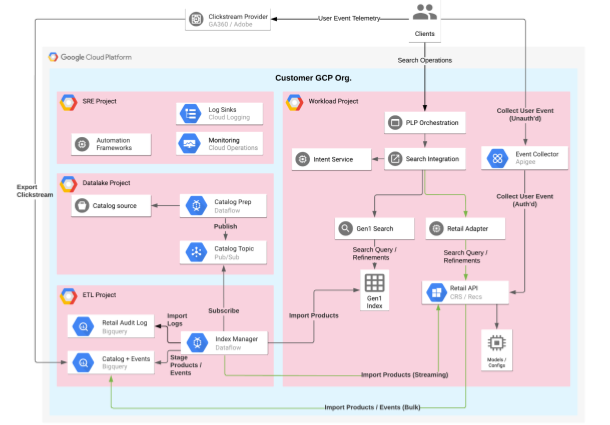
## Reference architecture
This is the AI Commerce Search reference architectural design on Google Cloud. This reference architecture depicts the flow of data and services for a Conversational agent. The diagram shows how user events, product catalog data, and operational logs are processed, transformed, and integrated into a generative AI index and Retail Adapter service to handle search operations and fulfill user intents to return search results. The architecture connects various projects to enable comprehensive AI-powered commerce search functionality.

## Preview features: Agent invocation and reasoning engine
This preview introduces new capabilities to extend the Conversational agent with agentic workflows, utilizing Vertex AI's reasoning engine for session management and enabling integration with external tools.
To enable preview features, see [Sign up](https://docs.cloud.google.com/retail/conversational_search_backup/conversational-commerce-dev-guide#preview-sign-up).
### New features
- **Reasoning engine integration:** Leverages [Vertex AI Conversational agent engine sessions](https://docs.cloud.google.com/Conversational agent-builder/Conversational agent-engine/sessions/overview) to manage persistent sessions. This allows the Conversational agent to maintain context across multi-turn conversations using "Vertex AI Agent Engine" session persistence.
- **MCP tools support:** Adds support for invoking Model Context Protocol (MCP) tools, enabling the Conversational agent to retrieve information from external sources and perform actions beyond standard retail search capabilities.
### API changes
The `ConversationalSearchRequest` and `ConversationalSearchResponse` messages have been updated to support these features:
**Request Fields:**
- `enableAgentInvocation` (boolean): If set to true, the service enables the Conversational agent invocation workflow for the request.
- `reasoningEngine` (string): The resource name of the reasoning engine (Conversational agent Engine) that hosts the Conversational agent sessions, formatted as `projects/*/locations/*/reasoningEngines/*`.
**Response Fields:**
- `agentInvocations`: Contains Conversational agent invocation details, including responses from MCP tools.
### Prerequisites
Before you can use new features, you need to make sure you set up the prerequisites.
#### Setting up persistent sessions
To use persistent sessions with a reasoning engine, you must configure your "Google Cloud" project as follows:
1. **Enable the Vertex AI API** on your project ([more details](https://docs.cloud.google.com/retail/vertex-ai/docs/featurestore/setup#configure_project)).
2. **Grant IAM permissions:** Grant the service account `cloud-ml-consumeragent-server@system.gserviceaccount.com` the **Vertex AI User** role on your project.
3. **Create an agent engine:** You must create a reasoning engine instance to handle sessions. You can follow the [Vertex AI documentation samples](https://docs.cloud.google.com/retail/vertex-ai/generative-ai/docs/samples/generativeaionvertexai-create-reasoning-engine-basic) or use the following Python script, which initializes it.
```python
import vertexai
from vertexai.preview import reasoning_engines
PROJECT_ID = "your-project-id"
LOCATION = "us-central1"
DISPLAY_NAME = "Session-Engine"
vertexai.init(project=PROJECT_ID, location=LOCATION)
client = vertexai.Client(project=PROJECT_ID, location=LOCATION)
my_agent_engine_instance = client.agent_engines.create(
config={
"display_name": DISPLAY_NAME
}
)
print(f"Successfully created Agent Engine: {my_agent_engine.resource_name}")
```
#### Setting up MCP tools
You can extend the Conversational agent with your custom search by bringing up your own [MCP server](https://modelcontextprotocol.io/docs/learn/server-concepts#how-prompts-work) and sharing the following details with us:
1. MCP server address.
2. MCP server authentication method.
3. Tool responsible for search.
### API usage example
The following example demonstrates how to call the Conversational agent API with Conversational agent invocation enabled. If you have set up a reasoning engine, include the resource name to persist the session.
```json
{
"branch": "projects/{project_id}/locations/{location_id}/catalogs/default_catalog/branches/default_branch",
"placement": "projects/{project_id}/locations/global/catalogs/default_catalog/placements/default_search",
"query": "Help me plan a party",
"visitorId": "your_visitor_id",
"enableAgentInvocation": true,
"reasoningEngine": "projects/{project_id}/locations/{location_id}/reasoningEngines/{reasoning_engine_id}"
}
```
### Private preview SDKs
Access the private SDKs for these features here: [Google Drive link](https://drive.google.com/drive/folders/1hoNERYwdeZgQF1YKJrOhvpI75SV9sk_t?usp=drive_link).
If you don't have access to the folder, request it using Google Drive.
### Sign up
Use [the early access form](https://docs.google.com/forms/d/e/1FAIpQLSdNKZ2ZQt4ZPktVslOIBH-ih3MV5ZsfoFX_AE-NaGkXDReSoA/viewform) to sign up for the feature.
## What's next
For additional support resources, see answers to questions about [Conversational features](https://docs.cloud.google.com/retail/docs/faq#faq-conversation).