

Learn about common issues you might encounter or questions you might have while using reCAPTCHA.
Implementation
Can I use reCAPTCHA globally?
Yes, you can use www.recaptcha.net in your frontend code when
www.google.com is not accessible to your users.
- First, replace
<script src="https://www.google.com/recaptcha/enterprise.js?render=<SITE_KEY>"></script>with<script src="https://www.recaptcha.net/recaptcha/enterprise.js?render=<SITE_KEY>"></script>, substituting your Site Key for<SITE_KEY>. - After that, apply the same logic to everywhere else that uses
www.google.com/recaptcha/on your site.
Does reCAPTCHA use cookies?
reCAPTCHA sets a necessary cookie (_GRECAPTCHA) when executed for the purpose of providing its risk analysis.
If you prefer to not use the www.google.com domain which may have other cookies set, you can use www.recaptcha.net instead.
I'd like to hide the reCAPTCHA badge. What is allowed?
You are allowed to hide the badge as long as you include the fact that you use reCAPTCHA to protect your site. Include the following text:
This site is protected by reCAPTCHA.
For example:
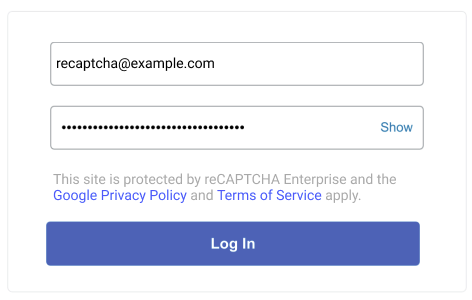
Learn about reCAPTCHA data processing.
Do I need to show the reCAPTCHA badge or widget in my native mobile
No. The reCAPTCHA Mobile SDK runs invisibly in the background and doesn't render any badge or widget in your native mobile application. You don't need to hide or configure a badge.
If you choose to notify users that your mobile application is protected by reCAPTCHA, you can display a text disclosure in your application, such as in the about screen, the user flow, or the footer. For example:
This app is protected by reCAPTCHA.
Can I customize the reCAPTCHA widget or badge?
Yes. reCAPTCHA offers light and dark themes. To choose a
theme, set the data-theme attribute or the theme parameter when
rendering the widget or badge.
Light theme:

Dark theme:

I'm using Content-Security-Policy (CSP) on my website. How can I configure it to work with reCAPTCHA?
We recommend using the approach documented with CSP3.
Make sure to include your number that can be used only once in the reCAPTCHA enterprise.js script tag, and we'll handle the rest.
Alternatively, add the following values to the directives:
- script-src https://www.google.com/recaptcha/, https://www.gstatic.com/recaptcha/
- frame-src https://www.google.com/recaptcha/, https://recaptcha.google.com/recaptcha/
- connect-src https://www.google.com/recaptcha/
How many domains can I add in the "verify domains" list in Google Cloud console?
There is a limit of 250 domains per key.
To use a key on more than 250 domains, see Create keys for websites.
I use a third-party plug-in implementation that does not formally support reCAPTCHA's cloud API, but only the legacy reCAPTCHA API siteverify. Can I still use reCAPTCHA?
Yes, the legacy secret key is available in the Google Cloud console. To learn about how to find the legacy secret key, see Find a legacy reCAPTCHA secret key.
How can I avoid stepping into reCAPTCHA code when debugging my site?
To avoid stepping into the reCAPTCHA code while debugging other JavaScript on your site, add the reCAPTCHA script /recaptcha__.+\.js$ to your browser's ignore list. For instructions for Chrome, refer to Ignore a custom list of scripts. Similar features are available in other browsers.
Only on iOS 10, why does the page scroll to the bottom when the user completes the challenge?
This is a focusing bug that we've reported to Apple. It affects users only on iOS 10, and only on some sites. If you are affected, a workaround is to move the reCAPTCHA widget higher or lower on the page.
Usage
Are there any rate limits on my use of reCAPTCHA?
Yes, see quotas and limits.
In the reCAPTCHA Dashboard, what timezone is used? Can I change this?
This timezone is based on the Client Timezone of your browser. This cannot be changed at this time.
How do I measure the quality of the scores reCAPTCHA is returning?
Ultimately, it depends on your use case and required results. Generally, we recommend that you use your own internal metrics about user behavior to determine if the score was accurate, such as:
- Did a user that reset their password and received a high score later report that their account was hijacked?
- Did a user that logged in with a low score proceed to spam others?
- Did a user that failed to login and received a low score, then proceed to try and login to several different usernames?
How can I see more about my website's traffic?
You can see details on the reCAPTCHA page of the Google Cloud console.
I'd like to run automated tests with reCAPTCHA. What should I do?
You can create reCAPTCHA site keys designed for testing by using
the Google Cloud CLI.
For more information, see the --testing-challenge and --testing-score options in the recaptcha keys create reference page.
Examples
- Creating a checkbox site key that always returns "No CAPTCHA" (no challenge) and 1.0 (change --domains and --display-name below).
gcloud recaptcha keys create --testing-challenge=nocaptcha --testing-score=1.0 --web --domains="domain1.com,domain2.com" --display-name="Always No CAPTCHA" --integration-type=checkbox
- Creating a checkbox site key that always returns an unsolvable challenge (change --domains and --display-name below).
gcloud recaptcha keys create --testing-score=0.0 --testing-challenge=challenge --web --domains="domain1.com,domain2.com" --display-name="Unsolvable Challenge" --integration-type=checkbox
- Creating a score-based site key that always returns a set score (change --domains, --display-name, and --testing-score below).
gcloud recaptcha keys create --testing-score=1.0 --web --domains="domain1.com,domain2.com" --display-name="Always 1" --integration-type=score
I'd like to communicate with the reCAPTCHA REST API. Can I assume that the response format will not change in the future?
As our product evolves, we might apply non-breaking changes like adding new fields to our API. If you use JSON, make sure you do not strictly validate the format of the response to maintain compatibility with future additions to the API.
What are my options if I'd like to create a classic reCAPTCHA key?
You can no longer create new classic keys. If you have existing classic keys, then we recommend that you migrate from reCAPTCHA Classic. All Google Cloud reCAPTCHA customers can create 10,000 assessments at no cost every month. For more information about usage and pricing, see reCAPTCHA pricing.
Data processing
Learn about reCAPTCHA data processing
What are the implications and recommendations regarding the removal of Google's Privacy Policy and Terms of Use references from the reCAPTCHA badge and customer websites starting April 2, 2026?
Starting April 2, 2026, references to Google's Privacy Policy and Terms of Use are removed from the reCAPTCHA badge to reflect the customer's role as data controller and Google's role as data processor of Customer Data. Even though these links will remain active for other Google products, we recommend that customers proactively remove these references from their own websites for accurate representation. You may continue to hide the reCAPTCHA badge if needed.
Do customers assume the role of Data Controller?
reCAPTCHA customers have always been data controllers with respect to their end user data. Google, however, maintained the position that it operated as an independent data controller with respect to its delivery of reCAPTCHA. By switching to the role of data processor, Google is relinquishing its ability to determine the purposes and means of processing Customer Data, which is why reCAPTCHA customers should remove references to the Google Privacy Policy and Terms of Use. Starting April 2, 2026, reCAPTCHA customers are the sole data controller of Customer Data and Google only processes your reCAPTCHA Customer Data in accordance with the Google Cloud Terms of Service and Cloud Data Processing Addendum.
I'm linking to the Google data privacy policy in my cookie ( _grecaptcha) details. Is this cookie impacted with the change to the data processor?
The reCAPTCHA cookie (_grecaptcha) remains and there is no impact to that cookie.
Are there any implications for reCAPTCHA customer's current reCAPTCHA implementations or contractual posture with Google switching to the role of data processor?
There are no implications for our customer's reCAPTCHA implementations or contractual posture as it relates to Google. That said, we encourage customers to review their own end user facing privacy disclosures to ensure they cover the purpose of processing performed by reCAPTCHA, which is security, fraud, and abuse prevention. The reCAPTCHA Service Specific Terms were updated as part of reCAPTCHA's switch to a data processor, but that update is primarily in the form of removing obligations on our customers, like the requirement to show the Google Privacy Policy and Google Terms of Service to their end users.
As a data processor, what limitations on processing apply to Customer Data processed by reCAPTCHA?
Google commits to processing Customer Data captured using reCAPTCHA only as necessary to provide and maintain the service, and ensure that the service's security, threat detection, protection, and response capabilities remain effective against evolving threats. This purpose limitation is already captured in the current reCAPTCHA Service Specific Terms and is further grounded in our obligations as a data processor in the Cloud Data Processing Addendum.
What session data is collected by reCAPTCHA and how does Google protect it?
For information about the data collected by reCAPTCHA and measures that Google takes to protect data, see our Cloud Data Processing Addendum and reCAPTCHA Service Specific Terms.
For more information about how Google protects data, see the Security White Paper.
Is reCAPTCHA GDPR Compliant?
Yes. In Google Cloud, we champion initiatives that prioritize and improve the security and privacy of customer personal data, and want reCAPTCHA customers to feel confident using our services in light of GDPR requirements. We commit in our Cloud Data Processing Addendum to comply with GDPR in relation to our processing of customer personal data in all Google Cloud services, including reCAPTCHA.
For additional terms specific to reCAPTCHA, see reCAPTCHA Service Specific Terms.
Is payment transaction information collected by reCAPTCHA?
When you install reCAPTCHA on a payment transaction page, it examines certain transaction signals to help protect against automated attacks. For example, many purchase attempts per second with the same price can in certain cases indicate an attack.
However, bots represent only a fraction of the overall fraud problem. For more comprehensive protection, integrate with reCAPTCHA Fraud Prevention, which allows you to send more complete transaction information and receive assessments for fraud such as card testing and stolen instrument usage.