

Learn about common issues you might encounter or questions you might have while using Google Cloud Fraud Defense.
General
Learn how Fraud Defense and reCAPTCHA relate to each other and work with your existing integrations.
What is the difference between reCAPTCHA and Fraud Defense, and what does it mean for my current integration?
Fraud Defense is the next evolution of our trust platform, designed to secure digital interactions against bots, human fraud, and AI agents. Within the Fraud Defense product suite, reCAPTCHA continues to be the core bot defense pillar.
The underlying reCAPTCHA API, bot defense capabilities, and tokens that you use remain fully supported. For current reCAPTCHA customers, the transition to Fraud Defense is seamless:
- You are automatically a Fraud Defense customer.
- No migration or action is required.
- There are no changes to pricing.
- Your existing site keys and integrations continue to work without any code or configuration changes.
Implementation
Can I use reCAPTCHA globally?
Yes, you can use www.recaptcha.net in your frontend code when
www.google.com is not accessible to your users.
- First, replace
<script src="https://www.google.com/recaptcha/enterprise.js?render=<SITE_KEY>"></script>with<script src="https://www.recaptcha.net/recaptcha/enterprise.js?render=<SITE_KEY>"></script>, substituting your Site Key for<SITE_KEY>. - After that, apply the same logic to everywhere else that uses
www.google.com/recaptcha/on your site.
Does Fraud Defense use cookies?
Fraud Defense sets a necessary cookie (_GRECAPTCHA) when executed for the purpose of providing its risk analysis.
If you prefer to not use the www.google.com domain which may have other cookies set, you can use www.recaptcha.net instead.
I'd like to hide the reCAPTCHA badge. What is allowed?
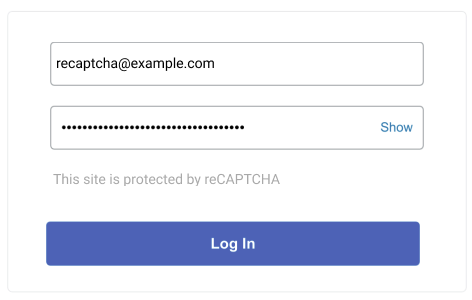
You are allowed to hide the badge as long as you include the fact that you use reCAPTCHA to protect your site. Include the following text:
This site is protected by reCAPTCHA.
For example:
Learn about Fraud Defense data processing.
Do I need to show the reCAPTCHA badge or widget in my native mobile application?
No. The reCAPTCHA Mobile SDK runs invisibly in the background and doesn't render any badge or widget in your native mobile application. You don't need to hide or configure a badge.
If you choose to notify users that your mobile application is protected by reCAPTCHA, you can display a text disclosure in your application, such as in the about screen, the user flow, or the footer. For example:
This app is protected by reCAPTCHA.
Can I customize the reCAPTCHA widget or badge?
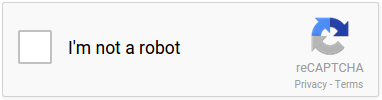
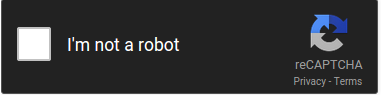
Yes. reCAPTCHA offers light and dark themes. To choose a
theme, set the data-theme attribute or the theme parameter when
rendering the widget or badge.
Light theme:
Dark theme:
We recommend using the approach documented with CSP3.
Make sure to include your number that can be used only once in the reCAPTCHA enterprise.js script tag, and we'll handle the rest.
Alternatively, add the following values to the directives:
- script-src https://www.google.com/recaptcha/, https://www.gstatic.com/recaptcha/
- frame-src https://www.google.com/recaptcha/, https://recaptcha.google.com/recaptcha/
- connect-src https://www.google.com/recaptcha/
How many domains can I add in the "verify domains" list in Google Cloud console?
There is a limit of 250 domains per key.
To use a key on more than 250 domains, see Create keys for websites.
I use a third-party plug-in implementation that does not formally support reCAPTCHA's cloud API, but only the legacy reCAPTCHA API siteverify. Can I still use reCAPTCHA?
Yes, the legacy secret key is available in the Google Cloud console. To learn about how to find the legacy secret key, see Find a legacy reCAPTCHA secret key.
How can I avoid stepping into Fraud Defense code when debugging my site?
To avoid stepping into the reCAPTCHA code while debugging other JavaScript on your site, add the reCAPTCHA script /recaptcha__.+\.js$ to your browser's ignore list. For instructions for Chrome, refer to Ignore a custom list of scripts. Similar features are available in other browsers.
Only on iOS 10, why does the page scroll to the bottom when the user completes the challenge?
This is a focusing bug that we've reported to Apple. It affects users only on iOS 10, and only on some sites. If you are affected, a workaround is to move the reCAPTCHA widget higher or lower on the page.
Usage
Find answers to questions about Google Cloud Fraud Defense quotas, metrics, and testing.
Why am I seeing the message "Your computer or network may be sending automated queries"?
You might see the message "Your computer or network may be sending automated queries. To protect our users, we can't process your request right now." for one of the following reasons:
- Shared network traffic: You are using a shared network (such as a corporate VPN or public Wi-Fi) that is generating abusive or automated traffic.
- Suspicious IP address: Your internet service provider (ISP) assigned you an IP address recently associated with suspicious activity.
- Active site attack: The website you are trying to access is experiencing a heavy volume of automated requests or a DDoS attack.
To troubleshoot the issue, see the unusual traffic help page or try your request again later.
Are there any rate limits on my use of Fraud Defense?
Yes, see quotas and limits.
In the Fraud Defense Dashboard, what timezone is used? Can I change this?
This timezone is based on the Client Timezone of your browser. This cannot be changed at this time.
How do I measure the quality of the scores Fraud Defense is returning?
Ultimately, it depends on your use case and required results. Generally, we recommend that you use your own internal metrics about user behavior to determine if the score was accurate, such as:
- Did a user that reset their password and received a high score later report that their account was hijacked?
- Did a user that logged in with a low score proceed to spam others?
- Did a user that failed to login and received a low score, then proceed to try and login to several different usernames?
How can I see more about my website's traffic?
You can see details on the Fraud Defense page of the Google Cloud console.
I'd like to run automated tests with reCAPTCHA. What should I do?
You can create reCAPTCHA site keys designed for testing by using
the Google Cloud CLI.
For more information, see the --testing-challenge and --testing-score options in the recaptcha keys create reference page.
Examples
- Creating a checkbox site key that always returns "No CAPTCHA" (no challenge) and 1.0 (change --domains and --display-name below).
gcloud recaptcha keys create --testing-challenge=nocaptcha --testing-score=1.0 --web --domains="domain1.com,domain2.com" --display-name="Always No CAPTCHA" --integration-type=checkbox
- Creating a checkbox site key that always returns an unsolvable challenge (change --domains and --display-name below).
gcloud recaptcha keys create --testing-score=0.0 --testing-challenge=challenge --web --domains="domain1.com,domain2.com" --display-name="Unsolvable Challenge" --integration-type=checkbox
- Creating a score-based site key that always returns a set score (change --domains, --display-name, and --testing-score below).
gcloud recaptcha keys create --testing-score=1.0 --web --domains="domain1.com,domain2.com" --display-name="Always 1" --integration-type=score
I'd like to communicate with the reCAPTCHA REST API. Can I assume that the response format will not change in the future?
As our product evolves, we might apply non-breaking changes like adding new fields to our API. If you use JSON, make sure you do not strictly validate the format of the response to maintain compatibility with future additions to the API.
What are my options if I'd like to create a classic reCAPTCHA key?
You can no longer create new classic keys. If you have existing classic keys, then we recommend that you migrate from reCAPTCHA Classic. All Google Cloud reCAPTCHA customers can create 10,000 assessments at no cost every month. For more information about usage and pricing, see reCAPTCHA pricing.
Data processing
Learn about Fraud Defense data processing.
What are the implications and recommendations regarding the removal of Google's Privacy Policy and Terms of Use references from the reCAPTCHA badge and customer websites starting April 2, 2026?
Starting April 2, 2026, references to Google's Privacy Policy and Terms of Use are removed from the reCAPTCHA badge to reflect the customer's role as data controller and Google's role as data processor of Customer Data. Even though these links will remain active for other Google products, we recommend that customers proactively remove these references from their own websites for accurate representation. You may continue to hide the reCAPTCHA badge if needed.
Do customers assume the role of Data Controller?
Fraud Defense customers have always been data controllers with respect to their end user data. Google, however, maintained the position that it operated as an independent data controller with respect to its delivery of Fraud Defense. By switching to the role of data processor, Google is relinquishing its ability to determine the purposes and means of processing Customer Data, which is why Fraud Defense customers should remove references to the Google Privacy Policy and Terms of Use. Starting April 2, 2026, Fraud Defense customers are the sole data controller of Customer Data and Google only processes your Fraud Defense Customer Data in accordance with the Google Cloud Terms of Service and Cloud Data Processing Addendum.
I'm linking to the Google data privacy policy in my cookie (_grecaptcha) details. Is this cookie impacted with the change to the data processor?
The reCAPTCHA cookie (_grecaptcha) remains and there is no impact to that cookie.
Are there any implications for current Fraud Defense implementations or contractual posture with Google switching to the role of data processor?
There are no implications for your Fraud Defense implementations or contractual posture with Google. However, you should review your end-user-facing privacy disclosures to ensure that they cover the purpose of processing performed by Fraud Defense, which is security, fraud, and abuse prevention. Google updated the Fraud Defense Service Specific Terms as part of the switch to a data processor. This update primarily removes customer obligations, such as the requirement to display the Google Privacy Policy and Google Terms of Service to end users.
As a data processor, what limitations on processing apply to Customer Data processed by Fraud Defense?
Google commits to processing Customer Data captured using Fraud Defense only as necessary to provide and maintain the service, and ensure that the service's security, threat detection, protection, and response capabilities remain effective against evolving threats. This purpose limitation is already captured in the current Fraud Defense Service Specific Terms and is further grounded in our obligations as a data processor in the Cloud Data Processing Addendum.
What session data is collected by Fraud Defense and how does Google protect it?
For information about the data collected by Fraud Defense and measures that Google takes to protect data, see our Cloud Data Processing Addendum and Fraud Defense Service Specific Terms.
For more information about how Google protects data, see the Security White Paper.
Is Fraud Defense GDPR Compliant?
Yes. In Google Cloud, we champion initiatives that prioritize and improve the security and privacy of customer personal data, and want Fraud Defense customers to feel confident using our services in light of GDPR requirements. We commit in our Cloud Data Processing Addendum to comply with GDPR in relation to our processing of customer personal data in all Google Cloud services, including Fraud Defense.
For additional terms specific to Fraud Defense, see Fraud Defense Service Specific Terms.
Is payment transaction information collected by Fraud Defense?
When you install Fraud Defense on a payment transaction page, it examines certain transaction signals to help protect against automated attacks. For example, many purchase attempts per second with the same price can in certain cases indicate an attack.
However, bots represent only a fraction of the overall fraud problem. For more comprehensive protection, integrate with Fraud Defense, which lets you send more complete transaction information and receive assessments for fraud such as card testing and stolen instrument usage.