[reCAPTCHA keys (also known as *keys*)](https://docs.cloud.google.com/recaptcha/docs/keys.md.txt),
let you protect your endpoints by verifying user interactions on your web pages
and mobile applications.
To choose the appropriate reCAPTCHA key type, you must understand the types of
keys that are supported for each platform and their differences.
## Types of reCAPTCHA keys
The following table lists reCAPTCHA keys that are supported for each platform:
| Platform | Description | Supported keys | Challenge type |
|---|---|---|---|
| web | For integration on web pages. | Score-based keys | `SCORE` |
| web | For integration on web pages. | Checkbox keys | `CHECKBOX` |
| web | For integration on web pages. | Policy-based challenge keys | `POLICY_BASED_CHALLENGE` |
| mobile | For integration with Android and iOS apps. | reCAPTCHA keys for Android | `SCORE` |
| mobile | For integration with Android and iOS apps. | reCAPTCHA keys for iOS | `SCORE` |
| WAF | For web pages and APIs served through WAF or Edge compute servers. | action-token keys | `SCORE` and `CHECKBOX` |
| WAF | For web pages and APIs served through WAF or Edge compute servers. | session-token keys | `SCORE` |
| WAF | For web pages and APIs served through WAF or Edge compute servers. | challenge-page keys | `INVISIBLE` |
| API | For integration with APIs or clients like IoT devices that do not support the reCAPTCHA JavaScript or mobile SDKs. | express keys | `SCORE` |
> [!NOTE]
> **Note:** See [Reconcile legacy reCAPTCHA terminology](https://docs.cloud.google.com/recaptcha/docs/reconcile-legacy-terminology.md.txt) for legacy key types.
## Choose a reCAPTCHA key type for web
To verify user interactions on websites, reCAPTCHA provides
*score-based keys*, which don't trigger CAPTCHA challenges, checkbox keys, which
trigger non-deterministic CAPTCHA challenges, and policy-based challenge keys,
which trigger deterministic CAPTCHA challenges.
All the key types return a score
for each request, which is based on user interactions with your site. This score
lets you
understand the level of risk that the interaction poses and helps you to take
appropriate actions for your site.
The following table summarizes the differences between score-based keys, checkbox
keys, and policy-based challenge keys:
| Comparison category | Score-based key (Recommended) | Checkbox key | Policy-based challenge key |
|---|---|---|---|
| Description | Score-based keys let you verify whether an interaction is legitimate without any user interaction. | Checkbox keys use a checkbox challenge that requires user interaction to verify that the user is not a robot. Also, you can use checkbox keys to protect specific actions with CAPTCHA challenges. > [!NOTE] > We don't recommend using checkbox keys because they increase user friction and don't significantly improve accuracy. For more information, see the [FAQs.](https://docs.cloud.google.com/recaptcha/docs/faq.md.txt#id_like_to_use_the_score_from_to_show_a_challenge_checkbox_widget_how_can_i_do_this) | Policy-based challenge keys trigger CAPTCHA challenges based on the configured score threshold. You can use policy-based challenge keys to protect specific actions using CAPTCHA challenges. |
| How it works | With score-based keys, the reCAPTCHA Enterprise API returns a score, which you can use to take action in the context of your site. Examples of actions you might take include requiring additional factors of authentication, sending a post to moderation, or throttling bots that might be scraping content. | A checkbox key renders an **I'm not a robot** checkbox that a user must click to verify that they're not a robot. This checkbox key might or might not challenge them with CAPTCHA challenges. In both cases, the reCAPTCHA Enterprise API returns a score. CAPTCHA challenges require a user to select certain kinds of objects, such as street signs, from a collection of images. The following animated GIF is an example of a checkbox key: 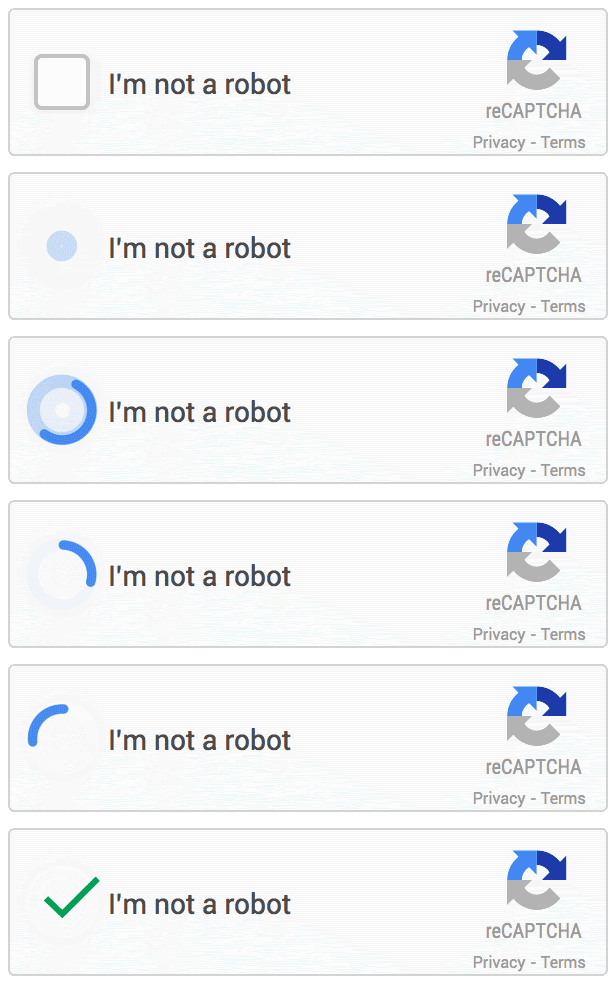 The following image shows a sample CAPTCHA challenge: 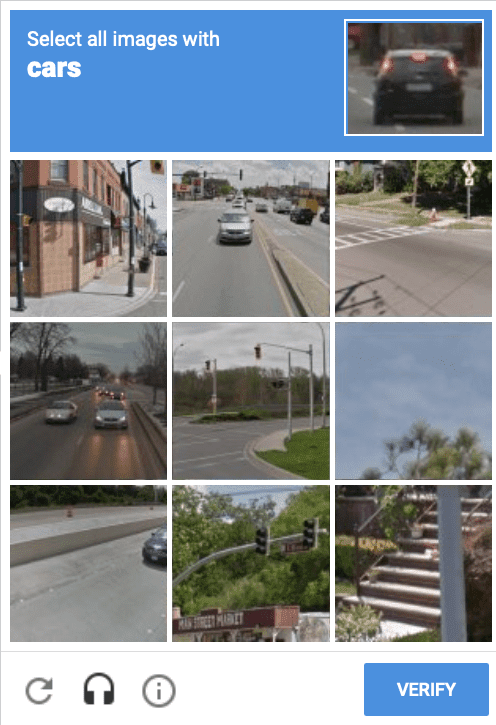  Before using CAPTCHA challenges, you must understand the [CAPTCHA challenges caveats.](https://docs.cloud.google.com/recaptcha/docs/choose-key-type.md.txt#captcha-challenges) | With policy-based challenge keys, CAPTCHA challenges are triggered if the initial score that is computed by reCAPTCHA is below the configured score threshold. Policy-based challenge keys differ from checkbox keys because they can deterministically trigger CAPTCHA challenges. CAPTCHA challenges require a user to select certain kinds of objects, such as street signs, from a collection of images. The following image shows a sample CAPTCHA challenge:   Before using CAPTCHA challenges, you must understand the [CAPTCHA challenges caveats.](https://docs.cloud.google.com/recaptcha/docs/choose-key-type.md.txt#captcha-challenges) |
| Supported platforms | Websites and mobile platforms. | Websites only. | Websites only. |
| Use cases | Score-based keys are appropriate for the following use cases: - Websites that have accessibility requirements. - For payment-related transactions that prefer less friction for better conversion rates. - Situations where you want to use additional features such as password check (Password defense) or Multi-factor authentication (MFA). - Sites accessed through mobile applications. > [!NOTE] > We recommend that you don't use reCAPTCHA for websites in embedded WebViews, and instead use the built-in reCAPTCHA iOS and Android SDKs. | Checkbox keys are appropriate for forms, logins, and signups on web pages. Though it might cause extra friction for users, an extra step such as CAPTCHA challenge helps to deter unsophisticated attackers. | Policy-based challenge keys are appropriate for forms, logins, and signups on web pages. Though it might cause extra friction for users, an extra step such as CAPTCHA challenge helps to deter unsophisticated attackers. |
### Caveats with CAPTCHA challenges
If you want to use checkbox keys with CAPTCHA challenges to protect against
automated attacks, be aware of the following caveats:
- CAPTCHAs require user interaction, which increases friction and might decrease conversion rates.
- Due to the advances in computer vision and machine intelligence, CAPTCHAs are becoming less useful to distinguish between humans and bots.
- CAPTCHAs are also under threat from paid attackers who can solve all types of challenges.
- CAPTCHAs are not accessible for all users, so they might not be suitable if your website has accessibility requirements.
## Choose reCAPTCHA key types for WAF
reCAPTCHA for Google Cloud Armor integrations support action-tokens, session-tokens and challenge page.
You can use one or more reCAPTCHA for Google Cloud Armor features in a single application.
For example, you can choose to apply a session-token for all pages, and based on the
session-token's score, you can redirect suspicious requests to the reCAPTCHA challenge page.
Also, you can use an action-token for high-profile actions, such
as checkout. For more information, see [examples](https://docs.cloud.google.com/recaptcha/docs/examples-ca.md.txt).
The following table shows a brief comparison of the available reCAPTCHA for Google Cloud Armor features:
> [!NOTE]
> **Note:** Only reCAPTCHA action-tokens are supported for the integration of mobile applications with Google Cloud Armor.
| Comparison category | reCAPTCHA action-tokens | reCAPTCHA session-tokens | reCAPTCHA challenge page |
|---|---|---|---|
| Use case | Use to protect user actions, such as **login** or **comment posts**. | Use to protect the whole user session on the site's domain. | Use when you suspect spam activity directed to your site and you need to screen out bots. **This method interrupts a user's activity because the user has to verify a CAPTCHA challenge.** |
| Supported platforms | Websites and mobile applications | Websites | Websites |
| Client integration effort | **Medium** Manual client-side integration. | **Medium** Install reCAPTCHA JavaScript manually or through injection on the WAF. | **Low** Interstitial triggered by security policies. |
| Detection accuracy | **Highest** Client, server, and action specific signals are available. | **High** Client and server speicific signals are available. | **Medium** Client and server speicific signals are available. Client signals are only available in an interstitial page. |
| Supported reCAPTCHA version | [reCAPTCHA score-based and checkbox keys](https://docs.cloud.google.com/recaptcha/docs/keys.md.txt) | [reCAPTCHA score-based keys](https://docs.cloud.google.com/recaptcha/docs/keys.md.txt) | [reCAPTCHA challenge-based keys embedded in an interstitial page](https://docs.cloud.google.com/recaptcha/docs/keys.md.txt) |
## Choose reCAPTCHA express keys for APIs
Use reCAPTCHA express when your environment does not support a
reCAPTCHA client integration like the JavaScript API or the mobile
SDKs. reCAPTCHA express is suitable for APIs, websites, mobile applications,
and IoT devices such as TVs and gaming consoles, but can also be used to
protect websites or mobile applications when a client-side integration is infeasible.
Because reCAPTCHA express is a server-side only integration, it lacks client-side signal collection.
This typically results in a lower detection accuracy than integrations that involve a client-side component.
## What's next
- [Create reCAPTCHA keys for websites](https://docs.cloud.google.com/recaptcha/docs/create-key-website.md.txt).
- [Create reCAPTCHA keys for mobile applications](https://docs.cloud.google.com/recaptcha/docs/create-key-mobile.md.txt).
- Learn more about [reCAPTCHA keys for WAF](https://docs.cloud.google.com/recaptcha/docs/features-ca.md.txt).
- Learn more about [reCAPTCHA express keys for APIs](https://docs.cloud.google.com/recaptcha/docs/express-standalone.md.txt).