Subscribers might not be able to handle messages for a variety of reasons. For
example, there could be transient issues retrieving data needed to process a
message. Or, a message could be in a format that the subscriber does not expect.
To manage undeliverable messages that subscribers can't acknowledge,
Pub/Sub can forward them to a
[dead-letter topic](https://en.wikipedia.org/wiki/Dead_letter_queue) (also known as a
*dead-letter queue*).
## Before you begin
- [Create a topic](https://docs.cloud.google.com/pubsub/docs/dead-letter-topics.md.txt#create-topic-and-subscription) for your dead-letter
topic configuration.
Or, if you follow all instructions on this page
end-to-end, you can create the topic in a subsequent step.
## Required roles
To get the permissions that
you need to manage topics and subscriptions,
ask your administrator to grant you the
[Pub/Sub Editor](https://docs.cloud.google.com/iam/docs/roles-permissions/pubsub.md.txt#pubsub.editor) (`roles/pubsub.editor`) IAM role on your project.
For more information about granting roles, see [Manage access to projects, folders, and organizations](https://docs.cloud.google.com/iam/docs/granting-changing-revoking-access.md.txt).
You might also be able to get
the required permissions through [custom
roles](https://docs.cloud.google.com/iam/docs/creating-custom-roles) or other [predefined
roles](https://docs.cloud.google.com/iam/docs/roles-overview#predefined).
You can configure access control at the project level and at the individual
resource level. You can create a subscription in one project and attach it to a
topic located in a different project. Ensure that you have the required
permissions for each project.
> [!CAUTION]
> **Caution:** To use dead-letter topics, you must also grant specific publisher and subscriber roles to your Pub/Sub service account. However, you must do this *after* you create the dead-letter topic. For more information, see the section on [granting Identity and Access Management (IAM) roles to use dead-letter topics](https://docs.cloud.google.com/pubsub/docs/dead-letter-topics.md.txt#grant_forwarding_permissions).
## How dead-letter topics work
When a subscriber application can't acknowledge a message, Pub/Sub
retries delivery until the acknowledgment deadline is met or the message
expires. After an approximately configured number of delivery attempts,
Pub/Sub can forward the undeliverable message to a dead-letter
topic.
When Pub/Sub forwards an undeliverable message, it wraps the
original message in a new one and adds attributes that identify the source
subscription. The message is then sent to the specified dead-letter topic. A
separate subscription attached to the dead-letter topic can then receive these
forwarded messages for analysis and offline debugging.
### How maximum delivery attempts are calculated
Pub/Sub only counts delivery attempts when a dead-letter topic is
configured correctly and includes the correct [IAM
permissions](https://docs.cloud.google.com/pubsub/docs/dead-letter-topics#grant_forwarding_permissions).
The maximum number of delivery attempts is approximate because
Pub/Sub forwards undeliverable messages on a best-effort basis.
The service might forward a message after fewer attempts than configured, or it
might attempt delivery a few more times before forwarding.
The tracked number of delivery attempts for a message may also reset to zero,
especially for a pull subscription with inactive subscribers. As a result, the
messages might be delivered to the subscriber client more times than the
configured maximum number of delivery attempts.
### Dead-letter topic properties
> [!NOTE]
> **Note:** You configure a dead-letter topic on a **subscription** , not on the topic it pulls from. This is because it's a [subscription
> property](https://www.google.com/search?q=/pubsub/docs/subscription-properties).
You can set the following subscription properties on a dead-letter topic.
- **Maximum number of delivery attempts**: A numeric value that signifies the
number of delivery attempts that Pub/Sub makes for a specific
message. If the subscriber client cannot acknowledge the message within the
configured number of delivery attempts, the message is forwarded to a
dead-letter topic.
- Default value = 5
- Maximum value = 100
- Minimum value = 5
- **Project with the dead-letter topic** : If the dead-letter topic is in a different
project from the subscription, you must specify the project with the
dead-letter topic. Set the dead-letter topic to a different topic from the topic to
which the subscription is
[attached](https://docs.cloud.google.com/pubsub/docs/admin#creating_subscriptions).
## Configure a dead-letter topic
The following steps describe the workflow for using dead-letter topics.
1. Create a topic (to use as a dead-letter topic).
2. Create a subscription for your dead-letter topic.
3. Enable **Dead lettering** on your subscription.
4. Attach the topic you created earlier to your subscription.
5. [Grant the required roles](https://docs.cloud.google.com/pubsub/docs/dead-letter-topics.md.txt#grant_forwarding_permissions) to use
dead-letter topics to your Pub/Sub service account.
### Create a topic to use with dead-letter topics
If you already created a topic to use for your subscription, you can skip this
step.
1. In the Google Cloud console, go to the **Topics** page.
[Go to Topics](https://console.cloud.google.com/cloudpubsub/topicList)
2. Click **Create topic**.
3. Enter a **Topic ID** , for example, `my-test-topic`.
4. Retain the option for the default subscription and click **Create**.
### Set a dead-letter topic on a subscription
You can set a dead-letter topic on a new subscription or an existing subscription.
#### Set a dead-letter topic on a new subscription
You can create a subscription and set a dead-letter topic using the
Google Cloud console, the Google Cloud CLI, the client libraries, or the
Pub/Sub API.
### Console
To create a subscription and set a dead-letter topic, complete the following
steps:
1. In the Google Cloud console, go to the **Subscriptions** page.
[Go to Subscriptions](https://console.cloud.google.com/cloudpubsub/subscription)
2. Click **Create subscription**.
3. Enter the **Subscription ID**.
4. Choose the topic you want to use with your subscription. The subscription
receives messages from the topic. This is *not* your dead-letter topic.
You choose that in the next step.
5. In the **Dead lettering** section, select **Enable dead lettering**.
6. Choose a dead-letter topic from the drop-down menu.
If the chosen dead-letter topic does not have a subscription, the system prompts
you to create one.
7. In the **Maximum delivery attempts** field, specify an integer between 5 and 100.
8. Click **Create**.
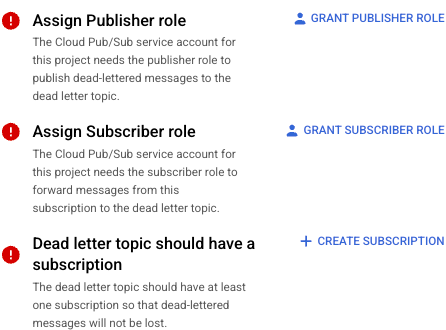
9. Click the **Details panel** to identify any possible action items. If any of the
items show an error icon , click
the action item to resolve the issue.
### gcloud
To create a subscription and set a dead-letter topic, use the
[`gcloud pubsub subscriptions create`](https://docs.cloud.google.com/sdk/gcloud/reference/pubsub/subscriptions/create)
command:
```bash
gcloud pubsub subscriptions create subscription-id \
--topic=topic-id \
--dead-letter-topic=dead-letter-topic-name \
[--max-delivery-attempts=max-delivery-attempts] \
[--dead-letter-topic-project=dead-letter-topic-project]
```
### C++
Before trying this sample, follow the C++ setup instructions in
[Quickstart: Using Client Libraries](https://docs.cloud.google.com/pubsub/docs/create-topic-client-libraries).
For more information, see the [Pub/Sub C++ API reference documentation](https://googleapis.dev/cpp/google-cloud-pubsub/latest/).
```c++
namespace pubsub = ::google::cloud::pubsub;
namespace pubsub_admin = ::google::cloud::pubsub_admin;
[](pubsub_admin::SubscriptionAdminClient client,
std::string const& project_id, std::string const& topic_id,
std::string const& subscription_id,
std::string const& dead_letter_topic_id,
int dead_letter_delivery_attempts) {
google::pubsub::v1::Subscription request;
request.set_name(
pubsub::Subscription(project_id, subscription_id).FullName());
request.set_topic(pubsub::Topic(project_id, topic_id).FullName());
request.mutable_dead_letter_policy()->set_dead_letter_topic(
pubsub::Topic(project_id, dead_letter_topic_id).FullName());
request.mutable_dead_letter_policy()->set_max_delivery_attempts(
dead_letter_delivery_attempts);
auto sub = client.CreateSubscription(request);
if (sub.status().code() == google::cloud::StatusCode::kAlreadyExists) {
std::cout << "The subscription already exists\n";
return;
}
if (!sub) throw std::move(sub).status();
std::cout << "The subscription was successfully created: "
<< sub->DebugString() << "\n";
std::cout << "It will forward dead letter messages to: "
<< sub->dead_letter_policy().dead_letter_topic() << "\n";
std::cout << "After " << sub->dead_letter_policy().max_delivery_attempts()
<< " delivery attempts.\n";
}
```
### C#
Before trying this sample, follow the C# setup instructions in
[Quickstart: Using Client Libraries](https://docs.cloud.google.com/pubsub/docs/create-topic-client-libraries).
For more information, see the [Pub/Sub C# API reference documentation](https://cloud.google.com/dotnet/docs/reference/Google.Cloud.PubSub.V1/latest).
```c#
using Google.Cloud.PubSub.V1;
using System;
public class CreateSubscriptionWithDeadLetterPolicySample
{
public Subscription CreateSubscriptionWithDeadLetterPolicy(string projectId, string topicId, string subscriptionId, string deadLetterTopicId)
{
SubscriberServiceApiClient subscriber = SubscriberServiceApiClient.Create();
// This is the subscription you want to create with a dead letter policy.
var subscriptionName = SubscriptionName.FromProjectSubscription(projectId, subscriptionId);
// This is an existing topic that you want to attach the subscription with dead letter policy to.
var topicName = TopicName.FromProjectTopic(projectId, topicId);
// This is an existing topic that the subscription with dead letter policy forwards dead letter messages to.
var deadLetterTopic = TopicName.FromProjectTopic(projectId, deadLetterTopicId).ToString();
var subscriptionRequest = new Subscription
{
SubscriptionName = subscriptionName,
TopicAsTopicName = topicName,
DeadLetterPolicy = new DeadLetterPolicy
{
DeadLetterTopic = deadLetterTopic,
// The maximum number of times that the service attempts to deliver a
// message before forwarding it to the dead letter topic. Must be [5-100].
MaxDeliveryAttempts = 10
},
AckDeadlineSeconds = 30
};
var subscription = subscriber.CreateSubscription(subscriptionRequest);
Console.WriteLine("Created subscription: " + subscription.SubscriptionName.SubscriptionId);
Console.WriteLine($"It will forward dead letter messages to: {subscription.DeadLetterPolicy.DeadLetterTopic}");
Console.WriteLine($"After {subscription.DeadLetterPolicy.MaxDeliveryAttempts} delivery attempts.");
// Remember to attach a subscription to the dead letter topic because
// messages published to a topic with no subscriptions are lost.
return subscription;
}
}
```
### Go
The following sample uses the major version of the Go Pub/Sub client library (v2). If you are still using the v1 library, see
[the migration guide to v2](https://github.com/googleapis/google-cloud-go/blob/main/pubsub/MIGRATING.md).
To see a list of v1 code samples, see [the deprecated code samples](https://docs.cloud.google.com/pubsub/docs/samples.md.txt?language=golang&text=deprecated).
Before trying this sample, follow the Go setup instructions in
[Quickstart: Using Client Libraries](https://docs.cloud.google.com/pubsub/docs/create-topic-client-libraries).
For more information, see the [Pub/Sub Go API reference documentation](https://pkg.go.dev/cloud.google.com/go/pubsub/v2).
```go
import (
"context"
"fmt"
"io"
"cloud.google.com/go/pubsub/v2"
"cloud.google.com/go/pubsub/v2/apiv1/pubsubpb"
)
// createSubWithDeadLetter creates a subscription with a dead letter policy.
func createSubWithDeadLetter(w io.Writer, projectID, topic, subscription, fullyQualifiedDeadLetterTopic string) error {
// projectID := "my-project-id"
// topic := "projects/my-project-id/topics/my-topic"
// subscription := "projects/my-project-id/subscriptions/my-sub"
// fullyQualifiedDeadLetterTopic := "projects/my-project-id/topics/my-dead-letter-topic"
ctx := context.Background()
client, err := pubsub.NewClient(ctx, projectID)
if err != nil {
return fmt.Errorf("pubsub.NewClient: %w", err)
}
defer client.Close()
_, err = client.SubscriptionAdminClient.CreateSubscription(ctx, &pubsubpb.Subscription{
Name: subscription,
Topic: topic,
DeadLetterPolicy: &pubsubpb.DeadLetterPolicy{
DeadLetterTopic: fullyQualifiedDeadLetterTopic,
MaxDeliveryAttempts: 10,
},
})
if err != nil {
return fmt.Errorf("CreateSubscription: %w", err)
}
fmt.Fprintf(w, "Created subscription with dead letter topic: (%s)\n", fullyQualifiedDeadLetterTopic)
fmt.Fprintln(w, "To process dead letter messages, remember to add a subscription to your dead letter topic.")
return nil
}
```
### Java
Before trying this sample, follow the Java setup instructions in
[Quickstart: Using Client Libraries](https://docs.cloud.google.com/pubsub/docs/create-topic-client-libraries).
For more information, see the [Pub/Sub Java API reference documentation](https://cloud.google.com/java/docs/reference/google-cloud-pubsub/latest/overview).
```java
import com.google.cloud.pubsub.v1.SubscriptionAdminClient;
import com.google.pubsub.v1.DeadLetterPolicy;
import com.google.pubsub.v1.ProjectSubscriptionName;
import com.google.pubsub.v1.ProjectTopicName;
import com.google.pubsub.v1.Subscription;
import java.io.IOException;
public class CreateSubscriptionWithDeadLetterPolicyExample {
public static void main(String... args) throws Exception {
// TODO(developer): Replace these variables before running the sample.
String projectId = "your-project-id";
// This is the subscription you want to create with a dead letter policy.
String subscriptionId = "your-subscription-id";
// This is an existing topic that you want to attach the subscription with dead letter policy
// to.
String topicId = "your-topic-id";
// This is an existing topic that the subscription with dead letter policy forwards dead letter
// messages to.
String deadLetterTopicId = "your-dead-letter-topic-id";
CreateSubscriptionWithDeadLetterPolicyExample.createSubscriptionWithDeadLetterPolicyExample(
projectId, subscriptionId, topicId, deadLetterTopicId);
}
public static void createSubscriptionWithDeadLetterPolicyExample(
String projectId, String subscriptionId, String topicId, String deadLetterTopicId)
throws IOException {
try (SubscriptionAdminClient subscriptionAdminClient = SubscriptionAdminClient.create()) {
ProjectTopicName topicName = ProjectTopicName.of(projectId, topicId);
ProjectSubscriptionName subscriptionName =
ProjectSubscriptionName.of(projectId, subscriptionId);
ProjectTopicName deadLetterTopicName = ProjectTopicName.of(projectId, deadLetterTopicId);
DeadLetterPolicy deadLetterPolicy =
DeadLetterPolicy.newBuilder()
.setDeadLetterTopic(deadLetterTopicName.toString())
// The maximum number of times that the service attempts to deliver a
// message before forwarding it to the dead letter topic. Must be [5-100].
.setMaxDeliveryAttempts(10)
.build();
Subscription request =
Subscription.newBuilder()
.setName(subscriptionName.toString())
.setTopic(topicName.toString())
.setDeadLetterPolicy(deadLetterPolicy)
.build();
Subscription subscription = subscriptionAdminClient.createSubscription(request);
System.out.println("Created subscription: " + subscription.getName());
System.out.println(
"It will forward dead letter messages to: "
+ subscription.getDeadLetterPolicy().getDeadLetterTopic());
System.out.println(
"After "
+ subscription.getDeadLetterPolicy().getMaxDeliveryAttempts()
+ " delivery attempts.");
// Remember to attach a subscription to the dead letter topic because
// messages published to a topic with no subscriptions are lost.
}
}
}
```
### Node.js
Before trying this sample, follow the Node.js setup instructions in
[Quickstart: Using Client Libraries](https://docs.cloud.google.com/pubsub/docs/create-topic-client-libraries).
For more information, see the [Pub/Sub Node.js API reference documentation](https://googleapis.dev/nodejs/pubsub/latest).
```javascript
/**
* TODO(developer): Uncomment these variables before running the sample.
*/
// const topicNameOrId = 'YOUR_TOPIC_NAME_OR_ID';
// const subscriptionNameOrId = 'YOUR_SUBSCRIPTION_NAME_OR_ID';
// const deadLetterTopicNameOrId = 'YOUR_DEAD_LETTER_TOPIC_NAME_OR_ID';
// Imports the Google Cloud client library
const {PubSub} = require('@google-cloud/pubsub');
// Creates a client; cache this for further use
const pubSubClient = new PubSub();
async function createSubscriptionWithDeadLetterPolicy(
topicNameOrId,
subscriptionNameOrId,
deadLetterTopicNameOrId,
) {
// Creates a new subscription
const options = {
deadLetterPolicy: {
deadLetterTopic: pubSubClient.topic(deadLetterTopicNameOrId).name,
maxDeliveryAttempts: 10,
},
};
await pubSubClient
.topic(topicNameOrId)
.createSubscription(subscriptionNameOrId, options);
console.log(
`Created subscription ${subscriptionNameOrId} with dead letter topic ${deadLetterTopicNameOrId}.`,
);
console.log(
'To process dead letter messages, remember to add a subscription to your dead letter topic.',
);
}
```
### Node.js
Before trying this sample, follow the Node.js setup instructions in
[Quickstart: Using Client Libraries](https://docs.cloud.google.com/pubsub/docs/create-topic-client-libraries).
For more information, see the [Pub/Sub Node.js API reference documentation](https://googleapis.dev/nodejs/pubsub/latest).
```javascript
/**
* TODO(developer): Uncomment these variables before running the sample.
*/
// const topicNameOrId = 'YOUR_TOPIC_NAME_OR_ID';
// const subscriptionNameOrId = 'YOUR_SUBSCRIPTION_NAME_OR_ID';
// const deadLetterTopicNameOrId = 'YOUR_DEAD_LETTER_TOPIC_NAME_OR_ID';
// Imports the Google Cloud client library
import {PubSub, CreateSubscriptionOptions} from '@google-cloud/pubsub';
// Creates a client; cache this for further use
const pubSubClient = new PubSub();
async function createSubscriptionWithDeadLetterPolicy(
topicNameOrId: string,
subscriptionNameOrId: string,
deadLetterTopicNameOrId: string,
) {
// Creates a new subscription
const options: CreateSubscriptionOptions = {
deadLetterPolicy: {
deadLetterTopic: pubSubClient.topic(deadLetterTopicNameOrId).name,
maxDeliveryAttempts: 10,
},
};
await pubSubClient
.topic(topicNameOrId)
.createSubscription(subscriptionNameOrId, options);
console.log(
`Created subscription ${subscriptionNameOrId} with dead letter topic ${deadLetterTopicNameOrId}.`,
);
console.log(
'To process dead letter messages, remember to add a subscription to your dead letter topic.',
);
}
```
### PHP
Before trying this sample, follow the PHP setup instructions in
[Quickstart: Using Client Libraries](https://docs.cloud.google.com/pubsub/docs/create-topic-client-libraries).
For more information, see the [Pub/Sub PHP API reference documentation](https://cloud.google.com/php/docs/reference/cloud-pubsub/latest).
```php
use Google\Cloud\PubSub\PubSubClient;
/**
* Creates a Pub/Sub subscription with dead letter policy enabled.
*
* @param string $projectId The Google project ID.
* @param string $topicName The Pub/Sub topic name.
* @param string $subscriptionName The Pub/Sub subscription name.
* @param string $deadLetterTopicName The Pub/Sub topic to use for dead letter policy.
*/
function dead_letter_create_subscription($projectId, $topicName, $subscriptionName, $deadLetterTopicName)
{
$pubsub = new PubSubClient([
'projectId' => $projectId,
]);
$topic = $pubsub->topic($topicName);
$deadLetterTopic = $pubsub->topic($deadLetterTopicName);
$subscription = $topic->subscribe($subscriptionName, [
'deadLetterPolicy' => [
'deadLetterTopic' => $deadLetterTopic
]
]);
printf(
'Subscription %s created with dead letter topic %s' . PHP_EOL,
$subscription->name(),
$deadLetterTopic->name()
);
}
```
### Python
Before trying this sample, follow the Python setup instructions in
[Quickstart: Using Client Libraries](https://docs.cloud.google.com/pubsub/docs/create-topic-client-libraries).
For more information, see the [Pub/Sub Python API reference documentation](https://docs.cloud.google.com/python/docs/reference/pubsub/latest.md.txt).
```python
from google.cloud import pubsub_v1
from google.cloud.pubsub_v1.types import DeadLetterPolicy
# TODO(developer)
# project_id = "your-project-id"
# endpoint = "https://my-test-project.appspot.com/push"
# TODO(developer): This is an existing topic that the subscription
# with dead letter policy is attached to.
# topic_id = "your-topic-id"
# TODO(developer): This is an existing subscription with a dead letter policy.
# subscription_id = "your-subscription-id"
# TODO(developer): This is an existing dead letter topic that the subscription
# with dead letter policy will forward dead letter messages to.
# dead_letter_topic_id = "your-dead-letter-topic-id"
# TODO(developer): This is the maximum number of delivery attempts allowed
# for a message before it gets delivered to a dead letter topic.
# max_delivery_attempts = 5
publisher = pubsub_v1.PublisherClient()
subscriber = pubsub_v1.SubscriberClient()
topic_path = publisher.topic_path(project_id, topic_id)
subscription_path = subscriber.subscription_path(project_id, subscription_id)
dead_letter_topic_path = publisher.topic_path(project_id, dead_letter_topic_id)
dead_letter_policy = DeadLetterPolicy(
dead_letter_topic=dead_letter_topic_path,
max_delivery_attempts=max_delivery_attempts,
)
with subscriber:
request = {
"name": subscription_path,
"topic": topic_path,
"dead_letter_policy": dead_letter_policy,
}
subscription = subscriber.create_subscription(request)
print(f"Subscription created: {subscription.name}")
print(
f"It will forward dead letter messages to: {subscription.dead_letter_policy.dead_letter_topic}."
)
print(
f"After {subscription.dead_letter_policy.max_delivery_attempts} delivery attempts."
)
```
### Ruby
The following sample uses Ruby Pub/Sub client library v3. If you are still using the v2 library, see
[the migration guide to v3](https://github.com/googleapis/google-cloud-ruby/blob/main/google-cloud-pubsub/MIGRATION_GUIDE.md).
To see a list of Ruby v2 code samples, see [the deprecated code samples](https://docs.cloud.google.com/pubsub/docs/samples.md.txt?language=ruby&text=deprecated).
Before trying this sample, follow the Ruby setup instructions in
[Quickstart: Using Client Libraries](https://docs.cloud.google.com/pubsub/docs/create-topic-client-libraries).
For more information, see the [Pub/Sub Ruby API reference documentation](https://googleapis.dev/ruby/google-cloud-pubsub/latest/Google/Cloud/PubSub.html).
### Ruby
Before trying this sample, follow the Ruby setup instructions in the
[Pub/Sub quickstart using
client libraries](https://docs.cloud.google.com/pubsub/docs/quickstart-client-libraries).
For more information, see the
[Pub/Sub Ruby API
reference documentation](https://googleapis.dev/ruby/google-cloud-pubsub/latest/Google/Cloud/PubSub.html).
To authenticate to Pub/Sub, set up Application Default Credentials.
For more information, see
[Set up authentication for a local development environment](https://docs.cloud.google.com/docs/authentication/set-up-adc-local-dev-environment.md.txt).
```ruby
# topic_id = "your-topic-id"
# subscription_id = "your-subscription-id"
# dead_letter_topic_id = "your-dead-letter-topic-id"
pubsub = Google::Cloud::PubSub.new
subscription_admin = pubsub.subscription_admin
subscription = subscription_admin.create_subscription \
name: pubsub.subscription_path(subscription_id),
topic: pubsub.topic_path(topic_id),
dead_letter_policy: {
dead_letter_topic: pubsub.topic_path(dead_letter_topic_id),
max_delivery_attempts: 10
}
puts "Created subscription #{subscription_id} with dead letter topic " \
"#{dead_letter_topic_id}."
puts "To process dead letter messages, remember to add a subscription to " \
"your dead letter topic."
```
### Rust
Before trying this sample, follow the Rust setup instructions in
[Quickstart: Using Client Libraries](https://docs.cloud.google.com/pubsub/docs/create-topic-client-libraries).
For more information, see the [Pub/Sub Rust API reference documentation](https://docs.rs/google-cloud-pubsub).
```rust
use google_cloud_pubsub::client::SubscriptionAdmin;
use google_cloud_pubsub::model::DeadLetterPolicy;
pub async fn sample(
client: &SubscriptionAdmin,
project_id: &str,
topic_id: &str,
subscription_id: &str,
dead_letter_topic_id: &str,
) -> anyhow::Result<()> {
let subscription_name = format!("projects/{project_id}/subscriptions/{subscription_id}");
let topic_name = format!("projects/{project_id}/topics/{topic_id}");
let dead_letter_topic_name = format!("projects/{project_id}/topics/{dead_letter_topic_id}");
let subscription = client
.create_subscription()
.set_name(subscription_name)
.set_topic(topic_name)
.set_dead_letter_policy(
DeadLetterPolicy::new()
.set_dead_letter_topic(dead_letter_topic_name)
.set_max_delivery_attempts(10),
)
.send()
.await?;
println!("successfully created subscription {subscription:?}");
Ok(())
}
```
#### Set a dead-letter topic for an existing subscription
You can update a subscription and set a dead-letter topic using the
Google Cloud console, the gcloud CLI, the client libraries, or the
Pub/Sub API.
### Console
To update a subscription and set a dead-letter topic, complete
the following steps.
1. In the Google Cloud console, go to the **Subscriptions** page.
[Go to Subscriptions](https://console.cloud.google.com/cloudpubsub/subscription)
2. Next to the subscription to update, click **More actions** .
3. In the context menu, select **Edit**.

4. In the **Dead lettering** section, select **Enable dead lettering**.
5. Choose a dead-letter topic from the drop-down menu.
If the chosen dead-letter topic does not have a subscription, the system prompts
you to create one.
6. In the **Maximum delivery attempts** field, specify an integer between 5 and 100.
7. Click **Update**.
8. Click the **Details panel** to identify any possible action items. If any of the
items show an error icon , click
the action item to resolve the issue.

### gcloud
To update a subscription and set a dead-letter topic, use the
[`gcloud pubsub subscriptions update`](https://docs.cloud.google.com/sdk/gcloud/reference/pubsub/subscriptions/update)
command:
```bash
gcloud pubsub subscriptions update subscription-id \
--dead-letter-topic=dead-letter-topic-name \
[--max-delivery-attempts=max-delivery-attempts] \
[--dead-letter-topic-project=dead-letter-topic-project]
```
### C++
Before trying this sample, follow the C++ setup instructions in
[Quickstart: Using Client Libraries](https://docs.cloud.google.com/pubsub/docs/create-topic-client-libraries).
For more information, see the [Pub/Sub C++ API reference documentation](https://googleapis.dev/cpp/google-cloud-pubsub/latest/).
```c++
namespace pubsub_admin = ::google::cloud::pubsub_admin;
namespace pubsub = ::google::cloud::pubsub;
[](pubsub_admin::SubscriptionAdminClient client,
std::string const& project_id, std::string const& subscription_id,
std::string const& dead_letter_topic_id,
int dead_letter_delivery_attempts) {
google::pubsub::v1::UpdateSubscriptionRequest request;
request.mutable_subscription()->set_name(
pubsub::Subscription(project_id, subscription_id).FullName());
request.mutable_subscription()
->mutable_dead_letter_policy()
->set_dead_letter_topic(
pubsub::Topic(project_id, dead_letter_topic_id).FullName());
request.mutable_subscription()
->mutable_dead_letter_policy()
->set_max_delivery_attempts(dead_letter_delivery_attempts);
*request.mutable_update_mask()->add_paths() = "dead_letter_policy";
auto sub = client.UpdateSubscription(request);
if (!sub) throw std::move(sub).status();
std::cout << "The subscription has been updated to: " << sub->DebugString()
<< "\n";
std::cout << "It will forward dead letter messages to: "
<< sub->dead_letter_policy().dead_letter_topic() << "\n";
std::cout << "After " << sub->dead_letter_policy().max_delivery_attempts()
<< " delivery attempts.\n";
}
```
### C#
Before trying this sample, follow the C# setup instructions in
[Quickstart: Using Client Libraries](https://docs.cloud.google.com/pubsub/docs/create-topic-client-libraries).
For more information, see the [Pub/Sub C# API reference documentation](https://cloud.google.com/dotnet/docs/reference/Google.Cloud.PubSub.V1/latest).
```c#
using Google.Cloud.PubSub.V1;
using Google.Protobuf.WellKnownTypes;
public class UpdateDeadLetterPolicySample
{
public Subscription UpdateDeadLetterPolicy(string projectId, string topicId, string subscriptionId, string deadLetterTopicId)
{
SubscriberServiceApiClient subscriber = SubscriberServiceApiClient.Create();
// This is an existing topic that the subscription with dead letter policy is attached to.
TopicName topicName = TopicName.FromProjectTopic(projectId, topicId);
// This is an existing subscription with a dead letter policy.
SubscriptionName subscriptionName = SubscriptionName.FromProjectSubscription(projectId, subscriptionId);
// This is an existing dead letter topic that the subscription with dead letter policy forwards
// dead letter messages to.
var deadLetterTopic = TopicName.FromProjectTopic(projectId, deadLetterTopicId).ToString();
// Construct the subscription with the dead letter policy you expect to have after the update.
// Here, values in the required fields (name, topic) help identify the subscription.
var subscription = new Subscription
{
SubscriptionName = subscriptionName,
TopicAsTopicName = topicName,
DeadLetterPolicy = new DeadLetterPolicy
{
DeadLetterTopic = deadLetterTopic,
MaxDeliveryAttempts = 20,
}
};
var request = new UpdateSubscriptionRequest
{
Subscription = subscription,
// Construct a field mask to indicate which field to update in the subscription.
UpdateMask = new FieldMask { Paths = { "dead_letter_policy" } }
};
var updatedSubscription = subscriber.UpdateSubscription(request);
return updatedSubscription;
}
}
```
### Go
The following sample uses the major version of the Go Pub/Sub client library (v2). If you are still using the v1 library, see
[the migration guide to v2](https://github.com/googleapis/google-cloud-go/blob/main/pubsub/MIGRATING.md).
To see a list of v1 code samples, see [the deprecated code samples](https://docs.cloud.google.com/pubsub/docs/samples.md.txt?language=golang&text=deprecated).
Before trying this sample, follow the Go setup instructions in
[Quickstart: Using Client Libraries](https://docs.cloud.google.com/pubsub/docs/create-topic-client-libraries).
For more information, see the [Pub/Sub Go API reference documentation](https://pkg.go.dev/cloud.google.com/go/pubsub/v2).
```go
import (
"context"
"fmt"
"io"
"cloud.google.com/go/pubsub/v2"
"cloud.google.com/go/pubsub/v2/apiv1/pubsubpb"
"google.golang.org/protobuf/types/known/fieldmaskpb"
)
// updateDeadLetter updates an existing subscription with a dead letter policy.
func updateDeadLetter(w io.Writer, projectID, subscription, deadLetterTopic string) error {
// projectID := "my-project-id"
// subID := "projects/my-project-id/subscriptions/my-sub"
// deadLetterTopic := "projects/my-project-id/topics/my-dead-letter-topic"
ctx := context.Background()
client, err := pubsub.NewClient(ctx, projectID)
if err != nil {
return fmt.Errorf("pubsub.NewClient: %w", err)
}
defer client.Close()
sub, err := client.SubscriptionAdminClient.UpdateSubscription(ctx, &pubsubpb.UpdateSubscriptionRequest{
Subscription: &pubsubpb.Subscription{
Name: subscription,
DeadLetterPolicy: &pubsubpb.DeadLetterPolicy{
MaxDeliveryAttempts: 20,
DeadLetterTopic: deadLetterTopic,
},
},
UpdateMask: &fieldmaskpb.FieldMask{
Paths: []string{"dead_letter_policy"},
},
})
if err != nil {
return fmt.Errorf("UpdateSubscription: %w", err)
}
fmt.Fprintf(w, "Updated subscription: %+v\n", sub)
return nil
}
```
### Java
Before trying this sample, follow the Java setup instructions in
[Quickstart: Using Client Libraries](https://docs.cloud.google.com/pubsub/docs/create-topic-client-libraries).
For more information, see the [Pub/Sub Java API reference documentation](https://cloud.google.com/java/docs/reference/google-cloud-pubsub/latest/overview).
```java
import com.google.cloud.pubsub.v1.SubscriptionAdminClient;
import com.google.protobuf.FieldMask;
import com.google.pubsub.v1.DeadLetterPolicy;
import com.google.pubsub.v1.Subscription;
import com.google.pubsub.v1.SubscriptionName;
import com.google.pubsub.v1.TopicName;
import com.google.pubsub.v1.UpdateSubscriptionRequest;
import java.io.IOException;
public class UpdateDeadLetterPolicyExample {
public static void main(String... args) throws Exception {
// TODO(developer): Replace these variables before running the sample.
String projectId = "your-project-id";
// This is an existing subscription with a dead letter policy.
String subscriptionId = "your-subscription-id";
// This is an existing topic that the subscription with dead letter policy is attached to.
String topicId = "your-topic-id";
// This is an existing dead letter topic that the subscription with dead letter policy forwards
// dead letter messages to.
String deadLetterTopicId = "your-dead-letter-topic-id";
UpdateDeadLetterPolicyExample.updateDeadLetterPolicyExample(
projectId, subscriptionId, topicId, deadLetterTopicId);
}
public static void updateDeadLetterPolicyExample(
String projectId, String subscriptionId, String topicId, String deadLetterTopicId)
throws IOException {
try (SubscriptionAdminClient subscriptionAdminClient = SubscriptionAdminClient.create()) {
SubscriptionName subscriptionName = SubscriptionName.of(projectId, subscriptionId);
System.out.println(
"Before: " + subscriptionAdminClient.getSubscription(subscriptionName).getAllFields());
TopicName topicName = TopicName.of(projectId, topicId);
TopicName deadLetterTopicName = TopicName.of(projectId, deadLetterTopicId);
// Construct the dead letter policy you expect to have after the update.
DeadLetterPolicy deadLetterPolicy =
DeadLetterPolicy.newBuilder()
.setDeadLetterTopic(deadLetterTopicName.toString())
.setMaxDeliveryAttempts(20)
.build();
// Construct the subscription with the dead letter policy you expect to have
// after the update. Here, values in the required fields (name, topic) help
// identify the subscription.
Subscription subscription =
Subscription.newBuilder()
.setName(subscriptionName.toString())
.setTopic(topicName.toString())
.setDeadLetterPolicy(deadLetterPolicy)
.build();
// Construct a field mask to indicate which field to update in the subscription.
FieldMask updateMask =
FieldMask.newBuilder().addPaths("dead_letter_policy.max_delivery_attempts").build();
UpdateSubscriptionRequest request =
UpdateSubscriptionRequest.newBuilder()
.setSubscription(subscription)
.setUpdateMask(updateMask)
.build();
Subscription response = subscriptionAdminClient.updateSubscription(request);
System.out.println("After: " + response.getAllFields());
System.out.println(
"Max delivery attempts is now "
+ response.getDeadLetterPolicy().getMaxDeliveryAttempts());
}
}
}
```
### Node.js
Before trying this sample, follow the Node.js setup instructions in
[Quickstart: Using Client Libraries](https://docs.cloud.google.com/pubsub/docs/create-topic-client-libraries).
For more information, see the [Pub/Sub Node.js API reference documentation](https://googleapis.dev/nodejs/pubsub/latest).
```javascript
/**
* TODO(developer): Uncomment these variables before running the sample.
*/
// const topicNameOrId = 'YOUR_TOPIC_NAME_OR_ID';
// const subscriptionNameOrId = 'YOUR_SUBSCRIPTION_NAME_OR_ID';
// Imports the Google Cloud client library
const {PubSub} = require('@google-cloud/pubsub');
// Creates a client; cache this for further use
const pubSubClient = new PubSub();
async function updateDeadLetterPolicy(topicNameOrId, subscriptionNameOrId) {
const metadata = {
deadLetterPolicy: {
deadLetterTopic: pubSubClient.topic(topicNameOrId).name,
maxDeliveryAttempts: 15,
},
};
await pubSubClient
.topic(topicNameOrId)
.subscription(subscriptionNameOrId)
.setMetadata(metadata);
console.log('Max delivery attempts updated successfully.');
}
```
### PHP
Before trying this sample, follow the PHP setup instructions in
[Quickstart: Using Client Libraries](https://docs.cloud.google.com/pubsub/docs/create-topic-client-libraries).
For more information, see the [Pub/Sub PHP API reference documentation](https://cloud.google.com/php/docs/reference/cloud-pubsub/latest).
```php
use Google\Cloud\PubSub\PubSubClient;
/**
* Set the dead letter policy on an existing subscription.
*
* @param string $projectId The Google project ID.
* @param string $topicName The Pub/Sub topic name.
* @param string $deadLetterTopicName The Pub/Sub topic to use for dead letter policy.
*/
function dead_letter_update_subscription(
string $projectId,
string $topicName,
string $subscriptionName,
string $deadLetterTopicName
): void {
$pubsub = new PubSubClient([
'projectId' => $projectId,
]);
$topic = $pubsub->topic($topicName);
$deadLetterTopic = $pubsub->topic($deadLetterTopicName);
$subscription = $topic->subscription($subscriptionName);
$subscription->update([
'deadLetterPolicy' => [
'deadLetterTopic' => $deadLetterTopic
]
]);
printf(
'Subscription %s updated with dead letter topic %s' . PHP_EOL,
$subscription->name(),
$deadLetterTopic->name()
);
}
```
### Python
Before trying this sample, follow the Python setup instructions in
[Quickstart: Using Client Libraries](https://docs.cloud.google.com/pubsub/docs/create-topic-client-libraries).
For more information, see the [Pub/Sub Python API reference documentation](https://docs.cloud.google.com/python/docs/reference/pubsub/latest.md.txt).
```python
from google.cloud import pubsub_v1
from google.cloud.pubsub_v1.types import DeadLetterPolicy, FieldMask
# TODO(developer)
# project_id = "your-project-id"
# TODO(developer): This is an existing topic that the subscription
# with dead letter policy is attached to.
# topic_id = "your-topic-id"
# TODO(developer): This is an existing subscription with a dead letter policy.
# subscription_id = "your-subscription-id"
# TODO(developer): This is an existing dead letter topic that the subscription
# with dead letter policy will forward dead letter messages to.
# dead_letter_topic_id = "your-dead-letter-topic-id"
# TODO(developer): This is the maximum number of delivery attempts allowed
# for a message before it gets delivered to a dead letter topic.
# max_delivery_attempts = 5
publisher = pubsub_v1.PublisherClient()
subscriber = pubsub_v1.SubscriberClient()
topic_path = publisher.topic_path(project_id, topic_id)
subscription_path = subscriber.subscription_path(project_id, subscription_id)
dead_letter_topic_path = publisher.topic_path(project_id, dead_letter_topic_id)
subscription_before_update = subscriber.get_subscription(
request={"subscription": subscription_path}
)
print(f"Before the update: {subscription_before_update}.")
# Indicates which fields in the provided subscription to update.
update_mask = FieldMask(paths=["dead_letter_policy"])
# Construct a dead letter policy you expect to have after the update.
dead_letter_policy = DeadLetterPolicy(
dead_letter_topic=dead_letter_topic_path,
max_delivery_attempts=max_delivery_attempts,
)
# Construct the subscription with the dead letter policy you expect to have
# after the update. Here, values in the required fields (name, topic) help
# identify the subscription.
subscription = pubsub_v1.types.Subscription(
name=subscription_path,
topic=topic_path,
dead_letter_policy=dead_letter_policy,
)
with subscriber:
subscription_after_update: gapic_types.Subscription = (
subscriber.update_subscription(
request={"subscription": subscription, "update_mask": update_mask}
)
)
print(f"After the update: {subscription_after_update}.")
```
### Ruby
The following sample uses Ruby Pub/Sub client library v3. If you are still using the v2 library, see
[the migration guide to v3](https://github.com/googleapis/google-cloud-ruby/blob/main/google-cloud-pubsub/MIGRATION_GUIDE.md).
To see a list of Ruby v2 code samples, see [the deprecated code samples](https://docs.cloud.google.com/pubsub/docs/samples.md.txt?language=ruby&text=deprecated).
Before trying this sample, follow the Ruby setup instructions in
[Quickstart: Using Client Libraries](https://docs.cloud.google.com/pubsub/docs/create-topic-client-libraries).
For more information, see the [Pub/Sub Ruby API reference documentation](https://googleapis.dev/ruby/google-cloud-pubsub/latest/Google/Cloud/PubSub.html).
### Ruby
Before trying this sample, follow the Ruby setup instructions in the
[Pub/Sub quickstart using
client libraries](https://docs.cloud.google.com/pubsub/docs/quickstart-client-libraries).
For more information, see the
[Pub/Sub Ruby API
reference documentation](https://googleapis.dev/ruby/google-cloud-pubsub/latest/Google/Cloud/PubSub.html).
To authenticate to Pub/Sub, set up Application Default Credentials.
For more information, see
[Set up authentication for a local development environment](https://docs.cloud.google.com/docs/authentication/set-up-adc-local-dev-environment.md.txt).
```ruby
# subscription_id = "your-subscription-id"
# role = "roles/pubsub.publisher"
# service_account_email =
# "serviceAccount:account_name@project_name.iam.gserviceaccount.com"
pubsub = Google::Cloud::PubSub.new
subscription_admin = pubsub.subscription_admin
subscription = subscription_admin.get_subscription \
subscription: pubsub.subscription_path(subscription_id)
subscription.dead_letter_policy.max_delivery_attempts = 20
subscription_admin.update_subscription subscription: subscription,
update_mask: {
paths: ["dead_letter_policy"]
}
puts "Max delivery attempts is now " \
"#{subscription.dead_letter_policy.max_delivery_attempts}."
```
### Grant the IAM roles to use dead-letter topics
To forward undeliverable messages to a dead-letter topic,
Pub/Sub must have permission to do the following:
- Publish messages to the topic.
- Acknowledge the messages, which removes them from the subscription.
Pub/Sub creates and maintains a service account for each
project:
`service-project-number@gcp-sa-pubsub.iam.gserviceaccount.com`.
You can grant forwarding permissions by assigning publisher and
subscriber roles to this service account.
### Console
To grant Pub/Sub permission to publish messages to a
dead-letter topic, complete the following steps:
1. In the Google Cloud console, go to the **Subscriptions** page.
[Go to Subscriptions](https://console.cloud.google.com/cloudpubsub/subscription)
2. Click the name of the subscription that has the dead-letter topic.
3. Click the **Dead lettering** tab.
4. To assign a publisher role, click **Grant publisher role** . If the
publisher role is assigned successfully, you see a blue check
.
5. To assign a subscriber role, click **Grant subscriber role** . If the
publisher role is assigned successfully, you see a blue check
.
### gcloud
To grant Pub/Sub permission to publish messages to a
dead-letter topic, run the following command:
```bash
PUBSUB_SERVICE_ACCOUNT="service-project-number@gcp-sa-pubsub.iam.gserviceaccount.com"
gcloud pubsub topics add-iam-policy-binding dead-letter-topic-name \
--member="serviceAccount:$PUBSUB_SERVICE_ACCOUNT"\
--role="roles/pubsub.publisher"
```
To grant Pub/Sub permission to acknowledge forwarded
undeliverable messages, run the following command:
```bash
PUBSUB_SERVICE_ACCOUNT="service-project-number@gcp-sa-pubsub.iam.gserviceaccount.com"
gcloud pubsub subscriptions add-iam-policy-binding subscription-id \
--member="serviceAccount:$PUBSUB_SERVICE_ACCOUNT"\
--role="roles/pubsub.subscriber"
```
## Track delivery attempts
After you enable a dead-letter topic for a subscription, every message
from that subscription has a field that specifies the number of
delivery attempts:
- Messages received from a pull subscription include the
[`delivery_attempt`](https://docs.cloud.google.com/pubsub/docs/reference/rpc/google.pubsub.v1.md.txt#google.pubsub.v1.ReceivedMessage)
field.
> [!NOTE]
> **Note:** If you use the Java or C# client library, the delivery attempts are in the `googclient_deliveryattempt` [message attribute](https://docs.cloud.google.com/pubsub/docs/overview.md.txt#core_concepts) instead of the `delivery_attempt` field.
- Messages received from a push subscription include the
[`deliveryAttempt`](https://docs.cloud.google.com/pubsub/docs/reference/rest/v1/projects.subscriptions/pull.md.txt#ReceivedMessage.FIELDS.delivery_attempt) field.
The following samples show you how to get the number of delivery attempts:
### C++
Before trying this sample, follow the C++ setup instructions in
[Quickstart: Using Client Libraries](https://docs.cloud.google.com/pubsub/docs/create-topic-client-libraries).
For more information, see the [Pub/Sub C++ API reference documentation](https://googleapis.dev/cpp/google-cloud-pubsub/latest/).
```c++
namespace pubsub = ::google::cloud::pubsub;
auto sample = [](pubsub::Subscriber subscriber) {
return subscriber.Subscribe(
[&](pubsub::Message const& m, pubsub::AckHandler h) {
std::cout << "Received message " << m << "\n";
std::cout << "Delivery attempt: " << h.delivery_attempt() << "\n";
std::move(h).ack();
PleaseIgnoreThisSimplifiesTestingTheSamples();
});
};
```
### C#
Before trying this sample, follow the C# setup instructions in
[Quickstart: Using Client Libraries](https://docs.cloud.google.com/pubsub/docs/create-topic-client-libraries).
For more information, see the [Pub/Sub C# API reference documentation](https://cloud.google.com/dotnet/docs/reference/Google.Cloud.PubSub.V1/latest).
```c#
using Google.Cloud.PubSub.V1;
using System.Threading;
using System.Threading.Tasks;
public class PullMessagesAsyncWithDeliveryAttemptsSample
{
public async Task PullMessagesAsyncWithDeliveryAttempts(string projectId, string subscriptionId, bool acknowledge)
{
// This is an existing subscription with a dead letter policy.
SubscriptionName subscriptionName = SubscriptionName.FromProjectSubscription(projectId, subscriptionId);
SubscriberClient subscriber = await SubscriberClient.CreateAsync(subscriptionName);
int deliveryAttempt = 0;
Task startTask = subscriber.StartAsync((PubsubMessage message, CancellationToken cancel) =>
{
string text = message.Data.ToStringUtf8();
System.Console.WriteLine($"Delivery Attempt: {message.GetDeliveryAttempt()}");
if (message.GetDeliveryAttempt() != null)
{
deliveryAttempt = message.GetDeliveryAttempt().Value;
}
return Task.FromResult(acknowledge ? SubscriberClient.Reply.Ack : SubscriberClient.Reply.Nack);
});
// Run for 7 seconds.
await Task.Delay(7000);
await subscriber.StopAsync(CancellationToken.None);
// Lets make sure that the start task finished successfully after the call to stop.
await startTask;
return deliveryAttempt;
}
}
```
### Go
The following sample uses the major version of the Go Pub/Sub client library (v2). If you are still using the v1 library, see
[the migration guide to v2](https://github.com/googleapis/google-cloud-go/blob/main/pubsub/MIGRATING.md).
To see a list of v1 code samples, see [the deprecated code samples](https://docs.cloud.google.com/pubsub/docs/samples.md.txt?language=golang&text=deprecated).
Before trying this sample, follow the Go setup instructions in
[Quickstart: Using Client Libraries](https://docs.cloud.google.com/pubsub/docs/create-topic-client-libraries).
For more information, see the [Pub/Sub Go API reference documentation](https://pkg.go.dev/cloud.google.com/go/pubsub/v2).
```go
import (
"context"
"fmt"
"io"
"time"
"cloud.google.com/go/pubsub/v2"
)
func pullMsgsDeadLetterDeliveryAttempt(w io.Writer, projectID, subID string) error {
// projectID := "my-project-id"
// subID := "my-sub"
ctx := context.Background()
client, err := pubsub.NewClient(ctx, projectID)
if err != nil {
return fmt.Errorf("pubsub.NewClient: %w", err)
}
defer client.Close()
// Receive messages for 10 seconds, which simplifies testing.
// Comment this out in production, since `Receive` should
// be used as a long running operation.
ctx, cancel := context.WithTimeout(ctx, 10*time.Second)
defer cancel()
// client.Subscriber can be passed a subscription ID (e.g. "my-sub") or
// a fully qualified name (e.g. "projects/my-project/subscriptions/my-sub").
// If a subscription ID is provided, the project ID from the client is used.
sub := client.Subscriber(subID)
err = sub.Receive(ctx, func(_ context.Context, msg *pubsub.Message) {
// When dead lettering is enabled, the delivery attempt field is a pointer to the
// the number of times the service has attempted to delivery a message.
// Otherwise, the field is nil.
if msg.DeliveryAttempt != nil {
fmt.Fprintf(w, "message: %s, delivery attempts: %d", msg.Data, *msg.DeliveryAttempt)
}
msg.Ack()
})
if err != nil {
return fmt.Errorf("got error in Receive: %w", err)
}
return nil
}
```
### Java
Before trying this sample, follow the Java setup instructions in
[Quickstart: Using Client Libraries](https://docs.cloud.google.com/pubsub/docs/create-topic-client-libraries).
For more information, see the [Pub/Sub Java API reference documentation](https://cloud.google.com/java/docs/reference/google-cloud-pubsub/latest/overview).
```java
import com.google.cloud.pubsub.v1.AckReplyConsumer;
import com.google.cloud.pubsub.v1.MessageReceiver;
import com.google.cloud.pubsub.v1.Subscriber;
import com.google.pubsub.v1.ProjectSubscriptionName;
import com.google.pubsub.v1.PubsubMessage;
import java.util.concurrent.TimeUnit;
import java.util.concurrent.TimeoutException;
public class ReceiveMessagesWithDeliveryAttemptsExample {
public static void main(String... args) throws Exception {
// TODO(developer): Replace these variables before running the sample.
String projectId = "your-project-id";
// This is an existing subscription with a dead letter policy.
String subscriptionId = "your-subscription-id";
ReceiveMessagesWithDeliveryAttemptsExample.receiveMessagesWithDeliveryAttemptsExample(
projectId, subscriptionId);
}
public static void receiveMessagesWithDeliveryAttemptsExample(
String projectId, String subscriptionId) {
ProjectSubscriptionName subscriptionName =
ProjectSubscriptionName.of(projectId, subscriptionId);
// Instantiate an asynchronous message receiver.
MessageReceiver receiver =
new MessageReceiver() {
@Override
public void receiveMessage(PubsubMessage message, AckReplyConsumer consumer) {
// Handle incoming message, then ack the received message.
System.out.println("Id: " + message.getMessageId());
System.out.println("Data: " + message.getData().toStringUtf8());
System.out.println("Delivery Attempt: " + Subscriber.getDeliveryAttempt(message));
consumer.ack();
}
};
Subscriber subscriber = null;
try {
subscriber = Subscriber.newBuilder(subscriptionName, receiver).build();
// Start the subscriber.
subscriber.startAsync().awaitRunning();
System.out.printf("Listening for messages on %s:\n", subscriptionName.toString());
// Allow the subscriber to run for 30s unless an unrecoverable error occurs.
subscriber.awaitTerminated(30, TimeUnit.SECONDS);
} catch (TimeoutException timeoutException) {
// Shut down the subscriber after 30s. Stop receiving messages.
subscriber.stopAsync();
}
}
}
```
### Node.js
Before trying this sample, follow the Node.js setup instructions in
[Quickstart: Using Client Libraries](https://docs.cloud.google.com/pubsub/docs/create-topic-client-libraries).
For more information, see the [Pub/Sub Node.js API reference documentation](https://googleapis.dev/nodejs/pubsub/latest).
/**
* TODO(developer): Uncomment these variables before running the sample.
*/
// const projectId = 'YOUR_PROJECT_ID';
// const subscriptionNameOrId = 'YOUR_SUBSCRIPTION_NAME_OR_ID';
// Imports the Google Cloud client library. v1 is for the lower level
// proto access.
const {v1} = require('@google-cloud/pubsub');
// Creates a client; cache this for further use.
const subClient = new v1.SubscriberClient();
async function synchronousPullWithDeliveryAttempts(
projectId,
subscriptionNameOrId,
) {
// The low level API client requires a name only.
const formattedSubscription =
subscriptionNameOrId.indexOf('/') >= 0
? subscriptionNameOrId
: subClient.subscriptionPath(projectId, subscriptionNameOrId);
// The maximum number of messages returned for this request.
// Pub/Sub may return fewer than the number specified.
const request = {
subscription: formattedSubscription,
maxMessages: 10,
};
// The subscriber pulls a specified number of messages.
const [response] = await subClient.pull(request);
// Process the messages.
const ackIds = [];
for (const message of response.receivedMessages || []) {
console.log(`Received message: ${message.message.data}`);
console.log(`Delivery Attempt: ${message.deliveryAttempt}`);
if (message.ackId) {
ackIds.push(message.ackId);
}
}
// Acknowledge all of the messages. You could also acknowledge
// these individually, but this is more efficient.
const ackRequest = {
subscription: formattedSubscription,
ackIds: ackIds,
};
await subClient.acknowledge(ackRequest);
console.log('Done.');
}
### PHP
Before trying this sample, follow the PHP setup instructions in
[Quickstart: Using Client Libraries](https://docs.cloud.google.com/pubsub/docs/create-topic-client-libraries).
For more information, see the [Pub/Sub PHP API reference documentation](https://cloud.google.com/php/docs/reference/cloud-pubsub/latest).
```php
use Google\Cloud\PubSub\Message;
use Google\Cloud\PubSub\PubSubClient;
/**
* Get the delivery attempt from a pulled message.
*
* @param string $projectId The Google project ID.
* @param string $topicName The Pub/Sub topic name.
* @param string $subscriptionName The Pub/Sub subscription name.
* @param string $message The contents of a pubsub message data field.
*/
function dead_letter_delivery_attempt($projectId, $topicName, $subscriptionName, $message)
{
$pubsub = new PubSubClient([
'projectId' => $projectId,
]);
$topic = $pubsub->topic($topicName);
// publish test message
$topic->publish(new Message([
'data' => $message
]));
$subscription = $topic->subscription($subscriptionName);
$messages = $subscription->pull();
foreach ($messages as $message) {
printf('Received message %s' . PHP_EOL, $message->data());
printf('Delivery attempt %d' . PHP_EOL, $message->deliveryAttempt());
}
print('Done' . PHP_EOL);
}
```
### Python
Before trying this sample, follow the Python setup instructions in
[Quickstart: Using Client Libraries](https://docs.cloud.google.com/pubsub/docs/create-topic-client-libraries).
For more information, see the [Pub/Sub Python API reference documentation](https://docs.cloud.google.com/python/docs/reference/pubsub/latest.md.txt).
```python
from concurrent.futures import TimeoutError
from google.cloud import pubsub_v1
# TODO(developer)
# project_id = "your-project-id"
# subscription_id = "your-subscription-id"
subscriber = pubsub_v1.SubscriberClient()
subscription_path = subscriber.subscription_path(project_id, subscription_id)
def callback(message: pubsub_v1.subscriber.message.Message) -> None:
print(f"Received {message}.")
print(f"With delivery attempts: {message.delivery_attempt}.")
message.ack()
streaming_pull_future = subscriber.subscribe(subscription_path, callback=callback)
print(f"Listening for messages on {subscription_path}..\n")
# Wrap subscriber in a 'with' block to automatically call close() when done.
with subscriber:
# When `timeout` is not set, result() will block indefinitely,
# unless an exception is encountered first.
try:
streaming_pull_future.result(timeout=timeout)
except TimeoutError:
streaming_pull_future.cancel() # Trigger the shutdown.
streaming_pull_future.result() # Block until the shutdown is complete.
```
### Ruby
The following sample uses Ruby Pub/Sub client library v3. If you are still using the v2 library, see
[the migration guide to v3](https://github.com/googleapis/google-cloud-ruby/blob/main/google-cloud-pubsub/MIGRATION_GUIDE.md).
To see a list of Ruby v2 code samples, see [the deprecated code samples](https://docs.cloud.google.com/pubsub/docs/samples.md.txt?language=ruby&text=deprecated).
Before trying this sample, follow the Ruby setup instructions in
[Quickstart: Using Client Libraries](https://docs.cloud.google.com/pubsub/docs/create-topic-client-libraries).
For more information, see the [Pub/Sub Ruby API reference documentation](https://googleapis.dev/ruby/google-cloud-pubsub/latest/Google/Cloud/PubSub.html).
```ruby
# subscription_id = "your-subscription-id"
pubsub = Google::Cloud::PubSub.new
subscriber = pubsub.subscriber subscription_id
subscriber.pull(immediate: false).each do |message|
puts "Received message: #{message.data}"
puts "Delivery Attempt: #{message.delivery_attempt}"
message.acknowledge!
end
```
### Rust
Before trying this sample, follow the Rust setup instructions in
[Quickstart: Using Client Libraries](https://docs.cloud.google.com/pubsub/docs/create-topic-client-libraries).
For more information, see the [Pub/Sub Rust API reference documentation](https://docs.rs/google-cloud-pubsub).
```rust
use google_cloud_pubsub::client::Subscriber;
use std::time::Duration;
pub async fn sample(project_id: &str, subscription_id: &str) -> anyhow::Result<()> {
let subscription_name = format!("projects/{project_id}/subscriptions/{subscription_id}");
let client = Subscriber::builder().build().await?;
let mut stream = client.subscribe(subscription_name).build();
// Terminate the example after 10 seconds.
let shutdown_token = stream.shutdown_token();
let shutdown = tokio::spawn(async move {
tokio::time::sleep(Duration::from_secs(10)).await;
shutdown_token.shutdown().await;
});
println!("listening for messages...");
while let Some((message, handler)) = stream.next().await.transpose()? {
println!("received message: {message:?}");
match handler.delivery_attempt() {
Some(i) => println!("delivery attempt: {i}"),
None => println!("delivery attempt: unknown"),
}
handler.ack();
}
shutdown.await?;
println!("done listening for messages");
Ok(())
}
```
When Pub/Sub forwards an undeliverable message to a dead-letter topic,
it adds the following [attributes](https://docs.cloud.google.com/pubsub/docs/publisher.md.txt#using-attributes) to
the message:
- `CloudPubSubDeadLetterSourceDeliveryCount`: The number of delivery attempts to the source subscription.
- `CloudPubSubDeadLetterSourceSubscription`: The name of the source subscription.
- `CloudPubSubDeadLetterSourceSubscriptionProject`: The name of the project that contains the source subscription.
- `CloudPubSubDeadLetterSourceTopicPublishTime`: The timestamp when the message was originally published.
- `CloudPubSubDeadLetterSourceDeliveryErrorMessage`: The reason the message couldn't be delivered to the original destination. The attribute only exists for [export subscriptions](https://docs.cloud.google.com/pubsub/docs/subscription-overview.md.txt#push_pull).
## Monitor forwarded messages
After forwarding an undeliverable message, the Pub/Sub service
removes the message from the subscription. You can monitor forwarded messages with
Cloud Monitoring.
If you attach a subscription to the dead-letter topic, the messages use the
expiration policy of the attached subscription rather than the expiration period
of the subscription with the dead-letter topic property.
The `subscription/dead_letter_message_count` [metric](https://docs.cloud.google.com/monitoring/api/metrics_gcp_p_z.md.txt#gcp-pubsub)
records the number of undeliverable messages that Pub/Sub
forwards from a subscription.
For more information, see
[Monitoring forwarded undeliverable messages](https://docs.cloud.google.com/pubsub/docs/monitoring.md.txt#monitoring_forwarded_undeliverable_messages).
## Remove a dead-letter topic
To stop forwarding undeliverable messages, remove the dead-letter topic from
the subscription.
You can remove a dead-letter topic from a subscription using the
Google Cloud console, the gcloud CLI, or the Pub/Sub API.
### Console
To remove a dead-letter topic from a subscription, complete the following
steps:
1. In the Google Cloud console, go to the **Subscriptions** page.
[Go to Subscriptions](https://console.cloud.google.com/cloudpubsub/subscription)
2. In the list of subscriptions, click
next to the
subscription to update.
3. From the context menu, select **Edit**.

4. In the **Dead lettering** section, clear **Enable dead lettering**.
5. Click **Update**.
### gcloud
To remove a dead-letter topic from a subscription, use the
[`gcloud pubsub subscriptions update`](https://docs.cloud.google.com/sdk/gcloud/reference/pubsub/subscriptions/update)
command and the `--clear-dead-letter-policy` flag:
```bash
gcloud pubsub subscriptions update subscription-id \
--clear-dead-letter-policy
```
### C++
Before trying this sample, follow the C++ setup instructions in
[Quickstart: Using Client Libraries](https://docs.cloud.google.com/pubsub/docs/create-topic-client-libraries).
For more information, see the [Pub/Sub C++ API reference documentation](https://googleapis.dev/cpp/google-cloud-pubsub/latest/).
```c++
namespace pubsub_admin = ::google::cloud::pubsub_admin;
namespace pubsub = ::google::cloud::pubsub;
[](pubsub_admin::SubscriptionAdminClient client,
std::string const& project_id, std::string const& subscription_id) {
google::pubsub::v1::UpdateSubscriptionRequest request;
request.mutable_subscription()->set_name(
pubsub::Subscription(project_id, subscription_id).FullName());
request.mutable_subscription()->clear_dead_letter_policy();
*request.mutable_update_mask()->add_paths() = "dead_letter_policy";
auto sub = client.UpdateSubscription(request);
if (!sub) throw std::move(sub).status();
std::cout << "The subscription has been updated to: " << sub->DebugString()
<< "\n";
}
```
### C#
Before trying this sample, follow the C# setup instructions in
[Quickstart: Using Client Libraries](https://docs.cloud.google.com/pubsub/docs/create-topic-client-libraries).
For more information, see the [Pub/Sub C# API reference documentation](https://cloud.google.com/dotnet/docs/reference/Google.Cloud.PubSub.V1/latest).
```c#
using Google.Cloud.PubSub.V1;
using Google.Protobuf.WellKnownTypes;
public class RemoveDeadLetterPolicySample
{
public Subscription RemoveDeadLetterPolicy(string projectId, string topicId, string subscriptionId)
{
SubscriberServiceApiClient subscriber = SubscriberServiceApiClient.Create();
// This is an existing topic that the subscription with dead letter policy is attached to.
TopicName topicName = TopicName.FromProjectTopic(projectId, topicId);
// This is an existing subscription with dead letter policy.
SubscriptionName subscriptionName = SubscriptionName.FromProjectSubscription(projectId, subscriptionId);
var subscription = new Subscription()
{
SubscriptionName = subscriptionName,
TopicAsTopicName = topicName,
DeadLetterPolicy = null
};
var request = new UpdateSubscriptionRequest
{
Subscription = subscription,
UpdateMask = new FieldMask { Paths = { "dead_letter_policy" } }
};
var updatedSubscription = subscriber.UpdateSubscription(request);
return updatedSubscription;
}
}
```
### Go
The following sample uses the major version of the Go Pub/Sub client library (v2). If you are still using the v1 library, see
[the migration guide to v2](https://github.com/googleapis/google-cloud-go/blob/main/pubsub/MIGRATING.md).
To see a list of v1 code samples, see [the deprecated code samples](https://docs.cloud.google.com/pubsub/docs/samples.md.txt?language=golang&text=deprecated).
Before trying this sample, follow the Go setup instructions in
[Quickstart: Using Client Libraries](https://docs.cloud.google.com/pubsub/docs/create-topic-client-libraries).
For more information, see the [Pub/Sub Go API reference documentation](https://pkg.go.dev/cloud.google.com/go/pubsub/v2).
```go
import (
"context"
"fmt"
"io"
"cloud.google.com/go/pubsub/v2"
"cloud.google.com/go/pubsub/v2/apiv1/pubsubpb"
"google.golang.org/protobuf/types/known/fieldmaskpb"
)
// removeDeadLetterTopic removes the dead letter policy from a subscription.
func removeDeadLetterTopic(w io.Writer, projectID, subscriptionName string) error {
// projectID := "my-project-id"
// subscription := "projects/my-project/subscriptions/my-sub"
ctx := context.Background()
client, err := pubsub.NewClient(ctx, projectID)
if err != nil {
return fmt.Errorf("pubsub.NewClient: %w", err)
}
defer client.Close()
sub, err := client.SubscriptionAdminClient.UpdateSubscription(ctx, &pubsubpb.UpdateSubscriptionRequest{
Subscription: &pubsubpb.Subscription{
Name: subscriptionName,
DeadLetterPolicy: nil, // alternatively, you can omit this line entirely.
},
UpdateMask: &fieldmaskpb.FieldMask{
Paths: []string{"dead_letter_policy"},
},
})
if err != nil {
return fmt.Errorf("UpdateSubscription: %w", err)
}
fmt.Fprintf(w, "Updated subscription: %+v\n", sub)
return nil
}
```
### Java
Before trying this sample, follow the Java setup instructions in
[Quickstart: Using Client Libraries](https://docs.cloud.google.com/pubsub/docs/create-topic-client-libraries).
For more information, see the [Pub/Sub Java API reference documentation](https://cloud.google.com/java/docs/reference/google-cloud-pubsub/latest/overview).
```java
import com.google.cloud.pubsub.v1.SubscriptionAdminClient;
import com.google.protobuf.FieldMask;
import com.google.pubsub.v1.ProjectSubscriptionName;
import com.google.pubsub.v1.Subscription;
import com.google.pubsub.v1.TopicName;
import com.google.pubsub.v1.UpdateSubscriptionRequest;
public class RemoveDeadLetterPolicyExample {
public static void main(String... args) throws Exception {
// TODO(developer): Replace these variables before running the sample.
String projectId = "your-project-id";
// This is an existing subscription with dead letter policy.
String subscriptionId = "your-subscription-id";
// This is an existing topic that the subscription with dead letter policy is attached to.
String topicId = "your-topic-id";
RemoveDeadLetterPolicyExample.removeDeadLetterPolicyExample(projectId, subscriptionId, topicId);
}
public static void removeDeadLetterPolicyExample(
String projectId, String subscriptionId, String topicId) throws Exception {
try (SubscriptionAdminClient subscriptionAdminClient = SubscriptionAdminClient.create()) {
ProjectSubscriptionName subscriptionName =
ProjectSubscriptionName.of(projectId, subscriptionId);
TopicName topicName = TopicName.of(projectId, topicId);
// Construct the subscription you expect to have after the request. Here,
// values in the required fields (name, topic) help identify the subscription.
// No dead letter policy is supplied.
Subscription expectedSubscription =
Subscription.newBuilder()
.setName(subscriptionName.toString())
.setTopic(topicName.toString())
.build();
// Construct a field mask to indicate which field to update in the subscription.
FieldMask updateMask = FieldMask.newBuilder().addPaths("dead_letter_policy").build();
UpdateSubscriptionRequest request =
UpdateSubscriptionRequest.newBuilder()
.setSubscription(expectedSubscription)
.setUpdateMask(updateMask)
.build();
Subscription response = subscriptionAdminClient.updateSubscription(request);
// You should see an empty dead letter topic field inside the dead letter policy.
System.out.println("After: " + response.getAllFields());
}
}
}
```
### Node.js
Before trying this sample, follow the Node.js setup instructions in
[Quickstart: Using Client Libraries](https://docs.cloud.google.com/pubsub/docs/create-topic-client-libraries).
For more information, see the [Pub/Sub Node.js API reference documentation](https://googleapis.dev/nodejs/pubsub/latest).
```javascript
/**
* TODO(developer): Uncomment these variables before running the sample.
*/
// const topicNameOrId = 'YOUR_TOPIC_NAME_OR_ID';
// const subscriptionNameOrId = 'YOUR_SUBSCRIPTION_NAME_OR_ID';
// Imports the Google Cloud client library
const {PubSub} = require('@google-cloud/pubsub');
// Creates a client; cache this for further use
const pubSubClient = new PubSub();
async function removeDeadLetterPolicy(topicNameOrId, subscriptionNameOrId) {
const metadata = {
deadLetterPolicy: null,
};
await pubSubClient
.topic(topicNameOrId)
.subscription(subscriptionNameOrId)
.setMetadata(metadata);
console.log(
`Removed dead letter topic from ${subscriptionNameOrId} subscription.`,
);
}
```
### PHP
Before trying this sample, follow the PHP setup instructions in
[Quickstart: Using Client Libraries](https://docs.cloud.google.com/pubsub/docs/create-topic-client-libraries).
For more information, see the [Pub/Sub PHP API reference documentation](https://cloud.google.com/php/docs/reference/cloud-pubsub/latest).
```php
use Google\Cloud\PubSub\PubSubClient;
/**
* Remove dead letter policy from an existing subscription.
*
* @param string $projectId The Google project ID.
* @param string $topicName The Pub/Sub topic name.
* @param string $subscriptionName The Pub/Sub subscription name.
*/
function dead_letter_remove($projectId, $topicName, $subscriptionName)
{
$pubsub = new PubSubClient([
'projectId' => $projectId,
]);
$topic = $pubsub->topic($topicName);
$subscription = $topic->subscription($subscriptionName);
// Provide deadLetterPolicy in the update mask, but omit from update fields to unset.
$subscription->update([], [
'updateMask' => [
'deadLetterPolicy'
]
]);
printf(
'Removed dead letter topic from subscription %s' . PHP_EOL,
$subscription->name()
);
}
```
### Python
Before trying this sample, follow the Python setup instructions in
[Quickstart: Using Client Libraries](https://docs.cloud.google.com/pubsub/docs/create-topic-client-libraries).
For more information, see the [Pub/Sub Python API reference documentation](https://docs.cloud.google.com/python/docs/reference/pubsub/latest.md.txt).
```python
from google.cloud import pubsub_v1
from google.cloud.pubsub_v1.types import FieldMask
# TODO(developer)
# project_id = "your-project-id"
# TODO(developer): This is an existing topic that the subscription
# with dead letter policy is attached to.
# topic_id = "your-topic-id"
# TODO(developer): This is an existing subscription with a dead letter policy.
# subscription_id = "your-subscription-id"
publisher = pubsub_v1.PublisherClient()
subscriber = pubsub_v1.SubscriberClient()
topic_path = publisher.topic_path(project_id, topic_id)
subscription_path = subscriber.subscription_path(project_id, subscription_id)
subscription_before_update = subscriber.get_subscription(
request={"subscription": subscription_path}
)
print(f"Before removing the policy: {subscription_before_update}.")
# Indicates which fields in the provided subscription to update.
update_mask = FieldMask(paths=["dead_letter_policy"])
# Construct the subscription (without any dead letter policy) that you
# expect to have after the update.
subscription = pubsub_v1.types.Subscription(
name=subscription_path, topic=topic_path
)
with subscriber:
subscription_after_update: gapic_types.Subscription = (
subscriber.update_subscription(
request={"subscription": subscription, "update_mask": update_mask}
)
)
print(f"After removing the policy: {subscription_after_update}.")
```
### Ruby
The following sample uses Ruby Pub/Sub client library v3. If you are still using the v2 library, see
[the migration guide to v3](https://github.com/googleapis/google-cloud-ruby/blob/main/google-cloud-pubsub/MIGRATION_GUIDE.md).
To see a list of Ruby v2 code samples, see [the deprecated code samples](https://docs.cloud.google.com/pubsub/docs/samples.md.txt?language=ruby&text=deprecated).
Before trying this sample, follow the Ruby setup instructions in
[Quickstart: Using Client Libraries](https://docs.cloud.google.com/pubsub/docs/create-topic-client-libraries).
For more information, see the [Pub/Sub Ruby API reference documentation](https://googleapis.dev/ruby/google-cloud-pubsub/latest/Google/Cloud/PubSub.html).
### Ruby
Before trying this sample, follow the Ruby setup instructions in the
[Pub/Sub quickstart using
client libraries](https://docs.cloud.google.com/pubsub/docs/quickstart-client-libraries).
For more information, see the
[Pub/Sub Ruby API
reference documentation](https://googleapis.dev/ruby/google-cloud-pubsub/latest/Google/Cloud/PubSub.html).
To authenticate to Pub/Sub, set up Application Default Credentials.
For more information, see
[Set up authentication for a local development environment](https://docs.cloud.google.com/docs/authentication/set-up-adc-local-dev-environment.md.txt).
```ruby
# subscription_id = "your-subscription-id"
pubsub = Google::Cloud::PubSub.new
subscription_admin = pubsub.subscription_admin
subscription = subscription_admin.get_subscription \
subscription: pubsub.subscription_path(subscription_id)
subscription.dead_letter_policy = nil
subscription_admin.update_subscription subscription: subscription,
update_mask: {
paths: ["dead_letter_policy"]
}
puts "Removed dead letter topic from #{subscription_id} subscription."
```
## Pricing
When the Pub/Sub service forwards undeliverable messages,
the following fees apply:
- Publish fees billed to the billing account associated with the project that contains the dead-letter topic.
- Subscription fees for outbound messages billed to the billing account associated with the project containing the subscription with the dead-letter topic property.
If you set the dead-letter topic property of a subscription but the
[message storage location policy](https://docs.cloud.google.com/pubsub/docs/resource-location-restriction.md.txt) of
the dead-letter topic topic doesn't allow the region that contains the subscription,
publish fees for outbound messages also apply.
Publish fees for outbound messages are billed to the project that contains the
dead-letter topic. For more information, see [Pricing](https://cloud.google.com/pubsub/pricing).
## What's next
- [Get the forwarded undeliverable messages](https://docs.cloud.google.com/pubsub/subscriber).
- [Monitor Pub/Sub applications](https://docs.cloud.google.com/pubsub/docs/monitoring.md.txt).
- [Learn message delivery concepts](https://docs.cloud.google.com/pubsub/architecture.md.txt#data_plane_-_the_life_of_a_message).