This tutorial walks you through setting up a set of applications that
communicate by sending messages through Pub/Sub rather than
synchronous RPCs. By decoupling applications, messaging:
- Makes applications more robust
- Might simplify development
For example, the caller (publisher) does not need the receiver (subscriber) to
be up and available. The publisher sends a message to Pub/Sub.
The publisher doesn't need to know which and how many subscriber applications
need to receive the message. As a result, the service can be relied upon to
deliver the message to one or more subscriber applications whenever they are
available.
### System overview
In this tutorial, you start a publisher application that sends
a "Hello, World!" message to two subscribers using [one-to-many](https://docs.cloud.google.com/pubsub/docs/pubsub-basics.md.txt#choose_a_publish_and_subscribe_pattern) communication,
as illustrated in the following diagram:
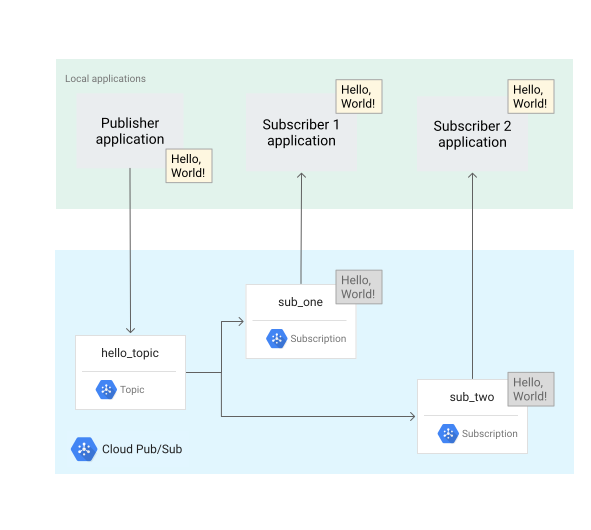
The two subscriber applications use the same code, but you start them
at different times. This process demonstrates how
Pub/Sub enables asynchronous communication. To build this
system, you complete the following steps:
1. Create an IAM service account that the applications use for authentication.
2. Set up IAM permissions.
3. Create a Pub/Sub topic and a subscription.
4. Start three independent applications: one publisher and two subscribers.
## Before you begin
### Install Python
This tutorial uses the [Pub/Sub Client Libraries](https://docs.cloud.google.com/python/docs/reference/pubsub/latest.md.txt), which requires
Python 3.7 or higher. Complete the instructions for [installing Python](https://docs.cloud.google.com/python/docs/setup.md.txt).
## Set up your Pub/Sub project
To manage message flow between publishing and subscribing applications, you
create a topic and two different subscriptions.
## Create a Pub/Sub topic
Create a topic with the ID `hello_topic`:
```bash
gcloud pubsub topics create hello_topic
```
## Create Pub/Sub subscriptions
Create two subscriptions and attach them to your topic.
These subscriptions are a [StreamingPull](https://docs.cloud.google.com/pubsub/docs/pull.md.txt#streamingpull) subscription, which is a
type of [pull](https://docs.cloud.google.com/pubsub/docs/subscriber.md.txt#pull-subscription)
subscription.
### Subscription 1
Create a subscription with the ID `sub_one` and attach it to `hello_topic`.
```bash
gcloud pubsub subscriptions create sub_one --topic=hello_topic
```
### Subscription 2
Create a subscription with the ID `sub_two` and attach it to `hello_topic`.
```bash
gcloud pubsub subscriptions create sub_two --topic=hello_topic
```
## Build the one-to-many system
### Download the publisher and subscriber code
1. Download the Pub/Sub Python files
needed for this tutorial.
```bash
git clone https://github.com/googleapis/python-pubsub.git
```
2. Close any open terminals before proceeding.
### Set up three terminals
1. Start one terminal for each tutorial application (one publisher and two
subscribers). For convenience, this tutorial calls these terminals:
- *publisher* terminal
- *sub_one* terminal
- *sub_two* terminal
> [!NOTE]
> **Note:** Make sure all three terminals are in the same directory relative to where you downloaded the Pub/Sub Python files in the previous step.
2. In the *publisher* terminal, create and activate a [Python virtual environment](https://docs.cloud.google.com/python/docs/setup.md.txt#installing_and_using_virtualenv)
named `pyenv-qs`.
### Bash
```bash
python -m venv pyenv-qs
source pyenv-qs/bin/activate
```
### PowerShell
```bash
py -m venv pyenv-qs
.\pyenv-qs\Scripts\activate
```
In the *sub_one* and *sub_two* terminals, run the following command:
### Bash
```bash
source pyenv-qs/bin/activate
```
### PowerShell
```bash
.\pyenv-qs\Scripts\activate
```
After you run the activate command, your command prompt includes the following
value `(pyenv-qs) $`.
3. In the *publisher* terminal, install the Pub/Sub Python client library using `pip`:
```bash
python -m pip install --upgrade google-cloud-pubsub
```
4. In all three terminals, set up an environment variable with your current
project ID. This gcloud command determines your selected project ID
and sets it as a variable:
### Bash
```bash
export PROJECT=`gcloud config get-value project`
```
### PowerShell
```bash
$env:PROJECT=$(gcloud config get-value project)
```
5. In all three terminals, change to the project path that contains the sample code.
```bash
cd python-pubsub/samples/snippets/quickstart/
```
## Start the apps and observe message flow
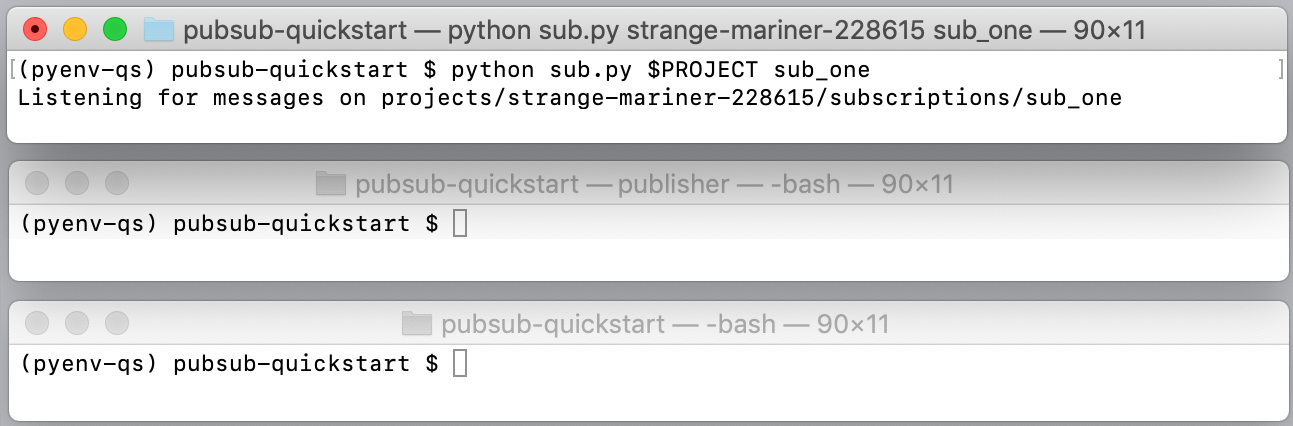
### Start the Subscriber 1 application
In the *sub_one* terminal, start **Subscriber 1**:
### Bash
```bash
python sub.py $PROJECT sub_one
```
### PowerShell
```bash
py sub.py $env:PROJECT sub_one
```
Once started, this application opens a bidirectional streaming connection with
the server. Pub/Sub delivers messages over the stream.
### Start the Publisher application
In the *publisher* terminal, start the **Publisher** application:
### Bash
```bash
python pub.py $PROJECT hello_topic
```
### PowerShell
```bash
py pub.py $env:PROJECT hello_topic
```
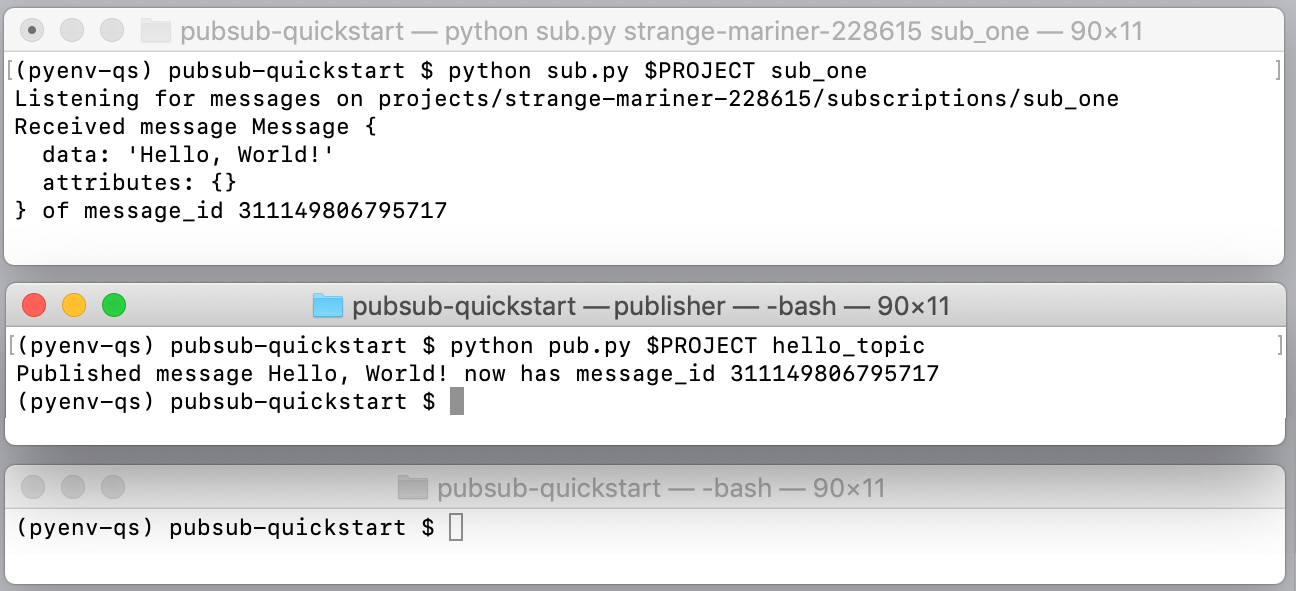
After the publisher application starts, the Pub/Sub system does
the following:
- The **Publisher** application sends a "Hello, World!" message to
Pub/Sub while remaining unaware of any existing
subscriptions. The server also assigns a message ID.
- The **Subscriber 1** application receives the "Hello, World!" message, prints
it, and sends an acknowledgment to Pub/Sub.
- The **Publisher** application prints the acknowledgment. The acknowledgment
tells Pub/Sub that the message has been processed
successfully and does not need to be re-sent to this or any other
*sub_one* subscriber.
Pub/Sub removes the message from *sub_one*.
### Start the Subscriber 2 application
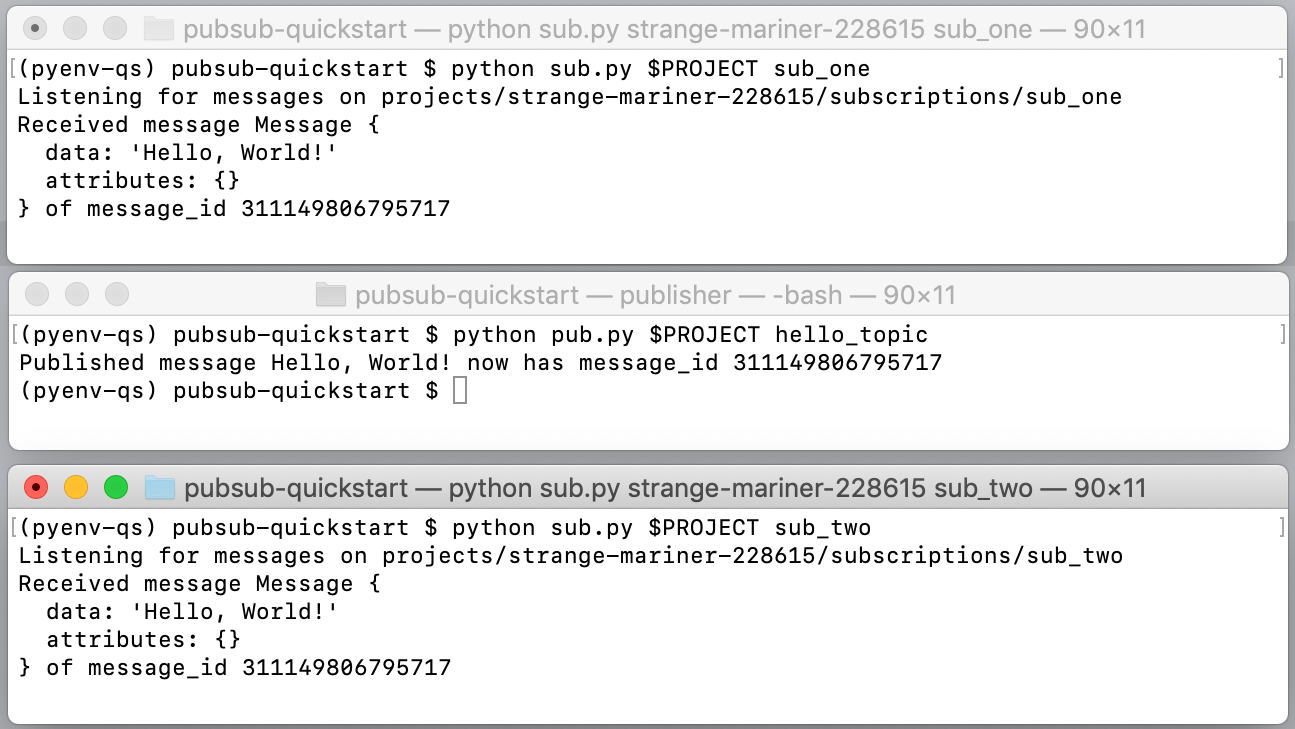
In the *sub_two* terminal, start **Subscriber 2**:
### Bash
```bash
python sub.py $PROJECT sub_two
```
### PowerShell
```bash
py sub.py $env:PROJECT sub_two
```
This subscriber receives messages delivered to the *sub_two* subscription.
**Subscriber 2** reuses the `sub.py` script. The difference is that **Subscriber
2** isn't started until after the Publisher has sent the message to the topic
and subscriptions. If **Publisher** were calling **Subscriber 2** directly, the
publishing application would either have to wait until **Subscriber 2** comes up
or it would have to time out. Pub/Sub manages this process by
effectively saving the message for **Subscriber 2**.
You are now ready to develop with Pub/Sub!
## How did it go?
> [!TIP]
> **Great!** What did you like about the quickstart? What could we have done better? [Let us know!](https://docs.cloud.google.com/pubsub/docs/building-pubsub-messaging-system.md.txt#).
> [!WARNING]
> **We're sorry to hear that.** [Let us know what went wrong](https://docs.cloud.google.com/pubsub/docs/building-pubsub-messaging-system.md.txt#). We'll want to fix it.
Additional resources and links are available on the
[Pub/Sub support page](https://docs.cloud.google.com/pubsub/docs/support.md.txt).
## Clean up
1. Stop all running applications.
2. Delete the sample code directory from your local environment.
3. Delete the topic.
```bash
gcloud pubsub topics delete hello_topic
```
4. Delete the subscriptions.
```bash
gcloud pubsub subscriptions delete sub_one
```
```bash
gcloud pubsub subscriptions delete sub_two
```
5. Shut down the tutorial project in the [IAM \& admin](https://console.cloud.google.com/iam-admin/settings)
section of the Google Cloud console.
6.
Optional: Revoke the authentication credentials that you created, and delete the local
credential file.
```bash
gcloud auth application-default revoke
```
7.
Optional: Revoke credentials from the gcloud CLI.
```bash
gcloud auth revoke
```
## What's next
Here are some things that you can try:
- Examine the tutorial's `pub.py` and `sub.py` code and browse other
Pub/Sub samples on [GitHub](https://github.com/googleapis/python-pubsub/blob/main/samples/snippets/quickstart/). As an exercise, create a version of
`pub.py` that publishes the local time every second.
- Learn to [batch messages](https://docs.cloud.google.com/pubsub/docs/batch-messaging.md.txt).
- Using [Push](https://docs.cloud.google.com/pubsub/docs/push.md.txt) subscriptions, receive messages that
trigger [App Engine endpoints](https://docs.cloud.google.com/appengine/docs/flexible/python/writing-and-responding-to-pub-sub-messages)
or [Cloud Functions](https://docs.cloud.google.com/functions/docs/tutorials/pubsub#triggering_the_function).
- Retrieve previously acknowledged messages using [replay](https://docs.cloud.google.com/pubsub/docs/replay-overview.md.txt).
By default, Pub/Sub removes acknowledged messages from
subscriptions. In this tutorial, for instance, you wouldn't be able to
rerun `sub.py` to receive the "Hello, World!" message again. The replay
feature lets you set up subscriptions so that you can receive messages
after they have been acknowledged.
- Get started with client libraries in [other languages](https://docs.cloud.google.com/pubsub/docs/publish-receive-messages-client-library.md.txt).