> [!WARNING]
>
> **Preview
> --- Troubleshooting Principal Access Boundary policies**
>
>
> This feature is
>
> subject to the "Pre-GA Offerings Terms" in the General Service Terms section of the
> [Service Specific
> Terms](https://docs.cloud.google.com/terms/service-terms#1).
>
> Pre-GA features are available "as is" and might have limited support.
>
> For more information, see the
> [launch stage descriptions](https://cloud.google.com/products/#product-launch-stages).
Policy Troubleshooter helps you understand whether a principal can access a resource. Given a principal, a resource, and a permission, Policy Troubleshooter examines the allow policies, deny policies, and Principal Access Boundary (PAB) policies that impact the principal's access. Then, it tells you whether, based on those policies, the principal can use the specified permission to access the resource. It also lists the relevant policies and explains how they affect the principal's access.
You can access Policy Troubleshooter using the
Google Cloud console, the Google Cloud CLI, or the REST API. For basic
queries, using the Google Cloud console is typically fastest. For more complex
scenarios, consider the gcloud CLI or the REST API.
> [!NOTE]
> **Note:** Policy Troubleshooter does not account for access granted by Cloud Storage [access control lists (ACLs)](https://docs.cloud.google.com/storage/docs/access-control/lists). It also does not diagnose access issues related to [VPC Service Controls](https://docs.cloud.google.com/vpc-service-controls/docs/overview). To troubleshoot issues with VPC Service Controls, use the [VPC Service Controls
> violation analyzer](https://docs.cloud.google.com/vpc-service-controls/docs/troubleshooter).
## Before you begin
-
Enable the Policy Troubleshooter API, if it is not already enabled.
**Roles required to enable APIs**
To enable APIs, you need the `serviceusage.services.enable` permission. If you
created the project, then you likely already have this permission through the
Owner role (`roles/owner`). Otherwise, you can get this permission through the
Service Usage Admin role (`roles/serviceusage.serviceUsageAdmin`).
[Learn how to grant roles](https://docs.cloud.google.com/iam/docs/granting-changing-revoking-access).
[Enable the API](https://console.cloud.google.com/apis/enableflow?apiid=policytroubleshooter.googleapis.com&redirect=https://console.cloud.google.com)
## Required permissions
To fully troubleshoot your principals' access, you need the following
permissions.
### Permissions to troubleshoot access for individual principals
Policy Troubleshooter analyzes a principal's access to a resource
based on the allow policies, deny policies, Principal Access Boundary policies, and
roles that you have permission to view. If you don't have permission to view a
policy that applies to a resource, or if you don't have permission to view a
custom role, then you might not be able to tell whether a principal has access.
#### Permissions to troubleshoot allow and deny policies
To troubleshoot allow and deny policies, you need permissions on the
organization that contains the resource that you want to troubleshoot. These
permissions let you view the allow and deny policies that control access to the
resource.
To get the permissions that
you need to troubleshoot a principal's access,
ask your administrator to grant you the
following IAM roles on the organization that contains the resource that you want to troubleshoot access for:
- [Security Reviewer](https://docs.cloud.google.com/iam/docs/roles-permissions/iam#iam.securityReviewer) (`roles/iam.securityReviewer`)
- Troubleshoot deny policies: [Deny Reviewer](https://docs.cloud.google.com/iam/docs/roles-permissions/iam#iam.denyReviewer) (`roles/iam.denyReviewer`)
- Troubleshoot policies that include bindings for [service account principal sets](https://docs.cloud.google.com/iam/docs/principal-identifiers#allow-service-account-principal-sets): [Browser](https://docs.cloud.google.com/iam/docs/roles-permissions/browser#browser) (`roles/browser`)
- Use the Google Cloud CLI to troubleshoot: [Service Usage Consumer](https://docs.cloud.google.com/iam/docs/roles-permissions/serviceusage#serviceusage.serviceUsageConsumer) (`roles/serviceusage.serviceUsageConsumer`)
For more information about granting roles, see [Manage access to projects, folders, and organizations](https://docs.cloud.google.com/iam/docs/granting-changing-revoking-access).
You might also be able to get
the required permissions through [custom
roles](https://docs.cloud.google.com/iam/docs/creating-custom-roles) or other [predefined
roles](https://docs.cloud.google.com/iam/docs/roles-overview#predefined).
If you don't have permission to view the allow and deny policies for a resource,
the access results for those allow and deny policies are `Unknown`.
#### Permissions to troubleshoot Principal Access Boundary policies
To troubleshoot Principal Access Boundary policies, you need permissions on the
organization whose principal set includes the principal. The way you identify
this organization depends on the principal type:
- Google Accounts and Google groups: The organization associated with the Google Workspace domain that includes the principal
- Federated identities (identities in workforce identity pools or workload identity pools): The organization that contains the identity pool that includes the principal
- Service accounts: The organization that contains the project where the service account was created
- Agent identities: The organization that contains the project where the agent was created
These permissions let you view the Principal Access Boundary policies that control what
the principal can access.
To get the permissions that
you need to troubleshoot a principal's access,
ask your administrator to grant you the
following IAM roles on the appropriate organization:
- [Principal Access Boundary Policy Viewer](https://docs.cloud.google.com/iam/docs/roles-permissions/iam#iam.principalAccessBoundaryViewer) (`roles/iam.principalAccessBoundaryViewer`)
- Troubleshoot Principal Access Boundary policies bound to a project's, folder's, or organization's principal set, or bound to agent identities: [Organization Administrator](https://docs.cloud.google.com/iam/docs/roles-permissions/resourcemanager#resourcemanager.organizationAdmin) (`roles/resourcemanager.organizationAdmin`)
- Troubleshoot Principal Access Boundary policies bound to Google Workspace domains: [Workspace Pool IAM Admin](https://docs.cloud.google.com/iam/docs/roles-permissions/iam#iam.workspacePoolAdmin) (`roles/iam.workspacePoolAdmin`)
- Troubleshoot Principal Access Boundary policies bound to workforce identity pools: [IAM Workforce Pool Admin](https://docs.cloud.google.com/iam/docs/roles-permissions/iam#iam.workforcePoolAdmin) (`roles/iam.workforcePoolAdmin`)
- Troubleshoot Principal Access Boundary policies bound to workload identity pools: [IAM Workload Identity Pool Admin](https://docs.cloud.google.com/iam/docs/roles-permissions/iam#iam.workloadIdentityPoolAdmin) (`roles/iam.workloadIdentityPoolAdmin`)
For more information about granting roles, see [Manage access to projects, folders, and organizations](https://docs.cloud.google.com/iam/docs/granting-changing-revoking-access).
You might also be able to get
the required permissions through [custom
roles](https://docs.cloud.google.com/iam/docs/creating-custom-roles) or other [predefined
roles](https://docs.cloud.google.com/iam/docs/roles-overview#predefined).
If you don't have permission to view the Principal Access Boundary policies that apply
to a principal, the access results for Principal Access Boundary policies are
`Unknown`.
### Permissions to troubleshoot access for group members
If your allow and deny policies include groups, you need the Google Workspace
Admin API permission `groups.read` to troubleshoot access for individual group
members. Super Admins and Group Admins automatically have this permission. To
give a user who is not a Super or Group admin this permission, [create a custom
Google Workspace administrator
role](https://support.google.com/a/answer/2406043) that contains the
`groups.read` privilege (located under *Admin API Privileges*) and grant it to
the user.
If you don't have these permissions, role bindings and deny rules that contain
groups or domains have an access result of **Unknown**, unless the role binding
or deny rule also explicitly includes the principal.
### Permissions to troubleshoot access for domain members
If your allow and deny policies include a Google Workspace account or
Cloud Identity domain, you must be a domain administrator to troubleshoot
access for individual domain members.
If you don't have these permissions, role bindings and deny rules that contain
groups or domains have an access result of **Unknown**, unless the role binding
or deny rule also explicitly includes the principal.
## Troubleshoot access
To troubleshoot access, you need the principal, resource, and permission you
want to check. This information can be provided by an error ID:
- **Error ID:** A unique identifier for a
[permission error message](https://docs.cloud.google.com/iam/docs/permission-error-messages). The error ID provides context
for the error, including the principal, resource, permission, and supported
IAM conditions. An error ID related to an Agent Identity
provides context for the Agent Identity and its claims, such as platform and
container.
Supported IAM conditions include `principal.type` and
`principal.subject`.
If you don't have an error ID, you can troubleshoot access with the following
information:
- **Principal:** The identity to check. You can enter one of the following:
- **An email address:** Must refer to a user, a single service account, or a
[service account principal set](https://docs.cloud.google.com/iam/docs/principal-identifiers#allow-service-account-principal-sets).
- **An [Agent Identity](https://docs.cloud.google.com/iam/docs/agent-identity-overview) identifier:** Must follow
this format:
`TRUST_DOMAIN/resources/SERVICE/RESOURCE_PATH`.
Example:
`agents.global.org-123456789012.system.id.goog/resources/aiplatform/projects/9876543210/locations/us-central1/reasoningEngines/my-test-agent`
Policy Troubleshooter extracts the platform and
resource container attributes from the agent's subject string using the
standard pattern `resources/{platform}/projects/{project_number}/...`. If
an agent uses a non-standard subject format,
Policy Troubleshooter cannot derive its attributes, and
attribute-based principal set bindings evaluate to `Unknown`.
If an agent has no granting allow bindings,
Policy Troubleshooter returns an access state of
`UNKNOWN_INFO` rather than `NOT_GRANTED`.
> [!CAUTION]
> **Caution:** Entering a bare SPIFFE URI (`spiffe://...`) or an email address for an Agent Identity results in an invalid principal error.
The identifiers use the following:
- `TRUST_DOMAIN`: Your organization's trust domain
(for example,
`agents.global.org-123456789012.system.id.goog`)
- `SERVICE`: The short name of the Google Cloud
service (for example, `aiplatform` or
`discoveryengine`)
- `RESOURCE_PATH`: The full path to the resource
that hosts the agent
Other types of principals, including groups, domains, workforce identities,
and workload identities, are not supported.
- **Resource:** The [full name](https://docs.cloud.google.com/apis/design/resource_names) of the resource
that you want to troubleshoot access to. For example, to troubleshoot access
to the project `my-project`, enter
`//cloudresourcemanager.googleapis.com/projects/my-project`. For other types
of resources, see the [examples of full resource names](https://docs.cloud.google.com/iam/docs/full-resource-names).
> [!NOTE]
> **Note:** Policy Troubleshooter doesn't support evaluating allow policies set on Pub/Sub resources. If you want to check whether a principal has access to a Pub/Sub resource, first troubleshoot access for the resource's parent project, and then manually review the allow policy set on the Pub/Sub resource, if any.
- **Permission:** The permission to check. If you use the
Google Cloud console, it presents a list of suggestions as you type.
To troubleshoot a permission, the permission must be applicable for the
resource in the request. In other words, it must be possible to use that
permission to access the resource in some way. If the permission isn't
applicable for the resource, then the request fails. For example, if you try
to troubleshoot the `compute.instances.get` permission for a
Google Kubernetes Engine cluster, then the request fails because the
`compute.instance.get` permission can't be used to access
Google Kubernetes Engine clusters.
For a complete list of permissions, see the [permissions
reference](https://docs.cloud.google.com/iam/docs/permissions-reference).
### Console
To troubleshoot access, do the following:
1. In the Google Cloud console, go to the **Policy Troubleshooter**
page.
[Go to
Policy Troubleshooter](https://console.cloud.google.com/iam-admin/troubleshooter)
2. If you have an error ID, select **Error ID** and enter it.
3. If you don't have an error ID, select **Manual**.
1. Enter the email address of the principal or the Agent Identity identifier
whose access you want to check.
2. Enter the full resource name of the resource to check.
If you don't know the full resource name, do one of the following:
- If you're troubleshooting access for a project, folder, or organization, start typing to see autocomplete options.
- If you're troubleshooting access for another resource type, click
**Browse** to open the resource search dialog, then search for the
resource:
1. In the **Select scope** box, select a project, folder, or organization to search within.
2. In the **Resource type** box, select the resource types you want to search for.
3. In the **Search for resources** box, enter a portion of the resource name.
4. In the results section, select the resource you want to check.
5. Click **Select** to choose the resource and close the dialog.
3. Enter the permission to check.
If you don't know the full permission name, start typing to see autocomplete
options.
4. Optional: To check multiple resources and permissions, select
**Add Another Pair** and repeat the previous step.
4. Click **Check access**.
### gcloud
To find out why a principal has, or doesn't have, an IAM permission, use the
`https://docs.cloud.google.com/sdk/gcloud/reference/beta/policy-troubleshoot/iam`
command.
Before using any of the command data below,
make the following replacements:
- `VERSION`: Optional. The version of the command to use. To troubleshoot access based on allow and deny policies only, don't specify a version. To troubleshoot access based on allow, deny, and Principal Access Boundary policies, use the version `beta`.
- `EMAIL`: The email address of the principal whose permissions you want to troubleshoot. For an [Agent Identity](https://docs.cloud.google.com/iam/docs/agent-identity-overview), you must instead provide the principal identifier.
- `RESOURCE`: The resource on which the permission is granted.
- `PERMISSION`: The permission that you want to troubleshoot.
Execute the
[gcloud beta policy-troubleshoot iam](https://docs.cloud.google.com/sdk/gcloud/reference/beta/policy-troubleshoot/iam)
command:
#### Linux, macOS, or Cloud Shell
> [!NOTE]
> **Note:** Ensure you have initialized the Google Cloud CLI with authentication and a project by running either [gcloud init](https://docs.cloud.google.com/sdk/gcloud/reference/init); or [gcloud auth login](https://docs.cloud.google.com/sdk/gcloud/reference/auth/login) and [gcloud config set project](https://docs.cloud.google.com/sdk/gcloud/reference/config/set).
```bash
gcloud VERSION policy-intelligence troubleshoot-policy iam RESOURCE --principal-email=EMAIL \
--permission=PERMISSION
```
#### Windows (PowerShell)
> [!NOTE]
> **Note:** Ensure you have initialized the Google Cloud CLI with authentication and a project by running either [gcloud init](https://docs.cloud.google.com/sdk/gcloud/reference/init); or [gcloud auth login](https://docs.cloud.google.com/sdk/gcloud/reference/auth/login) and [gcloud config set project](https://docs.cloud.google.com/sdk/gcloud/reference/config/set).
```bash
gcloud VERSION policy-intelligence troubleshoot-policy iam RESOURCE --principal-email=EMAIL `
--permission=PERMISSION
```
#### Windows (cmd.exe)
> [!NOTE]
> **Note:** Ensure you have initialized the Google Cloud CLI with authentication and a project by running either [gcloud init](https://docs.cloud.google.com/sdk/gcloud/reference/init); or [gcloud auth login](https://docs.cloud.google.com/sdk/gcloud/reference/auth/login) and [gcloud config set project](https://docs.cloud.google.com/sdk/gcloud/reference/config/set).
```bash
gcloud VERSION policy-intelligence troubleshoot-policy iam RESOURCE --principal-email=EMAIL ^
--permission=PERMISSION
```
You should receive a response similar to the following:
#### Response
```
{
"accessTuple": {
"conditionContext": {
"destination": {},
"effectiveTags": [
{
"namespacedTagKey": "project-1/tag-key-1",
"namespacedTagValue": "project-1/tag-key-1/tag-value-1",
"tagKey": "tagKeys/123456789012",
"tagKeyParentName": "projects/123456789012",
"tagValue": "tagValues/123456789012"
},
],
"request": {},
"resource": {}
},
"fullResourceName": "//cloudresourcemanager.googleapis.com/projects/project-1",
"permission": "bigtable.instances.create",
"permissionFqdn": "bigtable.googleapis.com/instances.create",
"principal": "service-account-3@project-1.iam.gserviceaccount.com"
},
"allowPolicyExplanation": {
"allowAccessState": "ALLOW_ACCESS_STATE_NOT_GRANTED",
"explainedPolicies": [
{
"allowAccessState": "ALLOW_ACCESS_STATE_NOT_GRANTED",
"bindingExplanations": [
{
"allowAccessState": "ALLOW_ACCESS_STATE_NOT_GRANTED",
"combinedMembership": {
"membership": "MEMBERSHIP_NOT_MATCHED",
"relevance": "HEURISTIC_RELEVANCE_NORMAL"
},
"condition": {
"expression": "resource.type == \"cloudresourcemanager.googleapis.com/Project\"",
"title": "Resource-based condition"
},
"conditionExplanation": {
"evaluationStates": [
{
"end": 62,
"value": false
}
],
"value": false
},
"memberships": {
"serviceAccount:service-account-1@project-1.iam.gserviceaccount.com": {
"membership": "MEMBERSHIP_NOT_MATCHED",
"relevance": "HEURISTIC_RELEVANCE_NORMAL"
}
},
"relevance": "HEURISTIC_RELEVANCE_NORMAL",
"role": "roles/bigquery.admin",
"rolePermission": "ROLE_PERMISSION_NOT_INCLUDED",
"rolePermissionRelevance": "HEURISTIC_RELEVANCE_NORMAL"
},
{
"allowAccessState": "ALLOW_ACCESS_STATE_NOT_GRANTED",
"combinedMembership": {
"membership": "MEMBERSHIP_NOT_MATCHED",
"relevance": "HEURISTIC_RELEVANCE_NORMAL"
},
"condition": {
"expression": "resource.matchTag(\"project-1/tag-key-1\", \"tag-value-1\")",
"title": "Tag-based condition"
},
"conditionExplanation": {
"evaluationStates": [
{
"end": 73,
"value": true
}
],
"value": true
},
"memberships": {
"serviceAccount:service-account-2@project-1.iam.gserviceaccount.com": {
"membership": "MEMBERSHIP_NOT_MATCHED",
"relevance": "HEURISTIC_RELEVANCE_NORMAL"
}
},
"relevance": "HEURISTIC_RELEVANCE_NORMAL",
"role": "roles/bigquery.admin",
"rolePermission": "ROLE_PERMISSION_NOT_INCLUDED",
"rolePermissionRelevance": "HEURISTIC_RELEVANCE_NORMAL"
},
{
"allowAccessState": "ALLOW_ACCESS_STATE_NOT_GRANTED",
"combinedMembership": {
"membership": "MEMBERSHIP_NOT_MATCHED",
"relevance": "HEURISTIC_RELEVANCE_NORMAL"
},
"memberships": {
"user:user-2@example.com": {
"membership": "MEMBERSHIP_NOT_MATCHED",
"relevance": "HEURISTIC_RELEVANCE_NORMAL"
}
},
"relevance": "HEURISTIC_RELEVANCE_NORMAL",
"role": "roles/compute.admin",
"rolePermission": "ROLE_PERMISSION_NOT_INCLUDED",
"rolePermissionRelevance": "HEURISTIC_RELEVANCE_NORMAL"
},
{
"allowAccessState": "ALLOW_ACCESS_STATE_NOT_GRANTED",
"combinedMembership": {
"membership": "MEMBERSHIP_NOT_MATCHED",
"relevance": "HEURISTIC_RELEVANCE_NORMAL"
},
"memberships": {
"user:user-1@example.com": {
"membership": "MEMBERSHIP_NOT_MATCHED",
"relevance": "HEURISTIC_RELEVANCE_NORMAL"
},
"user:user-3@example.com": {
"membership": "MEMBERSHIP_NOT_MATCHED",
"relevance": "HEURISTIC_RELEVANCE_NORMAL"
}
},
"relevance": "HEURISTIC_RELEVANCE_NORMAL",
"role": "roles/iam.serviceAccountTokenCreator",
"rolePermission": "ROLE_PERMISSION_NOT_INCLUDED",
"rolePermissionRelevance": "HEURISTIC_RELEVANCE_NORMAL"
},
{
"allowAccessState": "ALLOW_ACCESS_STATE_NOT_GRANTED",
"combinedMembership": {
"membership": "MEMBERSHIP_NOT_MATCHED",
"relevance": "HEURISTIC_RELEVANCE_NORMAL"
},
"memberships": {
"user:user-2@example.com": {
"membership": "MEMBERSHIP_NOT_MATCHED",
"relevance": "HEURISTIC_RELEVANCE_NORMAL"
},
"user:user-1@example.com": {
"membership": "MEMBERSHIP_NOT_MATCHED",
"relevance": "HEURISTIC_RELEVANCE_NORMAL"
}
},
"relevance": "HEURISTIC_RELEVANCE_HIGH",
"role": "roles/owner",
"rolePermission": "ROLE_PERMISSION_INCLUDED",
"rolePermissionRelevance": "HEURISTIC_RELEVANCE_HIGH"
},
{
"allowAccessState": "ALLOW_ACCESS_STATE_NOT_GRANTED",
"combinedMembership": {
"membership": "MEMBERSHIP_MATCHED",
"relevance": "HEURISTIC_RELEVANCE_NORMAL"
},
"memberships": {
"serviceAccount:service-account-3@project-1.iam.gserviceaccount.com": {
"membership": "MEMBERSHIP_MATCHED",
"relevance": "HEURISTIC_RELEVANCE_NORMAL"
},
"serviceAccount:service-account-4@project-1.iam.gserviceaccount.com": {
"membership": "MEMBERSHIP_NOT_MATCHED",
"relevance": "HEURISTIC_RELEVANCE_NORMAL"
}
},
"relevance": "HEURISTIC_RELEVANCE_NORMAL",
"role": "roles/resourcemanager.projectIamAdmin",
"rolePermission": "ROLE_PERMISSION_NOT_INCLUDED",
"rolePermissionRelevance": "HEURISTIC_RELEVANCE_NORMAL"
},
{
"allowAccessState": "ALLOW_ACCESS_STATE_NOT_GRANTED",
"combinedMembership": {
"membership": "MEMBERSHIP_NOT_MATCHED",
"relevance": "HEURISTIC_RELEVANCE_NORMAL"
},
"memberships": {
"serviceAccount:service-account-4@project-1.iam.gserviceaccount.com": {
"membership": "MEMBERSHIP_NOT_MATCHED",
"relevance": "HEURISTIC_RELEVANCE_NORMAL"
}
},
"relevance": "HEURISTIC_RELEVANCE_NORMAL",
"role": "roles/resourcemanager.tagViewer",
"rolePermission": "ROLE_PERMISSION_NOT_INCLUDED",
"rolePermissionRelevance": "HEURISTIC_RELEVANCE_NORMAL"
}
],
"fullResourceName": "//cloudresourcemanager.googleapis.com/projects/project-1",
"policy": {
"bindings": [
{
"condition": {
"expression": "resource.type == \"cloudresourcemanager.googleapis.com/Project\"",
"title": "Resource-based condition"
},
"members": [
"serviceAccount:service-account-1@project-1.iam.gserviceaccount.com"
],
"role": "roles/bigquery.admin"
},
{
"condition": {
"expression": "resource.matchTag(\"project-1/tag-key-1\", \"tag-value-1\")",
"title": "Tag-based condition"
},
"members": [
"serviceAccount:service-account-2@project-1.iam.gserviceaccount.com"
],
"role": "roles/bigquery.admin"
},
{
"members": [
"user:user-2@example.com"
],
"role": "roles/compute.admin"
},
{
"members": [
"user:user-1@example.com",
"user:user-3@example.com"
],
"role": "roles/iam.serviceAccountTokenCreator"
},
{
"members": [
"user:user-2@example.com",
"user:user-1@example.com"
],
"role": "roles/owner"
},
{
"members": [
"serviceAccount:service-account-3@project-1.iam.gserviceaccount.com",
"serviceAccount:service-account-4@project-1.iam.gserviceaccount.com"
],
"role": "roles/resourcemanager.projectIamAdmin"
},
{
"members": [
"serviceAccount:service-account-4@project-1.iam.gserviceaccount.com"
],
"role": "roles/resourcemanager.tagViewer"
}
],
"etag": "BwYY6ttEMEY=",
"version": 3
},
"relevance": "HEURISTIC_RELEVANCE_HIGH"
},
],
"relevance": "HEURISTIC_RELEVANCE_HIGH"
},
"denyPolicyExplanation": {
"denyAccessState": "DENY_ACCESS_STATE_NOT_DENIED",
"explainedResources": [
{
"denyAccessState": "DENY_ACCESS_STATE_NOT_DENIED",
"explainedPolicies": [
{
"denyAccessState": "DENY_ACCESS_STATE_NOT_DENIED",
"policy": {
"createTime": "2024-04-09T23:28:24.103203Z",
"displayName": "Troubleshooter v3 prober non-tag deny policy",
"etag": "MTgyMzk3MDY4OTY4MDE0ODg4OTY=",
"kind": "DenyPolicy",
"name": "policies/cloudresourcemanager.googleapis.com%2Fprojects%2F546942305807/denypolicies/deny-policy-1",
"rules": [
{
"denyRule": {
"deniedPermissions": [
"bigquery.googleapis.com/datasets.create"
],
"deniedPrincipals": [
"principal://iam.googleapis.com/projects/-/serviceAccounts/service-account-1@project-1.iam.gserviceaccount.com"
]
}
}
],
"uid": "fab63b4d-ecfb-5f06-8a6d-602bf1be5062",
"updateTime": "2024-05-20T23:29:38.428095Z"
},
"relevance": "HEURISTIC_RELEVANCE_HIGH",
"ruleExplanations": [
{
"combinedDeniedPermission": {
"permissionMatchingState": "PERMISSION_PATTERN_NOT_MATCHED",
"relevance": "HEURISTIC_RELEVANCE_HIGH"
},
"combinedDeniedPrincipal": {
"membership": "MEMBERSHIP_NOT_MATCHED",
"relevance": "HEURISTIC_RELEVANCE_HIGH"
},
"combinedExceptionPermission": {
"permissionMatchingState": "PERMISSION_PATTERN_NOT_MATCHED",
"relevance": "HEURISTIC_RELEVANCE_NORMAL"
},
"combinedExceptionPrincipal": {
"membership": "MEMBERSHIP_NOT_MATCHED",
"relevance": "HEURISTIC_RELEVANCE_NORMAL"
},
"deniedPermissions": {
"bigquery.googleapis.com/datasets.create": {
"permissionMatchingState": "PERMISSION_PATTERN_NOT_MATCHED",
"relevance": "HEURISTIC_RELEVANCE_HIGH"
}
},
"deniedPrincipals": {
"principal://iam.googleapis.com/projects/-/serviceAccounts/service-account-1@project-1.iam.gserviceaccount.com": {
"membership": "MEMBERSHIP_NOT_MATCHED",
"relevance": "HEURISTIC_RELEVANCE_HIGH"
}
},
"denyAccessState": "DENY_ACCESS_STATE_NOT_DENIED",
"relevance": "HEURISTIC_RELEVANCE_HIGH"
}
]
},
],
"fullResourceName": "//cloudresourcemanager.googleapis.com/projects/123456789012",
"relevance": "HEURISTIC_RELEVANCE_HIGH"
}
],
"permissionDeniable": true,
"relevance": "HEURISTIC_RELEVANCE_NORMAL"
},
"overallAccessState": "CANNOT_ACCESS",
"pabPolicyExplanation": {
"explainedBindingsAndPolicies": [
{
"bindingAndPolicyAccessState": "PAB_ACCESS_STATE_NOT_ENFORCED",
"explainedPolicy": {
"explainedRules": [
{
"combinedResourceInclusionState": "RESOURCE_INCLUSION_STATE_NOT_INCLUDED",
"effect": "ALLOW",
"explainedResources": [
{
"relevance": "HEURISTIC_RELEVANCE_NORMAL",
"resource": "//cloudresourcemanager.googleapis.com/projects/project-2",
"resourceInclusionState": "RESOURCE_INCLUSION_STATE_NOT_INCLUDED"
}
],
"relevance": "HEURISTIC_RELEVANCE_NORMAL",
"ruleAccessState": "PAB_ACCESS_STATE_NOT_ALLOWED"
}
],
"policy": {
"createTime": "2024-04-09T17:40:51.627668Z",
"details": {
"enforcementVersion": "1",
"rules": [
{
"effect": "ALLOW",
"resources": [
"//cloudresourcemanager.googleapis.com/projects/project-2"
]
}
]
},
"displayName": "Troubleshooter v3 PAB Policy",
"etag": "m64s4IgR80eDJDywuVA2DA==",
"name": "organizations/123456789012/locations/global/principalAccessBoundaryPolicies/example-pab-policy",
"uid": "puid_11875429267422576641",
"updateTime": "2024-04-09T17:40:51.627668Z"
},
"policyAccessState": "PAB_ACCESS_STATE_NOT_ENFORCED",
"policyVersion": {
"enforcementState": "PAB_POLICY_ENFORCEMENT_STATE_NOT_ENFORCED",
"version": 1
},
"relevance": "HEURISTIC_RELEVANCE_NORMAL"
},
"explainedPolicyBinding": {
"conditionExplanation": {
"evaluationStates": [
{
"end": 53,
"value": true
},
{
"end": 153,
"start": 58,
"value": false
},
{
"end": 248,
"start": 157,
"value": false
}
],
"value": false
},
"policyBinding": {
"condition": {
"expression": "principal.type == 'iam.googleapis.com/ServiceAccount' && (principal.subject=='service-account-1@project-1.iam.gserviceaccount.com' || principal.subject=='service-account-2@project-1.iam.gserviceaccount.com')"
},
"createTime": "2024-04-09T17:51:13.504418Z",
"displayName": "PAB Policy Binding on project-1 project",
"etag": "W/\"hz9IKzHsIqvopqDRcVYDxQ==\"",
"name": "projects/123456789012/locations/global/policyBindings/example-policy-binding",
"policy": "organizations/123456789012/locations/global/principalAccessBoundaryPolicies/example-pab-policy",
"policyKind": "PRINCIPAL_ACCESS_BOUNDARY",
"policyUid": "puid_11875429267422576641",
"target": {
"principalSet": "//cloudresourcemanager.googleapis.com/projects/project-1"
},
"uid": "buid_1012746966204940289",
"updateTime": "2024-05-09T23:08:56.846355Z"
},
"policyBindingState": "POLICY_BINDING_STATE_NOT_ENFORCED",
"relevance": "HEURISTIC_RELEVANCE_NORMAL"
},
"relevance": "HEURISTIC_RELEVANCE_NORMAL"
}
],
"principalAccessBoundaryAccessState": "PAB_ACCESS_STATE_NOT_ENFORCED",
"relevance": "HEURISTIC_RELEVANCE_NORMAL"
}
}
```
> [!NOTE]
> **Note:** The Policy Troubleshooter API calls the private method `GetEffectivePolicy` internally. If `ADMIN_READ` Data Access logs are enabled for IAM, you will see this call in your audit logs. For more information, see [IAM audit logging](https://docs.cloud.google.com/iam/docs/audit-logging).
### REST
To find out why a principal has, or doesn't have, an IAM permission, use the Policy Troubleshooter API's
`https://docs.cloud.google.com/policy-intelligence/docs/reference/policytroubleshooter/rest/v3beta/iam/troubleshoot`
method.
Before using any of the request data,
make the following replacements:
- `VERSION`: The API version to use for this request. To troubleshoot access based on allow and deny policies only, use `v3`. To troubleshoot access based on allow, deny, and Principal Access Boundary policies, use `v3beta`.
- `EMAIL`: The email address of the principal whose permissions you want to troubleshoot. For an [Agent Identity](https://docs.cloud.google.com/iam/docs/agent-identity-overview), you must instead provide the principal identifier.
- `RESOURCE`: The resource on which the permission is granted.
- `PERMISSION`: The permission that you want to troubleshoot.
- `PROJECT_ID`: The ID of the project that you want to use to make the request. Project IDs are alphanumeric strings, like `my-project`.
HTTP method and URL:
```
POST https://policytroubleshooter.googleapis.com/VERSION/iam:troubleshoot
```
Request JSON body:
```
{
"accessTuple": {
"principal": "EMAIL",
"fullResourceName": "RESOURCE",
"permission": "PERMISSION"
}
}
```
To send your request, expand one of these options:
#### curl (Linux, macOS, or Cloud Shell)
> [!NOTE]
> **Note:** The following command assumes that you have logged in to the `gcloud` CLI with your user account by running [`gcloud init`](https://docs.cloud.google.com/sdk/gcloud/reference/init) or [`gcloud auth login`](https://docs.cloud.google.com/sdk/gcloud/reference/auth/login) , or by using [Cloud Shell](https://docs.cloud.google.com/shell/docs), which automatically logs you into the `gcloud` CLI . You can check the currently active account by running [`gcloud auth list`](https://docs.cloud.google.com/sdk/gcloud/reference/auth/list).
Save the request body in a file named `request.json`,
and execute the following command:
```
curl -X POST \
-H "Authorization: Bearer $(gcloud auth print-access-token)" \
-H "x-goog-user-project: PROJECT_ID" \
-H "Content-Type: application/json; charset=utf-8" \
-d @request.json \
"https://policytroubleshooter.googleapis.com/VERSION/iam:troubleshoot"
```
#### PowerShell (Windows)
> [!NOTE]
> **Note:** The following command assumes that you have logged in to the `gcloud` CLI with your user account by running [`gcloud init`](https://docs.cloud.google.com/sdk/gcloud/reference/init) or [`gcloud auth login`](https://docs.cloud.google.com/sdk/gcloud/reference/auth/login) . You can check the currently active account by running [`gcloud auth list`](https://docs.cloud.google.com/sdk/gcloud/reference/auth/list).
Save the request body in a file named `request.json`,
and execute the following command:
```
$cred = gcloud auth print-access-token
$headers = @{ "Authorization" = "Bearer $cred"; "x-goog-user-project" = "PROJECT_ID" }
Invoke-WebRequest `
-Method POST `
-Headers $headers `
-ContentType: "application/json; charset=utf-8" `
-InFile request.json `
-Uri "https://policytroubleshooter.googleapis.com/VERSION/iam:troubleshoot" | Select-Object -Expand Content
```
#### APIs Explorer (browser)
Copy the request body and open the
[method reference page](https://docs.cloud.google.com/policy-intelligence/docs/reference/policytroubleshooter/rest/v3beta/iam/troubleshoot).
The APIs Explorer panel opens on the right side of the page.
You can interact with this tool to send requests.
Paste the request body in this tool, complete any other required fields, and click **Execute**.
You should receive a JSON response similar to the following:
#### Response
```
{
"overallAccessState": "CANNOT_ACCESS",
"accessTuple": {
"principal": "service-account-3@project-1.iam.gserviceaccount.com",
"fullResourceName": "//cloudresourcemanager.googleapis.com/projects/project-1",
"permission": "bigtable.instances.create",
"permissionFqdn": "bigtable.googleapis.com/instances.create",
"conditionContext": {
"effectiveTags": [
{
"tagValue": "tagValues/123456789012",
"namespacedTagValue": "project-1/example-tag-key/example-tag-value",
"tagKey": "tagKeys/123456789012",
"namespacedTagKey": "project-1/example-tag-key",
"tagKeyParentName": "projects/546942305807"
},
]
}
},
"allowPolicyExplanation": {
"allowAccessState": "ALLOW_ACCESS_STATE_NOT_GRANTED",
"explainedPolicies": [
{
"allowAccessState": "ALLOW_ACCESS_STATE_NOT_GRANTED",
"fullResourceName": "//cloudresourcemanager.googleapis.com/projects/project-1",
"bindingExplanations": [
{
"allowAccessState": "ALLOW_ACCESS_STATE_NOT_GRANTED",
"role": "roles/bigquery.admin",
"rolePermission": "ROLE_PERMISSION_NOT_INCLUDED",
"rolePermissionRelevance": "HEURISTIC_RELEVANCE_NORMAL",
"combinedMembership": {
"membership": "MEMBERSHIP_NOT_MATCHED",
"relevance": "HEURISTIC_RELEVANCE_NORMAL"
},
"memberships": {
"serviceAccount:service-account-1@project-1.iam.gserviceaccount.com": {
"membership": "MEMBERSHIP_NOT_MATCHED",
"relevance": "HEURISTIC_RELEVANCE_NORMAL"
}
},
"relevance": "HEURISTIC_RELEVANCE_NORMAL",
"condition": {
"expression": "resource.type == \"cloudresourcemanager.googleapis.com/Project\"",
"title": "Resource-based condition"
},
"conditionExplanation": {
"value": null
}
},
{
"allowAccessState": "ALLOW_ACCESS_STATE_NOT_GRANTED",
"role": "roles/bigquery.admin",
"rolePermission": "ROLE_PERMISSION_NOT_INCLUDED",
"rolePermissionRelevance": "HEURISTIC_RELEVANCE_NORMAL",
"combinedMembership": {
"membership": "MEMBERSHIP_NOT_MATCHED",
"relevance": "HEURISTIC_RELEVANCE_NORMAL"
},
"memberships": {
"serviceAccount:service-account-2@project-1.iam.gserviceaccount.com": {
"membership": "MEMBERSHIP_NOT_MATCHED",
"relevance": "HEURISTIC_RELEVANCE_NORMAL"
}
},
"relevance": "HEURISTIC_RELEVANCE_NORMAL",
"condition": {
"expression": "resource.matchTag(\"project-1/example-tag-key\", \"example-tag-value\")",
"title": "Tag-based condition"
},
"conditionExplanation": {
"value": true,
"evaluationStates": [
{
"end": 73,
"value": true
}
]
}
},
{
"allowAccessState": "ALLOW_ACCESS_STATE_NOT_GRANTED",
"role": "roles/compute.admin",
"rolePermission": "ROLE_PERMISSION_NOT_INCLUDED",
"rolePermissionRelevance": "HEURISTIC_RELEVANCE_NORMAL",
"combinedMembership": {
"membership": "MEMBERSHIP_NOT_MATCHED",
"relevance": "HEURISTIC_RELEVANCE_NORMAL"
},
"memberships": {
"user:user-1@example.com": {
"membership": "MEMBERSHIP_NOT_MATCHED",
"relevance": "HEURISTIC_RELEVANCE_NORMAL"
}
},
"relevance": "HEURISTIC_RELEVANCE_NORMAL"
},
{
"allowAccessState": "ALLOW_ACCESS_STATE_NOT_GRANTED",
"role": "roles/iam.serviceAccountTokenCreator",
"rolePermission": "ROLE_PERMISSION_NOT_INCLUDED",
"rolePermissionRelevance": "HEURISTIC_RELEVANCE_NORMAL",
"combinedMembership": {
"membership": "MEMBERSHIP_NOT_MATCHED",
"relevance": "HEURISTIC_RELEVANCE_NORMAL"
},
"memberships": {
"user:user-2@example.com": {
"membership": "MEMBERSHIP_NOT_MATCHED",
"relevance": "HEURISTIC_RELEVANCE_NORMAL"
},
"user:user-3@example.com": {
"membership": "MEMBERSHIP_NOT_MATCHED",
"relevance": "HEURISTIC_RELEVANCE_NORMAL"
}
},
"relevance": "HEURISTIC_RELEVANCE_NORMAL"
},
{
"allowAccessState": "ALLOW_ACCESS_STATE_NOT_GRANTED",
"role": "roles/owner",
"rolePermission": "ROLE_PERMISSION_INCLUDED",
"rolePermissionRelevance": "HEURISTIC_RELEVANCE_HIGH",
"combinedMembership": {
"membership": "MEMBERSHIP_NOT_MATCHED",
"relevance": "HEURISTIC_RELEVANCE_NORMAL"
},
"memberships": {
"user:user-1@example.com": {
"membership": "MEMBERSHIP_NOT_MATCHED",
"relevance": "HEURISTIC_RELEVANCE_NORMAL"
},
"user:user-3@example.com": {
"membership": "MEMBERSHIP_NOT_MATCHED",
"relevance": "HEURISTIC_RELEVANCE_NORMAL"
}
},
"relevance": "HEURISTIC_RELEVANCE_HIGH"
},
{
"allowAccessState": "ALLOW_ACCESS_STATE_NOT_GRANTED",
"role": "roles/resourcemanager.projectIamAdmin",
"rolePermission": "ROLE_PERMISSION_NOT_INCLUDED",
"rolePermissionRelevance": "HEURISTIC_RELEVANCE_NORMAL",
"combinedMembership": {
"membership": "MEMBERSHIP_MATCHED",
"relevance": "HEURISTIC_RELEVANCE_NORMAL"
},
"memberships": {
"serviceAccount:service-account-4@project-1.iam.gserviceaccount.com": {
"membership": "MEMBERSHIP_NOT_MATCHED",
"relevance": "HEURISTIC_RELEVANCE_NORMAL"
},
"serviceAccount:service-account-3@project-1.iam.gserviceaccount.com": {
"membership": "MEMBERSHIP_MATCHED",
"relevance": "HEURISTIC_RELEVANCE_NORMAL"
}
},
"relevance": "HEURISTIC_RELEVANCE_NORMAL"
},
{
"allowAccessState": "ALLOW_ACCESS_STATE_NOT_GRANTED",
"role": "roles/resourcemanager.tagViewer",
"rolePermission": "ROLE_PERMISSION_NOT_INCLUDED",
"rolePermissionRelevance": "HEURISTIC_RELEVANCE_NORMAL",
"combinedMembership": {
"membership": "MEMBERSHIP_NOT_MATCHED",
"relevance": "HEURISTIC_RELEVANCE_NORMAL"
},
"memberships": {
"serviceAccount:service-account-4@project-1.iam.gserviceaccount.com": {
"membership": "MEMBERSHIP_NOT_MATCHED",
"relevance": "HEURISTIC_RELEVANCE_NORMAL"
},
},
"relevance": "HEURISTIC_RELEVANCE_NORMAL"
}
],
"relevance": "HEURISTIC_RELEVANCE_HIGH",
"policy": {
"version": 3,
"etag": "BwYY6ttEMEY=",
"bindings": [
{
"role": "roles/bigquery.admin",
"members": [
"serviceAccount:service-account-1@project-1.iam.gserviceaccount.com"
],
"condition": {
"expression": "resource.type == \"cloudresourcemanager.googleapis.com/Project\"",
"title": "Resource-based condition"
}
},
{
"role": "roles/bigquery.admin",
"members": [
"serviceAccount:service-account-2@project-1.iam.gserviceaccount.com"
],
"condition": {
"expression": "resource.matchTag(\"project-1/example-tag-key\", \"example-tag-value\")",
"title": "Tag-based condition"
}
},
{
"role": "roles/compute.admin",
"members": [
"user:user-1@example.com"
]
},
{
"role": "roles/iam.serviceAccountTokenCreator",
"members": [
"user:user-3@example.com",
"user:user-2@example.com"
]
},
{
"role": "roles/owner",
"members": [
"user:user-1@example.com",
"user:user-3@example.com"
]
},
{
"role": "roles/resourcemanager.projectIamAdmin",
"members": [
"serviceAccount:service-account-3@project-1.iam.gserviceaccount.com",
"serviceAccount:service-account-4@project-1.iam.gserviceaccount.com"
]
},
{
"role": "roles/resourcemanager.tagViewer",
"members": [
"serviceAccount:service-account-4@project-1.iam.gserviceaccount.com"
]
}
]
}
},
],
"relevance": "HEURISTIC_RELEVANCE_HIGH"
},
"denyPolicyExplanation": {
"denyAccessState": "DENY_ACCESS_STATE_NOT_DENIED",
"explainedResources": [
{
"denyAccessState": "DENY_ACCESS_STATE_NOT_DENIED",
"fullResourceName": "//cloudresourcemanager.googleapis.com/projects/546942305807",
"explainedPolicies": [
{
"denyAccessState": "DENY_ACCESS_STATE_NOT_DENIED",
"policy": {
"name": "policies/cloudresourcemanager.googleapis.com%2Fprojects%2F546942305807/denypolicies/ts-v3-non-tag-deny-policy",
"uid": "fab63b4d-ecfb-5f06-8a6d-602bf1be5062",
"kind": "DenyPolicy",
"displayName": "Troubleshooter v3 prober non-tag deny policy",
"etag": "MTgyMzk3MDY4OTY4MDE0ODg4OTY=",
"createTime": "2024-04-09T23:28:24.103203Z",
"updateTime": "2024-05-20T23:29:38.428095Z",
"rules": [
{
"denyRule": {
"deniedPrincipals": [
"principal://iam.googleapis.com/projects/-/serviceAccounts/service-account-1@project-1.iam.gserviceaccount.com"
],
"deniedPermissions": [
"bigquery.googleapis.com/datasets.create"
]
}
}
]
},
"ruleExplanations": [
{
"denyAccessState": "DENY_ACCESS_STATE_NOT_DENIED",
"combinedDeniedPermission": {
"permissionMatchingState": "PERMISSION_PATTERN_NOT_MATCHED",
"relevance": "HEURISTIC_RELEVANCE_HIGH"
},
"deniedPermissions": {
"bigquery.googleapis.com/datasets.create": {
"permissionMatchingState": "PERMISSION_PATTERN_NOT_MATCHED",
"relevance": "HEURISTIC_RELEVANCE_HIGH"
}
},
"combinedExceptionPermission": {
"permissionMatchingState": "PERMISSION_PATTERN_NOT_MATCHED",
"relevance": "HEURISTIC_RELEVANCE_NORMAL"
},
"combinedDeniedPrincipal": {
"membership": "MEMBERSHIP_NOT_MATCHED",
"relevance": "HEURISTIC_RELEVANCE_HIGH"
},
"deniedPrincipals": {
"principal://iam.googleapis.com/projects/-/serviceAccounts/service-account-1@project-1.iam.gserviceaccount.com": {
"membership": "MEMBERSHIP_NOT_MATCHED",
"relevance": "HEURISTIC_RELEVANCE_HIGH"
}
},
"combinedExceptionPrincipal": {
"membership": "MEMBERSHIP_NOT_MATCHED",
"relevance": "HEURISTIC_RELEVANCE_NORMAL"
},
"relevance": "HEURISTIC_RELEVANCE_HIGH"
}
],
"relevance": "HEURISTIC_RELEVANCE_HIGH"
},
],
"relevance": "HEURISTIC_RELEVANCE_HIGH"
}
],
"relevance": "HEURISTIC_RELEVANCE_NORMAL",
"permissionDeniable": true
},
"pabPolicyExplanation": {
"principalAccessBoundaryAccessState": "PAB_ACCESS_STATE_NOT_ENFORCED",
"explainedBindingsAndPolicies": [
{
"bindingAndPolicyAccessState": "PAB_ACCESS_STATE_NOT_ENFORCED",
"explainedPolicyBinding": {
"policyBindingState": "POLICY_BINDING_STATE_NOT_ENFORCED",
"policyBinding": {
"name": "projects/546942305807/locations/global/policyBindings/example-policy-binding",
"uid": "buid_1012746966204940289",
"etag": "W/\"hz9IKzHsIqvopqDRcVYDxQ==\"",
"displayName": "PAB Policy Binding on project-1 project",
"target": {
"principalSet": "//cloudresourcemanager.googleapis.com/projects/project-1"
},
"policy": "organizations/123456789012/locations/global/principalAccessBoundaryPolicies/example-pab-policy",
"condition": {
"expression": "principal.type == 'iam.googleapis.com/ServiceAccount' && (principal.subject=='service-account-1@project-1.iam.gserviceaccount.com' || principal.subject=='service-account-2@project-1.iam.gserviceaccount.com')"
},
"createTime": "2024-04-09T17:51:13.504418Z",
"updateTime": "2024-05-09T23:08:56.846355Z",
"policyKind": "PRINCIPAL_ACCESS_BOUNDARY",
"policyUid": "puid_11875429267422576641"
},
"conditionExplanation": {
"value": false,
"evaluationStates": [
{
"end": 53,
"value": true
},
{
"start": 58,
"end": 153,
"value": false
},
{
"start": 157,
"end": 248,
"value": false
}
]
},
"relevance": "HEURISTIC_RELEVANCE_NORMAL"
},
"explainedPolicy": {
"policyAccessState": "PAB_ACCESS_STATE_NOT_ENFORCED",
"policy": {
"name": "organizations/123456789012/locations/global/principalAccessBoundaryPolicies/example-pab-policy",
"uid": "puid_11875429267422576641",
"etag": "m64s4IgR80eDJDywuVA2DA==",
"displayName": "Troubleshooter v3 PAB Policy",
"createTime": "2024-04-09T17:40:51.627668Z",
"updateTime": "2024-04-09T17:40:51.627668Z",
"details": {
"rules": [
{
"resources": [
"//cloudresourcemanager.googleapis.com/projects/project-2"
],
"effect": "ALLOW"
}
],
"enforcementVersion": "1"
}
},
"policyVersion": {
"version": 1,
"enforcementState": "PAB_POLICY_ENFORCEMENT_STATE_NOT_ENFORCED"
},
"explainedRules": [
{
"ruleAccessState": "PAB_ACCESS_STATE_NOT_ALLOWED",
"effect": "ALLOW",
"combinedResourceInclusionState": "RESOURCE_INCLUSION_STATE_NOT_INCLUDED",
"explainedResources": [
{
"resourceInclusionState": "RESOURCE_INCLUSION_STATE_NOT_INCLUDED",
"resource": "//cloudresourcemanager.googleapis.com/projects/project-2",
"relevance": "HEURISTIC_RELEVANCE_NORMAL"
}
],
"relevance": "HEURISTIC_RELEVANCE_NORMAL"
}
],
"relevance": "HEURISTIC_RELEVANCE_NORMAL"
},
"relevance": "HEURISTIC_RELEVANCE_NORMAL"
}
],
"relevance": "HEURISTIC_RELEVANCE_NORMAL"
}
}
```
> [!NOTE]
> **Note:** The Policy Troubleshooter API calls the private method `GetEffectivePolicy` internally. If `ADMIN_READ` Data Access logs are enabled for IAM, you will see this call in your audit logs. For more information, see [IAM audit logging](https://docs.cloud.google.com/iam/docs/audit-logging).
## Understand Troubleshooter results
### Console
The results page contains the following information:
- [Evaluation details](https://docs.cloud.google.com/policy-intelligence/docs/troubleshoot-access#evaluation-details)
- [Policy details](https://docs.cloud.google.com/policy-intelligence/docs/troubleshoot-access#policy-details), which contains the following:
- [Access state](https://docs.cloud.google.com/policy-intelligence/docs/troubleshoot-access#access-state)
- [Principal Access Boundary policy](https://docs.cloud.google.com/policy-intelligence/docs/troubleshoot-access#pab-policy)
- [Deny policy](https://docs.cloud.google.com/policy-intelligence/docs/troubleshoot-access#deny-policy)
- [Allow policy](https://docs.cloud.google.com/policy-intelligence/docs/troubleshoot-access#allow-policy)
**Evaluation details**
The **Evaluation details** section contains a summary of the access you're
troubleshooting, including the specified principal, resource, and permission. If
you're troubleshooting multiple resource permission pairs, you can use the
**Access Evaluation** list to switch between them.


**Policy details**
The **Policy details** section contains details about how the relevant allow,
deny, and Principal Access Boundary policies affect the principal's access.
Relevant Principal Access Boundary policies include all Principal Access Boundary policies
that are [bound
to](https://docs.cloud.google.com/iam/docs/principal-access-boundary-policies#binding) a principal set that includes the principal.
Relevant allow and deny policies include the following:
- The resource's allow policy
- The resource's deny policies, if any
- The allow policies of the resource's parent project, folder, and organization, if any
- The deny policies of the resource's parent project, folder, and organization, if any
The allow and deny policies of parent projects, folders, and organizations
are relevant
because of [policy inheritance](https://docs.cloud.google.com/iam/docs/policies#inheritance).
When you attach an allow or deny policy to a project, folder, or organization,
that policy also applies for all resources inside that project, folder, or
organization.
For example, if a deny policy for an organization says that a principal can't
use a specific permission, then the principal can't use that permission for any
resource within the organization. This rule applies even if the folders and
projects within that organization have more permissive deny policies, or allow
policies that give the principal the permission.
Similarly, if an allow policy for a project gives a principal a specific
permission, then the principal has that permission for any resource within the
project, provided that they aren't denied that permission.
The **Policy details** section contains the following sections:
- [Access state](https://docs.cloud.google.com/policy-intelligence/docs/troubleshoot-access#access-state)
- [Principal Access Boundary policy](https://docs.cloud.google.com/policy-intelligence/docs/troubleshoot-access#pab-policy)
- [Deny policy](https://docs.cloud.google.com/policy-intelligence/docs/troubleshoot-access#deny-policy)
- [Allow policy](https://docs.cloud.google.com/policy-intelligence/docs/troubleshoot-access#allow-policy)
**Access state**
The **Access state** section summarizes the results for each policy type
(Principal Access Boundary policies, deny policies, and allow policies), and states the
overall outcome. The outcome indicates whether the principal is able to use the
permission to access the resource, according to the relevant policies.
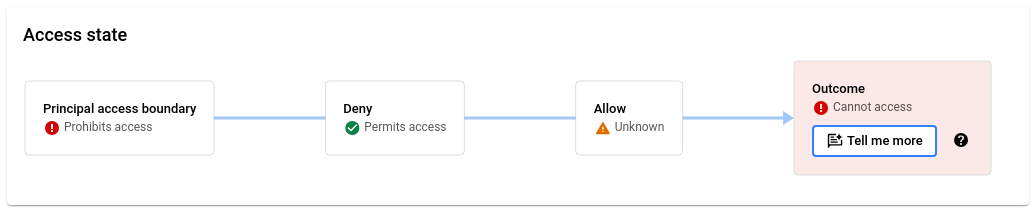

For a user to be able to use the permission to access the resource, all policy
types must permit access. For more information, see [Policy
evaluation](https://docs.cloud.google.com/iam/docs/policy-types#evaluation).
**Principal Access Boundary policy**
In the **Principal access boundary policy** section, you can view all
Principal Access Boundary policies that the principal is subject to, and the policy
bindings that bind these policies to the principal.
The **Policies** pane lists all policies that are bound to a principal set that
includes the principal. Next to each policy is an icon indicating how that
policy affects the principal's access.


Principal Access Boundary policies can affect a principal's access in the
following ways:
- **Principal is eligible to
access the resource**: The Principal Access Boundary policy applies to the principal, and one of its rules contains the queried resource.
- **Principal is ineligible to access
the resource**: The Principal Access Boundary policy applies to the principal, but the queried resource isn't in that policy's rules.
- **Not enforced**:
Principal Access Boundary policies aren't enforced in the following situations:
- IAM doesn't enforce the specified permission at the Principal Access Boundary policy's [enforcement
version](https://docs.cloud.google.com/iam/docs/principal-access-boundary-policies). As a result, the Principal Access Boundary policy can't block access.
- Due to a [condition
in the policy binding](https://docs.cloud.google.com/iam/docs/principal-access-boundary-policies#conditions), the Principal Access Boundary policy or binding doesn't apply to the principal.
- A Principal Access Boundary policy has no rules.
If a Principal Access Boundary policy isn't enforced, then it can't affect whether
the principal can access the resource.
To view the rules and bindings associated with a Principal Access Boundary policy,
click the policy name. The pane adjacent to the **Policies** pane displays the
policy's details.
To view the rules in the policy, click the **Boundary rules** tab. This tab
displays a table of the relevant Principal Access Boundary policy rules.
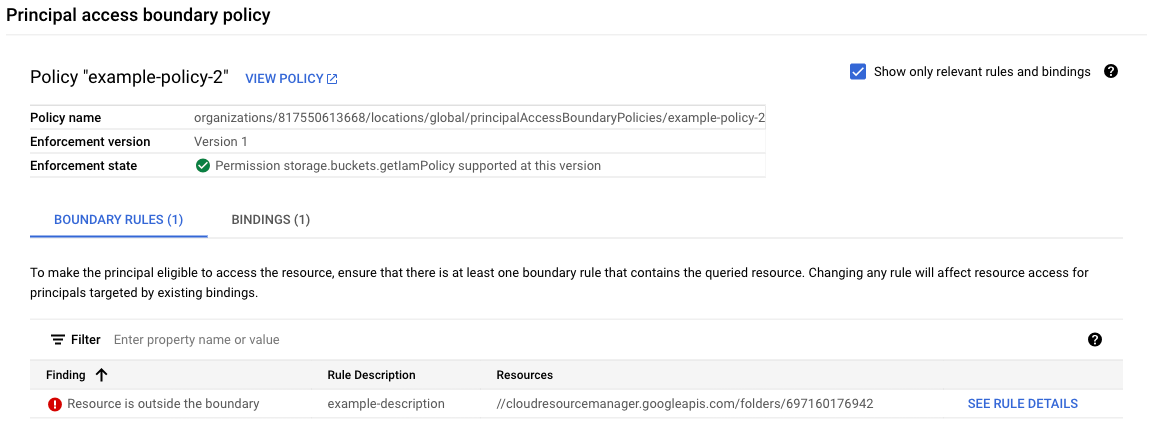

A Principal Access Boundary rule is relevant if the rule impacts the overall outcome of
the Policy Troubleshooter query. As a result, the relevant rules
vary depending on the Policy Troubleshooter results. For example,
consider the following situations:
- Policy Troubleshooter indicates that the principal can access the resource. As a result, the relevant rules are those that make the principal eligible to access the resource.
- Policy Troubleshooter indicates that the principal can't access the resource. However, according to the relevant Principal Access Boundary policies, the principal is eligible to access the resource. As a result, no rules are relevant, because the Principal Access Boundary policies aren't the reason that the principal can't access the resource.
- Policy Troubleshooter indicates that the principal can't access the resource. Additionally, according to the relevant Principal Access Boundary policies, the principal isn't eligible to access the resource. As a result, the relevant rules are those that don't make the principal eligible to access the resource.
To view all Principal Access Boundary rules in a policy, clear the **Show only relevant
rules and bindings** checkbox.
The **Findings** column in the boundary rules table indicates whether the
Principal Access Boundary rule contains the queried resource. To see more details about
the rule, click **See rule details**.
To view the policy bindings for the policy, click the **Bindings** tab. This tab
displays a table of the relevant policy bindings for the selected
Principal Access Boundary policy.
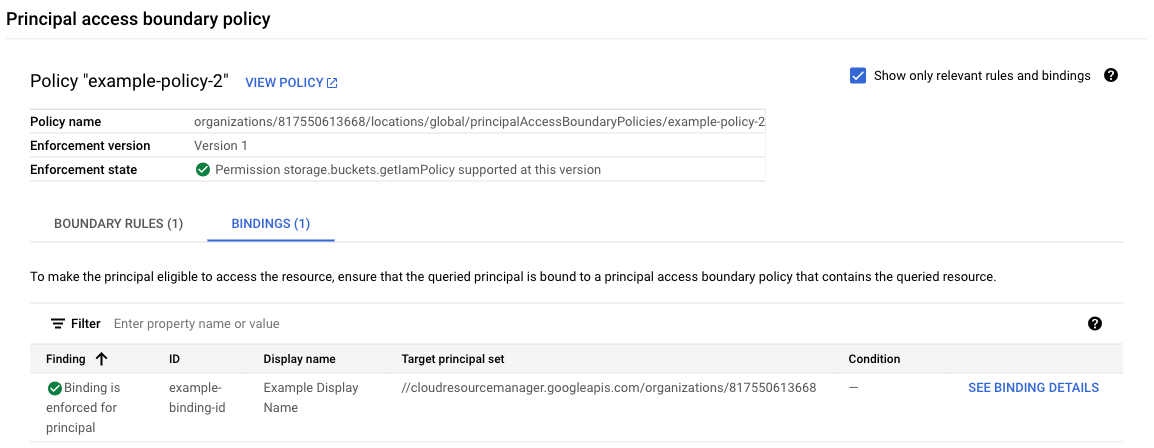

A policy binding is relevant if it effectively applies the Principal Access Boundary
policy to the queried principal. For a policy binding to apply a
Principal Access Boundary policy to a principal, the following must be true:
- The principal set in the policy binding must include the queried principal
- Any conditions in the policy binding must evaluate to `true` for the queried principal.
To view all policy bindings with principal sets that include the queried
principal, regardless of whether the queried principal meets the condition in
the binding, clear the **Show only relevant rules and bindings** checkbox.
For [Agent Identities](https://docs.cloud.google.com/iam/docs/agent-identity-overview),
Policy Troubleshooter evaluates Principal Access Boundary policies
associated with the resource hierarchy of the agent's hosting project or
container, and evaluates conditions matching the agent's identity type
(`principal.type == 'iam.googleapis.com/AgentPoolIdentity'`) and subject pattern
(`principal.subject.startsWith(...)`).
The **Findings** column in the bindings table indicates whether the binding is
enforced for the queried principal. To see more details about the policy
binding, click **See binding details**.
**Deny policy**
In the **Deny policy** section, you can view all relevant deny policies,
identify deny rules that deny access to the principal, and understand why a deny
rule denies or doesn't deny the principal the permission.
The **Resources with deny policies** pane lists all relevant deny policies,
organized by the resources they're attached to. Next to each deny policy is an
access evaluation. This evaluation only applies to that deny policy---it
doesn't reflect any access from [inherited policies](https://docs.cloud.google.com/iam/docs/policies#inheritance). If you
don't have permission to view a resource's deny policy, the resource list does
not include that resource or its deny policies.
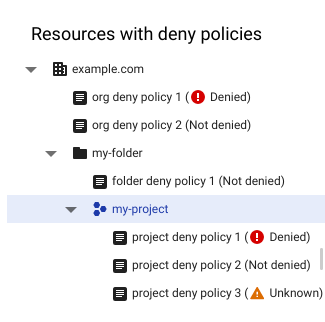

To view the relevant deny rules in these deny policies, click a deny policy. To
view all deny rules in a resource's deny policies, click a resource. The deny
rules appear in the **Deny rules** pane. This pane contains a table of all deny
rules with the queried principal or permission for the resource or deny policy
you've selected.
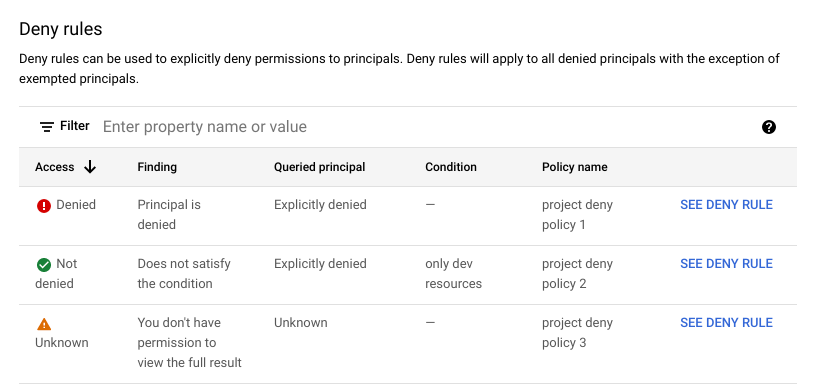

The **Access** column indicates whether the deny rule denies the principal the
permission. To see more details about the deny rule, click **See deny rule** in
that rule's row.
**Allow policy**
In the **Allow policy** section, you can navigate through all relevant allow
policies, identify role bindings that grant access to the principal, and
understand why a role binding gives or doesn't give the principal the
permission.
The **Resources** pane lists the specified resource and its ancestors. Next to
each resource is an access evaluation. This evaluation only applies to that
resource's allow policy---it doesn't reflect any access from [inherited
policies](https://docs.cloud.google.com/iam/docs/policies#inheritance). If you don't have permission to view a resource's
allow policy, the resource list does not include that resource.
To view the relevant role bindings in a resource's allow policy and see
how they do or don't give the principal the permission, click the
resource. The allow policy's role bindings appear in the **Role bindings**
pane.
The **Role bindings** pane contains a table of role bindings in the
selected resource's allow policy. By default, the table only contains role
bindings that include a role with the specified permission. If the
principal doesn't have access, the table also shows role bindings with
editable custom roles. To see all role bindings, clear the **Show only
relevant bindings** checkbox.
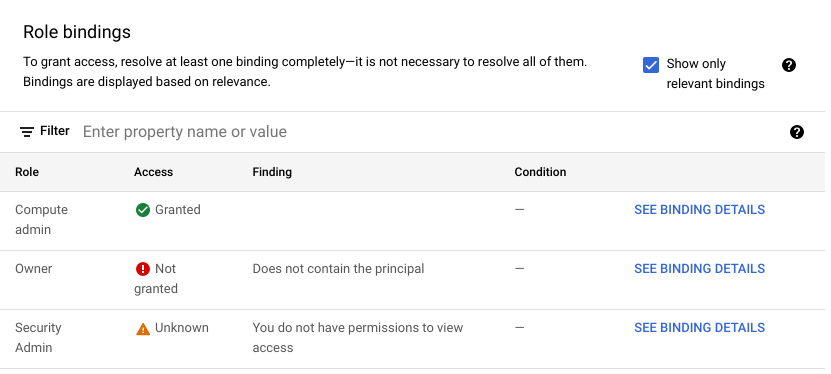

The **Access** column indicates whether the role binding gives the principal the
permission. To see more details about the role binding, click **See binding
details** in that role binding's row.
When evaluating allow policies for [agent identities](https://docs.cloud.google.com/iam/docs/agent-identity-overview),
Policy Troubleshooter checks whether the agent matches any of the
following principal identifiers:
| Principal identifier | Example |
|---|---|
| Direct agent identities | `principal://TRUST_DOMAIN/resources/SERVICE/RESOURCE_PATH` |
| Trust domain principal sets | `principalSet://TRUST_DOMAIN/*` |
| Platform principal sets | `principalSet://TRUST_DOMAIN/attribute.platform/SERVICE` |
| Resource container principal sets | `principalSet://TRUST_DOMAIN/attribute.container/projects/PROJECT_NUMBER` |
| Platform container principal sets | `principalSet://TRUST_DOMAIN/attribute.platformContainer/SERVICE/projects/PROJECT_NUMBER` |
When you troubleshoot access for a non-agent principal, such as a user or
service account, any role bindings for Agent Identities evaluate to
`Not matched`.
### gcloud
The response contains four main sections: a description of the access tuple in
the request, the results of the allow policy evaluation, the results of
the deny policy evaluation, and the overall access state.
- `accessTuple`: A description of the access tuple in the request, including any condition context that you provided. This section also contains a summary of the [tags](https://docs.cloud.google.com/resource-manager/docs/tags/tags-creating-and-managing) that apply to the resource.
-
`allowPolicyExplanation`: A summary of whether the relevant allow
policies grant the principal the permission, followed by a list of allow
policies and their role bindings.
For each allow policy, the response lists all role bindings in the policy
and evaluates them based on the following criteria:
- Whether the role binding includes the permission.
- Whether the role binding includes the principal.
- Whether the conditions in the role binding, if any, are met.
Then, the response prints the full JSON text of the allow policy.
-
`denyPolicyExplanation`: A summary of whether the relevant deny
policies deny the principal the permission, followed by a list of resources
with deny policies. For each resource, the response lists all deny policies
attached to the resource.
For each deny policy, the response prints the policy's metadata, lists the
deny rules in the policy, then evaluates each rule based on the following
criteria:
- Whether the deny rule includes the permission.
- Whether the permission is listed as an exception in the deny rule.
- Whether the deny rule includes the principal.
- Whether the principal is listed as an exception in the deny rule.
- Whether the conditions in the deny rule, if any, are met.
-
`overallAccessState`: Whether the principal is able to use the
specified permission to access the specified resource based on the relevant
allow policies, deny policies, and Principal Access Boundary policies.
Relevant Principal Access Boundary policies include all Principal Access Boundary policies
that are [bound
to](https://docs.cloud.google.com/iam/docs/principal-access-boundary-policies#binding) a principal set that includes the principal.
Relevant allow and deny policies include the following:
- The resource's allow policy
- The resource's deny policies, if any
- The allow policies of the resource's parent project, folder, and organization, if any
- The deny policies of the resource's parent project, folder, and organization, if any
The allow and deny policies of parent projects, folders, and organizations
are relevant
because of [policy inheritance](https://docs.cloud.google.com/iam/docs/policies#inheritance).
When you attach an allow or deny policy to a project, folder, or organization,
that policy also applies for all resources inside that project, folder, or
organization.
For example, if a deny policy for an organization says that a principal can't
use a specific permission, then the principal can't use that permission for any
resource within the organization. This rule applies even if the folders and
projects within that organization have more permissive deny policies, or allow
policies that give the principal the permission.
Similarly, if an allow policy for a project gives a principal a specific
permission, then the principal has that permission for any resource within the
project, provided that they aren't denied that permission.
For a user to be able to use the permission to access the resource, all
policy types must permit access. For more information, see [Policy evaluation](https://docs.cloud.google.com/iam/docs/policy-types#evaluation).
-
`pabPolicyExplanation`: A summary of whether the relevant
Principal Access Boundary policies permit the principal to access the
resource, followed by the relevant Principal Access Boundary policy bindings and
Principal Access Boundary policies.
Principal Access Boundary policies can either allow access, not allow access,
or not be enforced. Principal Access Boundary policies aren't enforced in the
following situations:
- IAM doesn't enforce the specified permission at the Principal Access Boundary policy's [enforcement
version](https://docs.cloud.google.com/iam/docs/principal-access-boundary-policies). As a result, the Principal Access Boundary policy can't block access.
- Due to a [condition
in the policy binding](https://docs.cloud.google.com/iam/docs/principal-access-boundary-policies#conditions), the Principal Access Boundary policy or binding doesn't apply to the principal.
- A Principal Access Boundary policy has no rules.
If a Principal Access Boundary policy isn't enforced, then it can't affect whether
the principal can access the resource.
The response also lists all policy bindings that include the principal, and
the details of the Principal Access Boundary policy in each of those policy
bindings:
- For each Principal Access Boundary policy binding, the response prints whether the policy binding is enforced for the principal, then prints the text of the policy binding. A policy binding is enforced if the principal set in the binding includes the queried principal, and if the condition in the policy binding evaluates to `true` for the queried principal. If the policy binding isn't enforced, then the policy can't affect whether the principal can access the resource.
-
For each Principal Access Boundary policy, the response prints the following:
- Whether the policy allows access, doesn't allow access, or isn't enforced.
- The enforcement version of the policy. This version number determines whether IAM enforces this Principal Access Boundary policy for the queried permission. If the permission isn't enforced, then the policy can't affect whether the principal can access the resource.
-
The rules in the Principal Access Boundary policy and whether each rule
allows access. For each rule, the response indicates whether the
queried resource is included in the rule.
A resource is included in a rule if one of the following is true:
- The resource is listed in the rule. Only Resource Manager resources (projects, folders, and organizations) can be directly listed in Principal Access Boundary rules.
- One of the resource's ancestors (that is, a project, folder, or organization above the resource in the [resource
hierarchy](https://docs.cloud.google.com/resource-manager/docs/cloud-platform-resource-hierarchy)) is listed in the rule.
Many objects in the response also have a `relevance` field. The value in this
field indicates how much that object contributes to the overall access state.
The `relevance` field can have the following values:
- `HEURISTIC_RELEVANCE_HIGH`: Indicates that the object has a strong impact on
the result. In other words, removing the object will likely change the overall
access state. For example, a role binding that grants the principal the
specified permission would have this relevance value.
- `HEURISTIC_RELEVANCE_NORMAL`: Indicates that the object has a limited impact
on the result. In other words, removing the object is unlikely to change the
overall access state. For example, a deny rule that doesn't contain the
permission or the principal would have this relevance value.
### REST
The response contains four main sections: the overall access state, a
description of the access tuple in the request, the results of the allow policy
evaluation, and the results of the deny policy evaluation.
-
`overallAccessState`: Whether the principal is able to use the
specified permission to access the specified resource based on the relevant
allow policies, deny policies, and Principal Access Boundary policies.
Relevant Principal Access Boundary policies include all Principal Access Boundary policies
that are [bound
to](https://docs.cloud.google.com/iam/docs/principal-access-boundary-policies#binding) a principal set that includes the principal.
Relevant allow and deny policies include the following:
- The resource's allow policy
- The resource's deny policies, if any
- The allow policies of the resource's parent project, folder, and organization, if any
- The deny policies of the resource's parent project, folder, and organization, if any
The allow and deny policies of parent projects, folders, and organizations
are relevant
because of [policy inheritance](https://docs.cloud.google.com/iam/docs/policies#inheritance).
When you attach an allow or deny policy to a project, folder, or organization,
that policy also applies for all resources inside that project, folder, or
organization.
For example, if a deny policy for an organization says that a principal can't
use a specific permission, then the principal can't use that permission for any
resource within the organization. This rule applies even if the folders and
projects within that organization have more permissive deny policies, or allow
policies that give the principal the permission.
Similarly, if an allow policy for a project gives a principal a specific
permission, then the principal has that permission for any resource within the
project, provided that they aren't denied that permission.
For a user to be able to use the permission to access the resource, all
policy types must permit access. For more information, see [Policy evaluation](https://docs.cloud.google.com/iam/docs/policy-types#evaluation).
- `accessTuple`: A description of the access tuple in the request, including any condition context that you provided. This section also contains a summary of the [tags](https://docs.cloud.google.com/resource-manager/docs/tags/tags-creating-and-managing) that apply to the resource.
-
`allowPolicyExplanation`: A summary of whether the relevant allow
policies grant the principal the permission, followed by a list of allow
policies and their role bindings.
For each allow policy, the response lists all role bindings in the policy
and evaluates them based on the following criteria:
- Whether the role binding includes the permission.
- Whether the role binding includes the principal.
- Whether the conditions in the role binding, if any, are met.
Then, the response prints the full JSON text of the allow policy.
-
`denyPolicyExplanation`: A summary of whether the relevant deny
policies deny the principal the permission, followed by a list of resources
with deny policies. For each resource, the response lists all deny policies
attached to the resource.
For each deny policy, the response prints the policy's metadata, lists the
deny rules in the policy, then evaluates each rule based on the following
criteria:
- Whether the deny rule includes the permission.
- Whether the permission is listed as an exception in the deny rule.
- Whether the deny rule includes the principal.
- Whether the principal is listed as an exception in the deny rule.
- Whether the conditions in the deny rule, if any, are met.
-
`pabPolicyExplanation`: A summary of whether the relevant
Principal Access Boundary policies permit the principal to access the
resource, followed by the relevant Principal Access Boundary policy bindings and
Principal Access Boundary policies.
Principal Access Boundary policies can either allow access, not allow access,
or not be enforced. Principal Access Boundary policies aren't enforced in the
following situations:
- IAM doesn't enforce the specified permission at the Principal Access Boundary policy's [enforcement
version](https://docs.cloud.google.com/iam/docs/principal-access-boundary-policies). As a result, the Principal Access Boundary policy can't block access.
- Due to a [condition
in the policy binding](https://docs.cloud.google.com/iam/docs/principal-access-boundary-policies#conditions), the Principal Access Boundary policy or binding doesn't apply to the principal.
- A Principal Access Boundary policy has no rules.
If a Principal Access Boundary policy isn't enforced, then it can't affect whether
the principal can access the resource.
The response also lists all policy bindings that include the principal, and
the details of the Principal Access Boundary policy in each of those policy
bindings:
- For each Principal Access Boundary policy binding, the response prints whether the policy binding is enforced for the principal, then prints the text of the policy binding. A policy binding is enforced if the principal set in the binding includes the queried principal, and if the condition in the policy binding evaluates to `true` for the queried principal. If the policy binding isn't enforced, then the policy can't affect whether the principal can access the resource.
-
For each Principal Access Boundary policy, the response prints the following:
- Whether the policy allows access, doesn't allow access, or isn't enforced.
- The enforcement version of the policy. This version number determines whether IAM enforces this Principal Access Boundary policy for the queried permission. If the permission isn't enforced, then the policy can't affect whether the principal can access the resource.
-
The rules in the Principal Access Boundary policy and whether each rule
allows access. For each rule, the response indicates whether the
queried resource is included in the rule.
A resource is included in a rule if one of the following is true:
- The resource is listed in the rule. Only Resource Manager resources (projects, folders, and organizations) can be directly listed in Principal Access Boundary rules.
- One of the resource's ancestors (that is, a project, folder, or organization above the resource in the [resource
hierarchy](https://docs.cloud.google.com/resource-manager/docs/cloud-platform-resource-hierarchy)) is listed in the rule.
Many objects in the response also have a `relevance` field. The value in this
field indicates how much that object contributes to the overall access state.
The `relevance` field can have the following values:
- `HEURISTIC_RELEVANCE_HIGH`: Indicates that the object has a strong impact on
the result. In other words, removing the object will likely change the overall
access state. For example, a role binding that grants the principal the
specified permission would have this relevance value.
- `HEURISTIC_RELEVANCE_NORMAL`: Indicates that the object has a limited impact
on the result. In other words, removing the object is unlikely to change the
overall access state. For example, a deny rule that doesn't contain the
permission or the principal would have this relevance value.
## Troubleshooting conditional role bindings
> [!WARNING]
>
> **Preview
> --- troubleshooting conditional role bindings**
>
>
> This feature is
>
> subject to the "Pre-GA Offerings Terms" in the General Service Terms section of the
> [Service Specific
> Terms](https://docs.cloud.google.com/terms/service-terms#1).
>
> Pre-GA features are available "as is" and might have limited support.
>
> For more information, see the
> [launch stage descriptions](https://cloud.google.com/products/#product-launch-stages).
Policy Troubleshooter automatically troubleshoots conditional
role bindings and deny rules based on [tags](https://docs.cloud.google.com/iam/docs/conditions-attribute-reference#resource-tags). It also
automatically troubleshoots Principal Access Boundary policy bindings with conditions
based on [principals](https://docs.cloud.google.com/iam/docs/conditions-attribute-reference#principals).
To troubleshoot other kinds of [conditional role bindings](https://docs.cloud.google.com/iam/docs/conditions-overview) or
conditional deny rules, Policy Troubleshooter needs additional
context about the request. For example, to troubleshoot conditions based on
date/time attributes, Policy Troubleshooter needs the time of the
request.
> [!WARNING]
> **Warning:** Policy Troubleshooter doesn't fetch tags for regional resources, such as [Google Kubernetes Engine regional clusters](https://docs.cloud.google.com/kubernetes-engine/docs/concepts/regional-clusters). As a result, if you have IAM policies with tag-based conditions and you try to use Policy Troubleshooter to troubleshoot access to regionalized resources, you might get inaccurate results.
In the gcloud CLI and REST API, you provide this additional context
manually.
In the Google Cloud console, you can provide this additional context by
troubleshooting directly from any [Admin Activity audit log](https://docs.cloud.google.com/logging/docs/audit#admin-activity) or
[Data Access audit log](https://docs.cloud.google.com/logging/docs/audit#data-access). Each audit log entry corresponds to a
request to a
Google Cloud API, or an action that Google Cloud takes on your
behalf. When you troubleshoot from an audit log,
Policy Troubleshooter automatically gets additional information
about the request, such as its date and time, which allows
Policy Troubleshooter to analyze conditional role bindings and
deny rules.
> [!NOTE]
> **Note:** Data Access audit logs are disabled by default. To learn how to enable them, see [Configuring data access audit logs](https://docs.cloud.google.com/logging/docs/audit/configure-data-access).
### Console
To troubleshoot conditional role bindings and deny rules, do the following:
1. In the Google Cloud console, go to the **Logs Explorer** page.
[Go to the Logs Explorer](https://console.cloud.google.com/logs)
2. If the page title is **Legacy Logs Viewer** , click the **Upgrade** drop-down
list and select **Upgrade to the new Logs Explorer**.
3. To view only Admin Activity and Data Access audit logs, enter the following
query in the query builder, then click **Run query**:
```
logName=("RESOURCE_TYPE/RESOURCE_ID/logs/cloudaudit.googleapis.com%2Factivity" OR "RESOURCE_TYPE/RESOURCE_ID/logs/cloudaudit.googleapis.com%2Fdata_access")
```
Replace the following values:
- `RESOURCE_TYPE`: The resource type that you are listing audit logs for. Use `projects`, `folders`, or `organizations`.
- `RESOURCE_ID`: The ID of your resource.
4. Locate the audit log entry that corresponds to the request that you want to
troubleshoot. To learn how to use the Logs Explorer to find specific log
entries, see [Using the Logs Explorer](https://docs.cloud.google.com/logging/docs/view/logs-explorer-interface).
> [!NOTE]
> **Note:** In some cases, a single request might produce more than one log entry. Review the entries carefully to determine which entry to troubleshoot.
5. In the **Summary** column of the log entry, click **IAM** , then click
**Troubleshoot access issue**.
Policy Troubleshooter uses the information in the log entry
to troubleshoot access, then shows you the results. The additional context
is listed in the evaluation details under **Condition context** . To view the
context details, click **View condition context** . To learn more about the
Policy Troubleshooter results page, see [Understand
Troubleshooter results](https://docs.cloud.google.com/policy-intelligence/docs/troubleshoot-access#understand-results) on this page.
> [!NOTE]
> **Note:** The additional context does not include group membership status. When troubleshooting group membership, Policy Troubleshooter always uses the group membership status at the time of troubleshooting.
6. Optional: To troubleshoot another request that involves conditional role
bindings and deny rules, return to the Logs Explorer page and repeat the
previous steps.
### gcloud
To troubleshoot conditional role bindings and deny rules, use the
`https://docs.cloud.google.com/sdk/gcloud/reference/policy-troubleshoot/iam`
command.
Before using any of the command data below,
make the following replacements:
- `EMAIL`: The email address of the principal whose permissions you want to troubleshoot. For an [Agent Identity](https://docs.cloud.google.com/iam/docs/agent-identity-overview), you must instead provide the principal identifier.
- `RESOURCE`: The resource on which the permission is granted.
- `PERMISSION`: The permission that you want to troubleshoot.
- `DESTINATION_IP`: Optional. The request destination IP address to use when checking conditional role bindings. For example, `198.1.1.1`.
- `DESTINATION_PORT`: Optional. The request destination port to use when checking conditional role bindings. For example, \`8080\`.
- `REQUEST_TIME`: Optional. The request timestamp to use when checking conditional role bindings. Use a timestamp in [RFC
3339](https://www.ietf.org/rfc/rfc3339.txt)format---for example, `2099-02-01T00:00:00Z`.
- `RESOURCE_NAME`: Optional. The resource name value to use when checking conditional role bindings. For a list of accepted resource name formats, see [Resource name
format](https://docs.cloud.google.com/iam/docs/conditions-resource-attributes#resource-name).
- `RESOURCE_SERVICE`: Optional. The resource service value to use when checking conditional role bindings. For a list of accepted service names, see [Resource
service values](https://docs.cloud.google.com/iam/docs/conditions-resource-attributes#resource-service).
- `RESOURCE_TYPE`: Optional. For a list of accepted resource types, see [Resource type
values](https://docs.cloud.google.com/iam/docs/conditions-resource-attributes#resource-type).
Execute the
[gcloud policy-troubleshoot iam](https://docs.cloud.google.com/sdk/gcloud/reference/policy-troubleshoot/iam)
command:
#### Linux, macOS, or Cloud Shell
> [!NOTE]
> **Note:** Ensure you have initialized the Google Cloud CLI with authentication and a project by running either [gcloud init](https://docs.cloud.google.com/sdk/gcloud/reference/init); or [gcloud auth login](https://docs.cloud.google.com/sdk/gcloud/reference/auth/login) and [gcloud config set project](https://docs.cloud.google.com/sdk/gcloud/reference/config/set).
```bash
gcloud policy-intelligence troubleshoot-policy iam RESOURCE --principal-email=EMAIL \
--permission=PERMISSION --destination-ip=DESTINATION_IP \
--destination-port=DESTINATION_PORT --request-time=REQUEST_TIME \
--resource-name=RESOURCE_NAME --resource-service=RESOURCE_SERVICE \
--resource-type=RESOURCE_TYPE
```
#### Windows (PowerShell)
> [!NOTE]
> **Note:** Ensure you have initialized the Google Cloud CLI with authentication and a project by running either [gcloud init](https://docs.cloud.google.com/sdk/gcloud/reference/init); or [gcloud auth login](https://docs.cloud.google.com/sdk/gcloud/reference/auth/login) and [gcloud config set project](https://docs.cloud.google.com/sdk/gcloud/reference/config/set).
```bash
gcloud policy-intelligence troubleshoot-policy iam RESOURCE --principal-email=EMAIL `
--permission=PERMISSION --destination-ip=DESTINATION_IP `
--destination-port=DESTINATION_PORT --request-time=REQUEST_TIME `
--resource-name=RESOURCE_NAME --resource-service=RESOURCE_SERVICE `
--resource-type=RESOURCE_TYPE
```
#### Windows (cmd.exe)
> [!NOTE]
> **Note:** Ensure you have initialized the Google Cloud CLI with authentication and a project by running either [gcloud init](https://docs.cloud.google.com/sdk/gcloud/reference/init); or [gcloud auth login](https://docs.cloud.google.com/sdk/gcloud/reference/auth/login) and [gcloud config set project](https://docs.cloud.google.com/sdk/gcloud/reference/config/set).
```bash
gcloud policy-intelligence troubleshoot-policy iam RESOURCE --principal-email=EMAIL ^
--permission=PERMISSION --destination-ip=DESTINATION_IP ^
--destination-port=DESTINATION_PORT --request-time=REQUEST_TIME ^
--resource-name=RESOURCE_NAME --resource-service=RESOURCE_SERVICE ^
--resource-type=RESOURCE_TYPE
```
The response contains an explanation of the principal's access. For each role
binding and deny rule with a condition, the response includes a
`conditionExplanation` field describing whether the condition
evaluates to true or false based on the condition context that you provided.
For example, the following is an evaluation of a role binding with a condition specifying the
resource type and resource service:
#### Response
```
...
{
"allowAccessState": "ALLOW_ACCESS_STATE_GRANTED",
"combinedMembership": {
"membership": "MEMBERSHIP_MATCHED",
"relevance": "HEURISTIC_RELEVANCE_HIGH"
},
"condition": {
"expression": " resource.type \u003d\u003d \"compute.googleapis.com/Instance\" \u0026\u0026 resource.service \u003d\u003d \"compute.googleapis.com\"",
"title": "Compute instances only",
"description": "Condition that limits permissions to only Compute instances"
},
"conditionExplanation": {
"evaluationStates": [{
"end": 51,
"start": 1,
"value": true
}, {
"end": 99,
"start": 55,
"value": true
}],
"value": true,
},
"memberships": {
"user:my-user@example.com": {
"membership": "MEMBERSHIP_MATCHED",
"relevance": "HEURISTIC_RELEVANCE_HIGH"
}
},
"relevance": "HEURISTIC_RELEVANCE_HIGH",
"role": "roles/compute.viewer",
"rolePermission": "ROLE_PERMISSION_INCLUDED",
"rolePermissionRelevance": "HEURISTIC_RELEVANCE_HIGH"
}
...
```
> [!NOTE]
> **Note:** The Policy Troubleshooter API calls the private method `GetEffectivePolicy` internally. If `ADMIN_READ` Data Access logs are enabled for IAM, you will see this call in your audit logs. For more information, see [IAM audit logging](https://docs.cloud.google.com/iam/docs/audit-logging).
### REST
To troubleshoot conditional role bindings and deny rules, use the Policy Troubleshooter API's
`https://docs.cloud.google.com/policy-intelligence/docs/reference/policytroubleshooter/rest/v3/iam/troubleshoot`
method.
Before using any of the request data,
make the following replacements:
- `EMAIL`: The email address of the principal whose permissions you want to troubleshoot. For an [Agent Identity](https://docs.cloud.google.com/iam/docs/agent-identity-overview), you must instead provide the principal identifier.
- `RESOURCE`: The resource on which the permission is granted.
- `PERMISSION`: The permission that you want to troubleshoot.
- `DESTINATION_IP`: Optional. The request destination IP address to use when checking conditional role bindings. For example, `198.1.1.1`.
- `DESTINATION_PORT`: Optional. The request destination port to use when checking conditional role bindings. For example, \`8080\`.
- `REQUEST_TIME`: Optional. The request timestamp to use when checking conditional role bindings. Use a timestamp in [RFC
3339](https://www.ietf.org/rfc/rfc3339.txt)format---for example, `2099-02-01T00:00:00Z`.
- `RESOURCE_NAME`: Optional. The resource name value to use when checking conditional role bindings. For a list of accepted resource name formats, see [Resource name
format](https://docs.cloud.google.com/iam/docs/conditions-resource-attributes#resource-name).
- `RESOURCE_SERVICE`: Optional. The resource service value to use when checking conditional role bindings. For a list of accepted service names, see [Resource
service values](https://docs.cloud.google.com/iam/docs/conditions-resource-attributes#resource-service).
- `RESOURCE_TYPE`: Optional. For a list of accepted resource types, see [Resource type
values](https://docs.cloud.google.com/iam/docs/conditions-resource-attributes#resource-type).
HTTP method and URL:
```
POST https://policytroubleshooter.googleapis.com/v3/iam:troubleshoot
```
Request JSON body:
```
{
"accessTuple": {
"principal": "EMAIL",
"fullResourceName": "RESOURCE",
"permission": "PERMISSION",
"conditionContext": {
"destination": {
"ip": DESTINATION_IP,
"port": DESTINATION_PORT
},
"request": {
"receiveTime": REQUEST_TIME
},
"resource": {
"name": RESOURCE_NAME,
"service": RESOURCE_SERVICE,
"type": RESOURCE_TYPE
}
}
}
}
```
To send your request, expand one of these options:
#### curl (Linux, macOS, or Cloud Shell)
> [!NOTE]
> **Note:** The following command assumes that you have logged in to the `gcloud` CLI with your user account by running [`gcloud init`](https://docs.cloud.google.com/sdk/gcloud/reference/init) or [`gcloud auth login`](https://docs.cloud.google.com/sdk/gcloud/reference/auth/login) , or by using [Cloud Shell](https://docs.cloud.google.com/shell/docs), which automatically logs you into the `gcloud` CLI . You can check the currently active account by running [`gcloud auth list`](https://docs.cloud.google.com/sdk/gcloud/reference/auth/list).
Save the request body in a file named `request.json`,
and execute the following command:
```
curl -X POST \
-H "Authorization: Bearer $(gcloud auth print-access-token)" \
-H "x-goog-user-project: PROJECT_ID" \
-H "Content-Type: application/json; charset=utf-8" \
-d @request.json \
"https://policytroubleshooter.googleapis.com/v3/iam:troubleshoot"
```
#### PowerShell (Windows)
> [!NOTE]
> **Note:** The following command assumes that you have logged in to the `gcloud` CLI with your user account by running [`gcloud init`](https://docs.cloud.google.com/sdk/gcloud/reference/init) or [`gcloud auth login`](https://docs.cloud.google.com/sdk/gcloud/reference/auth/login) . You can check the currently active account by running [`gcloud auth list`](https://docs.cloud.google.com/sdk/gcloud/reference/auth/list).
Save the request body in a file named `request.json`,
and execute the following command:
```
$cred = gcloud auth print-access-token
$headers = @{ "Authorization" = "Bearer $cred"; "x-goog-user-project" = "PROJECT_ID" }
Invoke-WebRequest `
-Method POST `
-Headers $headers `
-ContentType: "application/json; charset=utf-8" `
-InFile request.json `
-Uri "https://policytroubleshooter.googleapis.com/v3/iam:troubleshoot" | Select-Object -Expand Content
```
#### APIs Explorer (browser)
Copy the request body and open the
[method reference page](https://docs.cloud.google.com/policy-intelligence/docs/reference/policytroubleshooter/rest/v3/iam/troubleshoot).
The APIs Explorer panel opens on the right side of the page.
You can interact with this tool to send requests.
Paste the request body in this tool, complete any other required fields, and click **Execute**.
The response contains an explanation of the principal's access. For each role
binding and deny rule with a condition, the response includes a
`conditionExplanation` field describing whether the condition
evaluates to true or false based on the condition context that you provided.
For example, the following is an evaluation of a role binding with a condition specifying the
resource type and resource service:
```
...
{
"allowAccessState": "ALLOW_ACCESS_STATE_GRANTED",
"role": "roles/compute.viewer",
"rolePermission": "ROLE_PERMISSION_INCLUDED",
"rolePermissionRelevance": "HEURISTIC_RELEVANCE_HIGH",
"combinedMembership": {
"membership": "MEMBERSHIP_MATCHED",
"relevance": "HEURISTIC_RELEVANCE_HIGH"
},
"memberships": {
"user:my-user@example.com": {
"membership": "MEMBERSHIP_MATCHED",
"relevance": "HEURISTIC_RELEVANCE_HIGH"
}
},
"relevance": "HEURISTIC_RELEVANCE_HIGH",
"condition": {
"expression": " resource.type \u003d\u003d \"compute.googleapis.com/Instance\" \u0026\u0026 resource.service \u003d\u003d \"compute.googleapis.com\"",
"title": "Compute instances only",
"description": "Condition that limits permissions to only Compute instances"
},
"conditionExplanation": {
"value": true,
"evaluationStates": [{
"start": 1,
"end": 51,
"value": true
}, {
"start": 55,
"end": 99,
"value": true
}]
}
}
...
```
> [!NOTE]
> **Note:** The Policy Troubleshooter API calls the private method `GetEffectivePolicy` internally. If `ADMIN_READ` Data Access logs are enabled for IAM, you will see this call in your audit logs. For more information, see [IAM audit logging](https://docs.cloud.google.com/iam/docs/audit-logging).
## What's next
- Use the [permissions reference](https://docs.cloud.google.com/iam/docs/permissions-reference) or the [predefined roles reference](https://docs.cloud.google.com/iam/docs/roles-permissions) to determine which role to grant to a user who is missing permissions.
- Read about the other [Policy Intelligence
tools](https://docs.cloud.google.com/policy-intelligence/docs/overview), which help you understand and manage your policies to proactively improve your security configuration.