


בדף הזה מוסבר איך לנתח את ההגדרות של מדיניות הארגון כדי לראות אילו משאבים מכוסים על ידי איזו מדיניות ארגונית. באמצעות כלי הניתוח למדיניות עבור מדיניות הארגון, אפשר ליצור שאילתת ניתוח כדי לקבל מידע על מדיניות ארגונית בהתאמה אישית ועל מדיניות ארגונית מוגדרת מראש.
שאילתת ניתוח מורכבת מהיקף ומאילוץ.
- Constraint: מציין את שם המשאב של אילוץ.
היקף: מציין ארגון להגדרת היקף הניתוח. כל כללי המדיניות של הארגון עם האילוץ שצוין שמוגדרים בהיקף הזה נכללים בניתוח.
מידע נוסף על מדיניות הארגון זמין במאמר מבוא לשירות מדיניות הארגון.
מידע נוסף על יצירת הגבלות בהתאמה אישית זמין במאמר יצירה וניהול של הגבלות בהתאמה אישית.
מידע נוסף על אילוצים מנוהלים זמין במאמר בנושא שימוש באילוצים.
לפני שמתחילים
מפעילים את Cloud Asset API.
תפקידים שנדרשים להפעלת ממשקי API
כדי להפעיל ממשקי API, נדרשת ההרשאה
serviceusage.services.enable. אם יצרתם את הפרויקט, סביר להניח שכבר יש לכם את ההרשאה הזו דרך התפקיד 'בעלים' (roles/owner). אחרת, תוכלו לקבל את ההרשאה הזו דרך התפקיד 'אדמין בממשק 'שימוש בשירות'' (roles/serviceusage.serviceUsageAdmin). איך מקצים תפקידיםצריך להפעיל את ה-API בפרויקט שבו ישמש לשליחת השאילתה. המשאב הזה לא חייב להיות זהה למשאב שאליו מצומצמת השאילתה.
אופציונלי: אם רוצים להריץ יותר מ-20 שאילתות ניתוח מדיניות לכל ארגון ביום, צריך לוודא שיש לכם הפעלה ברמת הארגון של רמת Premium או Enterprise של Security Command Center. מידע נוסף זמין במאמר שאלות בנושא חיוב.
התפקידים וההרשאות הנדרשים
כדי לקבל את ההרשאות שדרושות בשביל להריץ ניתוח של מדיניות הארגון, אתם צריכים לבקש מהאדמין לתת לכם את תפקידי ה-IAM הבאים במשאב הארגון שבו אתם רוצים לבצע את הניתוח:
-
כדי לבצע את הניתוח:
Cloud Asset Viewer (
roles/cloudasset.viewer) -
כדי לראות את האילוצים:
צפייה במדיניות הארגון (
roles/orgpolicy.policyViewer)
להסבר על מתן תפקידים, ראו איך מנהלים את הגישה ברמת הפרויקט, התיקייה והארגון.
התפקידים המוגדרים מראש האלה מכילים את ההרשאות שנדרשות להרצת ניתוח של מדיניות הארגון. כדי לראות בדיוק אילו הרשאות נדרשות, אפשר להרחיב את הקטע ההרשאות הנדרשות:
ההרשאות הנדרשות
כדי להריץ ניתוח של מדיניות הארגון, נדרשות ההרשאות הבאות:
-
כדי לבצע את הניתוח:
-
cloudasset.assets.analyzeOrgPolicy -
cloudasset.assets.searchAllResources -
cloudasset.assets.searchAllIamPolicies
-
-
כדי לראות אילוצים מותאמים אישית ומנוהלים:
orgpolicy.customConstraints.get
יכול להיות שתקבלו את ההרשאות האלה באמצעות תפקידים בהתאמה אישית או תפקידים מוגדרים מראש אחרים.
תמחור ומכסות
כלי הניתוח למדיניות לניתוח מדיניות ארגונית בהיקף נרחב (מעל 20 שאילתות לארגון ביום) והדמיות של ירושה זמינים רק ללקוחות עם הפעלות ברמת הארגון של Security Command Center.
המיכסה של כלי הניתוח למדיניות של Organization Policy משותפת לכל כלי הניתוח למדיניות. מידע נוסף זמין במאמר שאלות בנושא חיוב.
ניתוח של כללי מדיניות מוגדרים
מדיניות ארגונית מורכבת מאילוץ ומאופציונליות של תנאים שבהם האילוץ נאכף. אתם יכולים להשתמש בכלי לניתוח מדיניות כדי לקבל רשימה של כללי מדיניות הארגון עם אילוץ מסוים, ושל המשאבים שכללי המדיניות האלה מצורפים אליהם.
לכל מדיניות ארגונית שמזוהה בהיקף של השאילתה, כלי ניתוח המדיניות מחזיר רשומה של תוצאה. רשומת תוצאה מכילה את השדות הבאים:
consolidatedPolicy: המשאב שאליו מצורפת מדיניות הארגון, והאכיפה בפועל של המדיניות על המשאב הזה בהתאם לכללי ההערכה של ההיררכיה.
project: המזהה של משאב הפרויקט שאליו שייכת המדיניות המאוחדת הזו.
folders: המזהה של משאבי תיקיות שהם ישויות אב של המשאב שאליו מצורפת מדיניות הארגון.
organization: המזהה של משאב הארגון שהוא ישות האם של המשאב שאליו מצורפת מדיניות הארגון.
policyBundle: מדיניות הארגון המלאה שהוגדרה ומצורפת למשאב שלמעלה, וכללי מדיניות הארגון שהוגדרו ברכיבי האב שלו בהיררכיית המשאבים.
אם המשאבים שלכם מוגנים על ידי גבולות גזרה לשירות של VPC Service Controls, אתם צריכים ליצור כלל תעבורת נתונים יוצאת (egress) בגבולות הגזרה של משאב הארגון, שיאפשר גישה לשירות cloudasset.googleapis.com. מכיוון שלא ניתן להגדיר הגבלות ברמת ה-method ב-Cloud Asset API, צריך לאפשר את כל ה-methods של Cloud Asset API על ידי ציון method: * בכלל היציאה. אם אין לכם כלל יציאה, הבקשה תיכשל ותוצג השגיאה NETWORK_NOT_IN_SAME_SERVICE_PERIMETER. מידע נוסף זמין במאמר ניפוי באגים בבקשות שנחסמו על ידי VPC Service Controls.
המסוף
נכנסים לדף כלי הניתוח למדיניות במסוף Google Cloud .
בקטע Analyze organization policy, מוצאים את החלונית Where are specific organization policies configured? ולוחצים על Create query בחלונית הזו.
בתיבה בחירת ארגון לשאילתה, בוחרים את הארגון שרוצים לנתח את המדיניות שלו.
בוחרים את סוג האילוץ שרוצים לנתח. כדי להגדיר אילוץ מוגדר מראש או מנוהל, בוחרים באפשרות אילוץ מובנה. כדי להגדיר אילוץ מותאם אישית, בוחרים באפשרות אילוץ מותאם אישית.
מזינים את השם של האילוץ שרוצים לנתח. הקידומת של סוג האילוץ שאתם מנתחים כבר כלולה. לדוגמה, כדי להגדיר את האילוץ המוגדר מראש של הגבלת הדומיין, מזינים
iam.allowedPolicyMemberDomains. כדי להגדיר את האילוץ המנוהל של יצירת חשבון שירות, מזיניםiam.managed.disableServiceAccountKeyCreation. כדי להגדיר אילוץ מותאם אישית, מזינים את השם שלו, כמוdisableGkeAutoUpgrade.לוחצים על Analyze (ניתוח) ואז על Run query (הפעלת שאילתה). בדף הדוח מוצגים פרמטרי השאילתה שהזנתם, וטבלת תוצאות של כל המשאבים שההגבלה הזו חלה עליהם באופן ישיר.
כדי לשמור את השאילתה הזו ולצפות בה שוב מאוחר יותר, לוחצים על העתקת כתובת ה-URL של השאילתה. כדי לראות את השאילתה הזו, צריך לעבור לכתובת ה-URL שנוצרה.
כדי לראות את ההורשה של האילוץ שניתחתם, בוחרים לפחות משאב אחד מהרשימה ואז לוחצים על View inheritance (הצגת ההורשה). אפשר גם לעבור מיד לתצוגה החזותית כשיוצרים את שאילתת הניתוח. לשם כך לוחצים על ניתוח ואז על תצוגה חזותית. מידע נוסף זמין במאמר הצגה חזותית של הרשאות ירושה.
gcloud
כדי לקבל ניתוח של אופן האכיפה של אילוץ מדיניות הארגון בארגון, משתמשים בפקודה gcloud asset analyze-org-policies:
gcloud asset analyze-org-policies \
    --constraint=CONSTRAINT_NAME  \
    --scope=organizations/ORGANIZATION_ID \
    --limit=LIMIT_POLICIES \
    --filter=FILTER_QUERY
מחליפים את מה שכתוב בשדות הבאים:
CONSTRAINT_NAME: השם של האילוץ של מדיניות הארגון שרוצים לנתח. רשימת האילוצים זמינה במאמר בנושא אילוצים של מדיניות הארגון.
ORGANIZATION_ID: המזהה של משאב הארגון. מידע נוסף על איתור מזהה הארגון זמין במאמר יצירה וניהול של ארגונים.
LIMIT_POLICIES: מספר רשומות התוצאות שרוצים להציג. כדי לראות את כל הערכים, מזינים
unlimited.FILTER_QUERY: שאילתת סינון כדי לראות רק מדיניות שתואמת לביטוי הסינון. השדה היחיד שזמין לסינון הוא
consolidated_policy.attached_resource. לדוגמה, consolidated_policy.attached_resource="//cloudresourcemanager.googleapis.com/projects/1234567890"יחזיר רק את כללי המדיניות שצורפו לפרויקט עם מזהה הפרויקט1234567890.
תגובת ה-YAML תיראה כך:
דוגמה לתגובת YAML
---
consolidatedPolicy:
  appliedResource: //cloudresourcemanager.googleapis.com/projects/opa-test-project-1-364621
  attachedResource: //cloudresourcemanager.googleapis.com/projects/opa-test-project-1-364621
  rules:
  - enforce: true
policyBundle:
- appliedResource: //cloudresourcemanager.googleapis.com/projects/opa-test-project-1-364621
  attachedResource: //cloudresourcemanager.googleapis.com/projects/opa-test-project-1-364621
  reset: true
- appliedResource: //cloudresourcemanager.googleapis.com/organizations/474566717491
  rules:
  - enforce: true
---
consolidatedPolicy:
  appliedResource: //cloudresourcemanager.googleapis.com/organizations/474566717491
  rules:
  - enforce: true
policyBundle:
- appliedResource: //cloudresourcemanager.googleapis.com/organizations/474566717491
  rules:
  - enforce: true
REST
כדי לקבל ניתוח של האופן שבו אילוץ במדיניות הארגון נאכף בארגון, משתמשים ב-method analyzeOrgPolicies של Cloud Asset API.
ה-method של ה-HTTP וכתובת ה-URL:
GET https://cloudasset.googleapis.com/v1/organizations/ORGANIZATION_ID:analyzeOrgPolicies
תוכן בקשת JSON:
JSON_REQUEST="{
  'constraint': 'CONSTRAINT_NAME',
  'filter': 'FILTER_QUERY',
  'page_size': PAGE_SIZE,
  'page_token': PAGE_TOKEN
}"
מחליפים את מה שכתוב בשדות הבאים:
ORGANIZATION_ID: המזהה של משאב הארגון. מידע נוסף על איתור מזהה הארגון זמין במאמר יצירה וניהול של ארגונים.
CONSTRAINT_NAME: השם של האילוץ של מדיניות הארגון שרוצים לנתח. רשימת האילוצים זמינה במאמר בנושא אילוצים של מדיניות הארגון.
FILTER_QUERY: שאילתת סינון כדי לראות רק מדיניות שתואמת לביטוי הסינון. השדה היחיד שזמין לסינון הוא
consolidated_policy.attached_resource. לדוגמה, consolidated_policy.attached_resource="//cloudresourcemanager.googleapis.com/projects/1234567890"יחזיר רק מדיניות שצורפה לפרויקט עם מזהה הפרויקט1234567890.PAGE_SIZE: מספר רשומות התוצאות שרוצים לראות בכל דף. כדי לראות את כל הערכים, מזינים
unlimited. אם שולחים בקשה עם הדגל הזה, הפונקציה מחזירה את הערךnextPageTokenאם המספר הכולל של רשומות התוצאות גדול מ-PAGE_SIZE.PAGE_TOKEN: אפשר להגדיר אותו רק בבקשות אחרי הבקשה הראשונה שכוללת את הדגל
page_size. אפשר להשתמש בערכיםnextPageTokenשמתקבלים מהתגובות הקודמות כדי להחזיר דף מסוים של תוצאות.
תגובת ה-JSON תהיה דומה לזו:
דוגמה לתגובת JSON
{
  "orgPolicyResults": [
    {
      "consolidatedPolicy": {
        "attachedResource": "//cloudresourcemanager.googleapis.com/folders/123456789012",
        "rules": [
          {
            "values": {
              "allowedValues": [
                "C0265whk2"
              ]
            }
          },
          {
            "values": {
              "allowedValues": [
                "C03kd36xr"
              ]
            }
          }
        ],
        "appliedResource": "//cloudresourcemanager.googleapis.com/folders/123456789012"
      },
      "policyBundle": [
        {
          "attachedResource": "//cloudresourcemanager.googleapis.com/folders/123456789012",
          "rules": [
            {
              "values": {
                "allowedValues": [
                  "C03kd36xr"
                ]
              }
            }
          ],
          "inheritFromParent": true,
          "appliedResource": "//cloudresourcemanager.googleapis.com/folders/123456789012"
        },
        {
          "attachedResource": "//cloudresourcemanager.googleapis.com/folders/234567890123",
          "rules": [
            {
              "values": {
                "allowedValues": [
                  "C0265whk2"
                ]
              }
            }
          ],
          "appliedResource": "//cloudresourcemanager.googleapis.com/folders/234567890123"
        }
      ]
    },
    {
      "consolidatedPolicy": {
        "attachedResource": "//cloudresourcemanager.googleapis.com/folders/234567890123",
        "rules": [
          {
            "values": {
              "allowedValues": [
                "C0265whk2"
              ]
            }
          }
        ],
        "appliedResource": "//cloudresourcemanager.googleapis.com/folders/234567890123"
      },
      "policyBundle": [
        {
          "attachedResource": "//cloudresourcemanager.googleapis.com/folders/234567890123",
          "rules": [
            {
              "values": {
                "allowedValues": [
                  "C0265whk2"
                ]
              }
            }
          ],
          "appliedResource": "//cloudresourcemanager.googleapis.com/folders/234567890123"
        }
      ]
    }
  ]
  "constraint": {
    "googleDefinedConstraint": {
      "name": "constraints/iam.allowedPolicyMemberDomains",
      "displayName": "Domain restricted sharing",
      "description": "This list constraint defines one or more Cloud Identity or Google Workspace customer IDs whose principals can be added to IAM policies. \u003cbr\u003eBy default, all user identities are allowed to be added to IAM policies. Only allowed values can be defined in this constraint, denied values are not supported. \u003cbr\u003eIf this constraint is active, only principals that belong to the allowed customer IDs can be added to IAM policies.",
      "constraintDefault": "ALLOW",
      "listConstraint": {}
    }
  }
}
ניתוח קונטיינרים
מאגר בהקשר הזה הוא משאב של פרויקט, תיקייה או ארגון. אפשר להשתמש בכלי הניתוח למדיניות כדי לקבל רשימה של כל הקונטיינרים שמוחלים עליהם כללי מדיניות של הארגון עם אילוץ מסוים. כמו כן, כלי הניתוח למדיניות מחזיר את השם המלא של כל מאגר, את מאגר האב שלו בהיררכיה ואת התגים שהמאגר ירש או שהוצמדו אליו.
לכל קונטיינר שמזוהה בהיקף של השאילתה, כלי הניתוח למדיניות מחזיר רשומה של תוצאה. רשומת תוצאה מכילה את השדות הבאים:
consolidatedPolicy: המאגר שאליו מצורפת מדיניות הארגון, והאכיפה של המדיניות בפועל במאגר הזה בהתאם לכללי הערכה היררכיים.
conditionEvaluation: אם התנאים הכלולים גורמים לאכיפה של מדיניות הארגון, הערך שלevaluationValueהואTRUE. אם התנאים גורמים לכך שמדיניות הארגון לא נאכפת, הערך שלevaluationValueהואFALSE. אם התנאי לא נתמך על ידי אחד או יותר מהמשאבים שבהם נאכפת מדיניות הארגון, התנאי עצמו מוחזר.
effectiveTags: כל התגים שמצורפים ישירות למאגר התגים או עוברים בירושה מהמאגר ומהמאגרים ברמה שמעליו בהיררכיה.
folders: המזהה של משאבי תיקיות שמכילים את המאגר שאליו מצורפת מדיניות הארגון.
fullResourceName: השם המלא של המאגר.
organization: המזהה של משאב הארגון שהוא ישות אם של המאגר שאליו מצורפת מדיניות הארגון.
parent: שם המשאב המלא של ההורה של המאגר הזה.
policyBundle: מדיניות הארגון שהוגדרה ישירות במאגר, אם קיימת כזו, ומדיניות הארגון שהוגדרה ברכיבי האב של המאגר בהיררכיית המשאבים.
project: המזהה של הקונטיינר שאליו מצורפת מדיניות הארגון, אם מדובר במשאב פרויקט.
אם המשאבים שלכם מוגנים על ידי גבולות גזרה לשירות של VPC Service Controls, אתם צריכים ליצור כלל תעבורת נתונים יוצאת (egress) בגבולות הגזרה של משאב הארגון, שיאפשר גישה לשירות cloudasset.googleapis.com. מכיוון שלא ניתן להגדיר הגבלות ברמת ה-method ב-Cloud Asset API, צריך לאפשר את כל ה-methods של Cloud Asset API על ידי ציון method: * בכלל היציאה. אם אין לכם כלל יציאה, הבקשה תיכשל ותוצג השגיאה NETWORK_NOT_IN_SAME_SERVICE_PERIMETER. מידע נוסף זמין במאמר ניפוי באגים בבקשות שנחסמו על ידי VPC Service Controls.
המסוף
נכנסים לדף כלי הניתוח למדיניות במסוף Google Cloud .
בקטע Analyze organization policy, מוצאים את החלונית Which projects or folders are affected by an organization policy constraint? ולוחצים על Create query בחלונית הזו.
בתיבה בחירת ארגון לשאילתה, בוחרים את הארגון שרוצים לנתח את המדיניות שלו.
בוחרים את סוג האילוץ שרוצים לנתח. כדי להגדיר אילוץ מוגדר מראש או מנוהל, בוחרים באפשרות אילוץ מובנה. כדי להגדיר אילוץ בהתאמה אישית, בוחרים באפשרות אילוץ בהתאמה אישית.
מזינים את השם של האילוץ שרוצים לנתח. הקידומת של סוג האילוץ שאתם מנתחים כבר כלולה. לדוגמה, כדי להגדיר את האילוץ המוגדר מראש של הגבלת הדומיין, מזינים
iam.allowedPolicyMemberDomains. כדי להגדיר את האילוץ המנוהל של יצירת חשבון שירות, מזיניםiam.managed.disableServiceAccountKeyCreation. כדי להגדיר אילוץ מותאם אישית, מזינים את השם שלו, כמוdisableGkeAutoUpgrade.לוחצים על Run query. בדף הדוח מוצגים פרמטרים של שאילתות שהזנתם, וטבלת תוצאות של כל מאגרי התגים שהאילוץ הזה חל עליהם או שהם ירשו אותו.
כדי לשמור את השאילתה הזו ולצפות בה שוב מאוחר יותר, לוחצים על העתקת כתובת ה-URL של השאילתה. כדי לראות את השאילתה הזו, צריך לעבור לכתובת ה-URL שנוצרה.
כדי לראות את ההורשה של האילוץ שניתחתם, בוחרים לפחות מאגר אחד מהרשימה ולוחצים על View inheritance (הצגת ההורשה). אפשר גם לעבור מיד לתצוגה החזותית כשיוצרים את שאילתת הניתוח. לשם כך לוחצים על ניתוח ואז על תצוגה חזותית. מידע נוסף זמין במאמר הצגה חזותית של הרשאות ירושה.
gcloud
כדי לקבל ניתוח של אופן האכיפה של אילוץ מדיניות הארגון על מאגרי תגים בארגון, משתמשים בפקודה gcloud asset analyze-org-policy-governed-containers:
gcloud asset analyze-org-policy-governed-containers \
    --constraint=CONSTRAINT_NAME  \
    --scope=organizations/ORGANIZATION_ID \
    --limit=LIMIT_CONTAINERS \
    --filter=FILTER_QUERY
מחליפים את מה שכתוב בשדות הבאים:
CONSTRAINT_NAME: השם של האילוץ של מדיניות הארגון שרוצים לנתח. רשימת האילוצים זמינה במאמר בנושא אילוצים של מדיניות הארגון.
ORGANIZATION_ID: המזהה של משאב הארגון. מידע נוסף על איתור מזהה הארגון זמין במאמר יצירה וניהול של ארגונים.
LIMIT_CONTAINERS: מספר רשומות התוצאות שרוצים להציג. כדי לראות את כל הערכים, מזינים
unlimited.FILTER_QUERY: שאילתת סינון כדי לראות רק מאגרי תגים שתואמים לביטוי הסינון. השדה היחיד שזמין לסינון הוא
parent. לדוגמה, הפקודהparent="//cloudresourcemanager.googleapis.com/organizations/012345678901"תחזיר רק מאגרי נתונים שהם צאצאים של הארגון עם מזהה הארגון012345678901.
תגובת ה-YAML תיראה כך:
דוגמה לתגובת YAML
---
consolidatedPolicy:
  appliedResource: //cloudresourcemanager.googleapis.com/projects/donghe-project1
  attachedResource: //cloudresourcemanager.googleapis.com/projects/donghe-project1
  rules:
  - values:
      allowedValues:
      - projects/donghe-project1/zones/us-central1-a/instances/instance-1
fullResourceName: //cloudresourcemanager.googleapis.com/projects/donghe-project1
parent: //cloudresourcemanager.googleapis.com/folders/86513245445
policyBundle:
- appliedResource: //cloudresourcemanager.googleapis.com/projects/donghe-project1
  attachedResource: //cloudresourcemanager.googleapis.com/projects/donghe-project1
  inheritFromParent: true
  rules:
  - values:
      allowedValues:
      - projects/donghe-project1/zones/us-central1-a/instances/instance-1
---
consolidatedPolicy:
  appliedResource: //cloudresourcemanager.googleapis.com/projects/jeffreyai-prj01-on-ipa1
  attachedResource: //cloudresourcemanager.googleapis.com/projects/jeffreyai-prj01-on-ipa1
  rules:
  - denyAll: true
fullResourceName: //cloudresourcemanager.googleapis.com/projects/jeffreyai-prj01-on-ipa1
parent: //cloudresourcemanager.googleapis.com/organizations/474566717491
policyBundle:
- appliedResource: //cloudresourcemanager.googleapis.com/projects/jeffreyai-prj01-on-ipa1
  attachedResource: //cloudresourcemanager.googleapis.com/projects/jeffreyai-prj01-on-ipa1
  inheritFromParent: true
  rules:
  - denyAll: true
---
consolidatedPolicy:
  appliedResource: //cloudresourcemanager.googleapis.com/projects/opa-test-project-1-364621
  attachedResource: //cloudresourcemanager.googleapis.com/projects/opa-test-project-1-364621
  rules:
  - values:
      allowedValues:
      - projects/opa-test-project-1-364621/zones/us-central1-a/instances/instance-1
fullResourceName: //cloudresourcemanager.googleapis.com/projects/opa-test-project-1-364621
parent: //cloudresourcemanager.googleapis.com/folders/666681422980
policyBundle:
- appliedResource: //cloudresourcemanager.googleapis.com/projects/opa-test-project-1-364621
  attachedResource: //cloudresourcemanager.googleapis.com/projects/opa-test-project-1-364621
  rules:
  - values:
      allowedValues:
      - projects/opa-test-project-1-364621/zones/us-central1-a/instances/instance-1
REST
כדי לקבל ניתוח של האופן שבו אילוץ של מדיניות הארגון נאכף על מאגרי נתונים בארגון, משתמשים ב-method analyzeOrgPolicyGovernedContainers של Cloud Asset API.
ה-method של ה-HTTP וכתובת ה-URL:
GET https://cloudasset.googleapis.com/v1/organizations/ORGANIZATION_ID:analyzeOrgPolicyGovernedContainers
תוכן בקשת JSON:
JSON_REQUEST="{
  'constraint': 'CONSTRAINT_NAME',
  'filter': '"FILTER_QUERY"',
  'page_size': PAGE_SIZE,
  'page_token': PAGE_TOKEN
}"
מחליפים את מה שכתוב בשדות הבאים:
ORGANIZATION_ID: המזהה של משאב הארגון. מידע נוסף על איתור מזהה הארגון זמין במאמר יצירה וניהול של ארגונים.
CONSTRAINT_NAME: השם של האילוץ של מדיניות הארגון שרוצים לנתח. רשימת האילוצים זמינה במאמר בנושא אילוצים של מדיניות הארגון.
FILTER_QUERY: שאילתת סינון כדי לראות רק מאגרי תגים שתואמים לביטוי הסינון. השדה היחיד שזמין לסינון הוא
parent. לדוגמה,parent="//cloudresourcemanager.googleapis.com/organizations/012345678901"יחזיר רק מאגרי נתונים שהם צאצאים של הארגון עם מזהה הארגון012345678901.PAGE_SIZE: מספר הדפים של רשומות התוצאות שרוצים להציג. כדי לראות את כל הערכים, מזינים
unlimited. אם שולחים בקשה עם הדגל הזה, הפונקציה מחזירה את הערךnextPageTokenאם המספר הכולל של רשומות התוצאות גדול מ-PAGE_SIZE.PAGE_TOKEN: אפשר להגדיר אותו רק בבקשות אחרי הבקשה הראשונה שכוללת את הדגל
page_size. אפשר להשתמש בערכיםnextPageTokenשמתקבלים מהתגובות הקודמות כדי להחזיר דף מסוים של תוצאות.
תגובת ה-JSON תהיה דומה לזו:
דוגמה לתגובת JSON
{
  "governedContainers": [
    {
      "fullResourceName": "//cloudresourcemanager.googleapis.com/projects/opa-test-project-2",
      "parent": "//cloudresourcemanager.googleapis.com/folders/513502730678",
      "consolidatedPolicy": {
        "attachedResource": "//cloudresourcemanager.googleapis.com/folders/513502730678",
        "rules": [
          {
            "enforce": false
          }
        ],
        "appliedResource": "//cloudresourcemanager.googleapis.com/folders/513502730678"
      },
      "policyBundle": [
        {
          "attachedResource": "//cloudresourcemanager.googleapis.com/folders/513502730678",
          "rules": [
            {
              "enforce": false
            }
          ],
          "appliedResource": "//cloudresourcemanager.googleapis.com/folders/513502730678"
        },
        {
          "attachedResource": "//cloudresourcemanager.googleapis.com/folders/666681422980",
          "rules": [
            {
              "enforce": true
            }
          ],
          "appliedResource": "//cloudresourcemanager.googleapis.com/folders/666681422980"
        }
      ]
    },
    {
      "fullResourceName": "//cloudresourcemanager.googleapis.com/projects/opa-test-project-1",
      "parent": "//cloudresourcemanager.googleapis.com/folders/513502730678",
      "consolidatedPolicy": {
        "attachedResource": "//cloudresourcemanager.googleapis.com/folders/513502730678",
        "rules": [
          {
            "enforce": false
          }
        ],
        "appliedResource": "//cloudresourcemanager.googleapis.com/folders/513502730678"
      },
      "policyBundle": [
        {
          "attachedResource": "//cloudresourcemanager.googleapis.com/folders/513502730678",
          "rules": [
            {
              "enforce": false
            }
          ],
          "appliedResource": "//cloudresourcemanager.googleapis.com/folders/513502730678"
        },
        {
          "attachedResource": "//cloudresourcemanager.googleapis.com/folders/666681422980",
          "rules": [
            {
              "enforce": true
            }
          ],
          "appliedResource": "//cloudresourcemanager.googleapis.com/folders/666681422980"
        }
      ]
    }
  ]
  "constraint": {
    "googleDefinedConstraint": {
      "name": "constraints/compute.requireOsLogin",
      "displayName": "Require OS Login",
      "description": "This boolean constraint, when set to \u003ccode\u003etrue\u003c/code\u003e, enables OS Login on all newly created Projects. All VM instances created in new projects will have OS Login enabled. On new and existing projects, this constraint prevents metadata updates that disable OS Login at the project or instance level. \u003cbr\u003eBy default, the OS Login feature is disabled on Compute Engine projects.\u003cbr\u003eGKE instances in private clusters running node pool versions 1.20.5-gke.2000 and later support OS Login. GKE instances in public clusters do not currently support OS Login. If this constraint is applied to a Project running public clusters, GKE instances running in that Project may not function properly.",
      "constraintDefault": "ALLOW",
      "booleanConstraint": {}
    }
  }
}
ניתוח נכסים
נכס בהקשר הזה הוא Google Cloud משאב או מדיניות הרשאות של ניהול זהויות והרשאות גישה (IAM). אפשר להשתמש בכלי הניתוח למדיניות כדי לקבל רשימה של כל הנכסים שמוחלים עליהם אילוצים מסוימים של מדיניות הארגון. המערכת תומכת באילוצים מותאמים אישית, באילוצים מנוהלים ובאילוצים המוגדרים מראש הבאים:
constraints/ainotebooks.accessModeconstraints/ainotebooks.disableFileDownloadsconstraints/ainotebooks.disableRootAccessconstraints/ainotebooks.disableTerminalconstraints/ainotebooks.environmentOptionsconstraints/ainotebooks.requireAutoUpgradeScheduleconstraints/ainotebooks.restrictVpcNetworksconstraints/compute.disableGuestAttributesAccessconstraints/compute.disableInstanceDataAccessApisconstraints/compute.disableNestedVirtualizationconstraints/compute.disableSerialPortAccessconstraints/compute.disableSerialPortLoggingconstraints/compute.disableVpcExternalIpv6constraints/compute.requireOsLoginconstraints/compute.requireShieldedVmconstraints/compute.restrictLoadBalancerCreationForTypesconstraints/compute.restrictProtocolForwardingCreationForTypesconstraints/compute.restrictXpnProjectLienRemovalconstraints/compute.setNewProjectDefaultToZonalDNSOnlyconstraints/compute.skipDefaultNetworkCreationconstraints/compute.trustedImageProjectsconstraints/compute.vmCanIpForwardconstraints/compute.vmExternalIpAccessconstraints/gcp.detailedAuditLoggingModeconstraints/gcp.resourceLocationsconstraints/iam.allowedPolicyMemberDomainsconstraints/iam.automaticIamGrantsForDefaultServiceAccountsconstraints/iam.disableServiceAccountCreationconstraints/iam.disableServiceAccountKeyCreationconstraints/iam.disableServiceAccountKeyUploadconstraints/iam.restrictCrossProjectServiceAccountLienRemovalconstraints/iam.serviceAccountKeyExpiryHoursconstraints/resourcemanager.accessBoundariesconstraints/resourcemanager.allowedExportDestinationsconstraints/sql.restrictAuthorizedNetworksconstraints/sql.restrictNoncompliantDiagnosticDataAccessconstraints/sql.restrictNoncompliantResourceCreationconstraints/sql.restrictPublicIpconstraints/storage.publicAccessPreventionconstraints/storage.restrictAuthTypesconstraints/storage.uniformBucketLevelAccess
כלי ניתוח המדיניות מחזיר את השם המלא של כל נכס, את הנכס שמעליו בהיררכיה ואת כל משאבי הפרויקט, התיקייה והארגון שנמצאים מעל הנכס בהיררכיה.
לכל נכס שמזוהה בהיקף של השאילתה, כלי הניתוח למדיניות מחזיר רשומה של תוצאה.
רשומת תוצאה של משאב מכילה את השדות הבאים:
consolidatedPolicy: המשאב שאליו מצורפת מדיניות הארגון, והאכיפה בפועל של המדיניות על המשאב הזה בהתאם לכללי ההערכה של ההיררכיה.
conditionEvaluation: אם התנאים הכלולים גורמים לאכיפה של מדיניות הארגון, הערך שלevaluationValueהואTRUE. אם התנאים גורמים לכך שמדיניות הארגון לא נאכפת, הערך שלevaluationValueהואFALSE. אם התנאי לא נתמך על ידי אחד או יותר מהמשאבים שבהם נאכפת מדיניות הארגון, התנאי עצמו מוחזר.
assetType: סוג המשאב של הנכס.
effectiveTags: כל התגים שמצורפים ישירות למשאב שאליו מצורפת מדיניות הארגון או עוברים אליו בירושה, וגם התגים של משאבי האב בהיררכיה.
folders: המזהה של משאבי תיקיות שמכילים את המשאב שאליו מצורפת מדיניות הארגון.
fullResourceName: שם המשאב המלא של המשאב.
organization: שם המשאב היחסי של הארגון שמכיל את המשאב.
parent: שם המשאב המלא של ההורה של המשאב.
project: מזהה הפרויקט שמכיל את המשאב.
policyBundle: מדיניות הארגון המלאה שהוגדרה ומצורפת למשאב שלמעלה, וכללי מדיניות הארגון שהוגדרו ברכיבי האב שלו בהיררכיית המשאבים.
רשומת תוצאה של מדיניות הרשאה מכילה את השדות הבאים:
consolidatedPolicy: המשאב שאליו מצורפת מדיניות הארגון, והאכיפה בפועל של המדיניות על המשאב הזה בהתאם לכללי ההערכה של ההיררכיה.
assetType: סוג המשאב שאליו מצורפת מדיניות ההרשאה.
attachedResource: השם המלא של המשאב שאליו מצורפת מדיניות ההרשאה.
folders: שם המשאב היחסי של תיקיות שמכילות את מדיניות ההרשאה.
organization: שם המשאב היחסי של הארגון שמכיל את מדיניות ההרשאה.
policy: מדיניות ההרשאות.
project: שם המשאב היחסי של הפרויקט שמכיל את מדיניות ההרשאה.
policyBundle: מדיניות הארגון המלאה שהוגדרה ומצורפת למשאב שלמעלה, וכללי מדיניות הארגון שהוגדרו ברכיבי האב שלו בהיררכיית המשאבים.
אם המשאבים שלכם מוגנים על ידי גבולות גזרה לשירות של VPC Service Controls, אתם צריכים ליצור כלל תעבורת נתונים יוצאת (egress) בגבולות הגזרה של משאב הארגון, שיאפשר גישה לשירות cloudasset.googleapis.com. מכיוון שלא ניתן להגדיר הגבלות ברמת ה-method ב-Cloud Asset API, צריך לאפשר את כל ה-methods של Cloud Asset API על ידי ציון method: * בכלל היציאה. אם אין לכם כלל יציאה, הבקשה תיכשל ותוצג השגיאה NETWORK_NOT_IN_SAME_SERVICE_PERIMETER. מידע נוסף זמין במאמר ניפוי באגים בבקשות שנחסמו על ידי VPC Service Controls.
המסוף
נכנסים לדף כלי הניתוח למדיניות במסוף Google Cloud .
בקטע Analyze organization policy, מאתרים את החלונית עם התווית Which resources are affected by an organization policy constraint? ולוחצים על Create query בחלונית הזו.
בתיבה בחירת ארגון לשאילתה, בוחרים את הארגון שרוצים לנתח את המדיניות שלו.
בוחרים את סוג האילוץ שרוצים לנתח. כדי להגדיר אילוץ מוגדר מראש או מנוהל, בוחרים באפשרות אילוץ מובנה. כדי להגדיר אילוץ בהתאמה אישית, בוחרים באפשרות אילוץ בהתאמה אישית.
מזינים את השם של האילוץ שרוצים לנתח. הקידומת של סוג האילוץ שאתם מנתחים כבר כלולה. לדוגמה, כדי להגדיר את האילוץ המוגדר מראש לגישה ברמת הקטגוריה, מזינים
storage.uniformBucketLevelAccess. כדי להגדיר את האילוץ המנוהל ליצירת חשבון שירות, מזיניםiam.managed.disableServiceAccountKeyCreation. כדי להגדיר אילוץ בהתאמה אישית, מזינים את השם שלו, כמוdisableGkeAccess.לוחצים על Run query. בדף הדוח מוצגים פרמטרים של שאילתות שהזנתם, וטבלת תוצאות של כל הנכסים שההגבלה הזו חלה עליהם או שהם ירשו אותה.
כדי לשמור את השאילתה הזו ולצפות בה שוב מאוחר יותר, לוחצים על העתקת כתובת ה-URL של השאילתה. כדי לראות את השאילתה הזו, צריך לעבור לכתובת ה-URL שנוצרה.
כדי לראות את ההורשה של ההגבלה שניתחתם, בוחרים לפחות נכס אחד מהרשימה ולוחצים על View inheritance. אפשר גם לעבור מיד לתצוגה החזותית כשיוצרים את שאילתת הניתוח. לשם כך לוחצים על ניתוח ואז על תצוגה חזותית. מידע נוסף זמין במאמר הצגה חזותית של הרשאות ירושה.
gcloud
כדי לקבל ניתוח של אופן האכיפה של אילוץ מדיניות הארגון על נכסים בארגון, משתמשים בפקודה gcloud asset analyze-org-policy-governed-assets:
gcloud asset analyze-org-policy-governed-assets \
    --constraint=CONSTRAINT_NAME  \
    --scope=organizations/ORGANIZATION_ID \
    --limit=LIMIT_ASSETS \
    --filter=FILTER_QUERY
מחליפים את מה שכתוב בשדות הבאים:
CONSTRAINT_NAME: השם של האילוץ של מדיניות הארגון שרוצים לנתח. רשימת האילוצים זמינה במאמר בנושא אילוצים של מדיניות הארגון.
ORGANIZATION_ID: המזהה של משאב הארגון. מידע נוסף על איתור מזהה הארגון זמין במאמר יצירה וניהול של ארגונים.
LIMIT_ASSETS: מספר רשומות התוצאות שרוצים להציג. כדי לראות את כל הערכים, מזינים
unlimited.FILTER_QUERY: שאילתת סינון להצגת נכסים שתואמים לביטוי הסינון. השדות הזמינים לסינון הם
governed_resource.folders,governed_resource.project,governed_iam_policy.foldersו-governed_iam_policy.project. לדוגמה, הפקודהgoverned_resource.project="projects/1234567890"תחזיר רק נכסים שצורפו לפרויקט עם מזהה הפרויקט1234567890.
תגובת ה-YAML תיראה כך:
דוגמה לתגובת YAML
---
consolidatedPolicy:
  appliedResource: //cloudresourcemanager.googleapis.com/projects/opa-test-project-2
  attachedResource: //cloudresourcemanager.googleapis.com/projects/opa-test-project-2
  rules:
  - enforce: false
governedResource:
  folders:
  - folders/513502730678
  - folders/666681422980
  fullResourceName: //container.googleapis.com/projects/opa-test-project-2/zones/us-central1-c/clusters/opa-test-project-2-cluster-1/nodePools/default-pool
  organization: organizations/474566717491
  parent: //container.googleapis.com/projects/opa-test-project-2/zones/us-central1-c/clusters/opa-test-project-2-cluster-1
  project: projects/892625391619
policyBundle:
- appliedResource: //cloudresourcemanager.googleapis.com/projects/opa-test-project-2
  attachedResource: //cloudresourcemanager.googleapis.com/projects/opa-test-project-2
  reset: true
- appliedResource: //cloudresourcemanager.googleapis.com/organizations/474566717491
  attachedResource: //cloudresourcemanager.googleapis.com/organizations/474566717491
  rules:
  - enforce: true
---
consolidatedPolicy:
  appliedResource: //cloudresourcemanager.googleapis.com/projects/project2-244918
  attachedResource: //cloudresourcemanager.googleapis.com/projects/project2-244918
  rules:
  - enforce: false
governedResource:
  folders:
  - folders/800636178739
  - folders/408342778736
  fullResourceName: //container.googleapis.com/projects/project2-244918/zones/us-central1-c/clusters/cluster-1/nodePools/default-pool
  organization: organizations/474566717491
  parent: //container.googleapis.com/projects/project2-244918/zones/us-central1-c/clusters/cluster-1
  project: projects/761097189269
policyBundle:
- appliedResource: //cloudresourcemanager.googleapis.com/projects/project2-244918
  attachedResource: //cloudresourcemanager.googleapis.com/projects/project2-244918
  rules:
  - enforce: false
- appliedResource: //cloudresourcemanager.googleapis.com/folders/408342778736
  attachedResource: //cloudresourcemanager.googleapis.com/folders/408342778736
  rules:
  - condition:
      description: cond-desc1
      expression: resource.matchTag("474566717491/env", "prod")
      title: cond-title1
    enforce: false
  - enforce: true
- appliedResource: //cloudresourcemanager.googleapis.com/organizations/474566717491
  attachedResource: //cloudresourcemanager.googleapis.com/organizations/474566717491
  rules:
  - enforce: true
---
consolidatedPolicy:
  appliedResource: //cloudresourcemanager.googleapis.com/organizations/474566717491
  attachedResource: //cloudresourcemanager.googleapis.com/organizations/474566717491
  rules:
  - enforce: true
governedResource:
  fullResourceName: //container.googleapis.com/projects/probe-per-rt-project/zones/us-west1-a/clusters/test-cluster-for-backup/nodePools/default-pool
  organization: organizations/474566717491
  parent: //container.googleapis.com/projects/probe-per-rt-project/zones/us-west1-a/clusters/test-cluster-for-backup
  project: projects/896190383908
policyBundle:
- appliedResource: //cloudresourcemanager.googleapis.com/organizations/474566717491
  attachedResource: //cloudresourcemanager.googleapis.com/organizations/474566717491
  rules:
  - enforce: true
REST
כדי לקבל ניתוח של האופן שבו אילוץ של מדיניות הארגון נאכף על נכסים בארגון, משתמשים ב-method analyzeOrgPolicyGovernedAssets של Cloud Asset API.
ה-method של ה-HTTP וכתובת ה-URL:
GET https://cloudasset.googleapis.com/v1/organizations/ORGANIZATION_ID:analyzeOrgPolicyGovernedAssets
תוכן בקשת JSON:
JSON_REQUEST="{
  'constraint': 'CONSTRAINT_NAME',
  'filter': 'FILTER_QUERY',
  'page_size': PAGE_SIZE,
  'page_token': PAGE_TOKEN
}"
מחליפים את מה שכתוב בשדות הבאים:
ORGANIZATION_ID: המזהה של משאב הארגון. מידע נוסף על איתור מזהה הארגון זמין במאמר יצירה וניהול של ארגונים.
CONSTRAINT_NAME: השם של האילוץ של מדיניות הארגון שרוצים לנתח. רשימת האילוצים זמינה במאמר בנושא אילוצים של מדיניות הארגון.
FILTER_QUERY: שאילתת סינון להצגת נכסים שתואמים לביטוי הסינון. השדות הזמינים לסינון הם
governed_resource.folders,governed_resource.project,governed_iam_policy.foldersו-governed_iam_policy.project. לדוגמה, הפקודהgoverned_resource.project="projects/1234567890"תחזיר רק נכסים שצורפו לפרויקט עם מזהה הפרויקט1234567890.PAGE_SIZE: מספר הדפים של רשומות התוצאות שרוצים להציג. כדי לראות את כל הערכים, מזינים
unlimited. אם שולחים בקשה עם הדגל הזה, הפונקציה מחזירה את הערךnextPageTokenאם המספר הכולל של רשומות התוצאות גדול מ-PAGE_SIZE.PAGE_TOKEN: אפשר להגדיר אותו רק בבקשות אחרי הבקשה הראשונה שכוללת את הדגל
page_size. אפשר להשתמש בערכיםnextPageTokenשמתקבלים מהתגובות הקודמות כדי להחזיר דף מסוים של תוצאות.
תגובת ה-JSON תהיה דומה לזו:
דוגמה לתגובת JSON
{
  "governedAssets": [
    {
      "governedResource": {
        "fullResourceName": "//container.googleapis.com/projects/opa-test-project-2/zones/us-central1-c/clusters/opa-test-project-2-cluster-1/nodePools/default-pool",
        "parent": "//container.googleapis.com/projects/opa-test-project-2/zones/us-central1-c/clusters/opa-test-project-2-cluster-1",
        "project": "projects/892625391619",
        "folders": [
          "folders/513502730678",
          "folders/666681422980"
        ],
        "organization": "organizations/474566717491"
      },
      "consolidatedPolicy": {
        "attachedResource": "//cloudresourcemanager.googleapis.com/projects/opa-test-project-2",
        "rules": [
          {
            "enforce": false
          }
        ],
        "appliedResource": "//cloudresourcemanager.googleapis.com/projects/opa-test-project-2"
      },
      "policyBundle": [
        {
          "attachedResource": "//cloudresourcemanager.googleapis.com/projects/opa-test-project-2",
          "reset": true,
          "appliedResource": "//cloudresourcemanager.googleapis.com/projects/opa-test-project-2"
        },
        {
          "attachedResource": "//cloudresourcemanager.googleapis.com/organizations/474566717491",
          "rules": [
            {
              "enforce": true
            }
          ],
          "appliedResource": "//cloudresourcemanager.googleapis.com/organizations/474566717491"
        }
      ]
    },
    {
      "governedResource": {
        "fullResourceName": "//container.googleapis.com/projects/project2-244918/zones/us-central1-c/clusters/cluster-1/nodePools/default-pool",
        "parent": "//container.googleapis.com/projects/project2-244918/zones/us-central1-c/clusters/cluster-1",
        "project": "projects/761097189269",
        "folders": [
          "folders/800636178739",
          "folders/408342778736"
        ],
        "organization": "organizations/474566717491"
      },
      "consolidatedPolicy": {
        "attachedResource": "//cloudresourcemanager.googleapis.com/projects/project2-244918",
        "rules": [
          {
            "enforce": false
          }
        ],
        "appliedResource": "//cloudresourcemanager.googleapis.com/projects/project2-244918"
      },
      "policyBundle": [
        {
          "attachedResource": "//cloudresourcemanager.googleapis.com/projects/project2-244918",
          "rules": [
            {
              "enforce": false
            }
          ],
          "appliedResource": "//cloudresourcemanager.googleapis.com/projects/project2-244918"
        },
        {
          "attachedResource": "//cloudresourcemanager.googleapis.com/folders/408342778736",
          "rules": [
            {
              "enforce": false,
              "condition": {
                "expression": "resource.matchTag(\"474566717491/env\", \"prod\")",
                "title": "cond-title1",
                "description": "cond-desc1"
              }
            },
            {
              "enforce": true
            }
          ],
          "appliedResource": "//cloudresourcemanager.googleapis.com/folders/408342778736"
        },
        {
          "attachedResource": "//cloudresourcemanager.googleapis.com/organizations/474566717491",
          "rules": [
            {
              "enforce": true
            }
          ],
          "appliedResource": "//cloudresourcemanager.googleapis.com/organizations/474566717491"
        }
      ]
    }
  ]
  "constraint": {
    "customConstraint": {
      "name": "organizations/474566717491/customConstraints/custom.disableGkeAutoUpgrade",
      "resourceTypes": [
        "container.googleapis.com/NodePool"
      ],
      "methodTypes": [
        "CREATE",
        "UPDATE"
      ],
      "condition": "resource.management.autoUpgrade == false",
      "actionType": "ALLOW",
      "displayName": "Disable GKE auto upgrade",
      "description": "Only allow GKE NodePool resource create or updates if AutoUpgrade is not enabled"
    }
  }
}
המחשת ירושה
אם הפעלתם ברמת הארגון את רמת Premium או Enterprise של Security Command Center, תוכלו להשתמש במסוף Google Cloud כדי לראות את ההורשה של מדיניות הארגון שניתחתה.
כדי לראות את ההמחשה של הירושה, יוצרים שאילתת ניתוח של מדיניות הארגון עבור מדיניות שהוגדרה, מאגרי מידע או נכסים. בדף Run query analysis, לוחצים על Analyze ואז על Visualize.
אפשר גם לעבור לכתובת ה-URL של שאילתה שמורה, לבחור את המשאבים שרוצים להדגיש ואז ללחוץ על הצגת ההרשאות שמועברות בירושה.
בדף Resource inheritance מוצגת ויזואליזציה של היררכיית המשאבים עבור המשאבים שנבחרו בשאילתת הניתוח:
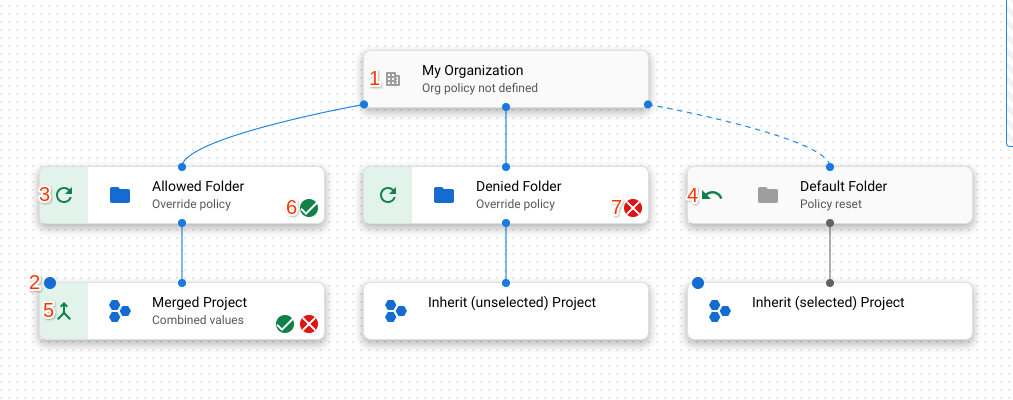

מציין אם המשאב הוא ארגון, תיקייה או פרויקט.
נקודה כחולה מציינת שהמשאב נבחר בשאילתה.
מציין שהמשאב מבטל את המדיניות של משאב ההורה שלו.
מציין שהמשאב מאפס את מדיניות הארגון לברירת המחדל שמנוהלת על ידי Google עבור המדיניות הזו. משאב שמבצע איפוס של המדיניות לברירת המחדל מחובר למשאב ההורה שלו באמצעות קו מקווקו.
ציון שהמשאב ממזג את המדיניות עם ההורה שלו.
מציין שמדיניות הארגון במשאב הזה אוכפת אילוץ בוליאני או אילוץ רשימה עם ערכים מותרים.
מציין שמדיניות הארגון במשאב הזה היא אילוץ של רשימה עם ערכים אסורים.
מציין שמדיניות הארגון במשאב הזה היא אילוץ בוליאני שלא נאכף.