When you set an [organization policy](https://docs.cloud.google.com/organization-policy/overview.md.txt) on a
resource, all descendants of that resource inherit the organization policy by
default. If you set an organization policy on your organization resource, then
those restrictions are inherited by all child resources.
You can set the same organization policy with a different configuration on child
resources, which will overwrite or merge with the inherited policy based on the
rules of hierarchy evaluation and the type of constraint defined in the
organization policy.
## Before you begin
- Read the [Understanding constraints](https://docs.cloud.google.com/organization-policy/overview.md.txt#constraints) page to learn
about what a constraint is.
- Read the [overview of the Organization Policy Service](https://docs.cloud.google.com/organization-policy/overview.md.txt) to
learn about how organization policy works.
## Example hierarchy
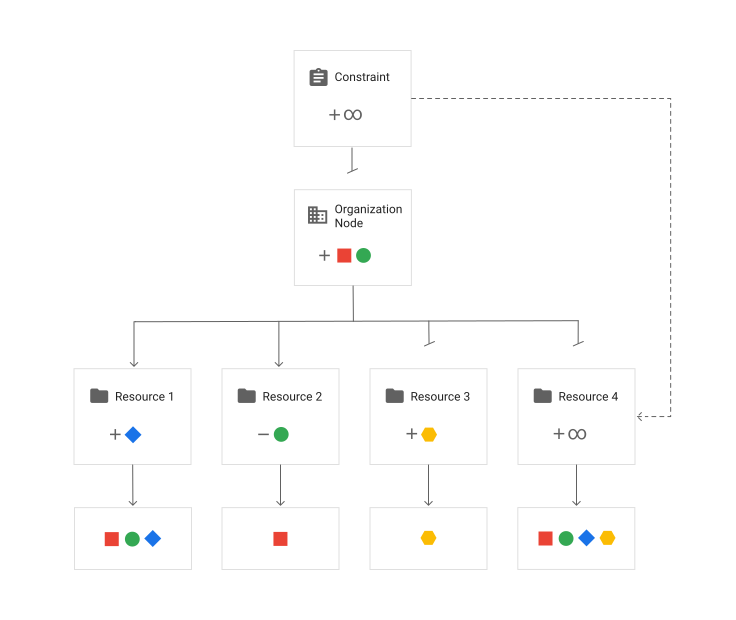
In the following resource hierarchy diagram, each resource sets an organization
policy that enforces a legacy managed constraint and defines whether the policy
inherits its parent resource's policy. The colored shapes represent the values
that the organization policy allows or denies.
A constraint is a particular type of restriction that's enforced on a
[Google Cloud service](https://docs.cloud.google.com/docs/overview/cloud-platform-services) or a list
of Google Cloud services. In the preceding example, the **Constraint**
represents the *constraint default* , which defines the behavior when the
constraint isn't defined in an organization policy. The constraint default in
this example allows all
values. The nodes below it define organization
policies that override the constraint default by allowing or denying values.
The effective policy on each node is evaluated based on the rules of
inheritance. If an organization policy isn't set, the resource inherits
the default constraint behavior. If you set an organization policy, your
policy is used instead. In the preceding example, the **Organization Node**
defines a policy that allows red
square and green
circle.
The resources that are in the hierarchy below the **Organization Node**
are evaluated as follows:
1. **Resource 1** defines a policy that sets `inheritFromParent` to `TRUE` and
allows
blue diamond. The policy from the **Organization Node** is
inherited and merged with the policy set on **Resource 1** . The effective
policy evaluates to allow red
square, green
circle, and
blue diamond.
2. **Resource 2** defines a policy that sets `inheritFromParent` to `TRUE` and
denies green
circle. Deny values always take precedence during policy
reconciliation. The policy from the **Organization Node** is inherited and
merged with the policy set on **Resource 2** . The effective policy evaluates
to allow only red
square.
3. **Resource 3** defines a policy that sets `inheritFromParent` to `FALSE` and
allows yellow
hexagon. The policy from the **Organization Node** isn't
inherited, so the effective policy evaluates to only allow
yellow
hexagon.
4. **Resource 4** defines a policy that sets `inheritFromParent` to `FALSE` and
includes the `restoreDefault` value. The policy from the
**Organization Node** isn't inherited, and the default constraint behavior
is used, so the effective policy evaluates to allow all
values.
## Hierarchy evaluation rules
The following rules govern how an organization policy is evaluated at a
given resource. You need the
[**Organization Policy Administrator**](https://docs.cloud.google.com/organization-policy/create-organization-policies.md.txt#delegate-admin)
role to set organization policy.
### Automatically enforced constraints
If an organization policy isn't enforced, it inherits from its lowest ancestor
where an organization policy is enforced. If no organization policy is enforced
anywhere in the ancestor hierarchy, the Google-managed default behavior
of the constraint is enforced.
If the Google-managed default behavior of an organization policy constraint
restricts an operation, then that operation is restricted even if you never
explicitly defined an organization policy. To allow those operations, you must
create organization policies that override the parent policy.
For a list of organization policy constraints that have a Google-managed default
behavior that restricts operations, see
[Organization policy constraints](https://docs.cloud.google.com/organization-policy/reference/org-policy-constraints.md.txt#automatically-enforced-constraints).
### Inheritance
A resource that has an organization policy set by default supersedes any
policy set by its parent resources in the hierarchy. However, if a resource has
set `inheritFromParent = true`, then the effective Policy of the parent resource
is inherited, merged, and reconciled to evaluate the resulting effective
policy. For example:
- A folder denies the value `projects/123`.
- A project underneath that folder denies the value `projects/456`.
The two policies are merged, and in this case result in an effective policy that
denies both `projects/123` and `projects/456`.
> [!NOTE]
> **Note:** Managed constraints that are inherited from a parent resource aren't merged to evaluate the effective policy on a given resource. A resource that inherits a managed constraint enforces the constraint as it was set on the parent resource or overrides the constraint with its own policy.
#### Inheriting default behavior
Default behavior is never merged. When a policy is set, it always replaces any
default behavior. For example:
- The `constraints/iam.allowServiceAccountCredentialLifetimeExtension` is set to `DENY` by default at organization level.
- For this constraint, a project directly underneath that organization allows the value `SomeServiceAccount`.
Since the default behavior is never merged and always replaced, this results in
an effective policy which allows `SomeServiceAccount`. In contrast, if the
policy were set *explicitly* to `DENY` at the organization level, the "`DENY`
value takes precedence" rule would apply and the effective policy would be
`DENY`.
### Disallow inheritance
If a resource has a policy that includes `inheritFromParent = false`, it doesn't
inherit the organization policy from its parent. Instead, the resource inherits
the constraint's default behavior unless you set a policy with allowed or denied
values.
### Reconciling policy conflicts
When a resource inherits organization policies, the inherited policies are
merged and reconciled with the organization policy of the parent resource. When
evaluating organization policies with list rules, `DENY` values always take
precedence. For example:
- A folder denies the value `projects/123`.
- A project underneath that folder allows the value `projects/123`.
The policies are merged and the `DENY` value takes precedence. The effective
policy denies all values, and evaluates the same way whether the parent or
child resource denies the value. We recommend not including a value in both the
allowed and denied lists. Doing so can make it harder to understand your
policies.
Organization policies with boolean rules don't merge and reconcile
policies. If a policy is specified on a resource, that `TRUE` or `FALSE` value
is used to determine the effective policy. For example:
- A folder sets `enforced: true` for
`constraints/iam.managed.disableServiceAccountCreation`.
- A project underneath that folder sets `enforced: false` for
`constraints/iam.managed.disableServiceAccountCreation`.
The `enforced: true` value set on the folder is ignored because
`enforced: false` is defined on the project itself. The organization policy
isn't enforced on that project.
## Reset to default policy
By invoking `RestoreDefault`, the organization policy uses the default
behavior of the constraint for this resource. Child resources also inherit this
behavior.