This page describes the deployment options for Oracle Database@Google Cloud services
and shows how to set up your Oracle Database@Google Cloud environment.
Oracle Database@Google Cloud is a joint offering between Oracle and Google that lets
you deploy Oracle Cloud Infrastructure (OCI) resources, such as Exadata Infrastructure
and Autonomous AI Database, directly in Google Cloud.
## Before you begin
Make sure that you complete [purchasing and onboarding](https://docs.cloud.google.com/oracle/database/docs/purchase-and-billing.md.txt#purchase-and-onboard).
## Deployment options
Under Oracle Database@Google Cloud, OCI manages a site known as the OCI child site that
is physically located within a Google Cloud region. An ODB Network
provides connectivity between Oracle Database@Google Cloud resources in the OCI child
site and your Google Cloud VPC network. The ODB Network maps OCI network
resources, such as Virtual Cloud Networks (VCNs), and their related subnets back
to Google Cloud.
ODB Network provide the following advantages:
- ODB Networks let network administration activities be performed by the network administrators and database administration activities be performed by the database administrators.
- ODB Networks let you use [Shared VPC](https://docs.cloud.google.com/vpc/docs/shared-vpc.md.txt) in your deployment, where VPC management is performed in a host project and the applications are placed within one or many service projects.
- Oracle Database@Google Cloud provides a simplified user experience where the administrators can select ODB Networks and ODB Subnets while provisioning resources.
ODB Networks complement your VPC networks by mapping the Oracle Cloud VCN
to an object within Google Cloud. Unlike VPC networks, ODB Networks:
- are provisioned within a region rather than globally.
- don't have a routing table.
- allow creation of up to five ODB Subnets.
Based on your requirements, you can create two types of deployments:
- [Standalone VPC network deployment](https://docs.cloud.google.com/oracle/database/docs/setup-oracle-database-environment.md.txt#odb-standalone-vpc-deployment)
- [Shared VPC network deployment](https://docs.cloud.google.com/oracle/database/docs/setup-oracle-database-environment.md.txt#odb-shared-vpc-deployment)
### Standalone VPC network deployment
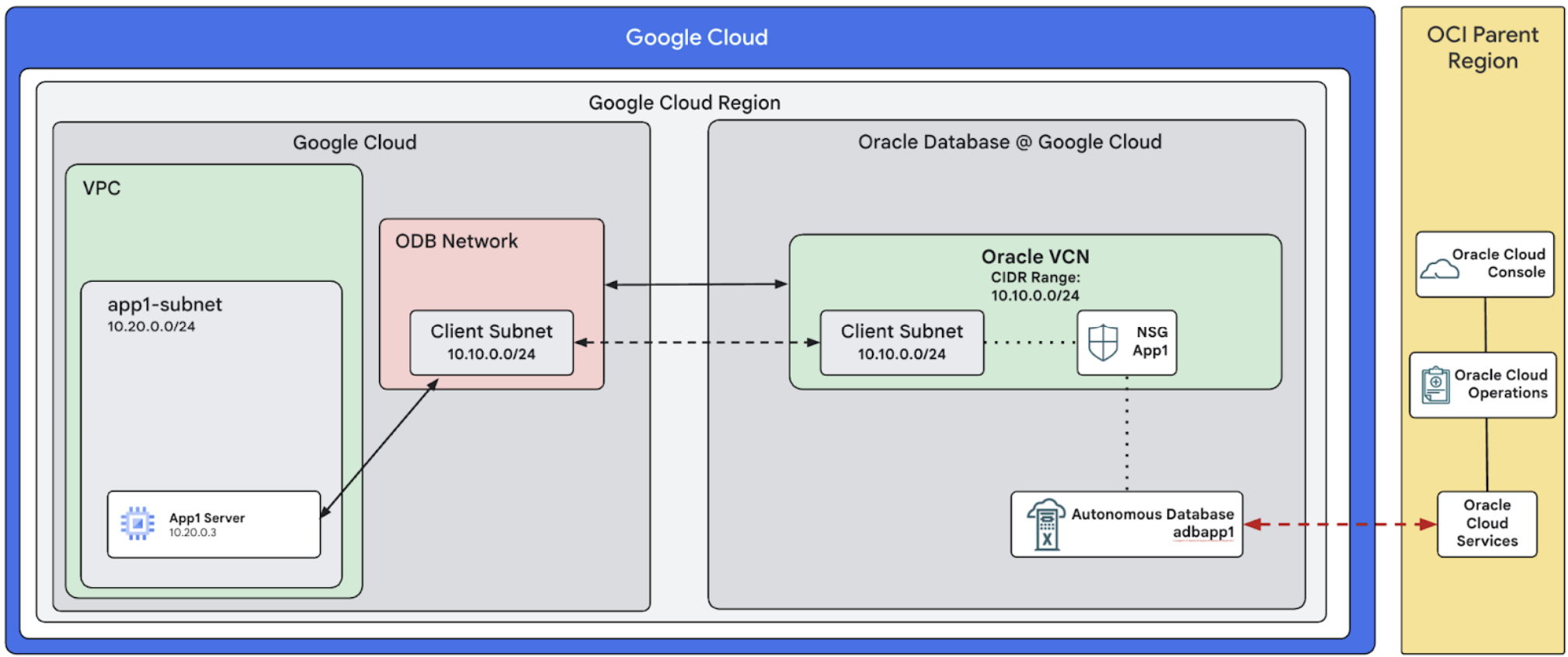
The following image shows a high level implementation of Oracle Database@Google Cloud
deployment with a standalone VPC network.
There is a VPC network with a single application subnet `app1-subnet`. This VPC
network is associated with an ODB Network that has a client subnet with an
assigned CIDR of `10.10.0.0/24`. The ODB Network and its subnet refer to an
Oracle Cloud VCN and subnet that exist within the Oracle Database@Google Cloud. An
Autonomous AI Database instance `adbapp1` is provisioned, which is protected by
the `App1` network security group in the Oracle VCN.
### Shared VPC network deployment
The introduction of ODB Networks and ODB Subnets enables
the usage of Shared VPC with Oracle Database@Google Cloud resources. Using a
Shared VPC lets network administrators maintain centralized control of
an organization's network configuration, while granting project administrators
the ability to use the Shared VPC. Network administrators can continue
to manage network resources, CIDR blocks, and access control policies through
ODB Network while the database administrators can create and delete databases
within ODB Subnets.
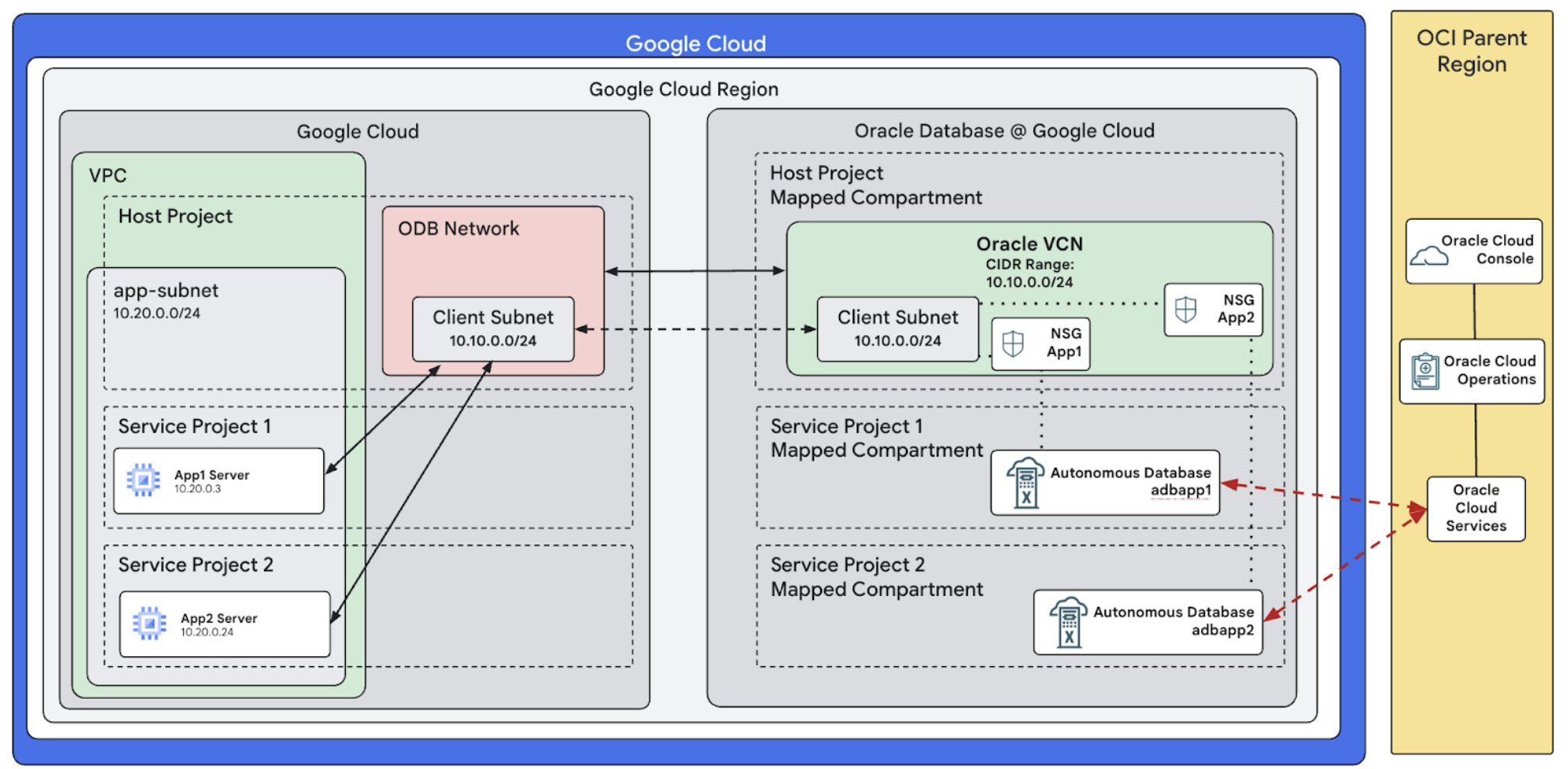
The following image shows a high level implementation of Oracle Database@Google Cloud
deployment with a Shared VPC. This architecture includes the following
three separate Google Cloud projects:
- Host project: contains the Shared VPC, the ODB Network, and ODB Subnets.
- Service project 1: contains application `App1`.
- Service project 2: contains application `App2`.
Each project is mapped to a separate OCI compartment within Oracle Database@Google Cloud.
The Shared VPC is created in the host project. An ODB Network is also
created in the same host project. Applications `App1` and `App2` are deployed in
separate service projects. Each of these applications run on separate
Autonomous AI Databases, namely `adbapp1` and `adbapp2`. Both the Autonomous AI Databases
are provisioned inside the same ODB Subnet. Access to each
Autonomous AI Database is controlled through its Network Security Group. The
Network Security Group of `App1` prevents the `App2` application server from
connecting to the `adbapp1` database.
When using Shared VPC, you can apply the principles of least privilege
to Oracle Database@Google Cloud. You can configure Identity and Access Management (IAM)
policies that allow only the administrators of `App1` to access their respective
service projects in Google Cloud and the mapped compartment in OCI. Also,
the network administrators maintain ownership of the host project and its mapped
OCI compartment, ensuring that they retain control over network access rules.
Additional service projects may exist that don't use Oracle Database@Google Cloud.
These service projects don't have mapped compartments within Oracle Database@Google Cloud,
and their administrators don't have the ability to create Oracle Database@Google Cloud
resources within the ODB Network.
## Deploy Oracle Database@Google Cloud environment
Following are the high-level steps to be completed to deploy Oracle Database@Google Cloud
resources:
1. Based on your chosen deployment option, do the following:
- For a standalone VPC deployment: create or select a standalone VPC network and a Google Cloud project to use with Oracle Database@Google Cloud. See [Configure VPC networks](https://docs.cloud.google.com/oracle/database/docs/configure-vpc.md.txt).
- For a Shared VPC deployment: create or select a Shared VPC, a host project, and service projects. See [Provision Shared VPC](https://docs.cloud.google.com/vpc/docs/provisioning-shared-vpc.md.txt#set-up-shared-vpc).
2. Make sure that billing is enabled for your Google Cloud project.
Learn how to [check if billing is enabled on a project](https://docs.cloud.google.com/billing/docs/how-to/verify-billing-enabled.md.txt).
3. In your Google Cloud project, [set up Google Cloud CLI and enable
Oracle Database@Google Cloud API](https://docs.cloud.google.com/oracle/database/docs/set-up).
Make sure that gcloud CLI is version `532.0.0` or later. To learn
how to upgrade, see [gcloud CLI update](https://docs.cloud.google.com/sdk/gcloud/reference/components/update).
To know your current gcloud CLI version, run the `gcloud version`
command:
```bash
gcloud version
```
4. In your Google Cloud project, grant the following IAM
roles to the user accounts to create Oracle Database@Google Cloud resources:
**For standalone VPC deployment**
For deploying Oracle Database@Google Cloud resources within a single project and a
standalone VPC, you have the following options to assign the IAM
roles and permissions:
- (Recommended) Follow the principles of least privilege. Assign the
network-related roles to the network administrators and assign
database-related roles to the database administrators.
| User role | Required IAM roles |
|---|---|
| Network administrator | roles/oracledatabase.odbNetworkAdmin roles/oracledatabase.odbSubnetAdmin |
| Autonomous AI Database administrator | roles/oracledatabase.odbSubnetUser roles/oracledatabase.autonomousDatabaseAdmin |
| Exadata Infrastructure administrator | roles/oracledatabase.odbSubnetUser roles/oracledatabase.cloudExadataInfrastructureAdmin roles/oracledatabase.cloudVmClusterAdmin |
| Exascale Infrastructure administrator | roles/oracledatabase.odbSubnetUser roles/oracledatabase.exadbVmClusterAdmin roles/oracledatabase.exascaleDbStorageVaultAdmin |
| DB system administrator | roles/oracledatabase.odbSubnetUser roles/oracledatabase.dbSystemAdmin |
| Goldengate administrator | roles/oracledatabase.odbSubnetUser roles/oracledatabase.goldenGateDeploymentAdmin roles/oracledatabase.goldenGateConnectionAdmin roles/oracledatabase.goldenGateConnectionAssignmentAdmin |
- Assign all administrative roles to the database administrators.
| User role | Required IAM roles |
|---|---|
| Network Administrator | None |
| Autonomous AI Database administrator | roles/oracledatabase.odbNetworkAdmin roles/oracledatabase.odbSubnetAdmin roles/oracledatabase.autonomousDatabaseAdmin |
| Exadata Infrastructure administrator | roles/oracledatabase.odbNetworkAdmin roles/oracledatabase.odbSubnetAdmin roles/oracledatabase.cloudExadataInfrastructureAdmin roles/oracledatabase.cloudVmClusterAdmin |
| Exascale Infrastructure administrator | roles/oracledatabase.odbNetworkAdmin roles/oracledatabase.odbSubnetAdmin roles/oracledatabase.exadbVmClusterAdmin roles/oracledatabase.exascaleDbStorageVaultAdmin |
| DB system administrator | roles/oracledatabase.odbNetworkAdmin roles/oracledatabase.odbSubnetAdmin roles/oracledatabase.dbSystemAdmin |
| Goldengate administrator | roles/oracledatabase.odbNetworkAdmin roles/oracledatabase.odbSubnetUser roles/oracledatabase.goldenGateDeploymentAdmin roles/oracledatabase.goldenGateConnectionAdmin roles/oracledatabase.goldenGateConnectionAssignmentAdmin |
**For Shared VPC deployment**
In a Shared VPC deployment, assign the following roles in each
project:
| User role | Required IAM roles in host project | Required IAM roles in service project |
|---|---|---|
| Network administrator | roles/oracledatabase.odbNetworkAdmin roles/oracledatabase.odbSubnetAdmin | None |
| Autonomous AI Database administrator | roles/oracledatabase.odbSubnetUser | roles/oracledatabase.autonomousDatabaseAdmin |
| Exadata Infrastructure administrator | roles/oracledatabase.odbSubnetUser | roles/oracledatabase.cloudExadataInfrastructureAdmin roles/oracledatabase.cloudVmClusterAdmin |
| Exascale Infrastructure administrator | roles/oracledatabase.odbSubnetUser | roles/oracledatabase.exadbVmClusterAdmin roles/oracledatabase.exascaleDbStorageVaultAdmin |
| DB system administrator | roles/oracledatabase.odbSubnetUser | roles/oracledatabase.dbSystemAdmin |
| Goldengate administrator | roles/oracledatabase.odbSubnetUser | roles/oracledatabase.goldenGateDeploymentAdmin roles/oracledatabase.goldenGateConnectionAdmin roles/oracledatabase.goldenGateConnectionAssignmentAdmin |
5. [Create an ODB Network and ODB Subnets](https://docs.cloud.google.com/oracle/database/docs/create-odb-network.md.txt).
6. Provision your resources:
- [Create Exadata Infrastructure](https://docs.cloud.google.com/oracle/database/docs/create-instances.md.txt)
- [Create Exadata VM Cluster](https://docs.cloud.google.com/oracle/database/docs/create-clusters.md.txt)
- [Create Exascale VM Cluster](https://docs.cloud.google.com/oracle/database/docs/create-exascale-clusters.md.txt)
- [Create Autonomous AI Database](https://docs.cloud.google.com/oracle/database/docs/create-databases.md.txt)
- [Create DB system](https://docs.cloud.google.com/oracle/database/docs/create-base-db-system.md.txt)
- [Create Goldengate deployment](https://docs.cloud.google.com/oracle/database/docs/deploy-and-connect.md.txt)