# Network Service Tiers overview
Network Service Tiers lets you optimize connectivity between systems on
the internet and your Google Cloud instances.
Premium Tier delivers
traffic on Google's premium backbone, while Standard Tier uses regular ISP
networks.
Use Premium Tier to optimize for performance, and use Standard Tier to optimize for cost.
| Google Cloud | Premium Tier | Standard Tier |
|---|---|---|
| Routing | Traffic between the internet and your application travels within the Google Cloud network to reach users | Uses peering, ISP, or transit networks to reach users |
| Security | Traffic is protected on Google Cloud's backbone until the last mile | Comparable to other public clouds |
| Networking features | Supports all Google Cloud networking features | Supports a foundational feature set including Cloud NAT, Regional external Application Load Balancer, and Regional external passthrough Network Load Balancer |
| Pricing | Premium Tier pricing is at parity with other public cloud providers | Standard Tier pricing is cost-effective and at parity with other cloud providers |
| [SLA](https://cloud.google.com/compute/sla) | 99.99% uptime | 99.9% uptime |
Outbound data transfer pricing for each of the Network Service Tiers is different. For more
information, see [Network Service Tiers pricing](https://cloud.google.com/network-tiers/pricing).
This diagram illustrates recommended use cases for Standard Tier and Premium Tier.
[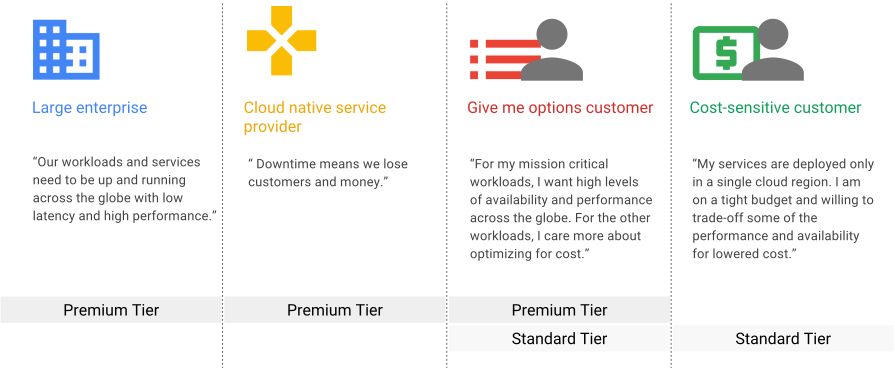](https://docs.cloud.google.com/static/network-tiers/images/tiers-use-cases-icons.svg) Network Service Tiers use cases (click to enlarge).
### Network Service Tiers and Google Cloud resources
Google Cloud has two types of external IP addresses: *global* and
*regional*.
| External IP address type | Premium Tier | Standard Tier |
|---|---|---|
| **Global external IPv4 and IPv6 addresses** Publicly routable anycast IP addresses. | YesSupported | YesSupported ([Preview](https://docs.cloud.google.com/products#product-launch-stages)) |
| **Regional external IPv4 addresses** Publicly routable IPv4 addresses designated for use by Google Cloud resources that fit within a single Google Cloud region | YesSupported | YesSupported when IP addresses are used with eligible resources. |
| **Regional external IPv6 addresses** Publicly routable IPv6 addresses designated for use by Google Cloud resources that fit within a single Google Cloud region | YesSupported | YesSupported ([Preview](https://docs.cloud.google.com/products#product-launch-stages)) |
Regardless of which tier you use, the network is designed to keep traffic
between virtual machine (VM) instances that are in the same or different regions
on Google's network, including when a load balancer is on the path. This is true
whether the traffic uses publicly or privately routable IP addresses.
> [!NOTE]
> **Note:** Regional external IP addresses can be contacted from anywhere on the internet. The term *regional* indicates that the Google Cloud resources must all be in a single Google Cloud region. The tier that you choose for a regional external IP address only affects the *path* that network traffic from the internet takes when contacting the Google Cloud resource.
The following table describes how Network Service Tiers applies to
Google Cloud resources and what type of external IP address must be used.
In the table, a Yes indicates that a
resource is supported in a network tier, and No
indicates that it is not supported.
| Google Cloud resource | Premium Tier | Standard Tier |
|---|---|---|
| Global external Application Load Balancer Global external proxy Network Load Balancer | Yes Requires a global external IP address. | No Not supported. |
| Classic Application Load Balancer Classic proxy Network Load Balancer | Yes Requires a global external IP address. | Yes Requires a regional external IP address. |
| Regional external Application Load Balancer Regional external proxy Network Load Balancer Regional external passthrough Network Load Balancer | Yes Requires a regional external IP address. | Yes Requires a regional external IP address. |
| VM instances, including GKE node VMs | Yes Requires a regional external IP address. | Yes Requires a regional external IP address. |
| Cloud VPN gateways | Yes Requires a regional external IP address. | No Not supported. |
| Cloud NAT gateways | Yes Requires a regional external IP address. | Yes Requires a regional external IP address. |
The following table shows how Network Service Tiers applies to Cloud Storage and Cloud CDN.
| Google Cloud service | Premium Tier | Standard Tier |
|---|---|---|
| Cloud Storage | By default, access to Cloud Storage buckets is considered Premium Tier, whether or not the bucket is used as a backend for an external Application Load Balancer. | Standard Tier is an option only if you use a Cloud Storage bucket as a backend for an external Application Load Balancer. For more information, see [Using Standard Tier with Cloud Storage](https://docs.cloud.google.com/network-tiers/docs/overview#standard-and-storage). |
| Cloud CDN | Cloud CDN is always Premium Tier. | You cannot use Standard Tier with Cloud CDN. |
### Standard Tier availability
Standard Tier is available to resources that use regional external IP addresses
in all regions. In addition, to use Standard Tier for Cloud Storage
buckets acting as backends for an external Application Load Balancer, the load balancer must use a
regional external IP address and also select Standard Tier.
## Traffic routing
This table summarizes the differences in routing for each of the Network Service Tiers.
| Traffic | Premium Tier | Standard Tier |
|---|---|---|
| Inbound data transfer to Google Cloud | Traffic from an internet user enters Google's network through peering or transit networks in a Google point of presence (PoP) that's as close as possible to the internet user. More specifically, Google Cloud advertises next hops for Premium Tier IP addresses to peering and transit networks in PoPs across the entire Google global network. These next hops are advertised with equivalent BGP metrics. This encourages the peering and transit networks to deliver traffic to a PoP that's as close as possible to the internet user. | Traffic from an internet user enters Google's network through peering or transit networks in a Google point of presence (PoP) that's as close as possible to the region of the Standard Tier IP address. This is accomplished by exclusively advertising the best BGP metrics with next hops in PoPs close to the region of the Standard Tier IP address. The set of closest peering PoPs eligible for Standard Tier routing for each region is selected to minimize network distance traveled on the Google global network. Note that the closest peering PoPs might not be in the same country as the region of a Standard Tier IP address, and the selection of the closest peering PoPs doesn't optimize for performance. Standard Tier traffic might be routed as Premium Tier in rare circumstances, such as when there are no peering or transit networks with reachability to an internet user from the closest Google PoPs. |
| Outbound data transfer from Google Cloud | Outbound traffic is sent on the [BGP best path](https://wikipedia.org/wiki/Border_Gateway_Protocol#Route_selection_process) to an internet user, which typically routes traffic over the Google global network to a point of presence (PoP) that's as close as possible to the internet user. Peering or transit networks then provide connectivity between the Google PoP and the internet user. Peering and transit networks can each advertise multiple next hops with equivalent BGP metrics for a single internet user in many points of presence (PoPs). When BGP best path next hops exist in two or more Google PoPs, the Google Cloud resource selects the next hop in the PoP which minimizes network distance within the Google global network. Depending on the network architecture of the BGP best path peering or transit network, selecting the BGP best path route that minimizes network distance within the Google global network can result in selecting a PoP that's *not* as close as possible to the internet user. When an internet user exists in a network that peers with the Google global network in multiple locations, Google Cloud doesn't guarantee that outbound traffic remains on the Google global network until it as close as possible to the internet user. | Outbound traffic is sent through a peering or transit network in a point of presence (PoP) near the region of the Standard Tier IP address. Peering or transit networks then provide connectivity between the Google PoP and the internet user. The preference of nearby PoPs is enforced as long as there is at least one peering or transit next hop advertising reachability to the internet user from a nearby PoP, even if that next hop isn't the BGP best path on Google's global network. The set of PoPs closest to the region are selected to minimize the network distance traveled on the Google global network. The closest PoPs might not be in the same country as the region of the Standard Tier IP address. Standard Tier traffic might be routed as Premium Tier in rare circumstances, such as when there are no peering or transit networks in the closest PoPs, or when there is insufficient steady traffic between the region and the internet user. |
### Premium Tier
Premium Tier delivers traffic from external systems to Google Cloud
resources by using Google's low latency, highly reliable global network. This
network consists of an extensive private fiber network with over [200
points of presence (PoPs)](http://peering.google.com/) around the globe.
This network is designed to tolerate multiple failures and disruptions while
still delivering traffic.
Premium Tier supports both regional external IP addresses and global external IP
addresses for VM instances and load balancers. All global external IP addresses
must use Premium Tier. Applications that require high performance and
availability, such as those that use external Application Load Balancers and external proxy Network Load Balancers,
with backends in more than one region, require Premium Tier.
Premium Tier is ideal for customers with users in multiple locations worldwide
who need the best network performance and reliability.
[](https://docs.cloud.google.com/static/network-tiers/images/tiers-premium.svg) Routing path for Premium Tier (click to enlarge).
With Premium Tier, incoming traffic from systems on the internet enters Google's
high-performance network at the PoP closest to the sending system. Within
Google's network, traffic is routed from that PoP to the VM in your
Virtual Private Cloud (VPC) network or closest Cloud Storage bucket.
Outbound traffic is sent through Google's network, exiting at the PoP closest to
its destination. This routing method minimizes congestion and maximizes
performance by reducing the number of hops between end users and the PoPs
closest to them.
We offer a 99.99% uptime Service Level Agreement (SLA) for Premium Tier VMs. As defined in the [Compute Engine Service Level Agreement](https://cloud.google.com/compute/sla), a VM that loses external connectivity for more than a minute is considered to be in downtime (100% packet loss). For an example of how the Compute Engine SLA works with VMs with multiple NICs, see [Overview of the SLA for Compute Engine networking](https://docs.cloud.google.com/compute/docs/ip-addresses#overview_of_the_sla_for_networking).
### Standard Tier
Standard Tier delivers traffic from external systems to Google Cloud
resources by routing it over the internet. It leverages the double redundancy of
Google's network only up to the point where Google's data center connects to a
peering PoP. Packets that leave Google's network are delivered using the
public internet and are subject to the reliability of intervening transit
providers and ISPs. Standard Tier provides network quality and reliability
comparable to that of other cloud providers.
Regional external IP addresses can use either Premium Tier or Standard Tier.
[](https://docs.cloud.google.com/static/network-tiers/images/tiers-standard.svg) Routing path for Standard Tier (click to enlarge).
Standard Tier is priced lower than Premium Tier because traffic from systems on
the internet is routed over transit (ISP) networks before being sent to VMs in
your VPC network or regional Cloud Storage buckets.
Standard Tier outbound traffic normally exits Google's network from the same
region used by the sending VM or Cloud Storage bucket, regardless of
its destination. In rare cases, such as during a network event, traffic
might not be able to travel out the closest exit and might be sent out another
exit, perhaps in another region.
Standard Tier offers a lower-cost alternative for the following use cases:
- You have applications that are not latency or performance sensitive.
- You're deploying VM instances or using Cloud Storage that can all be within a single region.
Google Cloud offers a 99.9% uptime Service Level Agreement (SLA) for
Standard Tier VMs. As defined in the
[Compute Engine Service Level Agreement](https://cloud.google.com/compute/sla), a VM that loses
external connectivity for more than a minute is considered to be in downtime
(100% packet loss). For an example of how the Compute Engine SLA works
for VMs with multiple NICs, see
[Overview of the SLA for Compute Engine networking](https://docs.cloud.google.com/compute/docs/ip-addresses#overview_of_the_sla_for_networking).
#### Free tier
Standard Tier includes a Free Tier, providing 200 GB of free Standard Tier
usage per month in each region that you use across all of your projects, on a
per SKU basis. You don't need to take any action to use the Free Tier, but
we recommend that you check all projects in your billing account to ensure that
their combined usage in each region does not exceed the 200 GB limit.
### Choosing a tier
It is important to choose the tier that meets your needs.
The following decision tree can help you decide which of the
Network Service Tiers is right for your use case. Because you choose a tier
at the resource level---such as the external IP address for a load
balancer or VM---you can use Standard Tier for some resources and Premium
Tier for others. If you are not sure which tier to use, choose Premium Tier,
which is the default.
[](https://docs.cloud.google.com/static/network-tiers/images/tiers-choosing.svg) Network Service Tiers decision tree (click to enlarge).
**Project-level (default: Premium Tier)**
- Specify tier at the project level
**Resource-level (default: Premium Tier)**
- Load balancing: Enable for a forwarding rule.
- Instance: Enable for a VM or instance template.
- Other resource-level knobs in the future.
The final tier for a resource is determined as follows:
- If a tier is configured for either a resource or the project in which the
resource resides, then that tier applies to the resource.
- If tiers are configured for both the project and the resource, then the
resource-level tier takes precedence for that resource.
## Using Standard Tier with Cloud Storage
To use Standard Tier with Cloud Storage, you must configure
your storage bucket as the backend of the Google Cloud load balancer. The
Cloud Storage bucket must be in the same region as the forwarding rule.
If they are in different regions, requests to the bucket produce an error.
To use multi-regional Cloud Storage buckets as backends, you must use
Premium Tier.
[](https://docs.cloud.google.com/static/network-tiers/images/tiers-storage.svg) Cloud Storage and load balancing (click to enlarge).
## Upgrading a resource from Standard Tier to Premium Tier
Google Cloud designates separate pools of external IP addresses for
Premium Tier and Standard Tier.
When an IP address is configured for an instance or load balancer, it is
allocated from either of these two pools based on the network tier
in effect for that resource.
Two separate pools for Premium Tier and Standard Tier entail the following:
- If you change the tier of an instance with an ephemeral IP address, the IP address of the instance changes as well.
- An IP address from one pool cannot be moved to the other pool.
- IP addresses in Standard Tier in one region cannot be moved to another region even if the tier remains the same.
## Configure Standard Tier for load balancing
Use the following instructions to configure Standard Tier for a variety of load
balancers.
### Configuring Standard Tier for regional external passthrough Network Load Balancers
To configure a regional external passthrough Network Load Balancer to use Standard Tier, specify
Standard Tier when creating the
[IP address](https://docs.cloud.google.com/network-tiers/docs/set-network-tier#creating_static_external_ip_addresses)
and [forwarding rule](https://docs.cloud.google.com/network-tiers/docs/set-network-tier#creating_forwarding_rules)
for the load balancer.
If you want to change an existing load balancer from Premium Tier (the default)
to Standard Tier, or from Standard Tier to Premium Tier, you must delete the
existing load balancer forwarding rule, and then create a new one that points to
the existing target pool. You must also use a Standard Tier IP address with the
Standard Tier forwarding rule.
### Configure Standard Tier for classic Application Load Balancers and classic proxy Network Load Balancers
If you don't specify a network tier, your load balancer defaults to using
Premium Tier. All load balancers that existed prior to the introduction of
Network Service Tiers use Premium Tier. Premium Tier enables
global load balancing, where a single IP address can point to backends in
regions around the world. Standard Tier is a regional service only.
To use Standard Tier, your load balancer must meet the following criteria:
- It must use a Standard Tier regional IP address.
- It must use a Standard Tier regional forwarding rule.
- It can have backends in the region that contains the forwarding rule only.
The following diagram illustrates the global nature of classic Application Load Balancers
and classic proxy Network Load Balancers when they are configured to use Premium Tier.
[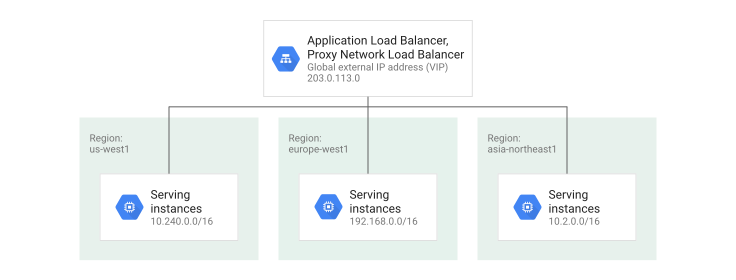](https://docs.cloud.google.com/static/network-tiers/images/tiers-global-lb-premium.svg) Premium Tier global load balancer (click to enlarge).
To use Standard Tier with a classic Application Load Balancer or a
classic proxy Network Load Balancer, you must decide upon a *single* Google Cloud
region, and then use a *regional external IP address* and a *regional forwarding
rule*, both configured for Standard Tier, to point to the appropriate target
HTTP(S) proxy, target SSL proxy, or target TCP proxy.
The IP address of the load balancer is still external, so clients from anywhere
on the internet can send traffic to it, but all of your backends must
be located in the region that you chose.
With Standard Tier, traffic sent to the load balancer traverses the internet
until it reaches a transit peering point at the Google Cloud region that
you have chosen for the load balancer. A Google Front End (GFE) acts as the
proxy, terminating HTTP(S), SSL, or TCP, and then contacting backends in your
chosen region. Because all of your backend VMs are located in one region, the
traffic from the original client to the GFE is subject to additional hops and
potential latency.
[](https://docs.cloud.google.com/static/network-tiers/images/tiers-edge-backbone.svg) Standard Tier TCP sessions (click to enlarge).
Standard Tier changes the behavior of classic Application Load Balancers and
classic proxy Network Load Balancers so that they operate like those of other cloud
providers. Standard Tier eliminates the ability for these types of load
balancers to operate in multiple Google Cloud regions.
The following diagram illustrates the regional nature of classic Application Load Balancers
and classic proxy Network Load Balancers when they are configured to use Standard Tier. If
you want to operate a Standard Tier-based load balancing deployment in multiple
regions, you'll need to create a separate load balancer in each region where you
want to receive traffic. Each load balancer has its own regional external IP
address. The region used for that IP address and forwarding rule matches the
region where the backend VMs are located.
[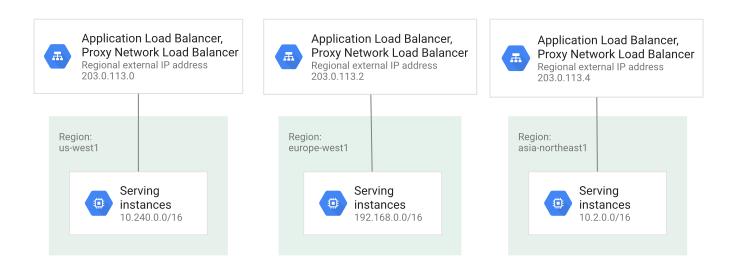](https://docs.cloud.google.com/static/network-tiers/images/tiers-regional-lb-standard.svg) Standard Tier regional load balancer (click to enlarge).
When creating a regional external IP address resource in Standard Tier, you must
specify the network tier of the regional external IP address as Standard. After
the network tier is set to Standard, it cannot be updated to Premium. To change
a load balancer to Premium Tier, you must reserve a new Premium Tier IP address.
If you want to change an existing load balancer from Premium Tier (the default)
to Standard Tier, you must do the following:
1. Remove any backends that are in regions other than the one that contains your
forwarding rule for the existing load balancer.
2. Delete the existing forwarding rule and IP address, and then create a new
Standard Tier regional forwarding rule and an IP address that point to the
existing target proxy.
## Upgrading large volumes of traffic from Standard Tier to Premium Tier
It is important to correctly identify and use the tier that best suits your
requirements.
When you make your selection, take into account these two important restrictions:
- You cannot use Premium Tier networking as a backup for Standard Tier. If,
during an outage for Standard Tier networking (for example, because of a fiber
cut), you reclassify your traffic as Premium Tier, it is treated as Standard
Tier for the duration of the outage.
- If you plan to move more than 5 Gbps of traffic from
Standard Tier to Premium Tier independent of an outage, you must contact
your account manager.
## Premium Tier and Standard Tier summary
| | | Premium Tier | Standard Tier |
| Use case | | Performance optimized Global network Global network services | Cost optimized Regional network Regional network services |
| Network | Routing | Inbound: Traffic across the globe enters Google's global network at a location near your user. Outbound: Your outbound traffic rides Google's high-quality global backbone network to the Google global edge PoP that is geographically closest to your user. | Inbound: Traffic enters Google's network by peering or transit only in the region in which you have deployed the destination Google Cloud resources. Outbound: Traffic is sent to the internet by peering or transit that is local to the Google Cloud region where the traffic originates. |
| Network services | External Application Load Balancer | - Supports global, regional, and classic modes - Terminates TCP as close to the user as possible, worldwide | - Supports regional and classic modes - Supports backend VMs in a single region - To support multiple regions, requires DNS and multiple Google Cloud load balancers (one load balancer per region) - Terminates TCP in the destination region |
| | Internal Application Load Balancer | Cross-region or regional | Standard Tier is not available for internal Application Load Balancers. |
| | External proxy Network Load Balancer | - Supports global, regional, and classic modes - Terminates TCP as close to the user as possible, worldwide | - Supports regional and classic modes - Supports backend VMs in a single region - To support multiple regions, requires DNS and multiple Google Cloud load balancers (one load balancer per region) - Terminates TCP in the destination region |
| | Internal proxy Network Load Balancer | Regional | Standard Tier is not available for internal proxy Network Load Balancers. |
| | Regional external passthrough Network Load Balancer | Regional external passthrough Network Load Balancer is supported in Premium Tier | Regional external passthrough Network Load Balancer is supported in Standard Tier |
| | Global external passthrough Network Load Balancer | Global external passthrough Network Load Balancer is supported in Premium Tier | Not available in Standard Tier |
| | Internal passthrough Network Load Balancer | Regional | Standard Tier is not available for internal passthrough Network Load Balancers. |
| | Cloud CDN | Only Premium Tier | Standard Tier is not available for Cloud CDN. |
| Pricing | | $/GB based on usage Premium Tier costs more than Standard Tier. [Pricing details](https://docs.cloud.google.com/network-tiers/pricing) | $/GB based on usage Standard Tier is priced lower than Premium Tier. [Pricing details](https://docs.cloud.google.com/network-tiers/pricing) |
| [SLA](https://cloud.google.com/compute/sla) | | 99.99% uptime | 99.9% uptime |
|---|---|---|---|
## Frequently asked questions
**Which network tier does Google recommend using for my network services
on Google Cloud?**
We recommend using Premium Tier so that you can deliver your services on Google's
high-quality network and take advantage of premium cloud network services such as
global load balancing and Cloud CDN. If you don't explicitly select a
network tier, you use Premium Tier by default.
**How can I switch my load balancer from Standard Tier back to Premium Tier?**
To switch your load balancer, follow these steps:
1. Create a new load balancer forwarding rule that uses a Premium Tier IP address.
2. Use DNS to slowly migrate traffic from your current Standard Tier IP address to the new Premium Tier IP address.
3. After the migration is complete, you can release the Standard Tier IP addresses and the regional load balancers associated with them. You don't need to change your backends because you can have multiple load balancers pointing to the same backends.
**What are the relative costs of using Premium Tier versus Standard Tier?**
Standard Tier is priced lower than Premium Tier for $/GB. For more information,
see [Network Service Tiers pricing](https://cloud.google.com/network-tiers/pricing).
**I want to test the performance of Premium Tier and Standard Tier. Which
configuration do you recommend testing with?**
You can test the performance of Premium Tier and Standard Tier with any
configuration that is representative of your requirements.
**Can I apply Standard Tier to internal traffic within a VPC
network?**
You can enable Standard Tier for internet-facing traffic on external IP
addresses only. VM instances that use internal IP addresses within
VPC networks to communicate always use Google Cloud's
Premium Tier networking infrastructure, but with standard
[VM-VM outbound data transfer pricing](https://docs.cloud.google.com/vpc/network-pricing#egress-within-gcp).
## What's next
- To specify a network tier for your workloads, see [Using Network Service Tiers](https://docs.cloud.google.com/network-tiers/docs/set-network-tier).