A common use case for Connectivity Tests is testing between two
Compute Engine virtual machine (VM) instances in the same or peered
Virtual Private Cloud (VPC) networks.
For this type of test, Connectivity Tests evaluates reachability
by using both configuration analysis and live data plane analysis. To analyze the
configuration, Connectivity Tests identifies and evaluates a trace
path.
Trace diagrams on this page use the symbols described in the following legend.
| Symbol | Name | Meaning |
|---|---|---|
| Gray diamond [](https://docs.cloud.google.com/static/network-intelligence-center/docs/connectivity-tests/images/gray-diamond.png) | Checkpoint | A decision point where Connectivity Tests checks a configuration and decides whether a trace packet is to be forwarded, delivered, or dropped. |
| Blue rectangle [](https://docs.cloud.google.com/static/network-intelligence-center/docs/connectivity-tests/images/blue-rectangle.png) | Hop | A step in the forwarding path for a trace packet, representing a Google Cloud resource that forwards a packet to the next hop in a VPC network---for example, to a Cloud Load Balancing proxy or to a Cloud VPN tunnel. |
| Orange hexagon [](https://docs.cloud.google.com/static/network-intelligence-center/docs/connectivity-tests/images/orange-hexagon.png) | Endpoint | The source or destination of a trace packet. |
The following diagram shows the typical trace path between two VM instances. The
`Match routes` object can represent routes that direct traffic in a single
VPC network or between two peered VPC networks.
[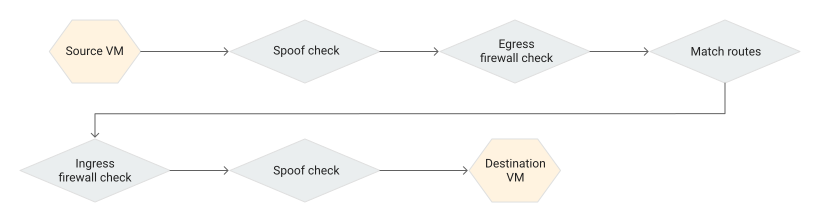](https://docs.cloud.google.com/static/network-intelligence-center/docs/connectivity-tests/images/source-vm-2-dest-vm-trace.svg) Source VM to destination VM trace (click to enlarge).
The following steps describe the checkpoints that correspond to each point in
the trace diagram. The check might fail at any check point. The query results
show the reason for each failure. For a complete list of test states and
messages, see
[Configuration analysis states](https://docs.cloud.google.com/network-intelligence-center/docs/connectivity-tests/concepts/state-tables#test-states).
1. Connectivity Tests verifies that the source VM can send egress
packets with the specified source IP address, or can otherwise default to the
spoof check process.
2. Connectivity Tests performs a spoof check when a simulated packet to or from
a VM instance uses an IP address not owned by that instance. IP addresses owned
by a VM include all VM internal IP addresses and secondary IP addresses.
If the address is an address that appears to originate from external traffic, also called a
foreign address, then the IP address fails the spoof check.
3. To determine whether trace packets can be sent from
the source, Connectivity Tests verifies the appropriate
egress firewall rules. As part of this process, Connectivity Tests
begins by evaluating any hierarchical firewall policy rules that exist.
For details about how hierarchical firewall policy rules and VPC
firewall rules affect connectivity, see
[Hierarchical firewall policy examples](https://docs.cloud.google.com/firewall/docs/firewall-policies-examples).
4. Connectivity Tests finds (matches) a route for the destination
IP address, according to the [routing order](https://docs.cloud.google.com/vpc/docs/routes#routeselection).
If no other routes are available to the destination VM instance,
Connectivity Tests uses the default static route with the next
hop as the internet gateway. All VPC networks use this
default route unless you have removed it.
5. Connectivity Tests verifies that the network's ingress firewall
rules allow the packet to arrive at the destination VM. Again,
Connectivity Tests begins by evaluating any hierarchical firewall
policy rules that exist.
6. If needed, Connectivity Tests runs
a spoof check on the packet that arrives at the second VM.
7. Connectivity Tests verifies that the destination VM can receive
a packet with the specified destination IP address. If this address is a
foreign IP address, the destination VM must have IP forwarding
enabled. A foreign IP address is an address that does not belong to the VM.
The following screenshot from the Google Cloud console shows the results of a
VM-to-VM test.
The configuration analysis shows a result of **Packet could be delivered** .
In the API response, this label corresponds to a
[final state of `Deliver`](https://docs.cloud.google.com/network-intelligence-center/docs/connectivity-tests/concepts/state-tables#deliver-state).
This result shows that the configuration analysis has validated network
connectivity for every Google Cloud resource in the path from the source
VM to the destination VM. In this case, the route included two
VPC firewall rules: an implied VPC firewall
rule (named `default`) and one that was created for this VPC
network.
Also, Connectivity Tests dynamically verified that the destination VM
is reachable by using active probing. The **Last packet transmission result**
field shows the details of this result.
[](https://docs.cloud.google.com/static/network-intelligence-center/docs/connectivity-tests/images/vm-2-vm-ui-cards.png) Google Cloud console screenshot for VM-to-VM trace (click to enlarge)
You can expand each of the cards in the trace path to view more detail.
The following example shows an expanded card for an ingress firewall rule.
This card includes information about the VPC network, the
configured action for the firewall rule (allow), and the rule priority.
[](https://docs.cloud.google.com/static/network-intelligence-center/docs/connectivity-tests/images/vm-2-vm-firewall-card.png) Ingress firewall rule card expanded (click to enlarge)
When a trace contains a VPC network route with the next hop
as a peered VPC network, the start of the trace is not a VM
instance, but a VPC network. This type of trace validates
firewall rules and routes at the network level because the IP address
that you test comes from a network range instead of a VM instance.
Peered networks can exist in the same or in different projects. The following
trace example shows peered networks in different projects.
[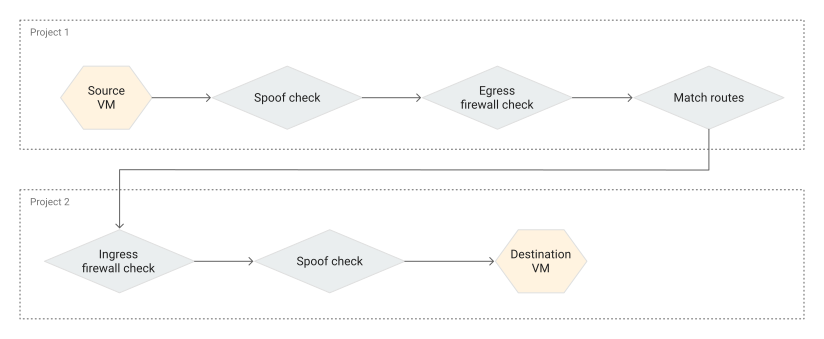](https://docs.cloud.google.com/static/network-intelligence-center/docs/connectivity-tests/images/trace-path-vpc-peering-different-accessible-project.svg) VM-to-VM trace through an accessible peered VPC network in a different project (click to enlarge)
## Test failures for VPC networks
The following table lists common failures for tests within VPC
networks.
| Failure type | Description | Trace results |
|---|---|---|
| Blocked by a firewall rule | Traffic leaving a source endpoint or entering a destination endpoint is blocked by a hierarchical firewall policy rule or a VPC firewall rule. | - If connectivity is blocked by a hierarchical firewall policy rule, the trace includes the name of the policy. The person running the test might not have permission to view the policy details. For more details about this situation, see [Troubleshoot hierarchical firewall policy](https://docs.cloud.google.com/network-intelligence-center/docs/connectivity-tests/support/troubleshooting#policy-rules). - If connectivity is blocked by a VPC firewall rule, the trace lists the name of the relevant ingress or egress firewall rule. |
| No matching route | A route to the destination endpoint couldn't be found. | - If the source and destination VM instances are in different VPC networks and those networks aren't peered, the analysis determines that **Packet could be dropped**. - If the VMs are in the same network, but a matching route is not found, traffic is sent on the default static route with a next hop to *internet gateway*. In this case, traffic never arrives at the destination VM, and the analysis determines that **Packet could be dropped**. - If there is no route to an internet gateway, the analysis determines that **Packet could be dropped**. |
| Instance not running | The destination VM instance exists, but is not in a running state. | The analysis determines that **Packet could be dropped**. |
| Invalid next hop | The configured next hop for a VM instance no longer exists, and the route to that instance is invalid. | The analysis determines that **Packet could be dropped**. |
> [!NOTE]
> **Note:** The Google Cloud console result **Packet could be dropped** is represented in the API response as a [final state of `Drop`](https://docs.cloud.google.com/network-intelligence-center/docs/connectivity-tests/concepts/state-tables#drop-state).
The following screenshot illustrates a trace that failed because connectivity
was blocked by an ingress hierarchical firewall policy rule.
[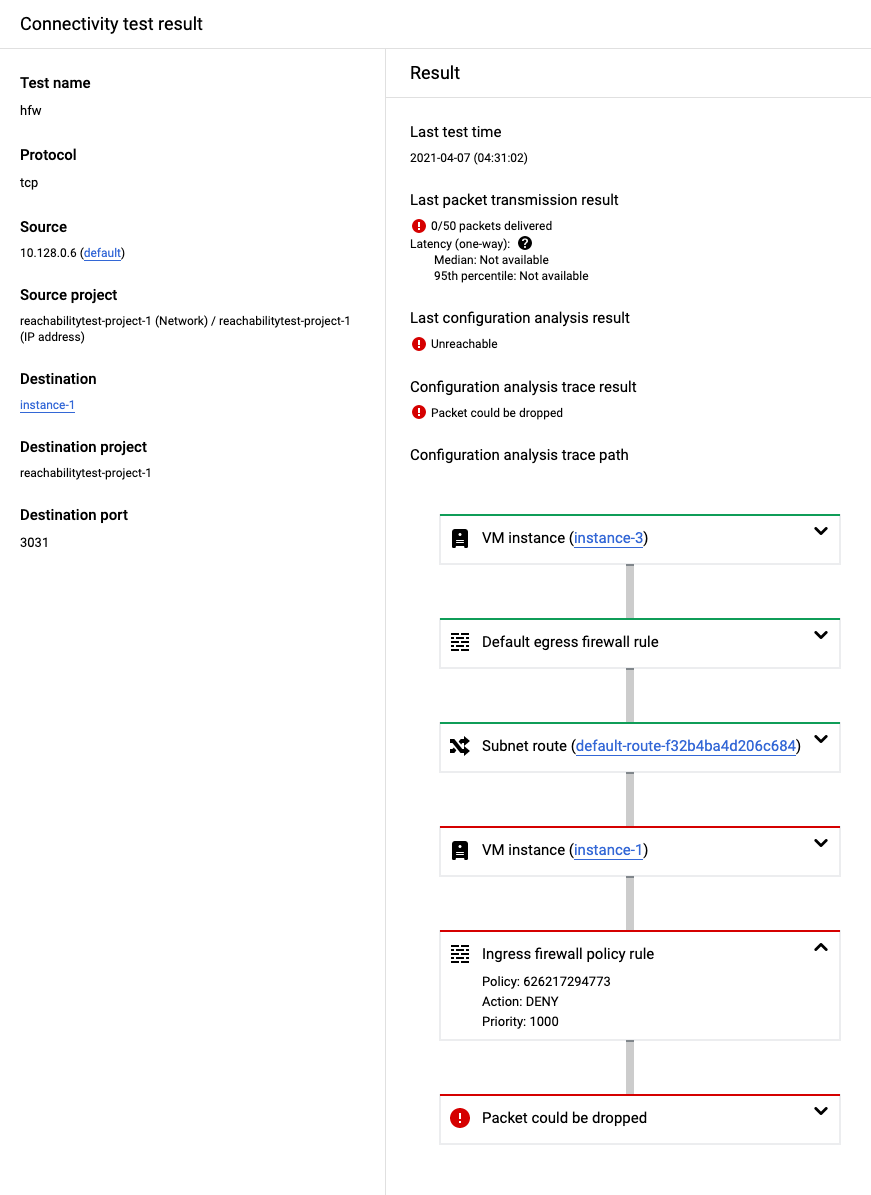](https://docs.cloud.google.com/static/network-intelligence-center/docs/connectivity-tests/images/vm-2-vm-with-policy.png) Google Cloud console screenshot for a trace that's blocked by a hierarchical firewall policy rule (click to enlarge)
## Test failures for Shared VPC networks
In Shared VPC networks, not having permissions to the host
project or the service project can cause the test failures listed in the
following table.
| Failure type | Behavior | Trace results |
|---|---|---|
| Permissions only to the host project | You can't run the trace because you don't have permissions to the service project where the destination IP address is located. | The configuration analysis shows a result of **Configuration analysis aborted** . In the API response, this label corresponds to a [final state of `Abort`](https://docs.cloud.google.com/network-intelligence-center/docs/connectivity-tests/concepts/state-tables#abort-state). |
| Permissions only to the service project | You can't run the trace or select the host project network in the Google Cloud console because you don't have permission. Because the host project owns network configurations, a trace against resources in the service project cannot proceed without access to VPC firewall rules, network routes, or IP addresses in the host project. | The overall reachability result is [`Undetermined`](https://docs.cloud.google.com/network-intelligence-center/docs/connectivity-tests/concepts/state-tables#reachability-result-table) because Connectivity Tests can't determine if the packet can be delivered to the destination. |
## Test failures for VPC Network Peering networks
With VPC Network Peering, not having permission to the `peered`
network's Google Cloud project from the `primary` network can cause
the test result listed in the following table.
| Failure type | Behavior | Trace results |
|---|---|---|
| You have no permissions to the project configuration in the peered VPC network. | Connectivity Tests can only trace the configurations in the primary network's project. | The configuration analysis shows a result of **Packet could be forwarded** . This result indicates that a packet would leave the network and be sent to a network that you don't have access to. In this case, the packet has been forwarded to a peered network gateway. In the API response, this state corresponds to a [final state of `Forward`](https://docs.cloud.google.com/network-intelligence-center/docs/connectivity-tests/concepts/state-tables#forward-state). |
The following trace path shows forward state for peered VPC networks.
[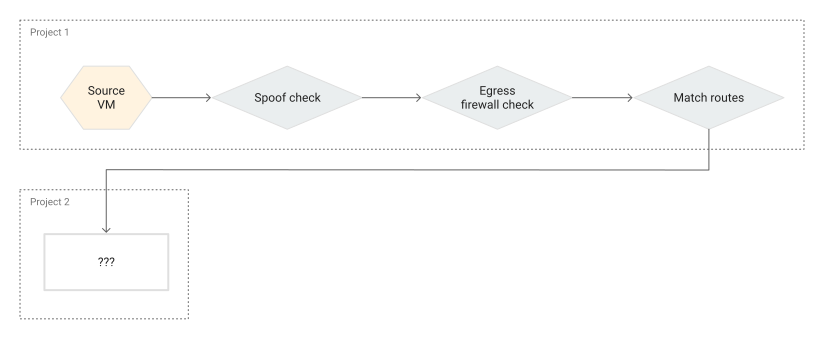](https://docs.cloud.google.com/static/network-intelligence-center/docs/connectivity-tests/images/trace-path-vpc-peering-different-inaccessible-project.svg) VM-to-VM trace through an inaccessible peered VPC network in a different project (click to enlarge)
## What's next
- [Common test scenarios](https://docs.cloud.google.com/network-intelligence-center/docs/connectivity-tests/concepts/common-use-cases)
- [Learn about Connectivity Tests](https://docs.cloud.google.com/network-intelligence-center/docs/connectivity-tests/concepts/overview)
- [Troubleshoot Connectivity Tests](https://docs.cloud.google.com/network-intelligence-center/docs/connectivity-tests/support/troubleshooting)