This page describes the scenarios for testing connectivity
from a source VM to a destination VM connected through a Network Connectivity Center hub.
If two VPC networks are connected through a NCC
hub, there are two scenarios to test the connectivity:
- Test from VM to VM through a NCC hub.
- Test from VM to VM through a NCC hub to a different project.
Trace diagrams on this page use the symbols described in the following legend.
| Symbol | Name | Meaning |
|---|---|---|
| Gray diamond [](https://docs.cloud.google.com/static/network-intelligence-center/docs/connectivity-tests/images/gray-diamond.png) | Checkpoint | A decision point where Connectivity Tests checks a configuration and decides whether a trace packet is to be forwarded, delivered, or dropped. |
| Blue rectangle [](https://docs.cloud.google.com/static/network-intelligence-center/docs/connectivity-tests/images/blue-rectangle.png) | Hop | A step in the forwarding path for a trace packet, representing a Google Cloud resource that forwards a packet to the next hop in a VPC network---for example, to a Cloud Load Balancing proxy or to a Cloud VPN tunnel. |
| Orange hexagon [](https://docs.cloud.google.com/static/network-intelligence-center/docs/connectivity-tests/images/orange-hexagon.png) | Endpoint | The source or destination of a trace packet. |
## Test from VM to VM through a NCC hub
In this scenario, Connectivity Tests traces a simulated packet from one VM
to another through a NCC hub. You have access to the project
configurations where the source network, destination network, and
NCC hub are located.
You specify a source IP address within the source network. If it's assigned to
a VM instance, the trace starts from the instance. Otherwise, it starts
from the network and checks network level configurations.
Alternatively, you can provide the destination VM instance IP address
instead of the URI.
> [!NOTE]
> **Note:** The destination network is optional because it's inferred from the routing.
The following diagram shows the typical trace path between two VM instances
through a NCC hub.
[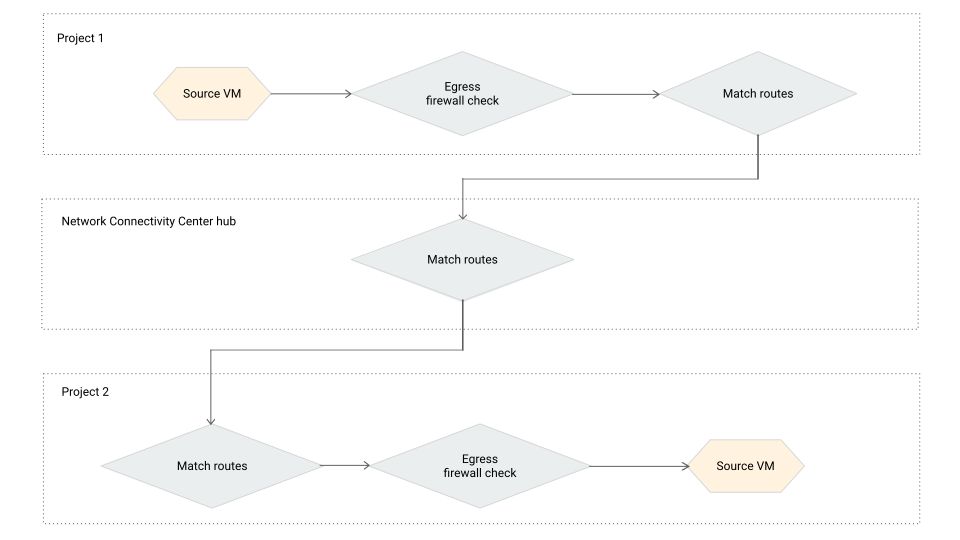](https://docs.cloud.google.com/static/network-intelligence-center/docs/connectivity-tests/images/vm-2-vm-via-ncchub.svg) VM to VM trace through a NCC hub (click to enlarge).
The following successful test result indicates an
[overall result of `Reachable`](https://docs.cloud.google.com/network-intelligence-center/docs/connectivity-tests/concepts/state-tables#result-values).
It also shows the peering route discovered in the VPC peering
trace.
[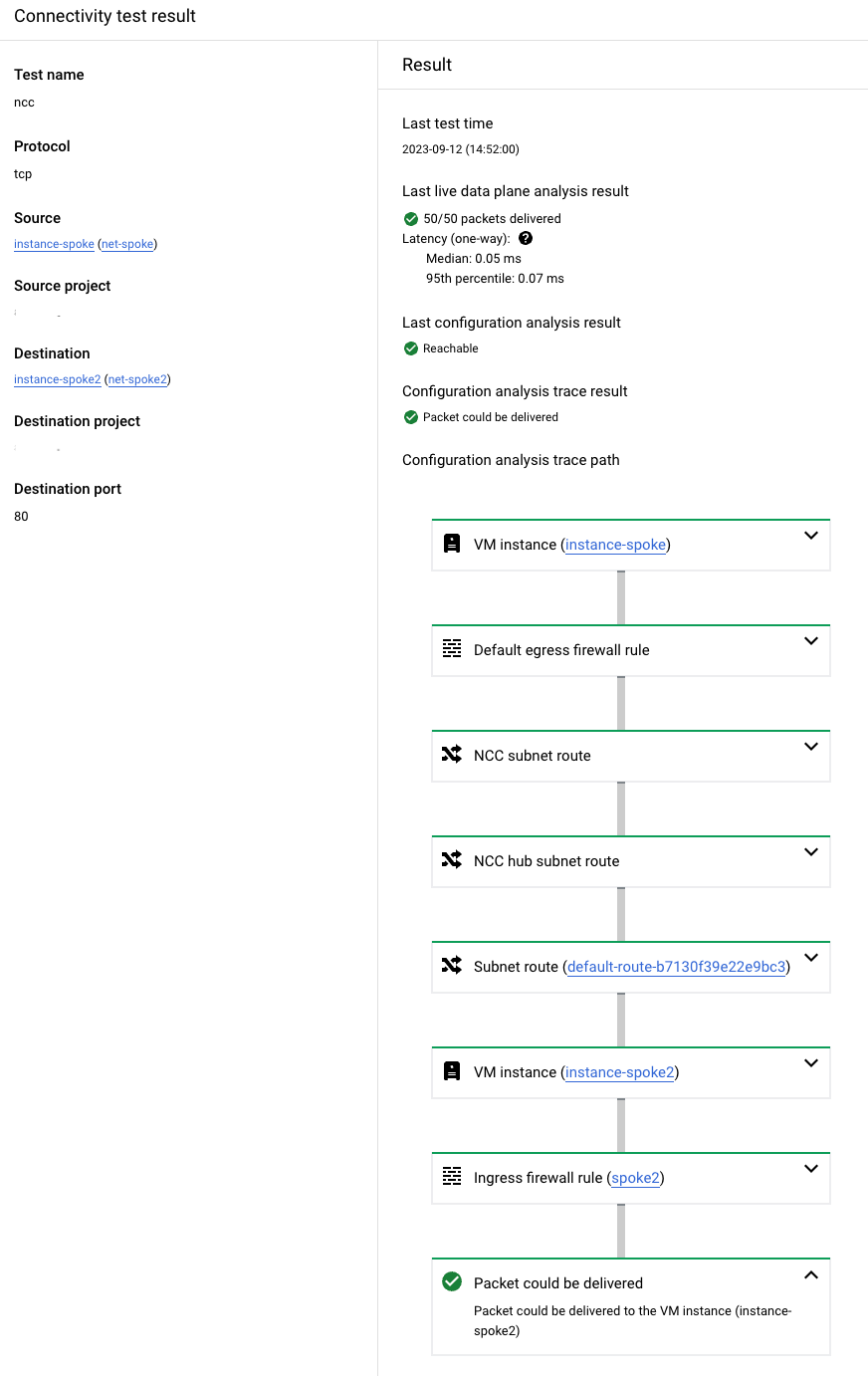](https://docs.cloud.google.com/static/network-intelligence-center/docs/connectivity-tests/images/example-vm-2-vm-ncchub.png) Example output for a successful test from VM to VM through a NCC hub (click to enlarge).
## Test from VM to VM through a NCC hub to a different project
In this scenario, Connectivity Tests traces a simulated packet from a
source VM to a destination VM through a NCC hub, but
you don't have access to the destination network or the NCC hub.
Not having permission to the destination network or NCC hub
can cause the test result listed in the following table.
| Permissions | Behavior | Trace results |
|---|---|---|
| You have no permissions to the project's configuration where the destination network or the NCC hub are located. | Connectivity Tests can only trace the configurations in the known network's project. | The configuration analysis shows a result of **Packet could be forwarded** . This result indicates that a packet would leave the network and be sent to a network that you don't have access to, which means the delivery state of the packet is undetermined. This scenario helps you to understand that there are no blocking configurations from the known networks. In the API response, this state corresponds to a final state of [`Forward`](https://docs.cloud.google.com/network-intelligence-center/docs/connectivity-tests/concepts/state-tables#forward-state). |
The following diagram shows the typical trace path from VM to VM
through a NCC hub to an inaccessible network in a different
project. The `Match routes` object can represent routes that direct traffic
between two networks that are connected through a NCC hub.
[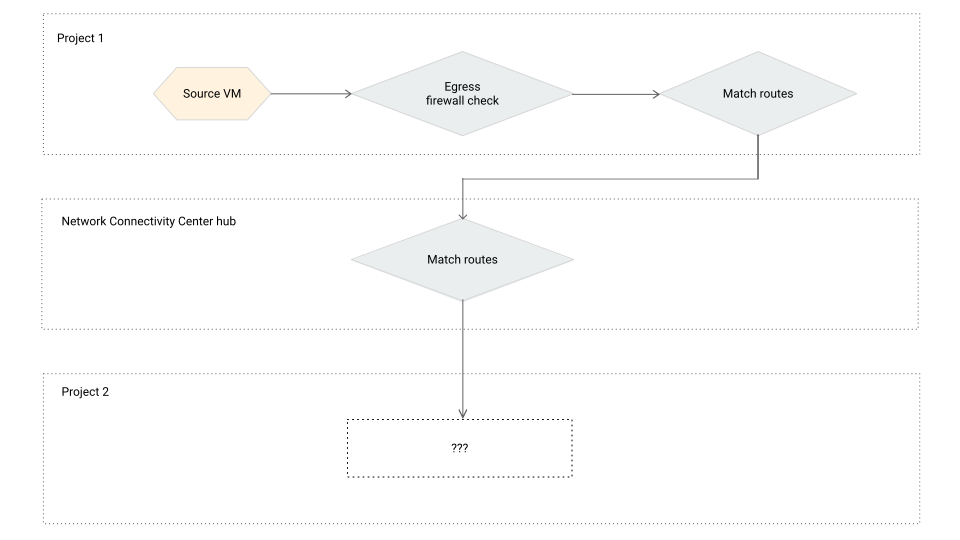](https://docs.cloud.google.com/static/network-intelligence-center/docs/connectivity-tests/images/vm-2-vm-via-ncchub-fwd-state.svg) VM to VM trace through a NCC hub to an inaccessible network in a different project (click to enlarge).
## What's next
- [Common test scenarios](https://docs.cloud.google.com/network-intelligence-center/docs/connectivity-tests/concepts/common-use-cases)
- [Learn about Connectivity Tests](https://docs.cloud.google.com/network-intelligence-center/docs/connectivity-tests/concepts/overview)
- [Troubleshoot Connectivity Tests](https://docs.cloud.google.com/network-intelligence-center/docs/connectivity-tests/support/troubleshooting)