This page describes common scenarios for testing connectivity to
Google Cloud load balancers.
Connectivity Tests configuration analysis supports tracing simulated
packets to all types of Google Cloud load balancers. The trace path for an
external Application Load Balancer also applies to external proxy Network Load Balancers.
For more information, see the
[Cloud Load Balancing overview](https://docs.cloud.google.com/load-balancing/docs/load-balancing-overview).
In the following example, Connectivity Tests traces a simulated packet
from an external host to a virtual IP address (VIP) for an external Application Load Balancer.
The TCP connection from the external host terminates at the proxy for the
external Application Load Balancer. The external Application Load Balancer then initiates a new TCP
connection to a VM acting as a load balancer backend.
[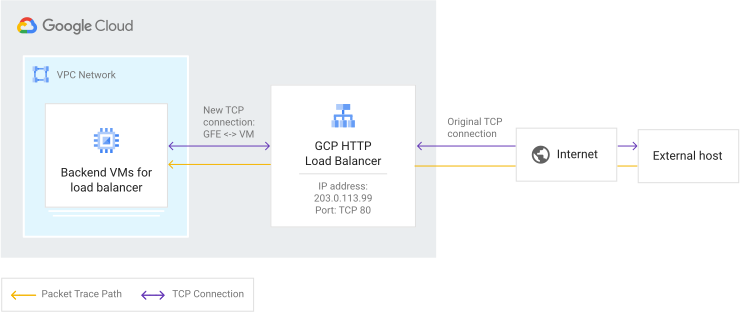](https://docs.cloud.google.com/static/network-intelligence-center/docs/connectivity-tests/images/trace-path-https-lb.svg) A typical trace path to an external Application Load Balancer
Trace diagrams on this page use the symbols described in the following legend.
| Symbol | Name | Meaning |
|---|---|---|
| Gray diamond [](https://docs.cloud.google.com/static/network-intelligence-center/docs/connectivity-tests/images/gray-diamond.png) | Checkpoint | A decision point where Connectivity Tests checks a configuration and decides whether a trace packet is to be forwarded, delivered, or dropped. |
| Blue rectangle [](https://docs.cloud.google.com/static/network-intelligence-center/docs/connectivity-tests/images/blue-rectangle.png) | Hop | A step in the forwarding path for a trace packet, representing a Google Cloud resource that forwards a packet to the next hop in a VPC network---for example, to a Cloud Load Balancing proxy or to a Cloud VPN tunnel. |
| Orange hexagon [](https://docs.cloud.google.com/static/network-intelligence-center/docs/connectivity-tests/images/orange-hexagon.png) | Endpoint | The source or destination of a trace packet. |
In the following trace path, the Connectivity Tests configuration
analysis provides three traces, one for each possible path to the three load
balancer backends. Connectivity Tests does this because it validates
only configurations, not the live data plane.
[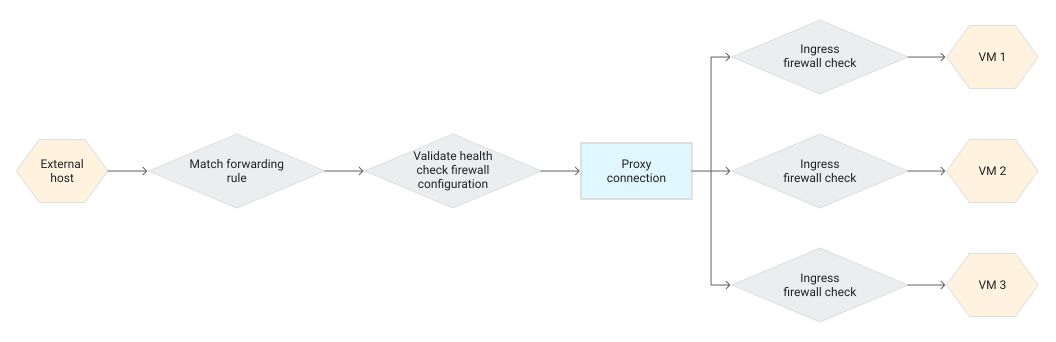](https://docs.cloud.google.com/static/network-intelligence-center/docs/connectivity-tests/images/trace-to-gcp-https-lb.svg) Packet trace to an external Application Load Balancer
## Number of traces in a test to a load balancer
Connectivity Tests configuration analysis considers all configured
backends of a proxy Network Load Balancer and a passthrough Network Load Balancer and all backend services
that are referenced in the URL map of an Application Load Balancer. If
a proxy Network Load Balancer uses Server Name Indication (SNI) routing,
Connectivity Tests analyzes all backend services that are
referenced in its associated TLS routes.
Traces are produced only
for matching backends. The status of the health check probes is not taken into
consideration---traces are produced for both healthy and unhealthy backends.
The number of traces produced by Connectivity Tests configuration
analysis depends on the load balancer type, the number of matching backends,
and the type of matching backends:
- For backend services with the `PREFER_IPV6` [IP address selection policy](https://docs.cloud.google.com/load-balancing/docs/backend-service#ip-address-selection-policy), traces to both IPv4 and IPv6 backend endpoints are produced.
- For other types of backends, a single trace to each backend endpoint is produced.
Connectivity Tests configuration analysis has a limit for the number
of traces it can return. If a load balancer has too many backends, some of them
might be omitted.
## A successful test to a load balancer
This section describes an example of a successful test to the external Application Load Balancer
described previously.
In the actual data plane, the load-balancing algorithm chooses a VM instance
for each backend connection. Because there are three load balancer backends in
this example, the **Trace selection** menu on the **Results** screen enables
you to
[select the trace that you want to view](https://docs.cloud.google.com/network-intelligence-center/docs/connectivity-tests/how-to/running-connectivity-tests#viewing-tests).
The following successful test result validates that all of the following
Google Cloud resources for the external Application Load Balancer are configured correctly:
- The forwarding rule
- The load balancer backends, including the ability for the load balancer to successfully send health checks to those backends
- The proxy connection
- VPC firewall rules
This result shows that a simulated packet from an external IP address could
successfully reach the backend VM instances.
For a detailed example of a trace to all three backends, see
[Detect invalid or inconsistent configurations](https://docs.cloud.google.com/network-intelligence-center/docs/connectivity-tests/concepts/detecting-configs#inconsistent-config).
[](https://docs.cloud.google.com/static/network-intelligence-center/docs/connectivity-tests/images/example-lb-test-success.png) Example output for a successful test to an external Application Load Balancer
If you don't have permissions to review the Google Cloud resources
in the network path for the external Application Load Balancer, you still see results in
the Google Cloud console, including successful results. However, the card
for each resource tested reads "No permission to view resource in
`PROJECT_NAME`."
## A test showing a missing firewall rule for a health check
A load balancer trace verifies many of the same Google Cloud resource
configurations described previously. However, if the following load balancer
resources are misconfigured, the analysis shows **Packet could be dropped**
(a final state of the trace is [`Drop`](https://docs.cloud.google.com/network-intelligence-center/docs/connectivity-tests/concepts/state-tables#drop-state)).
The following test result shows that the VPC network's
ingress firewall rules do not allow a health check to the load balancer
backends, making the backends unavailable to the load balancer.
[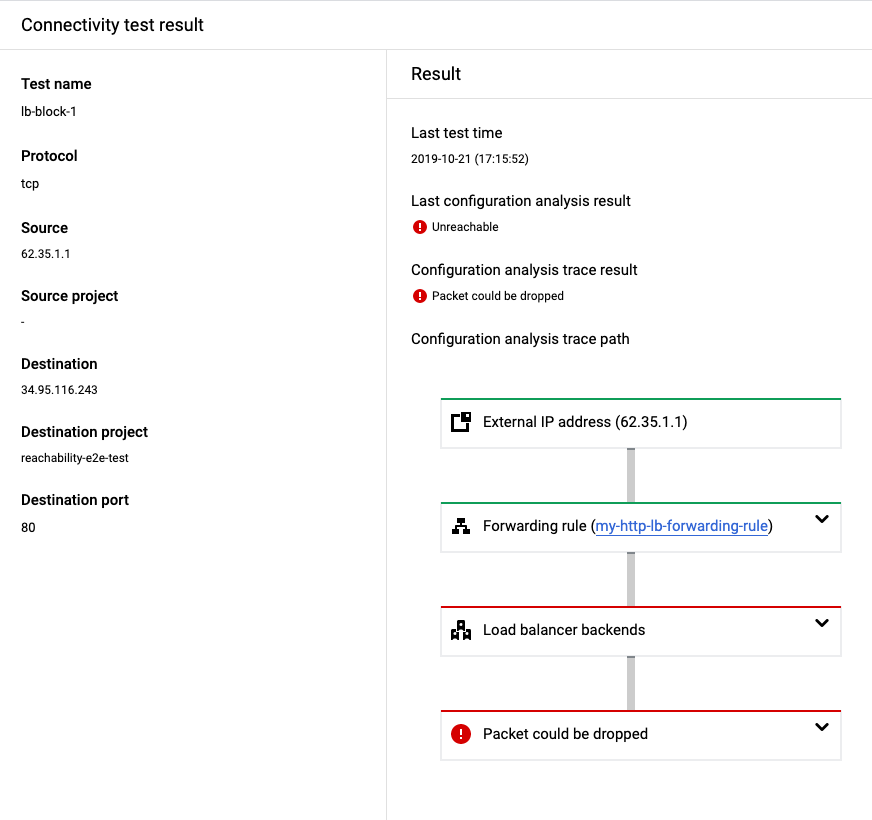](https://docs.cloud.google.com/static/network-intelligence-center/docs/connectivity-tests/images/example-lb-test-invalid-healthcheck.png) Example output for a missing firewall rule
In addition to invalid VPC firewall rules, the problems in the
following table are common configuration issues that
Connectivity Tests detects for Google Cloud load balancers. To
correct these issues, use the solutions described in the table.
| Configuration issue | Solution |
|---|---|
| The input parameters don't match the protocol or port that you defined in the forwarding rule for the load balancer. | Before you run a test, change the input parameter to match the protocol or port that you defined in the forwarding rule. |
| The forwarding rule for the load balancer does not have backends configured. | Before you run a test, configure the backends for the load balancer. |
| The load balancer has [invalid or inconsistent configurations](https://docs.cloud.google.com/network-intelligence-center/docs/connectivity-tests/concepts/detecting-configs). | Before you run a test, correct the invalid or inconsistent configurations. |
| Traffic can't reach an internal passthrough Network Load Balancer that has a mismatched region because the internal passthrough Network Load Balancer is a regional service. | Before you run a test, [configure load balancer components](https://docs.cloud.google.com/load-balancing/docs/l7-internal#traffic_types_scheme_and_scope) so that they are located in the same region. |
## What's next
- [Common test scenarios](https://docs.cloud.google.com/network-intelligence-center/docs/connectivity-tests/concepts/common-use-cases)
- [Learn about Connectivity Tests](https://docs.cloud.google.com/network-intelligence-center/docs/connectivity-tests/concepts/overview)
- [Troubleshoot Connectivity Tests](https://docs.cloud.google.com/network-intelligence-center/docs/connectivity-tests/support/troubleshooting)