This page describes the following common use cases for Connectivity Tests:
- Test connectivity from a Virtual Private Cloud (VPC) network to a non-Google Cloud network
- Test connectivity from a non-Google Cloud network to a VPC network
- Test connectivity between two non-Google Cloud networks
Trace diagrams on this page use the symbols described in the following legend.
| Symbol | Name | Meaning |
|---|---|---|
| Gray diamond [](https://docs.cloud.google.com/static/network-intelligence-center/docs/connectivity-tests/images/gray-diamond.png) | Checkpoint | A decision point where Connectivity Tests checks a configuration and decides whether a trace packet is to be forwarded, delivered, or dropped. |
| Blue rectangle [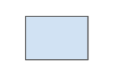](https://docs.cloud.google.com/static/network-intelligence-center/docs/connectivity-tests/images/blue-rectangle.png) | Hop | A step in the forwarding path for a trace packet, representing a Google Cloud resource that forwards a packet to the next hop in a VPC network---for example, to a Cloud Load Balancing proxy or to a Cloud VPN tunnel. |
| Orange hexagon [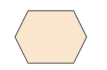](https://docs.cloud.google.com/static/network-intelligence-center/docs/connectivity-tests/images/orange-hexagon.png) | Endpoint | The source or destination of a trace packet. |
## From a VPC network to a non-Google Cloud network
You can use the Connectivity Tests configuration analysis to test
connectivity from your VPC network to a non-Google Cloud
network over Cloud VPN or Cloud Interconnect. Typically, a
non-Google Cloud network is your on-premises network or
another cloud provider's network.
The configuration analysis evaluates the network path only up to the external
IP address of the router or VPN gateway in a peer network.
The following example shows a trace from `VM1` in a VPC network,
over a Classic VPN tunnel using static routing, to `VM2` in an
on-premises network.
[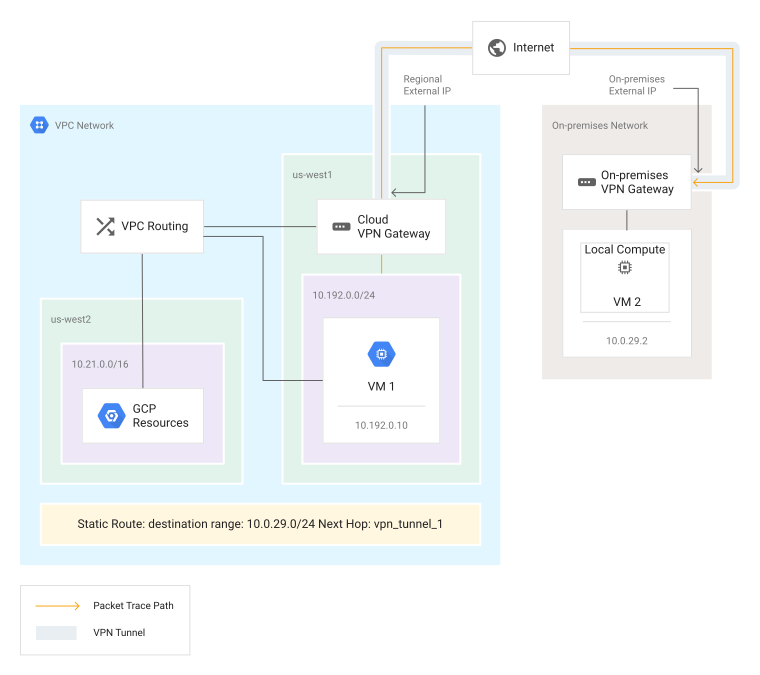](https://docs.cloud.google.com/static/network-intelligence-center/docs/connectivity-tests/images/packet-trace-through-vpn-tunnel-static.svg) Packet trace through a Cloud VPN tunnel using static routes
If there is a matching static or dynamic route for the destination IP address in
a peer network, the configuration analysis matches and verifies the
route according to [route precedence](https://docs.cloud.google.com/vpc/docs/routes#routeselection).
There is a default static route for all destinations with the next hop as the
internet gateway. Connectivity Tests can match this default route
unless you have removed or modified it.
If the default static route does not exist and there are no other valid routes
to the destination, the trace returns a
[final state of `Drop`](https://docs.cloud.google.com/network-intelligence-center/docs/connectivity-tests/concepts/state-tables#drop-state).
[](https://docs.cloud.google.com/static/network-intelligence-center/docs/connectivity-tests/images/trace-path-gcp-vm-to-on-prem.svg) Trace path to a non-Google Cloud network using static routing
[](https://docs.cloud.google.com/static/network-intelligence-center/docs/connectivity-tests/images/trace-path-dynamic-routing.svg) Trace path to a non-Google Cloud network using dynamic routing
## From a non-Google Cloud network to a VPC network
The configuration analysis verifies that your VPC network can
receive an inbound packet from your on-premises network after that packet could
arrive at your VPC network. The analysis also verifies that the
VPC network configuration is likely to allow delivery of this
packet to the intended destination. The configuration analysis shows that
**Packet could be delivered** (in the API response, a [final
state of `delivered`](https://docs.cloud.google.com/network-intelligence-center/docs/connectivity-tests/concepts/state-tables#deliver-state)). The
destination is considered reachable.
When your VPC network peers with your on-premises network through
Cloud Router, the VPC network receives one or more
dynamic routes from your peered on-premises network. At the same time, your
VPC network advertises its own routes to your peered on-premises
network.
Because Connectivity Tests doesn't have access to your on-premises
network configuration, it can't verify the configuration of correct routes and
firewall rules on your on-premises router. Thus, traffic from your on-premises
network to your VPC network is always considered valid by the
Connectivity Tests configuration analysis.
However, Connectivity Tests can evaluate whether the VPC
configuration allows delivery of a packet to a destination
in Google Cloud. To assess reachability, it evaluates the following
Google Cloud resources:
- The VPC network's ingress firewall rules.
- The [advertised route](https://docs.cloud.google.com/network-connectivity/docs/router/concepts/advertised-routes#overview-am) for IP addresses in your VPC network that Cloud Router advertises to your on-premises (peer) network.
The following successful test result evaluates connectivity through
Cloud VPN from the on-premises IP address to a VM instance. It also
evaluates the Border Gateway Protocol (BGP) session, routes, and
VPC firewall rules.
[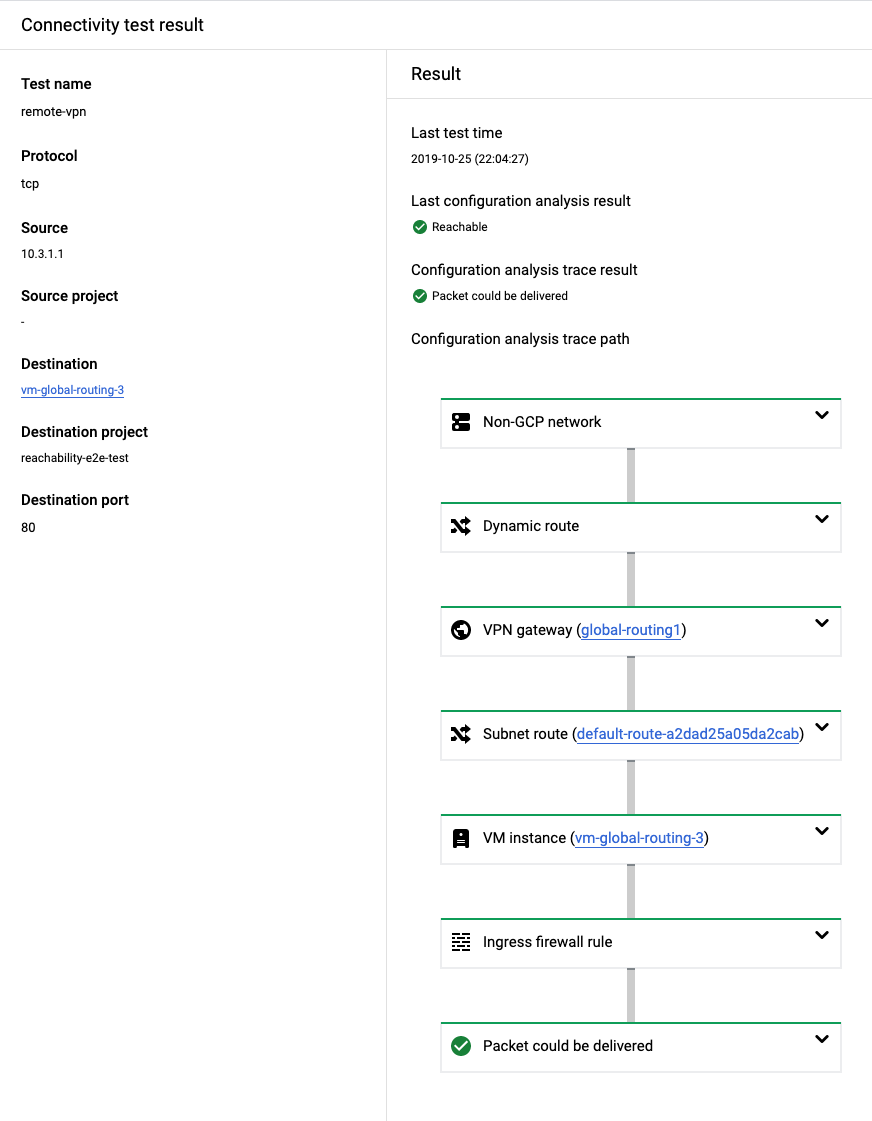](https://docs.cloud.google.com/static/network-intelligence-center/docs/connectivity-tests/images/example-on-prem-2-gcp.png) Example output for a successful test from on-premises to Google Cloud
## Between two non-Google Cloud networks
You can use the Connectivity Tests configuration analysis to evaluate
reachability between two non-Google Cloud networks that are
connected through NCC. In this context, a non-Google Cloud
network is typically your on-premises data center or a branch office.
Because Connectivity Tests doesn't have access to your on-premises
network configuration, it can't verify the configuration of routes and
firewall rules on your on-premises router. Thus, traffic from your on-premises
network to your VPC network is always considered valid by the
Connectivity Tests configuration analysis, and only configurations
within Google Cloud are verified.
The configuration analysis learns the on-premises network ranges from the
Cloud Routers associated with the NCC spokes. You can
identify configuration issues within your VPC network that can
impact connectivity between the on-premises networks.
All NCC spoke types use Cloud Routers to exchange routes
through BGP sessions. For example:
- Router appliance spokes: When Cloud Router and router appliance instances are in the same region, they exchange routes with one another.
- Cloud VPN and VLAN attachment spokes: Cloud Routers exchange BGP routes with routers in the on-premises network.
For more information about NCC, see the
[NCC overview](https://docs.cloud.google.com/network-connectivity/docs/network-connectivity-center/concepts/overview).
### Between two non-Google Cloud networks through Router appliance
In the following example, Connectivity Tests traces a simulated
packet from one on-premises network to another. The packet enters the
VPC network from the Router appliance spoke connected to the
first on-premises network. From there, it follows a dynamic route
as advertised by the Cloud Router associated with the Router appliance
spoke that is connected to the second on-premises network. The packet
reaches the on-premises network from the second router appliance
instance.
The following successful test result evaluates connectivity from an on-premises
network through two router appliance instances to another on-premises network.
It also evaluates the BGP session, routes, and VPC firewall rules.
[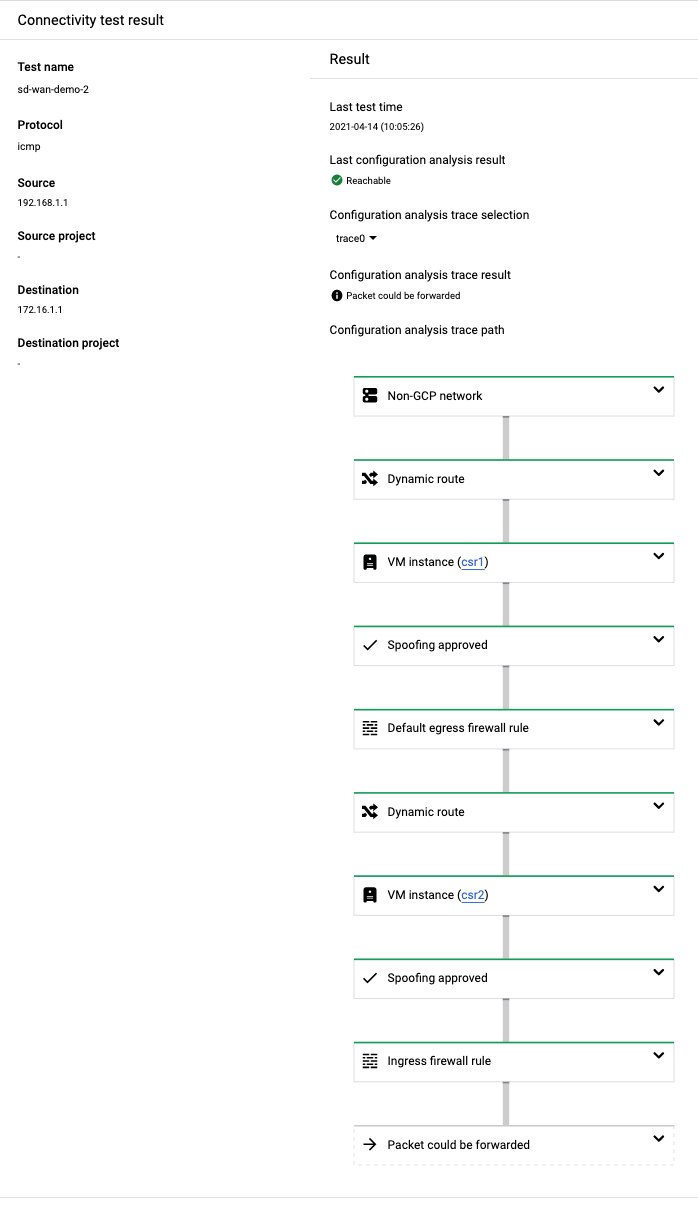](https://docs.cloud.google.com/static/network-intelligence-center/docs/connectivity-tests/images/example-on-prem-2-on-prem-ra.png) Example output for a successful test from on-premises to on-premises
### Between two non-Google Cloud networks through Cloud VPN and Cloud Interconnect
In the following example, Connectivity Tests traces a simulated packet
from one on-premises network to another. The packet enters the
VPC network through the VPN gateway. The packet reaches the other
on-premises network through an Interconnect connection.
The following successful test result evaluates connectivity from an on-premises
network through VPN and VLAN attachment spokes to another on-premises network.
[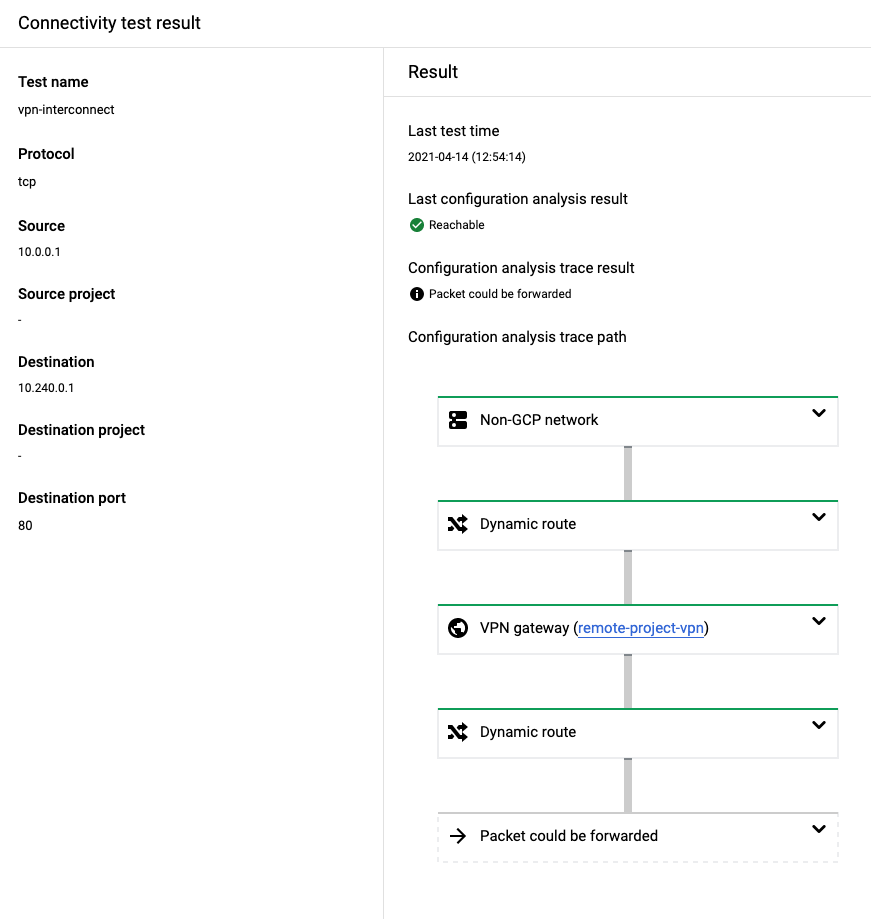](https://docs.cloud.google.com/static/network-intelligence-center/docs/connectivity-tests/images/example-onprem-onprem-vpnic.png) Example output for a successful test from on-premises to on-premises through VPN and VLAN attachment spokes
## What's next
- [Common test scenarios](https://docs.cloud.google.com/network-intelligence-center/docs/connectivity-tests/concepts/common-use-cases)
- [Learn about Connectivity Tests](https://docs.cloud.google.com/network-intelligence-center/docs/connectivity-tests/concepts/overview)
- [Troubleshoot Connectivity Tests](https://docs.cloud.google.com/network-intelligence-center/docs/connectivity-tests/support/troubleshooting)