> [!NOTE]
> **Note:** Connectivity Tests performs a [static analysis](https://docs.cloud.google.com/network-intelligence-center/docs/connectivity-tests/concepts/overview#no-data-plane-testing) of the resource configurations in your VPC network. This analysis does not represent the actual condition of the network data plane.
This page shows examples of invalid or inconsistent configurations of
Google Cloud resources that you might encounter when troubleshooting your
network with Connectivity Tests.
> [!NOTE]
> **Note:** The configuration failure examples shown in this document are a subset of all issues that Connectivity Tests can discover through its analysis. For the complete list of failure causes, see [Configuration analysis states](https://docs.cloud.google.com/network-intelligence-center/docs/connectivity-tests/concepts/state-tables).
For instructions about how to run tests, see
[Create and run
Connectivity Tests](https://docs.cloud.google.com/network-intelligence-center/docs/connectivity-tests/how-to/running-connectivity-tests).
For a description of testing to and from common network source
and destination types, see
[Common use cases](https://docs.cloud.google.com/network-intelligence-center/docs/connectivity-tests/concepts/common-use-cases).
## Detect an invalid configuration
There are many different types of invalid configurations; that is,
configurations that are not correct or that have been updated and are no longer
valid.
One example is a virtual machine (VM) instance that has been
[configured as a NAT gateway](https://docs.cloud.google.com/vpc/docs/special-configurations#natgateway),
but which has been
deleted
or migrated. In this case, the route to the VM instance still exists.
In the following diagram, `VM1` in `Network 1` should be able to access data on
`VM2`, `VM3`, and `VM4` in `Network 2` through a VM instance named `nat_vm_1`.
However, `nat_vm_1` no longer exists because it has migrated to a new VM,
`nat_vm_2`.
The configured route from `VM1` to the other three VM instances still
points to `nat_vm_1` as the next hop. However, because `nat_vm_1` no longer
exists and there is no route to `nat_vm_2`, `VM1` can't communicate with the
other VM instances.
A Connectivity Test run from`VM1` to `VM2` reveals that the
traffic between `VM1` and the other VM instances has been dropped due to an
invalid next hop for the route to the other VMs.
[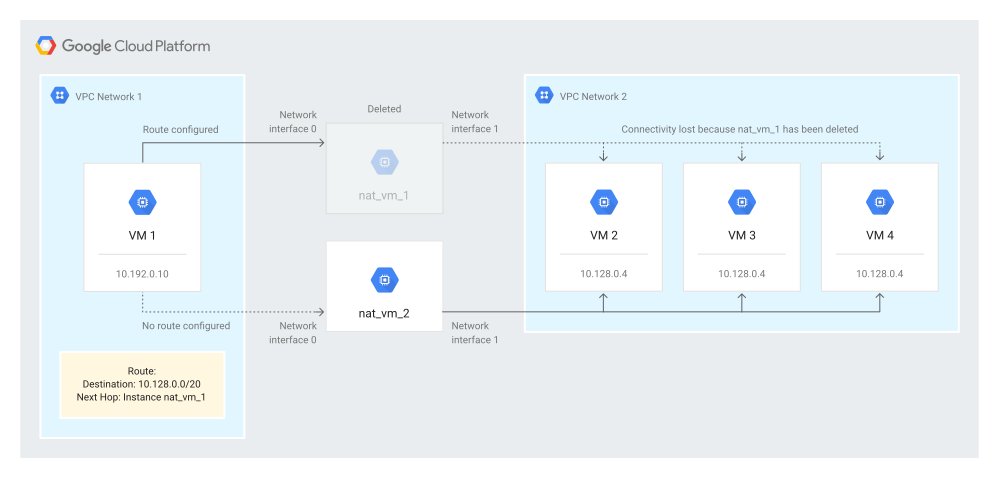](https://docs.cloud.google.com/static/network-intelligence-center/docs/connectivity-tests/images/invalid-route-configuration.svg) An invalid route configuration for Cloud NAT
In contrast, in the use case for an
[inconsistent configuration](https://docs.cloud.google.com/network-intelligence-center/docs/connectivity-tests/concepts/detecting-configs#inconsistent-config),
`VM3` is missing a network tag, making the load balancer configuration
inconsistent
across the load balancer backends. However, the configuration for `VM3` itself
is valid because configuring a VM instance doesn't require a tag.
## Detect an inconsistent configuration
You can also use Connectivity Tests to routinely validate
inconsistent
configurations. These configurations might not be causing any current
connectivity issues, but might unintentionally reduce network redundancy or
cause performance issues in the future.
The load balancer is configured to send traffic to an external IP address of
`35.184.176.28`. The traffic to that address is distributed across three
backends: `VM1`, `VM2`, and `VM3`. However, because of a missing network tag
on
`VM3`, the Virtual Private Cloud (VPC) firewall rule allows traffic from
external IP ranges to `VM1` and `VM2`, but denies that traffic to `VM3`.
The following trace from the allowed source ranges configured for the load
balancer to the destination external IP address of the load balancer shows the
intended configuration and the inconsistency. `VM1` and `VM2` are reachable,
but
`VM3` is unreachable. Only the two backends are reachable because `VM3` has
failed the health check.
[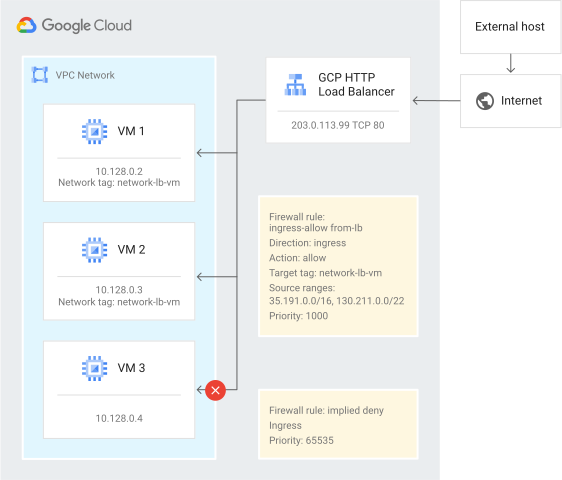](https://docs.cloud.google.com/static/network-intelligence-center/docs/connectivity-tests/images/external-https-lb-inconsistent-backend-config.svg) An external Application Load Balancer with an inconsistent backend configuration
## What's next
- [Learn about Connectivity Tests](https://docs.cloud.google.com/network-intelligence-center/docs/connectivity-tests/concepts/overview)
- [Troubleshoot Connectivity Tests](https://docs.cloud.google.com/network-intelligence-center/docs/connectivity-tests/support/troubleshooting)