If you're an Organization Policy Administrator, you can create an organization
policy constraint that restricts the IP addresses users
can specify for a peer VPN gateway. As a Cloud VPN user, you specify
at least one IP address for a peer VPN gateway when you create a
Cloud VPN tunnel. Limiting the IP addresses that users can specify
for a peer VPN gateway is a strategy for preventing the creation of
unauthorized VPN tunnels.
Policy constraints apply to all Cloud VPN
tunnels in a specific project, folder, or organization for both
Classic VPN and HA VPN.
The peer gateway IP addresses are the IP addresses of either on-premises
VPN gateways or other Cloud VPN gateways.
To control the list of peer IP addresses that users can specify when
creating Cloud VPN tunnels, use the Resource Manager constraint
[`constraints/compute.restrictVpnPeerIPs`](https://docs.cloud.google.com/resource-manager/docs/organization-policy/org-policy-constraints).
## Example organization policy constraint
In the following example, an Organization Policy Administrator creates an
organization policy constraint that defines the allowed peer VPN gateway IPv4
address and one IPv6 address.
This constraint has an allowlist that consists of one IPv4
address, `100.1.1.1`, and one IPv6 address, `2001:db8::2d9:51:0:0`.
Network Administrators in the project can only create Cloud VPN
tunnels that connect to the peer gateway IPv4 address `100.1.1.1` or the IPv6
address `2001:db8::2d9:51:0:0`. The constraint
disallows creation of Cloud VPN tunnels to
different peer gateway IP addresses.
[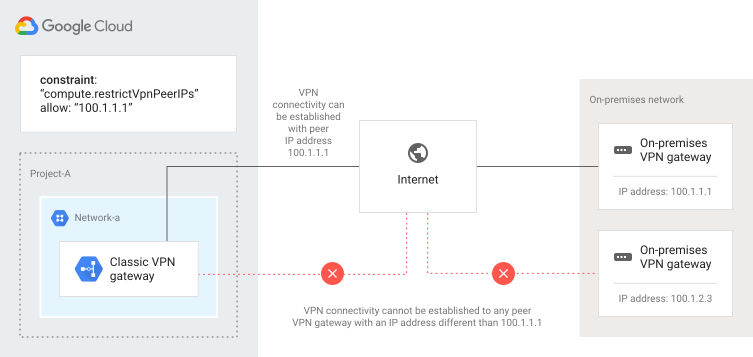](https://docs.cloud.google.com/static/network-connectivity/docs/vpn/images/vpn-org-policy-restrict-peer-ips.svg) Organization policy to restrict VPN peers (click to enlarge).
## Considerations
- The [organizational policy constraint](https://docs.cloud.google.com/resource-manager/docs/organization-policy/understanding-hierarchy#reconciling_policy_conflicts)
that restricts peer gateway IP addresses applies only to new Cloud VPN
tunnels. The constraint forbids Cloud VPN tunnels created after the
constraint is applied. For more information, see
[Understanding the Resource Manager
hierarchy](https://docs.cloud.google.com/resource-manager/docs/organization-policy/understanding-hierarchy).
- You can apply this constraint to Classic VPN tunnels
or to HA VPN tunnels.
- You can specify either multiple `allowedValues` or multiple `deniedValues` entries in a given policy, but you cannot use
`allowedValues` and `deniedValues` entries together in the same policy.
- You, or a Network Administrator with the correct permissions, must manage and
maintain the lifecycle and integrity of your VPN tunnels.
## Apply an organization policy constraint
To create an organization policy and associate it with an organization,
a folder, or a project, use the examples listed in the next sections and follow
the steps in [Using constraints](https://docs.cloud.google.com/resource-manager/docs/organization-policy/using-constraints).
### Required permissions
To set a peer IP address constraint at the organization or project level,
you must first be granted the [Organization Policy
Administrator role](https://docs.cloud.google.com/iam/docs/roles-permissions/orgpolicy) (`roles/orgpolicy.policyAdmin`) for your organization.
### Constrain connectivity from specific peer IP addresses
To only allow specific peer IP addresses through a Cloud VPN tunnel,
perform the following steps:
1. Find your organization ID by running the following command:
```
gcloud organizations list
```
The command output should look like the following example:
```
DISPLAY NAME ID
example-organization 29252605212
```
2. Create a JSON file that defines your policy, as
in the following example:
```
{
"constraint": "constraints/compute.restrictVpnPeerIPs",
"listPolicy": {
"allowedValues": [
"100.1.1.1",
"2001:db8::2d9:51:0:0"
],
}
}
```
3. Set the organization policy by using the Resource Manager
`gcloud` command `set-policy`, passing in the JSON file,
and using the `ORGANIZATION_ID` that you found in the
previous step.
### Constrain connectivity from any peer IP address
To prohibit the creation of any Cloud VPN tunnels, follow the steps
in this example constraint:
1. Find your organization ID or the ID for the node in your resource hierarchy
where you want to set a policy.
2. Create a JSON file like the following example:
```
{
"constraint": "constraints/compute.restrictVpnPeerIPs",
"listPolicy": {
"allValues": "DENY"
}
}
```
3. Pass in the JSON file by running the same command that you would use for
restricting specific peer IP addresses.
## What's next
- To use high-availability and high-throughput scenarios or multiple subnet scenarios, see [Advanced configurations](https://docs.cloud.google.com/network-connectivity/docs/vpn/concepts/advanced).
- To solve common issues that you might encounter when using Cloud VPN, see [Troubleshooting](https://docs.cloud.google.com/network-connectivity/docs/vpn/support/troubleshooting).