This document describes recommended topologies and the corresponding availability
Service Level Agreement (SLA) for each HA VPN topology.
For Classic VPN topologies, see
[Classic VPN topologies](https://docs.cloud.google.com/network-connectivity/docs/vpn/concepts/classic-topologies).
For more information about Cloud VPN, including both VPN types, see the
[Cloud VPN overview](https://docs.cloud.google.com/network-connectivity/docs/vpn/concepts/overview).
For definitions of terms used on this page, see
[Key terms](https://docs.cloud.google.com/network-connectivity/docs/vpn/concepts/key-terms).
## Overview
HA VPN supports one of the following recommended
topologies:
- [**Connect Google Cloud to your peer VPN gateway**](https://docs.cloud.google.com/network-connectivity/docs/vpn/concepts/topologies#peer-vpn-gateways).
This topology requires two VPN tunnels from
the HA VPN gateway to achieve the high availability SLA.
In this configuration, HA VPN has three typical peer
gateway configurations:
- Two separate peer VPN gateways, each with its own IP address.
- One peer VPN gateway with two separate IP addresses.
- One peer VPN gateway with one IP address.
- [**Connect multiple Google Cloud VPC
networks**](https://docs.cloud.google.com/network-connectivity/docs/vpn/concepts/topologies#connect-vpcs). To connect two Google Cloud
VPC networks, you create an HA VPN
gateway in each network. The networks can be in the same or different
[Google Cloud regions](https://docs.cloud.google.com/docs/geography-and-regions).
You receive a different availability SLA for HA VPN
gateways deployed in the same region versus those deployed across different
regions. For more information, see [High availability Configurations for
HA VPN](https://docs.cloud.google.com/network-connectivity/docs/vpn/concepts/topologies#ha-configurations).
- [**Connect a HA VPN gateway to Compute Engine VM
instances**](https://docs.cloud.google.com/network-connectivity/docs/vpn/concepts/topologies#connect-vms). In this topology, you connect an
HA VPN gateway to a Compute Engine virtual machine
(VM) instance. Your VM instances can be in same zone or different zones.
The availability SLA of the Compute Engine VM instance determines
the availability SLA for the VPN connection.
- [**HA VPN over Cloud Interconnect**](https://docs.cloud.google.com/network-connectivity/docs/interconnect/concepts/ha-vpn-interconnect).
In this topology, you create HA VPN tunnels to carry
IPsec-encrypted traffic over VLAN attachments of either
Dedicated Interconnect or Partner Interconnect. You can
reserve regional internal IP address ranges for your
HA VPN gateways. Your peer VPN gateway can also have
internal IP addresses. For more information and architecture diagrams, see
[HA VPN over Cloud Interconnect deployment
architecture](https://docs.cloud.google.com/network-connectivity/docs/interconnect/concepts/ha-vpn-interconnect#deployment_architecture).
In Google Cloud, all peer gateway scenarios are represented by a single
external peer VPN resource.
## High availability configurations for HA VPN
The following table outlines the availability SLAs offered by different
HA VPN configurations:
| Topology | Description | Availability SLA |
|---|---|---|
| [Connect Google Cloud to your peer VPN gateway](https://docs.cloud.google.com/network-connectivity/docs/vpn/concepts/topologies#peer-vpn-gateways) | Connect an HA VPN gateway to one or two separate peer VPN gateways | 99.99% |
| [Connect VPC networks by using HA VPN gateways](https://docs.cloud.google.com/network-connectivity/docs/vpn/concepts/topologies#connect-vpcs) | Connect two Google Cloud VPC networks by using an HA VPN gateway in each network. The HA VPN gateways are deployed in the same region. The VPC networks can be in the same region or different regions. | 99.99% |
| [HA VPN to Compute Engine VM instances in multiple zones](https://docs.cloud.google.com/network-connectivity/docs/vpn/concepts/topologies#vm-multi-zone) | Connect an HA VPN gateway to Compute Engine VM instances with external IP addresses | 99.9% |
| [HA VPN to a single Compute Engine VM instance](https://docs.cloud.google.com/network-connectivity/docs/vpn/concepts/topologies#vm-single-zone) | Connect an HA VPN gateway to only one Compute Engine VM instance with an external IP address | The availability SLA is determined by the availability SLA provided for a single VM instance of memory-optimized machine family for Compute Engine. For more information, see [Compute Engine Service Level Agreement (SLA)](https://docs.cloud.google.com/compute/sla). |
To help ensure the maximum availability SLA for your HA VPN
connections, we recommend that you configure two tunnels from your
HA VPN gateway to your peer VPN gateway or to another
HA VPN gateway. Make sure that the peer VPN gateway is also
configured to receive the same availability SLA.
To maintain connectivity in case of failure of one of the tunnels, connect all
interfaces of the HA VPN gateway to all interfaces of
the peer gateway or another HA VPN gateway.
## Connect Google Cloud to your peer VPN gateway
There are three typical peer gateway configurations for
HA VPN:
- An HA VPN gateway to two separate peer VPN gateways, each with its own IP address
- An HA VPN gateway to one peer VPN gateway that uses two separate IP addresses
- An HA VPN gateway to one peer VPN gateway that uses one IP address
To set up any of these configurations, see
[Create an HA VPN to a peer VPN gateway](https://docs.cloud.google.com/network-connectivity/docs/vpn/how-to/creating-ha-vpn).
If you deploy an HA VPN gateway with IPV6_ONLY
or IPV4_IPV6 stack type, then your VPN tunnels can support the exchange of IPv6
traffic. IPv6 must also be enabled in the BGP sessions that you create for the
VPN tunnels. In this scenario, you can assign IPv6 addresses to the on-premises
subnets and VPC subnets in the following topologies. For more
information, see [IPv6 support](https://docs.cloud.google.com/network-connectivity/docs/vpn/concepts/overview#ipv6-support).
### Connect two peer VPN gateways
If your peer-side gateway is hardware-based, having a second peer-side
gateway provides redundancy and failover on that side of the connection.
A second physical gateway lets you take one of the gateways offline for software
upgrades or other scheduled maintenance. It also protects you if there is a
failure in one of the physical gateways.
In this topology, one HA VPN gateway connects to two peer
VPN gateways. Each peer VPN gateway has one interface and one external IP address.
The HA VPN gateway uses two tunnels, one tunnel to each
peer VPN gateway.
In Google Cloud, the `REDUNDANCY_TYPE` for this configuration takes the
value `TWO_IPS_REDUNDANCY`.
The following example provides 99.99% availability SLA.
[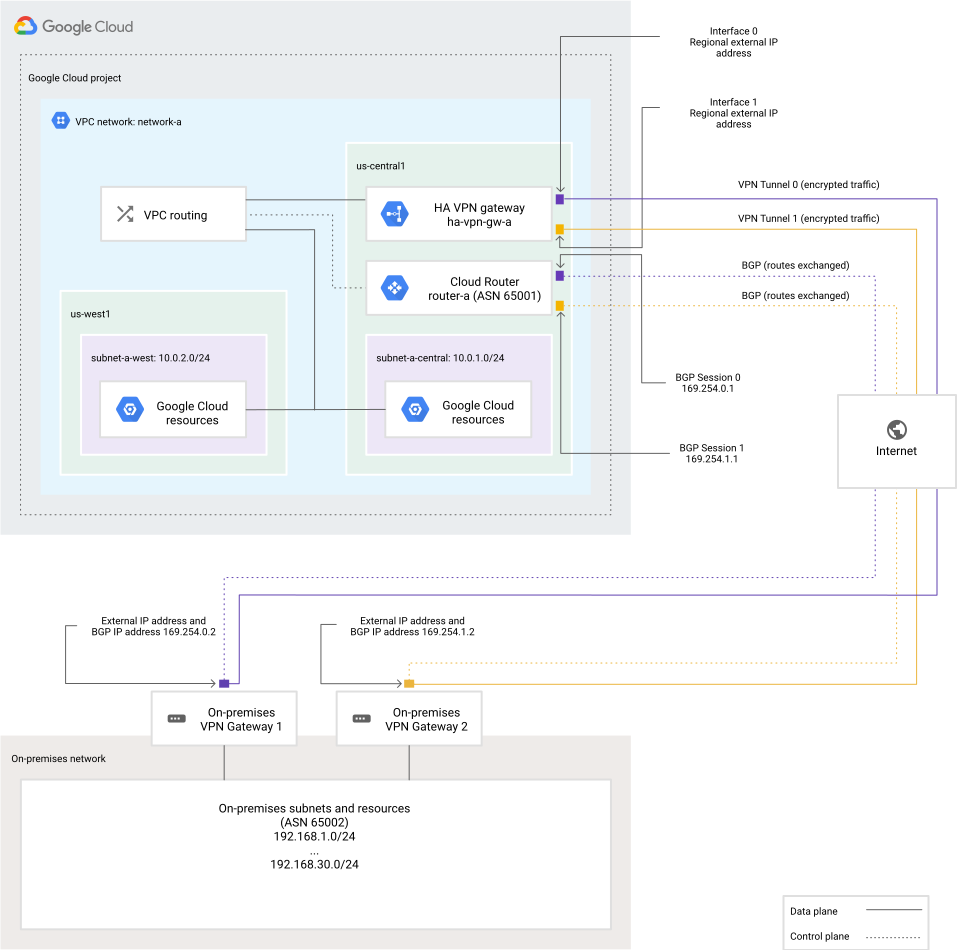](https://docs.cloud.google.com/static/network-connectivity/docs/vpn/images/ha-vpn-gcp-to-on-prem-2-a.svg) HA VPN to two peer (on-premises) VPN gateways (click to enlarge)
### Connect one peer VPN gateway with two IP addresses
This topology describes one HA VPN gateway that connects
to one peer VPN gateway that has two separate external IP addresses. The
HA VPN gateway uses two tunnels, one tunnel to each
external IP address on the peer VPN gateway.
In Google Cloud, the `REDUNDANCY_TYPE` for this configuration takes
the value `TWO_IPS_REDUNDANCY`.
The following example provides 99.99% availability SLA.
[](https://docs.cloud.google.com/static/network-connectivity/docs/vpn/images/ha-vpn-gcp-to-on-prem-2-b.svg) HA VPN to one peer (on-premises) VPN gateway with two IP addresses (click to enlarge)
### Connect one peer VPN gateway with one IP address
This topology describes one HA VPN gateway that connects
to one peer VPN gateway that has one external IP address. The HA VPN
gateway uses two tunnels, both tunnels to the single external IP address on the
peer VPN gateway.
In Google Cloud, the `REDUNDANCY_TYPE` for this configuration takes the value
`SINGLE_IP_INTERNALLY_REDUNDANT`.
The following example provides 99.99% availability SLA.
[](https://docs.cloud.google.com/static/network-connectivity/docs/vpn/images/ha-vpn-gcp-to-on-prem-2-c.svg) HA VPN to one peer (on-premises) VPN gateway with one IP address (click to enlarge)
### Configure for 99.99% availability SLA
To meet the 99.99% availability SLA on the Google Cloud side, there must
be a tunnel from each of the two interfaces on the HA VPN
gateway to the corresponding interfaces on the peer gateway.
If the peer gateway has two interfaces, then configuring two tunnels, one from
each peer interface to each HA VPN gateway interface, meets
the requirements for the 99.99% availability SLA. A full mesh configuration is
*not* required for 99.99% availability SLA *on the Google Cloud side*.
In this case, a full mesh is defined as two tunnels from each
HA VPN interface to each of the two interfaces on the
peer gateway. To confirm if your VPN vendor recommends a full mesh
configuration, see the documentation for your peer (on-premises) VPN
gateway or contact your VPN vendor.
In configurations with two peer interfaces, tunnels on each of the following
interfaces on the HA VPN gateway match the corresponding
interfaces on the peer gateway or gateways:
- HA VPN `interface 0` to peer `interface 0`
- HA VPN `interface 1` to peer `interface 1`
Examples are shown in the diagrams for
[two peer VPN gateways, two interfaces](https://docs.cloud.google.com/network-connectivity/docs/vpn/concepts/topologies#2-device-2-peers-drawing)
and [one peer VPN gateway, two interfaces](https://docs.cloud.google.com/network-connectivity/docs/vpn/concepts/topologies#1-device-2-peers-drawing).
If there is only one peer interface on one peer gateway, each tunnel from each
HA VPN gateway interface must connect to the single
peer interface. See the diagram for [one peer VPN gateway,
one interface](https://docs.cloud.google.com/network-connectivity/docs/vpn/concepts/topologies#1-peer-drawing).
> [!CAUTION]
> **Caution:** To receive the 99.99% availability SLA, configure at least one tunnel on each HA VPN gateway interface. Configuring only one tunnel from a single HA VPN interface to a single interface on the peer gateway doesn't provide enough redundancy to meet the availability SLA because there is an unused interface on the HA VPN gateway, which does not have a tunnel configured on it.
The following example *does not* provide 99.99% availability SLA:
- HA VPN `interface 0` to peer `interface 0`
[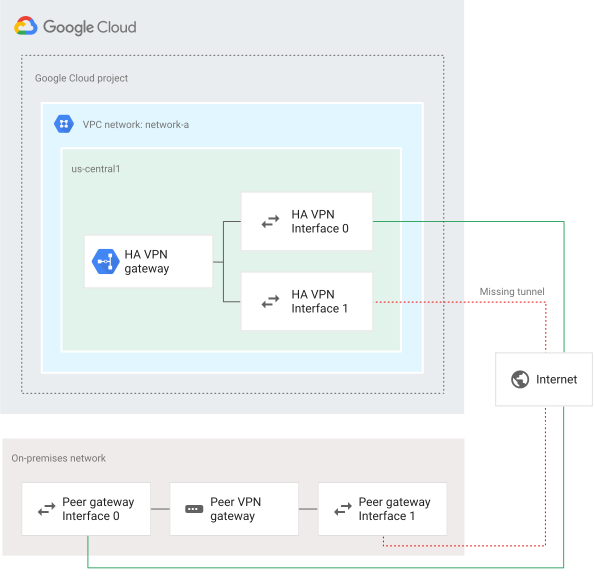](https://docs.cloud.google.com/static/network-connectivity/docs/vpn/images/ha-gcp-2-peer-1-tunnel.svg) A topology that doesn't provide high availability (click to enlarge)
## Active-active and active-passive routing options for HA VPN
If a Cloud VPN tunnel goes down, it restarts automatically. If an
entire virtual VPN device fails, Cloud VPN automatically instantiates a
new one with the same configuration. The new gateway and tunnel connect
automatically.
VPN tunnels connected to HA VPN gateways must use dynamic
(BGP) routing. Depending on the way that you configure route priorities for
HA VPN tunnels, you can create an active-active or
active-passive routing configuration. For both of these routing configurations,
both VPN tunnels remain active.
The following table compares the features of an active-active or active-passive
routing configuration.
| Feature | Active-active | Active-passive |
|---|---|---|
| Throughput | The effective aggregate throughput is the *combined throughput of both tunnels*. | After reducing from two active tunnels to one, the *effective overall throughput is cut in half*, which can result in slower connectivity or dropped packets. |
| Route advertisement | Your peer gateway advertises the peer network's routes with *identical multi-exit discriminator (MED) values for each tunnel*. The Cloud Router managing the Cloud VPN tunnels imports these routes as custom dynamic routes in your VPC network with *identical priorities*. Egress traffic sent to your peer network uses *[equal-cost multipath (ECMP) routing](https://wikipedia.org/wiki/Equal-cost_multi-path_routing)*. The same Cloud Router uses *identical priorities* to advertise routes to your VPC network. Your peer gateway *uses ECMP* to use these routes to send egress traffic to Google Cloud. | Your peer gateway advertises the peer network's routes with *different MED values for each tunnel*. The Cloud Router managing the Cloud VPN tunnels imports these routes as custom dynamic routes in your VPC network with *different priorities*. Egress traffic sent to your peer network uses *the route with the highest priority*, as long as the associated tunnel is available. The same Cloud Router uses *different priorities for each tunnel* to advertise routes to your VPC network. Your peer gateway can only *use the tunnel with highest priority* to send traffic to Google Cloud. |
| Failover | If the tunnel becomes unhealthy---for example, because DPD is down, then Cloud Router withdraws the learned routes whose next hops are the unavailable tunnel. If a BGP session down occurs, Cloud Router removes the learned routes whose next hops are the unavailable tunnel, without causing a tunnel to be unhealthy. The withdrawal process can take [40-60 seconds](https://docs.cloud.google.com/network-connectivity/docs/vpn/concepts/order-of-routes#tunnels_down), during which packet loss is expected. | If the tunnel becomes unhealthy---for example, because DPD is down, then Cloud Router withdraws the learned routes whose next hops are the unavailable tunnel. If a BGP session down occurs, Cloud Router removes the learned routes whose next hops are the unavailable tunnel, without causing a tunnel to be unhealthy. The withdrawal process can take 40-60 seconds, during which packet loss is expected. Uses a maximum of one tunnel at a time so that the second tunnel is able to handle all your egress bandwidth if the first tunnel fails and needs to be failed over. |
### Active-passive routing in full mesh topologies
If Cloud Router receives the same prefix with different MED values
through a given Cloud VPN interface, it only imports the route with the
highest priority to the VPC network. The other inactive routes
are not visible in the Google Cloud console or through the Google Cloud CLI. If the
route with the highest priority becomes unavailable, Cloud Router
withdraws it and automatically imports the next best route to the
VPC network.
### Using multiple tunnels or gateways
> [!NOTE]
> **Note:** For an example of a multiple-tunnel active-passive scenario, see [Configuring HA VPN for more
> bandwidth](https://docs.cloud.google.com/network-connectivity/docs/vpn/concepts/topologies#more-bandwidth).
> [!CAUTION]
> **Caution:** We recommend avoiding an active-passive configuration when you have more than two HA VPN tunnels. If you use an active-passive configuration across multiple HA VPN gateways---with an active and passive tunnel pair configured on each gateway---HA VPN doesn't use the passive tunnels for failover until all the active tunnels on all gateways have failed. Configuring multiple gateways with an active-passive configuration *can cause bandwidth
> loss*.
Depending on the peer gateway configuration, it's possible to construct routes
such that some traffic traverses one tunnel and other traffic traverses another
tunnel due to route priorities (MED values). Similarly, you can adjust the base
priority that the Cloud Router uses to share your VPC
network routes. These situations demonstrate possible routing configurations
that are neither purely active-active nor purely active-passive.
### Recommended routing option
When using a single HA VPN gateway, we recommend using an
active-passive routing configuration. With this configuration, the observed
bandwidth capacity at the time of normal tunnel operation matches the bandwidth
capacity observed during failover. This type of configuration is easier to
manage because the observed bandwidth limit stays constant, except for the
multiple gateway scenario described previously.
When using multiple HA VPN gateways, we recommend using an
active-active routing configuration. With this configuration, the observed
bandwidth capacity at the time of normal tunnel operation is twice that of the
maximum bandwidth capacity. However, this configuration effectively under
provisions the tunnels and can cause dropped traffic in case of failover.
## Connect VPC networks by using HA VPN gateways
You can connect two Google Cloud VPC networks by using
an HA VPN gateway in each network. The
VPC networks and the HA VPN gateways
can be in the same or different regions.
You can connect more than two VPC networks by using transitive
routing. To achieve transitive routing, create a *hub* VPC
network and connect your other VPC networks to this hub by using
individual HA VPN connections.
The availability SLA in this topology on whether the HA VPN
gateways are in the same region or different regions. You get a higher
availability SLA if the HA VPN gateways are in the same
region.
### Connect VPC networks
You can connect two VPC networks together by using an
HA VPN gateway in each network.
The HA VPN gateways must be deployed in the same region to
get the best availability SLA even if the VPC networks are in
different regions. Each HA VPN gateway
identifies the other gateway by its name.
The following example provides 99.99% availability SLA.
[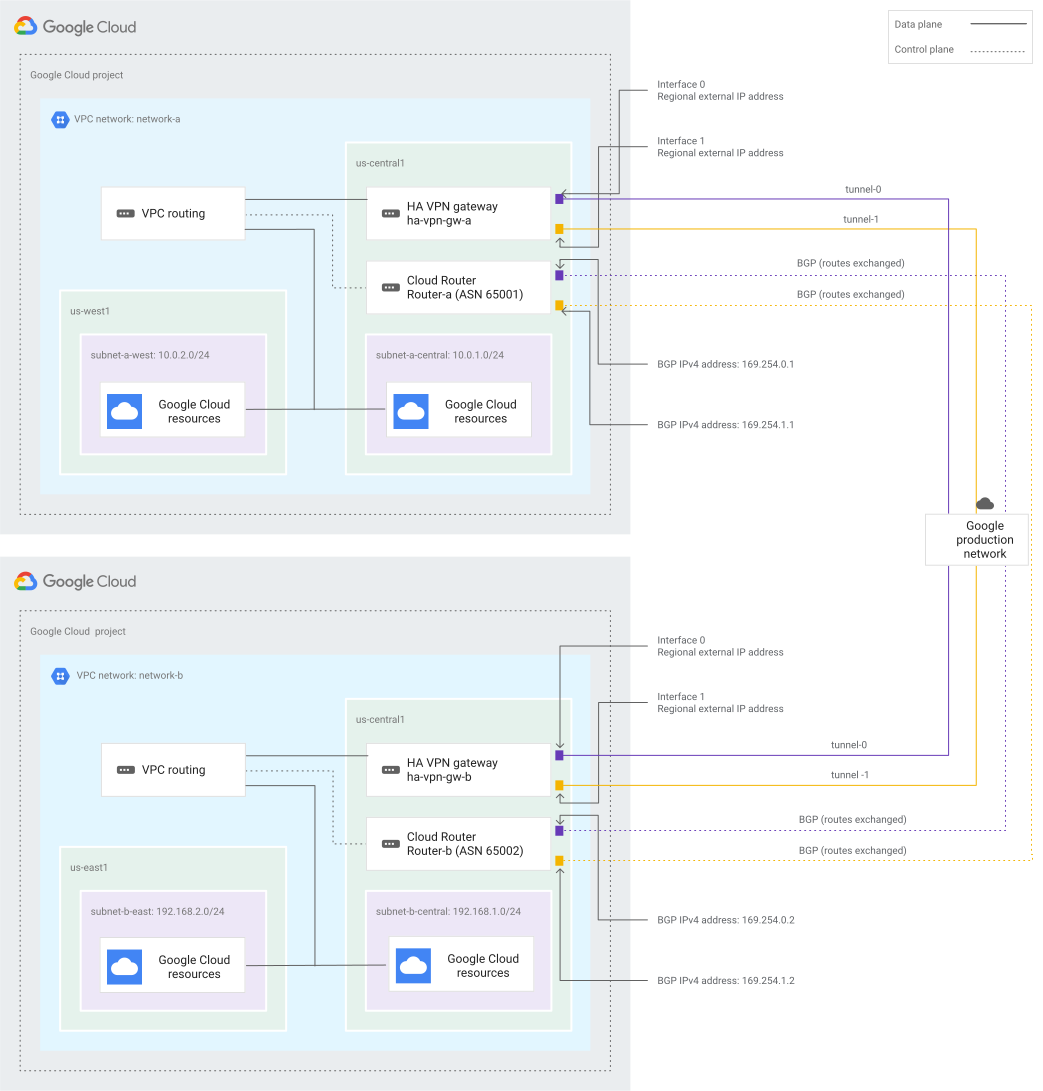](https://docs.cloud.google.com/static/network-connectivity/docs/vpn/images/ha-vpn-gcp-to-gcp.svg) HA VPN gateways between Google Cloud networks (click to enlarge)
To set up this configuration, see
[Create two fully configured HA VPN gateways that connect to each other](https://docs.cloud.google.com/network-connectivity/docs/vpn/how-to/creating-ha-vpn2#creating-ha-gw-2-gw-and-tunnel).
#### Configure for 99.99% availability SLA
Caution: Both HA VPN gateways must be in the same region to provide 99.99% availability SLA. Configuring only one tunnel on one interface for each HA VPN gateway doesn't provide 99.99% availability SLA.
To help ensure 99.99% availability SLA, configure each HA VPN
gateway with two tunnels so that both of the following are true:
- `Tunnel 0` connects `interface 0` on one HA VPN gateway to `interface 0` on the other HA VPN gateway.
- `Tunnel 1` connects `interface 1` on one HA VPN gateway to `interface 1` on the other HA VPN gateway.
You can connect two VPC networks together by using an
HA VPN gateway in each network, where the
HA VPN gateways are in different regions. However, this
topology provides a 99.9% availability SLA.
Unless you have a requirement for the HA VPN gateways
to be in different regions, we don't recommend having the
HA VPN gateways in different regions.
VPC networks are global resources, which means you can
use HA VPN to connect resources in different regions while
the HA VPN gateways are deployed in the same region.
The following example provides 99.9% availability SLA.
[](https://docs.cloud.google.com/static/network-connectivity/docs/vpn/images/ha-vpn-gcp-to-gcp-different-regions.svg) HA VPN gateways between Google Cloud networks (click to enlarge)
To set up this configuration, see
[Create two fully configured HA VPN gateways that connect
to each other](https://docs.cloud.google.com/network-connectivity/docs/vpn/how-to/creating-ha-vpn2#creating-ha-gw-2-gw-and-tunnel).
#### Configure for 99.9% availability SLA
To help ensure 99.9% availability SLA if the VPN gateways are in different
regions, configure each HA VPN
gateway with two tunnels so that both of the following are true:
- `Tunnel 0` connects `interface 0` on one HA VPN gateway to `interface 0` on the other HA VPN gateway.
- `Tunnel 1` connects `interface 1` on one HA VPN gateway to `interface 1` on the other HA VPN gateway.
To receive a better availability SLA, deploy the HA VPN
gateways in the same region . This configuration also lets you connect
VPC networks in different regions.
## Connect a HA VPN gateway to Compute Engine VM instances
With HA VPN, you can establish a secure connection
between an HA VPN gateway and Compute Engine
VM instances that function as network virtual appliances with
an IPsec implementation. This topology provides 99.9% availability SLA when
configured correctly.
### Connect HA VPN gateway to multiple VM instances
In this topology, an HA VPN gateway connects to two
Compute Engine VM instances. The HA VPN
gateway and the VMs are in two different Virtual Private Cloud networks. The two VMs
are in different zones, with each VM having an external IP address. The VM
instances behave like peer VPN gateways.
This topology is especially useful when you want to connect
HA VPN to a third-party network virtual appliance VM
hosted in a Compute Engine VM instance. For example, by using this topology, you can
upgrade one of the network virtual appliance VMs
without any downtime to the VPN connection.
In the diagram, the HA VPN gateway is in a VPC
network named `network-a`, and the two VMs are in `network-b`. Both VPC
networks are located in `us-central1`. The HA VPN
gateway in `network-a` is configured with the external IP addresses of each of
the VMs in `network-b`.
You can also have the HA VPN gateway and
the VMs in two different regions.
We recommend that you use this topology to improve availability.
The following example provides 99.9% availability SLA.
[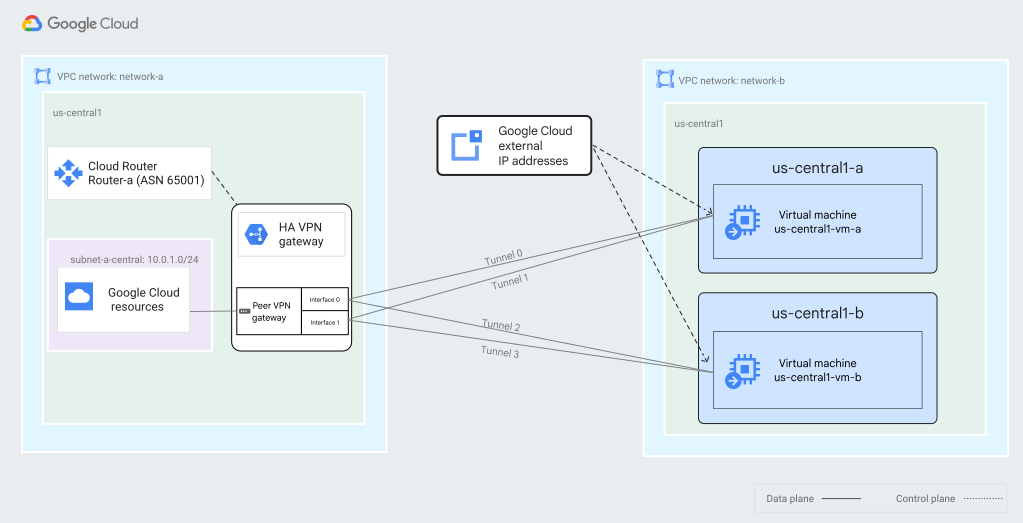](https://docs.cloud.google.com/static/network-connectivity/docs/vpn/images/ha-vpn-gateway-to-vm.svg) A topology that connects an HA VPN gateway to two Compute Engine VM instances with each VM in a different zone (click to enlarge)
To set up this configuration, see [Connect HA VPN to
Compute Engine VMs](https://docs.cloud.google.com/network-connectivity/docs/vpn/how-to/connect-ha-vpn-vm).
#### Configure for 99.9% availability SLA
To meet the 99.9% SLA, there must be at least two tunnels from each of the two
interfaces on the HA VPN gateway to the corresponding
interfaces on each of the VMs. We recommend that you use this topology to get
higher availability SLA.
Two tunnels on each of the following interfaces on the
HA VPN gateway connect to the interfaces on the VM:
- `Tunnel 0` from `interface 0` to `us-central1-vm-a` in the `us-central1-a` zone
- `Tunnel 1` from `interface 1` to `us-central1-vm-a` in the `us-central1-a` zone
- `Tunnel 2` from `interface 0` to `us-central1-vm-b` in the `us-central1-b` zone
- `Tunnel 3` from `interface 1` to `us-central1-vm-b` in the `us-central1-b` zone
### Connect HA VPN gateway HA VPN to a single VM instance
HA VPN lets you connect a HA VPN gateway to a
Compute Engine virtual machine (VM) instance that works as a
network virtual appliance and runs an IPsec VPN implementation. The
HA VPN gateway and the VM are in two different VPCs. The VM has
an external IP address.
Overall availability is determined by the availability SLA provided for a single
VM instance of memory-optimized machine family for Compute Engine.
For more information, see
[Compute Engine Service Level Agreement (SLA)](https://cloud.google.com/compute/sla).
[](https://docs.cloud.google.com/static/network-connectivity/docs/vpn/images/ha-vpn-gateway-to-vm2.svg) A topology that connects an HA VPN gateway to a Compute Engine VM (click to enlarge)
To set up this configuration, see [Connect HA VPN to
Compute Engine VMs](https://docs.cloud.google.com/network-connectivity/docs/vpn/how-to/connect-ha-vpn-vm).
#### Configure for 99.9% availability SLA
To meet the 99.9% availability SLA, there must be two tunnels from each of the
two interfaces on the HA VPN gateway to the interface of
the Compute Engine VM.
> [!IMPORTANT]
> **Important:** Overall availability is determined by the availability SLA provided for a single VM instance of memory-optimized machine family for Compute Engine. For more information, see [Compute Engine Service Level Agreement (SLA)](https://cloud.google.com/compute/sla).
Two tunnels on each of the following interfaces on the
HA VPN gateway connect to the interfaces on VM:
- `Tunnel 0` from `interface 0` to `us-central1-vm-a` in the `us-central1-a` zone
- `Tunnel 1` from `interface 1` to `us-central1-vm-a` in the `us-central1-a` zone
## What's next
- To use high-availability and high-throughput scenarios or multiple subnet scenarios, see [Advanced configurations](https://docs.cloud.google.com/network-connectivity/docs/vpn/concepts/advanced).
- To help you solve common issues that you might encounter when using Cloud VPN, see [Troubleshooting](https://docs.cloud.google.com/network-connectivity/docs/vpn/support/troubleshooting).