This document describes HA VPN topologies that help to increase
the bandwidth of your HA VPN setup. If your bandwidth
needs exceed the Cloud VPN set limit of 250,000 packets per second, use the
recommended topology described in this document to increase the bandwidth of
your HA VPN setup.
For definitions of terms used on this page, see [Key
terms](https://docs.cloud.google.com/network-connectivity/docs/vpn/concepts/key-terms).
## Increase bandwidth of your HA VPN setup
You can increase the bandwidth of your HA VPN setup by
adding more tunnels, each with a unique pair of IP addresses. If you want
different IP addresses for each tunnel, create multiple
HA VPN gateways. If you want the same IP address for
different tunnels, use the same HA VPN gateway interface
for these tunnels.
Each Cloud VPN tunnel can handle up to 250,000 packets per second for
the sum of ingress and egress traffic. The bandwidth required for a tunnel
depends on the average packet size. 250,000 packets per second is equivalent to
a bandwidth between 1 Gbps and 3 Gbps. This bandwidth equivalent
depends on the average size of the packets.
To determine the number of tunnels you require, use 250,000 packets per second as
the sum of inbound and outbound capacity for each tunnel. For example, if you
need 600,000 packets per second for a total of inbound and outbound traffic, you
need 3 pairs of HA VPN tunnels (6 tunnels) to ensure the
required bandwidth and failover capacity. If you want to use the same IP address
for different tunnels, all the tunnels must use the same interface of a gateway.
For more information about VPN bandwidth calculations, see [Network bandwidth](https://docs.cloud.google.com/network-connectivity/docs/vpn/concepts/overview#network-bandwidth).
When configuring HA VPN to increase bandwidth, consider
the following guidelines:
- **Check VPN tunnel quotas**
Unless you are connecting an HA VPN gateway
to another HA VPN gateway,
each HA VPN gateway supports an unlimited number
of VPN tunnels on each interface. If you want to have different IP addresses
for each tunnel, you must create multiple gateways. [Quotas](https://docs.cloud.google.com/network-connectivity/docs/vpn/quotas#quotas) limit
the total number of VPN tunnels in your project; you can
[request additional quota](https://docs.cloud.google.com/network-connectivity/docs/vpn/quotas#requesting-additional-quota)
to increase or decrease to this quota.
- **Add HA VPN gateways to add tunnels between two HA VPNs**
When you connect an HA VPN gateway to another
HA VPN gateway, you can connect only one tunnel per
interface (`0` or `1`) to the corresponding interface (`0` or `1`) on the other
HA VPN gateway. This means you can't have two tunnels
using the same interface on either side. [Quotas](https://docs.cloud.google.com/network-connectivity/docs/vpn/quotas#quotas)
limit the total number of HA VPN gateways in your
project. You can [request additional
quota](https://docs.cloud.google.com/network-connectivity/docs/vpn/quotas#requesting-additional-quota) to
increase this quota.
To increase the number of VPN tunnels between
HA VPN gateways, you must create additional pairs of
HA VPN gateways.
- **Add pairs of VPN tunnels**
To increase the bandwidth between HA VPN and
a peer VPN gateway, add more VPN tunnel pairs.
For example, to double the bandwidth of an HA VPN
gateway that connects to a peer VPN gateway with two tunnels
(one *active* , one *passive*), add two more VPN tunnels. Add one more active
tunnel and one more passive tunnel.
The BGP sessions for all four tunnels receive the same prefixes.
The two active tunnels receive the prefixes with the same higher priority,
and the two passive tunnels receive the prefixes with the same lower priority.
- **Match interfaces on the peer VPN gateway**
To continue receiving an availability service level agreement (SLA), you
must match the interfaces on your peer VPN gateway to the interfaces on your
HA VPN gateway.
When you double the bandwidth of an HA VPN gateway
that connects to a peer VPN gateway, match the tunnels
to the interfaces on the peer VPN gateway.
Place the two active tunnels on interface `0` and the two passive
tunnels on interface `1`. Alternatively, you can place
the two active tunnels on interface `1` and the
two passive tunnels on interface `0`.
### Connect VPC networks
To increase bandwidth between two VPC networks, you can increase
the number of tunnels between the two HA VPN gateways in
the first VPC to the two peer HA VPN gateways
in the second VPC. In this topology, the VPC can
be in the same or different projects. The interfaces on both VPC
networks are configured consistently. For example, if you have two active tunnels,
you place them on interface `0` on both VPC networks.
For example, if you need your HA VPN setup to handle
800,000 packets per second between your two VPC networks, you
must configure four pairs of HA VPN tunnels
(a total of eight tunnels) to achieve this bandwidth.
We recommend that you configure only one Cloud Router per side. More
than one Cloud Router per side doesn't provide any benefit, unless you
need more BGP sessions than are supported by one Cloud Router. For
more information about the maximum number of BGP peers supported by a
Cloud Router, see
[Limits](https://docs.cloud.google.com/network-connectivity/docs/router/quotas#limits).
This topology provides the following bandwidth characteristics:
- Uses the Google network for data transfer.
- Can potentially support a very large number of gateways and tunnels, leading to very high bandwidth.
- Has a maximum bandwidth capacity of 250,000 packets per second per tunnel.
[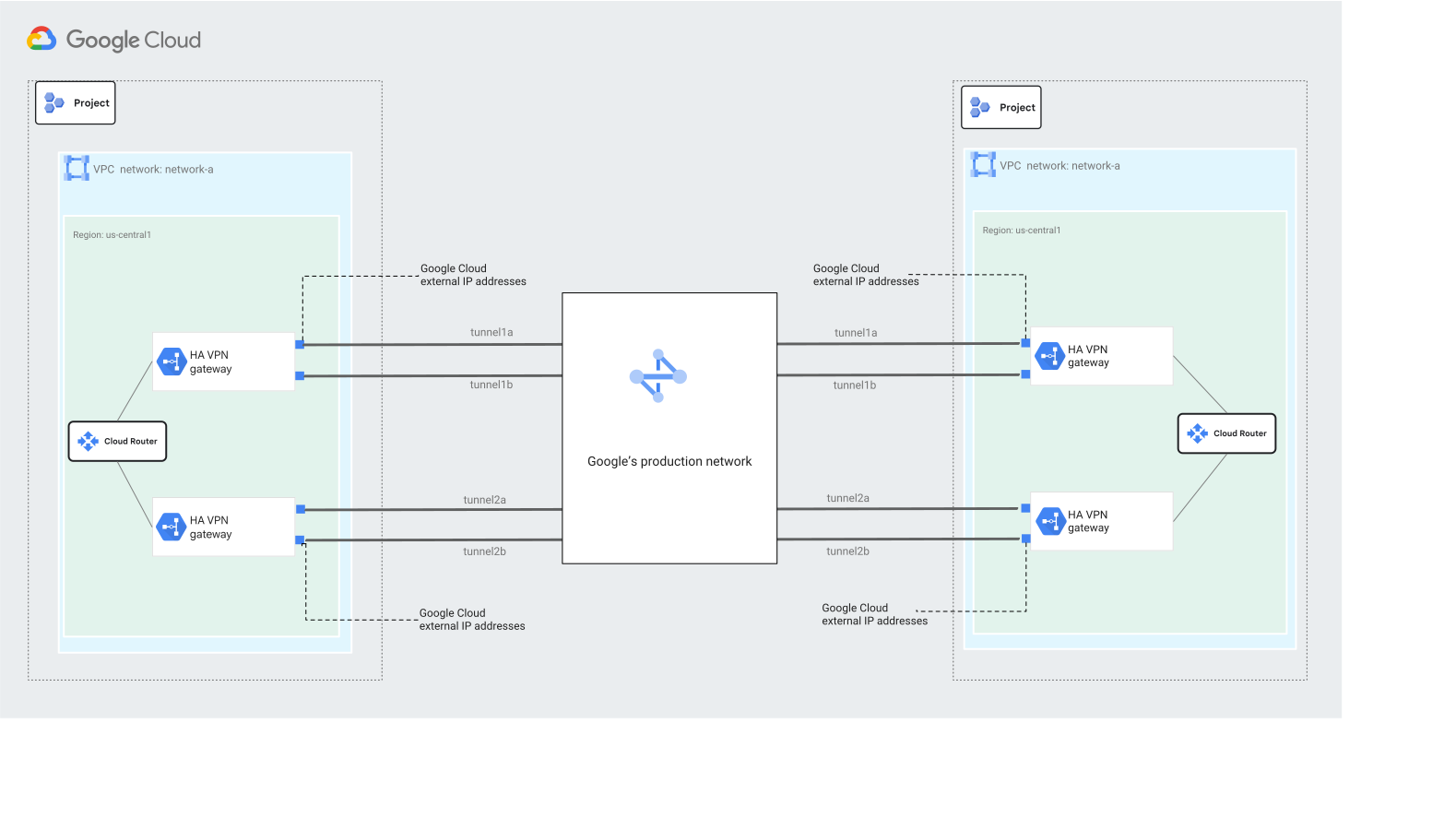](https://docs.cloud.google.com/static/network-connectivity/docs/vpn/images/two-vpc-bw.svg) Connect two VPC networks to increase bandwidth (click to enlarge)
### Connect Google Cloud to multiple remote sites
To increase bandwidth between Google Cloud and multiple remote sites, you can
create several Cloud VPN tunnels to distribute traffic and potentially
increase bandwidth.
In this topology, one HA VPN gateway in the
VPC is connected to multiple remote site. Each
remote site location establishes connectivity to Google Cloud by using
a pair of tunnels to the HA VPN gateway. The bandwidth
is limited only by the tunnel bandwidth limit of 250,000 packets per second.
This topology provides the following bandwidth characteristics:
- Uses one IP address per HA VPN interface, saving IPv4 public IP addresses.
- Supports a bandwidth of 250,000 packets per second per tunnel and can handle a very large number of tunnels.
- Supports a remote VPN gateway that can be one or multiple physical VPN devices.
[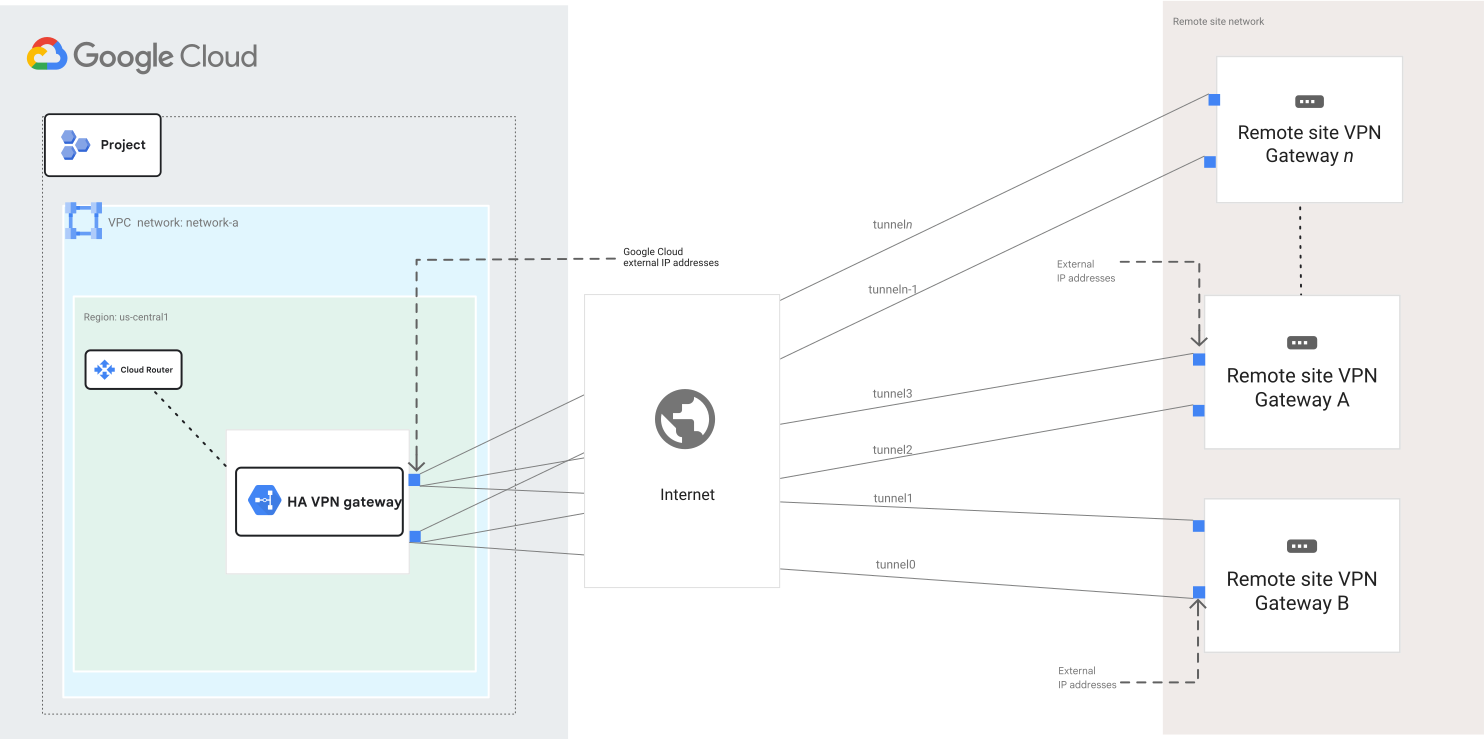](https://docs.cloud.google.com/static/network-connectivity/docs/vpn/images/gcp-to-remote-bandwidth.svg) Connect Google Cloud to multiple remote sites (click to enlarge)
### Connect Google Cloud to multiple remote site with Cloud Interconnect
To increase bandwidth between Google Cloud and multiple remote sites connected
by using Cloud Interconnect, create several Cloud VPN tunnels
to distribute traffic and potentially increase bandwidth.
In this topology, one HA VPN gateway in the
VPC is connected to multiple geographically dispersed remote site
locations by using Cloud Interconnect
locations. Each remote site establishes connectivity to
Google Cloud by using a pair of tunnels that connect to the
HA VPN gateway. This topology requires you to configure
two Cloud Router. The bandwidth is limited only by the tunnel
bandwidth limit of 250,000 packets per second.
This topology provides the following bandwidth characteristics:
- Combines Cloud Interconnect and VPC to create a solution that balances security and performance.
- Lets you use Cloud Interconnect for large data transfers and
VPC for secure access to specific applications or services
within Google Cloud.
[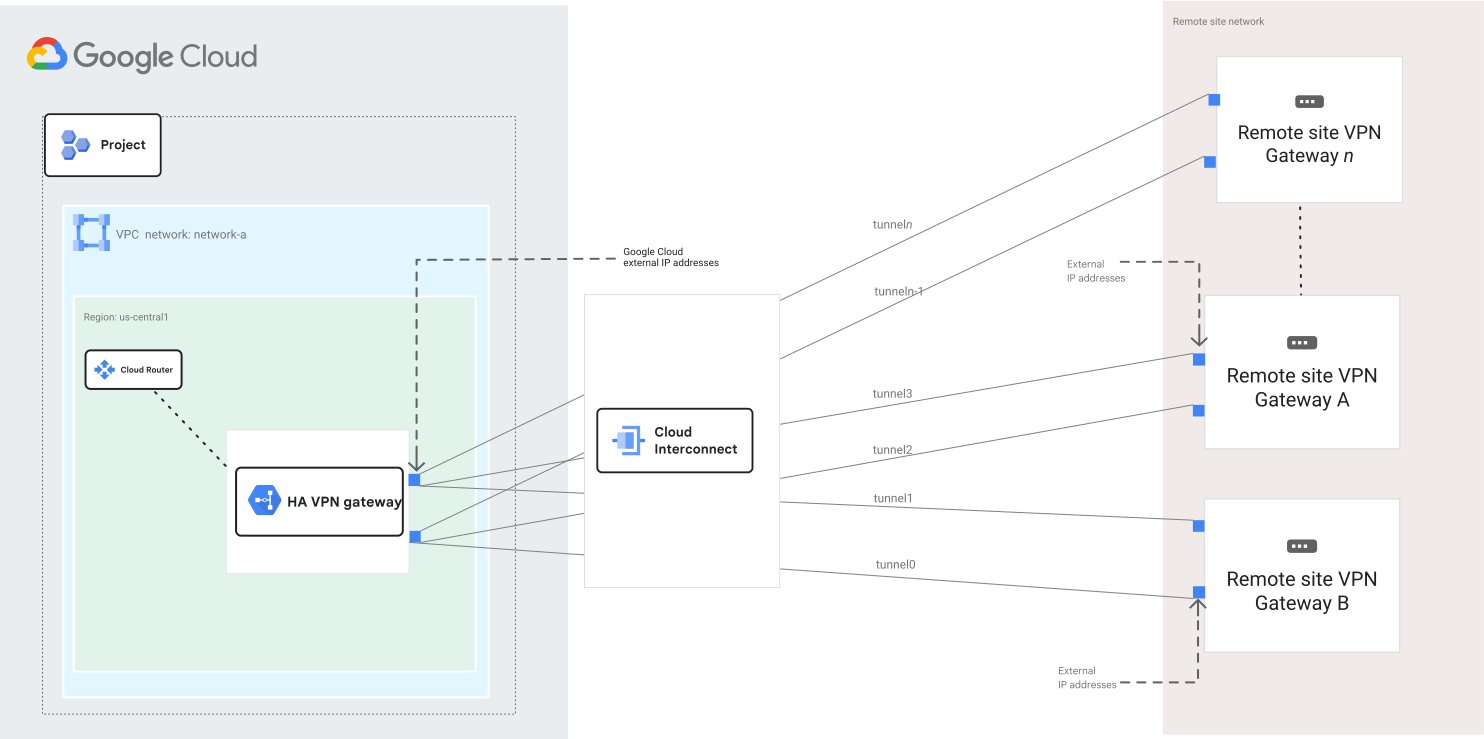](https://docs.cloud.google.com/static/network-connectivity/docs/vpn/images/gcp-to-remote-interconnect-bandwidth.svg) Connect Google Cloud to multiple remote sites by using Cloud Interconnect networks (click to enlarge)
## What's next
- To use high-availability and high-throughput scenarios or multiple subnet scenarios, see [Advanced configurations](https://docs.cloud.google.com/network-connectivity/docs/vpn/concepts/advanced).
- To help you solve common issues that you might encounter when using Cloud VPN, see [Troubleshooting](https://docs.cloud.google.com/network-connectivity/docs/vpn/support/troubleshooting).