

This document describes common Network Connectivity Center (NCC) use cases to help you choose a topology for connecting Virtual Private Cloud (VPC) networks, on-premises networks, and other cloud provider networks.
Connect different VPC networks with NCC
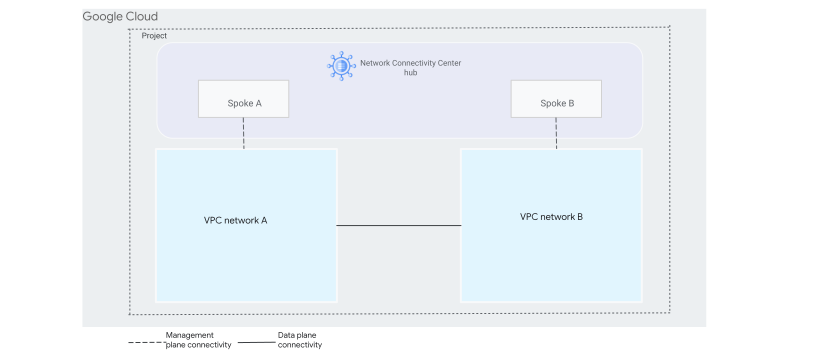
When you attach two or more Virtual Private Cloud (VPC) spokes to a hub, NCC provides connectivity through subnet routes among all the VPC networks that are represented by the spokes. Using a hub simplifies the management of large-scale mesh subnet connectivity. See quotas for how many VPC networks can be connected to a hub.
The following diagram shows two VPC spokes.
Connect VPC spokes to on-premises networks
VPC spokes can connect to on-premises networks by using hybrid spokes located in other routing VPC networks. Each NCC hub supports multiple VPC spokes and Cloud Interconnect VLAN attachments, HA VPN tunnels, or Router appliance VMs added as hybrid spokes.
Connect networks using Router appliance VMs
NCC can use Router appliance VMs in the following two IPv4 connectivity scenarios:
- Connecting a VPC network to an on-premises or other cloud provider network using dynamic routes
- Connecting two VPC networks to each other using dynamic routes
With this option, Cloud Router manages the BGP sessions for Router appliance VMs.
Connect an external network to Google Cloud
The following diagram uses a hybrid spoke with a Router appliance VM to connect two VPC networks to an external network. The Cloud Router VM has one network interface (NIC) in each VPC network.
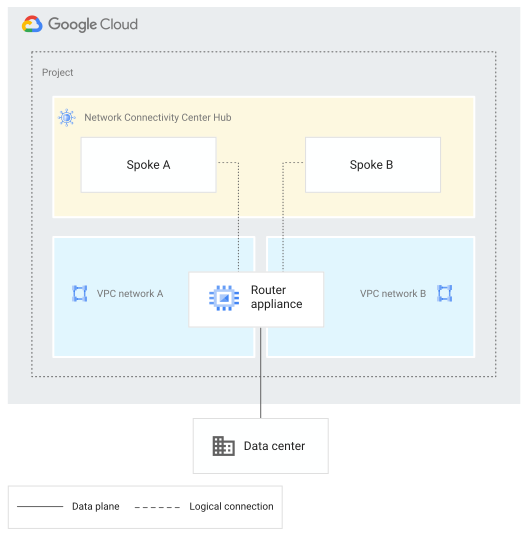
For more information about this use case, see Site-to-cloud topologies that use a third-party appliance.
Manage connectivity between VPC networks
The following diagram uses a hybrid spoke with a Router appliance VM running specialized firewall or packet inspection software to connect two VPC networks.
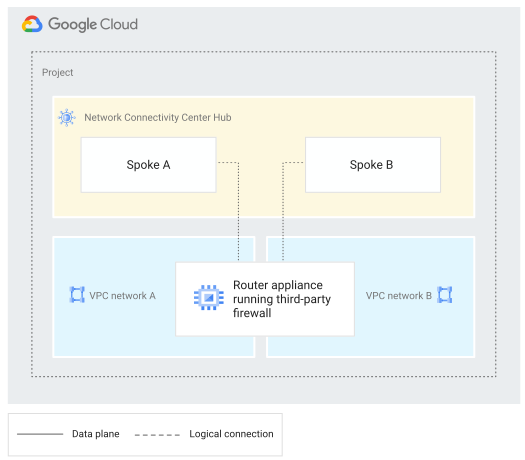
For more information, see VPC-to-VPC topology that uses a third-party appliance.
Conduct data transfer over Google's network (site-to-site)
Data transfer provides IPv4 and IPv6 (Preview) connectivity between external networks using a Google Cloud VPC network and hybrid spokes. You can transfer data between multiple on-premises networks or to other cloud networks.
When you create a hybrid spoke, you can enable the data transfer option for that spoke. When data transfer is enabled for hybrid spokes connected to the same hub, the dynamic routes learned by each Router appliance VM, Cloud VPN tunnel, or Cloud Interconnect VLAN attachment are re-advertised to the other VMs, tunnels, or VLAN attachments associated with any hybrid spoke connected to the same hub. Data transfer requires that all hybrid spokes refer to Router appliance VMs, Cloud VPN tunnels, or Cloud Interconnect VLAN attachments in a single VPC network.
For example, suppose you have data centers in New York, Sydney, and Tokyo. After you use supported resources to connect your VPC network to each of these sites, you can create a spoke to represent each network. After you complete this setup, NCC would provide full mesh connectivity between all three sites.
As shown in the following diagram, you can create spokes that rely on connectivity resources such as Cloud VPN, Cloud Interconnect, and Router appliance.
The diagram doesn't show Cross-Cloud Interconnect, but you can also use Cross-Cloud Interconnect VLAN attachments.
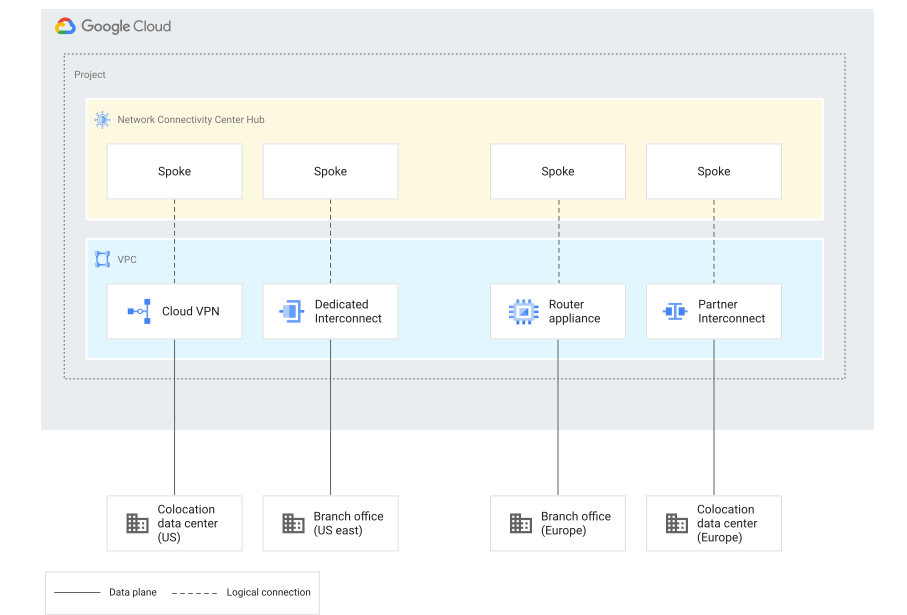
For more information about this use case, see Site-to-site data transfer overview.
Secure remote networks with NCC Gateway spokes
NCC Gateway lets you secure your access to private applications hosted in Google Cloud, on-premises, in other cloud providers, and in public applications hosted on internet and SaaS applications. NCC Gateway lets you create regional deployments for optimal data center proximity and manage cross-region traffic on the Google Cloud private backbone.
For detailed information about NCC Gateway use cases, see the Use cases section in the NCC Gateway overview.
What's next
- To learn how to manage hubs and spokes, see Work with hubs and spokes.
- To learn how to use Cloud VPN spokes, see Connect two sites by using Cloud VPN spokes.
- To obtain a list of partners whose solutions are integrated with NCC, see NCC partners.
- To check the maximum number of hubs and spokes per project, see Quotas and limits.