# Public NAT
Public NAT lets your Compute Engine virtual machine (VM) instances
communicate with the internet by allocating a set of shared external IPv4
addresses and source ports to each VM that uses Public NAT to
create outbound connections to the internet.
With Public NAT, VM instances that
don't have external IPv4 addresses can communicate with IPv4 destinations on the
internet. Public NAT also lets your VM instances with either
external or internal IPv6 addresses connect to IPv4 destinations on the
internet.
## Specifications
Cloud NAT supports the following types of address translation
for Public NAT:
- From IPv4 to IPv4, or NAT44. For more
information, see [NAT44 in Public NAT](https://docs.cloud.google.com/nat/docs/public-nat#snat-flow-example).
- From IPv6 to IPv4, or NAT64. NAT64 is available for Compute Engine VM
instances. For Google Kubernetes Engine (GKE) nodes, serverless endpoints,
and regional internet network endpoint groups, Cloud NAT
translates only IPv4 addresses. For more information, see
[NAT64 in Public NAT](https://docs.cloud.google.com/nat/docs/public-nat#nat64).
### General specifications
- Public NAT allows outbound connections and the inbound responses to those connections.
Each Cloud NAT gateway for Public NAT performs source NAT on egress traffic and
destination NAT for established response packets.
- Public NAT doesn't permit unsolicited inbound requests from the internet, even if firewall
rules would otherwise permit those requests. For more information, see [Applicable RFCs](https://docs.cloud.google.com/nat/docs/public-nat#specs-rfcs).
- Each Cloud NAT gateway for Public NAT is associated with a single VPC
network, region, and Cloud Router. The Cloud NAT gateway and
the Cloud Router provide a control plane---they aren't involved in
the data plane---so packets don't pass through the Cloud NAT gateway
or Cloud Router.
Even though a Cloud NAT gateway for Public NAT is
managed by a Cloud Router, Public NAT doesn't use or depend on the
Border Gateway Protocol.
- For NAT44, Public NAT can provide NAT for outbound packets sent
from the following:
- **The VM's network interface's primary internal IP address,
provided that the network interface doesn't have an external IP address
assigned to it** : if the network interface has an external IP address
assigned to it, Google Cloud automatically performs one-to-one NAT for
packets whose sources match the interface's primary internal IP address
because the network interface meets the Google Cloud [internet access
requirements](https://docs.cloud.google.com/vpc/docs/vpc#internet_access_reqs). The existence of an
external IP address on an interface always takes precedence and always
performs one-to-one NAT, without using Public NAT.
- **An [alias IP range](https://docs.cloud.google.com/vpc/docs/alias-ip) assigned to the VM's network
interface**: even if the network interface has an external IP address
assigned to it, you can configure a Cloud NAT gateway for
Public NAT to provide NAT for packets
whose sources come from an alias IP range of the interface. An external IP
address on an interface never performs one-to-one NAT for alias IP
addresses.
- IP addresses used by VMs for [IP forwarding](https://docs.cloud.google.com/vpc/docs/using-routes#canipforward).
To configure NAT for these addresses, you create a NAT rule to match the
source IP address that the VM uses when it forwards packets. For more
information see, [Source-based rules](https://docs.cloud.google.com/nat/docs/nat-rules-overview#source).
- **GKE clusters** : Public NAT can provide
service even if the cluster has external IP addresses in certain
circumstances. For details, see
[GKE interaction](https://docs.cloud.google.com/nat/docs/nat-product-interactions#NATwithGKE).
- For NAT64, Public NAT can provide NAT for outbound packets sent
from the following:
- The internal `/96` address range of the VM's IPv6-only network interface.
- The external `/96` address range of the VM's IPv6-only network interface.
### Routes and firewall rules
Public NAT relies on local static routes whose next hops are
the default internet gateway. A
[default route](https://docs.cloud.google.com/vpc/docs/routes#routingpacketsinternet) commonly meets this
requirement. For more information, see
[routes interactions](https://docs.cloud.google.com/nat/docs/nat-product-interactions#interaction-routes).
Cloud NGFW firewall rules are applied directly to the network interfaces of
Compute Engine VMs, not Cloud NAT gateways for Public NAT.
When a Cloud NAT gateway for Public NAT provides NAT for a VM's network
interface, applicable egress firewall rules are evaluated as packets for that network interface
before NAT. Ingress firewall rules are evaluated after packets have been processed by NAT.
You don't need to create any firewall rules specifically for NAT.
However, if you want to enable [NAT64](https://docs.cloud.google.com/nat/docs/public-nat#nat64) in a VPC network
that has an egress deny firewall rule for an IPv4 destination, we recommend
that you [create](https://docs.cloud.google.com/firewall/docs/using-firewalls) an additional
egress deny firewall rule for the IPv4-embedded IPv6 address
of the destination. This ensures that traffic from the VMs that use NAT64 can't
bypass the IPv4 firewall rule. For example, if the destination in your IPv4 rule
is `1.2.3.4/32`, the destination in the IPv6 rule must be
`64:ff9b:0102:0304/128`. To learn more about IPv4-embedded IPv6 addresses,
see [NAT64](https://en.wikipedia.org/wiki/NAT64).
### Subnet IP address range applicability
Public NAT provides NAT for IPv4 subnet ranges, IPv6
subnet ranges, or both:
- For IPv4 subnet ranges, you can use the following options
to configure NAT for primary IP address ranges, alias IP ranges, or both:
- **Primary and secondary IPv4 address ranges of all subnets in the region**: a single
Cloud NAT gateway provides NAT for the primary internal IP
addresses and all alias IP ranges of eligible VMs whose network interfaces
use an IPv4 subnet in the region.
- **Primary IPv4 address ranges of all subnets in the region**: a single
Cloud NAT gateway provides NAT for the primary internal IP
addresses and alias IP ranges from subnet primary IP address ranges of
eligible VMs whose network interfaces use an IPv4 subnet in the region. You can
create additional Cloud NAT gateways for Public NAT in the region to
provide NAT for alias IP ranges from subnet secondary IP address ranges of
eligible VMs.
- **Custom subnet list**: a single Cloud NAT gateway provides NAT for
the primary internal IP addresses and all alias IP ranges of eligible VMs whose network
interfaces use a subnet from a list of specified subnets.
- **Custom subnet IPv4 address ranges** : you can create as many Cloud NAT gateways for
Public NAT as necessary, subject to [Public NAT quotas and
limits](https://docs.cloud.google.com/nat/quota#limits). You choose which subnet primary or secondary IP
address ranges are to be served by each gateway.
- For IPv6 subnet ranges, you can use the following options
to configure NAT for internal IP address ranges, external IP address ranges,
or both:
- **Internal and external IP address ranges of all subnets in the
region**: a single Cloud NAT gateway provides NAT for all internal and external IP address ranges in the region.
- **Custom subnet list**: a single Cloud NAT gateway provides NAT for the internal and external IP address ranges of eligible VMs whose network interfaces use a subnet from a list of specified subnets.
### Multiple Cloud NAT gateways
You can have multiple Cloud NAT gateways for Public NAT
in the same region of a VPC network if one of the following
conditions is true:
- Each gateway is configured for a different source subnet.
- Within a single source subnet, each gateway is configured for a different IP address range of the subnet.
You can map a Cloud NAT gateway for Public NAT to a
specific source subnet or subnet range by using a custom
[Cloud NAT mapping](https://docs.cloud.google.com/nat/docs/set-up-manage-network-address-translation#change_subnets_and_ip_address_resources_associated_with_nat).
As long as your Cloud NAT gateways are configured for
unique source subnets or subnet ranges, you can create as many
gateways as necessary, subject to Public NAT
quotas and limits. For more information, see [Limits](https://docs.cloud.google.com/nat/quota#limits).
### Bandwidth
Using a Cloud NAT gateway for Public NAT doesn't change the amount of outbound or
inbound bandwidth that a VM can use. For bandwidth specifications, which vary by
machine type, see [Network bandwidth](https://docs.cloud.google.com/compute/docs/network-bandwidth) in the
Compute Engine documentation.
### VMs with multiple network interfaces
If you configure a VM to have [multiple network
interfaces](https://docs.cloud.google.com/vpc/docs/multiple-interfaces-concepts), the interfaces can be in the same VPC network or different
VPC networks.
Consider the following:
- For a VM that has multiple network interfaces in the same VPC network, a single Cloud NAT gateway for Public NAT applies to all interfaces in the VPC network.
- For a VM that has multiple network interfaces that are each in different VPC networks, a single Cloud NAT gateway for Public NAT can only apply to a single network interface of the VM. Separate Cloud NAT gateways for Public NAT can provide NAT to the same VM, where each gateway applies to a separate interface.
- One interface of a multiple network interface VM can have an external IPv4 address, which makes that interface ineligible for Public NAT, while another one of its interfaces can be eligible for NAT if that interface doesn't have an external IPv4 address and you've configured a Cloud NAT gateway for Public NAT to apply to the appropriate subnet IP address range. For IPv6, both internal and external IPv6 addresses are supported.
### NAT IP addresses and ports
When you create a Cloud NAT gateway for Public NAT,
you can choose to have the
gateway automatically allocate regional external IP addresses. Alternatively,
you can manually assign a fixed number of regional external IP addresses to the
gateway.
For a Cloud NAT gateway for Public NAT with automatic
NAT IP address allocation, consider the following:
- You can select the Network Service Tiers (Premium Tier or Standard Tier) from which the Cloud NAT gateway allocates the IP addresses.
- When you change the tier for a Cloud NAT gateway for
Public NAT that has automatically
allocated NAT IP addresses, Google Cloud releases all assigned IP
addresses for that gateway and retires all port allocations.
> [!NOTE]
> **Note:** Changing the network tier of the automatically allocated IP addresses for a Cloud NAT gateway for Public NAT immediately closes all the existing connections on the previously assigned IP addresses.
A new set of IP addresses from the newly selected tier is automatically allocated,
and new port allocations are provided to all endpoints.
For a given Cloud NAT gateway for Public NAT, you can
also manually assign IP addresses from either Premium Tier or Standard Tier or
both, subject to certain
[conditions](https://docs.cloud.google.com/nat/docs/ports-and-addresses#assign-mixed-tier-ip).
For details about NAT IP address assignment, see [Public NAT IP
addresses](https://docs.cloud.google.com/nat/docs/ports-and-addresses#addresses).
You can configure the number of source ports that each Cloud NAT gateway for Public NAT
reserves on each VM for which it is to provide NAT services. You can
configure [static port allocation](https://docs.cloud.google.com/nat/docs/ports-and-addresses#static-port),
where the same number of ports is reserved for each VM, or
[dynamic port
allocation](https://docs.cloud.google.com/nat/docs/ports-and-addresses#dynamic-port), where the number of reserved
ports can vary between the minimum and maximum limits that you specify.
The VMs for which NAT is to be provided are determined by the
[subnet IP
address ranges](https://docs.cloud.google.com/nat/docs/public-nat#specs-subnet-ranges) that the gateway is configured to serve.
For more information about ports, see [Ports](https://docs.cloud.google.com/nat/docs/ports-and-addresses#ports).
### Applicable RFCs
Public NAT supports *endpoint-independent
mapping (EIM)* and *endpoint-dependent filtering* as defined in [RFC
5128](https://tools.ietf.org/html/rfc5128). You can enable or disable endpoint-independent
mapping. By default, endpoint-independent mapping is disabled when you create
a NAT gateway.
Endpoint-independent mapping means that if a VM sends packets from a given
internal IP address and port pair to multiple different destinations, then the
gateway maps all of those packets to the same NAT IP address and port pair,
regardless of the destination of the packets. For details and implications
pertinent to endpoint-independent mapping, see
[Simultaneous port reuse and endpoint-independent mapping](https://docs.cloud.google.com/nat/docs/ports-and-addresses#ports-reuse-endpoints).
*Endpoint-Dependent Filtering* means that response packets from the internet are
allowed to enter only if they are from an IP address and port that a VM had
already sent packets to. The *filtering* is endpoint dependent regardless
of Endpoint Mapping type. This feature is always on and not user configurable.
For more information about the relationship between ports and connections, see
[Ports and connections](https://docs.cloud.google.com/nat/docs/ports-and-addresses#ports-and-connections)
and the [NAT flow example](https://docs.cloud.google.com/nat/docs/public-nat#snat-flow-example).
Public NAT is a *Port Restricted Cone NAT* as defined
in [RFC 3489](https://www.ietf.org/rfc/rfc3489.txt).
### NAT traversal
If endpoint-independent mapping is enabled, Public NAT
is compatible with common NAT traversal protocols such as STUN and TURN if you
deploy your own STUN or TURN servers:
- STUN (Session Traversal Utilities for NAT, [RFC 5389](https://tools.ietf.org/html/rfc5389)) allows direct communication between VMs behind NAT when a communication channel is established.
- TURN (Traversal Using Relays around NAT, [RFC 5766](https://tools.ietf.org/html/rfc5766)) permits communication between VMs behind NAT by way of a third server where that server has an external IP address. Each VM connects to the server's external IP address, and that server relays communication between the two VMs. TURN is more robust, but consumes more bandwidth and resources.
### NAT timeouts
Public NAT sets timeouts for protocol connections. For
information about these timeouts and their default values,
see [NAT timeouts](https://docs.cloud.google.com/nat/docs/tune-nat-configuration#nat-timeouts).
## NAT44 in Public NAT
The following diagram shows a basic Public NAT configuration
for IPv4 traffic:
[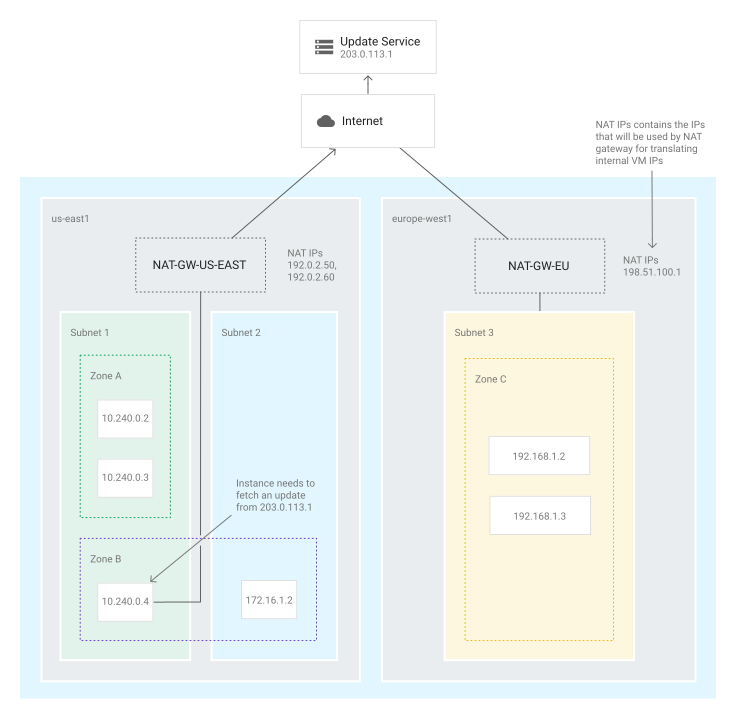](https://docs.cloud.google.com/static/nat/images/02.svg) Public NAT translation example (click to enlarge).
In this example:
- The `nat-gw-us-east` gateway is configured to apply to the primary IP address
range of `subnet-1` in the `us-east1` region. A VM whose network interface
does not have an external IP address can send traffic to the internet by using
either its primary internal IP address or an alias IP range from the primary
IP address range of `subnet-1`, `10.240.0.0/16`.
- A VM whose network interface does not have an external IP address and whose
primary internal IP address is located in `subnet-2` cannot access the
internet because no Cloud NAT gateway applies to any IP address
range of that subnet.
- The `nat-gw-eu` gateway is configured to apply to the primary IP address
range of `subnet-3` in the `europe-west1` region. A VM whose network interface
does not have an external IP address can send traffic to the internet by using
either its primary internal IP address or an alias IP range from the primary
IP address range of `subnet-3`, `192.168.1.0/24`.
### Example workflow
In the preceding diagram, a VM with primary internal IP address `10.240.0.4`, without an
external IP address, needs to download an update from the external IP address
`203.0.113.1`. In the diagram, the `nat-gw-us-east` gateway is configured
as follows:
- Minimum ports per instance: 64
- Manually assigned two NAT IP addresses: `192.0.2.50` and `192.0.2.60`
- Provided NAT for the primary IP address range of `subnet-1`
Public NAT follows the [port reservation procedure](https://docs.cloud.google.com/nat/docs/ports-and-addresses#port-reservation-procedure)
to reserve the following NAT source IP address
and source port tuples for each of the VMs in the network. For example, the
Cloud NAT gateway for Public NAT reserves 64 source
ports for the VM with internal IP
address `10.240.0.4`. The NAT IP address `192.0.2.50` has 64 unreserved ports,
so the gateway reserves the following set of 64 NAT source IP address and source port
tuples for that VM:
- `192.0.2.50:34000` through `192.0.2.50:34063`
When the VM sends a packet to the update server `203.0.113.1` on destination
port `80`, using the TCP protocol, the following occurs:
- The VM sends a request packet with these attributes:
- Source IP address: `10.240.0.4`, the primary internal IP address of the VM
- Source port: `24000`, the ephemeral source port chosen by the VM's operating system
- Destination address: `203.0.113.1`, the update server's external IP address
- Destination port: `80`, the destination port for HTTP traffic to the update server
- Protocol: TCP
- The `nat-gw-us-east` gateway performs source network address translation (SNAT) on egress, rewriting the request
packet's NAT source IP address and source port. The modified packet is sent to the
internet if the Virtual Private Cloud (VPC) network has a route for the `203.0.113.1`
destination whose next hop is the default internet gateway. A [default
route](https://docs.cloud.google.com/vpc/docs/routes#routingpacketsinternet) commonly meets this
requirement.
- NAT source IP address: `192.0.2.50`, from one of the VM's reserved NAT source IP address and source port tuples
- Source port: `34022`, an unused source port from one of the VM's reserved source port tuples
- Destination address: `203.0.113.1`, unchanged
- Destination port: `80`, unchanged
- Protocol: TCP, unchanged
- When the update server sends a response packet, that packet arrives on the
`nat-gw-us-east` gateway with these attributes:
- Source IP address: `203.0.113.1`, the update server's external IP address
- Source port: `80`, the HTTP response from the update server
- Destination address: `192.0.2.50`, matching the original NAT source IP address of the request packet
- Destination port: `34022`, matching the source port of the request packet
- Protocol: TCP, unchanged
- The `nat-gw-us-east` gateway performs destination network address translation
(DNAT) on the response packet, rewriting the response packet's destination
address and destination port so that the packet is delivered to the VM:
- Source IP address: `203.0.113.1`, unchanged
- Source port: `80`, unchanged
- Destination address: `10.240.0.4`, the primary internal IP address of the VM
- Destination port: `24000`, matching the original ephemeral source port of the request packet
- Protocol: TCP, unchanged
## NAT64 in Public NAT
NAT64 lets VM instances with IPv6-only network interfaces communicate with IPv4
destinations on the internet.
To use NAT64, destination addresses must be in the `64:ff9b::/96`
range. You can [configure DNS64](https://docs.cloud.google.com/dns/docs/configure-dns64) to automatically
synthesize IPv4-embedded IPv6 addresses by prepending this prefix to your
destination IPv4 addresses.
When an IPv6-only VM instance sends a request to a destination
in the `64:ff9b::/96` range and the request reaches the
Cloud NAT gateway with NAT64 enabled, the gateway performs NAT by
doing the following:
- Translating the source IPv6 address and port to one of the external IPv4 addresses and ports that are allocated to the gateway.
- Translating the synthesized destination IPv6 address to the original IPv4
address by extracting the last 32 bits of the synthesized address.
The Cloud NAT gateway also uses the last 32 bits of the synthesized
IPv6 address to determine how the request packet is routed to the internet.
When an IPv6-only VM instance sends a packet to a destination in the
`64:ff9b::/96` range, the gateway applies the VPC
network's IPv4 routing table to the extracted destination IPv4 address.
If the IPv4 routing table has a route for that address with
the default internet gateway as the next hop, the modified packet is sent to
the internet.
When the response is received, the Cloud NAT gateway performs NAT by
doing the following:
- Prepending the `64:ff9b::/96` prefix to the source IP address of the response packet.
- Rewriting the response packet's destination address and destination port to the original address and port of the VM.
Before configuring NAT64, review
[Limitations](https://docs.cloud.google.com/nat/docs/set-up-manage-network-address-translation#limitations)
and [Routes and firewall rules](https://docs.cloud.google.com/nat/docs/public-nat#specs-routes-firewalls).
## What's next
- Learn about [Cloud NAT product interactions](https://docs.cloud.google.com/nat/docs/nat-product-interactions)
- Learn about [IP addresses and ports](https://docs.cloud.google.com/nat/docs/ports-and-addresses)
- Learn about [Cloud NAT rules](https://docs.cloud.google.com/nat/docs/nat-rules-overview)
- [Set up and manage network address translation with Public NAT](https://docs.cloud.google.com/nat/docs/set-up-manage-network-address-translation)