

This page provides an overview of cross-region replication for Memorystore for Redis Cluster.
For instructions on managing cross-region replication, see Work with cross-region replication.
Cross-region replication lets you create secondary clusters from a primary cluster to make your cluster available for reads in different regions. Secondary clusters also provide redundancy for disaster recovery scenarios in case of regional outages.
Key concepts in this page include the following:
- Primary cluster. A read-write cluster in a single region.
- Secondary cluster. A read-only cluster that replicates from the primary cluster asynchronously. For information about promoting and detaching secondary clusters, see the detach and switchover tasks that appear in How to manage cross-region replication.
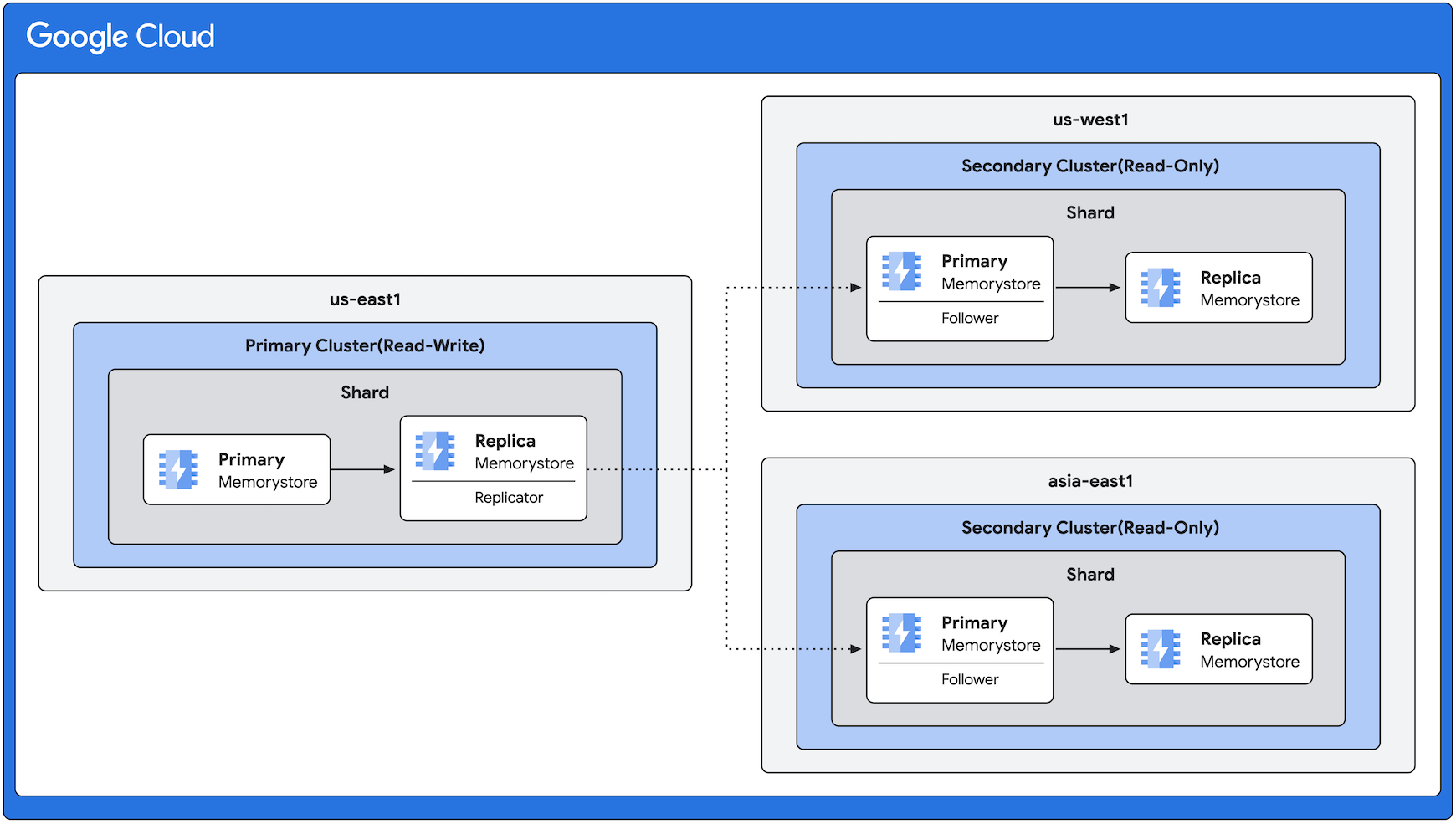
- Replicator node: A node in the primary cluster's shard that replicates to a follower node in the secondary cluster. Any primary or replica node in the shard can serve the role of a replicator.
- Follower nodes: Nodes in the secondary cluster that replicate from a replicator node in the primary cluster. Only primary nodes in the secondary cluster can have the role of a follower.
- Shard count and slot assignment: Primary and secondary clusters have the same number of shards and slot assignments.
Benefits
Benefits of cross-region replication on Memorystore for Redis Cluster include the following:
- Disaster recovery: If the primary cluster's region becomes unavailable, then you can detach or switch over to a secondary cluster in another region to serve read and write requests. Secondary clusters serve read requests without issuing a switchover or detach command.
- Geographically distributed data: Distributing data geographically brings the data closer to you and decreases read latency.
- Geographic load balancing for read traffic: If slow or overloaded connections occur in one region, then you can route traffic to another region.
Feature behavior
This section explains important behavior for the cross-region replication feature.
- Scale the cluster capacity: When you scale the capacity of the primary cluster, Memorystore for Redis Cluster scales secondary clusters automatically to match the primary cluster.
- Scale the replica count: You can scale the replica count for primary and secondary clusters independently based on your workload needs. Updates to the replica count are local only and don't propagate to other clusters within the cross-region replication collection of clusters.
- Switch over during a potential outage: You can perform a switchover to promote a secondary cluster, even if the primary cluster isn't available because of an outage. When the outage is resolved, the unavailable primary cluster becomes a secondary cluster.
- Create online secondary clusters: When adding a secondary cluster to a primary cluster, the primary cluster stays online. While Memorystore for Redis Cluster creates the secondary cluster, the primary cluster handles requests and replicates data.
- Create secondary clusters: You can have up to two secondary clusters. They can be located either in the same region or in different regions from each other. You can't make an existing cluster into a secondary cluster. You can add only new clusters as secondary clusters.
- Synchronize settings: Memorystore for Redis Cluster synchronizes most cluster settings automatically between primary and secondary clusters. For more information about these settings, see Cluster settings.
- Pricing: Memorystore for Redis Cluster charges customers that use cross-region replication for any secondary clusters that Memorystore for Redis Cluster provisions for cross-region replication. For each node and replica that Memorystore for Redis Cluster deploys on the secondary cluster, you're charged as per any other primary cluster. Additionally, you incur networking charges for transferring data between clusters in different regions.
- Perform maintenance updates: To ensure compatibility with cross-region replication, while creating your secondary cluster, your primary cluster might undergo a maintenance update. If the primary cluster isn't running the required software version, then this update happens. The update process might introduce some additional latency when creating your secondary cluster. For more information, see About maintenance.
- Use ACL policies: If you use cross-region replication to create secondary clusters from a primary cluster, then you must manage access control list (ACL) policies for primary and secondary clusters independently. Memorystore for Redis Cluster doesn't propagate ACL policies from primary clusters to secondary clusters.
How to manage cross-region replication
Cross-region replication involves the following tasks:
- Create a secondary cluster: create a secondary cluster that replicates data from your primary cluster continuously.
- View the secondary cluster: view information about the secondary cluster, including the name of the primary cluster and the other secondary cluster in the replication group.
Detach secondary clusters: detaching secondary clusters is an operation in which you decouple secondary clusters from their primary cluster. This makes them fully functional, independent clusters that allow both reads and writes. After a detach operation, the secondary clusters no longer replicate data from the primary cluster with which they were associated formerly. Both the original primary cluster and the newly detached clusters (former secondaries) function as independent clusters with no relationship to one another.
You detach secondary clusters for the following reasons:
- Regional migration: perform a planned migration of Memorystore for Redis Cluster resources from their primary region to another region.
- Disaster recovery: activate Memorystore for Redis Cluster resources in a secondary region rapidly if the resources in the primary region become unavailable. If the secondary clusters aren't caught up to the primary cluster fully, then some data loss might occur.
Switch over your clusters: perform a switchover to reverse the roles of your primary and secondary clusters. You can perform a switchover for the following reasons:
- Test your disaster recovery setup
- Switch over during an actual disaster recovery scenario
- Perform a migration of your workload
After you complete the switchover, Memorystore for Redis Cluster reverses the direction of replication. The former secondary cluster can now accept both reads and writes, while the former primary cluster switches to read-only.
Architecture example for cross-region replication
This diagram shows a primary cluster in the us-east1 region and secondary
clusters in the us-west1 and asia-east1 regions. The direction of
replication is always from the primary cluster to the secondary clusters (for
this example, from the us-east1 region to the other regions).
Even though this diagram shows the same number of replicas in all regions, cross-region replication lets you have varying numbers of replicas according to your requirements.
Cluster settings
This section explains the settings that are required, copied, and overridden for primary and secondary clusters that use cross-region replication. It also explains the settings that you configure on the primary cluster, and the settings that you configure locally.
Required parameters to create a secondary cluster
To create a secondary cluster, you must set values for the following parameters:
- Google Cloud project: the project where your primary cluster is located and where you create the secondary cluster.
- Region: the region where you want the secondary cluster to be located.
- Private Service Connect configuration: the network setup for the secondary cluster.
- Primary cluster: when you create the secondary cluster, you must indicate a primary cluster. You can use any cluster other than a secondary cluster as a primary cluster. If you don't have a primary cluster, then create it.
Settings that a secondary cluster copies from the primary cluster
When you create a secondary cluster, this cluster copies the following settings from the primary cluster:
- Shard count
- IAM authentication mode
- In-transit encryption mode
- Cluster configurations
- Redis version
- Node type
- Persistence mode
Override default settings
When you create a secondary cluster, you can use the following settings to override the default settings:
- Zone distribution configuration
- Replica count
- Maintenance windows
- Deletion protection
- Automated backups
Update cluster settings
When you update the settings for your cluster in Memorystore for Redis Cluster, you can change some settings only on the primary cluster. Memorystore for Redis Cluster syncs these changes to the secondary clusters automatically.
You can change other settings on the primary and secondary clusters independently. Memorystore for Redis Cluster applies these changes only locally, and doesn't sync them with the other clusters.
Configure settings on the primary cluster
You must change the following settings on the primary cluster. Memorystore for Redis Cluster syncs these changes with the secondary clusters automatically.
Configure local settings
You configure the following settings locally:
Best practices for switching primary and secondary clusters
When you perform a switchover, we recommend that you follow the instructions in this section. This way, your application can keep track of writes and send any writes to the appropriate cluster.
- Stop your application from writing to the primary cluster.
If there are multiple secondary clusters to promote, then determine the secondary cluster that you want to promote to the primary cluster. The following factors can help you determine which secondary cluster to promote:
- How close your application is to the cluster. This can affect write latency.
- The secondary cluster that's most caught up, in terms of data.
- The secondary cluster that's closest to the primary cluster, in terms of settings.
Wait for the switchover operation to complete.
Update your application to send any writes to the newly promoted cluster that you selected in step 2.