This page shows you how to create a Managed Service for Apache Spark cluster that uses the
[Spark Spanner connector](https://github.com/GoogleCloudDataproc/spark-spanner-connector)
to read data from and write data to [Spanner](https://docs.cloud.google.com/spanner/docs.md.txt "Spanner")
using [Apache Spark](https://spark.apache.org "Apache Spark").
The Spanner connector works with Spark to read data from
and write data to the Spanner database using the
[Spanner Java library](https://docs.cloud.google.com/java/docs/reference/google-cloud-spanner/latest/overview.md.txt).
The Spanner connector supports reading Spanner
[tables](https://docs.cloud.google.com/spanner/docs/schema-and-data-model.md.txt) and
[graphs](https://docs.cloud.google.com/spanner/docs/graph/overview.md.txt) into Spark
[DataFrames](https://spark.apache.org/docs/latest/api/python/reference/pyspark.sql/dataframe.html)
and
[GraphFrames](https://github.com/graphframes/graphframes),
and writing DataFrame data into Spanner tables.
## Costs
In this document, you use the following billable components of Google Cloud:
- Managed Service for Apache Spark
- Spanner
- Cloud Storage
To generate a cost estimate based on your projected usage,
use the [pricing calculator](https://docs.cloud.google.com/products/calculator).
New Google Cloud users might be eligible for a [free trial](https://docs.cloud.google.com/free).
## Before you begin
1. [Grant required roles](https://docs.cloud.google.com/managed-spark/docs/tutorials/spanner-connector-spark-example.md.txt#grant-required-roles).
2. [Set up a Managed Service for Apache Spark cluster](https://docs.cloud.google.com/managed-spark/docs/tutorials/spanner-connector-spark-example.md.txt#set-up-a-dataproc-cluster).
3. [Set up a Spanner instance with a Singers database table](https://docs.cloud.google.com/managed-spark/docs/tutorials/spanner-connector-spark-example.md.txt#set-up-a-spanner-instance-with-a-singers-database-table).
### Grant required roles
Certain IAM roles are required to
run the examples on this page. Depending on organization policies, these
roles may have already been granted. To check role grants, see
[Do you need to grant roles?](https://docs.cloud.google.com/managed-spark/docs/concepts/iam#do_you_need_to_grant_roles).
For more information about granting roles, see
[Manage access to projects, folders, and organizations](https://docs.cloud.google.com/iam/docs/granting-changing-revoking-access.md.txt).
To ensure that the Compute Engine default service account has the necessary
permissions to create a Managed Service for Apache Spark cluster,
ask your administrator to grant the
following IAM roles to the Compute Engine default service account on the project:
**Important:** You must grant these roles to the Compute Engine default service account, *not* to your user account. Failure to grant the roles to the correct principal might result in permission errors.
- [Dataproc Worker](https://docs.cloud.google.com/iam/docs/roles-permissions/dataproc.md.txt#dataproc.worker) (`roles/dataproc.worker`)
- [Cloud Spanner Database User](https://docs.cloud.google.com/iam/docs/roles-permissions/spanner.md.txt#spanner.databaseUser) (`roles/spanner.databaseUser`)
- [Cloud Spanner Database Reader with DataBoost](https://docs.cloud.google.com/iam/docs/roles-permissions/spanner.md.txt#spanner.databaseReaderWithDataBoost) (`roles/spanner.databaseReaderWithDataBoost`)
### Set up a Managed Service for Apache Spark cluster
[Create a Managed Service for Apache Spark cluster](https://docs.cloud.google.com/managed-spark/docs/guides/create-cluster.md.txt)
or use an existing Managed Service for Apache Spark cluster that was created with the
[`2.1` or later Managed Service for Apache Spark image](https://docs.cloud.google.com/managed-spark/docs/concepts/versioning/dataproc-version-clusters#supported-dataproc-image-versions) or, if the
cluster was created with the `2.0` or earlier image, it mus have been created with
the `scope` property set to
[`cloud-platform` scope](https://docs.cloud.google.com/managed-spark/docs/concepts/iam/iam.md.txt#dataproc_vm_access_scopes).
### Set up a Spanner instance with a Singers database table
[Create a Spanner instance](https://docs.cloud.google.com/spanner/docs/create-query-database-console.md.txt)
with a database that contains a `Singers` table. Note the Spanner
instance ID and database ID.
## Use the Spanner connector with Spark
The Spanner connector is available for Spark versions `3.1+`. You
specify the
[connector version](https://github.com/GoogleCloudDataproc/spark-spanner-connector/releases)
as part of the Cloud Storage connector JAR file specification when you
[submit a job](https://docs.cloud.google.com/managed-spark/docs/guides/submit-job.md.txt#how_to_submit_a_job) to a
Managed Service for Apache Spark cluster.
**Example:** gcloud CLI Spark job submission with the
Spanner connector.
```
gcloud dataproc jobs submit spark \
--jars=gs://spark-lib/spanner/spark-3.1-spanner-CONNECTOR_VERSION.jar \
... [other job submission flags]
```
Replace the following:
CONNECTOR_VERSION: Spanner connector version.
Choose the Spanner connector version from the version list in the GitHub
[`GoogleCloudDataproc/spark-spanner-connector`](https://github.com/GoogleCloudDataproc/spark-spanner-connector/releases) repository.
> [!NOTE]
> **Note:** If the connector isn't available at runtime, a `ClassNotFoundException` is thrown.
### Read Spanner tables
You can use Python or Scala to read Spanner table data into a
Spark Dataframe using the
[Spark data source API](https://spark.apache.org/docs/latest/sql-data-sources.html "Data Sources").
### PySpark
You can run the example PySpark code in this section on your cluster by submitting the job to the
Managed Service for Apache Spark or by running the job from the `spark-submit` REPL
on the cluster master node.
### Managed Service for Apache Spark job
1. Create a `singers.py` file in using a local text editor or in [Cloud Shell](https://console.cloud.google.com/?cloudshell=true) using the pre-installed `vi`, `vim`, or `nano` text editor.
1. After populating the placehoder variables, paste the following code into the `singers.py` file. Note that the Spanner [Data Boost](https://docs.cloud.google.com/spanner/docs/databoost/databoost-overview.md.txt) feature is enabled, which has near-zero impact on the main Spanner instance.
```python
#!/usr/bin/env python
"""Spanner PySpark read example."""
from pyspark.sql import SparkSession
spark = SparkSession \
.builder \
.master('yarn') \
.appName('spark-spanner-demo') \
.getOrCreate()
# Load data from Spanner.
singers = spark.read.format('cloud-spanner') \
.option("projectId", "PROJECT_ID") \
.option("instanceId", "INSTANCE_ID") \
.option("databaseId", "DATABASE_ID") \
.option("table", "TABLE_NAME") \
.option("enableDataBoost", "true") \
.load()
singers.createOrReplaceTempView('Singers')
# Read from Singers
result = spark.sql('SELECT * FROM Singers')
result.show()
result.printSchema()
```
Replace the following:
1. PROJECT_ID: Your Google Cloud project ID. Project IDs are listed in the **Project info** section on the Google Cloud console [Dashboard](https://console.cloud.google.com/home/dashboard).
2. INSTANCE_ID, DATABASE_ID, and TABLE_NAME : See [Set up a Spanner instance with `Singers` database table](https://docs.cloud.google.com/managed-spark/docs/tutorials/spanner-connector-spark-example.md.txt#set-up-a-spanner-instance-with-a-singers-database-table).
2. Save the `singers.py` file.
2. [Submit the job](https://docs.cloud.google.com/managed-spark/docs/guides/submit-job.md.txt#how_to_submit_a_job) to Managed Service for Apache Spark using the Google Cloud console, gcloud CLI or REST API.
**Example:** gcloud CLI job submission with the Spanner connector.
```
gcloud dataproc jobs submit pyspark singers.py \
--cluster=CLUSTER_NAME \
--region=REGION \
--jars=gs://spark-lib/spanner/spark-3.1-spanner-CONNECTOR_VERSION.jar
```
Replace the following:
1. CLUSTER_NAME: The name of the new cluster.
2. REGION: An available Compute Engine [region](https://docs.cloud.google.com/compute/docs/regions-zones.md.txt#available) to run the workload.
3. CONNECTOR_VERSION: Spanner connector version. Choose the Spanner connector version from the version list in the GitHub [`GoogleCloudDataproc/spark-spanner-connector`](https://github.com/GoogleCloudDataproc/spark-spanner-connector/releases) repository.
### spark-submit job
1. Connect to the Managed Service for Apache Spark cluster master node using SSH.
1. Go to the Managed Service for Apache Spark [**Clusters**](https://console.cloud.google.com/dataproc/clusters) page in the Google Cloud console, then click the name of your cluster.
2. On the **Cluster details** page, select the VM Instances tab. Then click `SSH` to the right of the name of the cluster master node. 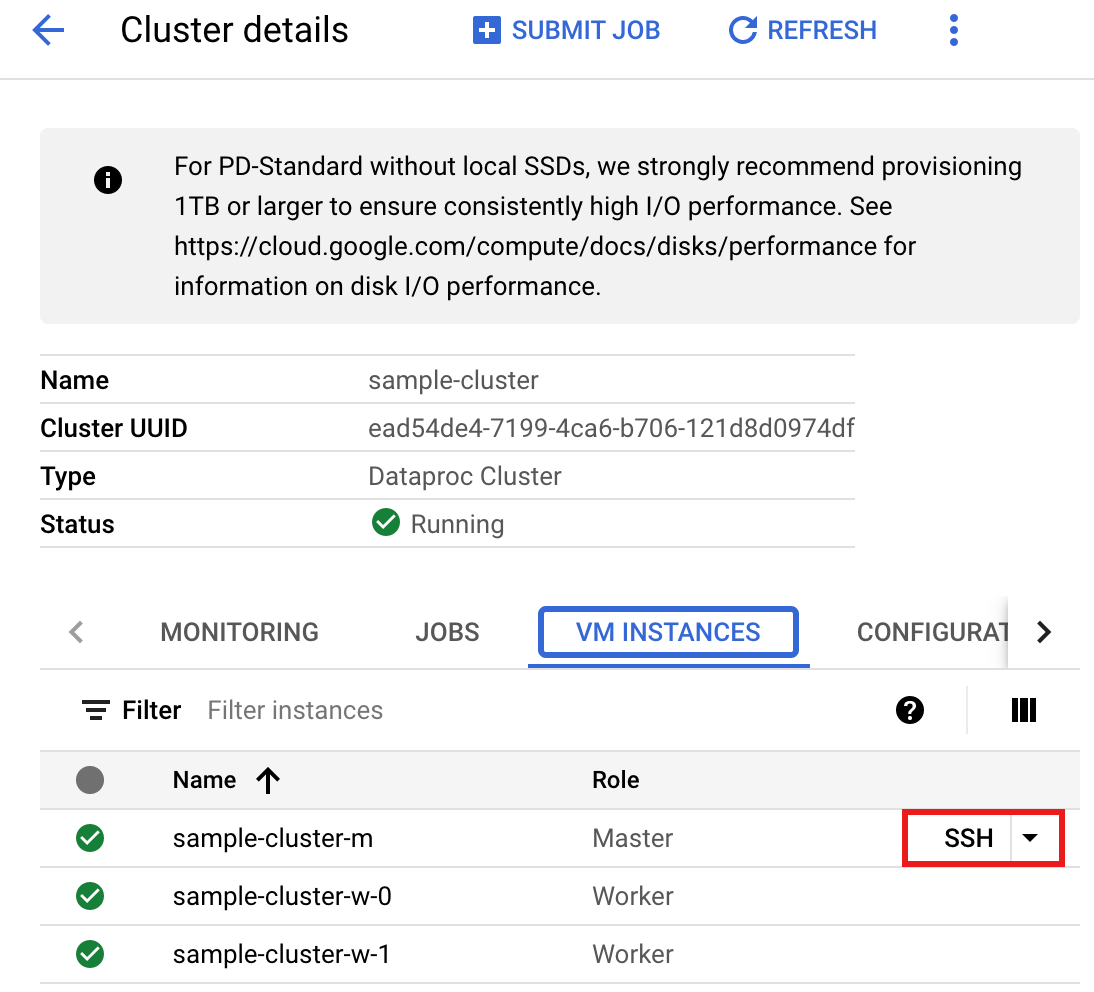
A browser window opens at your home directory on the master node.
```
Connected, host fingerprint: ssh-rsa 2048 ...
...
user@clusterName-m:~$
```
2. Create a `singers.py` file on the master node using the pre-installed `vi`, `vim`, or `nano` text editor.
1. Paste the following code into the `singers.py` file after populating the placehoder variables into the `singers.py` file. Note that the Spanner [Data Boost](https://docs.cloud.google.com/spanner/docs/databoost/databoost-overview.md.txt) feature is enabled, which has near-zero impact on the main Spanner instance.
```python
#!/usr/bin/env python
"""Spanner PySpark read example."""
from pyspark.sql import SparkSession
spark = SparkSession \
.builder \
.master('yarn') \
.appName('spark-spanner-demo') \
.getOrCreate()
# Load data from Spanner.
singers = spark.read.format('cloud-spanner') \
.option("projectId", "PROJECT_ID") \
.option("instanceId", "INSTANCE_ID") \
.option("databaseId", "DATABASE_ID") \
.option("table", "TABLE_NAME") \
.option("enableDataBoost", "true") \
.load()
singers.createOrReplaceTempView('Singers')
# Read from Singers
result = spark.sql('SELECT * FROM Singers')
result.show()
result.printSchema()
```
Replace the following:
1. PROJECT_ID: Your Google Cloud project ID. Project IDs are listed in the **Project info** section on the Google Cloud console [Dashboard](https://console.cloud.google.com/home/dashboard).
2. INSTANCE_ID, DATABASE_ID, and TABLE_NAME : See [Set up a Spanner instance with `Singers` database table](https://docs.cloud.google.com/managed-spark/docs/tutorials/spanner-connector-spark-example.md.txt#set-up-a-spanner-instance-with-a-singers-database-table).
2. Save the `singers.py` file.
3. Run `singers.py` with `spark-submit` to create the Spanner `Singers` table.
```
spark-submit --jars gs://spark-lib/spanner/spark-3.1-spanner-CONNECTOR_VERSION.jar singers.py
```
Replace the following:
1. CONNECTOR_VERSION: Spanner connector version. Choose the Spanner connector version from the version list in the GitHub [`GoogleCloudDataproc/spark-spanner-connector`](https://github.com/GoogleCloudDataproc/spark-spanner-connector/releases) repository.
The output is:
```
...
+---+---+---+---+---+
|SingerId|FirstName|LastName|BirthDate|LastUpdated|
+---+---+---+---+---+
| 1| Marc|Richards| null| null|
| 2| Catalina| Smith| null| null|
| 3| Alice| Trentor| null| null|
+---+---+---+---+---+
root
|-- SingerId: long (nullable = false)
|-- FirstName: string (nullable = true)
|-- LastName: string (nullable = true)
|-- BirthDate: date (nullable = true)
|-- LastUpdated: timestamp (nullable = true)
only showing top 20 rows
```
### Scala
To run the example Scala code on your cluster, complete the following steps:
1. Connect to the Managed Service for Apache Spark cluster master node using SSH.
1. Go to the Managed Service for Apache Spark [**Clusters**](https://console.cloud.google.com/dataproc/clusters) page in the Google Cloud console, then click the name of your cluster.
2. On the **Cluster details** page, select the VM Instances tab. Then click `SSH` to the right of the name of the cluster master node. 
A browser window opens at your home directory on the master node.
```
Connected, host fingerprint: ssh-rsa 2048 ...
...
user@clusterName-m:~$
```
2. Create a `singers.scala` file on the master node using the pre-installed `vi`, `vim`, or `nano` text editor.
1. Paste the following code into the `singers.scala` file. Note that the Spanner [Data Boost](https://docs.cloud.google.com/spanner/docs/databoost/databoost-overview.md.txt) feature is enabled, which has near-zero impact on the main Spanner instance.
```scala
object singers {
def main(): Unit = {
/*
* Uncomment (use the following code) if you are not running in spark-shell.
*
import org.apache.spark.sql.SparkSession
val spark = SparkSession.builder()
.appName("spark-spanner-demo")
.getOrCreate()
*/
// Load data in from Spanner. See
// https://github.com/GoogleCloudDataproc/spark-spanner-connector/blob/main/README.md#properties
// for option information.
val singersDF =
(spark.read.format("cloud-spanner")
.option("projectId", "PROJECT_ID")
.option("instanceId", "INSTANCE_ID")
.option("databaseId", "DATABASE_ID")
.option("table", "TABLE_NAME")
.option("enableDataBoost", true)
.load()
.cache())
singersDF.createOrReplaceTempView("Singers")
// Load the Singers table.
val result = spark.sql("SELECT * FROM Singers")
result.show()
result.printSchema()
}
}
```
Replace the following:
1. PROJECT_ID: Your Google Cloud project ID. Project IDs are listed in the **Project info** section on the Google Cloud console [Dashboard](https://console.cloud.google.com/home/dashboard).
2. INSTANCE_ID, DATABASE_ID, and TABLE_NAME : See [Set up a Spanner instance with `Singers` database table](https://docs.cloud.google.com/managed-spark/docs/tutorials/spanner-connector-spark-example.md.txt#set-up-a-spanner-instance-with-a-singers-database-table).
2. Save the `singers.scala` file.
3. Launch the `spark-shell` REPL.
```
$ spark-shell --jars=gs://spark-lib/spanner/spark-3.1-spanner-CONNECTOR_VERSION.jar
```
Replace the following:
CONNECTOR_VERSION: Spanner connector version.
Choose the Spanner connector version from the version list in the GitHub
[`GoogleCloudDataproc/spark-spanner-connector`](https://github.com/GoogleCloudDataproc/spark-spanner-connector/releases) repository.
4. Run `singers.scala` with the `:load singers.scala` command to create the Spanner `Singers` table. The output listing displays examplesfrom the Singers output.
```
> :load singers.scala
Loading singers.scala...
defined object singers
> singers.main()
...
+---+---+---+---+---+
|SingerId|FirstName|LastName|BirthDate|LastUpdated|
+---+---+---+---+---+
| 1| Marc|Richards| null| null|
| 2| Catalina| Smith| null| null|
| 3| Alice| Trentor| null| null|
+---+---+---+---+---+
root
|-- SingerId: long (nullable = false)
|-- FirstName: string (nullable = true)
|-- LastName: string (nullable = true)
|-- BirthDate: date (nullable = true)
|-- LastUpdated: timestamp (nullable = true)
```
### Read Spanner graphs
The Spanner connector supports exporting the graph into separate
node and edge
[DataFrames](https://spark.apache.org/docs/latest/api/python/reference/pyspark.sql/dataframe.html)
as well as exporting into
[`GraphFrames`](https://github.com/graphframes/graphframes)
directly.
The following example exports a Spanner into a `GraphFrame`. It
uses the Python `SpannerGraphConnector`class, included in the
Spanner connector jar, to read the
[Spanner Graph](https://docs.cloud.google.com/spanner/docs/graph/overview.md.txt).
> [!NOTE]
> **Note:** Populate the placeholder variables before running the example.
```python
from pyspark.sql import SparkSession
connector_jar = "gs://spark-lib/spanner/spark-3.1-spanner-CONNECTOR_VERSION.jar"
spark = (SparkSession.builder.appName("spanner-graphframe-graphx-example")
.config("spark.jars.packages", "graphframes:graphframes:0.8.4-spark3.5-s_2.12")
.config("spark.jars", connector_jar)
.getOrCreate())
spark.sparkContext.addPyFile(connector_jar)
from spannergraph import SpannerGraphConnector
connector = (SpannerGraphConnector()
.spark(spark)
.project("PROJECT_ID")
.instance("INSTANCE_ID")
.database("DATABASE_ID")
.graph("GRAPH_ID"))
g = connector.load_graph()
g.vertices.show()
g.edges.show()
```
Replace the following:
- CONNECTOR_VERSION: Spanner connector version. Choose the Spanner connector version from the version list in the GitHub [`GoogleCloudDataproc/spark-spanner-connector`](https://github.com/GoogleCloudDataproc/spark-spanner-connector/releases) repository.
- PROJECT_ID: Your Google Cloud project ID. Project IDs are listed in the **Project info** section on the Google Cloud console [Dashboard](https://console.cloud.google.com/home/dashboard).
- INSTANCE_ID, DATABASE_ID, and TABLE_NAME Insert the instance, database, and graph IDs.
To export node and edge `DataFrames` instead of GraphFrames, use `load_dfs`
instead:
```python
df_vertices, df_edges, df_id_map = connector.load_dfs()
```
> [!IMPORTANT]
> See [Exporting
> Spanner Graphs](https://github.com/GoogleCloudDataproc/spark-spanner-connector?tab=readme-ov-file#exporting-spanner-graphs) in GitHub for more information.
### Write Spanner tables
The Spanner connector supports writing a Spark Dataframe
to a Spanner table using the
[Spark data source API](https://spark.apache.org/docs/latest/sql-data-sources.html "Data Sources").
#### Write DataFrame to Spanner table example
Populate the variables before saving and running the code.
```python
"""Spanner PySpark write example."""
from pyspark.sql import SparkSession
spark = SparkSession.builder.appName('Spanner Write App').getOrCreate()
columns = ['id', 'name', 'email']
data = [(1, 'John Doe', 'john.doe@example.com'), (2, 'Jane Doe', 'jane.doe@example.com')]
df = spark.createDataFrame(data, columns)
df.write.format('cloud-spanner') \
.option("projectId", "PROJECT_ID")
.option("instanceId", "INSTANCE_ID")
.option("databaseId", "DATABASE_ID")
.option("table", "TABLE_NAME")
.mode("append") \
.save()
```
Replace the following.
- PROJECT_ID: The Google Cloud project ID. Project IDs are listed in the **Project info** section on the Google Cloud console [Dashboard](https://console.cloud.google.com/home/dashboard).
- INSTANCE_ID, DATABASE_ID, and TABLE_NAME Insert the instance, database, and table IDs.
> [!NOTE]
> **Note:** For more information, see [Writing to Spanner tables](https://github.com/GoogleCloudDataproc/spark-spanner-connector?tab=readme-ov-file#writing-to-spanner-tables-preview) in GitHub.
## Clean up
To avoid incurring ongoing charges to your Google Cloud account, you can
[stop](https://docs.cloud.google.com/managed-spark/docs/guides/start-stop.md.txt#using_stopstart) or
[delete](https://docs.cloud.google.com/managed-spark/docs/guides/manage-cluster.md.txt#delete_a_cluster) your
Managed Service for Apache Spark cluster and
[delete your Spanner instance](https://docs.cloud.google.com/spanner/docs/create-manage-instances.md.txt#delete-instance).
## What's next
- Refer to the [`pyspark.sql.DataFrame` examples](https://spark.apache.org/docs/latest/api/python/reference/pyspark.sql/api/pyspark.sql.DataFrame.html).
- For Spark DataFrame language support, see the following:
- [Scala](https://spark.apache.org/docs/latest/api/scala/org/apache/spark/sql/Dataset.html)
- [Java](https://spark.apache.org/docs/latest/api/java/index.html?org/apache/spark/sql/Dataset.html)
- [R](https://spark.apache.org/docs/latest/api/R/reference/SparkDataFrame.html)
- Refer to the [Spark Spanner Connector](https://github.com/GoogleCloudDataproc/spark-spanner-connector/tree/main) repository on GitHub.
- See the [Spark job tuning tips](https://docs.cloud.google.com/managed-spark/docs/support/spark-job-tuning.md.txt).