Managed Service for Apache Spark job and cluster logs can be viewed, searched, filtered,
and archived in [Cloud Logging](https://docs.cloud.google.com/logging/docs.md.txt).
- See [Google Cloud Observability pricing](https://cloud.google.com/stackdriver/pricing)
to understand your costs.
- See [Logs retention periods](https://docs.cloud.google.com/logging/quotas.md.txt#logs_retention_periods)
for information on logging retention.
- See [Logs exclusions](https://docs.cloud.google.com/logging/docs/exclusions) to disable all logs or exclude
logs from Logging.
- See [Routing and storage overview](https://docs.cloud.google.com/logging/docs/routing/overview.md.txt) to route
logs from Logging to Cloud Storage,
BigQuery, or Pub/Sub.
## Component logging levels
Set Spark, Hadoop, Flink, and other [Managed Service for Apache Spark component](https://docs.cloud.google.com/managed-spark/docs/concepts/components/overview.md.txt)
logging levels with component-specific log4j
[cluster properties](https://docs.cloud.google.com/managed-spark/docs/concepts/configuring-clusters/cluster-properties.md.txt#file-prefixed_properties_table),
such as `hadoop-log4j`, when you
[create a cluster](https://docs.cloud.google.com/managed-spark/docs/guides/create-cluster.md.txt). Cluster-based
component logging levels apply to service daemons, such as the YARN ResourceManager,
and to jobs that run on the cluster.
If log4j properties are not supported for a component, such as the Presto component,
write an [initialization action](https://docs.cloud.google.com/managed-spark/docs/concepts/configuring-clusters/init-actions.md.txt)
that edits the component's `log4j.properties` or `log4j2.properties` file.
Job-specific component logging levels: You can also set component logging levels when you
[submit a job](https://docs.cloud.google.com/managed-spark/docs/guides/submit-job.md.txt). These
logging levels are applied to the job, and take precedence
over logging levels set when you created the cluster. See
[Cluster vs. job properties](https://docs.cloud.google.com/managed-spark/docs/concepts/configuring-clusters/cluster-properties.md.txt#cluster_vs_job_properties)
for more information.
**Spark and Hive component version logging levels:**
The Spark 3.3.X and Hive 3.X components use log4j2 properties,
while previous versions of these components use log4j properties (see
[Apache Log4j2](https://logging.apache.org/log4j/2.x/index.html)).
Use a `spark-log4j:` prefix to set Spark logging levels on a cluster.
- Example: [Managed Service for Apache Spark image version 2.0](https://docs.cloud.google.com/managed-spark/docs/concepts/versioning/dataproc-release-2.0)
with Spark 3.1 to set `log4j.logger.org.apache.spark`:
```
gcloud dataproc clusters create ... \
--properties spark-log4j:log4j.logger.org.apache.spark=DEBUG
```
- Example: [Managed Service for Apache Spark image version 2.1](https://docs.cloud.google.com/managed-spark/docs/concepts/versioning/dataproc-release-2.1)
with Spark 3.3 to set `logger.sparkRoot.level`:
```
gcloud dataproc clusters create ...\
--properties spark-log4j:logger.sparkRoot.level=debug
```
## Job driver logging levels
Managed Service for Apache Spark uses a default
[logging level](https://en.wikipedia.org/wiki/Log4j "Logging Level List")
of `INFO` for job driver programs. You can change this setting for one or more packages
with the [gcloud dataproc jobs submit](https://docs.cloud.google.com/sdk/gcloud/reference/dataproc/jobs/submit)
`--driver-log-levels` flag.
Example:
Set the `DEBUG` logging level when submitting a Spark job that reads
Cloud Storage files.
```
gcloud dataproc jobs submit spark ...\
--driver-log-levels org.apache.spark=DEBUG,com.google.cloud.hadoop.gcsio=DEBUG
```
Example:
Set the `root` logger level to `WARN`, `com.example` logger level to `INFO`.
```
gcloud dataproc jobs submit hadoop ...\
--driver-log-levels root=WARN,com.example=INFO
```
## Spark executor logging levels
To configure Spark executor logging levels:
1. Prepare a log4j config file, and then upload it to Cloud Storage
> [!IMPORTANT]
> Copy and customize the default `log4j` config located in `/etc/spark/conf/`
.
2. Reference your config file when you submit the job.
Example:
```
gcloud dataproc jobs submit spark ...\
--file gs://my-bucket/path/spark-log4j.properties \
--properties spark.executor.extraJavaOptions=-Dlog4j.configuration=file:spark-log4j.properties
```
Spark downloads the Cloud Storage properties file to the job's
local working directory, referenced as `file:` in `-Dlog4j.configuration`.
## Managed Service for Apache Spark job logs in Logging
See [Managed Service for Apache Spark job output and logs](https://docs.cloud.google.com/managed-spark/docs/guides/job-output.md.txt)
for information on enabling Managed Service for Apache Spark job driver logs in Logging.
### Access job logs in Logging
Access Managed Service for Apache Spark job logs using the
[Logs Explorer](https://console.cloud.google.com/logs/query),
the [gcloud logging](https://docs.cloud.google.com/sdk/gcloud/reference/logging.md.txt) command, or
the [Logging API](https://docs.cloud.google.com/logging/docs/apis.md.txt).
### Console
Managed Service for Apache Spark Job driver and YARN container logs
are listed under the
[Cloud Managed Service for Apache Spark Job](https://docs.cloud.google.com/monitoring/api/resources.md.txt#tag_cloud_dataproc_job)
resource.
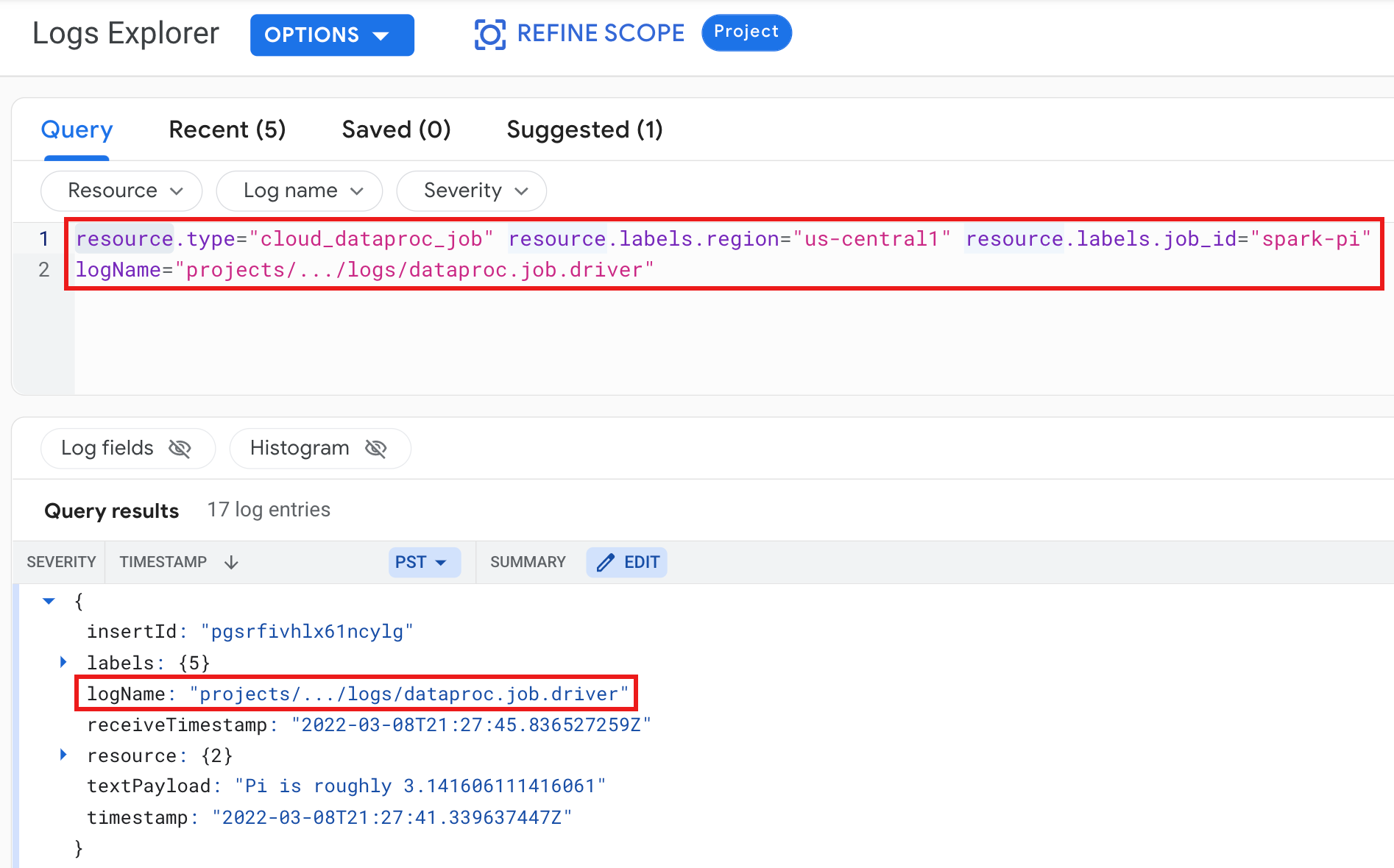
Example: Job driver log after running a
Logs Explorer query with the following selections:
- **Resource:** `Cloud Dataproc Job`
- **Log name:** `dataproc.job.driver`
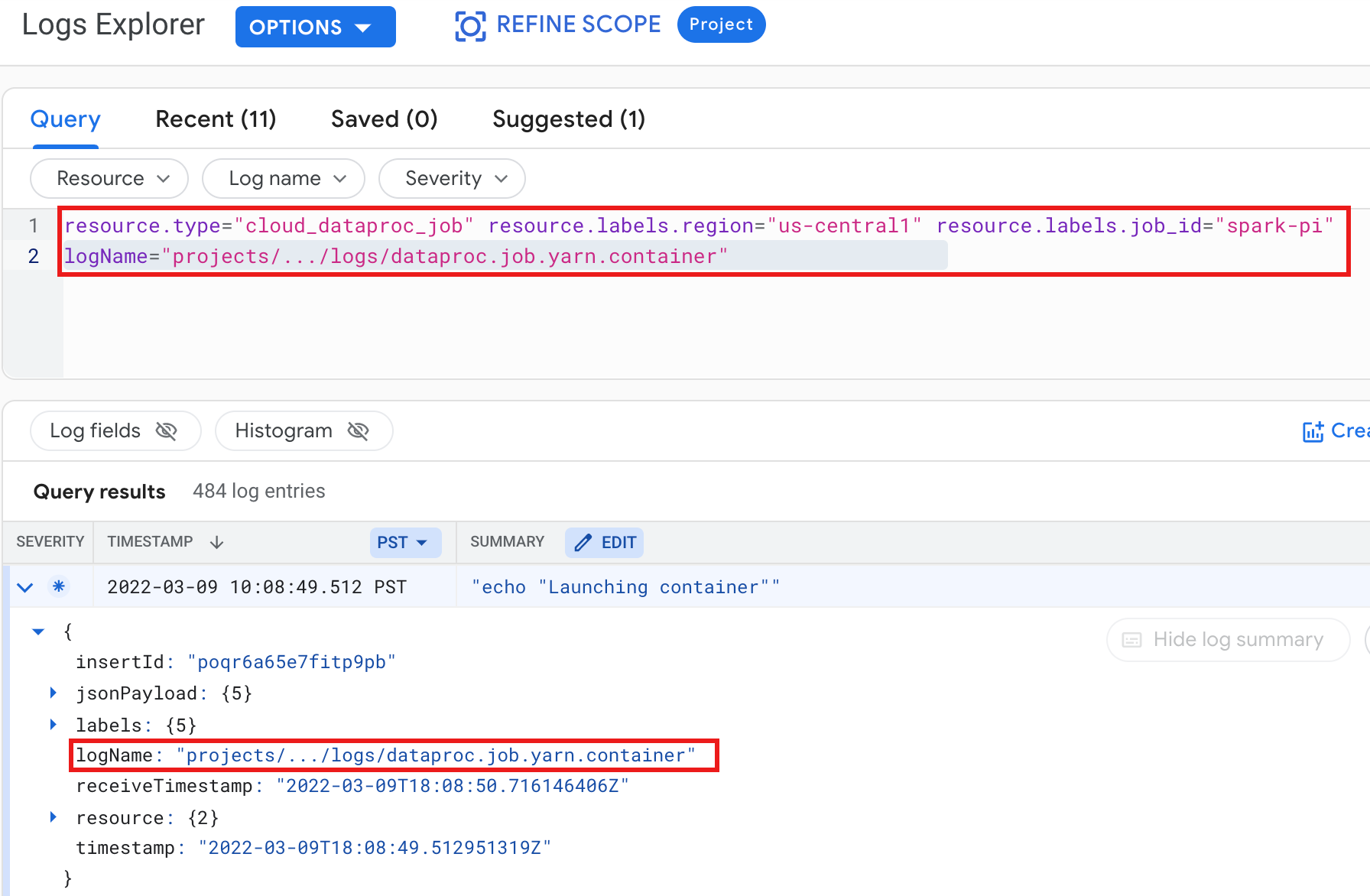
Example: YARN container log after running a
Logs Explorer query with the following selections:
- **Resource:** `Cloud Dataproc Job`
- **Log name:** `dataproc.job.yarn.container`
### gcloud
You can read job log entries using the
[gcloud logging read](https://docs.cloud.google.com/sdk/gcloud/reference/logging/read.md.txt) command.
**The resource arguments must be enclosed in quotes ("...").**
The following command uses cluster labels to filter the returned log entries.
```
gcloud logging read \
"resource.type=cloud_dataproc_job \
resource.labels.region=cluster-region \
resource.labels.job_id=my-job-id"
```
**Sample output (partial):**
```
jsonPayload:
class: org.apache.hadoop.hdfs.StateChange
filename: hadoop-hdfs-namenode-test-dataproc-resize-cluster-20190410-38an-m-0.log
,,,
logName: projects/project-id/logs/hadoop-hdfs-namenode
---
jsonPayload:
class: SecurityLogger.org.apache.hadoop.security.authorize.ServiceAuthorizationManager
filename: cluster-name-dataproc-resize-cluster-20190410-38an-m-0.log
...
logName: projects/google.com:hadoop-cloud-dev/logs/hadoop-hdfs-namenode
```
### REST API
You can use the Logging REST API to list log entries (see
[entries.list](https://docs.cloud.google.com/logging/docs/reference/v2/rest/v2/entries/list.md.txt)).
## Managed Service for Apache Spark cluster logs in Logging
Managed Service for Apache Spark exports the following Apache Hadoop, Spark, Hive,
Zookeeper, and other Managed Service for Apache Spark cluster logs to Cloud Logging.
| Log Type | Log Name | Description | Notes |
|---|---|---|---|
| Master daemon logs | hadoop-hdfs hadoop-hdfs-namenode hadoop-hdfs-secondarynamenode hadoop-hdfs-zkfc hadoop-yarn-resourcemanager hadoop-yarn-timelineserver hive-metastore hive-server2 hadoop-mapred-historyserver zookeeper | Journal node HDFS namenode HDFS secondary namenode Zookeeper failover controller YARN resource manager YARN timeline server Hive metastore Hive server2 Mapreduce job history server Zookeeper server | |
| Worker daemon logs | hadoop-hdfs-datanode hadoop-yarn-nodemanager | HDFS datanode YARN nodemanager | |
| System logs | autoscaler google.dataproc.agent google.dataproc.startup | Managed Service for Apache Spark autoscaler log Managed Service for Apache Spark agent log Managed Service for Apache Spark startup script log + initialization action log | |
| Extended (additional) logs | knox gateway-audit zeppelin ranger-usersync jupyter_notebook jupyter_kernel_gateway spark-history-server | All logs inside `/var/log/` subdirectories matching: knox (includes gateway-audit.log) zeppelin ranger-usersync jupyter_notebook jupyter_kernel_gateway spark-history-server | Setting the ` dataproc:dataproc.logging.extended.enabled=false` property disables the collection of extended logs on the cluster |
| VM syslogs | syslog | Syslogs from cluster's master and worker nodes | Setting the ` dataproc:dataproc.logging.syslog.enabled=false` property disables the collection of VM syslogs on the cluster |
### Access cluster logs in Cloud Logging
You can access Managed Service for Apache Spark cluster logs using the
[Logs Explorer](https://console.cloud.google.com/logs/query),
the [gcloud logging](https://docs.cloud.google.com/sdk/gcloud/reference/logging.md.txt) command, or
the [Logging API](https://docs.cloud.google.com/logging/docs/apis.md.txt).
### Console
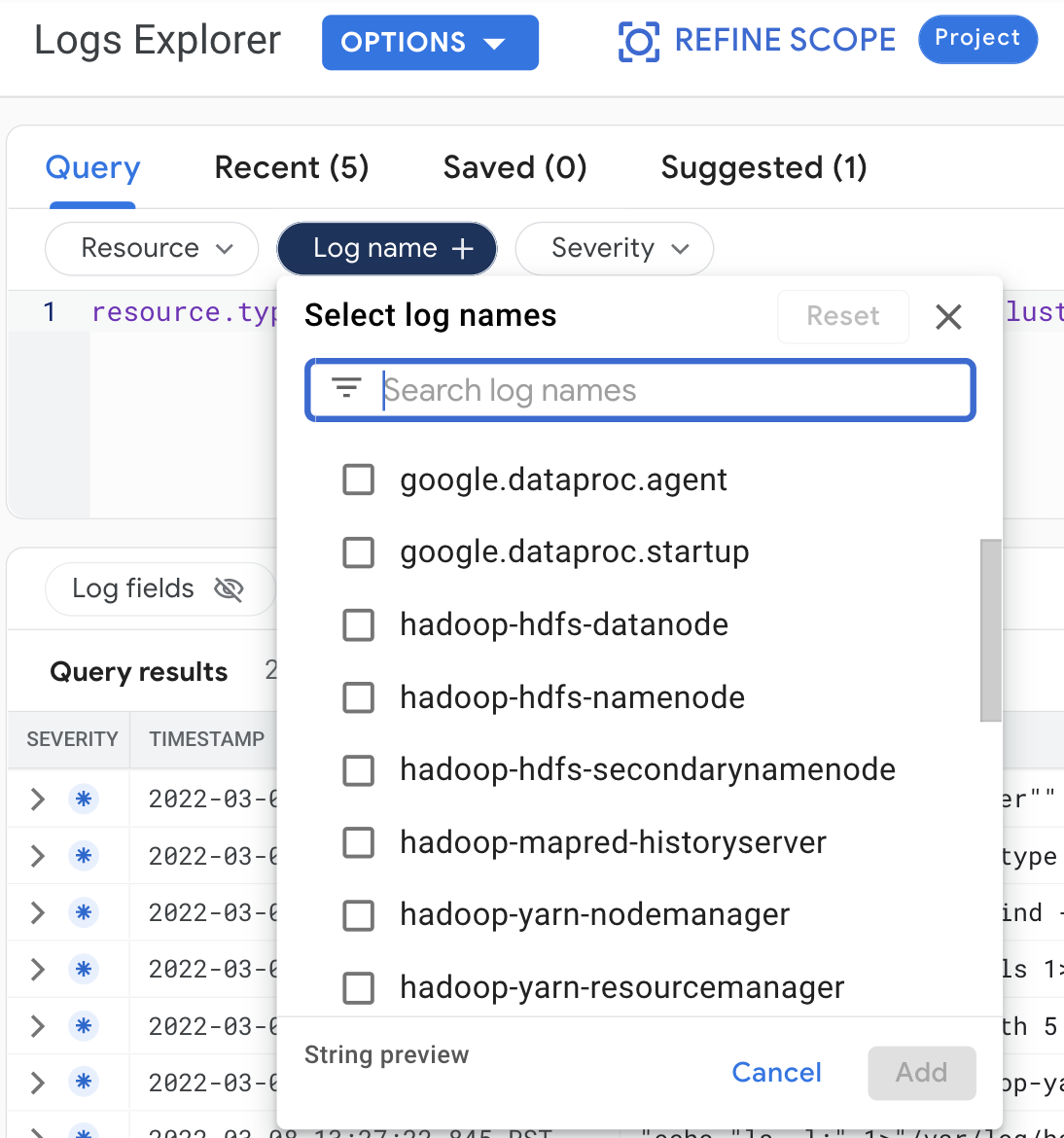
Make the following query selections to view
cluster logs in the Logs Explorer:
- **Resource:** `Cloud Dataproc Cluster`
- **Log name:** log name
> [!IMPORTANT]
> To pre-select a cluster in the Logs Explorer:
>
> 1. Click the cluster name on the [Clusters](https://console.cloud.google.com/dataproc/clusters) page in Google Cloud console to open the **Cluster details** page.
> 2. Click **View Logs** . 
**Use an
[Advanced Filter](https://docs.cloud.google.com/logging/docs/view/advanced-filters) to
target cluster logs.** Automatically created cluster labels, which can be used to filter cluster logs, are listed under the Configuration tab in the Managed Service for Apache Spark **Cluster details** page in the Google Cloud console. 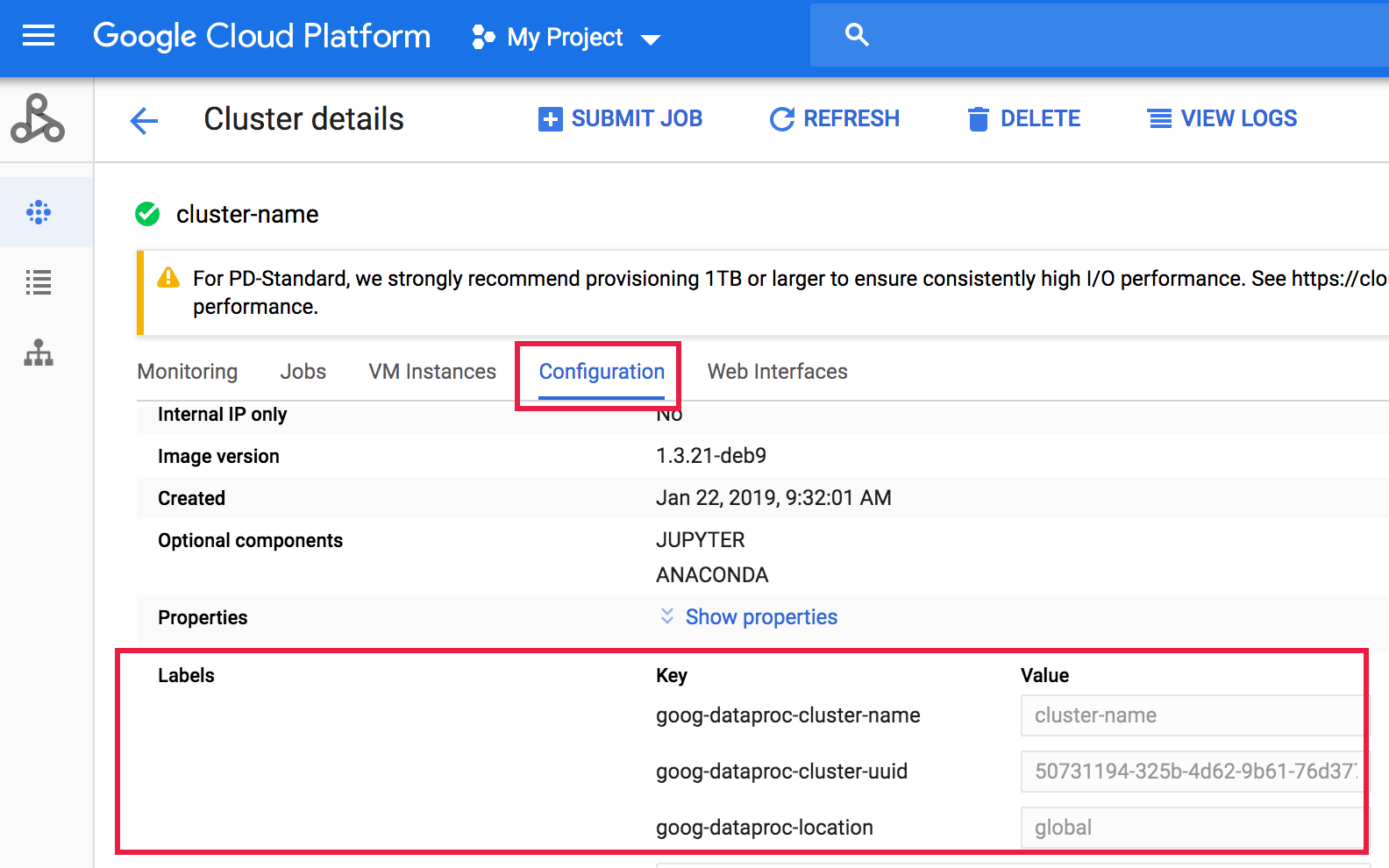
### gcloud
You can read cluster log entries using the
[gcloud logging read](https://docs.cloud.google.com/sdk/gcloud/reference/logging/read.md.txt) command.
**The resource arguments must be enclosed in quotes ("...").**
The following command uses cluster labels to filter the returned log entries.
```
gcloud logging read <<'EOF'
"resource.type=cloud_dataproc_cluster
resource.labels.region=cluster-region
resource.labels.cluster_name=cluster-name
resource.labels.cluster_uuid=cluster-uuid"
EOF
```
**Sample output (partial):**
```
jsonPayload:
class: org.apache.hadoop.yarn.server.resourcemanager.ResourceTrackerService
filename: hadoop-yarn-resourcemanager-cluster-name-m.log
...
logName: projects/project-id/logs/hadoop-yarn-resourcemanager
---
jsonPayload:
class: org.apache.hadoop.yarn.server.resourcemanager.ResourceTrackerService
filename: hadoop-yarn-resourcemanager-component-gateway-cluster-m.log
...
logName: projects/project-id/logs/hadoop-yarn-resourcemanager
```
> [!IMPORTANT]
> Run `gcloud dataproc clusters describe cluster-name
> --region=region` to list cluster labels that you can use to filter logging results.
### REST API
You can use the Logging REST API to list log entries (see
[entries.list](https://docs.cloud.google.com/logging/docs/reference/v2/rest/v2/entries/list.md.txt)).
## Permissions
To write logs to Logging, the Managed Service for Apache Spark VM service
account must have the [`logging.logWriter`](https://docs.cloud.google.com/logging/docs/access-control.md.txt)
IAM role. The default Managed Service for Apache Spark service account has this role. If you use
a [custom service account](https://docs.cloud.google.com/managed-spark/docs/concepts/configuring-clusters/service-accounts.md.txt#using_service_accounts),
you must assign this role to the service account.
## Protecting the logs
By default, logs in Logging are encrypted at rest. You can enable [customer-managed encryption keys (CMEK)](https://docs.cloud.google.com/kms/docs/cmek.md.txt) to encrypt the logs. For more information on CMEK support, see [Manage the keys that protect Log Router data](https://docs.cloud.google.com/logging/docs/routing/managed-encryption.md.txt) and [Manage the keys that protect Logging storage data](https://docs.cloud.google.com/logging/docs/routing/managed-encryption-storage.md.txt).
## What's next
- Explore [Google Cloud Observability](https://docs.cloud.google.com/stackdriver/docs.md.txt).