This document shows you how to enable Lightning Engine to accelerate
Managed Service for Apache Spark batch workloads and interactive sessions.
## Overview
Lightning Engine is a high-performance query accelerator powered by a multi-layer
optimization engine that performs customary optimization techniques,
such as query and execution optimizations, as well as curated optimizations
in the file system layer and data access connectors.
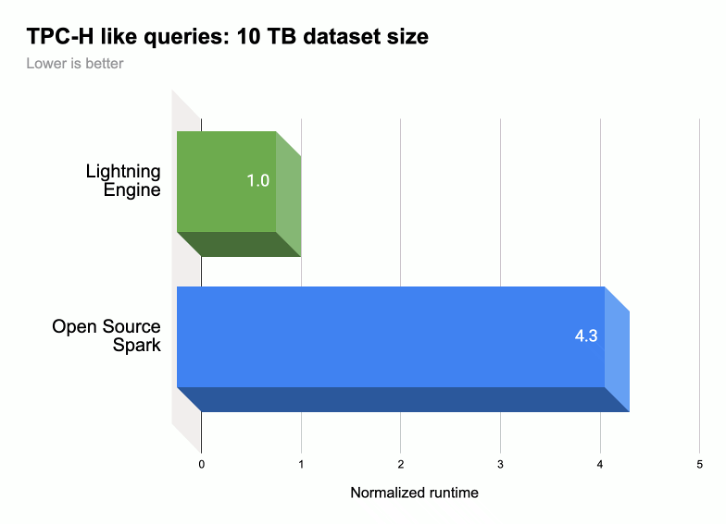
As shown in the following illustration, Lightning Engine accelerates Spark query
execution performance on a [TPC-H](https://www.tpc.org/tpch)-like workload
(`10 TB` dataset size).
> [!NOTE]
> **Note:** Performance results are based on 10TB Cloud Storage Parquet data and queries derived from the [TPC-H standard](https://www.tpc.org/tpch). These results aren't comparable to published TPC-H standard results since they don't comply with all requirements of the standard specification.
For more information: see
[Introducing Lightning Engine --- the next generation of Apache Spark performance](https://cloud.google.com/blog/products/data-analytics/introducing-lightning-engine-for-apache-spark).
## Lightning Engine availability
- Lightning Engine and [Native Query Execution](https://docs.cloud.google.com/managed-spark/docs/guides/lightning-engine-serverless#native_query_execution) are available for use with
[Managed Service for Apache Spark runtime `2.3`](https://docs.cloud.google.com/managed-spark/docs/concepts/versions/spark-runtime-2.3). Lightning Engine and Native Query Execution are not available
in the [`3.0`](https://docs.cloud.google.com/managed-spark/docs/concepts/versions/spark-runtime-3.0)
runtime.
- Lightning Engine is available only with the Managed Service for Apache Spark
[premium pricing tier](https://docs.cloud.google.com/managed-spark/docs/tiers#premium_tier_differentiation).
- **Batch workloads:** Lightning Engine is automatically enabled for batch workloads on the premium tier. No action is required.
- **Interactive sessions:** Lightning Engine is not enabled by default for interactive sessions. To enable it, see [Enable Lightning Engine](https://docs.cloud.google.com/managed-spark/docs/guides/lightning-engine#enable_lightning_engine).
- **Session templates:** Lightning Engine is not enabled by default for session templates. To enable it, see [Enable Lightning Engine](https://docs.cloud.google.com/managed-spark/docs/guides/lightning-engine#enable_lightning_engine).
## Enable Lightning Engine
The following sections show you how to enable Lightning engine on a
Managed Service for Apache Spark batch workload, session template, and
interactive session.
### Batch workload
### Enable Lightning Engine on a batch workload
You can use the Google Cloud console, Google Cloud CLI, or Dataproc API
to enable Lightning Engine on a batch workload.
### Console
Use the Google Cloud console to enable Lightning Engine on a batch workload.
1. In the Google Cloud console:
1. [Go to Managed Service for Apache Spark Batches](https://console.cloud.google.com/dataproc/batches).
2. Click **Create** to open the **Create batch** page.
2. Select and fill in the following fields:
- **Container:**
- **Runtime version:** Select `2.3`.
- **Tier Configuration:**
- Select `Premium`. This automatically enables and checks "Enable LIGHTNING ENGINE to accelerate Spark performance".
When you select the premium tier, the **Driver Compute Tier** and the
**Executor Compute Tier** are set to `Premium`.
These automatically set premium tier compute settings can't be
overridden for batches using runtimes prior to `3.0`.
You can configure the **Driver Disk Tier** and the
**Executor Disk Tier** to `Premium` or leave them at their default
`Standard` tier value. If you choose a premium disk tier, you must select
the disk size. For more information, see
[resource allocation properties](https://docs.cloud.google.com/managed-spark/docs/concepts/properties#resource_allocation_properties).
- **Properties:** Optional: Enter the following
`Key` (property name) and `Value` pair if you want to select the
[Native Query Execution](https://docs.cloud.google.com/managed-spark/docs/guides/lightning-engine-serverless#native_query_execution) runtime:
| Key | Value |
|---|---|
| `spark.dataproc.lightningEngine.runtime` | native |
The `spark.dataproc.runtimeEngine=native` property, previously used to enable Native Query Execution, is deprecated. It is unsupported starting with `3.0+` runtimes.
3. Fill in, select, or confirm other batch workloads settings. See
[Submit a Spark batch workload](https://docs.cloud.google.com/managed-spark/docs/quickstarts/spark-batch#submit_a_spark_batch_workload).
4. Click **Submit** to run the Spark batch workload.
### gcloud
Set the following gcloud CLI
[`gcloud dataproc batches submit spark`](https://docs.cloud.google.com/sdk/gcloud/reference/dataproc/batches/submit)
command flags to enable a Lightning Engine on a batch workload.
```
gcloud dataproc batches submit spark \
--project=PROJECT_ID \
--region=REGION \
--version=2.3 \
--properties=dataproc.tier=premium \
OTHER_FLAGS_AS_NEEDED
```
Notes:
- PROJECT_ID: Your Google Cloud project ID. Project IDs are listed in the **Project info** section on the Google Cloud console [Dashboard](https://console.cloud.google.com/home/dashboard).
- REGION: An available Compute Engine [region](https://docs.cloud.google.com/compute/docs/regions-zones#available) to run the workload.
- `--properties=dataproc.tier=premium`.
Setting the premium tier automatically sets the following properties on the
batch workload:
- `spark.dataproc.engine=lightningEngine` selects Lightning Engine for the batch workload.
- `spark.dataproc.driver.compute.tier` and `spark.dataproc.executor.compute.tier` are set to `premium` (see [resource allocation properties](https://docs.cloud.google.com/managed-spark/docs/concepts/properties#resource_allocation_properties)). These automatically set premium tier compute settings can't be overridden for batches using runtimes prior to `3.0`.
- **Other properties**
- **Native Query Engine** : `spark.dataproc.lightningEngine.runtime=native`
Add this property if you want to select the
[Native Query Execution](https://docs.cloud.google.com/managed-spark/docs/guides/lightning-engine-serverless#native_query_execution) runtime.
The `spark.dataproc.runtimeEngine=native` property, previously used to enable Native Query Execution, is deprecated. It is unsupported starting with `3.0+` runtimes.
- **Disk tiers and sizes** : By default, driver and executor
disk sizes are set to `standard` tiers and sizes. You can add
properties to select `premium` disk tiers and sizes (in multiples of `375 GiB`).
For more information, see [resource allocation properties](https://docs.cloud.google.com/managed-spark/docs/concepts/properties#resource_allocation_properties).
- OTHER_FLAGS_AS_NEEDED: See
[Submit a Spark batch workload](https://docs.cloud.google.com/managed-spark/docs/quickstarts/spark-batch#submit_a_spark_batch_workload).
### API
To enable Lightning Engine on a batch workload, as part of your
[`batches.create`](https://docs.cloud.google.com/managed-spark/docs/reference/rest/v1/projects.locations.batches/create) request:
- Set [RuntimeConfig.version](https://docs.cloud.google.com/managed-spark/docs/reference/rest/v1/RuntimeConfig) to `2.3`.
- Add "dataproc.tier":"premium" to
[RuntimeConfig.properties](https://docs.cloud.google.com/managed-spark/docs/reference/rest/v1/RuntimeConfig)
Setting the premium tier automatically sets the following properties on the
batch workload:
- `spark.dataproc.engine=lightningEngine` selects Lightning Engine for the batch workload.
- `spark.dataproc.driver.compute.tier` and `spark.dataproc.executor.compute.tier` are set to `premium` (see [resource allocation properties](https://docs.cloud.google.com/managed-spark/docs/concepts/properties#resource_allocation_properties)). These automatically set premium tier compute settings can't be overridden for batches using runtimes prior to `3.0`.
Other `RuntimeConfig.properties`:
- **Native Query Engine** : `spark.dataproc.lightningEngine.runtime:native`.
Add this property if you want to select the
[Native Query Execution](https://docs.cloud.google.com/managed-spark/docs/guides/lightning-engine-serverless#native_query_execution) runtime.
The `spark.dataproc.runtimeEngine=native` property, previously used to enable Native Query Execution, is deprecated. It is unsupported starting with `3.0+` runtimes.
- **Disk tiers and sizes** : By default, driver and executor
disk sizes are set to `standard` tiers and sizes. You can add
properties to select `premium` tiers and sizes (in multiples of `375 GiB`).
For more information, see [resource allocation properties](https://docs.cloud.google.com/managed-spark/docs/concepts/properties#resource_allocation_properties).
See [Submit a Spark batch workload](https://docs.cloud.google.com/managed-spark/docs/quickstarts/spark-batch#submit_a_spark_batch_workload)
to set other batch workload API fields.
### Session template
### Enable Lightning Engine on a session template
You can use the Google Cloud console, Google Cloud CLI, or Dataproc API
to enable Lightning Engine on a session template for a
Jupyter or
[Spark Connect](https://spark.apache.org/docs/latest/spark-connect-overview.html) session.
### Console
Use the Google Cloud console to enable Lightning Engine on a batch workload.
1. In the Google Cloud console:
1. [Go to Managed Service for Apache Spark Session Templates](https://console.cloud.google.com/dataproc/sessionTemplates).
2. Click **Create** to open the **Create session template** page.
2. Select and fill in the following fields:
- **Session template info:**
- Select "Enable Lightning Engine to accelerate Spark performance".
- **Execution Configuration:**
- **Runtime version:** Select `2.3`.
- **Properties:**
Enter the following `Key` (property name) and `Value` pairs to select the
Premium tier:
| Key | Value |
|---|---|
| `dataproc.tier` | premium |
| `spark.dataproc.engine` | lightningEngine |
Optional: Enter the following
`Key` (property name) and `Value` pair to select the
[Native Query Execution](https://docs.cloud.google.com/managed-spark/docs/guides/lightning-engine-serverless#native_query_execution) runtime:
| Key | Value |
|---|---|
| `spark.dataproc.lightningEngine.runtime` | `native` |
The `spark.dataproc.runtimeEngine=native` property, previously used to enable Native Query Execution, is deprecated. It is unsupported starting with `3.0+` runtimes.
3. Fill in, select, or confirm other session template settings. See
[Create a session template](https://docs.cloud.google.com/managed-spark/docs/guides/create-serverless-sessions-templates#dataproc_serverless_session_template_create-console).
4. Click **Submit** to create the session template.
### gcloud
You can't directly create a Managed Service for Apache Spark session template using the
gcloud CLI. Instead, you can use the
`gcloud beta dataproc session-templates import` command to import an
existing session template, edit the imported template to enable
the Lightning Engine and optionally the Native Query runtime, and then export
the edited template using the `gcloud beta dataproc session-templates export`
command.
### API
To enable Lightning Engine on a session template, as part of your
[`sessionTemplates.create`](https://docs.cloud.google.com/managed-spark/docs/reference/rest/v1/projects.locations.sessionTemplates/create) request:
- Set [RuntimeConfig.version](https://docs.cloud.google.com/managed-spark/docs/reference/rest/v1/RuntimeConfig) to `2.3`.
- Add "dataproc.tier":"premium" and "spark.dataproc.engine":"lightningEngine" to [RuntimeConfig.properties](https://docs.cloud.google.com/managed-spark/docs/reference/rest/v1/RuntimeConfig).
Other `RuntimeConfig.properties`:
- **Native Query Engine** : `spark.dataproc.lightningEngine.runtime:native`: Add this property to [RuntimeConfig.properties](https://docs.cloud.google.com/managed-spark/docs/reference/rest/v1/RuntimeConfig) to select the [Native Query Execution](https://docs.cloud.google.com/managed-spark/docs/guides/lightning-engine-serverless#native_query_execution) runtime. The `spark.dataproc.runtimeEngine=native` property, previously used to enable Native Query Execution, is deprecated. It is unsupported starting with `3.0+` runtimes.
See [Create a session template](https://docs.cloud.google.com/managed-spark/docs/guides/create-serverless-sessions-templates#dataproc_serverless_session_template_create-rest)
to set other session template API fields.
### Interactive session
### Enable Lightning Engine on an interactive session
You can use the Google Cloud CLI or Dataproc API
to enable Lightning Engine on a Managed Service for Apache Spark interactive session.
You can also enable Lightning Engine in an interactive session in
a BigQuery Studio notebook.
### gcloud
Set the following gcloud CLI
[`gcloud beta dataproc sessions create spark`](https://docs.cloud.google.com/sdk/gcloud/reference/beta/dataproc/sessions/create)
command flags to enable Lightning Engine on an interactive session.
```
gcloud beta dataproc sessions create spark \
--project=PROJECT_ID \
--location=REGION \
--version=2.3 \
--properties=dataproc.tier=premium,spark.dataproc.engine=lightningEngine \
OTHER_FLAGS_AS_NEEDED
```
Notes:
- PROJECT_ID: Your Google Cloud project ID. Project IDs are listed in the **Project info** section on the Google Cloud console [Dashboard](https://console.cloud.google.com/home/dashboard).
- REGION: An available Compute Engine [region](https://docs.cloud.google.com/compute/docs/regions-zones#available) to run the workload.
- `--properties=dataproc.tier=premium,spark.dataproc.engine=lightningEngine`.
These properties enable Lightning Engine on the session.
- Other properties:
- **Native Query Engine** : `spark.dataproc.lightningEngine.runtime=native`: Add this property to select the [Native Query Execution](https://docs.cloud.google.com/managed-spark/docs/guides/lightning-engine-serverless#native_query_execution) runtime. The `spark.dataproc.runtimeEngine=native` property, previously used to enable Native Query Execution, is deprecated. It is unsupported starting with `3.0+` runtimes.
- OTHER_FLAGS_AS_NEEDED: See
[Create an interactive session](https://docs.cloud.google.com/managed-spark/docs/guides/create-serverless-sessions-templates#dataproc_serverless_session_create-gcloud).
### API
To enable Lightning Engine on a session, as part of your
[`sessions.create`](https://docs.cloud.google.com/managed-spark/docs/reference/rest/v1/projects.locations.sessions/create) request:
- Set [RuntimeConfig.version](https://docs.cloud.google.com/managed-spark/docs/reference/rest/v1/RuntimeConfig) to `2.3`.
- Add "dataproc.tier":"premium" and "spark.dataproc.engine":"lightningEngine" to [RuntimeConfig.properties](https://docs.cloud.google.com/managed-spark/docs/reference/rest/v1/RuntimeConfig).
**Other `RuntimeConfig.properties`**:
- **Native Query Engine** : `spark.dataproc.lightningEngine.runtime:native`: Add this property to [RuntimeConfig.properties](https://docs.cloud.google.com/managed-spark/docs/reference/rest/v1/RuntimeConfig) if you want to select the [Native Query Execution](https://docs.cloud.google.com/managed-spark/docs/guides/lightning-engine-serverless#native_query_execution) runtime. The `spark.dataproc.runtimeEngine=native` property, previously used to enable Native Query Execution, is deprecated. It is unsupported starting with `3.0+` runtimes.
See [Create an interactive session](https://docs.cloud.google.com/managed-spark/docs/guides/create-serverless-sessions-templates#dataproc_serverless_session_create-rest)
to set other session template API fields.
### BigQuery notebook
You can enable Lightning Engine when you create a session in a
[BigQuery Studio PySpark notebook](https://docs.cloud.google.com/bigquery/docs/use-spark).
from google.cloud.dataproc_spark_connect import DataprocSparkSession
from google.cloud.dataproc_v1 import https://docs.cloud.google.com/python/docs/reference/dataproc/latest/google.cloud.dataproc_v1.types.Session.html
session = Session()
# Enable Lightning Engine.
session.runtime_config.properties["version"] = "2.3"
session.runtime_config.properties["dataproc.tier"] = "premium"
session.runtime_config.properties["spark.dataproc.engine"] = "lightningEngine"
# Enable THE Native Query Execution runtime.
session.runtime_config.properties["spark.dataproc.lightningEngine.runtime"] = "native"
# Create the Spark session.
spark = (
DataprocSparkSession.builder
.appName("APP_NAME")
.dataprocSessionConfig(session)
.getOrCreate())
# Add Spark application code here:
## Verify Lightning Engine settings
You can use the Google Cloud console, Google Cloud CLI, or Dataproc API
to verify Lightning Engine settings on a batch workload, session template, or
interactive session.
### Batch workload
- To verify the batch **tier** is set to `premium` and **engine** is set to
`Lightning Engine`:
- Google Cloud console: On the [Batches](https://console.cloud.google.com/dataproc/batches) page, see the **Tier** and **Engine** columns for the batch. You can click The **Batch ID** to also view these settings on the batch details page.
- gcloud CLI: Run the `gcloud dataproc batches describe` command.
- API: Issue a `batches.get` request.
### Session template
- To verify **engine** is set to `Lightning Engine` for a session template:
- Google Cloud console: On the [Session Templates](https://console.cloud.google.com/dataproc/sessionTemplates) page, see the **Engine** column for your template. You can click the session template **Name** to also view this setting on the session template details page.
- gcloud CLI: Run the `gcloud beta dataproc session-templates describe` command.
- API: Issue a `sessionTemplates.get` request.
### Interactive session
- To the **engine** is set to `Lightning Engine` for an interactive session:
- Google Cloud console: On the [Interactive Sessions](https://console.cloud.google.com/dataproc/interactive) page, see the **Engine** column for the template. You can click the **Interactive Session ID** to also view this setting on the session template details page.
- gcloud CLI: Run the `gcloud beta dataproc sessions describe` command.
- API: Issue a `sessions.get` request.
## Native Query Execution
Native Query Execution (NQE) is an optional Lightning Engine feature that
enhances performance through a native implementation based on
[Apache Gluten](https://gluten.apache.org/) and
[Velox](https://github.com/facebookincubator/velox) that is
designed for Google hardware.
The Native Query Execution runtime includes unified memory management for
dynamic switching between off-heap and on-heap memory without requiring changes
to existing Spark configurations. NQE includes expanded support for operators,
functions and Spark data types, as well as intelligence to automatically
identify opportunities to use the native engine for optimal pushdown operations.
## Identify Native query execution workloads
Use Native Query Execution in the following scenarios:
- Spark Dataframe APIs, Spark Dataset APIs, and Spark SQL queries that read data
from Parquet and ORC files. The output file format doesn't affect Native Query
Execution performance.
- Workloads recommended by the
[Native Query Execution qualification tool](https://docs.cloud.google.com/managed-spark/docs/guides/run-nqe-tool).
Native query execution is not recommended with for workloads with inputs of the
following data types:
- Byte: ORC and Parquet
- Timestamp: ORC
- Struct, Array, Map: Parquet
## Native Query Execution limitations
Enabling Native Query Execution in the following scenarios can cause
exceptions, Spark incompatibilities, or workload fallback to the default
Spark engine.
### Fallbacks
Native Query Execution in the following the execution can result in workload
fallback to the Spark execution engine, resulting in regression or failure.
- **ANSI:** If ANSI mode is enabled, execution falls back to Spark.
- **Case-sensitive mode:** Native Query Execution supports the Spark default
case-insensitive mode only. If case-sensitive mode is enabled,
incorrect results can occur.
- **Partitioned table scan:** Native Query Execution supports the partitioned table
scan only when the path contains the partition information, otherwise the workload
falls back to the Spark execution engine.
### Incompatible behavior
Incompatible behavior or incorrect results can result when using Native query
execution in the following cases:
- **JSON functions:** Native Query Execution supports strings surrounded by double quotes,
not single quotes. Incorrect results occur with single quotes. Using "\*" in
the path with the `get_json_object` function returns `NULL`.
- **Parquet read configuration:**
- Native Query Execution treats [`spark.files.ignoreCorruptFiles`](https://spark.apache.org/docs/latest/configuration.html#execution-behavior) as set to the default `false` value, even when set to `true`.
- Native Query Execution ignores [`spark.sql.parquet.datetimeRebaseModeInRead`](https://spark.apache.org/docs/latest/sql-data-sources-parquet.html#data-source-option), and returns only the Parquet file contents. Differences between the legacy hybrid (Julian Gregorian) calendar and the Proleptic Gregorian calendar are not considered. Spark results can differ.
- **`NaN`:** Not supported. Unexpected results can occur, for example, when using
`NaN` in a numeric comparison.
- **Spark columnar reading:** A fatal error can occur due since the Spark
columnar vector is incompatible with Native Query Execution.
- **Spill:** When shuffle partitions are set to a large number,
the spill-to-disk feature can trigger an `OutOfMemoryException`. If this
occurs, reducing the number of partitions can eliminate this exception.
> [!NOTE]
> **Note:** You can [run the Native Query Execution qualification tool](https://docs.cloud.google.com/managed-spark/docs/guides/run-nqe-tool) to determine whether to use the Native Query Execution runtime with your Managed Service for Apache Spark batch workloads and interactive sessions.