When you [submit a Managed Service for Apache Spark job](https://docs.cloud.google.com/managed-spark/docs/guides/submit-job.md.txt),
Managed Service for Apache Spark automatically gathers the
job output, and makes it available to you. This means you can
quickly review job output without having to maintain a
connection to the cluster while your jobs run or look through complicated log
files.
> [!IMPORTANT]
> **System and cluster logs:** This guide describes how to configure and view job output. See [Managed Service for Apache Spark cluster logs in Logging](https://docs.cloud.google.com/managed-spark/docs/guides/logging.md.txt#cluster-logs) for information on configuring and viewing Managed Service for Apache Spark cluster system and daemon logs.
## Spark logs
There are two types of Spark logs: Spark driver logs and Spark executor logs.
Spark driver logs contain job output; Spark executor logs contain job executable
or launcher output, such as a `spark-submit` "Submitted application ... " message, and
can be helpful for debugging job failures.
The Managed Service for Apache Spark job driver, which is distinct from the Spark driver,
is a launcher for many job types. When launching Spark jobs, it runs as a
wrapper on the underlying `spark-submit` executable, which launches the Spark
driver. The Spark driver runs the job on the Managed Service for Apache Spark cluster in Spark
[`client` or `cluster` mode](https://spark.apache.org/docs/latest/running-on-yarn.html#launching-spark-on-yarn):
- `client` mode: the Spark driver runs the job in the `spark-submit` process,
and Spark logs are sent to the Managed Service for Apache Spark job driver.
- `cluster` mode: the Spark driver runs the job in a YARN container. Spark driver
logs are not available to the Managed Service for Apache Spark job driver.
## Managed Service for Apache Spark and Spark job properties overview
> [!NOTE]
> **Note:** The first two properties in the following table must be set at cluster creation time, and cannot be overridden when a job is submitted.
| Property | Value | Default | Description |
|---|---|---|---|
| `dataproc:dataproc.logging.stackdriver.job.driver.enable` | true or false | false | **Must be set at cluster creation time.** When `true`, job driver output is in Logging, associated with the job resource; when `false`, job driver output is not in Logging. Note: The following cluster property settings are also required to enable job driver logs in Logging, and are set by default when a cluster is created: `dataproc:dataproc.logging.stackdriver.enable=true` and `dataproc:jobs.file-backed-output.enable=true` |
| `dataproc:dataproc.logging.stackdriver.job.yarn.container.enable` | true or false | false | **Must be set at cluster creation time.** When `true`, job YARN container logs are associated with the job resource; when `false`, job YARN container logs are associated with the cluster resource. |
| `spark:spark.submit.deployMode` | client or cluster | client | Controls Spark `client` or `cluster` mode. |
## Spark jobs submitted using the Managed Service for Apache Spark `jobs` API
The tables in this section list the effect of different property settings on the
destination of Managed Service for Apache Spark job driver output when jobs are submitted
through the Managed Service for Apache Spark `jobs` API, which includes job submission through the
Google Cloud console, gcloud CLI, and Cloud Client Libraries.
The listed [Managed Service for Apache Spark and Spark properties](https://docs.cloud.google.com/managed-spark/docs/concepts/configuring-clusters/cluster-properties.md.txt)
can be set with the `--properties` flag when a cluster is created, and will apply
to all Spark jobs run on the cluster; Spark properties can also be set with the
`--properties` flag (without the "spark:" prefix) when a job is
submitted to the Managed Service for Apache Spark `jobs` API, and will apply only to the job.
### Managed Service for Apache Spark job driver output
The following tables list the effect of different property settings on the
destination of Managed Service for Apache Spark job driver output.
| `dataproc: dataproc.logging.stackdriver.job.driver.enable` | Output |
|---|---|
| false (default) | - Streamed to client - In Cloud Storage at the Managed Service for Apache Spark-generated `driverOutputResourceUri` - Not in Logging |
| true | - Streamed to client - In Cloud Storage at the Managed Service for Apache Spark-generated `driverOutputResourceUri` - In Logging: `dataproc.job.driver` under the job resource. |
### Spark driver logs
The following tables list the effect of different property settings on the
destination of Spark driver logs.
| `spark: spark.submit.deployMode` | `dataproc: dataproc.logging.stackdriver.job.driver.enable` | `dataproc: dataproc.logging.stackdriver.job.yarn.container.enable` | Driver Output |
|---|---|---|---|
| client | false (default) | true or false | - Streamed to client - In Cloud Storage at the Managed Service for Apache Spark-generated `driverOutputResourceUri` - Not in Logging |
| client | true | true or false | - Streamed to client - In Cloud Storage at the Managed Service for Apache Spark-generated `driverOutputResourceUri` - In Logging: `dataproc.job.driver` under the job resource |
| cluster | false (default) | false | - Not streamed to client - Not in Cloud Storage - In Logging `yarn-userlogs` under the cluster resource |
| cluster | true | true | - Not streamed to client - Not in Cloud Storage - In Logging: `dataproc.job.yarn.container` under the job resource |
### Spark executor logs
The following tables list the effect of different property settings on the
destination of Spark executor logs.
| `dataproc: dataproc.logging.stackdriver.job.yarn.container.enable` | Executor log |
|---|---|
| false (default) | In Logging: `yarn-userlogs` under the cluster resource |
| true | In Logging `dataproc.job.yarn.container` under the job resource |
## Spark jobs submitted without using the Managed Service for Apache Spark `jobs` API
This section lists the effect of different property settings on the
destination of Spark job logs when jobs are submitted
without using the Managed Service for Apache Spark `jobs` API, for example when submitting
a job directly on a cluster node using `spark-submit` or when using a Jupyter
or Zeppelin notebook. These jobs do not have Managed Service for Apache Spark job IDs or drivers.
### Spark driver logs
The following tables list the effect of different property settings on the
destination of Spark driver logs for jobs not submitted through the Managed Service for Apache Spark `jobs` API.
| `spark: spark.submit.deployMode` | Driver Output |
|---|---|
| client | - Streamed to client - Not in Cloud Storage - Not in Logging |
| cluster | - Not streamed to client - Not in Cloud Storage - In Logging `yarn-userlogs` under the cluster resource |
### Spark executor logs
When Spark jobs are not submitted through the Managed Service for Apache Spark `jobs` API, executor
logs are in Logging `yarn-userlogs` under the cluster resource.
## View job output
You can access Managed Service for Apache Spark job output in the Google Cloud console,
the gcloud CLI, Cloud Storage, or Logging.
### Console
To view job output, go to your project's Managed Service for Apache Spark
[**Jobs**](https://console.cloud.google.com/dataproc/jobs)
section, then click on the **Job ID** to view job output.
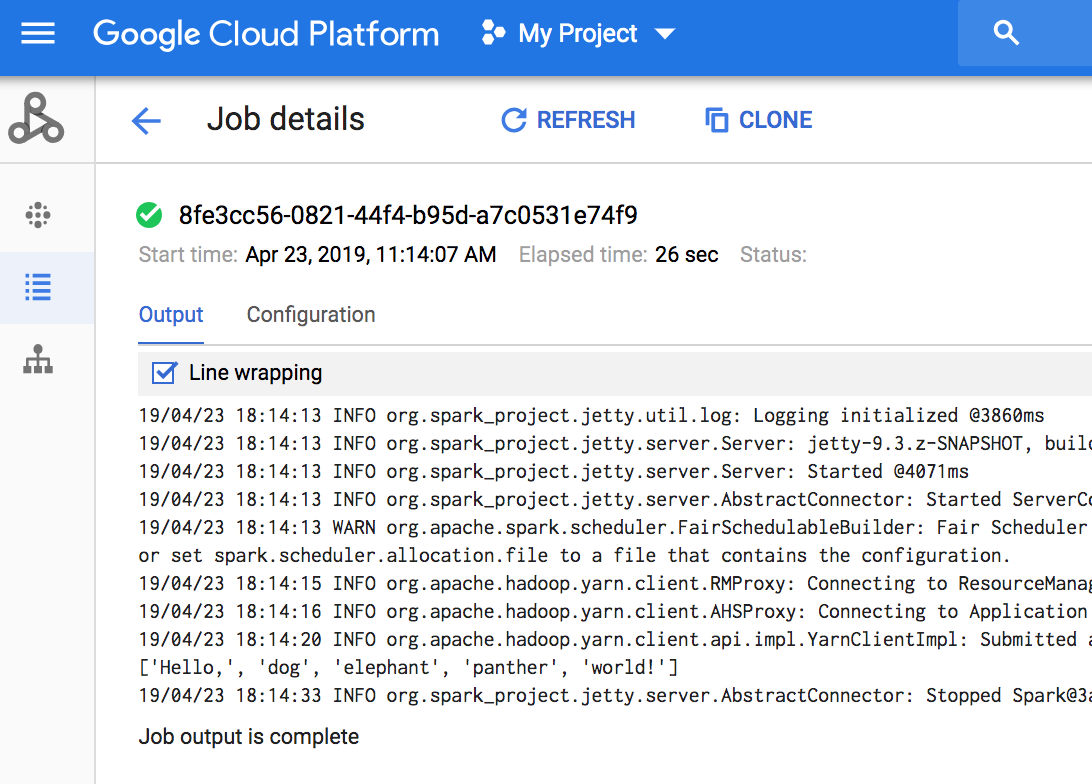
If the job is running, job output periodically refreshes with
new content.
### gcloud command
When you submit a job with the
[gcloud dataproc jobs submit](https://docs.cloud.google.com/sdk/gcloud/reference/dataproc/jobs/submit)
command, job output is displayed on the console. You can "rejoin"
output at a later time, on a different computer, or in
a new window by passing your job's ID to the
[gcloud dataproc jobs wait](https://docs.cloud.google.com/sdk/gcloud/reference/dataproc/jobs/wait)
command. The Job ID is a
[GUID](https://wikipedia.org/wiki/Globally_unique_identifier),
such as `5c1754a5-34f7-4553-b667-8a1199cb9cab`. Here's an example.
```
gcloud dataproc jobs wait 5c1754a5-34f7-4553-b667-8a1199cb9cab \
--project my-project-id --region my-cluster-region
```
```
Waiting for job output...
... INFO gcs.GoogleHadoopFileSystemBase: GHFS version: 1.4.2-hadoop2
... 16:47:45 INFO client.RMProxy: Connecting to ResourceManager at my-test-cluster-m/
...
```
### Cloud Storage
Job output is stored in Cloud Storage in
either the [staging bucket](https://docs.cloud.google.com/managed-spark/docs/concepts/configuring-clusters/staging-bucket.md.txt)
or the bucket you specified when you created your cluster. A link to
job output in Cloud Storage is provided in the
[Job.driverOutputResourceUri](https://docs.cloud.google.com/managed-spark/docs/reference/rest/v1/projects.regions.jobs.md.txt)
field returned by:
- a [jobs.get](https://docs.cloud.google.com/managed-spark/docs/reference/rest/v1/projects.regions.jobs/get.md.txt) API request.
- a [gcloud dataproc jobs describe](https://docs.cloud.google.com/sdk/gcloud/reference/dataproc/jobs/describe) job-id command.
```
$ gcloud dataproc jobs describe spark-pi
...
driverOutputResourceUri: gs://dataproc-nnn/jobs/spark-pi/driveroutput
...
```
> [!CAUTION]
> **Cloud Storage Data Retention:** To prevent data loss, job output and logs saved in Cloud Storage remain in storage after a cluster is removed. You must manually delete job output and logs from Cloud Storage.
### Logging
See [Managed Service for Apache Spark Logs](https://docs.cloud.google.com/managed-spark/docs/guides/logging.md.txt) for information on how to view Managed Service for Apache Spark job output in Logging.