> [!WARNING]
>
> **Preview**
>
>
> This feature is
>
> subject to the "Pre-GA Offerings Terms" in the General Service Terms section of the
> [Service Specific
> Terms](https://docs.cloud.google.com/terms/service-terms#1).
>
> Pre-GA features are available "as is" and might have limited support.
>
> For more information, see the
> [launch stage descriptions](https://cloud.google.com/products/#product-launch-stages).
> [!NOTE]
> **Note:** To provide feedback or ask questions that are related to this preview feature, contact [dataproc-lineage-support@google.com](mailto:dataproc-lineage-support@google.com).
This document shows you how to enable and use
[data lineage](https://docs.cloud.google.com/dataplex/docs/about-data-lineage) for
Managed Service for Apache Spark Hive jobs.
You enable Data lineage for Managed Service for Apache Spark Hive jobs
using an [initialization action](https://docs.cloud.google.com/managed-spark/docs/concepts/configuring-clusters/init-actions.md.txt)
when you [create a cluster](https://docs.cloud.google.com/managed-spark/docs/guides/create-cluster.md.txt#creating_a_cloud_dataproc_cluster).
When you [enable Hive Data lineage](https://docs.cloud.google.com/managed-spark/docs/guides/hive-lineage.md.txt#enable-hive-data-lineage)
on a cluster, Hive jobs that you [submit to the cluster](https://docs.cloud.google.com/managed-spark/docs/guides/hive-lineage.md.txt#submit-a-hive-job) capture data
lineage events and publish them to [Knowledge Catalog](https://docs.cloud.google.com/dataplex/docs/introduction).
## Visualize lineage information
A Data lineage graph displays relationships between your project
resources and the processes that created them. You can access lineage graphs
using [Knowledge Catalog](https://docs.cloud.google.com/dataplex/docs/about-data-lineage#lineage-feature-graph),
[BigQuery Studio](https://docs.cloud.google.com/dataplex/docs/use-lineage#view-lineage), and
[Vertex AI](https://docs.cloud.google.com/dataplex/docs/use-lineage#view-lineage)
in the Google Cloud console.
> [!IMPORTANT]
> You can retrieve data lineage information as JSON data using the Data Lineage API.
## Pricing
Managed Service for Apache Spark Hive data lineage is offered during
Preview without additional charge. Standard
[Managed Service for Apache Spark pricing](https://cloud.google.com/managed-spark/pricing) applies.
## Before you begin
1. In the Google Cloud console, on the project selector page, select the project
that contains the Managed Service for Apache Spark cluster for which you want to track
lineage.
[Go to project selector](https://console.cloud.google.com/projectselector2/home/dashboard)
2. Enable the Data Lineage API and Dataplex API.
[Enable the APIs](https://console.cloud.google.com/apis/enableflow?apiid=datalineage.googleapis.com,dataplex.googleapis.com)
## Required roles
To get the permissions that
you need to use data lineage in Managed Service for Apache Spark,
ask your administrator to grant you the
following IAM roles on the Managed Service for Apache Spark cluster [VM service account](https://docs.cloud.google.com/managed-spark/docs/concepts/iam/principals.md.txt#vm_service_account_data_plane_identity):
- View data lineage in Knowledge Catalog or use the Data Lineage API: [Data Lineage Viewer](https://docs.cloud.google.com/iam/docs/roles-permissions/datalineage.md.txt#datalineage.viewer) (`roles/datalineage.viewer`)
- Produce data lineage manually using the API: [Data Lineage Events Producer](https://docs.cloud.google.com/iam/docs/roles-permissions/datalineage.md.txt#datalineage.producer) (`roles/datalineage.producer`)
- Edit data lineage using the API: [Data Lineage Editor](https://docs.cloud.google.com/iam/docs/roles-permissions/datalineage.md.txt#datalineage.editor) (`roles/datalineage.editor`)
- Perform all operations on data lineage: [Data Lineage Administrator](https://docs.cloud.google.com/iam/docs/roles-permissions/datalineage.md.txt#datalineage.admin) (`roles/datalineage.admin`)
For more information about granting roles, see [Manage access to projects, folders, and organizations](https://docs.cloud.google.com/iam/docs/granting-changing-revoking-access.md.txt).
You might also be able to get
the required permissions through [custom
roles](https://docs.cloud.google.com/iam/docs/creating-custom-roles) or other [predefined
roles](https://docs.cloud.google.com/iam/docs/roles-overview#predefined).
## Enable Hive data lineage
To enable Hive data lineage on a cluster, specify the `hive-lineage.sh`
[initialization action](https://docs.cloud.google.com/managed-spark/docs/concepts/configuring-clusters/init-actions.md.txt) when
you [create a Managed Service for Apache Spark cluster](https://docs.cloud.google.com/managed-spark/docs/guides/create-cluster.md.txt#creating_a_cloud_dataproc_cluster).
This initialization action is stored in regional buckets in Cloud Storage.
> [!NOTE]
> **Note:** See [Important considerations and guidelines](https://docs.cloud.google.com/managed-spark/docs/concepts/configuring-clusters/init-actions.md.txt#important_considerations_and_guidelines) when using initialization actions in production.
**gcloud CLI cluster creation example:**
```bash
gcloud dataproc clusters create CLUSTER_NAME \
--project PROJECT_ID \
--region REGION \
--image-version IMAGE_VERSION \
--initialization-actions gs://goog-dataproc-initialization-actions-REGION/hive-lineage/hive-lineage.sh
```
Replace the following:
- CLUSTER_NAME: The name of the cluster.
- PROJECT_ID: Your Google Cloud project ID. Project IDs are listed in the **Project info** section on the Google Cloud console [Dashboard](https://console.cloud.google.com/home/dashboard).
- REGION: The [Compute Engine region](https://docs.cloud.google.com/compute/docs/regions-zones.md.txt#available)<> in which to locate the cluster.
- IMAGE_VERSION The intended [image version](https://docs.cloud.google.com/managed-spark/docs/concepts/versioning/dataproc-version-clusters) for the cluster.
- `--initialization-actions`: Specifies an installation action located in a Cloud Storage regional location, that enables [Hive data lineage](https://docs.cloud.google.com/managed-spark/docs/guides/hive-lineage.md.txt#enable-hive-data-lineage).
- Optionally add the **Hive-BigQuery connector** initialization action. If you want to integrate BigQuery tables with Hive workloads, you must install the Hive-BigQuery connector on the cluster. See the [Hive data lineage with BigQuery example](https://docs.cloud.google.com/managed-spark/docs/guides/hive-lineage.md.txt#hive-data-lineage-with-bigquery-example), which runs a connector initialization action to install the Hive-BigQuery connector on the cluster.
## Submit a Hive job
When you [submit a Hive job](https://docs.cloud.google.com/managed-spark/docs/guides/submit-job.md.txt#how_to_submit_a_job)
to a Managed Service for Apache Spark cluster that was created with
[Hive data lineage enabled](https://docs.cloud.google.com/managed-spark/docs/guides/hive-lineage.md.txt#enable-hive-data-lineage),
Managed Service for Apache Spark captures and reports the data lineage information to
Knowledge Catalog.
**gcloud CLI Hive job submission example:**
```bash
gcloud dataproc jobs submit hive \
--cluster=CLUSTER_NAME \
--project PROJECT_ID \
--region REGION \
--properties=hive.openlineage.namespace=CUSTOM_NAMESPACE \
--execute HIVE_QUERY
```
Replace the following:
- CLUSTER_NAME: The name of the cluster.
- PROJECT_ID: Your Google Cloud project ID. Project IDs are listed in the **Project info** section on the Google Cloud console [Dashboard](https://console.cloud.google.com/home/dashboard).
- REGION: The [Compute Engine region](https://docs.cloud.google.com/compute/docs/regions-zones.md.txt#available)<> where your cluster is located.
- CUSTOM_NAMESPACE: An optional custom Hive namespace you can specify to identify the Hive job.
- HIVE_QUERY: The Hive query to submit to the cluster. Instead of specifying a query, you can replace the `--execute HIVE_QUERY` flag with a `--file SQL_FILE` flag to specify the location of a file that contains the query.
## View lineage in Knowledge Catalog
A lineage graph displays relationships between your project
resources and the processes that created them. You can
[view data lineage information](https://docs.cloud.google.com/dataplex/docs/use-lineage)
in the Google Cloud console, or
retrieve it from the [Data Lineage API](https://docs.cloud.google.com/dataplex/docs/reference/data-lineage/rest)
in the form of JSON data.
## Hive data lineage with BigQuery example
The example in this section consists of the following steps:
1. Create a Managed Service for Apache Spark cluster that has Hive data lineage enabled and the Hive-BigQuery connector installed on the cluster.
2. Run a Hive query on the cluster to copy data between Hive tables.
3. View the generated data lineage graph in BigQuery Studio.
### Create a Managed Service for Apache Spark cluster
Run the following command in a local terminal window or in [Cloud Shell](https://console.cloud.google.com/?cloudshell=true)
to [create a Managed Service for Apache Spark cluster](https://docs.cloud.google.com/managed-spark/docs/guides/create-cluster.md.txt#creating_a_cloud_dataproc_cluster).
```
gcloud dataproc clusters create CLUSTER_NAME \
--project PROJECT_ID \
--region REGION \
--image-version IMAGE_VERSION \
--initialization-actions gs://goog-dataproc-initialization-actions-REGION/connectors/connectors.sh, gs://goog-dataproc-initialization-actions-REGION/hive-lineage/hive-lineage.sh \
--metadata hive-bigquery-connector-version=HIVE_BQ_VERSION
```
Notes:
- CLUSTER_NAME: The name of the cluster.
- PROJECT_ID: Your Google Cloud project ID. Project IDs are listed in the **Project info** section on the Google Cloud console [Dashboard](https://console.cloud.google.com/home/dashboard).
- REGION: The [Compute Engine region](https://docs.cloud.google.com/compute/docs/regions-zones.md.txt#available)<> in which to locate the cluster.
- IMAGE_VERSION The intended [image version](https://docs.cloud.google.com/managed-spark/docs/concepts/versioning/dataproc-version-clusters) for the cluster.
- `--initialization-actions`: These installation actions, located in Cloud Storage, [install the Hive-BigQuery connector](https://github.com/GoogleCloudDataproc/initialization-actions/blob/master/connectors/README.md#bigquery-connectors) and enable [Hive data lineage](https://docs.cloud.google.com/managed-spark/docs/guides/hive-lineage.md.txt#enable-hive-data-lineage).
- HIVE_BQ_VERSION: Specifies the [Hive-BigQuery connector version](https://github.com/GoogleCloudDataproc/hive-bigquery-connector/releases). The `--metadata` flag passes the version to the [`connectors.sh` initialization action](https://github.com/GoogleCloudDataproc/initialization-actions/tree/master/connectors) to install the Hive-BigQuery connector on the cluster.
### Run a Hive query
Run a Hive query to perform the following actions:
- Create a `us_states` external table with sample data input from `gs://cloud-samples-data/bigquery/hive-partitioning-samples/autolayout`.
- Create a `us_states_copy` managed table in the specified BigQuery dataset.
- Copy the entire data from `us_states` to `us_states_copy`.
To run the query:
1. In a local terminal window or in [Cloud Shell](https://console.cloud.google.com/?cloudshell=true), use a text editor, such as the `vi` or `nano`, to copy the following Hive query statement into an `hive-example.sql` file, then save the file in the current directory.
2. [Submit the `hive-example.sql` file](https://docs.cloud.google.com/managed-spark/docs/guides/hive-lineage.md.txt#submit-a-hive-job) to the Managed Service for Apache Spark cluster [created earlier](https://docs.cloud.google.com/managed-spark/docs/guides/hive-lineage.md.txt#create-a-dataproc-hive-example-cluster) replacing the `--execute HIVE_QUERY` flag with a `--file SQL_FILE` flag to specify the location of the saved `hive-example.sql` file. Note that the PROJECT and BQ_DATASET variables must be populated.
**Hive BigQueryStorageHandler**
```sql
CREATE EXTERNAL TABLE us_states (
name STRING,
post_abbr STRING
)
STORED AS PARQUET
LOCATION 'gs://cloud-samples-data/bigquery/hive-partitioning-samples/autolayout';
CREATE TABLE us_states_copy (
name STRING,
post_abbr STRING
)
STORED BY 'com.google.cloud.hive.bigquery.connector.BigQueryStorageHandler'
TBLPROPERTIES (
'bq.table'='PROJECT.BQ_DATASET.us_states_copy'
);
INSERT INTO us_states_copy SELECT * FROM us_states;
```
### View the data lineage graph
After the Hive job finishes successfully, view the data lineage in
**BigQuery Studio** in the Google Cloud console:
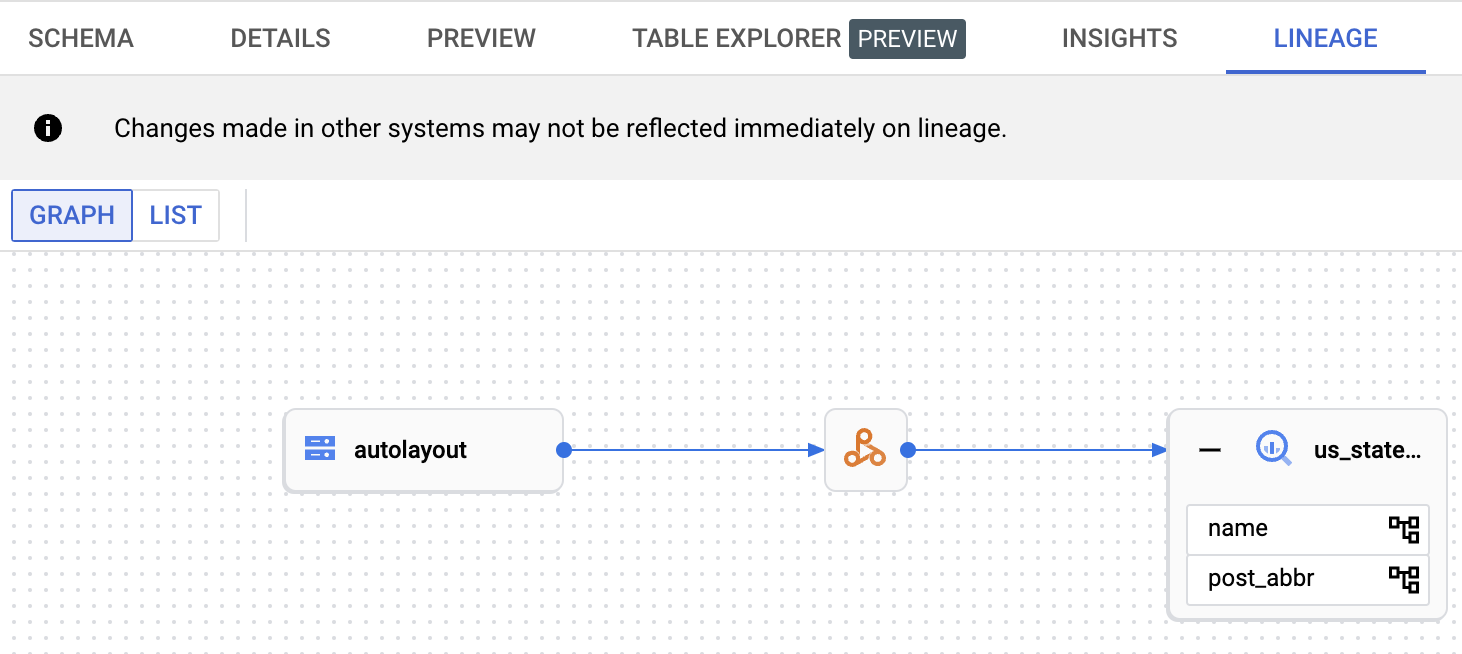
For information about displaying graphs in BigQuery Studio, see
[View lineage in BigQuery](https://docs.cloud.google.com/dataplex/docs/use-lineage#view-lineage).
For information about understanding graphs, see
[Data lineage information model](https://docs.cloud.google.com/dataplex/docs/about-data-lineage#information-model).
## What's next
- Learn more about [data lineage](https://docs.cloud.google.com/dataplex/docs/about-data-lineage).