You can apply user labels to Managed Service for Apache Spark clusters and jobs
in order to group these resources for later
filtering and listing. You associate labels with resources when the resource is
created, at cluster creation or job submission. Once a resource
is associated with a label, the label is propagated to operations performed on
the resource---cluster create, update, patch, or delete; job submit, update,
cancel, or delete---allowing you to filter and list clusters, jobs, and
operations by label.
You can also add labels to Compute Engine resources associated with cluster
resources, such as Virtual Machine instances and disks.
## What are labels?
A label is a key-value pair that you can assign to Managed Service for Apache Spark clusters and jobs.
They help you organize these resources and manage your costs at scale, with the
granularity you need. You can attach a label to each resource, then filter the
resources based on their labels. Information about labels is forwarded to the billing system that
lets you break down your billed charges by label. With built-in [billing reports](https://docs.cloud.google.com/billing/docs/how-to/reports.md.txt),
you can filter and group costs by resource labels. You can also use labels to
query [billing data exports](https://docs.cloud.google.com/billing/docs/how-to/bq-examples.md.txt).
## Requirements for labels
The labels applied to a resource must meet the following
requirements:
- Each cluster or job can have up to 32 labels.
- Each label must be a key-value pair.
- Keys have a minimum length of 1 character and a maximum length of 63 characters, and cannot be empty. Values can be empty, and have a maximum length of 63 characters.
- Keys and values can contain only lowercase letters, numeric characters, underscores, and dashes. All characters must use UTF-8 encoding, and international characters are allowed. Keys must start with a lowercase letter or international character.
- The key portion of a label must be unique within a single resource. However, you can use the same key with multiple resources.
These limits apply to the key and value for each label, and to the
individual Managed Service for Apache Spark cluster or job that have labels. There
is no limit on how many labels you can apply across all resources
within a project.
## Common uses of labels
Here are some common use cases for labels:
- **Team or cost center labels** : Add labels based on team or
cost center to distinguish Managed Service for Apache Spark clusters and jobs owned by different
teams (for example, `team:research` and `team:analytics`). You can use this
type of label for cost accounting or budgeting.
- **Component labels** : For example, `component:redis`,
`component:frontend`, `component:ingest`, and `component:dashboard`.
- **Environment or stage labels** : For example,
`environment:production` and `environment:test`.
- **State labels** : For example, `state:active`,
`state:readytodelete`, and `state:archive`.
- **Ownership labels** : Used to identify the teams that are
responsible for operations, for example: `team:shopping-cart`.
> [!NOTE]
> **Note:** Don't include sensitive information in labels, including personally identifiable information, such as an individual's name or title. Labels are not designed to handle sensitive information.
We don't recommend creating large numbers of unique labels, such as
for timestamps or individual values for every API call.
The problem with this approach is that when the values change frequently or with
keys that clutter the catalog, this makes it difficult to effectively filter and
report on resources.
## Labels and tags
Labels can be used as queryable annotations for resources, but can't be used
to set conditions on policies. Tags provide a way to conditionally allow or
deny policies based on whether a resource has a specific tag, by providing fine-grained
control over policies. For more information, see the
[Tags overview](https://docs.cloud.google.com/resource-manager/docs/tags/tags-overview.md.txt).
## Create and use Managed Service for Apache Spark labels
**Updating labels on clusters with secondary workers.** A cluster can contain either [preemptible workers](https://docs.cloud.google.com/managed-spark/docs/concepts/compute/preemptible-vms) or non-preemptible secondary workers, but not both. Label updates propagate to all preemptible secondary workers within 24 hours. Label updates don't propagate to existing non-preemptible secondary workers. Label updates also propagate to workers added to a cluster after the label update. For example, if you scale up the cluster, all new primary and secondary workers will have the new labels.
### Console
You can specify a set of labels to add to a cluster or job
at cluster creation or job submit time using the Google Cloud console.
- Add labels to a cluster from the [Create cluster](https://console.cloud.google.com/dataproc/clusters/create) page Click **Additional configuration** to expand that section, then edit **Customization \& Other** , and add labels under the **Labels** section.
- Add labels to a job from the [Submit a job](https://console.cloud.google.com/dataproc/jobs/jobsSubmit) page, under the **Job execution and properties** \> **Labels** section.
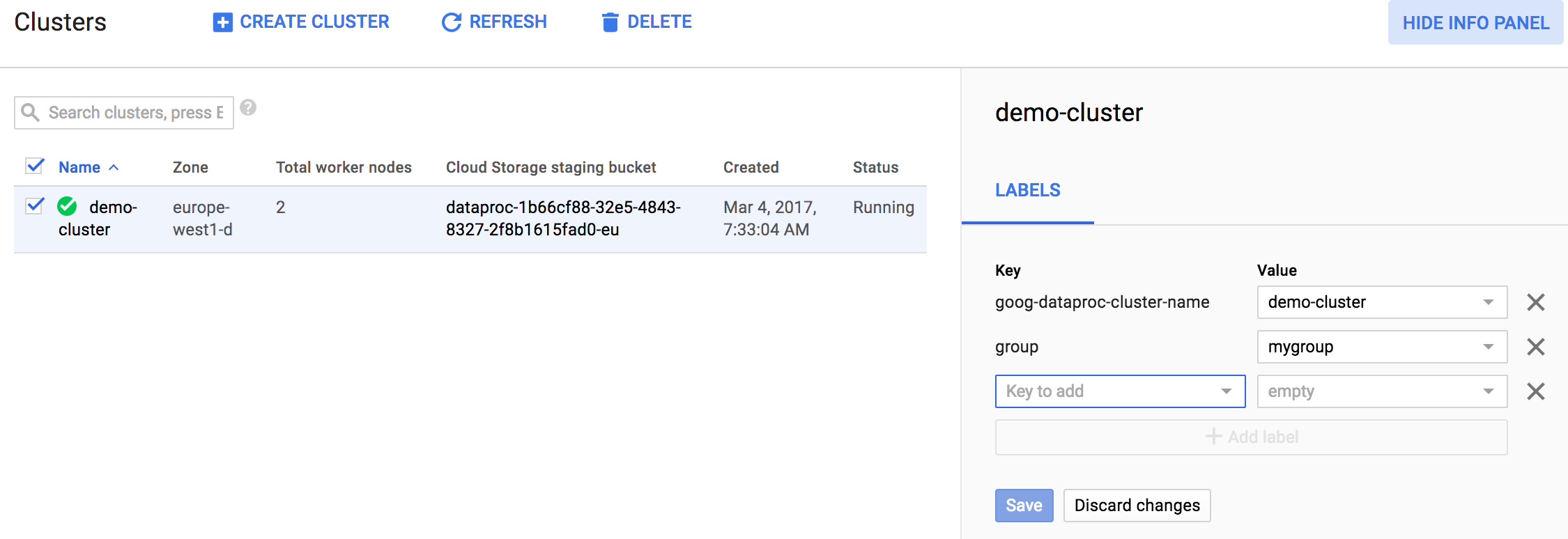
Once a cluster or job has been created or submitted,
you can update the labels associated with the cluster or job. To update labels,
click the selection box for a listed cluster or job, then click `SHOW INFO PANEL`. This is an example from the [Managed Service for Apache Spark→List clusters](https://console.cloud.google.com/dataproc/clusters) page.

### gcloud Command
You can specify one or more labels to be applied to a Managed Service for Apache Spark cluster or job
at creation or submit time using the Google Cloud CLI.
gcloud dataproc clusters create args --labels environment=production,customer=acme
gcloud dataproc jobs submit args --labels environment=production,customer=acme
Once a Managed Service for Apache Spark cluster or job has been created, you can update the labels
associated with that resource using the Google Cloud CLI.
gcloud dataproc clusters update args --update-labels environment=production,customer=acme
gcloud dataproc jobs update args --update-labels environment=production,customer=acme
Similarly, you can use the Google Cloud CLI to filter Managed Service for Apache Spark resources by label using
a filter expression of the following format: `labels.`.
gcloud dataproc clusters list \
--region=region \
--filter="status.state=ACTIVE AND labels.environment=production"
gcloud dataproc jobs list \
--region=region \
--filter="status.state=ACTIVE AND labels.customer=acme"
See the
[clusters.list](https://docs.cloud.google.com/managed-spark/docs/reference/rest/v1/projects.regions.clusters/list.md.txt#query-parameters)
and
[jobs.list](https://docs.cloud.google.com/managed-spark/docs/reference/rest/v1/projects.regions.jobs/list.md.txt#query-parameters)
Dataproc API documentation for more information on writing a filter expression.
### REST API
Labels can be attached to clusters or jobs through the
[Dataproc REST API](https://docs.cloud.google.com/managed-spark/docs/reference/rest.md.txt). The [clusters.create](https://docs.cloud.google.com/managed-spark/docs/reference/rest/v1/projects.regions.clusters/create.md.txt),
[jobs.submit](https://docs.cloud.google.com/managed-spark/docs/reference/rest/v1/projects.regions.jobs/submit.md.txt)
APIs can be used to attach labels to a cluster or job at creation or submit time.
The [clusters.patch](https://docs.cloud.google.com/managed-spark/docs/reference/rest/v1/projects.regions.clusters/patch.md.txt),
[jobs.patch](https://docs.cloud.google.com/managed-spark/docs/reference/rest/v1/projects.regions.jobs/patch.md.txt) APIs
can be used to edit labels after a cluster has been created. Here is the JSON body of a cluster.create request that includes attaches a
`key1:value` label to the cluster.
```json
{
"clusterName":"cluster-1",
"projectId":"my-project",
"config":{
"configBucket":"",
"gceClusterConfig":{
"networkUri":".../networks/default",
"zoneUri":".../zones/us-central1-f"
},
"masterConfig":{
"numInstances":1,
"machineTypeUri":"..../machineTypes/n1-standard-4",
"diskConfig":{
"bootDiskSizeGb":500,
"numLocalSsds":0
}
},
"workerConfig":{
"numInstances":2,
"machineTypeUri":"...machineTypes/n1-standard-4",
"diskConfig":{
"bootDiskSizeGb":500,
"numLocalSsds":0
}
}
},
"labels":{
"key1":"value1"
}
}
```
The [clusters.list](https://docs.cloud.google.com/managed-spark/docs/reference/rest/v1/projects.regions.clusters/list.md.txt)
and [jobs.list](https://docs.cloud.google.com/managed-spark/docs/reference/rest/v1/projects.regions.jobs/list.md.txt)
APIs can be used to list clusters or jobs that match a specified filter, using
the following format: `labels.`.
Here is a sample Dataproc API
[clusters.list](https://docs.cloud.google.com/managed-spark/docs/reference/rest/v1/projects.regions.clusters/list.md.txt)
HTTPS GET request that specifies a `key=value` label filter. The caller inserts
`project`, `region`, a filter `label-key` and `label-value`, and an `api-key`.
Note that this sample request is broken into two lines for readability.
```
GET https://dataproc.googleapis.com/v1/projects/project/regions/region/clusters?
filter=labels.label-key=label-value&key=api-key
```
See the
[clusters.list](https://docs.cloud.google.com/managed-spark/docs/reference/rest/v1/projects.regions.clusters/list.md.txt#query-parameters)
and
[jobs.list](https://docs.cloud.google.com/managed-spark/docs/reference/rest/v1/projects.regions.jobs/list.md.txt#query-parameters)
Dataproc API documentation for more information on writing a filter expression.
> [!IMPORTANT]
> If you want to examine the JSON body of a Dataproc API cluster create or job submit request, you can construct the request on the appropriate Managed Service for Apache Spark page of the Google Cloud console, then click the **Equivalent REST** link at the bottom of the page.
Once the info panel is displayed, you can update the labels for your
cluster or job. The following is an example of updating
labels for a Managed Service for Apache Spark cluster.
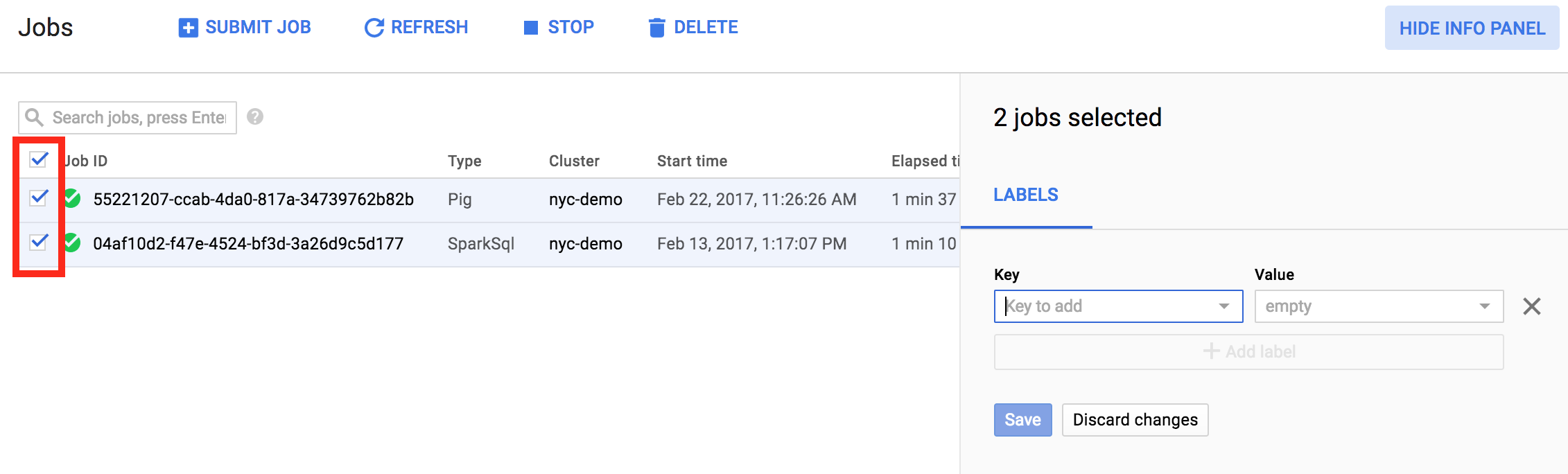
It is also possible to update labels for multiple items in one operation. In
this example, labels are being updated for multiple Managed Service for Apache Spark jobs at the
same time.
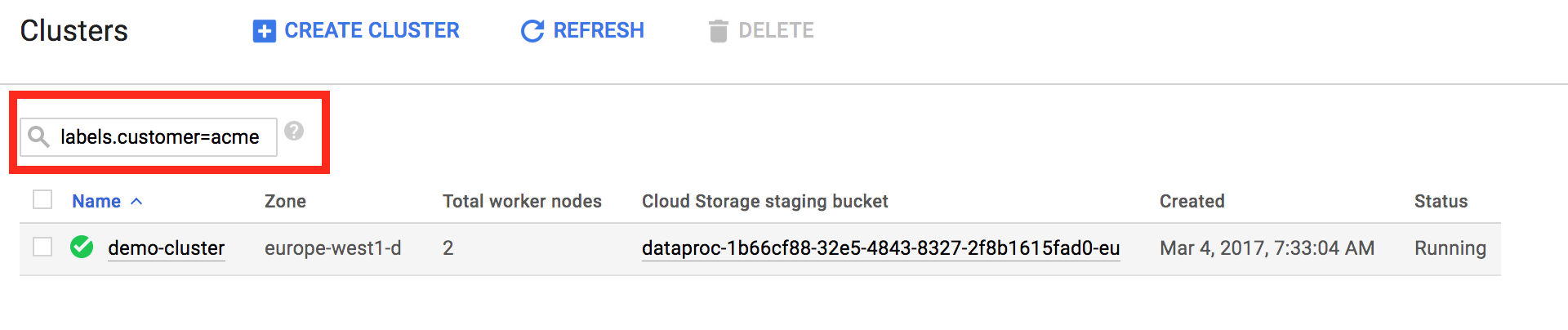
Labels allow you to filter the resources shown on the [List clusters](https://console.cloud.google.com/dataproc/clusters) and [List jobs](https://console.cloud.google.com/dataproc/jobs) pages. At the top of the page, you can use the search pattern `labels.=` to filter resources by a label.
## Automatically applied labels
When creating or updating a cluster, Managed Service for Apache Spark automatically
applies several labels to the cluster and cluster resources. For example,
Managed Service for Apache Spark applies labels to virtual machines, persistent disks,
and accelerators when a cluster is created. Automatically applied labels have a
special `goog-dataproc` prefix.
The following `goog-dataproc` labels are automatically applied to
Managed Service for Apache Spark resources. Any values you supply for the reserved
`goog-dataproc` labels at cluster creation will override
automatically supplied values. For this reason, supplying your own values for
these labels is not recommended.
| Label | Description |
|---|---|
| `goog-dataproc-cluster-name` | User-specified cluster name |
| `goog-dataproc-cluster-uuid` | Unique cluster ID |
| `goog-dataproc-location` | Managed Service for Apache Spark [regional cluster endpoint](https://docs.cloud.google.com/managed-spark/docs/concepts/regional-endpoints) |
You can use these automatically applied labels in many ways, including:
- [Searching and filtering](https://docs.cloud.google.com/compute/docs/labeling-resources.md.txt#filter) for Managed Service for Apache Spark resources
- [Filtering billing data](https://docs.cloud.google.com/billing/docs/how-to/bq-examples.md.txt) to calculate Managed Service for Apache Spark costs
## What's next
- Learn how to [create and update labels for projects](https://docs.cloud.google.com/resource-manager/docs/using-labels) using the Resource Manager.
- Learn how to [organize resources using labels](https://docs.cloud.google.com/compute/docs/label-or-tag-resources).