# Create a lakehouse with Spark and Lakehouse runtime catalog
A lakehouse architecture combines the flexibility of a data lake with the data
management features of a data warehouse. This document shows you how to set up a
lakehouse on Google Cloud. You use Apache Iceberg as the table
format, Managed Service for Apache Spark for processing, and the Lakehouse runtime catalog
Iceberg REST Catalog for unified metadata management.
This architecture uses open table formats like Iceberg to add data warehousing
capabilities, such as transactions and schema evolution, to data in
Cloud Storage. This approach creates a single source of truth for your data
that various engines can access.
This document covers catalogs that you create in Lakehouse runtime catalog. To
query Iceberg tables that are managed by AWS Glue
Data Catalog, Databricks Unity Catalog, or Snowflake Horizon Catalog through
Lakehouse runtime catalog federated catalogs, see
[Query federated catalogs with Spark](https://docs.cloud.google.com/managed-spark/docs/guides/query-federated-catalogs.md.txt).
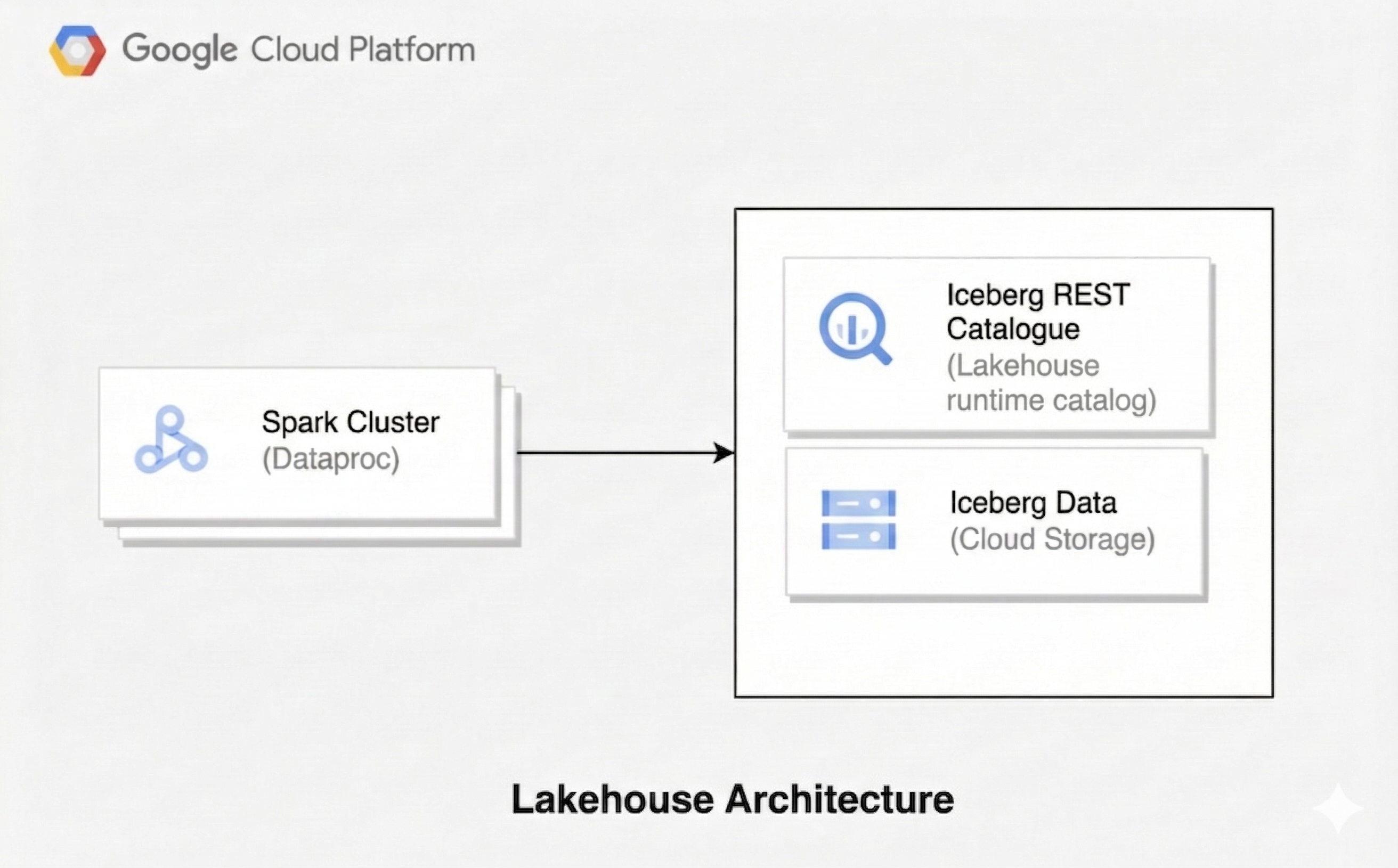 Lakehouse architecture diagram.
## About the Lakehouse runtime catalog
The Lakehouse runtime catalog is a serverless, fully managed metastore built on
[Lakehouse runtime catalog](https://docs.cloud.google.com/lakehouse/docs/introduction.md.txt). It stores table metadata for
open table formats such as Iceberg, and exposes the
following endpoints:
- **[Iceberg REST catalog endpoint](https://docs.cloud.google.com/lakehouse/docs/about-iceberg-rest-catalog-endpoint.md.txt)**: lets Spark and other engines read and write Iceberg tables through the standard Iceberg REST protocol.
- **[Hive catalog endpoint](https://docs.cloud.google.com/lakehouse/docs/about-spark-hive-metastore.md.txt)**: lets Spark and Hive workloads manage standard Hive and Spark tables, such as Parquet, ORC, Avro, and Delta Lake tables, without a self-hosted Hive Metastore.
Starting with Managed Service for Apache Spark image and runtime versions `4.0`,
the Lakehouse runtime catalog is the
[default Spark catalog](https://docs.cloud.google.com/managed-spark/docs/guides/create-lakehouse.md.txt#default-catalog), so you can create and query
Iceberg tables without any catalog configuration.
### Benefits compared with the Hive Metastore
By default, open source Apache Spark stores table metadata in a Hive Metastore
that runs with the cluster, such as an embedded Apache Derby database or a Hive
Metastore service on the cluster master node. The Lakehouse runtime catalog provides the
following advantages:
| Capability | Spark Hive Metastore | Lakehouse runtime catalog |
|---|---|---|
| Infrastructure | Runs on the cluster. You size, patch, back up, and scale it. | Serverless and fully managed. No metastore infrastructure to operate. |
| Metadata lifetime | Tied to the cluster. Metadata is lost when you delete an ephemeral cluster, and serverless workloads have no persistent metastore. | Persists independently of clusters, batch workloads, and sessions. |
| Sharing across workloads | Each cluster has its own metastore unless you set up and connect an external metastore. | Clusters, batch workloads, sessions, and other projects share the same catalog. |
| Multi-engine access | Spark and Hive. | Spark, Hive, BigQuery, and any engine that supports the Iceberg REST protocol. |
| Table formats | Hive tables. Iceberg requires additional catalog configuration. | Iceberg tables through the Iceberg REST catalog endpoint, and Hive tables through the Hive catalog endpoint. |
| Access control | Metastore-level access, often managed separately from data access. | IAM-based catalog and table permissions. |
| Setup | Manual catalog properties in every cluster or workload. | On by default for image and runtime version `4.0` and later. |
For a detailed list of Hive Metastore operations that the Hive catalog endpoint
supports, see
[Feature comparison with Hive Metastore](https://docs.cloud.google.com/lakehouse/docs/about-spark-hive-metastore.md.txt#feature-compare-hive).
## Before you begin
1. [Create a Cloud Storage bucket](https://docs.cloud.google.com/storage/docs/creating-buckets.md.txt) to store Iceberg data.
2. [Create a
catalog in Lakehouse runtime catalog](https://docs.cloud.google.com/lakehouse/docs/set-up-lakehouse-iceberg-rest-catalog#process) that points to your bucket. A multiple-bucket catalog is recommended. This step is optional for image and runtime versions `4.0` and later if you use the [default starter catalog](https://docs.cloud.google.com/managed-spark/docs/guides/create-lakehouse.md.txt#default-catalog), which is created automatically.
### Required roles
Certain Identity and Access Management (IAM) roles are required to
run the examples on this page. Depending on organization policies, these
roles may have already been granted. To check role grants, see
[Do you need to grant roles?](https://docs.cloud.google.com/managed-spark/docs/concepts/iam/iam.md.txt#do_you_need_to_grant_roles).
For more information about granting roles, see
[Manage access to projects,folders, and organizations](https://docs.cloud.google.com/iam/docs/granting-changing-revoking-access.md.txt).
The roles that you need depend on how your workload runs.
Managed Service for Apache Spark clusters and
Managed Service for Apache Spark serverless runtimes `2.3` and earlier run workloads
as a service account. Managed Service for Apache Spark serverless runtimes `3.0` and
later run workloads with your end-user credentials (EUC) by default, so you
grant data access roles to your user account instead of a service account. If
you specify a custom service account for a `3.0` or later runtime, the workload
runs with service account credentials. For more information, see
[Serverless deployments roles](https://docs.cloud.google.com/managed-spark/docs/concepts/iam-serverless.md.txt#s8s-role-requirements).
#### User roles
To get the permissions that
you need to create a Managed Service for Apache Spark cluster, submit a batch workload, or create an interactive session,
ask your administrator to grant you the
following IAM roles:
- Use a cluster or a serverless runtime 2.3 or earlier:
- [Dataproc Editor](https://docs.cloud.google.com/iam/docs/roles-permissions/dataproc.md.txt#dataproc.editor) (`roles/dataproc.editor`) on the project
- [Service Account User](https://docs.cloud.google.com/iam/docs/roles-permissions/iam.md.txt#iam.serviceAccountUser) (`roles/iam.serviceAccountUser`) on the Compute Engine default service account or a custom service account
- Use a serverless runtime 3.0 or later: [Dataproc Serverless Editor](https://docs.cloud.google.com/iam/docs/roles-permissions/dataproc.md.txt#dataproc.serverlessEditor) (`roles/dataproc.serverlessEditor`) on the project
- Use service account credentials on a serverless runtime 3.0 or later: [Service Account User](https://docs.cloud.google.com/iam/docs/roles-permissions/iam.md.txt#iam.serviceAccountUser) (`roles/iam.serviceAccountUser`) on the custom service account
If you use a Managed Service for Apache Spark serverless runtime `3.0` or later with
end-user credentials (the default), you also need the following data access
roles:
To get the permissions that
you need to read and write tables in your catalog with end-user credentials,
ask your administrator to grant you the
following IAM roles:
- Read and write table data in credential vending mode: [BigLake Editor](https://docs.cloud.google.com/iam/docs/roles-permissions/biglake.md.txt#biglake.editor) (`roles/biglake.editor`) on the project that contains the catalog
- Manage catalog resources and write table data in non-credential vending mode:
- [BigLake Editor](https://docs.cloud.google.com/iam/docs/roles-permissions/biglake.md.txt#biglake.editor) (`roles/biglake.editor`) on the project that contains the catalog
- [Storage Object User](https://docs.cloud.google.com/iam/docs/roles-permissions/storage.md.txt#storage.objectUser) (`roles/storage.objectUser`) on all Cloud Storage buckets associated with the catalog
#### Service account roles
Grant the following roles to the service account that runs your workload.
Managed Service for Apache Spark serverless runtimes `3.0` and later need these
roles only if the workload runs with service account credentials.
To ensure that the Compute Engine default service account or a custom service account has the necessary
permissions to run Managed Service for Apache Spark jobs and read and write tables in your catalog,
ask your administrator to grant the
following IAM roles to the Compute Engine default service account or a custom service account:
**Important:** You must grant these roles to the Compute Engine default service account or a custom service account, *not* to your user account. Failure to grant the roles to the correct principal might result in permission errors.
- Run Managed Service for Apache Spark jobs on a cluster or a serverless runtime 2.3 or earlier: [Dataproc Worker](https://docs.cloud.google.com/iam/docs/roles-permissions/dataproc.md.txt#dataproc.worker) (`roles/dataproc.worker`) on the project
- Run Managed Service for Apache Spark jobs on a serverless runtime 3.0 or later:
- [Dataproc Serverless Node](https://docs.cloud.google.com/iam/docs/roles-permissions/dataproc.md.txt#dataproc.serverlessNode) (`roles/dataproc.serverlessNode`) on the project
- [Dataproc Resource Manager Node Service Agent](https://docs.cloud.google.com/iam/docs/roles-permissions/dataprocrm.md.txt#dataprocrm.nodeServiceAgent) (`roles/dataprocrm.nodeServiceAgent`) on the project
- Read and write table data in credential vending mode: [BigLake Editor](https://docs.cloud.google.com/iam/docs/roles-permissions/biglake.md.txt#biglake.editor) (`roles/biglake.editor`) on the project that contains the catalog
- Manage catalog resources and write table data in non-credential vending mode:
- [BigLake Editor](https://docs.cloud.google.com/iam/docs/roles-permissions/biglake.md.txt#biglake.editor) (`roles/biglake.editor`) on the project that contains the catalog
- [Storage Object User](https://docs.cloud.google.com/iam/docs/roles-permissions/storage.md.txt#storage.objectUser) (`roles/storage.objectUser`) on all Cloud Storage buckets associated with the catalog
## Use the Lakehouse runtime catalog
Starting with image and runtime version `4.0`, Managed Service for Apache Spark
sets the Lakehouse runtime catalog as the default Spark catalog for clusters, batch
workloads, interactive sessions, and runtime profiles. You don't need to create
a catalog or set any catalog properties.
On image and runtime version `3.0` and earlier, you can opt in to the default
Lakehouse runtime catalog by setting the following property:
- Batch workloads, interactive sessions, and runtime profiles: `dataproc.lakehouse.defaultCatalog=standard-lh-catalog-REGION`
- Clusters: `dataproc:dataproc.lakehouse.defaultCatalog=standard-lh-catalog-REGION`
Replace `REGION` with the region of the
workload, for example, `us-central1`.
Managed Service for Apache Spark resolves the default catalog as follows:
1. If you set `dataproc.lakehouse.defaultCatalog` (for clusters,
`dataproc:dataproc.lakehouse.defaultCatalog`),
Managed Service for Apache Spark uses your value and doesn't change it.
2. Otherwise, for image and runtime version `4.0` and later,
Managed Service for Apache Spark sets `dataproc.lakehouse.defaultCatalog` to
the regional starter catalog,
`standard-lh-catalog-REGION`, where
`REGION` is the region of the
workload. If the starter catalog doesn't exist,
Managed Service for Apache Spark creates it automatically in the project that
runs the workload. You don't need any additional IAM roles
to create the starter catalog.
3. For image and runtime version `3.0` and earlier,
Managed Service for Apache Spark doesn't set a default catalog. To opt in, set
`dataproc.lakehouse.defaultCatalog=standard-lh-catalog-REGION`
explicitly, as described earlier in this section.
When the default catalog is set, Spark registers it with the catalog name
`default_catalog` and the following resolved properties:
| Spark property | Value |
|---|---|
| `spark.sql.defaultCatalog` | `default_catalog` |
| `spark.sql.catalog.default_catalog` | `org.apache.iceberg.spark.SparkCatalog` |
| `spark.sql.catalog.default_catalog.type` | `rest` |
| `spark.sql.catalog.default_catalog.warehouse` | `bl://projects/PROJECT_ID/catalogs/CATALOG_ID` |
As a result, unqualified table names such as `my_namespace.my_table` resolve to
`default_catalog.my_namespace.my_table` in the Lakehouse runtime catalog.
### Set the default catalog
To use the Lakehouse runtime catalog as the default catalog on an earlier image or runtime
version, or to use a catalog other than the starter catalog, set the
`dataproc.lakehouse.defaultCatalog=CATALOG`
property (for clusters,
`dataproc:dataproc.lakehouse.defaultCatalog=CATALOG`),
where `CATALOG` is one of the following:
- `standard-lh-catalog-REGION`: the regional starter catalog in the workload project.
- `projects/PROJECT_ID/catalogs/CATALOG_ID`: an existing catalog, which can be in another project.
For example, the following command submits a batch workload that uses an
existing catalog as the default catalog:
```bash
gcloud dataproc batches submit pyspark PYSPARK_FILE \
--region=REGION \
--version=RUNTIME_VERSION \
--properties=dataproc.lakehouse.defaultCatalog=projects/PROJECT_ID/catalogs/CATALOG_ID
```
To configure the default catalog in the Google Cloud console, see the
[Runtime profile](https://docs.cloud.google.com/managed-spark/docs/guides/create-lakehouse.md.txt#serverless-runtime-profile) and [Cluster](https://docs.cloud.google.com/managed-spark/docs/guides/create-lakehouse.md.txt#configure-cluster-console)
configuration instructions.
### Opt out of the starter catalog
On image and runtime version `4.0` and later, you can opt out of the regional
starter catalog by setting
`dataproc.lakehouse.defaultCatalog=CATALOG`
(for clusters,
`dataproc:dataproc.lakehouse.defaultCatalog=CATALOG`)
to the full resource name of another catalog, such as
`projects/PROJECT_ID/catalogs/CATALOG_ID`.
Managed Service for Apache Spark uses your catalog instead of the starter catalog,
and doesn't override the property when you set it explicitly.
> [!NOTE]
> **Note:** If you set `spark.sql.defaultCatalog`, as the examples in [Configure Managed Service for Apache Spark and create a Spark session](https://docs.cloud.google.com/managed-spark/docs/guides/create-lakehouse.md.txt#configure-spark-session) do, Managed Service for Apache Spark doesn't set the starter catalog as the default catalog.
### Verify the default catalog
1. Check the resolved properties:
- For interactive sessions, run the following command:
```bash
gcloud beta dataproc sessions describe SESSION_ID \
--location=REGION \
--format="yaml(runtimeConfig.properties)"
```
- For clusters, check `/etc/spark/conf/spark-defaults.conf` on the
master node.
2. In your Spark application, confirm that the default catalog is active:
```python
print(spark.conf.get("spark.sql.defaultCatalog")) # default_catalog
```
## Configure Managed Service for Apache Spark and create a Spark session
Configure a cluster, a batch workload, or an interactive session to use the
Lakehouse runtime catalog Iceberg REST Catalog. All three
support the
`dataproc.lakehouse.catalog.CATALOG_NAME` simplified
configuration property (recommended), which lets Managed Service for Apache Spark
read the catalog definition and generate the Iceberg REST
Catalog Spark properties. Only the cluster form takes the `dataproc:` prefix.
On image and runtime version `4.0` and later, you can skip this configuration
and use the [default Lakehouse runtime catalog](https://docs.cloud.google.com/managed-spark/docs/guides/create-lakehouse.md.txt#default-catalog). Use the following
instructions to register your own catalogs, or to configure the
Lakehouse runtime catalog on earlier versions.
**Supported image and runtime versions:**
Both simplified configuration and manual configuration use Google authorization
for Iceberg (`GoogleAuthManager`), which requires one of
the following versions:
- Managed Service for Apache Spark clusters: `2.2` image versions `2.2.65` and later, `2.3` image versions `2.3.11` and later, or `4.0` and later image versions.
- Managed Service for Apache Spark serverless batch workloads and interactive sessions: `2.2` runtimes `2.2.60` and later, `2.3` runtimes `2.3.10` and later, or `3.0` and later runtimes.
On image and runtime version `4.0` and later, the Lakehouse runtime catalog is the
[default catalog](https://docs.cloud.google.com/managed-spark/docs/guides/create-lakehouse.md.txt#default-catalog).
For serverless batch workloads and interactive sessions, the required roles
depend on the runtime version. Runtimes `3.0` and later use end-user
credentials by default. For details, see [Required roles](https://docs.cloud.google.com/managed-spark/docs/guides/create-lakehouse.md.txt#required_roles).
### Cluster
Create a Managed Service for Apache Spark cluster with the Iceberg and Jupyter
optional components using simplified configuration properties (recommended),
or by manually specifying catalog properties in your notebook.
> [!NOTE]
> **Note:** On image version `4.0` and later, clusters use the [default Lakehouse runtime catalog](https://docs.cloud.google.com/managed-spark/docs/guides/create-lakehouse.md.txt#default-catalog) without any catalog properties.
### Simplified configuration using properties (recommended)
Create the cluster with the catalog property:
```bash
gcloud dataproc clusters create CLUSTER_NAME \
--project=PROJECT_ID \
--region=REGION \
--image-version=IMAGE_VERSION \
--optional-components=ICEBERG,JUPYTER \
--enable-component-gateway \
--properties='dataproc:dataproc.lineage.enabled=true,dataproc:dataproc.lakehouse.catalog.CATALOG_NAME=projects/PROJECT_ID/catalogs/CATALOG_ID,spark:spark.sql.defaultCatalog=CATALOG_NAME'
```
Replace the following:
- `CLUSTER_NAME`: a name for your cluster.
- `PROJECT_ID`: your Google Cloud project ID.
- `REGION`: the Google Cloud region for the cluster, for example, `us-central1`.
- `IMAGE_VERSION`: the Managed Service for Apache Spark image version---for example, `2.3-debian12`. See [Supported image and runtime versions](https://docs.cloud.google.com/managed-spark/docs/guides/create-lakehouse.md.txt#supported-versions).
- `CATALOG_NAME`: a name for the local Spark catalog, for example, `iceberg_catalog`. It can be the same as `CATALOG_ID`.
- `CATALOG_ID`: the ID of the catalog that you created in [Before you begin](https://docs.cloud.google.com/managed-spark/docs/guides/create-lakehouse.md.txt#before-you-begin).
The `dataproc:dataproc.lineage.enabled=true` property isn't required for the
Lakehouse runtime catalog Iceberg REST Catalog to work
correctly. It is added for lineage tracking in the
[data lineage example](https://docs.cloud.google.com/managed-spark/docs/guides/create-lakehouse.md.txt#data-lineage).
> [!NOTE]
> **Note:** You can pass multiple comma-separated catalogs to the `--properties` flag. Each cluster catalog property requires the `dataproc:` prefix.
Connect to the cluster using a Jupyter notebook (either a
Vertex AI Workbench notebook or a notebook launched on the
cluster), and create the `SparkSession` without specifying catalog configs:
```python
from pyspark.sql import SparkSession
spark = SparkSession.builder.appName("APP_NAME").getOrCreate()
```
Replace `APP_NAME` with the name of your
Spark application.
#### Manual configuration
If you don't use the simplified configuration property, create the cluster
as described earlier without `dataproc:dataproc.lakehouse.catalog.`
in the `--properties` flag, connect to a Jupyter notebook, and
configure your `SparkSession` manually, as follows:
```python
import pyspark
from pyspark.context import SparkContext
from pyspark.sql import SparkSession
catalog_name = "CATALOG_NAME"
spark = SparkSession.builder.appName("APP_NAME") \
.config('spark.sql.defaultCatalog', catalog_name) \
.config(f'spark.sql.catalog.{catalog_name}', 'org.apache.iceberg.spark.SparkCatalog') \
.config(f'spark.sql.catalog.{catalog_name}.type', 'rest') \
.config(f'spark.sql.catalog.{catalog_name}.uri', 'https://biglake.googleapis.com/iceberg/v1/restcatalog') \
.config(f'spark.sql.catalog.{catalog_name}.warehouse', 'WAREHOUSE_PATH') \
.config(f'spark.sql.catalog.{catalog_name}.header.x-goog-user-project', 'PROJECT_ID') \
.config(f'spark.sql.catalog.{catalog_name}.rest.auth.type', 'org.apache.iceberg.gcp.auth.GoogleAuthManager') \
.config(f'spark.sql.catalog.{catalog_name}.io-impl', 'org.apache.iceberg.gcp.gcs.GCSFileIO') \
.config('spark.sql.extensions', 'org.apache.iceberg.spark.extensions.IcebergSparkSessionExtensions') \
.getOrCreate()
```
Replace the following:
- `CATALOG_NAME`: a name for the local Spark catalog, for example, `iceberg_catalog`.
- `APP_NAME`: the name of your Spark application.
- `WAREHOUSE_PATH`: the path to your warehouse. For multiple-bucket catalogs (recommended), use `bl://projects/PROJECT_ID/catalogs/CATALOG_ID`. For single-bucket catalogs, use `gs://CLOUD_STORAGE_BUCKET_NAME`.
- `PROJECT_ID`: your Google Cloud project ID.
##### Configure with credential vending
To use credential vending, you must use a
[catalog in credential vending mode](https://docs.cloud.google.com/lakehouse/docs/set-up-lakehouse-iceberg-rest-catalog.md.txt#create_a_catalog)
and add the `X-Iceberg-Access-Delegation` header to
Iceberg REST catalog requests with a value of
`vended-credentials` by adding the following line to the
`SparkSession` builder:
```python
.config(f'spark.sql.catalog.{catalog_name}.header.X-Iceberg-Access-Delegation', 'vended-credentials')
```
The following example configures the `SparkSession` with
credential vending:
```python
from pyspark.sql import SparkSession
catalog_name = "CATALOG_NAME"
spark = SparkSession.builder.appName("APP_NAME") \
.config('spark.sql.defaultCatalog', catalog_name) \
.config(f'spark.sql.catalog.{catalog_name}', 'org.apache.iceberg.spark.SparkCatalog') \
.config(f'spark.sql.catalog.{catalog_name}.type', 'rest') \
.config(f'spark.sql.catalog.{catalog_name}.uri', 'https://biglake.googleapis.com/iceberg/v1/restcatalog') \
.config(f'spark.sql.catalog.{catalog_name}.warehouse', 'WAREHOUSE_PATH') \
.config(f'spark.sql.catalog.{catalog_name}.header.x-goog-user-project', 'PROJECT_ID') \
.config(f'spark.sql.catalog.{catalog_name}.rest.auth.type', 'org.apache.iceberg.gcp.auth.GoogleAuthManager') \
.config(f'spark.sql.catalog.{catalog_name}.io-impl', 'org.apache.iceberg.gcp.gcs.GCSFileIO') \
.config(f'spark.sql.catalog.{catalog_name}.header.X-Iceberg-Access-Delegation', 'vended-credentials') \
.config('spark.sql.extensions', 'org.apache.iceberg.spark.extensions.IcebergSparkSessionExtensions') \
.getOrCreate()
```
Simplified configuration adds this header when the catalog uses
credential vending mode. For more information, see the
[Headers in the `RESTCatalog`](https://py.iceberg.apache.org/configuration/#headers-in-rest-catalog)
section of the Iceberg documentation.
### Console configuration
To configure the Lakehouse runtime catalog when you create a cluster in the
Google Cloud console, complete the following steps:
1. In the Google Cloud console, go to the Managed Service for Apache Spark
**Clusters** page.
[Go to Clusters](https://console.cloud.google.com/dataproc/clusters)
2. Click **Create cluster** , and then click **Create** in the **Cluster on
Compute Engine** row.
3. In the metastore configuration step, under **Select metastore and
project** , select **Lakehouse runtime catalog**.
4. Configure the **Project ID** , the **Iceberg REST Endpoint** catalog, and
the optional **Hive Endpoint** catalog, as described in the
[Runtime profile](https://docs.cloud.google.com/managed-spark/docs/guides/create-lakehouse.md.txt#serverless-runtime-profile) tab.
5. Complete the remaining cluster settings, and then click **Create**.
### Serverless
Submit a PySpark batch workload to Managed Service for Apache Spark serverless
using simplified configuration properties (recommended), or by manually
specifying catalog properties.
> [!NOTE]
> **Note:** On runtime version `4.0` and later, batch workloads use the [default Lakehouse runtime catalog](https://docs.cloud.google.com/managed-spark/docs/guides/create-lakehouse.md.txt#default-catalog) without any catalog properties.
### Simplified configuration using properties (recommended)
Pass the `dataproc.lakehouse.catalog.CATALOG_NAME`
property (without the `dataproc:` prefix) when you submit the batch workload:
```bash
gcloud dataproc batches submit pyspark PYSPARK_FILE \
--project=PROJECT_ID \
--region=REGION \
--version=RUNTIME_VERSION \
--properties="dataproc.lakehouse.catalog.CATALOG_NAME=projects/PROJECT_ID/catalogs/CATALOG_ID,spark.sql.defaultCatalog=CATALOG_NAME"
```
Replace the following:
- `PYSPARK_FILE`: the `gs://` Cloud Storage path to your PySpark application file.
- `PROJECT_ID`: your Google Cloud project ID.
- `REGION`: the region for your batch workload.
- `RUNTIME_VERSION`: the Managed Service for Apache Spark serverless runtime version, for example, `3.0`. The [required roles](https://docs.cloud.google.com/managed-spark/docs/guides/create-lakehouse.md.txt#required_roles) depend on the runtime version (see [Supported image and runtime versions](https://docs.cloud.google.com/managed-spark/docs/guides/create-lakehouse.md.txt#supported-versions)).
- `CATALOG_NAME`: a name for the local Spark catalog, for example, `iceberg_catalog`. It can be the same as `CATALOG_ID`.
- `CATALOG_ID`: the ID of the catalog that you created in [Before you begin](https://docs.cloud.google.com/managed-spark/docs/guides/create-lakehouse.md.txt#before-you-begin).
> [!NOTE]
> **Note:** You can pass multiple comma-separated catalogs to the `--properties` flag.
In your PySpark application file, create the `SparkSession` without
specifying catalog configs:
```python
from pyspark.sql import SparkSession
spark = SparkSession.builder.appName("APP_NAME").getOrCreate()
```
#### Manual configuration
If you don't use the simplified configuration property, specify the catalog
properties in the `--properties` flag when you submit your batch
workload:
```bash
gcloud dataproc batches submit pyspark PYSPARK_FILE \
--project=PROJECT_ID \
--region=REGION \
--version=RUNTIME_VERSION \
--properties="\
spark.sql.defaultCatalog=CATALOG_NAME,\
spark.sql.catalog.CATALOG_NAME=org.apache.iceberg.spark.SparkCatalog,\
spark.sql.catalog.CATALOG_NAME.type=rest,\
spark.sql.catalog.CATALOG_NAME.uri=https://biglake.googleapis.com/iceberg/v1/restcatalog,\
spark.sql.catalog.CATALOG_NAME.warehouse=WAREHOUSE_PATH,\
spark.sql.catalog.CATALOG_NAME.header.x-goog-user-project=PROJECT_ID,\
spark.sql.catalog.CATALOG_NAME.rest.auth.type=org.apache.iceberg.gcp.auth.GoogleAuthManager,\
spark.sql.catalog.CATALOG_NAME.io-impl=org.apache.iceberg.gcp.gcs.GCSFileIO,\
spark.sql.extensions=org.apache.iceberg.spark.extensions.IcebergSparkSessionExtensions"
```
Replace `WAREHOUSE_PATH` with the path
to your warehouse. For multiple-bucket catalogs (recommended), use
`bl://projects/PROJECT_ID/catalogs/CATALOG_ID`.
For single-bucket catalogs, use
`gs://CLOUD_STORAGE_BUCKET_NAME`.
##### Configure with credential vending
To use credential vending, you must use a
[catalog in credential vending mode](https://docs.cloud.google.com/lakehouse/docs/set-up-lakehouse-iceberg-rest-catalog.md.txt#create_a_catalog)
and add the `X-Iceberg-Access-Delegation` header to
Iceberg REST catalog requests with a value of
`vended-credentials` by adding the following property to the
`--properties` flag:
```bash
spark.sql.catalog.CATALOG_NAME.header.X-Iceberg-Access-Delegation=vended-credentials
```
The following example submits a batch workload with credential
vending:
```bash
gcloud dataproc batches submit pyspark PYSPARK_FILE \
--project=PROJECT_ID \
--region=REGION \
--version=RUNTIME_VERSION \
--properties="\
spark.sql.defaultCatalog=CATALOG_NAME,\
spark.sql.catalog.CATALOG_NAME=org.apache.iceberg.spark.SparkCatalog,\
spark.sql.catalog.CATALOG_NAME.type=rest,\
spark.sql.catalog.CATALOG_NAME.uri=https://biglake.googleapis.com/iceberg/v1/restcatalog,\
spark.sql.catalog.CATALOG_NAME.warehouse=WAREHOUSE_PATH,\
spark.sql.catalog.CATALOG_NAME.header.x-goog-user-project=PROJECT_ID,\
spark.sql.catalog.CATALOG_NAME.rest.auth.type=org.apache.iceberg.gcp.auth.GoogleAuthManager,\
spark.sql.catalog.CATALOG_NAME.io-impl=org.apache.iceberg.gcp.gcs.GCSFileIO,\
spark.sql.catalog.CATALOG_NAME.header.X-Iceberg-Access-Delegation=vended-credentials,\
spark.sql.extensions=org.apache.iceberg.spark.extensions.IcebergSparkSessionExtensions"
```
Simplified configuration adds this header when the catalog uses
credential vending mode. For more information, see the
[Headers in the `RESTCatalog`](https://py.iceberg.apache.org/configuration/#headers-in-rest-catalog)
section of the Iceberg documentation.
### Serverless
Create a Managed Service for Apache Spark serverless interactive session from a
notebook with the
[`ManagedSparkSession`](https://docs.cloud.google.com/managed-spark/docs/guides/spark-connect-client.md.txt)
API, using simplified configuration properties (recommended), or by manually
specifying catalog properties.
> [!NOTE]
> **Note:** On runtime version `4.0` and later, interactive sessions use the [default Lakehouse runtime catalog](https://docs.cloud.google.com/managed-spark/docs/guides/create-lakehouse.md.txt#default-catalog) without any catalog properties.
### Simplified configuration using properties (recommended)
In a notebook that has the `google-cloud-spark-connect` package installed,
such as a [Google Cloud Data Agent Kit](https://docs.cloud.google.com/data-agent-kit/overview.md.txt) notebook or a
Vertex AI Workbench notebook, pass the
`dataproc.lakehouse.catalog.CATALOG_NAME` property
(without the `dataproc:` prefix) when you create the session:
```python
from google.cloud.managed_spark_connect import ManagedSparkSession
from google.cloud.dataproc_v1 import Session
catalog_name = "CATALOG_NAME"
session_config = Session()
session_config.runtime_config.version = 'RUNTIME_VERSION'
spark = ManagedSparkSession.builder.sessionId("SESSION_ID") \
.sessionConfig(session_config) \
.config(f'dataproc.lakehouse.catalog.{catalog_name}', 'projects/PROJECT_ID/catalogs/CATALOG_ID') \
.config('spark.sql.defaultCatalog', catalog_name) \
.getOrCreate()
```
Replace the following:
- `CATALOG_NAME`: a name for the local Spark catalog, for example, `iceberg_catalog`. It can be the same as `CATALOG_ID`.
- `RUNTIME_VERSION`: the Managed Service for Apache Spark serverless runtime version. `google-cloud-spark-connect` requires runtime `3.0` or later. The [required roles](https://docs.cloud.google.com/managed-spark/docs/guides/create-lakehouse.md.txt#required_roles) depend on the runtime version (see [Supported image and runtime versions](https://docs.cloud.google.com/managed-spark/docs/guides/create-lakehouse.md.txt#supported-versions)).
- `SESSION_ID`: a custom ID for your Spark session, for example, `my-spark-session`.
- `PROJECT_ID`: your Google Cloud project ID.
- `CATALOG_ID`: the ID of the catalog that you created in [Before you begin](https://docs.cloud.google.com/managed-spark/docs/guides/create-lakehouse.md.txt#before-you-begin).
You can also configure a Lakehouse catalog in a runtime profile. For more
information, see the [Runtime profile](https://docs.cloud.google.com/managed-spark/docs/guides/create-lakehouse.md.txt#serverless-runtime-profile) tab.
#### Manual configuration
If you don't use the simplified configuration property, specify the catalog
properties when you create the session:
```python
from google.cloud.managed_spark_connect import ManagedSparkSession
from google.cloud.dataproc_v1 import Session
catalog_name = "CATALOG_NAME"
session_config = Session()
session_config.runtime_config.version = 'RUNTIME_VERSION'
spark = ManagedSparkSession.builder.sessionId("SESSION_ID") \
.sessionConfig(session_config) \
.config('spark.sql.defaultCatalog', catalog_name) \
.config(f'spark.sql.catalog.{catalog_name}', 'org.apache.iceberg.spark.SparkCatalog') \
.config(f'spark.sql.catalog.{catalog_name}.type', 'rest') \
.config(f'spark.sql.catalog.{catalog_name}.uri', 'https://biglake.googleapis.com/iceberg/v1/restcatalog') \
.config(f'spark.sql.catalog.{catalog_name}.warehouse', 'WAREHOUSE_PATH') \
.config(f'spark.sql.catalog.{catalog_name}.header.x-goog-user-project', 'PROJECT_ID') \
.config(f'spark.sql.catalog.{catalog_name}.rest.auth.type', 'org.apache.iceberg.gcp.auth.GoogleAuthManager') \
.config(f'spark.sql.catalog.{catalog_name}.io-impl', 'org.apache.iceberg.gcp.gcs.GCSFileIO') \
.config('spark.sql.extensions', 'org.apache.iceberg.spark.extensions.IcebergSparkSessionExtensions') \
.getOrCreate()
```
Replace `RUNTIME_VERSION` as
described in the simplified configuration example earlier in this tab.
Replace `WAREHOUSE_PATH` with the path
to your warehouse. For multiple-bucket catalogs (recommended), use
`bl://projects/PROJECT_ID/catalogs/CATALOG_ID`.
For single-bucket catalogs, use
`gs://CLOUD_STORAGE_BUCKET_NAME`.
##### Configure with credential vending
To use credential vending, you must use a
[catalog in credential vending mode](https://docs.cloud.google.com/lakehouse/docs/set-up-lakehouse-iceberg-rest-catalog.md.txt#create_a_catalog)
and add the `X-Iceberg-Access-Delegation` header to
Iceberg REST catalog requests with a value of
`vended-credentials` by adding the following line to the
session builder:
```python
.config(f'spark.sql.catalog.{catalog_name}.header.X-Iceberg-Access-Delegation', 'vended-credentials')
```
The following example creates a session with credential vending:
```python
from google.cloud.managed_spark_connect import ManagedSparkSession
from google.cloud.dataproc_v1 import Session
catalog_name = "CATALOG_NAME"
session_config = Session()
session_config.runtime_config.version = 'RUNTIME_VERSION'
spark = ManagedSparkSession.builder.sessionId("SESSION_ID") \
.sessionConfig(session_config) \
.config('spark.sql.defaultCatalog', catalog_name) \
.config(f'spark.sql.catalog.{catalog_name}', 'org.apache.iceberg.spark.SparkCatalog') \
.config(f'spark.sql.catalog.{catalog_name}.type', 'rest') \
.config(f'spark.sql.catalog.{catalog_name}.uri', 'https://biglake.googleapis.com/iceberg/v1/restcatalog') \
.config(f'spark.sql.catalog.{catalog_name}.warehouse', 'WAREHOUSE_PATH') \
.config(f'spark.sql.catalog.{catalog_name}.header.x-goog-user-project', 'PROJECT_ID') \
.config(f'spark.sql.catalog.{catalog_name}.rest.auth.type', 'org.apache.iceberg.gcp.auth.GoogleAuthManager') \
.config(f'spark.sql.catalog.{catalog_name}.io-impl', 'org.apache.iceberg.gcp.gcs.GCSFileIO') \
.config(f'spark.sql.catalog.{catalog_name}.header.X-Iceberg-Access-Delegation', 'vended-credentials') \
.config('spark.sql.extensions', 'org.apache.iceberg.spark.extensions.IcebergSparkSessionExtensions') \
.getOrCreate()
```
Simplified configuration adds this header when the catalog uses
credential vending mode. For more information, see the
[Headers in the `RESTCatalog`](https://py.iceberg.apache.org/configuration/#headers-in-rest-catalog)
section of the Iceberg documentation.
### Serverless
A
[runtime profile](https://docs.cloud.google.com/managed-spark/docs/guides/create-serverless-sessions-templates.md.txt#create-a-runtime-profile),
called a session template in the gcloud CLI and the
Dataproc API, stores reusable serverless settings, including the
metastore. Interactive sessions that you create from the runtime profile use
its catalog configuration.
### Console configuration
1. In the Google Cloud console, go to the **Serverless Runtime Profiles** page.
[Go to Serverless Runtime Profiles](https://console.cloud.google.com/dataproc/runtimeProfiles)
2. Click **Create** , or click the name of an existing runtime profile and
then click **Edit**.
3. Expand **Additional configuration** , and then next to **Metastore
configuration** , click **Edit**.
4. Select **Lakehouse runtime catalog**. This is the default selection.
5. Configure the catalog:
- **Project ID**: the project that contains the catalog. The default is the current project.
- **Iceberg REST Endpoint** : selected by default. Choose one of the following:
- Define a new catalog to use the regional starter catalog, `standard-lh-catalog-REGION`.
- Choose an existing **Catalog ID**.
- Optional: **Hive Endpoint** : select this checkbox and specify the **Project ID** , **Catalog ID** , and **Catalog Name** of a Hive catalog.
6. Click **Save** , and then click **Create** or **Save**.
### gcloud configuration
1. Create a YAML file that sets the default catalog in
`runtimeConfig.properties`:
```yaml
runtimeConfig:
version: "RUNTIME_VERSION"
properties:
dataproc.lakehouse.defaultCatalog: projects/PROJECT_ID/catalogs/CATALOG_ID
sparkConnectSession: {}
```
On runtime version `4.0` and later, you can omit
`dataproc.lakehouse.defaultCatalog` to use the regional starter catalog.
2. Import the file to create or update the runtime profile:
```bash
gcloud beta dataproc session-templates import RUNTIME_PROFILE_ID \
--location=REGION \
--source=FILE_NAME.yaml
```
Replace the following:
- `RUNTIME_VERSION`: the Managed Service for Apache Spark serverless runtime version, for example, `4.0`.
- `PROJECT_ID`: the project that contains the catalog.
- `CATALOG_ID`: the ID of the catalog.
- `RUNTIME_PROFILE_ID`: the ID of the runtime profile.
- `REGION`: the region of the runtime profile.
- `FILE_NAME`: the name of the YAML file.
## Manage data with Spark SQL
After you configure the Spark session, use Spark SQL to perform data management
operations.
**Setting the catalog:** The `dataproc.lakehouse.catalog.` property registers
the catalog with Spark, but it doesn't make it the *default* catalog. The
examples in the preceding section set `spark.sql.defaultCatalog`
(`spark:spark.sql.defaultCatalog` on a cluster) so that you can use
unqualified table names. If you omit that property, qualify table names with
the catalog name---for example,
`CATALOG_NAME.NAMESPACE_NAME.base_table`.
On image and runtime version `4.0` and later, if you don't set
`dataproc.lakehouse.defaultCatalog`, unqualified table names resolve to the
[default Lakehouse runtime catalog](https://docs.cloud.google.com/managed-spark/docs/guides/create-lakehouse.md.txt#default-catalog) (`default_catalog`).
1. Create a namespace. In the Lakehouse runtime catalog
Iceberg REST Catalog, a namespace corresponds to a
BigQuery dataset.
```python
spark.sql("CREATE NAMESPACE IF NOT EXISTS NAMESPACE_NAME")
spark.sql("USE NAMESPACE_NAME")
```
Replace `NAMESPACE_NAME` with the name for your
namespace, for example, `spark_lakehouse`.
2. Create a base table in Iceberg format and insert data.
```python
spark.sql("DROP TABLE IF EXISTS base_table PURGE")
spark.sql("CREATE TABLE base_table (id LONG) USING iceberg")
spark.sql("INSERT INTO base_table VALUES 0, 1, 2, 3, 4")
spark.sql("SELECT * FROM base_table").show()
```
The output is similar to the following:
+---+
| id|
+---+
| 0|
| 1|
| 2|
| 3|
| 4|
+---+
3. Create another table for new data.
```python
spark.sql("DROP TABLE IF EXISTS newdata PURGE")
spark.sql("CREATE TABLE newdata(id LONG) USING iceberg")
spark.sql("INSERT INTO newdata VALUES 3, 4, 5, 6")
spark.sql("SELECT * FROM newdata").show()
```
The output is similar to the following:
+---+
| id|
+---+
| 3|
| 4|
| 5|
| 6|
+---+
4. Merge the new data into the base table.
```python
spark.sql("""MERGE INTO base_table USING newdata
ON base_table.id = newdata.id
WHEN MATCHED THEN
UPDATE SET base_table.id = newdata.id
WHEN NOT MATCHED THEN INSERT * """)
spark.sql("SELECT * FROM base_table").show()
```
The output is similar to the following:
+---+
| id|
+---+
| 0|
| 1|
| 2|
| 3|
| 4|
| 5|
| 6|
+---+
5. Update records in the base table.
```python
spark.sql(
"UPDATE base_table SET id = (id + 100) WHERE (id % 2 == 0)"
)
spark.sql("SELECT * FROM base_table").show()
```
The output is similar to the following:
+---+
| id|
+---+
| 3|
|104|
| 5|
|106|
|100|
|102|
| 1|
+---+
6. Delete records from the base table.
```python
spark.sql("DELETE FROM base_table WHERE (id % 2 == 0)")
spark.sql("SELECT * FROM base_table").show()
```
The output is similar to the following:
+---+
| id|
+---+
| 3|
| 5|
| 1|
+---+
## Query a historical snapshot
Retrieve a previous version of a table by querying a snapshot ID. This
operation is also known as *time travel*.
1. Retrieve the snapshot ID of the table version before the `MERGE`, `UPDATE`,
and `DELETE` operations.
```python
snapshot_ids = spark.sql(
"SELECT snapshot_id FROM `NAMESPACE_NAME`.`base_table`.snapshots"
).collect()
oldest_snapshot_id = snapshot_ids[1]["snapshot_id"]
```
Replace `NAMESPACE_NAME` with the namespace that
you created.
2. Query the table using the retrieved snapshot ID.
```python
df = (
spark.read.format("iceberg")
.option("versionAsOf", oldest_snapshot_id)
.load("base_table")
)
df.show()
```
The output shows the state of the table after the `MERGE` operation but
before `UPDATE` or `DELETE` operations.
+---+
| id|
+---+
| 0|
| 1|
| 2|
| 3|
| 4|
| 5|
| 6|
+---+
## Discover data lineage
Using Managed Service for Apache Spark `2.2` and later image versions,
you can track data movement between Lakehouse runtime catalog
Iceberg REST Catalog tables
with [data lineage](https://docs.cloud.google.com/dataplex/docs/about-data-lineage).
### Data lineage example
1. Create source and target Iceberg tables, then copy data.
```python
spark.sql("DROP TABLE IF EXISTS source_table PURGE")
spark.sql("DROP TABLE IF EXISTS target_table PURGE")
spark.sql("CREATE TABLE source_table (id LONG) USING iceberg")
spark.sql("""CREATE TABLE target_table
USING ICEBERG
AS SELECT max(id) as top_id FROM source_table
""")
```
2. In the Google Cloud console, go to the [Knowledge Catalog
**Search**](https://console.cloud.google.com/dataplex/dp-search) page.
[Go to Search](https://console.cloud.google.com/dataplex/dp-search)
3. Search for one of the tables, and then click the `Lineage` tab:
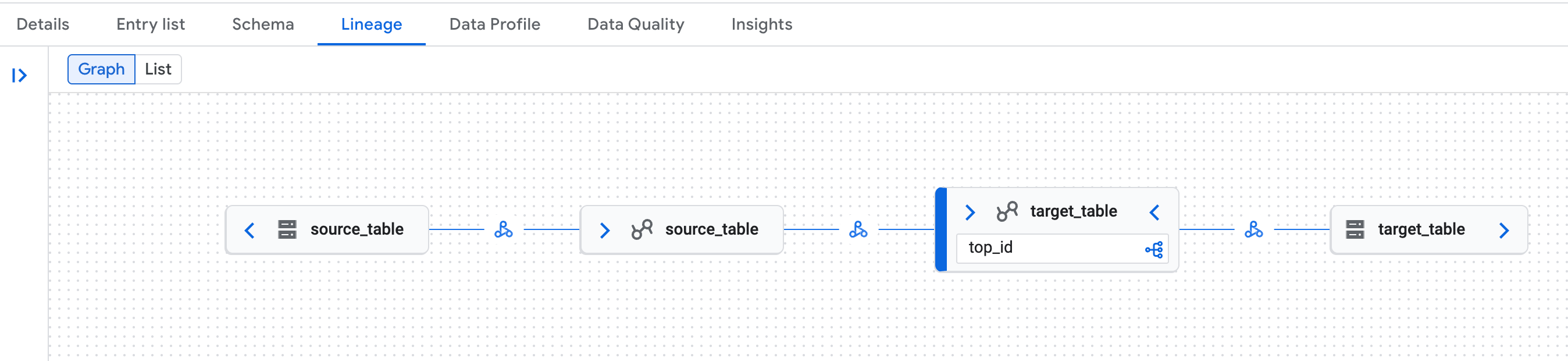 Example of data lineage graph in the Knowledge Catalog page in the Google Cloud console.
Data lineage recognizes both the logical (Lakehouse runtime catalog table) and
physical (Cloud Storage) representations of Lakehouse runtime catalog
Iceberg REST Catalog tables.
### Data lineage known issues
In some Managed Service for Apache Spark clusters, the full data lineage may not be
generated due to an [OpenLineage](https://openlineage.io/) library issue. This
is a known limitation. If it affects your workloads, contact
[Google Cloud support](https://docs.cloud.google.com/managed-spark/docs/support/getting-support.md.txt).
## What's next
- Learn more about the [Lakehouse runtime catalog Iceberg REST Catalog](https://docs.cloud.google.com/lakehouse/docs/about-iceberg-rest-catalog-endpoint.md.txt).
- [Query federated catalogs with Spark](https://docs.cloud.google.com/managed-spark/docs/guides/query-federated-catalogs.md.txt).
- Explore the features of [Apache Iceberg](https://iceberg.apache.org/docs/nightly/).
- Learn how to [query Iceberg data from Lakehouse runtime catalog](https://docs.cloud.google.com/bigquery/docs/query-iceberg-data.md.txt).
- Learn more about [data lineage and Managed Service for Apache Spark](https://docs.cloud.google.com/managed-spark/docs/guides/spark-lineage.md.txt).