## Overview
The Managed Service for Apache Spark
Persistent History Server (PHS) provides web interfaces to view job history
for jobs run on active or deleted Managed Service for Apache Spark clusters. It
is available in
Managed Service for Apache Spark [image version 1.5](https://docs.cloud.google.com/managed-spark/docs/concepts/versioning/dataproc-versions#supported-dataproc-image-versions) and later, and runs on a
[single node Managed Service for Apache Spark cluster](https://docs.cloud.google.com/managed-spark/docs/concepts/configuring-clusters/single-node-clusters.md.txt).
It provides [web interfaces](https://docs.cloud.google.com/managed-spark/docs/concepts/jobs/history-server.md.txt#component_gateway_web_interfaces)
to the following files and data:
- MapReduce and Spark job history files
- Flink job history files (see
[Dataproc optional Flink component](https://docs.cloud.google.com/managed-spark/docs/concepts/components/flink.md.txt)
to create a Managed Service for Apache Spark cluster to run Flink jobs)
- Application Timeline data files created by
[YARN Timeline Service v2](https://hadoop.apache.org/docs/stable/hadoop-yarn/hadoop-yarn-site/TimelineServiceV2.html) and stored in a Bigtable instance.
- YARN aggregation logs
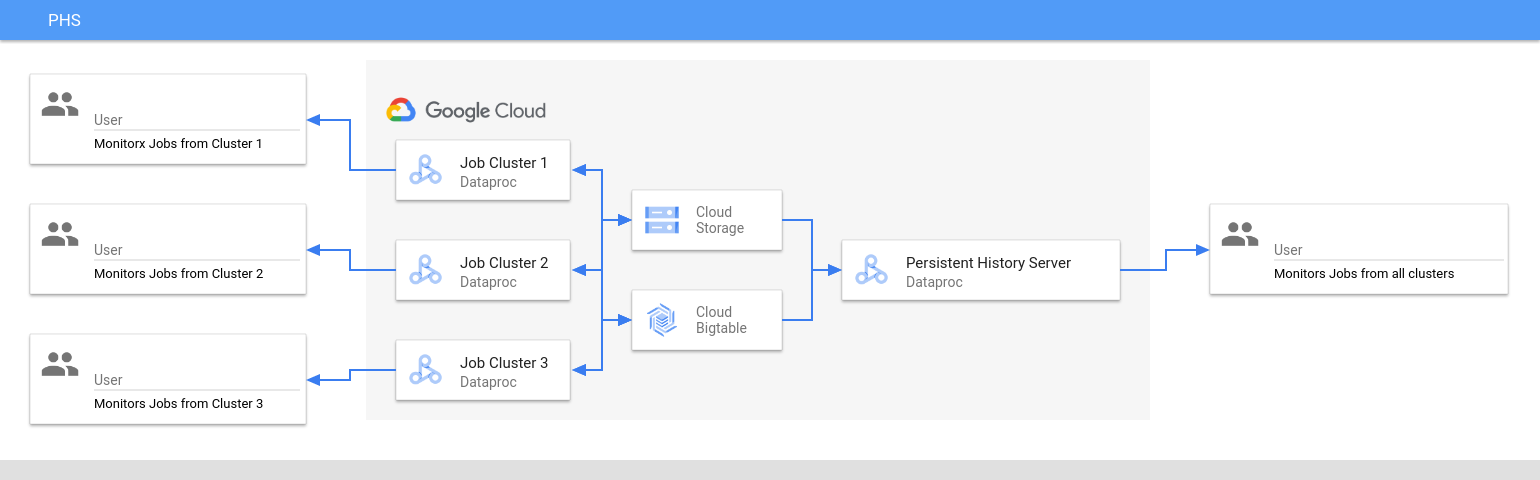
The Persistent History Server accesses and displays Spark and MapReduce job history
files, Flink job history files, and YARN log files written to Cloud Storage
during the lifetime of Managed Service for Apache Spark job clusters.
### Limitations
- The PHS cluster image version and the Managed Service for Apache Spark
job cluster(s) image version must match. For example, you can use a Managed Service for Apache Spark
2.0 image version PHS cluster to view job history files of jobs that ran
on Managed Service for Apache Spark 2.0 image version job clusters that were located
in the project where the PHS cluster is located.
- A PHS cluster does not support
[Kerberos](https://docs.cloud.google.com/managed-spark/docs/concepts/configuring-clusters/security.md.txt)
and [Personal Authentication](https://docs.cloud.google.com/managed-spark/docs/concepts/iam/personal-auth.md.txt).
> [!IMPORTANT]
> You can also view job history and data via [Managed Service for Apache Spark Component Gateway](https://docs.cloud.google.com/managed-spark/docs/concepts/accessing/gateways.md.txt) web interfaces running on a Managed Service for Apache Spark cluster. These on-cluster job history files and web interfaces do not persist after the cluster is deleted.
## Create a Managed Service for Apache Spark PHS cluster
You can run the following
[`gcloud dataproc clusters create`](https://docs.cloud.google.com/sdk/gcloud/reference/dataproc/clusters/create.md.txt)
command in a local terminal or in
[Cloud Shell](https://console.cloud.google.com/?cloudshell=true) with the following flags and
[cluster properties](https://docs.cloud.google.com/managed-spark/docs/concepts/configuring-clusters/cluster-properties.md.txt#dataproc_service_properties_table)
to create a Managed Service for Apache Spark Persistent History Server single-node cluster.
For information on different ways to create a Dataproc cluster, including using the Google Cloud console, the Cloud Client Libraries, and the Dataproc API, see [How to create a Dataproc cluster](https://docs.cloud.google.com/managed-spark/docs/guides/create-cluster.md.txt#creating_a_cloud_dataproc_cluster).
```
gcloud dataproc clusters create CLUSTER_NAME \
--project=PROJECT \
--region=REGION \
--single-node \
--enable-component-gateway \
--optional-components=COMPONENT \
--properties=PROPERTIES
```
- CLUSTER_NAME: Specify the name of the PHS cluster.
- PROJECT: Specify the project to associate with the PHS cluster. This project should be the same as the project associated with the cluster that runs your jobs (see [Create a Dataproc job cluster](https://docs.cloud.google.com/managed-spark/docs/concepts/jobs/history-server.md.txt#create_a_job_cluster)).
- REGION: Specify a [Compute Engine region](https://docs.cloud.google.com/compute/docs/regions-zones.md.txt#available) where the PHS cluster will be located.
- `--single-node`: A PHS cluster is a Dataproc [single node cluster](https://docs.cloud.google.com/managed-spark/docs/concepts/configuring-clusters/single-node-clusters.md.txt).
- `--enable-component-gateway`: This flag enables [Component Gateway](https://docs.cloud.google.com/managed-spark/docs/concepts/accessing/gateways.md.txt) web interfaces on the PHS cluster.
- COMPONENT: Use this flag to install one or more [optional components](https://docs.cloud.google.com/managed-spark/docs/concepts/components/overview.md.txt#available_optional_components) on the cluster. **You must specify the `FLINK` optional component to run the
Flink HistoryServer Web Service on the PHS cluster to view
Flink job history files.**
- PROPERTIES. Specify one or more [cluster properties](https://docs.cloud.google.com/managed-spark/docs/concepts/configuring-clusters/cluster-properties.md.txt).
- Optionally, add the
[--image-version](https://docs.cloud.google.com/sdk/gcloud/reference/dataproc/clusters/create.md.txt#--image-version)
flag to specify the PHS cluster image version. The PHS image version must
match the image version of the Managed Service for Apache Spark job cluster(s). See
[Limitations](https://docs.cloud.google.com/managed-spark/docs/concepts/jobs/history-server.md.txt#limitations).
**Notes:**
- The property value examples in this section use a "\*" wildcard character to allow the PHS to match multiple directories in the specified bucket written to by different job clusters (but see [Wildcard efficiency considerations](https://docs.cloud.google.com/storage/docs/wildcards.md.txt#efficiency)).
- Separate `--properties` flags are shown in the following examples to aid readability. The recommended practice when using `gcloud dataproc
clusters create` to create a Managed Service for Apache Spark cluster is to use one `--properties` flag to specify a list of comma-separated properties (see [cluster properties formatting](https://docs.cloud.google.com/managed-spark/docs/concepts/configuring-clusters/cluster-properties.md.txt#formatting)).
**Properties:**
- `yarn:yarn.nodemanager.remote-app-log-dir=gs://bucket-name/*/yarn-logs`: Add this property to specify the Cloud Storage location where the PHS will access YARN logs written by job clusters.
- `spark:spark.history.fs.logDirectory=gs://bucket-name/*/spark-job-history`:
Add this property to enable persistent Spark job history. This property specifies the
location where the PHS will access Spark job history logs written by job clusters.
In Managed Service for Apache Spark **2.0+** clusters, the following two properties
must also be set to enable PHS Spark history logs (see
[Spark History Server Configuration Options](https://spark.apache.org/docs/latest/monitoring.html#spark-history-server-configuration-options)).
The `spark.history.custom.executor.log.url` value is a literal value that
contains {{PLACEHOLDERS}}
for variables that will be set by the Persistent History Server. These
variables are not set by users; pass in the property value as shown.
```
--properties=spark:spark.history.custom.executor.log.url.applyIncompleteApplication=false
```
```
--properties=spark:spark.history.custom.executor.log.url={{YARN_LOG_SERVER_URL}}/{{NM_HOST}}:{{NM_PORT}}/{{CONTAINER_ID}}/{{CONTAINER_ID}}/{{USER}}/{{FILE_NAME}}
```
- `mapred:mapreduce.jobhistory.read-only.dir-pattern=gs://bucket-name/*/mapreduce-job-history/done`:
Add this property to enable persistent MapReduce job history.
This property specifies the Cloud Storage location where the PHS
will access MapReduce job history logs written by job clusters.
- `dataproc:yarn.atsv2.bigtable.instance=projects/project-id/instance_id/bigtable-instance-id`: After you
[Configure Yarn Timeline Service v2](https://docs.cloud.google.com/managed-spark/docs/concepts/jobs/history-server.md.txt#configure_yarn_timeline_service_v2),
add this property to use the PHS cluster to view timeline data on the
**YARN Application Timeline Service V2**
and **Tez** web interfaces (see [Component Gateway web interfaces](https://docs.cloud.google.com/managed-spark/docs/concepts/jobs/history-server.md.txt#component_gateway_web_interfaces)).
- `flink:historyserver.archive.fs.dir=gs://bucket-name/*/flink-job-history/completed-jobs`:
Use this property to configure the Flink `HistoryServer` to monitor a
comma-separated list of directories.
**Properties examples:**
```
--properties=spark:spark.history.fs.logDirectory=gs://bucket-name/*/spark-job-history
```
```
--properties=mapred:mapreduce.jobhistory.read-only.dir-pattern=gs://bucket-name/*/mapreduce-job-history/done
```
```
--properties=flink:flink.historyserver.archive.fs.dir=gs://bucket-name/*/flink-job-history/completed-jobs
```
## Create a Managed Service for Apache Spark job cluster
You can run the following command in a local terminal or in
[Cloud Shell](https://console.cloud.google.com/?cloudshell=true) to create a
Managed Service for Apache Spark job cluster that runs jobs and writes job history files to
a Persistent History Server (PHS).
For information on different ways to install, configure, and run Flink on a Dataproc cluster, see [Dataproc optional Flink component](https://docs.cloud.google.com/managed-spark/docs/concepts/components/flink.md.txt).
```
gcloud dataproc clusters create CLUSTER_NAME \
--project=PROJECT \
--region=REGION \
--optional-components=COMPONENT \
--enable-component-gateway \
--properties=PROPERTIES \
other args ...
```
- CLUSTER_NAME: Specify the name of the job cluster.
- PROJECT: Specify the project associated with the job cluster.
- REGION: Specify the [Compute Engine region](https://docs.cloud.google.com/compute/docs/regions-zones.md.txt#available) where the job cluster will be located.
- `--enable-component-gateway`: This flag enables [Component Gateway](https://docs.cloud.google.com/managed-spark/docs/concepts/accessing/gateways.md.txt) web interfaces on the job cluster.
- COMPONENT: Use this flag to install one or more [optional components](https://docs.cloud.google.com/managed-spark/docs/concepts/components/overview.md.txt#available_optional_components) on the cluster. Specify the `FLINK` optional component to [run Flink jobs](https://docs.cloud.google.com/managed-spark/docs/concepts/components/flink.md.txt#run_flink_jobs) on the cluster.
- PROPERTIES: Add one or more of the following
[cluster properties](https://docs.cloud.google.com/managed-spark/docs/concepts/configuring-clusters/cluster-properties.md.txt#dataproc_service_properties_table)
to set PHS-related non-default Cloud Storage locations and other job cluster properties.
**Notes:**
- The property value examples in this section use a "\*" wildcard character to allow the PHS to match multiple directories in the specified bucket written to by different job clusters (but see [Wildcard efficiency considerations](https://docs.cloud.google.com/storage/docs/wildcards.md.txt#efficiency)).
- Separate `--properties` flags are shown in the following examples to aid readability. The recommended practice when using `gcloud dataproc
clusters create` to create a Managed Service for Apache Spark cluster is to use one `--properties` flag to specify a list of comma-separated properties (see [cluster properties formatting](https://docs.cloud.google.com/managed-spark/docs/concepts/configuring-clusters/cluster-properties.md.txt#formatting)).
**Properties:**
- `yarn:yarn.nodemanager.remote-app-log-dir`: By default, aggregated YARN logs are enabled on Managed Service for Apache Spark job clusters and written to the cluster [temp bucket](https://docs.cloud.google.com/managed-spark/docs/concepts/configuring-clusters/staging-bucket.md.txt). Add this property to specify a different Cloud Storage location where the cluster will write aggregation logs for access by the Persistent History Server.
```
--properties=yarn:yarn.nodemanager.remote-app-log-dir=gs://bucket-name/directory-name/yarn-logs
```
- `spark:spark.history.fs.logDirectory` and `spark:spark.eventLog.dir`: By default, Spark job history files are saved in the cluster [`temp bucket`](https://docs.cloud.google.com/managed-spark/docs/concepts/configuring-clusters/staging-bucket.md.txt) in the `/spark-job-history` directory. You can add these properties to specify different Cloud Storage locations for these files. If both properties are used, they must point to directories in the same bucket.
```
--properties=spark:spark.history.fs.logDirectory=gs://bucket-name/directory-name/spark-job-history
```
```
--properties=spark:spark.eventLog.dir=gs://bucket-name/directory-name/spark-job-history
```
- `mapred:mapreduce.jobhistory.done-dir` and `mapred:mapreduce.jobhistory.intermediate-done-dir`: By default, MapReduce job history files are saved in the cluster [`temp bucket`](https://docs.cloud.google.com/managed-spark/docs/concepts/configuring-clusters/staging-bucket.md.txt) in the `/mapreduce-job-history/done` and `/mapreduce-job-history/intermediate-done` directories. The intermediate `mapreduce.jobhistory.intermediate-done-dir` location is temporary storage; intermediate files are moved to the `mapreduce.jobhistory.done-dir` location when the MapReduce job completes. You can add these properties to specify different Cloud Storage locations for these files. If both properties are used, they must point to directories in the same bucket.
```
--properties=mapred:mapreduce.jobhistory.done-dir=gs://bucket-name/directory-name/mapreduce-job-history/done
```
```
--properties=mapred:mapreduce.jobhistory.intermediate-done-dir=gs://bucket-name/directory-name/mapreduce-job-history/intermediate-done
```
- `spark:spark.history.fs.gs.outputstream.type`: This property applies to [`2.0`](https://docs.cloud.google.com/managed-spark/docs/concepts/versioning/dataproc-release-2.0) and [`2.1`](https://docs.cloud.google.com/managed-spark/docs/concepts/versioning/dataproc-release-2.1) image version clusters that use Cloud Storage connector version `2.0.x` (the default connector version for `2.0` and `2.1` image version clusters). It controls how Spark jobs send data to Cloud Storage. The default setting is `BASIC`, which sends data to Cloud Storage after job completion. When set to `FLUSHABLE_COMPOSITE`, data is copied to Cloud Storage at regular intervals while the job is running as set by `spark:spark.history.fs.gs.outputstream.sync.min.interval.ms`.
```
--properties=spark:spark.history.fs.gs.outputstream.type=FLUSHABLE_COMPOSITE
```
- `spark:spark.history.fs.gs.outputstream.sync.min.interval.ms`: This property applies to [`2.0`](https://docs.cloud.google.com/managed-spark/docs/concepts/versioning/dataproc-release-2.0) and [`2.1`](https://docs.cloud.google.com/managed-spark/docs/concepts/versioning/dataproc-release-2.1) image version clusters that use Cloud Storage connector version `2.0.x` (the default connector version for `2.0` and `2.1` image version clusters). It controls the frequency in milliseconds at which data is transferred to Cloud Storage when `spark:spark.history.fs.gs.outputstream.type` is set to `FLUSHABLE_COMPOSITE`. The default time interval is `5000ms`. The millisecond time interval value can be specified with or without adding the `ms` suffix.
```
--properties=spark:spark.history.fs.gs.outputstream.sync.min.interval.ms=INTERVALms
```
- `spark:spark.history.fs.gs.outputstream.sync.min.interval`: This property applies to [`2.2`](https://docs.cloud.google.com/managed-spark/docs/concepts/versioning/dataproc-release-2.2) and later image version clusters that use Cloud Storage connector version `3.0.x` (the default connector version for `2.2` image version clusters). It replaces the previous `spark:spark.history.fs.gs.outputstream.sync.min.interval.ms` property, and supports time-suffixed values, such as `ms`, `s`, and `m`. It controls the frequency at which data is transferred to Cloud Storage when `spark:spark.history.fs.gs.outputstream.type` is set to `FLUSHABLE_COMPOSITE`.
```
--properties=spark:spark.history.fs.gs.outputstream.sync.min.interval=INTERVAL
```
- `dataproc:yarn.atsv2.bigtable.instance`: After you [Configure Yarn Timeline Service v2](https://docs.cloud.google.com/managed-spark/docs/concepts/jobs/history-server.md.txt#configure_yarn_timeline_service_v2), add this property to write YARN timeline data to the specified Bigtable instance for viewing on the PHS cluster **YARN Application Timeline Service V2** and **Tez** web interfaces. Note: cluster creation will fail if the Bigtable instance does not exist.
```
--properties=dataproc:yarn.atsv2.bigtable.instance=projects/project-id/instance_id/bigtable-instance-id
```
- `flink:jobhistory.archive.fs.dir`: The Flink JobManager archives completed Flink jobs by uploading archived job information to a filesystem directory. Use this property to set the archive directory in `flink-conf.yaml`.
```
--properties=flink:jobmanager.archive.fs.dir=gs://bucket-name/job-cluster-1/flink-job-history/completed-jobs
```
## Use PHS with Spark batch workloads
To use the Persistent History Server with Managed Service for Apache Spark Serverless for
Spark batch workloads:
1. [Create a PHS cluster](https://docs.cloud.google.com/managed-spark/docs/concepts/jobs/history-server.md.txt#create_a_phs_cluster).
2. Select or specify the PHS cluster when you
[submit a Spark batch workload](https://docs.cloud.google.com/managed-spark/docs/quickstarts/spark-batch.md.txt#submit_a_spark_batch_workload).
## Use PHS with Managed Service for Apache Spark on Google Kubernetes Engine
To use the Persistent History Server with
[Managed Service for Apache Spark on GKE](https://docs.cloud.google.com/managed-spark/docs/guides/dpgke/dataproc-gke-overview):
1. [Create a PHS cluster](https://docs.cloud.google.com/managed-spark/docs/concepts/jobs/history-server.md.txt#create_a_phs_cluster).
2. Select or specify the PHS cluster when you
[create a Managed Service for Apache Spark on GKE virtual cluster](https://docs.cloud.google.com/managed-spark/docs/guides/dpgke/quickstarts/gke-quickstart-create-cluster.md.txt#create_a_virtual_cluster).
## Component Gateway web interfaces
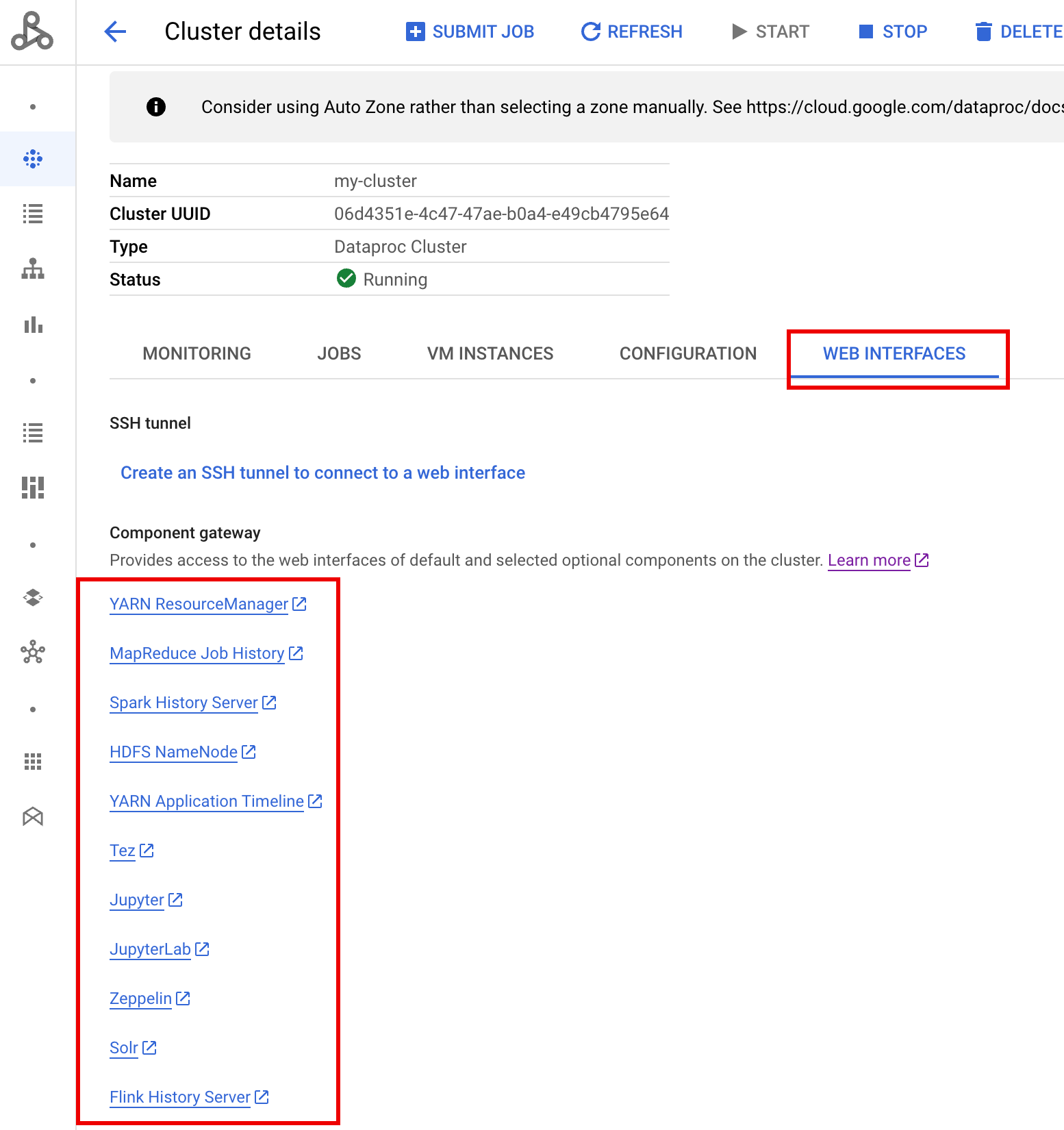
In the in the Google Cloud console, from the Managed Service for Apache Spark
[**Clusters**](https://console.cloud.google.com/dataproc/clusters) page, click PHS cluster name
to open the **Cluster details** page. Under the **Web Interfaces** tab,
select the Component gateway links to open web interfaces running
on the PHS cluster.
> [!NOTE]
> **Note:** These component gateway links are also provided in the Google Cloud console for the job cluster during the lifetime of the job cluster (see [Viewing and Accessing Component Gateway URLs](https://docs.cloud.google.com/managed-spark/docs/concepts/accessing/gateways.md.txt#viewing_and_accessing_component_gateway_urls)).
> [!NOTE]
> **Note:** The PHS cluster **YARN ResourceManager** and **HDFS NameNode** web interfaces do not access and display data.
### Spark History Server web interface
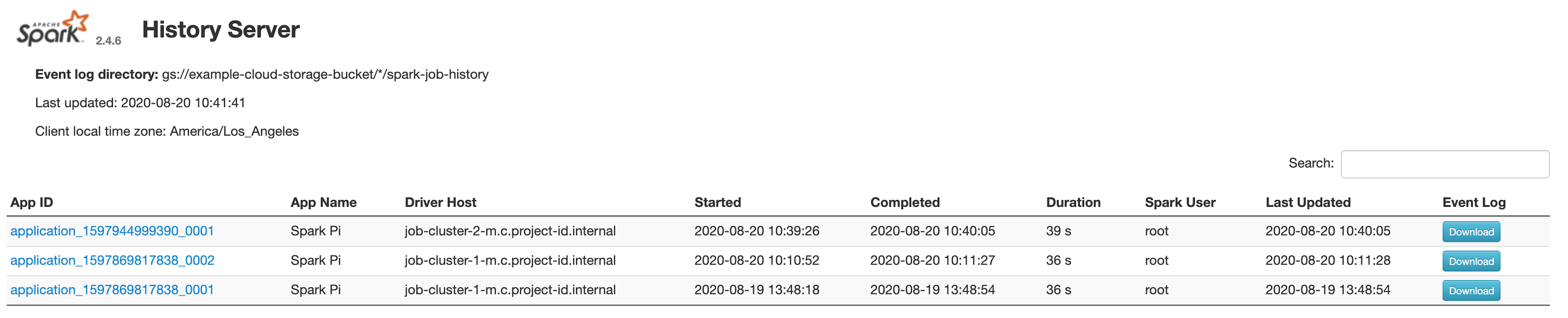
The following screenshot shows the Spark History Server web interface displaying links
to Spark jobs run on job-cluster-1 and job-cluster-2 after setting
up the job clusters'`spark.history.fs.logDirectory` and `spark:spark.eventLog.dir`
and PHS cluster's `spark.history.fs.logDirectory` locations as follows:
|---|---|
| job-cluster-1 | gs://example-cloud-storage-bucket/job-cluster-1/spark-job-history |
| job-cluster-2 | gs://example-cloud-storage-bucket/job-cluster-2/spark-job-history |
| phs-cluster | gs://example-cloud-storage-bucket/\*/spark-job-history |
#### App name search
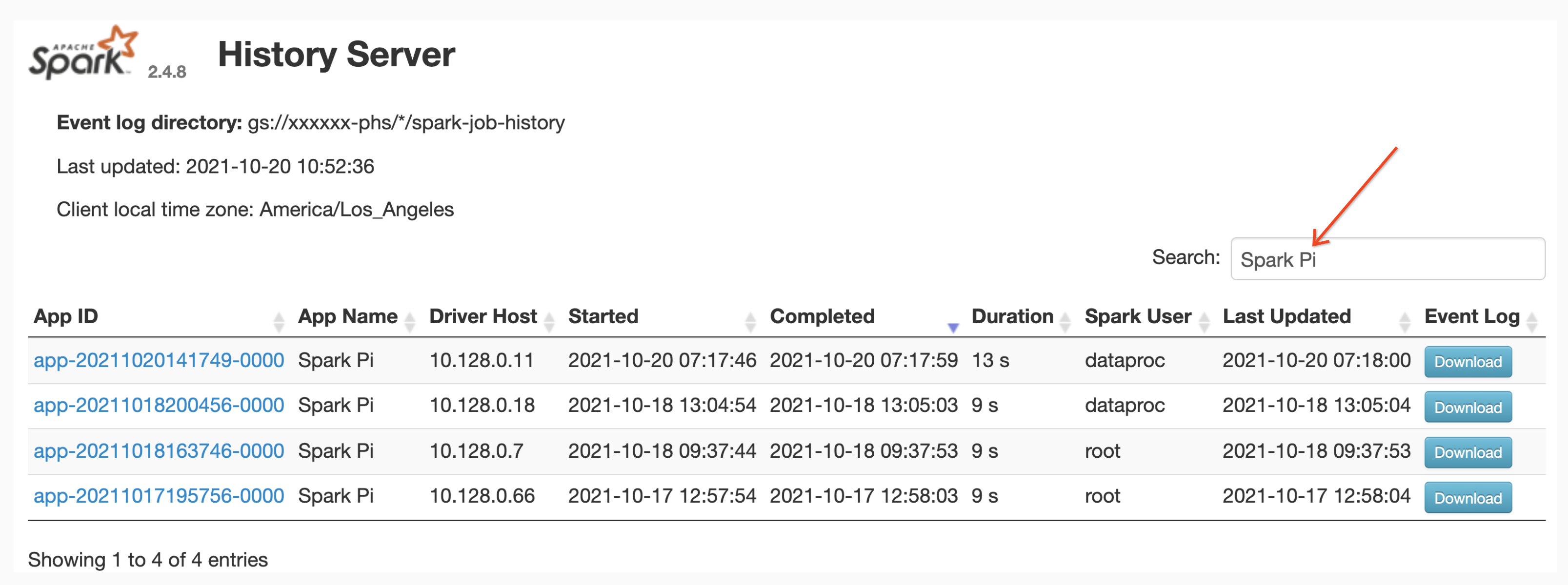
You can list jobs by App Name in the **Spark History Server** web interface by entering
an app name in the search box. The app name can be set in one of the following ways
(listed by priority):
1. Set inside the application code when creating the spark context
2. Set by the [spark.app.name](https://spark.apache.org/docs/latest/configuration.html#available-properties) property when the job is submitted
3. Set by Managed Service for Apache Spark to the full REST resource name for job (`projects/project-id/regions/region/jobs/job-id`)
Users can input an app or resource name term in the **Search** box
to find and list jobs.
#### Event logs
The Spark History Server web interface provides an **Event Log** button you can
click to download Spark event logs. These logs are useful for examining the
lifecycle of the Spark application.
#### Spark jobs
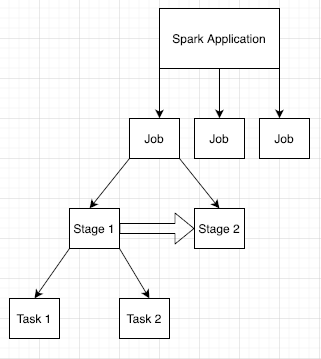
Spark applications are broken down into multiple jobs, which are further broken
down into multiple stages. Each stage can have multiple tasks, which are run on
executor nodes (workers).
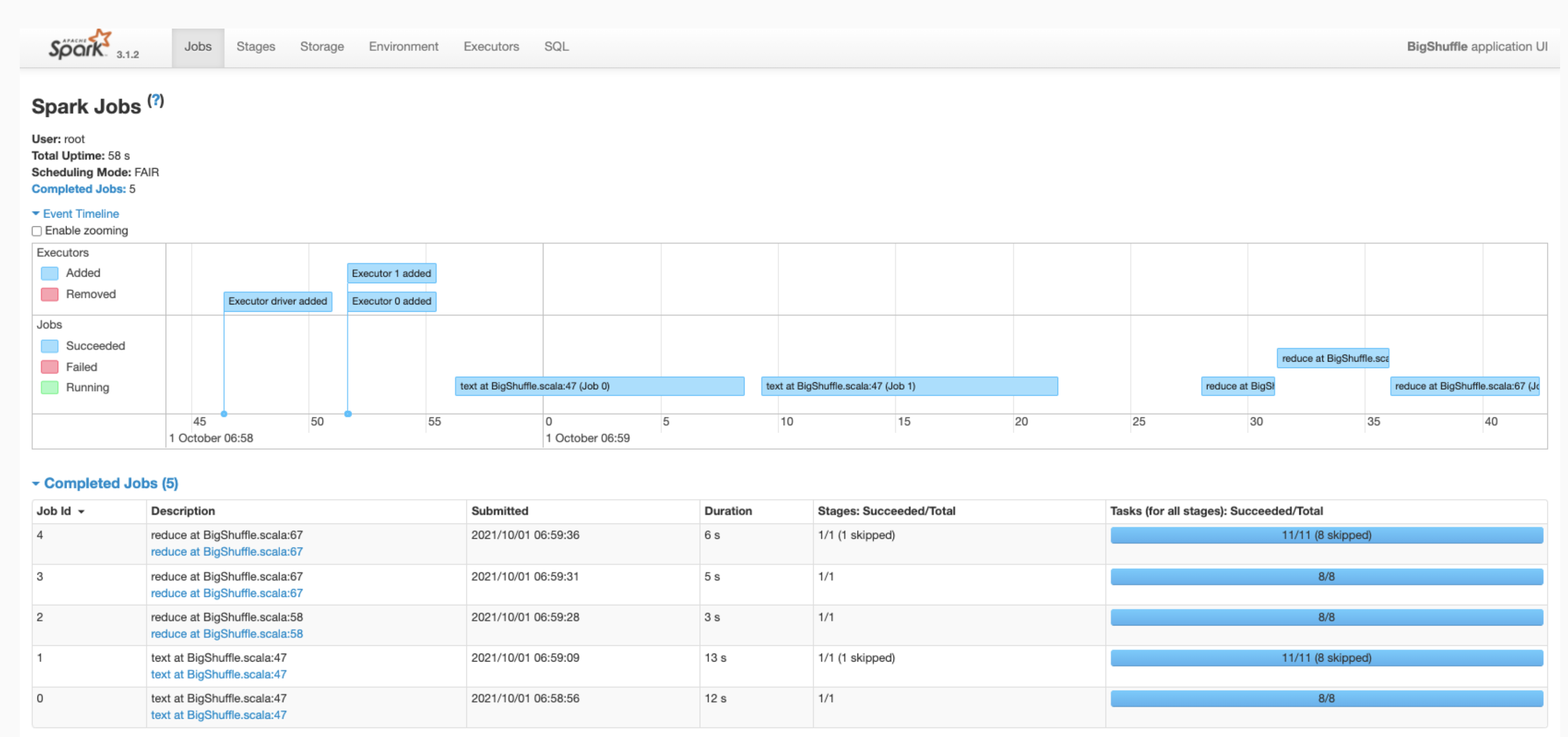
- Click a Spark App ID in the web interface to open the Spark Jobs page, which provides
an event timeline and summary of jobs within the application.
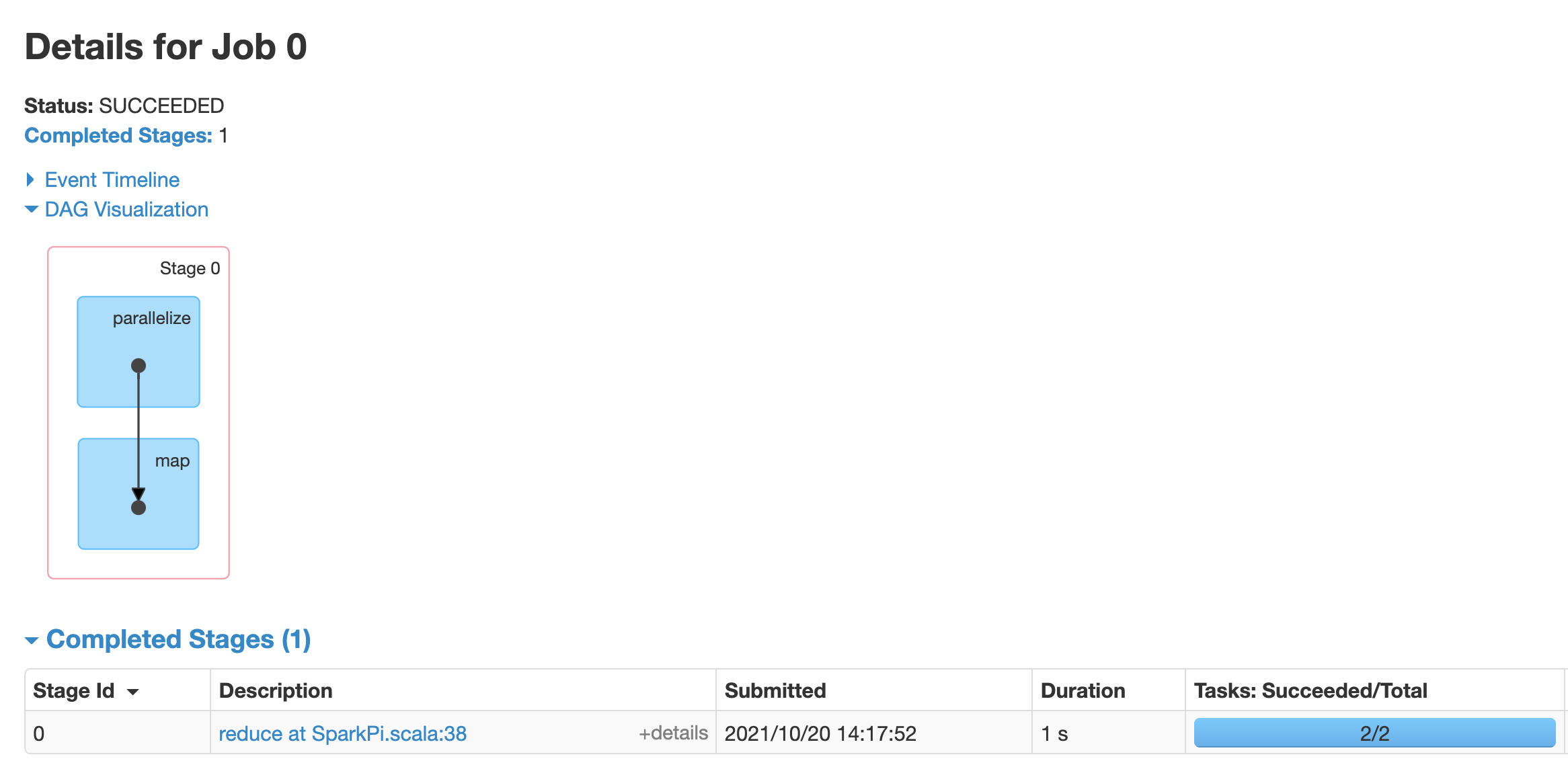
- Click a job to open a Job Details page with a Directed Acyclic Graph (DAG)
and summary of job stages.
- Click a stage or use the Stages tab to select a stage to open the Stage
Details page.
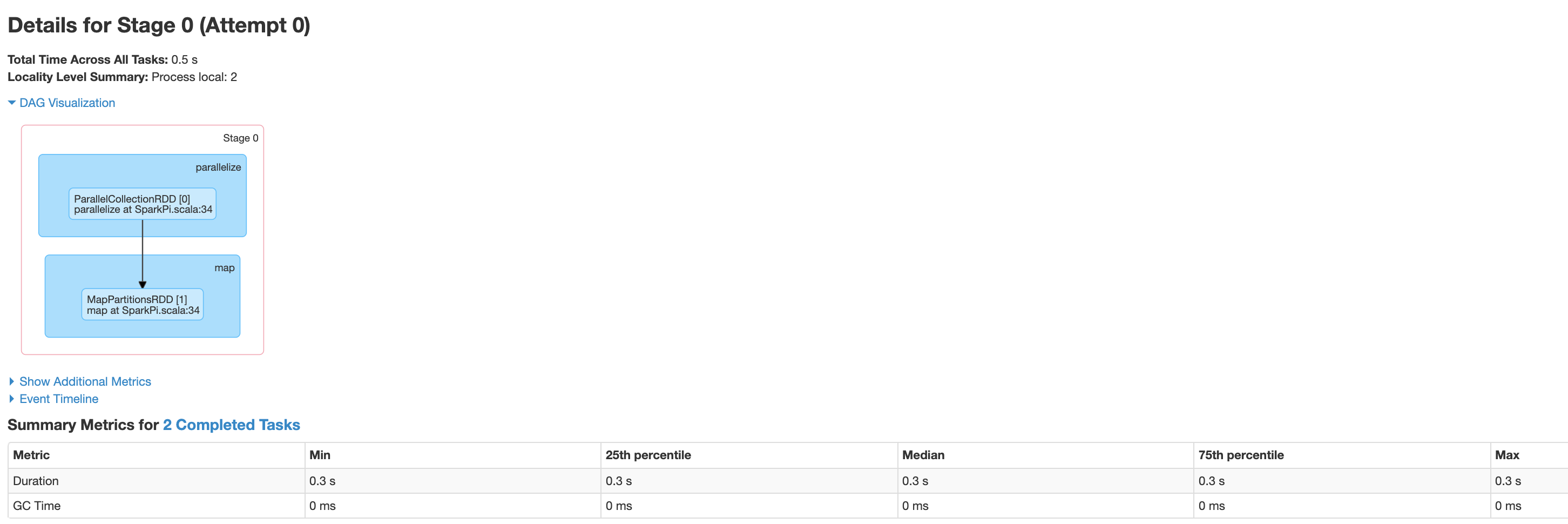
Stage Details includes a DAG visualization, an event timeline, and metrics
for the tasks within the stage. You can use this page to troubleshoot issues
related to strangled tasks, scheduler delays, and out of memory errors. The
DAG visualizer shows the line of code from which the stage is derived,
helping you track issues back to the code.
- Click the Executors tab for information about the Spark application's
driver and executor nodes.
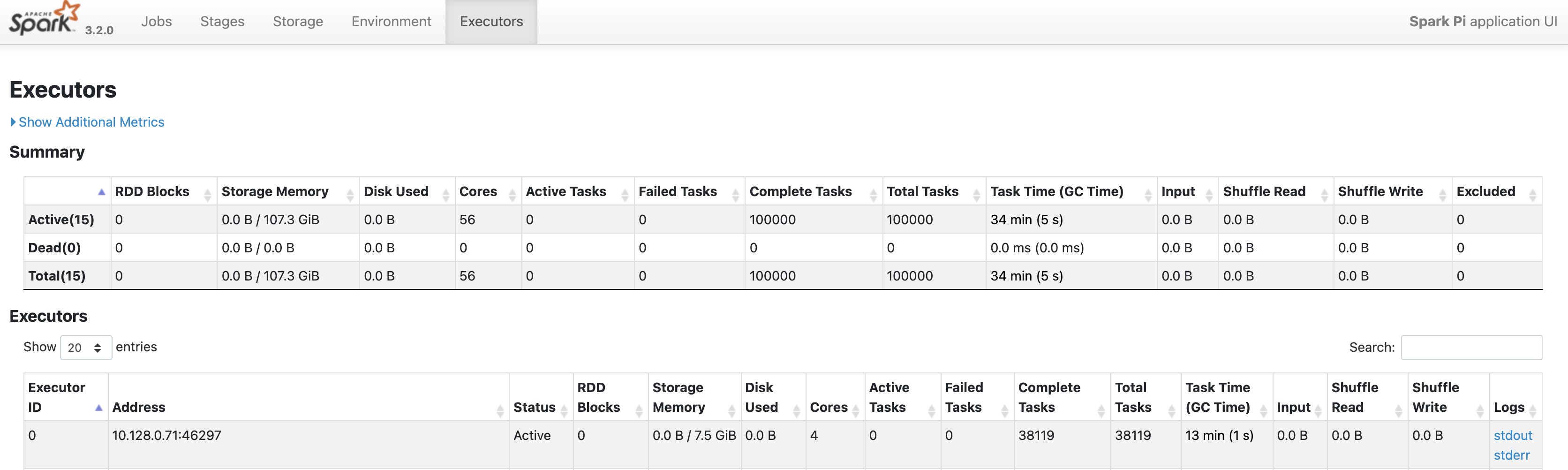
Important pieces of information on this page include the number of cores
and the number of tasks that were run on each executor.
> [!IMPORTANT]
> If an application runs slowly, look at the size of the shuffle reads and writes; a large amount of data can slow performance.
### Tez web interface
Tez is the default execution engine for Hive and Pig on Managed Service for Apache Spark.
Submitting a Hive job on a Managed Service for Apache Spark job cluster launches a
Tez application.
If you [configured Yarn Timeline Service v2](https://docs.cloud.google.com/managed-spark/docs/concepts/jobs/history-server.md.txt#configure_yarn_timeline_service_v2)
and set the `dataproc:yarn.atsv2.bigtable.instance` property when you
created the PHS and Managed Service for Apache Spark job clusters, YARN writes
generated Hive and Pig job timeline data to the specified Bigtable
instance for retrieval and display on the Tez web interface running on the
PHS server.
> [!NOTE]
> **Note:** The **Hive Queries** tab is not supported in the Tez web interface running on the PHS cluster.

### YARN Application Timeline V2 web interface
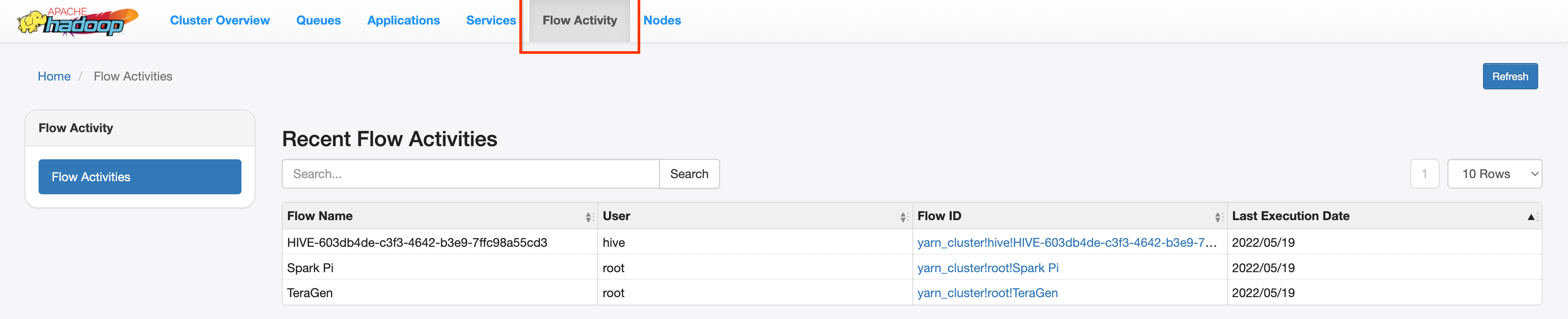
If you [configured Yarn Timeline Service v2](https://docs.cloud.google.com/managed-spark/docs/concepts/jobs/history-server.md.txt#configure_yarn_timeline_service_v2)
and set the `dataproc:yarn.atsv2.bigtable.instance` property when you
created the PHS and Managed Service for Apache Spark job clusters, YARN writes
generated job timeline data to the specified Bigtable instance for retrieval and
display on the YARN Application Timeline Service web interface running on the
PHS server. Managed Service for Apache Spark jobs are listed under the **Flow Activity**
tab in web interface.
## Configure Yarn Timeline Service v2
To configure Yarn Timeline Service v2, set up a Bigtable instance
and, in needed, check service account roles, as follows:
1. [Create a Bigtable instance](https://docs.cloud.google.com/bigtable/docs/creating-instance.md.txt).
2. Check service account roles, if needed. The default
[VM service account](https://docs.cloud.google.com/managed-spark/docs/concepts/configuring-clusters/service-accounts.md.txt#VM_service_account)
used by Dataproc cluster VMs has the permissions needed to create and configure
the Bigtable instance for the YARN Timeline Service.
If you create your job or PHS cluster with a
[custom VM Service account](https://docs.cloud.google.com/managed-spark/docs/concepts/configuring-clusters/service-accounts.md.txt#create_a_cluster_with_a_custom_vm_service_account),
the account must have either the
[Bigtable `Administrator` or `Bigtable User` role](https://docs.cloud.google.com/bigtable/docs/access-control.md.txt#roles).
### Required table schema
Managed Service for Apache Spark PHS support for
[YARN Timeline Service v2](https://hadoop.apache.org/docs/stable/hadoop-yarn/hadoop-yarn-site/TimelineServiceV2.html)
requires a specific schema created in the
Bigtable instance. **Managed Service for Apache Spark creates the required
schema** when a job cluster or PHS cluster is created with the
`dataproc:yarn.atsv2.bigtable.instance` property set to point to the
Bigtable instance.
> [!NOTE]
> **Note:** If the required bigtable instance schema exists when the `dataproc:yarn.atsv2.bigtable.instance` property is submitted to Managed Service for Apache Spark, Managed Service for Apache Spark will not create the schema.
The following is the required Bigtable instance schema:
| Tables | Column families |
|---|---|
| prod.timelineservice.application | c,i,m |
| prod.timelineservice.app_flow | m |
| prod.timelineservice.entity | c,i,m |
| prod.timelineservice.flowactivity | i |
| prod.timelineservice.flowrun | i |
| prod.timelineservice.subapplication | c,i,m |
### Bigtable garbage collection
You can configure age-based [Bigtable Garbage Collection](https://cloud.google.com/bigtable/docs/garbage-collection) for
ATSv2 tables:
- Install
[cbt](https://cloud.google.com/bigtable/docs/cbt-overview),
(including the creation of the `.cbrtc file`).
- Create the ATSv2 age-based garbage collection policy:
```
export NUMBER_OF_DAYS = number \
cbt setgcpolicy prod.timelineservice.application c maxage=${NUMBER_OF_DAYS} \
cbt setgcpolicy prod.timelineservice.application i maxage=${NUMBER_OF_DAYS} \
cbt setgcpolicy prod.timelineservice.application m maxage=${NUMBER_OF_DAYS} \
cbt setgcpolicy prod.timelineservice.app_flow m maxage=${NUMBER_OF_DAYS} \
cbt setgcpolicy prod.timelineservice.entity c maxage=${NUMBER_OF_DAYS} \
cbt setgcpolicy prod.timelineservice.entity i maxage=${NUMBER_OF_DAYS} \
cbt setgcpolicy prod.timelineservice.entity m maxage=${NUMBER_OF_DAYS} \
cbt setgcpolicy prod.timelineservice.flowactivity i maxage=${NUMBER_OF_DAYS} \
cbt setgcpolicy prod.timelineservice.flowrun i maxage=${NUMBER_OF_DAYS} \
cbt setgcpolicy prod.timelineservice.subapplication c maxage=${NUMBER_OF_DAYS} \
cbt setgcpolicy prod.timelineservice.subapplication i maxage=${NUMBER_OF_DAYS} \
cbt setgcpolicy prod.timelineservice.subapplication m maxage=${NUMBER_OF_DAYS}
```
Notes:
NUMBER_OF_DAYS: Maximum number of days is `30d`.