Managed Service for Apache Spark Granular IAM is feature that lets you
grant permissions at the cluster, jobs, operations, workflow template, or
autoscaling policy level.
Example: You can grant one user a cluster Viewer role, which allows the user to view
a cluster within a project, and grant another user a jobs Editor role,
which allows that user to update and cancel, as well as view the job.
To understand the specific Google Cloud CLI commands enabled by each
Managed Service for Apache Spark Granular IAM role, see
[SDK commands enabled by Granular IAM](https://docs.cloud.google.com/managed-spark/docs/concepts/iam/granular-iam.md.txt#sdk-commands).
> [!NOTE]
> Managed Service for Apache Spark Granular IAM updates permissions on **existing** Managed Service for Apache Spark resources. For example, you cannot use it to set permissions on a cluster that is being created or a job that is being submitted.
## Managed Service for Apache Spark Granular IAM roles and permissions
Managed Service for Apache Spark Granular IAM can set the following roles
with the following permissions on Managed Service for Apache Spark resources.
### Cluster roles
| Role | Permissions |
|---|---|
| Viewer | dataproc.clusters.get |
| Editor | dataproc.clusters.get dataproc.clusters.list dataproc.clusters.delete dataproc.clusters.update dataproc.clusters.use dataproc.clusters.start dataproc.clusters.stop |
| Owner | dataproc.clusters.get dataproc.clusters.list dataproc.clusters.delete dataproc.clusters.update dataproc.clusters.use dataproc.clusters.start dataproc.clusters.stop dataproc.clusters.setIamPolicy dataproc.clusters.getIamPolicy |
### Job roles
| Role | Permissions |
|---|---|
| Viewer | dataproc.jobs.get |
| Editor | dataproc.jobs.get dataproc.jobs.cancel dataproc.jobs.delete dataproc.jobs.update |
| Owner | dataproc.jobs.get dataproc.jobs.cancel dataproc.jobs.delete dataproc.jobs.update dataproc.jobs.setIamPolicy dataproc.jobs.getIamPolicy |
### Operation roles
| Role | Permissions |
|---|---|
| Viewer | dataproc.operations.get |
| Editor | dataproc.jobs.get dataproc.operations.cancel dataproc.operations.delete |
| Owner | dataproc.jobs.get dataproc.operations.cancel dataproc.operations.delete dataproc.operations.setIamPolicy dataproc.operations.getIamPolicy |
### Workflow template roles
| Role | Permissions |
|---|---|
| Viewer | dataproc.workflowTemplates.get |
| Editor | dataproc.workflowTemplates.get dataproc.workflowTemplates.delete dataproc.workflowTemplates.update |
| Owner | dataproc.workflowTemplates.get dataproc.workflowTemplates.delete dataproc.workflowTemplates.update dataproc.workflowTemplates.setIamPolicy dataproc.workflowTemplates.getIamPolicy |
### Autoscaling policy roles
| Role | Permissions |
|---|---|
| Viewer | dataproc.autoscalingPolicies.get |
| Editor | dataproc.autoscalingPolicies.get dataproc.autoscalingPolicies.use dataproc.autoscalingPolicies.delete dataproc.autoscalingPolicies.update |
| Owner | dataproc.autoscalingPolicies.get dataproc.autoscalingPolicies.use dataproc.autoscalingPolicies.delete dataproc.autoscalingPolicies.update dataproc.autoscalingPolicies.setIamPolicy dataproc.autoscalingPolicies.getIamPolicy |
## Use Managed Service for Apache Spark Granular IAM
This section explains how to use Managed Service for Apache Spark Granular
IAM to assign roles to users on an existing Managed Service for Apache Spark
resource.
For more information about updating and removing Identity and Access Management (IAM)
roles, see
[Manage access to projects, folders, and organizations](https://docs.cloud.google.com/iam/docs/granting-changing-revoking-access.md.txt).
> [!IMPORTANT]
> **IAM Terminology** . The following are the basic IAM terms. Understanding these terms can help you understand the structure and effect of the examples in this section.
>
> - **Resource** A project, cluster, job, operation, workflow template, or autoscaling policy
> - **Policy** A collection of bindings on a resource (one policy per resource)
> - **Binding** A mapping of a list of principals (users, groups or service accounts) to a role
> - **Role** A collection of permissions
### gcloud Command
1. Get the resource's IAM [policy](https://docs.cloud.google.com/managed-spark/docs/reference/rest/v1/Policy.md.txt), and write it to a JSON file (the resource-type can be "clusters" or "jobs" or "operations" or "workflow-templates" or "autoscaling-policies"):
```
gcloud dataproc resource-type get-iam-policy resource-id \
--region=region \
--format=json > iam.json
```
2. The contents of the JSON file will look similar to the following:
```
{
"bindings": [
{
"role": "roles/editor",
"members": [
"user:mike@example.com",
"group:admins@example.com",
"domain:google.com",
"serviceAccount:my-other-app@appspot.gserviceaccount.com"
]
}
],
"etag": "string"
}
```
3. Using a text editor, add a new [binding object](https://docs.cloud.google.com/managed-spark/docs/reference/rest/v1/Policy.md.txt#Binding) to the bindings array that defines users and the resource access role for those users. For example, to grant the Viewer role (`roles/viewer`) to the user `sean@example.com`, you would change the preceding example to add a new binding object (shown in **bold** in the following example). Note: Make sure to return the `etag` value you received from `gcloud dataproc resource-type get-iam-policy`. See the [etag documentation](https://docs.cloud.google.com/managed-spark/docs/reference/rest/v1/Policy.md.txt#FIELDS.etag).
```
{
"bindings": [
{
"role": "roles/editor",
"members": [
"user:mike@example.com",
"group:admins@example.com",
"domain:google.com",
"serviceAccount:my-other-app@appspot.gserviceaccount.com"
]
},
{
"role": "roles/viewer",
"members": [
"user:sean@example.com"
]
}
],
"etag": "value-from-get-iam-policy"
}
```
4. Update the cluster's policy with the new bindings array by running the following command (resource-type can be "clusters" or "jobs" or "operations" or "workflow-templates" or "autoscaling-policies"):
```
gcloud dataproc resource-type set-iam-policy resource-name \
--region=region \
--format=json iam.json
```
5. The command outputs the updated policy:
```
{
"bindings": [
{
"role": "roles/editor",
"members": [
"user:mike@example.com",
"group:admins@example.com",
"domain:google.com",
"serviceAccount:my-other-app@appspot.gserviceaccount.com"
]
},
{
"role": "roles/viewer",
"members": [
"user:sean@example.com"
]
}
],
"etag": "string"
}
```
### REST API
1. Issue a resource-type ("clusters" or "jobs" or "operations" or "workflowTemplates" or "autoscalingPolicies") getIamPolicy request to get the IAM [policy](https://docs.cloud.google.com/managed-spark/docs/reference/rest/v1/Policy.md.txt) for the resource.
**Cluster [getIamPolicy](https://docs.cloud.google.com/managed-spark/docs/reference/rest/v1/projects.regions.clusters/getIamPolicy.md.txt) Example:**
```
GET https://dataproc.googleapis.com/v1/projects/projectName/regions/region/clusters/clusterName:getIamPolicy
```
2. The contents of the JSON file will look similar to the following:
```
{
"bindings": [
{
"role": "roles/editor",
"members": [
"user:mike@example.com",
"group:admins@example.com",
"domain:google.com",
"serviceAccount:my-other-app@appspot.gserviceaccount.com"
]
}
],
"etag": "string"
}
```
3. Using a text editor, construct the following JSON [policy](https://docs.cloud.google.com/managed-spark/docs/reference/rest/v1/Policy.md.txt) object to enclose the bindings array you just received from the Managed Service for Apache Spark service. Make sure to return the "etag" value you received in the getIamPolicy response (see the [etag documentation](https://docs.cloud.google.com/managed-spark/docs/reference/rest/v1/Policy.md.txt#FIELDS.etag)). Now, add a new [binding object](https://docs.cloud.google.com/managed-spark/docs/reference/rest/v1/Policy.md.txt#Binding) to the bindings array that defines users and the cluster access role for those users. For example, to grant the Viewer role (`roles/viewer`) to the user `sean@example.com`, you would change the example above to add a new binding object (shown in **bold** , below).
```
{
"policy": {
"version": "",
"bindings": [
{
"role": "roles/editor",
"members": [
"user:mike@example.com",
"group:admins@example.com",
"domain:google.com",
"serviceAccount:my-other-app@appspot.gserviceaccount.com"
]
},
{
"role": "roles/viewer",
"members": [
"user:sean@example.com"
]
}
],
"etag": "value-from-getIamPolicy"
}
}
```
4. Set the updated policy on the resource by issuing a `setIamPolicy` request.
**Cluster [setIamPolicy](https://docs.cloud.google.com/managed-spark/docs/reference/rest/v1/projects.regions.clusters/setIamPolicy.md.txt)
Example:**
```
POST https://dataproc.googleapis.com/v1/projects/projectName/regions/region/clusters/clusterName:setIamPolicy
Request body
```
```
{
"policy": {
"version": "",
"bindings": [
{
"role": "roles/editor",
"members": [
"user:mike@example.com",
"group:admins@example.com",
"domain:google.com",
"serviceAccount:my-other-app@appspot.gserviceaccount.com"
]
},
{
"role": "roles/viewer",
"members": [
"user:sean@example.com"
]
}
],
"etag": "value-from-getIamPolicy"
}
}
```
5. The contents of the JSON response will look similar to the following: **Response**
```
{
"bindings": [
{
"role": "roles/editor",
"members": [
"user:mike@example.com",
"group:admins@example.com",
"domain:google.com",
"serviceAccount:my-other-app@appspot.gserviceaccount.com"
]
},
{
"role": "roles/viewer",
"members": [
"user:sean@example.com"
]
}
],
"etag": "string"
}
```
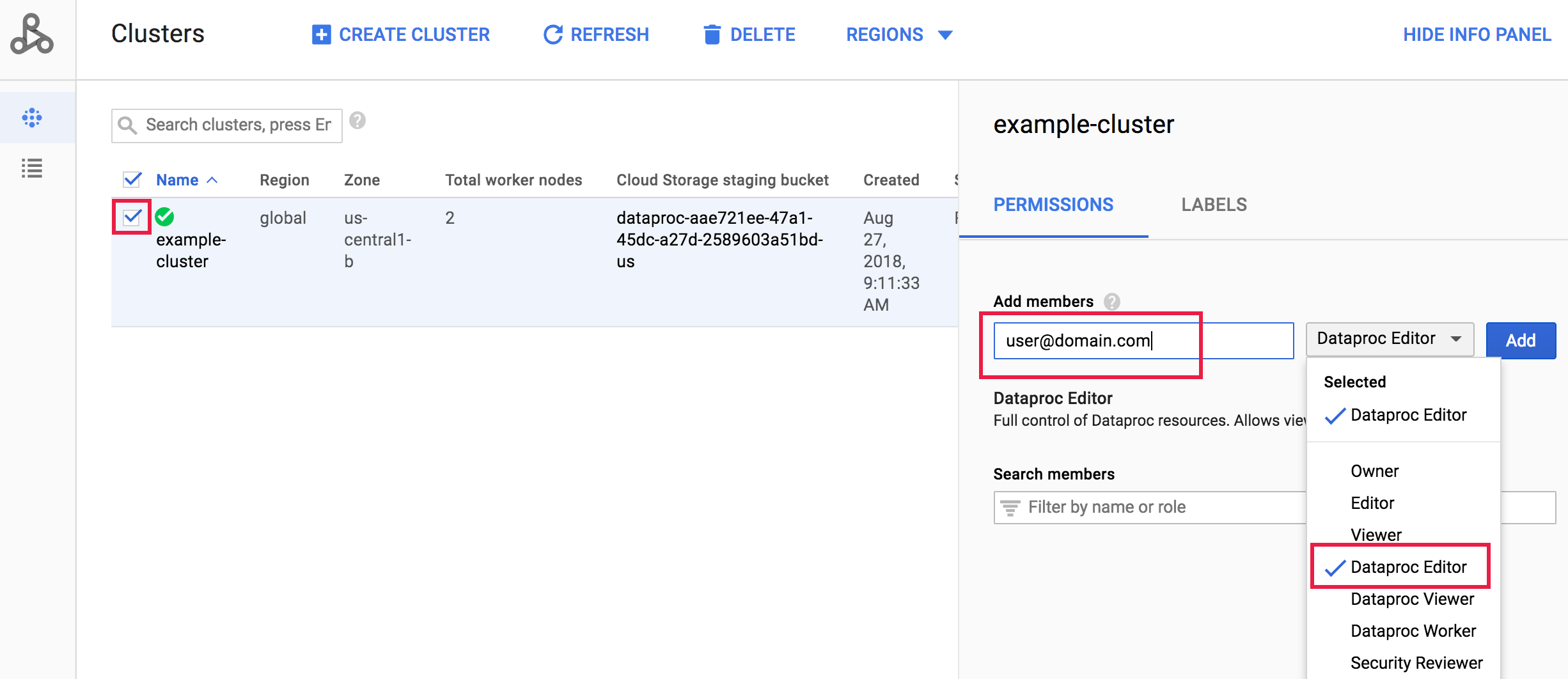
### Console
Go to the
[Managed Service for Apache Spark Clusters](https://console.cloud.google.com/dataproc/clusters)
page in the Google Cloud console, then click the box to the left
of the cluster name to open the **Permissions/Labels** panel (if the
panel is not showing, click **SHOW INFO PANEL** at the top-right of the page).
Under the Permissions tab, select the Managed Service for Apache Spark role, add
one or more account addresses in the **Add principals** box, then
click **Add**.
## SDK commands enabled by Granular IAM
This section describes the `gcloud dataproc` commands enabled on
Managed Service for Apache Spark resources by each Granular IAM role.
### Clusters
| IAM Role | Command |
|---|---|
| Viewer | `gcloud dataproc clusters describe cluster-name` |
| Editor | `gcloud dataproc clusters describe cluster-name` `gcloud dataproc clusters list` `gcloud dataproc clusters delete cluster-name` `gcloud dataproc clusters diagnose cluster-name` `gcloud dataproc clusters update cluster-name` `gcloud beta dataproc clusters start cluster-name` `gcloud beta dataproc clusters stop cluster-name` |
| Owner | `gcloud dataproc clusters describe cluster-name` `gcloud dataproc clusters list` `gcloud dataproc clusters delete cluster-name` `gcloud dataproc clusters diagnose cluster-name` `gcloud dataproc clusters update cluster-name` `gcloud beta dataproc clusters start cluster-name` `gcloud beta dataproc clusters stop cluster-name` `gcloud dataproc clusters get-iam-policy cluster-name` `gcloud dataproc clusters set-iam-policy cluster-name` |
### Jobs
| IAM Role | Command |
|---|---|
| Viewer | `gcloud dataproc jobs describe job-id` |
| Editor | `gcloud dataproc jobs delete job-id` `gcloud dataproc jobs describe job-id` `gcloud dataproc jobs kill job-id` `gcloud dataproc jobs update job-id` `gcloud dataproc jobs wait job-id` |
| Owner | `gcloud dataproc jobs delete job-id` `gcloud dataproc jobs describe job-id` `gcloud dataproc jobs kill job-id` `gcloud dataproc jobs update job-id` `gcloud dataproc jobs wait job-id` `gcloud dataproc jobs get-iam-policy job-id` `gcloud dataproc jobs set-iam-policy job-id` |
### Operations
| IAM Role | Command |
|---|---|
| Viewer | `gcloud dataproc operations describe operation-id` |
| Editor | `gcloud dataproc operations delete operation-id` `gcloud dataproc operations describe operation-id` `gcloud dataproc operations cancel operation-id` |
| Owner | `gcloud dataproc operations delete operation-id` `gcloud dataproc operations describe operation-id` `gcloud dataproc operations cancel operation-id` `gcloud dataproc operations get-iam-policy operation-id` `gcloud dataproc operations set-iam-policy operation-id` |
### Workflow templates
| IAM Role | Command |
|---|---|
| Viewer | `gcloud dataproc workflow-templates describe template-id` |
| Editor | `gcloud dataproc workflow-templates delete template-id` `gcloud dataproc workflow-templates describe template-id` `gcloud dataproc workflow-templates remove-job template-id` `gcloud dataproc workflow-templates run template-id` |
| Owner | `gcloud dataproc workflow-templates delete template-id` `gcloud dataproc workflow-templates describe template-id` `gcloud dataproc workflow-templates remove-job template-id` `gcloud dataproc workflow-templates run template-id` `gcloud dataproc workflow-templates get-iam-policy template-id` `gcloud dataproc workflow-templates set-iam-policy template-id` |
### Autoscaling policies
| IAM Role | Command |
|---|---|
| Viewer | `gcloud dataproc autoscaling-policies describe policy-id` |
| Editor | `gcloud dataproc autoscaling-policies delete policy-id` `gcloud dataproc autoscaling-policies describe policy-id` `gcloud dataproc autoscaling-policies update policy-id` `gcloud dataproc clusters create cluster-name --autoscaling-policy policy-id` |
| Owner | `gcloud dataproc autoscaling-policies delete policy-id` `gcloud dataproc autoscaling-policies describe policy-id` `gcloud dataproc autoscaling-policies update policy-id` `gcloud dataproc clusters create cluster-name --autoscaling-policy policy-id` `gcloud dataproc autoscaling-policies get-iam-policy policy-id` `gcloud dataproc autoscaling-policies set-iam-policy policy-id` |
## Submit jobs with Granular IAM
To allow a principal (user, group or service account) to submit jobs
to a specified cluster using Managed Service for Apache Spark Granular IAM, in addition to
granting a user an Editor role on a cluster,
additional permissions must be set at the project level. Here are
the steps to take to allow a principal to submit jobs on a specified Managed Service for Apache Spark
cluster:
1. Create a [Cloud Storage bucket](https://docs.cloud.google.com/storage/docs/creating-buckets.md.txt) that your cluster can use to connect to Cloud Storage.
2. [Add the principal to the bucket-level policy](https://docs.cloud.google.com/storage/docs/access-control/iam-roles.md.txt), selecting the Storage Object Viewer role for the principal (see [`roles/storage.objectViewer`](https://docs.cloud.google.com/storage/docs/access-control/iam-roles.md.txt#standard-roles)), which includes the following permissions:
1. `storage.objects.get`
2. `storage.objects.list`
3. When you create the cluster, pass the name of the bucket you just created to your cluster using the `--bucket` parameter (see [`gcloud dataproc clusters create --bucket`](https://docs.cloud.google.com/sdk/gcloud/reference/dataproc/clusters/create.md.txt)).
4. After the cluster is created, set a policy on the cluster that grants the principal an Editor or Owner role (see [Use Managed Service for Apache Spark Granular IAM](https://docs.cloud.google.com/managed-spark/docs/concepts/iam/granular-iam.md.txt#use-granular-iam)).
5. [Create an IAM custom role](https://docs.cloud.google.com/iam/docs/creating-custom-roles.md.txt#creating_a_custom_role) with the following permissions:
1. `dataproc.jobs.create`
2. `dataproc.jobs.get`
6. Select or Add the principal on the Google Cloud console [IAM](https://console.cloud.google.com/iam-admin/iam/) page, then select the custom role to apply it to the principal.