The [Apache Flink](https://flink.apache.org/)
[optional component](https://docs.cloud.google.com/managed-spark/docs/concepts/components/overview.md.txt#available_optional_components)
lets you create a Managed Service for Apache Spark cluster configured to run
distributed streaming and batch processing workloads. Activating this component
prepares the runtime to execute stateful pipelines and large-scale data
applications.
You can use your Flink cluster to
[run Flink jobs using the `Jobs` resource](https://docs.cloud.google.com/managed-spark/docs/concepts/components/flink.md.txt#run-flink-jobs-resource)
from the Google Cloud console, Google Cloud CLI, or Dataproc API, or execute
workloads with the
[`flink` CLI](https://docs.cloud.google.com/managed-spark/docs/concepts/components/flink.md.txt#run-flink-jobs-cli)
on the master node. The component also supports
[Apache Beam jobs](https://docs.cloud.google.com/managed-spark/docs/concepts/components/flink.md.txt#run-flink-jobs-beam)
and running on
[Kerberized clusters](https://docs.cloud.google.com/managed-spark/docs/concepts/components/flink.md.txt#run-flink-jobs-kerberized).
## Create a Flink cluster
You can use the Google Cloud console, Google Cloud CLI, or the Dataproc
API to create a cluster that has the Flink component
activated on the cluster.
**Recommendation:** Use a standard 1-master VM cluster with the Flink component.
[Managed Service for Apache Spark High Availability mode clusters](https://docs.cloud.google.com/managed-spark/docs/concepts/configuring-clusters/high-availability.md.txt)
(with 3 master VMs) do not support
[Flink high-availability mode](https://nightlies.apache.org/flink/flink-docs-master/docs/deployment/ha/overview/).
### Console
To create a Managed Service for Apache Spark Flink cluster using the Google Cloud console,
perform the following steps:
1. Open the [**Create cluster**](https://console.cloud.google.com/dataproc/clusters/create) page.
2. In the **Define your cluster** section, confirm or change the **image version** :
- The image version must be `1.5` or higher to activate the Flink component on the cluster. See [Supported Managed Service for Apache Spark versions](https://docs.cloud.google.com/managed-spark/docs/concepts/versioning/dataproc-versions#supported-dataproc-image-versions) to view listings of the component versions included in each image release.
- See [Run Managed Service for Apache Spark Flink jobs](https://docs.cloud.google.com/managed-spark/docs/concepts/components/flink.md.txt#run-flink-resource) for image version requirements to run Flink jobs using the Jobs resource.
3. Click **Additional configuration** to expand that section.
4. Edit **Optional components**.
5. In the panel that opens, select the checkbox for **Flink** , then click **Save**.
6. Edit **Customization \& Other**.
7. In the panel that opens:
- In the **Cluster properties** section, click **+ Add properties** to configure Flink properties (Prefix: `flink`, Key: FLINK_KEY, Value: VALUE) in `/etc/flink/conf/flink-conf.yaml` that will act as defaults for Flink applications that you run on the cluster.
Examples:
- Set `flink:historyserver.archive.fs.dir` to specify the Cloud Storage location to write Flink job history files (this location will be used by the Flink History Server running on the Flink cluster).
- Set Flink task slots with `flink:taskmanager.numberOfTaskSlots=n`.
- In the **Custom cluster metadata** section, click **+ Add properties** , and set the key to `flink-start-yarn-session` and value to `true` to run the Flink YARN daemon, `/usr/bin/flink-yarn-daemon`, in the background on the cluster driver node to start a Flink YARN session (see [Run Flink jobs using the flink CLI - Session mode](https://docs.cloud.google.com/managed-spark/docs/concepts/components/flink.md.txt#run-flink-jobs-cli).
8. Click **Save**.
9. If you are using Managed Service for Apache Spark image version `2.0` or earlier, click **Security**.
- In the panel that opens, under **Project access** , select the checkbox for **Enables the cloud-platform scope for this cluster** , then click **Save** (`cloud-platform` scope is enabled by default when you create a cluster that uses Managed Service for Apache Spark image version `2.1` or later).
10. Click **Create cluster** to create the cluster.
### gcloud
To create a Managed Service for Apache Spark Flink cluster using the gcloud CLI, run the following
[gcloud dataproc clusters create](https://docs.cloud.google.com/sdk/gcloud/reference/dataproc/clusters/create.md.txt)
command locally in a terminal window or in
[Cloud Shell](https://console.cloud.google.com/?cloudshell=true):
```bash
gcloud dataproc clusters create CLUSTER_NAME \
--region=REGION \
--image-version=DATAPROC_IMAGE_VERSION \
--optional-components=FLINK \
--enable-component-gateway \
--properties=PROPERTIES
... other flags
```
Notes:
- CLUSTER_NAME: Specify the name of the cluster.
- REGION: Specify a [Compute Engine region](https://docs.cloud.google.com/compute/docs/regions-zones.md.txt#available) where the cluster will be located.
- DATAPROC_IMAGE_VERSION: Optionally specify the image version
to use on the cluster. The cluster image version determines the
version of the Flink component installed on the cluster.
- The image version must be `1.5` or higher to activate the Flink component on the cluster. See [Supported Managed Service for Apache Spark image versions](https://docs.cloud.google.com/managed-spark/docs/concepts/versioning/dataproc-versions#supported-dataproc-image-versions) to view listings of the component versions included in each image release.
- See [Run Managed Service for Apache Spark Flink jobs](https://docs.cloud.google.com/managed-spark/docs/concepts/components/flink.md.txt#run-flink-jobs-resource) for image version requirements to run Flink jobs through the Dataproc Jobs API.
- `--optional-components`: You must specify the `FLINK` component to run Flink
jobs and the Flink HistoryServer Web Service on the cluster.
- `--enable-component-gateway`: You must enable the
[Component Gateway](https://docs.cloud.google.com/managed-spark/docs/concepts/accessing/gateways.md.txt#console_1) to
activate the Component Gateway link to Flink History Server UI.
Enabling the Component Gateway also enables access to the
[Flink Job Manager web interface](https://docs.cloud.google.com/managed-spark/docs/concepts/components/flink.md.txt#flink-job-manager-ui) running on the
Flink cluster.
- PROPERTIES. Optionally specify one or more
[cluster properties](https://docs.cloud.google.com/managed-spark/docs/concepts/configuring-clusters/cluster-properties.md.txt).
- When creating Managed Service for Apache Spark clusters with
image versions `2.0.67`+ and `2.1.15`+, you can use the `--properties` flag to
to configure Flink properties in `/etc/flink/conf/flink-conf.yaml` that will
act as defaults for Flink applications that you run on the cluster.
- You can set `flink:historyserver.archive.fs.dir`
to specify the Cloud Storage location to write Flink job history
files (this location will be used by the Flink History Server running
on the Flink cluster).
- Multiple properties example:
--properties=flink:historyserver.archive.fs.dir=gs://my-bucket/my-flink-cluster/completed-jobs,flink:taskmanager.numberOfTaskSlots=2
- Other flags:
- You can add the optional `--metadata flink-start-yarn-session=true` flag to run the Flink YARN daemon, `/usr/bin/flink-yarn-daemon`, in the background on the cluster master node to start a Flink YARN session (see [Run Flink jobs using the flink CLI - Session mode](https://docs.cloud.google.com/managed-spark/docs/concepts/components/flink.md.txt#run-flink-jobs-cli)).
- When using 2.0 or earlier image versions, add the
`--scopes=https://www.googleapis.com/auth/cloud-platform` flag to
enable access to Google Cloud APIs by your cluster
(see [Scopes best practice](https://docs.cloud.google.com/compute/docs/access/service-accounts.md.txt#scopes_best_practice)).
`cloud-platform` scope is enabled by default when you create a cluster
that uses Managed Service for Apache Spark image version 2.1 or later.
### API
To create a Managed Service for Apache Spark Flink cluster using the Dataproc API, submit a
[clusters.create](https://docs.cloud.google.com/managed-spark/docs/reference/rest/v1/projects.regions.clusters/create.md.txt)
request, as follows:
Notes:
- Set the
[SoftwareConfig.Component](https://docs.cloud.google.com/managed-spark/docs/reference/rest/v1/ClusterConfig.md.txt#SoftwareConfig.FIELDS.optional_components)
to `FLINK`.
- You can optionally set
[`SoftwareConfig.imageVersion`](https://docs.cloud.google.com/managed-spark/docs/reference/rest/v1/ClusterConfig.md.txt#softwareconfig)
to specify the image version to use on the cluster. The cluster image version determines the
version of the Flink component installed on the cluster.
- The image version must be `1.5` or higher to activate the Flink component on the cluster
(See [Supported Managed Service for Apache Spark versions](https://docs.cloud.google.com/managed-spark/docs/concepts/versioning/dataproc-versions#supported-dataproc-image-versions)
to view listings of the component versions included in each
Managed Service for Apache Spark image release).
- See [Run Managed Service for Apache Spark Flink jobs](https://docs.cloud.google.com/managed-spark/docs/concepts/components/flink.md.txt#run-flink-jobs-resource)
for image version requirements to run Flink jobs
through the Dataproc Jobs API.
- Set
[EndpointConfig.enableHttpPortAccess](https://docs.cloud.google.com/managed-spark/docs/reference/rest/v1/ClusterConfig.md.txt#endpointconfig)
to `true` to [enable the Component Gateway](https://docs.cloud.google.com/managed-spark/docs/concepts/accessing/gateways.md.txt#console_1)
link to Flink History Server UI.
Enabling the Component Gateway also enables access to the
[Flink Job Manager web interface](https://docs.cloud.google.com/managed-spark/docs/concepts/components/flink.md.txt#flink-job-manager-ui) running on the
Flink cluster.
- You can optionally set
[`SoftwareConfig.properties`](https://docs.cloud.google.com/managed-spark/docs/reference/rest/v1/ClusterConfig.md.txt#softwareconfig)
to specify one or more
[cluster properties](https://docs.cloud.google.com/managed-spark/docs/concepts/configuring-clusters/cluster-properties.md.txt).
- You can specify Flink properties that will act as defaults for Flink applications that you run on the cluster. For example, you can set the `flink:historyserver.archive.fs.dir` to specify the Cloud Storage location to write Flink job history files (this location will be used by the Flink History Server running on the Flink cluster).
- You can optionally set:
- [`GceClusterConfig.metadata`](https://docs.cloud.google.com/managed-spark/docs/reference/rest/v1/ClusterConfig.md.txt#GceClusterConfig.FIELDS.metadata). for example, to specify `flink-start-yarn-session` `true` to run the Flink YARN daemon, `/usr/bin/flink-yarn-daemon`, in the background on the cluster master node to start a Flink YARN session (see [Flink session mode](https://docs.cloud.google.com/managed-spark/docs/concepts/components/flink.md.txt#session_mode)).
- [GceClusterConfig.serviceAccountScopes](https://docs.cloud.google.com/managed-spark/docs/reference/rest/v1/ClusterConfig.md.txt#GceClusterConfig.FIELDS.service_account_scopes) to `https://www.googleapis.com/auth/cloud-platform` (`cloud-platform` scope) when using 2.0 or earlier image versions to enable access to Google Cloud APIs by your cluster (see [Scopes best practice](https://docs.cloud.google.com/compute/docs/access/service-accounts.md.txt#scopes_best_practice)). `cloud-platform` scope is enabled by default when you create a cluster that uses Managed Service for Apache Spark image version 2.1 or later.
### After you create a Flink cluster
- Use the `Flink History Server` link in the [Component Gateway](https://docs.cloud.google.com/managed-spark/docs/concepts/accessing/gateways.md.txt#viewing_and_accessing_component_gateway_urls) to view the Flink History Server running on the Flink cluster.
- Use the `YARN ResourceManager link` in the Component Gateway to view the [Flink Job Manager web interface](https://docs.cloud.google.com/managed-spark/docs/concepts/components/flink.md.txt#flink-job-manager-ui) running on the Flink cluster .
- Create a [Managed Service for Apache Spark Persistent History Server](https://docs.cloud.google.com/managed-spark/docs/concepts/jobs/history-server.md.txt) to view Flink job history files written by existing and deleted Flink clusters.
## Run Flink jobs using the `Jobs` resource
You can run Flink jobs using the Managed Service for Apache Spark `Jobs` resource from the
Google Cloud console, Google Cloud CLI, or Dataproc API.
> [!NOTE]
> **Note:** This feature is available in Managed Service for Apache Spark `2.0.71`+, `2.1.19`+, and later cluster image versions.
> [!NOTE]
>
> **Private Preview**
>
>
> This product or feature is
>
> subject to the "Pre-GA Offerings Terms" in the General Service Terms section
> of the [Service Specific
> Terms](https://docs.cloud.google.com/terms/service-terms#1).
>
> Pre-GA products and features are available "as is" and might have limited support.
>
> For more information, see the
> [launch stage descriptions](https://cloud.google.com/products/#product-launch-stages).
>
>
> For information about access to this release, see the [access
> request page](https://docs.cloud.google.com/managed-spark/docs/support/getting-support#dataproc-allowlist).
### Console
To submit a sample Flink wordcount job from the console:
1. Open the Managed Service for Apache Spark
[Submit a job](https://console.cloud.google.com/dataproc/jobs/jobsSubmit) page in the
Google Cloud console in your browser.
2. Fill in the fields on the **Submit a job** page:
1. Under **Select compute type for job** , select **Spark on Compute Engine**.
2. In the **Cluster job details** section, select your **Cluster** name from the cluster list.
3. In the **Files and artifacts** section:
1. Set **Job type** to `Flink`.
2. Under **Driver configuration** , select **Main class** , and set **Main class** to `org.apache.flink.examples.java.wordcount.WordCount`.
3. Set **Jar files** to `file:///usr/lib/flink/examples/batch/WordCount.jar`.
- `file:///` denotes a file located on the cluster. Managed Service for Apache Spark installed the `WordCount.jar` when it created the Flink cluster.
- This field also accepts a Cloud Storage path (`gs://BUCKET/JARFILE`) or a Hadoop Distributed File System (HDFS) path (`hdfs://PATH_TO_JAR`).
3. Click **Submit**.
- Job driver output is displayed on the **Job details** page.
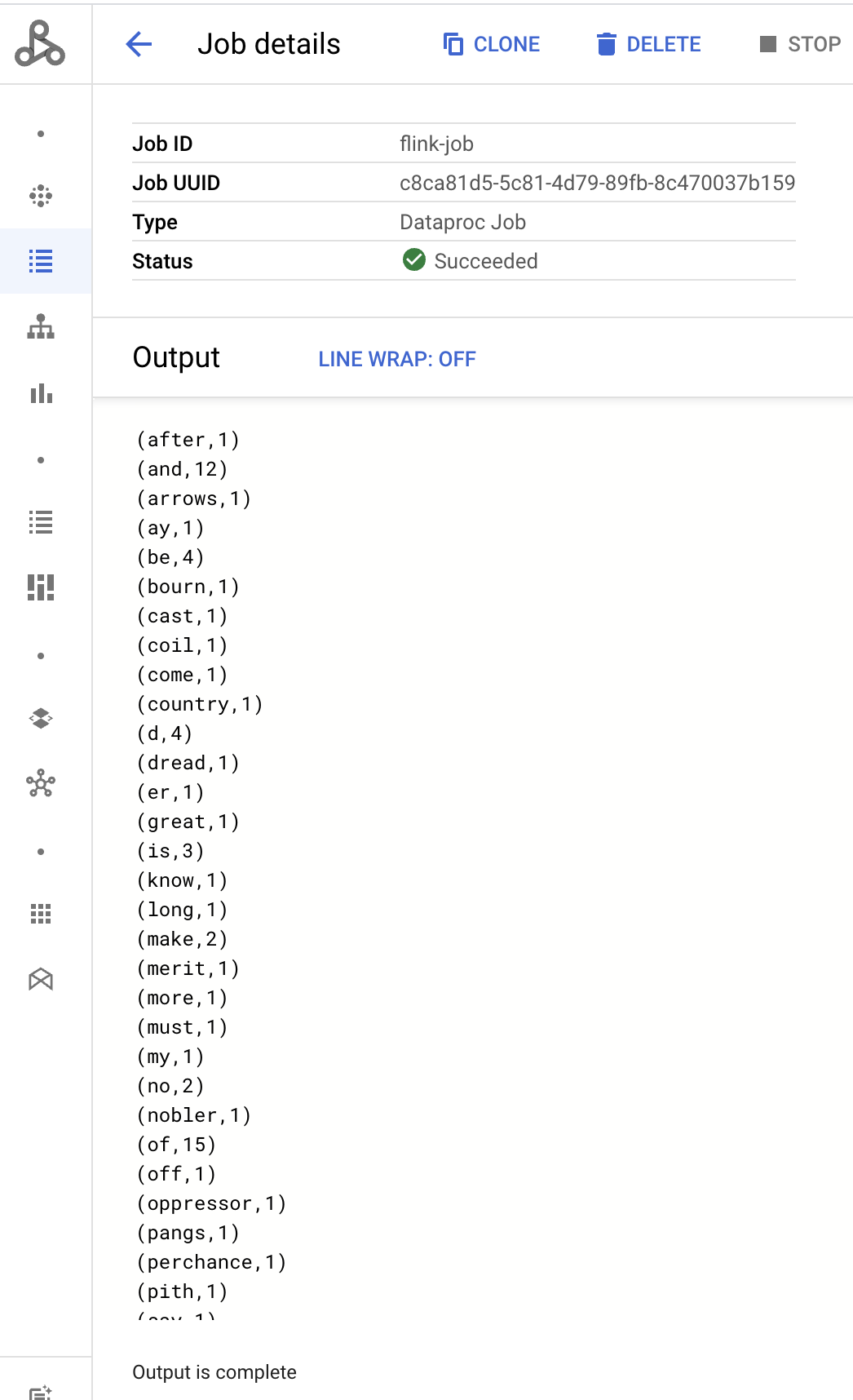
- Flink jobs are listed on the Managed Service for Apache Spark [**Jobs**](https://console.cloud.google.com/dataproc/jobs) page in the Google Cloud console.
- Click **Stop** or **Delete** from the **Jobs** or **Job details** page to stop or delete a job.
### gcloud
To submit a Flink job to a Managed Service for Apache Spark Flink cluster, run the gcloud CLI
[gcloud dataproc jobs submit](https://docs.cloud.google.com/sdk/gcloud/reference/dataproc/jobs/submit)
command locally in a terminal window or in
[Cloud Shell](https://console.cloud.google.com/?cloudshell=true).
```bash
gcloud dataproc jobs submit flink \
--cluster=CLUSTER_NAME \
--region=REGION \
--class=MAIN_CLASS \
--jar=JAR_FILE \
-- JOB_ARGS
```
Notes:
- CLUSTER_NAME: Specify the name of the Managed Service for Apache Spark Flink cluster to submit the job to.
- REGION: Specify a [Compute Engine region](https://docs.cloud.google.com/compute/docs/regions-zones.md.txt#available) where the cluster is located.
- MAIN_CLASS: Specify the `main` class of your Flink application, such as:
- `org.apache.flink.examples.java.wordcount.WordCount`
- JAR_FILE: Specify the Flink application jar file. You can specify:
- A jar file installed on the cluster, using the file:///\` prefix:
- `file:///usr/lib/flink/examples/streaming/TopSpeedWindowing.jar`
- `file:///usr/lib/flink/examples/batch/WordCount.jar`
- A jar file in Cloud Storage: `gs://BUCKET/JARFILE`
- A jar file in HDFS: `hdfs://PATH_TO_JAR`
- JOB_ARGS: Optionally, add job arguments after the double dash (`--`).
- After submitting the job, job driver output is displayed in the
local or Cloud Shell terminal.
```bash
Program execution finished
Job with JobID 829d48df4ebef2817f4000dfba126e0f has finished.
Job Runtime: 13610 ms
...
(after,1)
(and,12)
(arrows,1)
(ay,1)
(be,4)
(bourn,1)
(cast,1)
(coil,1)
(come,1)
```
> [!NOTE]
> **Note:** You can stop a job with the [`gcloud dataproc jobs kill JOB_ID`](https://docs.cloud.google.com/sdk/gcloud/reference/dataproc/jobs/kill) command, and delete a job with the [`gcloud dataproc jobs delete JOB_ID`](https://docs.cloud.google.com/sdk/gcloud/reference/dataproc/jobs/delete) command.
### REST
This section shows how to submit a Flink job to a Managed Service for Apache Spark Flink
cluster using the Managed Service for Apache Spark
[jobs.submit](https://docs.cloud.google.com/managed-spark/docs/reference/rest/v1/projects.regions.jobs/submit.md.txt) API.
You can add the `clusterLabels` field to the API request shown below to specify one or more cluster labels. Managed Service for Apache Spark will submit the job to a cluster that matches a specified cluster label (see the [jobs.submit](https://docs.cloud.google.com/managed-spark/docs/reference/rest/v1/projects.regions.jobs.md.txt#JobPlacement.FIELDS.cluster_labels) API for more information).
Before using any of the request data,
make the following replacements:
- PROJECT_ID: Google Cloud project ID
- REGION: [cluster region](https://docs.cloud.google.com/managed-spark/docs/guides/create-cluster.md.txt#cluster-region)
- CLUSTER_NAME: Specify the name of the Managed Service for Apache Spark Flink cluster to submit the job to
HTTP method and URL:
```
POST https://dataproc.googleapis.com/v1/projects/PROJECT_ID/regions/REGION/jobs:submit
```
Request JSON body:
```
{
"job": {
"placement": {
"clusterName": "CLUSTER_NAME"
},
"flinkJob": {
"mainClass": "org.apache.flink.examples.java.wordcount.WordCount",
"jarFileUris": [
"file:///usr/lib/flink/examples/batch/WordCount.jar"
]
}
}
}
```
To send your request, expand one of these options:
#### curl (Linux, macOS, or Cloud Shell)
> [!NOTE]
> **Note:** The following command assumes that you have logged in to the `gcloud` CLI with your user account by running [`gcloud init`](https://docs.cloud.google.com/sdk/gcloud/reference/init) or [`gcloud auth login`](https://docs.cloud.google.com/sdk/gcloud/reference/auth/login.md.txt) , or by using [Cloud Shell](https://docs.cloud.google.com/shell/docs.md.txt), which automatically logs you into the `gcloud` CLI . You can check the currently active account by running [`gcloud auth list`](https://docs.cloud.google.com/sdk/gcloud/reference/auth/list.md.txt).
Save the request body in a file named `request.json`,
and execute the following command:
```
curl -X POST \
-H "Authorization: Bearer $(gcloud auth print-access-token)" \
-H "Content-Type: application/json; charset=utf-8" \
-d @request.json \
"https://dataproc.googleapis.com/v1/projects/PROJECT_ID/regions/REGION/jobs:submit"
```
#### PowerShell (Windows)
> [!NOTE]
> **Note:** The following command assumes that you have logged in to the `gcloud` CLI with your user account by running [`gcloud init`](https://docs.cloud.google.com/sdk/gcloud/reference/init) or [`gcloud auth login`](https://docs.cloud.google.com/sdk/gcloud/reference/auth/login.md.txt) . You can check the currently active account by running [`gcloud auth list`](https://docs.cloud.google.com/sdk/gcloud/reference/auth/list.md.txt).
Save the request body in a file named `request.json`,
and execute the following command:
```
$cred = gcloud auth print-access-token
$headers = @{ "Authorization" = "Bearer $cred" }
Invoke-WebRequest `
-Method POST `
-Headers $headers `
-ContentType: "application/json; charset=utf-8" `
-InFile request.json `
-Uri "https://dataproc.googleapis.com/v1/projects/PROJECT_ID/regions/REGION/jobs:submit" | Select-Object -Expand Content
```
You should receive a JSON response similar to the following:
```
{
"reference": {
"projectId": "PROJECT_ID",
"jobId": "JOB_ID"
},
"placement": {
"clusterName": "CLUSTER_NAME",
"clusterUuid": "CLUSTER_UUID"
},
"flinkJob": {
"mainClass": "org.apache.flink.examples.java.wordcount.WordCount",
"args": [
"1000"
],
"jarFileUris": [
"file:///usr/lib/flink/examples/batch/WordCount.jar"
]
},
"status": {
"state": "PENDING",
"stateStartTime": "2020-10-07T20:16:21.759Z"
},
"jobUuid": "JOB_UUID"
}
```
> [!IMPORTANT]
> **Note:** You can click the **Equivalent REST** link at the bottom of the Managed Service for Apache Spark Google Cloud console [Submit a job](https://console.cloud.google.com/dataproc/jobs/jobsSubmit) page to have the Google Cloud console construct an equivalent API REST request to use in your code to submit a job to your cluster.
- Flink jobs are listed on the Managed Service for Apache Spark [**Jobs**](https://console.cloud.google.com/dataproc/jobs) page in the Google Cloud console.
- You can click **Stop** or **Delete** from the **Jobs** or **Job details** page in the Google Cloud console to stop or delete a job.
## Run Flink jobs using the `flink` CLI
Instead of
[running Flink jobs using the Managed Service for Apache Spark `Jobs` resource](https://docs.cloud.google.com/managed-spark/docs/concepts/components/flink.md.txt#run-flink-jobs-resource),
you can run Flink jobs on the driver node of your Flink cluster using the `flink` CLI.
> [!NOTE]
> **Note:** To use the `flink` cli on your cluster, you must have activated the Flink optional component when you created your cluster---see [Create a Managed Service for Apache Spark Flink cluster](https://docs.cloud.google.com/managed-spark/docs/concepts/components/flink.md.txt#create-flink-cluster)).
The following sections describe different ways you can run a `flink` CLI job on
your Managed Service for Apache Spark Flink cluster.
1. **SSH into the master node:** Use the [SSH](https://docs.cloud.google.com/managed-spark/docs/concepts/accessing/ssh.md.txt)
utility to open a terminal window on the cluster master VM.
2. **Set the classpath:** Initialize the Hadoop classpath from the SSH terminal window on the
Flink cluster master VM:
export HADOOP_CLASSPATH=$(hadoop classpath)
> [!NOTE]
> **Note:** Flink command syntax can differ according to the Flink version installed on the Managed Service for Apache Spark cluster. See the [Managed Service for Apache Spark Image version list](https://docs.cloud.google.com/managed-spark/docs/concepts/versioning/dataproc-versions) or run `flink --version` on your cluster to check the Flink component version installed on your Flink cluster. Run `flink` command help for additional flag information.
3. **Run Flink jobs:** You can run Flink jobs in different
[deployment modes on YARN](https://nightlies.apache.org/flink/flink-docs-stable/docs/deployment/resource-providers/yarn/#deployment-modes-supported-by-flink-on-yarn): application, per-job, and session mode.
1. **Application mode:** Flink Application mode is supported by Managed Service for Apache Spark image version 2.0 and later.
This mode executes the job's `main()` method on the YARN Job Manager. The cluster shuts
down after the job finishes.
Job submission example:
flink run-application \
-t yarn-application \
-Djobmanager.memory.process.size=1024m \
-Dtaskmanager.memory.process.size=2048m \
-Djobmanager.heap.mb=820 \
-Dtaskmanager.heap.mb=1640 \
-Dtaskmanager.numberOfTaskSlots=2 \
-Dparallelism.default=4 \
/usr/lib/flink/examples/batch/WordCount.jar
List running jobs:
./bin/flink list -t yarn-application -Dyarn.application.id=application_XXXX_YY
Cancel a running job:
./bin/flink cancel -t yarn-application -Dyarn.application.id=application_XXXX_YY
2. **Per-job mode:** This Flink mode executes the job's `main()` method on the
client side.
Job submission example:
flink run \
-m yarn-cluster \
-p 4 \
-ys 2 \
-yjm 1024m \
-ytm 2048m \
/usr/lib/flink/examples/batch/WordCount.jar
3. **Session mode:** Start a long-running Flink YARN session, then submit
one or more jobs to the session.
1. **Start a session:** You can start a Flink session in one of the
following ways:
1. [Create a Flink cluster](https://docs.cloud.google.com/managed-spark/docs/concepts/components/flink.md.txt#install_the_component), adding the
`--metadata flink-start-yarn-session=true` flag to the
`gcloud dataproc clusters create` command (See
[Create a Dataproc Flink cluster](https://docs.cloud.google.com/managed-spark/docs/concepts/components/flink.md.txt#create-flink-cluster)).
With this flag
enabled, after the cluster is created, Managed Service for Apache Spark runs
`/usr/bin/flink-yarn-daemon` to start a Flink session on the cluster.
The session's YARN application ID is saved in `/tmp/.yarn-properties-${USER}`.
You can list the ID with the `yarn application -list` command.
2. Run the Flink
[`yarn-session.sh`](https://github.com/apache/flink/blob/master/flink-dist/src/main/flink-bin/yarn-bin/yarn-session.sh)
script, which is pre-installed on the cluster master VM, with custom settings:
Example with custom settings:
/usr/lib/flink/bin/yarn-session.sh \
-s 1 \
-jm 1024m \
-tm 2048m \
-nm flink-dataproc \
--detached
3. Run the Flink the `/usr/bin/flink-yarn-daemon` wrapper script with
default settings:
. /usr/bin/flink-yarn-daemon
2. **Submit a job to a session:** Run the following command to submit a
Flink job to the session.
flink run -m FLINK_MASTER_URL/usr/lib/flink/examples/batch/WordCount.jar
- FLINK_MASTER_URL: the URL, including host and port, of the Flink master VM where jobs are executed. **Remove the `http:// prefix` from
the URL.** This URL is listed in the command output when you start a Flink session. You can run the following command to list this URL in the `Tracking-URL` field:
yarn application -list -appId= | sed 's#http://##'
```
3. **List jobs in a session:** To list Flink jobs in a session, do one of
the following:
- Run `flink list` without arguments. The command looks for the
the session's YARN application ID in `/tmp/.yarn-properties-${USER}`.
- Obtain the YARN application ID of the session from
`/tmp/.yarn-properties-${USER}` or the output of `yarn application -list`,
and then run ``flink list -yid YARN_APPLICATION_ID.
- Run `flink list -m FLINK_MASTER_URL`.
4. **Stop a session:** To stop the session, obtain the YARN application ID
of the session from `/tmp/.yarn-properties-${USER}` or the output of
`yarn application -list`, then run either of the following commands:
echo "stop" | /usr/lib/flink/bin/yarn-session.sh -id YARN_APPLICATION_ID
yarn application -kill YARN_APPLICATION_ID
## Run Apache Beam jobs on Flink
You can run [Apache Beam](https://beam.apache.org/) jobs on
Managed Service for Apache Spark using the
[`FlinkRunner`](https://beam.apache.org/documentation/runners/flink/).
> [!NOTE]
> **Note:** In pre-2.18 Beam versions, a separate Beam Job Service was required to package and submit jobs written in Python to Flink. Starting with Beam 2.18, the Beam Job Service is no longer needed.
You can run Beam jobs on Flink in the following ways:
1. Java Beam jobs
2. Portable Beam jobs
### Java Beam jobs
[Package your Beam jobs into a JAR file](https://beam.apache.org/documentation/runners/flink/#executing-a-beam-pipeline-on-a-flink-cluster). Supply the bundled JAR file with the dependencies needed to run the job.
The following example runs a Java Beam job from the Managed Service for Apache Spark
cluster's master node.
> [!NOTE]
> **Note:** This example executes successfully with Managed Service for Apache Spark 1.5, Flink 1.9 and the [compatible Beam versions](https://beam.apache.org/documentation/runners/flink/#flink-version-compatibility). However, with Managed Service for Apache Spark 2.0, Flink 1.12, and Beam \>=2.30, see this JIRA issue [BEAM-10430](https://issues.apache.org/jira/browse/BEAM-10430).
1. Create a Managed Service for Apache Spark cluster with the
[Flink component](https://docs.cloud.google.com/managed-spark/docs/concepts/components/flink.md.txt) enabled.
gcloud dataproc clusters create CLUSTER_NAME \
--optional-components=FLINK \
--image-version=DATAPROC_IMAGE_VERSION \
--region=REGION \
--enable-component-gateway \
--scopes=https://www.googleapis.com/auth/cloud-platform
- `--optional-components`: Flink.
- `--image-version`: the [cluster's image version](https://docs.cloud.google.com/managed-spark/docs/concepts/versioning/dataproc-versions#supported_cloud_dataproc_versions), which determines the Flink version installed on the cluster (for example, see the Apache Flink component versions listed for the latest and previous four [2.0.x image release versions](https://docs.cloud.google.com/managed-spark/docs/concepts/versioning/dataproc-release-2.0)).
- `--region`: a supported Managed Service for Apache Spark [region](https://docs.cloud.google.com/managed-spark/docs/concepts/regional-endpoints#regional_endpoint_semantics).
- `--enable-component-gateway`: enable access to the Flink Job Manager UI.
- `--scopes`: enable access to Google Cloud APIs by your cluster (see [Scopes best practice](https://docs.cloud.google.com/compute/docs/access/service-accounts.md.txt#scopes_best_practice)). `cloud-platform` scope is enabled by default (you do not need to include this flag setting) when you create a cluster that uses Managed Service for Apache Spark image version 2.1 or later.
2. Use the [**SSH utility**](https://docs.cloud.google.com/managed-spark/docs/concepts/accessing/cluster-web-interfaces.md.txt#create_an_ssh_tunnel)
to open a terminal window on the Flink cluster master node.
3. Start a Flink YARN session on the Managed Service for Apache Spark cluster master
node.
. /usr/bin/flink-yarn-daemon
Take note of the Flink version on your Managed Service for Apache Spark cluster.
flink --version
4. On your local machine, [generate the canonical Beam word count example in Java](https://beam.apache.org/get-started/quickstart-java/).
Choose a Beam version that is compatible with the Flink version on your
Managed Service for Apache Spark cluster. See the [Flink Version Compatibility](https://beam.apache.org/documentation/runners/flink/#flink-version-compatibility)
table that lists Beam-Flink version compatibility.
Open the generated POM file. Check the Beam Flink runner version specified by
the tag ``. If the Beam Flink runner version in the
Flink artifact name does not match the Flink version on your cluster, update
the version number to match.
mvn archetype:generate \
-DarchetypeGroupId=org.apache.beam \
-DarchetypeArtifactId=beam-sdks-java-maven-archetypes-examples \
-DarchetypeVersion=BEAM_VERSION \
-DgroupId=org.example \
-DartifactId=word-count-beam \
-Dversion="0.1" \
-Dpackage=org.apache.beam.examples \
-DinteractiveMode=false
5. Package the word count example.
mvn package -Pflink-runner
6. Upload the packaged uber JAR file, `word-count-beam-bundled-0.1.jar` (\~135 MB)
to your Managed Service for Apache Spark cluster's master node. You can use
[`gcloud storage cp`](https://docs.cloud.google.com/sdk/gcloud/reference/storage/cp)
for faster file transfers to your Managed Service for Apache Spark cluster from
Cloud Storage.
1. On your local terminal, create a Cloud Storage bucket, and upload
the uber JAR.
`gcloud storage buckets create BUCKET_NAME`
`gcloud storage cp target/word-count-beam-bundled-0.1.jar gs://BUCKET_NAME/`
2. On your Managed Service for Apache Spark's master node, download the uber JAR.
gcloud storage cp gs://BUCKET_NAME/word-count-beam-bundled-0.1.jar .
7. Run the Java Beam job on the Managed Service for Apache Spark cluster driver node.
flink run -c org.apache.beam.examples.WordCount word-count-beam-bundled-0.1.jar \
--runner=FlinkRunner \
--output=gs://BUCKET_NAME/java-wordcount-out
8. Check that the results were written to your Cloud Storage bucket.
gcloud storage cat gs://BUCKET_NAME/java-wordcount-out-SHARD_ID
9. Stop the Flink YARN session.
`yarn application -list`
`yarn application -kill YARN_APPLICATION_ID`
### Portable Beam Jobs
To run Beam jobs written in Python, Go, and other supported languages, you can
use the `FlinkRunner` and `PortableRunner` as described on the Beam's
[Flink Runner](https://beam.apache.org/documentation/runners/flink/)
page (also see [Portability Framework Roadmap](https://beam.apache.org/roadmap/portability/)).
The following example runs a portable Beam job in Python from the
Managed Service for Apache Spark cluster's master node.
> [!NOTE]
> **Note:** This example executes successfully with Managed Service for Apache Spark 1.5, Flink 1.9 and the [compatible Beam versions](https://beam.apache.org/documentation/runners/flink/#flink-version-compatibility). However, with Managed Service for Apache Spark 2.0, Flink 1.12, and Beam \>=2.30, see this JIRA issue [BEAM-10430](https://issues.apache.org/jira/browse/BEAM-10430).
1. Create a Managed Service for Apache Spark cluster with both the
[Flink](https://docs.cloud.google.com/managed-spark/docs/concepts/components/flink.md.txt)
and [Docker](https://docs.cloud.google.com/managed-spark/docs/concepts/components/docker.md.txt) components enabled.
gcloud dataproc clusters create CLUSTER_NAME \
--optional-components=FLINK,DOCKER \
--image-version=DATAPROC_IMAGE_VERSION \
--region=REGION \
--enable-component-gateway \
--scopes=https://www.googleapis.com/auth/cloud-platform
Notes:
- `--optional-components`: Flink and Docker.
- `--image-version`: The [cluster's image version](https://docs.cloud.google.com/managed-spark/docs/concepts/versioning/dataproc-versions#supported_cloud_dataproc_versions), which determines the Flink version installed on the cluster (for example, see the Apache Flink component versions listed for the latest and previous four [2.0.x image release versions](https://docs.cloud.google.com/managed-spark/docs/concepts/versioning/dataproc-release-2.0)).
- `--region`: An available Managed Service for Apache Spark [region](https://docs.cloud.google.com/managed-spark/docs/concepts/regional-endpoints#regional_endpoint_semantics).
- `--enable-component-gateway`: Enable access to the Flink Job Manager UI.
- `--scopes`: Enable access to Google Cloud APIs by your cluster (see [Scopes best practice](https://docs.cloud.google.com/compute/docs/access/service-accounts.md.txt#scopes_best_practice)). `cloud-platform` scope is enabled by default (you do not need to include this flag setting) when you create a cluster that uses Managed Service for Apache Spark image version 2.1 or later.
2. Use the gcloud CLI locally or in
[Cloud Shell](https://console.cloud.google.com/?cloudshell=true) to create a
Cloud Storage bucket. You will specify the BUCKET_NAME
when you run a sample wordcount program.
gcloud storage buckets create BUCKET_NAME
3. In a terminal window on the cluster VM, start a Flink YARN session.
Note the Flink master URL, the address of the Flink master
where jobs are executed.. You will specify the FLINK_MASTER_URL when you
run a sample wordcount program.
. /usr/bin/flink-yarn-daemon
Display and **note the Flink version** running the Managed Service for Apache Spark
cluster. You will specify the FLINK_VERSION when you
run a sample wordcount program.
flink --version
4. Install Python libraries needed for the job on the
cluster master node.
5. Install a
[Beam version](https://beam.apache.org/documentation/runners/flink/#flink-version-compatibility)
that is compatible with the Flink version on the cluster.
python -m pip install apache-beam[gcp]==BEAM_VERSION
6. Run the word count example on the cluster master
node.
python -m apache_beam.examples.wordcount \
--runner=FlinkRunner \
--flink_version=FLINK_VERSION \
--flink_master=FLINK_MASTER_URL
--flink_submit_uber_jar \
--output=gs://BUCKET_NAME/python-wordcount-out
Notes:
- `--runner`: `FlinkRunner`.
- `--flink_version`: FLINK_VERSION, noted earlier.
- `--flink_master`: FLINK_MASTER_URL, noted earlier.
- `--flink_submit_uber_jar`: Use the uber JAR to execute the Beam job.
- `--output`: BUCKET_NAME, created earlier.
7. Verify that results were written to your bucket.
gcloud storage cat gs://BUCKET_NAME/python-wordcount-out-SHARD_ID
8. Stop the Flink YARN session.
1. Get the application ID.
`yarn application -list`
1. Insert the YARN_APPLICATION_ID, then stop the session.
`yarn application -kill `
## Run Flink on a Kerberized cluster
The Managed Service for Apache Spark Flink component supports
[Kerberized clusters](https://docs.cloud.google.com/managed-spark/docs/concepts/configuring-clusters/security.md.txt).
A valid Kerberos ticket is needed to submit and persist a Flink job or to start
a Flink cluster. By default, a Kerberos ticket remains valid for seven days.
## Access the Flink Job Manager UI
The Flink Job Manager web interface is available while a Flink job or Flink
session cluster is running. To use the web interface:
1. [Create a Managed Service for Apache Spark Flink cluster](https://docs.cloud.google.com/managed-spark/docs/concepts/components/flink.md.txt#create-flink-cluster).
2. After cluster creation, click the **Component Gateway** [YARN ResourceManager link](https://docs.cloud.google.com/managed-spark/docs/concepts/accessing/gateways.md.txt#console_1) on the Web Interface tab on the **Cluster details** page in the Google Cloud console.
3. On the **YARN Resource Manager** UI, identify the Flink cluster application entry. Depending on a job's completion status, an **ApplicationMaster** or **History** link will be listed. 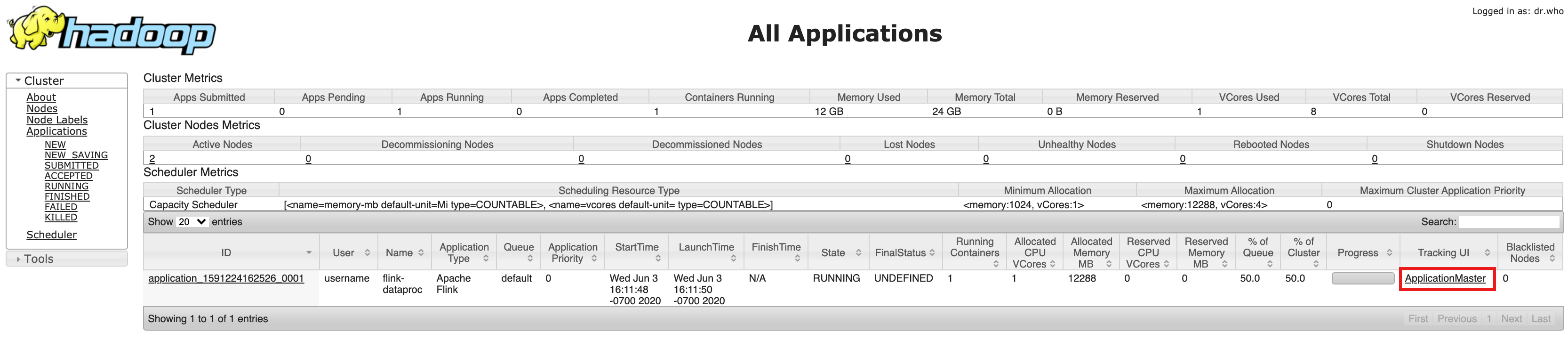
4. For a long-running streaming job, click the **ApplicationManager** link to open the Flink dashboard; for a completed job, click the **History** link to view job details. 