Managed Service for Apache Spark autotuning lets you optimize recurring batch
workloads for performance and resiliency without manual configuration. Rather
than requiring you to evaluate complex Spark parameters, autotuning analyzes
previous runs (called *cohorts*) and automatically applies settings based on
Spark best practices.
> [!NOTE]
>
> **Private Preview**
>
>
> This feature is
>
> subject to the "Pre-GA Offerings Terms" in the General Service Terms section of the
> [Service Specific
> Terms](https://docs.cloud.google.com/terms/service-terms#1).
>
> Pre-GA features are available "as is" and might have limited support.
>
> For more information, see the
> [launch stage descriptions](https://cloud.google.com/products/#product-launch-stages).
>
>
> For information about access to this release, see the [access
> request page](https://docs.google.com/forms/d/e/1FAIpQLSeoH3mLxuL1WeAkPnUko448XQH3gKaCQjc3T9S8cRMpZ0WfkQ/viewform).
This document provides information about autotuning
Managed Service for Apache Spark batch workloads. Optimizing a Spark workload for
performance and resiliency can be challenging due to the number of Spark
configuration options and the difficulty of assessing how those options impact a
workload. Managed Service for Apache Spark autotuning provides an alternative to
manual workload configuration by automatically applying Spark configuration
settings to a recurring Spark workload based on Spark optimization best
practices and an analysis of workload runs (called "cohorts").
## Sign up for Managed Service for Apache Spark autotuning
To sign up for access to the Managed Service for Apache Spark autotuning
[preview release](https://docs.cloud.google.com/products#product-launch-stages)
described on this page, complete and submit the
[Managed Service for Apache Spark Preview access request](https://docs.google.com/forms/d/e/1FAIpQLSeoH3mLxuL1WeAkPnUko448XQH3gKaCQjc3T9S8cRMpZ0WfkQ/viewform)
signup form. After the form is approved, projects listed in the form have access
to preview features.
## Benefits
Managed Service for Apache Spark autotuning can provide the following benefits:
- **Auto-optimization**: Automatically tune inefficient Managed Service for Apache Spark batch and Spark configurations, which can speed job runtimes.
- **Historical learning**: Learn from recurring runs to apply recommendations tailored to your workload.
## Autotuning cohorts
Autotuning is applied to recurring executions (cohorts) of a batch workload.
The cohort name that you specify when you submit a batch workload identifies it
as one of the successive runs of the recurring workload.
Autotuning is applied to batch workload cohorts as follows:
- Autotuning is calculated and applied to the second and subsequent cohorts of a
workload. Autotuning is not applied to the first run of a recurring workload
because Managed Service for Apache Spark autotuning uses workload history for
optimization.
- Autotuning is not applied retroactively to running workloads, it is applied
only to newly submitted workloads.
- Autotuning learns and improves over time by analyzing the cohort statistics.
To allow the system to gather sufficient data, we recommend keeping autotuning
enabled for at least five runs.
**Cohort names** : A recommended practice is to use cohort names that help to
identify the recurring workload type. For example, you might use
`daily_sales_aggregation` as the cohort name for a scheduled workload that runs
a daily sales aggregation task.
## Autotuning scenarios
When applicable, autotuning automatically selects and executes the following
`scenarios` or goals to optimize a batch workload:
- **Scaling**: Spark autoscaling configuration settings.
- **Join optimization**: Spark configuration settings to optimize SQL broadcast join performance.
- **Shuffle partitions**: Spark configuration settings to tune shuffle partitions.
## Use Managed Service for Apache Spark autotuning
You can enable Managed Service for Apache Spark autotuning on a batch workload by
using the Google Cloud console, Google Cloud CLI, or Dataproc API, or
the [Cloud Client Libraries](https://docs.cloud.google.com/apis/docs/cloud-client-libraries.md.txt).
### Console
To enable Managed Service for Apache Spark autotuning on each submission of a
recurring batch workload, perform the following steps:
1. In the Google Cloud console, go to the Managed Service for Apache Spark **Jobs** page.
[Go to Managed Service for Apache Spark Jobs](https://console.cloud.google.com/dataproc/jobs)
2. To create a batch workload, click **Submit job** to open the **Submit a job**
page.
3. Under **Select compute type for job** , confirm that **Serverless Spark** is
selected.
4. In the **Serverless job details** section:
1. Specify a **Job ID** or accept the default ID.
2. Select a **Runtime profile** (or keep **Default service configuration** for your region), and then click **Configure** in the **Summary** card (or click **Create new profile** in the **Runtime profile** menu) to open the runtime profile configuration panel.
3. In the runtime profile configuration panel, expand **Additional
configuration** , and then click **Edit** next to **Other
customizations**.
4. In the **Other customizations** panel, under **Autotuning**:
- Click the **Enable** toggle to enable autotuning for the Spark batch workload.
- **Cohort ID** : Fill in the [cohort](https://docs.cloud.google.com/managed-spark/docs/concepts/autotuning.md.txt#autotuning_cohorts) ID, which identifies the batch as one of a series of recurring workloads. Autotuning is applied to the second and subsequent workloads that are submitted with this cohort ID. For example, specify `daily_sales_aggregation` as the cohort ID for a scheduled batch workload that runs a daily sales aggregation task.
5. Click **Save** in the **Other customizations** panel, and then click
**Use configuration** (or **Save new profile**) in the runtime profile
configuration panel.
5. Fill in the **Files and artifacts** and **Job execution and properties**
sections on the **Submit a job** page as needed, and then click **Submit** .
For more information about these fields, see
[Submit a batch workload](https://docs.cloud.google.com/dataproc-serverless/docs/quickstarts/spark-batch#dataproc_serverless_create_batch_workload-console).
### gcloud
To enable Managed Service for Apache Spark autotuning on each submission of a
recurring batch workload, run the following gcloud CLI
[`gcloud dataproc batches submit`](https://docs.cloud.google.com/sdk/gcloud/reference/dataproc/batches/submit.md.txt)
command locally in a terminal window or in
[Cloud Shell](https://console.cloud.google.com/?cloudshell=true).
```bash
gcloud dataproc batches submit COMMAND \
--region=REGION \
--cohort=COHORT \
--autotuning-scenarios=auto \
other arguments ...
```
Replace the following:
- COMMAND: the Spark workload type, such as `Spark`, `PySpark`, `Spark-Sql`, or `Spark-R`.
- REGION: the [region](https://docs.cloud.google.com/compute/docs/regions-zones.md.txt#available) where your batch workload will run.
- COHORT: the [cohort](https://docs.cloud.google.com/managed-spark/docs/concepts/autotuning.md.txt#autotuning_cohorts) name, which identifies the batch as one of a series of recurring workloads. Autotuning is applied to the second and subsequent workloads that are submitted with this cohort name. For example, specify `daily_sales_aggregation` as the cohort name for a scheduled batch workload that runs a daily sales aggregation task.
- `--autotuning-scenarios=auto`: Enable autotuning.
> [!NOTE]
> **Note:** `auto` is the recommended setting to get automatic benefits from autotuning. Yet, if required, you can specify one or more comma-separated specific [scenarios](https://docs.cloud.google.com/managed-spark/docs/concepts/autotuning.md.txt#autotuning_scenarios) to apply to the workload (such as `scaling` or `broadcast-hash-join`).
### API
To enable Managed Service for Apache Spark autotuning on each submission of a
recurring batch workload, submit a
[batches.create](https://docs.cloud.google.com/dataproc-serverless/docs/reference/rest/v1/projects.locations.batches/create)
request that includes the following fields:
- `RuntimeConfig.cohort`: the [cohort](https://docs.cloud.google.com/managed-spark/docs/concepts/autotuning.md.txt#autotuning_cohorts) name, which identifies the batch as one of a series of recurring workloads. Autotuning is applied to the second and subsequent workloads submitted with this cohort name. For example, specify `daily_sales_aggregation` as the cohort name for a scheduled batch workload that runs a daily sales aggregation task.
- `AutotuningConfig.scenarios`: Specify `AUTO` to enable autotuning on the Spark
batch workload.
> [!NOTE]
> **Note:** `AUTO` is the recommended setting to get automatic benefits from autotuning. Yet, if required, you can specify one or more specific [scenarios](https://docs.cloud.google.com/managed-spark/docs/concepts/autotuning.md.txt#autotuning_scenarios) to apply to the workload (such as `SCALING` or `BROADCAST_HASH_JOIN`).
Example:
...
runtimeConfig:
cohort: COHORT_NAME
autotuningConfig:
scenarios:
- AUTO
...
### Java
Before trying this sample, follow the Java setup instructions in the
[Managed Service for Apache Spark quickstart using
client libraries](https://docs.cloud.google.com/managed-spark/docs/quickstarts/create-cluster-client-libraries).
For more information, see the
[Managed Service for Apache Spark Java API
reference documentation](https://docs.cloud.google.com/java/docs/reference/google-cloud-dataproc/latest/overview).
To authenticate to Managed Service for Apache Spark, set up Application Default Credentials.
For more information, see
[Set up authentication for a local development environment](https://docs.cloud.google.com/docs/authentication/set-up-adc-local-dev-environment.md.txt).
To enable Managed Service for Apache Spark autotuning on each submission of a
recurring batch workload, call
[BatchControllerClient.createBatch](https://docs.cloud.google.com/java/docs/reference/google-cloud-dataproc/latest/com.google.cloud.dataproc.v1.BatchControllerClient.md.txt)
with a
[CreateBatchRequest](https://docs.cloud.google.com/java/docs/reference/google-cloud-dataproc/latest/com.google.cloud.dataproc.v1.CreateBatchRequest.md.txt)
that includes the following fields:
- `Batch.RuntimeConfig.cohort`: The [cohort](https://docs.cloud.google.com/managed-spark/docs/concepts/autotuning.md.txt#autotuning_cohorts) name, which identifies the batch as one of a series of recurring workloads. Autotuning is applied to the second and subsequent workloads submitted with this cohort name. For example, you might specify `daily_sales_aggregation` as the cohort name for a scheduled batch workload that runs a daily sales aggregation task.
- `Batch.RuntimeConfig.AutotuningConfig.scenarios`: Specify `AUTO` to enable
autotuning on the Spark batch workload.
> [!NOTE]
> **Note:** `AUTO` is the recommended setting to get automatic benefits from autotuning. Yet, if required, you can specify one or more specific [scenarios](https://docs.cloud.google.com/managed-spark/docs/concepts/autotuning.md.txt#autotuning_scenarios) to apply to the workload (such as `SCALING` or `BROADCAST_HASH_JOIN`).
Example:
```java
...
Batch batch =
Batch.newBuilder()
.setRuntimeConfig(
RuntimeConfig.newBuilder()
.setCohort("daily_sales_aggregation")
.setAutotuningConfig(
AutotuningConfig.newBuilder()
.addScenarios(Scenario.AUTO))
...
.build();
batchControllerClient.createBatch(
CreateBatchRequest.newBuilder()
.setParent(parent)
.setBatchId(batchId)
.setBatch(batch)
.build());
...
```
To use the API, you must use `google-cloud-dataproc` client library version
`4.43.0` or later. You can use one of the following configurations to add the
library to your project.
### Maven
```xml
com.google.cloud
google-cloud-dataproc
4.43.0
```
### Gradle
```groovy
implementation 'com.google.cloud:google-cloud-dataproc:4.43.0'
```
### SBT
```scala
libraryDependencies += "com.google.cloud" % "google-cloud-dataproc" % "4.43.0"
```
### Python
Before trying this sample, follow the Python setup instructions in the
[Managed Service for Apache Spark quickstart using
client libraries](https://docs.cloud.google.com/managed-spark/docs/quickstarts/create-cluster-client-libraries).
For more information, see the
[Managed Service for Apache Spark Python API
reference documentation](https://docs.cloud.google.com/python/docs/reference/dataproc/latest).
To authenticate to Managed Service for Apache Spark, set up Application Default Credentials.
For more information, see
[Set up authentication for a local development environment](https://docs.cloud.google.com/docs/authentication/set-up-adc-local-dev-environment.md.txt).
To enable Managed Service for Apache Spark autotuning on each submission of a
recurring batch workload, call
[BatchControllerClient.create_batch](https://docs.cloud.google.com/python/docs/reference/dataproc/latest/google.cloud.dataproc_v1.services.batch_controller.BatchControllerClient.md.txt#google_cloud_dataproc_v1_services_batch_controller_BatchControllerClient_create_batch)
with a
[Batch](https://docs.cloud.google.com/python/docs/reference/dataproc/latest/google.cloud.dataproc_v1.types.Batch.md.txt)
that includes the following fields:
- `batch.runtime_config.cohort`: The [cohort](https://docs.cloud.google.com/managed-spark/docs/concepts/autotuning.md.txt#autotuning_cohorts) name, which identifies the batch as one of a series of recurring workloads. Autotuning is applied to the second and subsequent workloads submitted with this cohort name. For example, you might specify `daily_sales_aggregation` as the cohort name for a scheduled batch workload that runs a daily sales aggregation task.
- `batch.runtime_config.autotuning_config.scenarios`: Specify `AUTO` to enable
autotuning on the Spark batch workload.
> [!NOTE]
> **Note:** `AUTO` is the recommended setting to get automatic benefits from autotuning. Yet, if required, you can specify one or more specific [scenarios](https://docs.cloud.google.com/managed-spark/docs/concepts/autotuning.md.txt#autotuning_scenarios) to apply to the workload (such as `SCALING` or `BROADCAST_HASH_JOIN`).
Example:
```python
# Create a client
client = dataproc_v1.BatchControllerClient()
# Initialize request argument(s)
batch = dataproc_v1.Batch()
batch.pyspark_batch.main_python_file_uri = "gs://bucket/run_tpcds.py"
batch.runtime_config.cohort = "daily_sales_aggregation"
batch.runtime_config.autotuning_config.scenarios = [
Scenario.AUTO
]
request = dataproc_v1.CreateBatchRequest(
parent="parent_value",
batch=batch,
)
# Make the request
operation = client.create_batch(request=request)
```
To use the API, you must use `google-cloud-dataproc` client library version `5.10.1`
or later. To add it to your project, you can use the following requirement:
google-cloud-dataproc>=5.10.1
### Airflow
Instead of submitting each autotuned batch cohort manually, you can use Airflow
to schedule the submission of each recurring batch workload. To do this,
call
[BatchControllerClient.create_batch](https://docs.cloud.google.com/python/docs/reference/dataproc/latest/google.cloud.dataproc_v1.services.batch_controller.BatchControllerClient.md.txt#google_cloud_dataproc_v1_services_batch_controller_BatchControllerClient_create_batch)
with a
[Batch](https://docs.cloud.google.com/python/docs/reference/dataproc/latest/google.cloud.dataproc_v1.types.Batch.md.txt)
that includes the following fields:
- `batch.runtime_config.cohort`: The [cohort](https://docs.cloud.google.com/managed-spark/docs/concepts/autotuning.md.txt#autotuning_cohorts) name, which identifies the batch as one of a series of recurring workloads. Autotuning is applied to the second and subsequent workloads submitted with this cohort name. For example, you might specify `daily_sales_aggregation` as the cohort name for a scheduled batch workload that runs a daily sales aggregation task.
- `batch.runtime_config.autotuning_config.scenarios`: Specify `AUTO` to enable
autotuning on the Spark batch workload.
> [!NOTE]
> **Note:** `AUTO` is the recommended setting to get automatic benefits from autotuning. Yet, if required, you can specify one or more specific [scenarios](https://docs.cloud.google.com/managed-spark/docs/concepts/autotuning.md.txt#autotuning_scenarios) to apply to the workload (such as `SCALING` or `BROADCAST_HASH_JOIN`).
Example:
```python
create_batch = DataprocCreateBatchOperator(
task_id="batch_create",
batch={
"pyspark_batch": {
"main_python_file_uri": PYTHON_FILE_LOCATION,
},
"environment_config": {
"peripherals_config": {
"spark_history_server_config": {
"dataproc_cluster": PHS_CLUSTER_PATH,
},
},
},
"runtime_config": {
"cohort": "daily_sales_aggregation",
"autotuning_config": {
"scenarios": [
Scenario.AUTO,
]
}
},
},
batch_id="BATCH_ID",
)
```
To use the API, you must use `google-cloud-dataproc` client library version `5.10.1`
or later. You can use the following Airflow environment requirement:
google-cloud-dataproc>=5.10.1
To update the package in Managed Service for Apache Airflow, see
[Install Python dependencies for Managed Airflow](https://docs.cloud.google.com/composer/docs/how-to/using/installing-python-dependencies).
## View autotuning changes
To view Managed Service for Apache Spark autotuning changes to a batch workload,
run the
[`gcloud dataproc batches describe`](https://docs.cloud.google.com/sdk/gcloud/reference/dataproc/batches/describe)
command.
Example: `gcloud dataproc batches describe` output is similar to the following:
...
runtimeInfo:
propertiesInfo:
# Properties set by autotuning.
autotuningProperties:
spark.dataproc.sql.broadcastJoin.hints:
annotation: Converted 1 Sort-Merge Joins to Broadcast Hash Join
value: v2;Inner,
spark.dynamicAllocation.initialExecutors:
annotation: Adjusted Initial executors based on stages submitted in first
2 minutes to 9
overriddenValue: '2'
value: '9'
spark.dynamicAllocation.maxExecutors:
annotation: Tuned Max executors to 11
overriddenValue: '5'
value: '11'
spark.dynamicAllocation.minExecutors:
annotation: Changed Min executors to 9
overriddenValue: '2'
value: '9'
...
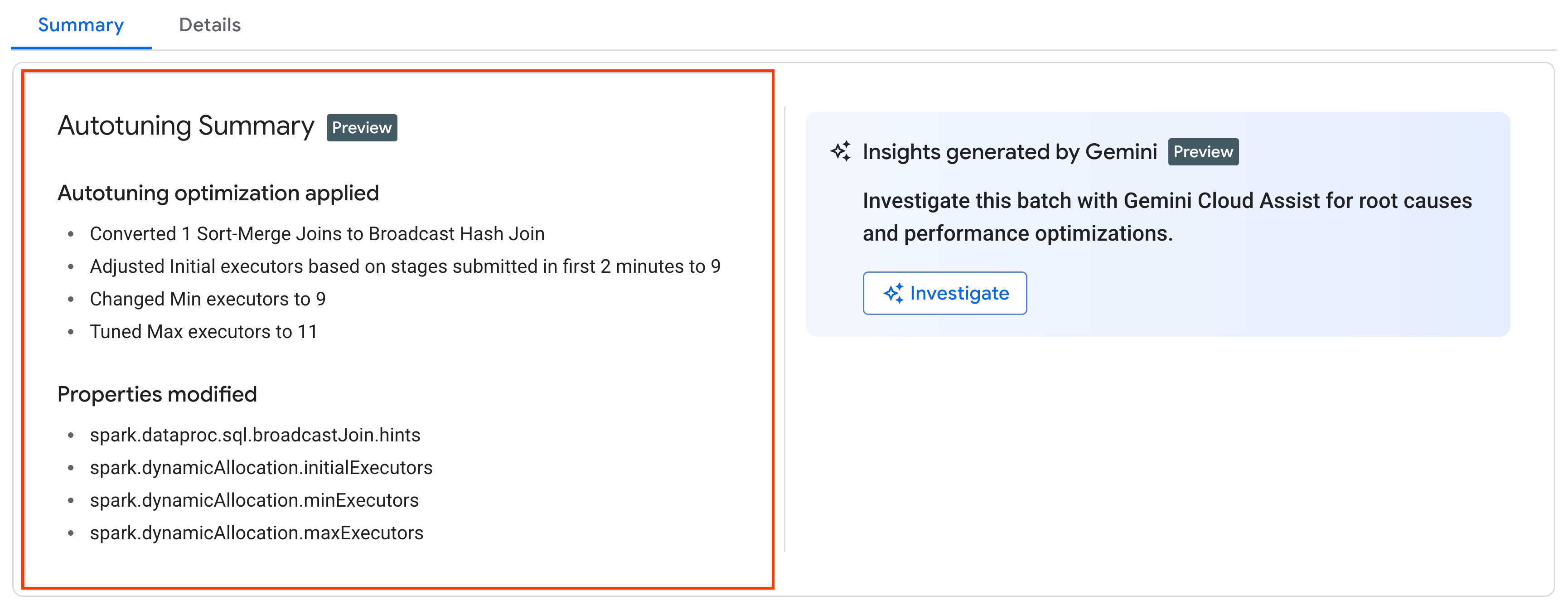
You can view the latest autotuning changes that were applied to a running,
completed, or failed workload on the batch **Job details** page in the
Google Cloud console (click the batch **Job ID** on the **Serverless Spark**
tab of the **Jobs** page), under the **Summary** tab.
## Pricing
Managed Service for Apache Spark autotuning is offered during private preview
without additional charge. Standard
[Managed Service for Apache Spark pricing](https://docs.cloud.google.com/dataproc-serverless/pricing)
applies.