

This page describes the main components of Dual Run. While some parts of the architecture are shared between batch and online comparison, others are specific to either workload.
Dual Run components
Dual Run components run as containers in a Google Kubernetes Engine (GKE) cluster. Dual Run also relies on other Google Cloud products, such as BigQuery, Cloud Storage, and other specialized components for batch comparison and online comparison.
The Dual Run cluster components shared for both online and batch workloads are the following:
- Config Manager: the user interface and dashboards.
- Env Checker: the installation verification engine.
Config Manager
Config Manager is the frontend of the Dual Run application. You use this component to manage user permissions, configure online workloads through endpoints, and edit dashboards. You can set up user authentication by using the Identity and Access Management system.
Config Manager also provides the dashboard environment where you can review the results of the comparison. The dashboard lets you view a summary of the comparison results based on filters that you apply, and lets you review the details of the results for each individual record.
The dashboard is based on Apache Superset, an open source software for data visualization and data exploration. It also lets you create customized reports and queries.
Env Checker
Env Checker is the Dual Run component that verifies that the installation and deployment of Dual Run completed successfully. It checks that all the necessary Dual Run components are correctly configured and running, and otherwise reports any errors or misconfigurations.
Architecture for batch comparison
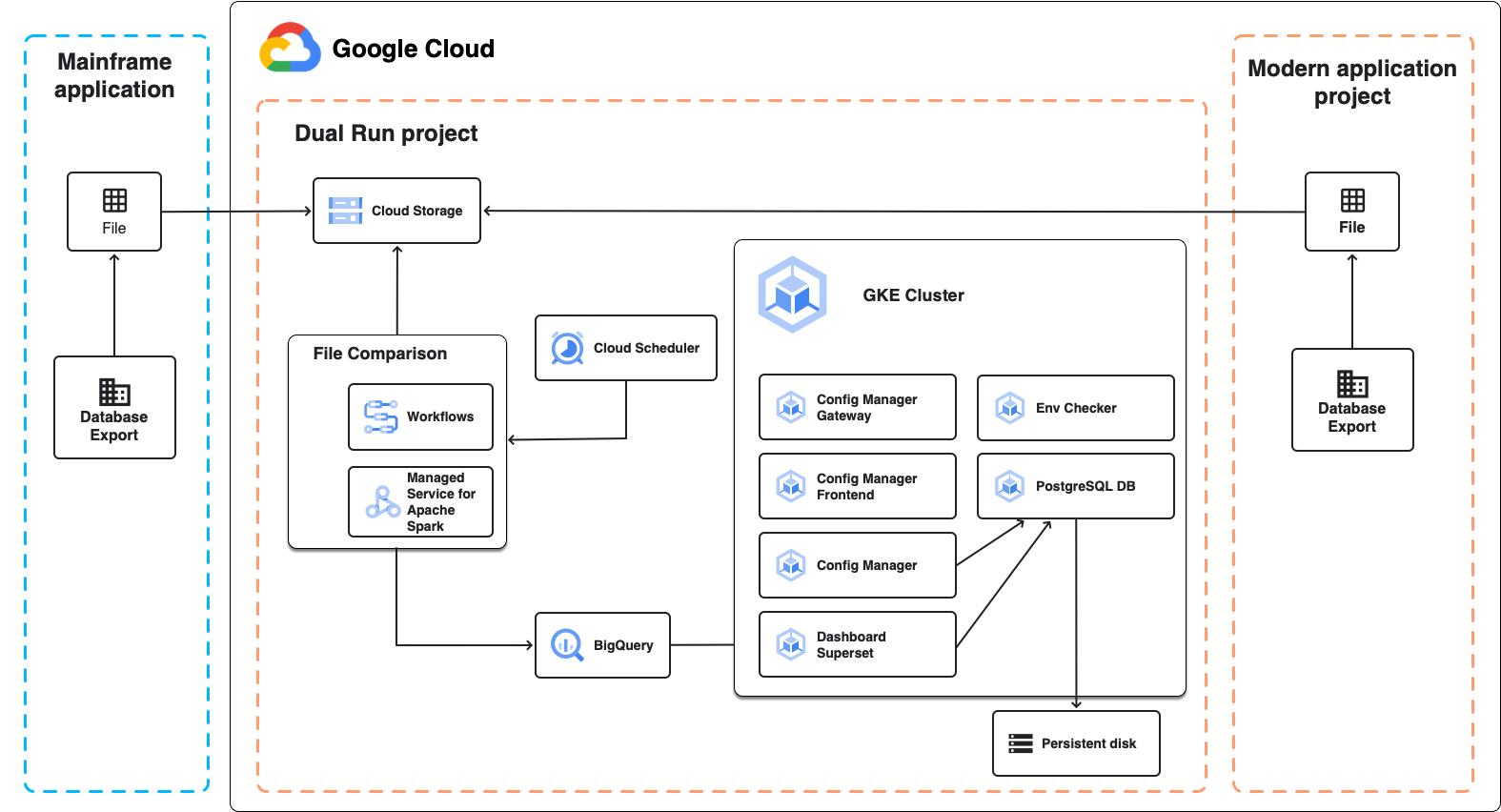
The following diagram shows the Dual Run architecture for batch comparison, as described in the following sections.
File Comparison
File Comparison is the Dual Run component that lets you compare the expected and actual file outputs of your Dual Run setup. When performing a comparison, you can set the level of tolerance to mark the results as equivalent.
File Comparison uses Managed Service for Apache Spark, a fully managed Apache Spark cluster running on Google Cloud, to perform the comparison. Depending on the size of data that you plan to compare and on your infrastructure requirements, you can choose two different approaches:
- A managed serverless Spark-based environment running on Managed Service for Apache Spark that is created as part of the Dual Run deployment. It uses a fixed configuration that lets you compare files of up to several GB. This is the default approach.
- A Spark cluster on Managed Service for Apache Spark that you create and configure after
the Dual Run deployment. This is useful in the following
cases:
- You plan to use custom VM or disk configurations.
- You need to compare files larger than several GB.
- You want to run multiple comparison jobs at the same time.
Architecture for online comparison
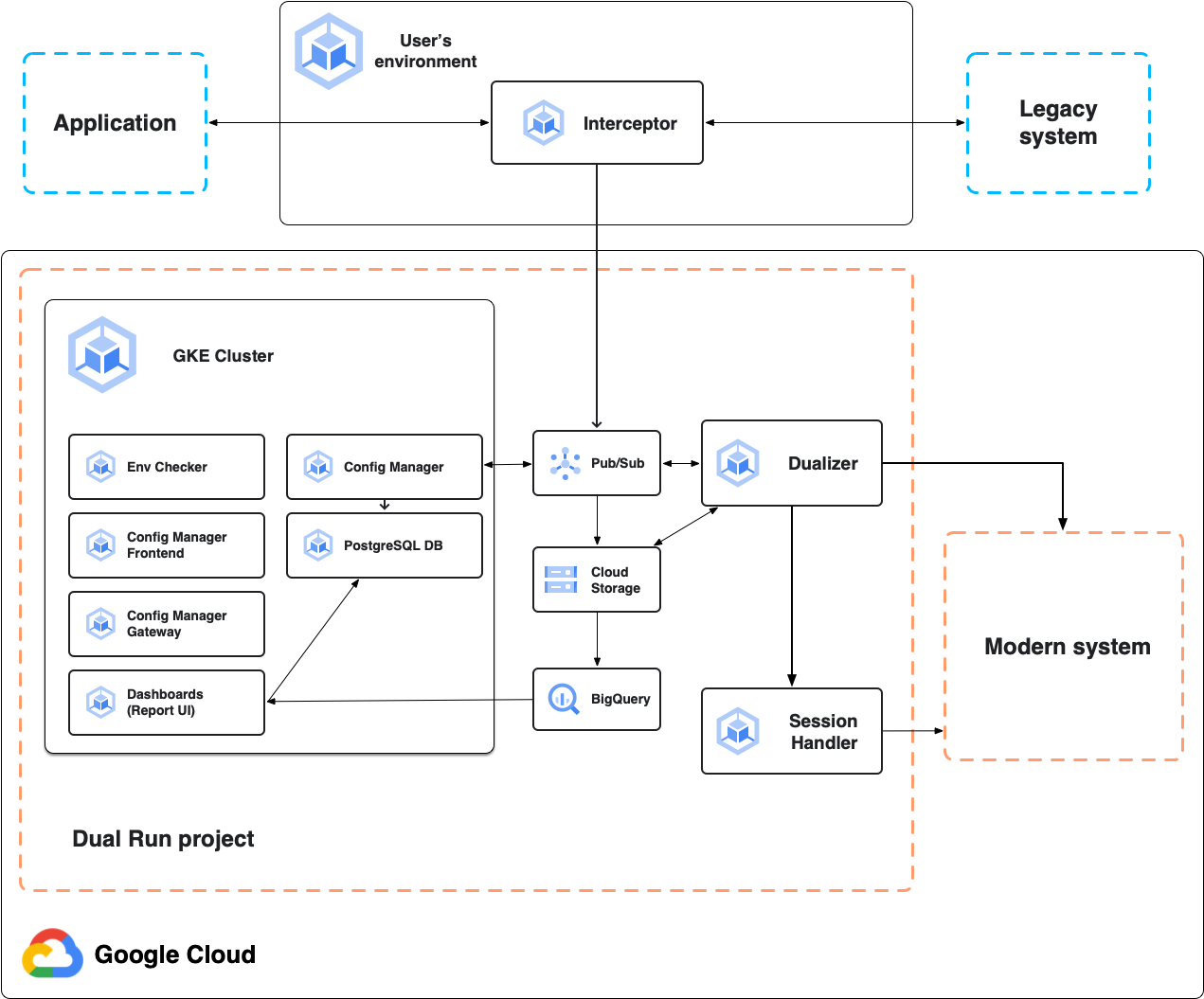
The following diagram shows the Dual Run architecture for online comparison, as described in the following sections.
Interceptor
The interceptor acts as a highly reliable and performant proxy for the primary system, the mainframe application. It listens to application traffic and forwards requests to the primary system with minimal latency. It replicates all requests and responses for subsequent dualization. You can deploy the interceptor in any Kubernetes-based environment, including the Dual Run project or your on-premises environment.
The interceptor operates even when the connection to Google Cloud services fails, ensuring maximum availability for the primary system.
Dual Run supports interceptors for HTTP, TN3270, and MQ messages.
Dualizer
The dualizer replays captured online transactions to the modernized secondary system. It consumes recorded transactions from the dualization queue in Pub/Sub, sends requests to the secondary system, and retrieves responses.
The primary and secondary responses are compared using the same underlying comparison engine that the File Comparison for batch uses. Requests, responses, and comparison results are stored in Cloud Storage, while comparison results are streamed to BigQuery. The configuration files are managed by the Config Manager and are read from Cloud Storage.
Session Handler
The session handler is responsible for maintaining the active sessions with the secondary system. The session handler maintains an open TCP socket per client connection, for communication protocols that are stateful, such as TN3270. For each request dualized to the secondary system, the dualizer sends the dualized request to the session handler. The session handler then sends it to the secondary system using the open socket, receives the secondary responses, and sends them back to the dualizer for processing.
Google Cloud dependencies
Dual Run relies on the following Google Cloud products to run:
- Google Kubernetes Engine: Dual Run uses GKE to run its microservices in pods.
- Cloud Storage: Dual Run stores configuration files for your environment and the comparison artifacts you provide in Cloud Storage buckets.
- Artifact Registry: Dual Run stores container images in the registry for GKE usage.
- BigQuery: Dual Run stores the comparison output results for both batch and online transactions in BigQuery.
- Pub/Sub: Dual Run uses Pub/Sub as an internal messaging system to pass configuration changes between its different pods.
- Cloud SQL: Dual Run creates a Cloud SQL database instance to ensure compatibility with future updates.
Dual Run batch comparison relies on the following additional products:
- Managed Service for Apache Spark: Dual Run uses a serverless Spark cluster in Managed Service for Apache Spark to run file comparisons.
- Workflows and Cloud Run functions: Dual Run uses Workflows to manage the Cloud Run functions that perform the file comparison jobs.
- Identity and Access Management: Dual Run relies on Identity and Access Management for authentication and access management, which lets you use Google or SAML identity providers to authenticate and authorize user roles.
Dual Run online comparison relies on the following additional products:
- Secret Manager: Dual Run uses Secret Manager to store secrets, such as the credentials for the queue manager that you deploy for Dual Run.
- Cloud Monitoring: Dual Run uses Cloud Monitoring to collect and monitor metrics, events, and logs from your Dual Run components and Google Cloud resources.
- Cloud Trace: Dual Run uses Cloud Trace to provide enhanced monitoring and debugging capabilities.
What's next
Learn more about Dual Run File Comparison.