[IBM mainframes](https://www.ibm.com/docs/en/zos-basic-skills?topic=vmt-who-uses-mainframes-why-do-they-do-it) are used by organizations to perform critical computing tasks. In recent years,
many companies that rely on mainframes have been working towards migrating to
the cloud. Mainframe Connector lets you move your mainframe data to
Google Cloud so that you can offload CPU-intensive report workloads to Google Cloud.
## Key benefits of Mainframe Connector
The following are the key benefits of using Mainframe Connector to move
mainframe data to Google Cloud:
- **Simplified data transfer:** Simplifies the movement of mainframe data to Google Cloud storage services like [Cloud Storage](https://docs.cloud.google.com/storage/docs/introduction.md.txt) and [BigQuery](https://docs.cloud.google.com/bigquery/docs/introduction.md.txt).
- **Batch job integration:** Lets you submit BigQuery jobs using mainframe batch jobs defined in [job control language (JCL)](https://www.ibm.com/docs/en/zos-basic-skills?topic=collection-basic-jcl-concepts). As queries are read in from datasets or files, analysts can use scheduled jobs with minimal knowledge and understanding of mainframe environments.
- **Easy monitoring:** Mainframe operations personnel don't have to monitor a different environment as jobs are submitted with familiar schedules using JCL.
- **Reduced MIPS:** Mainframe Connector uses a Java virtual machine (JVM) for most processing to minimize mainframe processor workload during data transfer, reducing million instructions per second (MIPS) thereby lowering costs. Mainframe Connector offloads most processor-intensive work to auxiliary processors. If auxiliary processors are stressed, you can also configure Mainframe Connector to perform transcoding and conversion using Compute Engine. For more information about Mainframe Connector configurations, see [Mainframe Connector configurations](https://docs.cloud.google.com/mainframe-connector/docs/configurations.md.txt).
- **Streaming transformation:** Transcodes files to ORC, JSON, or CSV formats,
which are compatible with Google Cloud services like BigQuery.
Mainframe Connector supports transcoding for the following file types:
- Queued Sequential Access Method (QSAM) or Virtual Storage Access Method (VSAM) mainframe datasets associated with COBOL copybooks in extended binary coded decimal interchange code (EBCDIC)
- Files in ASCII UTF-8
By default, Mainframe Connector transcodes datasets from the
*US EBCDIC: Cp037* character set to ORC, JSON, and CSV formats.
However, Mainframe Connector also supports transcoding datasets from
the following regional EBCDIC character sets:
- *French: Cp297*
- *German: Cp1141*
- *Spanish: Cp1145*
A custom character set can be implemented if an appropriate one is not
included in the IBM JVM.
## How Mainframe Connector works
Mainframe Connector lets you move data located on your mainframe in and
out of Cloud Storage, and submit BigQuery jobs from mainframe-based
batch jobs defined in JCL. Mainframe Connector lets you transcode
mainframe datasets directly to [Optimized Row Columnar (ORC)](https://orc.apache.org/)
format.
Transcoding is the process of converting information from one form of coded
representation to another, in this case to ORC. ORC is an open source
column-oriented data format that is widely used in the Apache Hadoop ecosystem,
and is supported by BigQuery.
Mainframe Connector provides a subset of the [Google Cloud SDK command-line utilities](https://docs.cloud.google.com/sdk/gcloud.md.txt)
enabling you to transfer data and interact with Google Cloud services. The shell
interpreter and JVM-based implementations of [gsutil](https://docs.cloud.google.com/storage/docs/gsutil.md.txt)
and [bq command-line utilities](https://docs.cloud.google.com/bigquery/docs/bq-command-line-tool) make it
possible for you to manage a complete extract, load, transform (ELT) pipeline
entirely from [IBM z/OS](https://www.ibm.com/products/zos) while retaining your
existing job scheduler.
One of the main challenges in transferring your mainframe data to and from the
cloud is that it is a multi-step process that would normally include executing
the following steps:
1. Copy data to a file server.
2. Copy data from the file server to another location for processing.
3. Use a data processing stack to convert the data to a modern format.
4. Write back the processed data to yet another location.
5. Load the processed data to a database or a data warehouse where data can be queried or used.
The following figure shows the multi-step process that is normally used to
transfer data from a mainframe to Google Cloud.
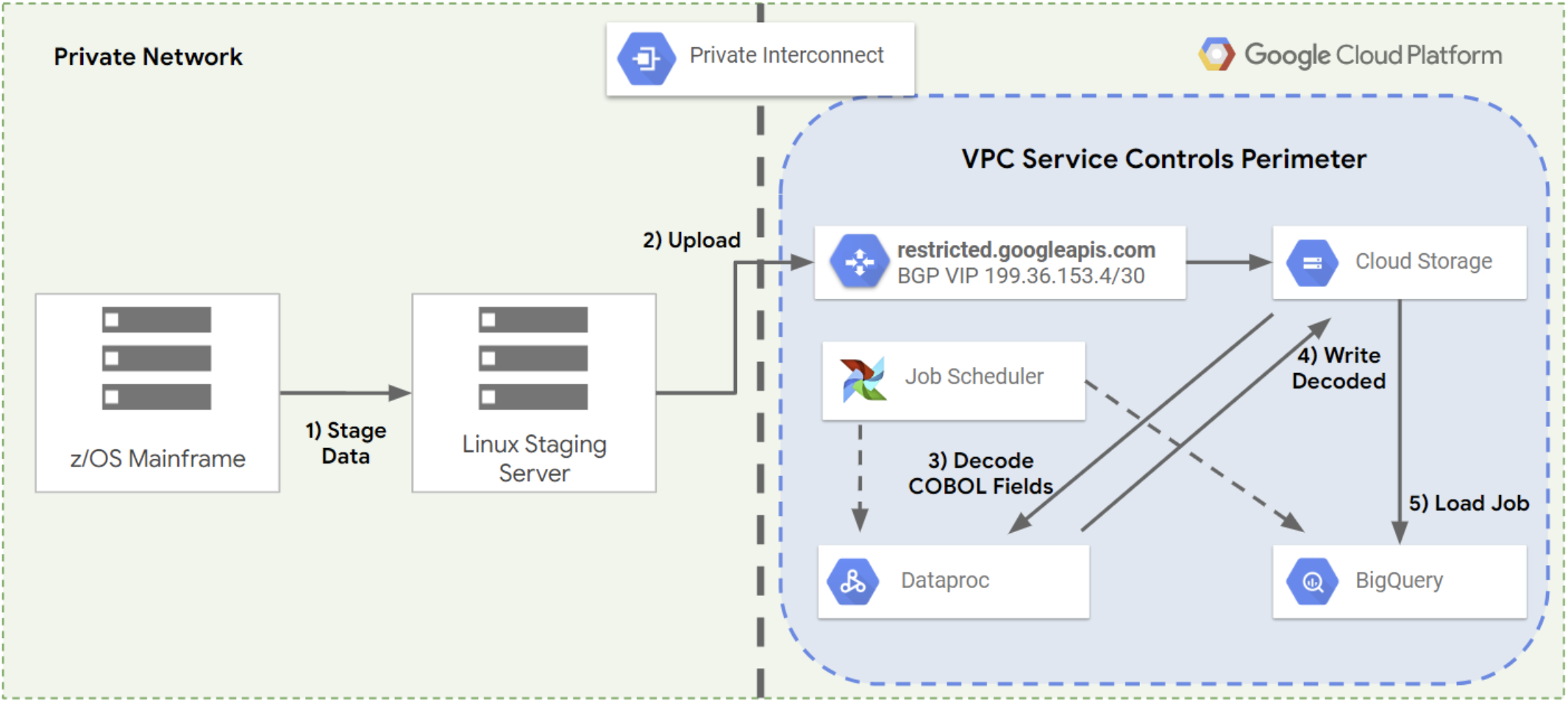 Multiple steps to move mainframe data to Google Cloud
Mainframe Connector lets you perform all these steps with a single
command using Cloud Storage as an intermediate storage location. This
reduces the time taken for the mainframe data to be processed and made available
in a database or data warehouse, as shown in the following figure.
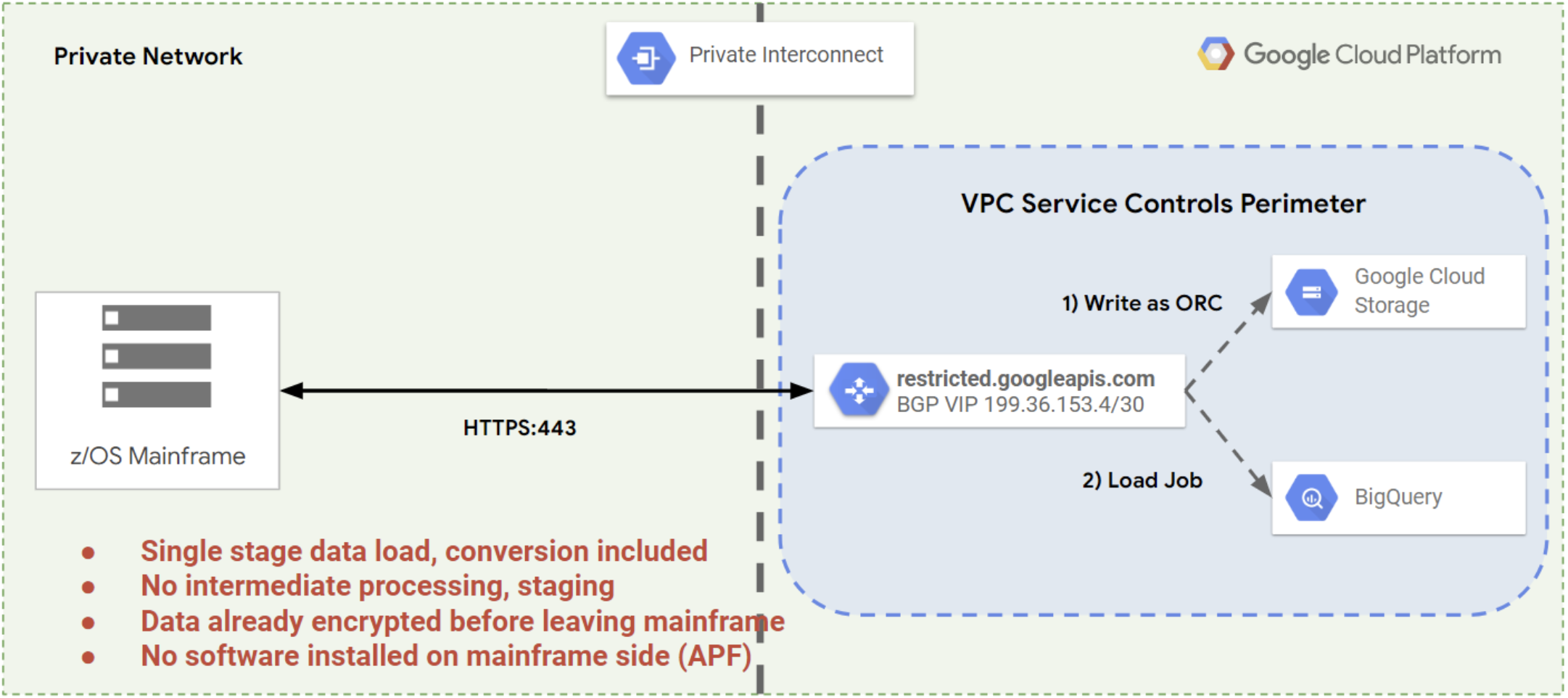 Steps eliminated by Mainframe Connector
## What's next
- [Mainframe Connector architecture](https://docs.cloud.google.com/mainframe-connector/docs/architecture.md.txt)
- [Mainframe Connector configurations](https://docs.cloud.google.com/mainframe-connector/docs/configurations.md.txt)
- [Install Mainframe Connector](https://docs.cloud.google.com/mainframe-connector/docs/installation.md.txt)