Mainframe Connector supports two versions of the copybook parser:
- [Native copybook parser](https://docs.cloud.google.com/mainframe-connector/docs/copybook-reference.md.txt#native-copybook-parser): The Native copybook parser implements an ANTLR4-based parser, supports COBOL copybooks, and is the recommended version of the parser.
- [Legacy copybook parser](https://docs.cloud.google.com/mainframe-connector/docs/copybook-reference.md.txt#legacy-copybook-parser): The Legacy copybook parser is an older version of the parser that has support for a very limited copybooks formats.
> [!NOTE]
> **Note:** The Legacy parser is being deprecated. We recommend that you switch to the Native copybook parser.
You can define which parser you want to use based on your copybook. For more
information on defining the parser that you want to use, see
[Define the copybook parser](https://docs.cloud.google.com/mainframe-connector/docs/define-parser.md.txt).
## Native copybook parser
The Native copybook parser is the latest version
of the parser and is used by default. The native copybook parser implements
an ANTLR4-based parser and supports COBOL copybooks.
This section lists the preprocessing tasks performed by the Native copybook
parser. It also outlines the [data types](https://docs.cloud.google.com/mainframe-connector/docs/data-types.md.txt)
supported by the Native copybook parser and the restrictions for its use.
### Preprocessing
Before parsing a copybook, the Native copybook
parser preprocesses the data and performs the following tasks:
- Removes comment lines.
- Resolves line continuation.
- Blanks out line number areas and column 73 areas.
- Preserves preprocessor specific statements like `EJECT`, `SPACE`, and `TITLE`. These field are parsed, but ignored. Copybooks containing preprocessor parameters that can be used by `COPY REPLACING` are not supported by the Native copybook parser. In these copybooks, identifiers are surrounded by a colon (:).
### Supported data types and restrictions
The following are the [data types](https://docs.cloud.google.com/mainframe-connector/docs/data-types.md.txt)
supported by the Native copybook parser and the
restrictions for its use:
- Level 66 (ALIAS) or 77 (STANDALONE) are not supported.
- Use only PICTURE fields. The following PICTURE fields are supported:
- Pic A, Pic, B, Pic G (DBCS), Pic N (national or DBCS), Pic U (UTF8), Pic X, and zoned decimal (max precision 38, max scale 38)
- IBM Hexadecimal floating point (HFP) is supported.
- REDEFINES are not supported.
- Use only the following COMP fields. ALIGN and OCCURS are not supported.
- COMP
- COMP4
- BINARY
- COMP3
- PACKED-DECIMAL
- [DATE and TIMESTAMP](https://docs.cloud.google.com/mainframe-connector/docs/copybook-reference.md.txt#date-timestamp) are supported.
- [Null indicators](https://docs.cloud.google.com/mainframe-connector/docs/copybook-reference.md.txt#null-indicator) are supported.
- [Double-byte character set (DBCS)](https://docs.cloud.google.com/mainframe-connector/docs/copybook-reference.md.txt#dbcs-usage) field Pic G and Pic N are supported and should be used instead of Pic T, which is now deprecated. To use the Pic N field as DBCS without specifying `USAGE DISPLAY-1`, you must set the `NSYMBOL` environment variable to `DBCS`. By default, `NSYMBOL` is set to `NATIONAL` which sets `USAGE NATIONAL` to Pic N fields that don't have a `USAGE` clause. Note that `NSYMBOL` can only be set to `NATIONAL` or `DBCS`.
- [Variable-length character strings](https://docs.cloud.google.com/mainframe-connector/docs/copybook-reference.md.txt#variable-length-strings) are supported.
- The [SIGN clause](https://www.mainframestechhelp.com/tutorials/cobol/sign-clause.htm) is supported.
- You must justify all fields and use a single indentation level.
- Comments are supported.
#### Support for date and timestamp fields
Mainframe Connector supports moving date and timestamp data in and out
of BigQuery. To do so, you must define environment variables that begin
with the word `SUFFIX` in the following format:
```
SUFFIX_SUFFIX_STRING="command --format FORMAT --timezone TIMEZONE"
```
The following list describes the format in more detail:
- `SUFFIX_SUFFIX_STRING`: The environment variable that you can use to define date and timestamp data. The SUFFIX_STRING name corresponds to the suffixes `-SUFFIX_STRING` or `_SUFFIX_STRING` that should be interpreted as either a date or timestamp when used as a suffix of a field name in a copybook. Ensure that the SUFFIX_STRING doesn't contain a hyphen or underscore.
- `command`: Defines the decoder that should be used to parse the field. The supported commands are `date-converter` and `timestamp-converter`.
- `--format`: A parameter that defines the format of the date or timestamp. You can specify at most five different formats separated by commas. If multiple formats can match a given input, the first format that matches is used for loading to BigQuery. If multiple formats are specified for exporting, only the first format is used. For more information on valid formats, see [Supported date and timestamp formats](https://docs.oracle.com/javase/8/docs/api/java/time/format/DateTimeFormatter.html).
- `--timezone`: An optional parameter for the type `TIMESTAMP`. By default, the timezone is UTC. For more information about supported timezone formats, see [Supported timezone formats](https://docs.oracle.com/javase/8/docs/api/java/time/ZoneId.html#of-java.lang.String-).
- `--omitsuffix` (Optional): If this parameter is specified, `-SUFFIX_STRING` or `_SUFFIX_STRING` is removed from the field name appearing in BigQuery.
To add an alias for a `SUFFIX_SUFFIX_STRING`, you can set
an environment variable `SUFFIX_SUFFIX_ALIAS=$SUFFIX_SUFFIX_STRING`.
Examples:
- If you define an environment variable as `SUFFIX_DT8="date-converter --format yyyyMMdd"`, a field with suffix `-DT8` or `_DT8` will be a `DATE` type field in BigQuery, and its pattern will be `yyyyMMdd`.
- If you define an environment variable as `SUFFIX_DT10="date-converter --format MM-dd-yyyy"`, a field with suffix `-DT10` or `_DT10` will be a `DATE` type field in BigQuery, and its pattern will be `MM-dd-yyyy`.
- If you define an environment variable as `SUFFIX_DT="date-converter --format 'MM-dd-yyyy,MM/dd/yyyy'"`, a field with suffix `-DT` or `_DT` will be a `DATE` type field in BigQuery, and its pattern will be either `MM-dd-yyyy` or `MM/dd/yyyy`.
- If you define two environment variables as `SUFFIX_TIMESTAMP="timestamp-converter --format yyyy-MM-dd SUFFIX_TIMESTAMP=timestamp-converter --format 'yyyy-MM-dd HH.mm.ss.SSSSSS' --timezone America/New_York"` and `SUFFIX_TS=$SUFFIX_TIMESTAMP`, a field with one of the following suffixes: `-TIMESTAMP`, `_TIMESTAMP`, `-TS`, or `_TS` will be a `TIMESTAMP` type field in BigQuery, and its pattern will be `yyyy-MM-dd HH:mm:ss.SSSSSS` with timezone `America/New_York`.
#### Support for null indicators
Mainframe Connector supports null indicators starting with version
5.13.0. To use null indicators, you must define environment variables that begin
with the word `SUFFIX` in the following format:
```
SUFFIX_NULL_INDICATOR_NAME="command --null-value NULL_VALUE --not-null-value NOT_NULL_VALUE"
```
NULL_INDICATOR_NAME corresponds to the suffixes
`-NULL_INDICATOR_NAME` or `_NULL_INDICATOR_NAME` that are
interpreted as a null indicator when used as a suffix of a field name in a
copybook.
The following list describes the parameters you can use with these environment
variables:
- `command`: The value must be `null-indicator`.
- `--null-value`: The value `null indicator` signals that the referenced field is null. The value of `--null-value` must be either a string or decimal number.
- `--not-null-value`: (Optional) When specified, the value `null indicator` signals that the referenced field is not null. If this parameter is not set, any value that is not `--value-null` is accepted. The value of `--not-null-value` must be either a string or decimal number.
- `--keep`: (Optional) When specified, the `null-indicator` field is kept as a column in the Optimized Row Columnar (ORC) file format. By default, this field is not kept in the ORC format.
- `-force-type`: (Optional) Supports two options -- `bytes` and `binary` that force a field to be decoded as either bytes or binary, respectively. For bytes, the values for `null` and `not-null` are expressed as `HEX` (for example, `FA3AB5`). `HIGH` and `LOW` constants are available that are equivalent to all `FF` or all `00`. For binary, the values are regular integers.
If the `null-indicator` doesn't have a referenced field,
Mainframe Connector displays an error message and stops processing the
files.
Examples:
Copybook snippet
10 COL1-NID1 PIC S9(4) USAGE COMP.
10 COL1 PIC S9(6) USAGE COMP.
10 FIELD PIC X(10).
10 FIELD-NID2 PIC X(1).
10 COL2 PIC X(10).
10 COL2-NULL PIC X(1).
Environment variables definition
SUFFIX_NID1="null-indicator --null-value -1 --not-null-value 0"
# Copybook fields with NID1 suffix null indicator configuration.
SUFFIX_NID2="null-indicator --null-value '?'"
# Copybook fields with NID2 suffix null indicator configuration.
SUFFIX_NULL="null-indicator --null-value '?' --keep"
# Copybook fields with NULL suffix null indicator configuration.
#### Support for DBCS fields
Ensure the following when using DBCS fields:
- When you use PIC G or Pic N DBCS fields, you must provide one of the following valid multi-byte character set (MBCS) encodings in the `encoding` option or in the `ENCODING` environment variable when using the `gsutil cp` or `bq export` commands:
- x-IBM930
- x-IBM933
- x-IBM935
- x-IBM937
- x-IBM939
- x-IBM942
- x-IBM942C
- x-IBM943
- x-IBM943C
- x-IBM949
- x-IBM949C
- x-IBM950
- x-IBM964
- x-IBM970
- x-IBM1364
- When a copybook field only contains DBCS bytes, but these bytes are not surrounded by shift-out (0x0E) and shift-in (0x0F), you must add the suffix `_DBCS` to the field name to ensure that these bytes are decoded as DBCS bytes.
For example, if your data corresponding to the copybook field
`03 FLD01 PIC N USAGE DISPLAY-1` contains bytes `0x43` and
`0xC5` in encoding [x-IBM930](https://public.dhe.ibm.com/software/globalization/gcoc/attachments/CP00300.pdf) that are not surrounded by `0x0E` and
`0x0F`, you must rename the copybook field name to
`03 FLD01-DBCS PIC N USAGE DISPLAY-1` in order to correctly decode
the DBCS data.
#### Support for variable-length character strings
The Native copybook parser supports the following
`struct` fields:
- 10 var
- 15 var-LEN PIC 9(4) USAGE COMP
- 15 var-TEXT PIC X(n)
The first field in the `struct` field is the length of the second
field, the string field. You might have to add some padding to the end of the
record based on the record length as shown in the following figure.
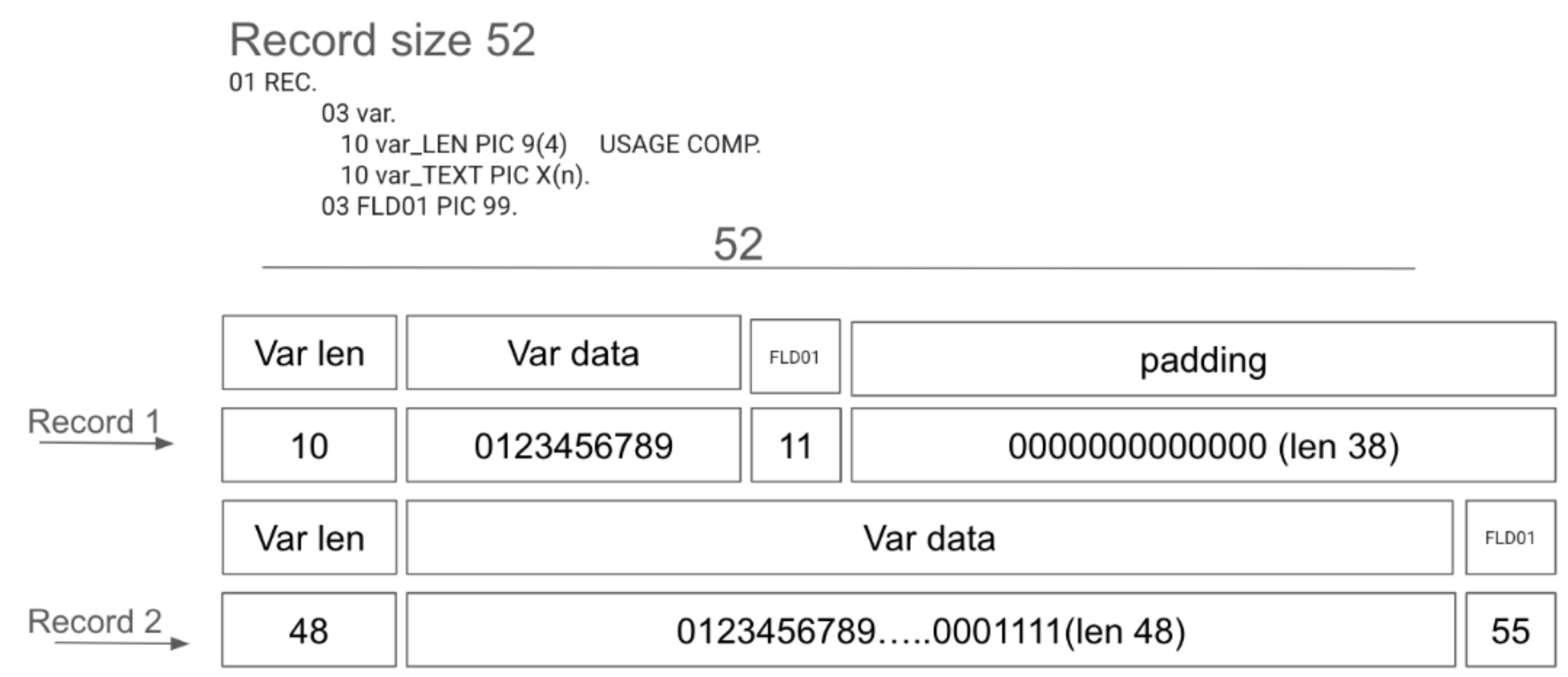 **Figure 1**. Padding added to variable-length character strings.
Mainframe Connector removes the suffix from the variable name before
saving the data in BigQuery. In this example, the variable name will be
`var`.
To use `struct` fields, set the environment variable
`BQSH_FEATURE_VARIABLE_LENGTH_ENABLED` to either `yes` or
`true`.
When using `struct` fields, ensure the following:
- The suffix of the first parameter in the `struct` is `-LEN`. If you want to use a different suffix, you must set the environment variable `BQSH_FEATURE_VARIABLE_LENGTH_LEN_SUFFIX` to the suffix that you want to use.
- The suffix of the second parameter in the `struct` is `-TEXT`. If you want to use a different suffix you must set the environment variable `BQSH_FEATURE_VARIABLE_LENGTH_DATA_SUFFIX` to the suffix that you want to use.
### Unsupported fields and constructs
The following sections describe fields and constructs are not supported by the
- [COBOL constructs](https://docs.cloud.google.com/mainframe-connector/docs/copybook-reference.md.txt#cobol-constructs)
- [Data types](https://docs.cloud.google.com/mainframe-connector/docs/copybook-reference.md.txt#data-types)
### COBOL constructs
COBOL constructs even though these constructs are not supported. If you use these
constructs in your copybook, Mainframe Connector shows an error.
- `dataAlignedClause`
- `dataBlankWhenZeroClause`
- `dataCommonOwnLocalClause`
- `dataIntegerStringClause`
- `dataJustifiedClause`
- `dataOccursClause`
- `dataReceivedByClause`
- `dataRecordAreaClause`
- `dataRenamesClause`
- `dataSignClause`
- `dataSynchronizedClause`
- `dataThreadLocalClause`
- `dataTypeClause`
- `dataTypeDefClause`
- `dataUsingClause`
#### Data types
COBOL [data types](https://docs.cloud.google.com/mainframe-connector/docs/data-types.md.txt) like COMP-1 and COMP-2
are supported.
## Legacy copybook parser
The legacy copybook parser is an older version of the parser that supports
non-COBOL features. If you are using DSL-based copybook the legacy parser might
be more suitable as the Native copybook parser
might cause errors.
> [!NOTE]
> **Note:** The Legacy parser is being deprecated. We recommend that you switch to the Native copybook parser.
You can use copybook DD with the following restrictions:
- Level 66 (ALIAS) or 77 (STANDALONE) are not supported.
- REDEFINES are not supported.
- Comment lines are not supported.
- Fields of length 10 whose name ends with DATE or DT are dates. Decoding is different for those fields.
- Use only the following COMP fields. ALIGN and OCCURS are not supported.
- COMP
- COMP4
- BINARY
- COMP3
- PACKED-DECIMAL
- Use only PICTURE fields. Define PICTURE fields on the same line, directly after the field name.
- You must justify all fields and use a single level. Comments are not supported.
- Ensure that columns 1 to 6 always contain blanks.