## Usage
```
explore: explore_name {
join: view_name { ... }
}
```
|---|---|
| Hierarchy [Model File](https://docs.cloud.google.com/looker/docs/reference/param-model.md.txt) [`explore`](https://docs.cloud.google.com/looker/docs/reference/param-explore-explore.md.txt) `join` | Default Value None
Accepts The name of an existing view
Special Rules - This parameter accepts a view name, not the name of the view's underlying table (although they are often identical) - If your dialect does not support [`symmetric_aggregates`](https://docs.cloud.google.com/looker/docs/reference/param-explore-symmetric-aggregates.md.txt) most measure types are excluded from joined views - You can join the same view more than once using [`from`](https://docs.cloud.google.com/looker/docs/reference/param-explore-join-from.md.txt) |
## Definition
`join` lets you define the join relationship between an [Explore](https://docs.cloud.google.com/looker/docs/reference/param-explore-explore.md.txt) and a [view](https://docs.cloud.google.com/looker/docs/reference/param-view.md.txt), so that you can combine data from multiple views. You can join in as many views as you like for any given Explore.
Recall that each view is associated with a table in your database, or a derived table that you have defined in Looker. Similarly, since an Explore is associated with a view, it is also connected to a table of some kind.
The table associated with the Explore is placed into the `FROM` clause of the SQL that Looker generates. Tables that are associated with joined views are placed into the `JOIN` clause of the SQL that Looker generates.
## Major join parameters
To define the join relationship (the SQL `ON` clause) between an Explore and a view, you'll need use `join` in combination with other parameters.
It is required that you use *either* the [`sql_on`](https://docs.cloud.google.com/looker/docs/reference/param-explore-join-sql-on.md.txt) *or* the [`foreign_key`](https://docs.cloud.google.com/looker/docs/reference/param-explore-join-foreign-key.md.txt) parameter in order to establish the SQL `ON` clause.
You'll also need to make sure that you are using appropriate join types and relationships, although the [`type`](https://docs.cloud.google.com/looker/docs/reference/param-explore-join-type.md.txt) and [`relationship`](https://docs.cloud.google.com/looker/docs/reference/param-explore-join-relationship.md.txt) parameters are not always explicitly required. If their default values of `type: left_outer` and `relationship: many_to_one` are appropriate for your use case, then these parameters can be excluded.
These key parameters, and their relation to the SQL that Looker generates, can be summarized as follows:
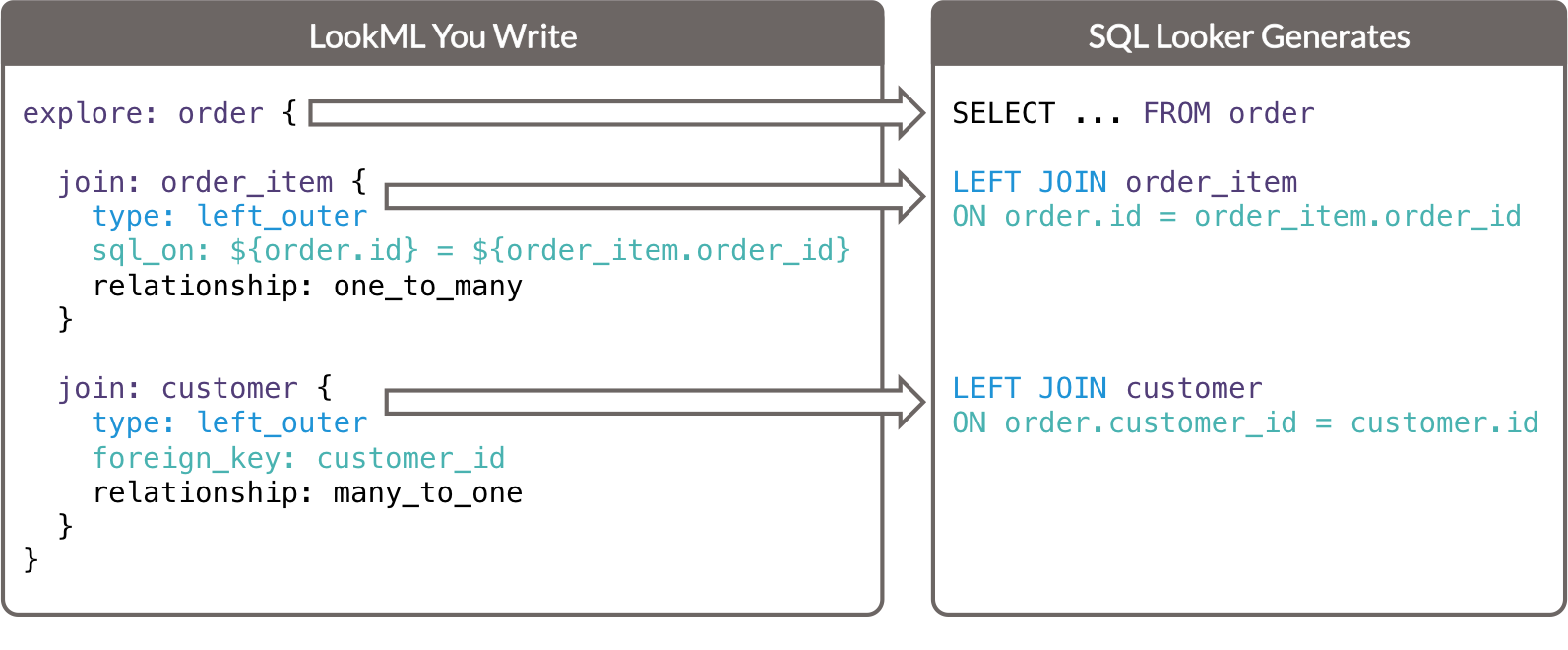
- The `explore` parameter determines the table in the `FROM` clause of the generated SQL query.
- Each `join` parameter determines a `JOIN` clause of the generated SQL query.
- The `type` parameter determines the type of SQL join.
- The `sql_on` parameter and `foreign_key` parameter determine the `ON` clause of the generated SQL query.
### `sql_on`
[`sql_on`](https://docs.cloud.google.com/looker/docs/reference/param-explore-join-sql-on.md.txt) lets you establish a join relationship by writing the SQL `ON` clause directly. It can accomplish the same joins that [`foreign_key`](https://docs.cloud.google.com/looker/docs/reference/param-explore-join-foreign-key.md.txt) can, but it is easier to read and understand.
See the [`sql_on`](https://docs.cloud.google.com/looker/docs/reference/param-explore-join-sql-on.md.txt) parameter documentation page for more information.
### `foreign_key`
[`foreign_key`](https://docs.cloud.google.com/looker/docs/reference/param-explore-join-foreign-key.md.txt) lets you establish a join relationship using the primary key of the joined view, and connecting it with a dimension in the Explore. This pattern is very common in database design, and [`foreign_key`](https://docs.cloud.google.com/looker/docs/reference/param-explore-join-foreign-key.md.txt) is an elegant way to express the join in these cases.
For a complete understanding, see the [`foreign_key`](https://docs.cloud.google.com/looker/docs/reference/param-explore-join-foreign-key.md.txt) parameter documentation page.
### `type`
Most joins in Looker are `LEFT JOIN` for the reasons discussed in the [Don't apply business logic in joins if possible](https://docs.cloud.google.com/looker/docs/reference/param-explore-join.md.txt#business-logic) section on this page. Therefore, if you don't explicitly add a [`type`](https://docs.cloud.google.com/looker/docs/reference/param-explore-join-type.md.txt), Looker will assume you want a `LEFT JOIN`. However, if you do need another type of join for some reason, you can do so with [`type`](https://docs.cloud.google.com/looker/docs/reference/param-explore-join-type.md.txt).
For a complete explanation, see the [`type`](https://docs.cloud.google.com/looker/docs/reference/param-explore-join-type.md.txt) parameter documentation page.
### `relationship`
[`relationship`](https://docs.cloud.google.com/looker/docs/reference/param-explore-join-relationship.md.txt) doesn't have a straightforward impact on the SQL that Looker generates, but it is **critical** to the proper functioning of Looker. If you don't explicitly add a [`relationship`](https://docs.cloud.google.com/looker/docs/reference/param-explore-join-relationship.md.txt), Looker will interpret the relationship as `many-to-one`, which means that many rows in the Explore can have one row in the joined view. Not all joins have this type of relationship, and joins with other relationships need to be declared properly.
For a complete understanding, see the [`relationship`](https://docs.cloud.google.com/looker/docs/reference/param-explore-join-relationship.md.txt) parameter documentation page.
## Examples
Join the view named `customer` to the Explore named `order` where the join relationship is
`FROM order LEFT JOIN customer ON order.customer_id = customer.id`:
explore: order {
join: customer {
foreign_key: customer_id
relationship: many_to_one # Could be excluded since many_to_one is the default
type: left_outer # Could be excluded since left_outer is the default
}
}
Join the view named `address` to the Explore named `person` where the join relationship is
`FROM person LEFT JOIN address ON person.id = address.person_id`
`AND address.type = 'permanent'`:
explore: person {
join: address {
sql_on: ${person.id} = ${address.person_id} AND ${address.type} = 'permanent' ;;
relationship: one_to_many
type: left_outer # Could be excluded since left_outer is the default
}
}
Join the view named `member` to the Explore named `event` where the join relationship is
`FROM event INNER JOIN member ON member.id = event.member_id`:
explore: event {
join: member {
sql_on: ${event.member_id} = ${member.id} ;;
relationship: many_to_one # Could be excluded since many_to_one is the default
type: inner
}
}
## Common challenges
### `join` must use view names and not underlying table names
The `join` parameter only takes a view name, not the table name associated with that view. Often the view name and table name are identical, which may lead to the false conclusion that table names can be used.
### Some types of measures require symmetric aggregates
If you are not using symmetric aggregates, most measure types are excluded from joined views. For Looker to support [symmetric aggregates](https://docs.cloud.google.com/looker/docs/working-with-joins.md.txt#symmetric-aggregates) in your Looker project, your database dialect must also support them. The following table shows which dialects support symmetric aggregates in the latest release of Looker:
| Dialect | Supported? |
|---|---|
| Actian Avalanche | Yes |
| Amazon Athena | Yes |
| Amazon Aurora MySQL | Yes |
| Amazon Redshift | Yes |
| Amazon Redshift 2.1+ | Yes |
| Amazon Redshift Serverless 2.1+ | Yes |
| Apache Druid | No |
| Apache Druid 0.13.x - 0.17.x | No |
| Apache Druid 0.18+ | No |
| Apache Hive 2.3+ | No |
| Apache Hive 3.1.2+ | No |
| Apache Spark 3+ | Yes |
| ClickHouse | No |
| ClickHouse 26+ | Yes |
| Cloudera Impala 3.1+ | Yes |
| Cloudera Impala 3.1+ with Native Driver | Yes |
| Cloudera Impala with Native Driver | No |
| DataVirtuality | Yes |
| Databricks | Yes |
| Denodo 7 | Yes |
| Denodo 8 \& 9 | Yes |
| Dremio | No |
| Dremio 11+ | Yes |
| Dremio 26+ with Arrow Flight SQL | Yes |
| Exasol | Yes |
| Google BigQuery Legacy SQL | Yes |
| Google BigQuery Standard SQL | Yes |
| Google Cloud AlloyDB for PostgreSQL | Yes |
| Google Cloud PostgreSQL | Yes |
| Google Cloud SQL | Yes |
| Google Spanner | Yes |
| Greenplum | Yes |
| HyperSQL | No |
| IBM Netezza | Yes |
| MariaDB | Yes |
| Microsoft Azure PostgreSQL | Yes |
| Microsoft Azure SQL Database | Yes |
| Microsoft Azure Synapse Analytics | Yes |
| Microsoft SQL Server 2008+ | Yes |
| Microsoft SQL Server 2012+ | Yes |
| Microsoft SQL Server 2016 | Yes |
| Microsoft SQL Server 2017+ | Yes |
| MongoBI | No |
| MongoSQL | No |
| MySQL | Yes |
| MySQL 8.0.12+ | Yes |
| Oracle | Yes |
| Oracle ADWC | Yes |
| PostgreSQL 9.5+ | Yes |
| PostgreSQL pre-9.5 | Yes |
| PrestoDB | Yes |
| PrestoSQL | Yes |
| SAP HANA | Yes |
| SAP HANA 2+ | Yes |
| SingleStore | Yes |
| SingleStore 7+ | Yes |
| Snowflake | Yes |
| Teradata | Yes |
| Trino | Yes |
| Vector | Yes |
| Vertica | Yes |
Without symmetric aggregates, join relationships that are not one-to-one can create inaccurate results in aggregate functions. Since Looker measures are aggregate functions, only measures of `type: count` (as `COUNT DISTINCT`) are brought from joined views into the Explore. If you do have a one-to-one join relationship, you can use the [`relationship`](https://docs.cloud.google.com/looker/docs/reference/param-explore-join-relationship.md.txt) parameter to force the other measure types to be included, like this:
explore: person {
join: dna {
sql_on: ${person.dna_id} = ${dna.id} ;;
relationship: one_to_one
}
}
The reasons that Looker works this way (for dialects that don't support symmetric aggregates) are discussed in more detail in [The problem of SQL fanouts](https://discuss.google.dev/t/the-problem-of-sql-fanouts/119220) Community post.
## Things to know
### You can join the same table more than once using `from`
In cases where a single table contains different types of entities, it is possible to join a view to an Explore more than once. To do so you'll need to use the [`from`](https://docs.cloud.google.com/looker/docs/reference/param-explore-join-from.md.txt) parameter. Suppose you had an `order` Explore and needed to join a `person` view to it twice: once for the customer and once for the customer service representative. You might do something like this:
explore: order {
join: customer {
from: person
sql_on: ${order.customer_id} = ${customer.id} ;;
}
join: representative {
from: person
sql_on: ${order.representative_id} = ${representative.id} ;;
}
}
### Don't apply business logic in joins if possible
The standard Looker approach to joining is to use a `LEFT JOIN` whenever possible. Consider a different approach if you find yourself doing something along these lines:
explore: member_event {
from: event
always_join: [member]
join: member {
sql_on: ${member_event.member_id} = ${member.id} ;;
type: inner
}
}
In this example we've created an Explore that *only* looks at events associated with known members. However, the preferred way to execute this in Looker would be to use a `LEFT JOIN` to get event data and member data stuck together, like this:
explore: event {
join: member {
sql_on: ${event.member_id} = ${member.id} ;;
}
}
Then you would create a dimension that you could set to `yes` or `no`, if you only wanted to look at member events, like this:
dimension: is_member_event {
type: yesno
sql: ${member.id} IS NOT NULL ;;
}
This approach is preferable because it gives users the flexibility to look either at all events, or at only member events, as they desire. You have not forced them to look only at member events via the join.
### If not using symmetric aggregates, avoid joins that cause fanouts
> This section only applies to database dialects that don't support [symmetric aggregates](https://docs.cloud.google.com/looker/docs/working-with-joins.md.txt#symmetric-aggregates). See the discussion of symmetric aggregates in the [Common challenges](https://docs.cloud.google.com/looker/docs/reference/param-explore-join.md.txt#if_not_using_symmetric_aggregates_measure) section on this page to determine if your dialect supports symmetric aggregates.
If your database dialect doesn't support [symmetric aggregates](https://docs.cloud.google.com/looker/docs/working-with-joins.md.txt#symmetric-aggregates), you should avoid joins that result in a fanout. In other words, joins that have a one-to-many relationship between the Explore and view should generally be avoided. Instead, aggregate the data from the view in a [derived table](https://docs.cloud.google.com/looker/docs/derived-tables.md.txt) in order to establish a one-to-one relationship with the Explore, then join that derived table into the Explore.
This important concept is further explained in the Community post [The problem of SQL fanouts](https://discuss.google.dev/t/the-problem-of-sql-fanouts/119220).