> This page refers to the `description` parameter that is part of an [Explore](https://docs.cloud.google.com/looker/docs/reference/param-explore-explore.md.txt).
>
> `description` can also be used as part of a field, described on the [`description` (for fields)](https://docs.cloud.google.com/looker/docs/reference/param-field-description.md.txt) parameter documentation page.
>
> `description` can also be used as part of a dashboard, described on the [Dashboard parameters](https://docs.cloud.google.com/looker/docs/reference/param-lookml-dashboard.md.txt#description-for-dashboard) documentation page.
## Usage
```
explore: explore_name {
description: "Description I Want"
}
```
|---|---|
| Hierarchy [Model File](https://docs.cloud.google.com/looker/docs/reference/param-model.md.txt) [`explore`](https://docs.cloud.google.com/looker/docs/reference/param-explore-explore.md.txt) `description` | Default Value None
Accepts A string
|
## Definition
`description` lets you add information about the [Explore](https://docs.cloud.google.com/looker/docs/reference/param-explore-explore.md.txt) to the UI, so users can get additional information while creating Explore queries. For example, here is a `description` parameter:
explore: order_items {
description: "Based on the individual items that comprise customer orders"
}
If a `description` is added to an Explore, users can see the description by hovering over the information icon next to the Explore name at the top of the field picker.
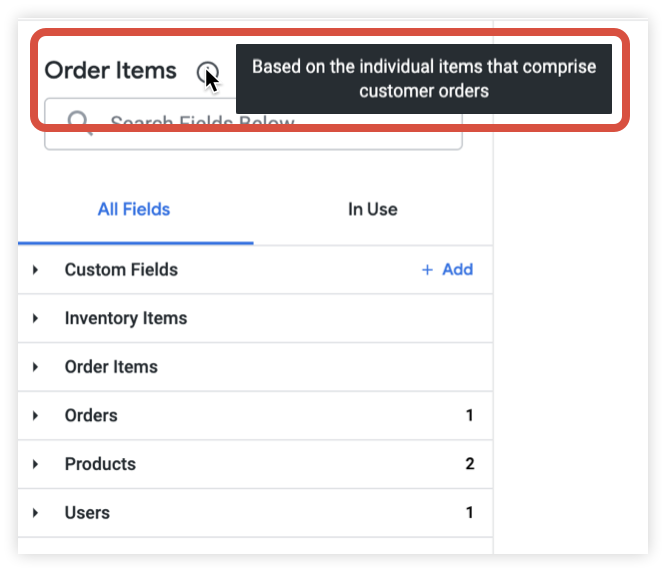
Users can also view a description by hovering over the same information icon in the drop-down list of Explores.

If you do not explicitly add a `description` to an [Explore](https://docs.cloud.google.com/looker/docs/reference/param-explore-explore.md.txt), no description will be shown.
## Examples
Add a description to an Explore named **User**:
explore: user {
description: "All customer users, staff users are excluded"
}