## Usage
```
explore: explore_name {
aggregate_table: table_name {
query: {
dimensions: [dimension1, dimension2, ... ]
measures: [measure1, measure2, ... ]
sorts: [field1: asc, field2: desc, ... ]
filters: [field1: "value1", field2: "value2", ... ]
timezone: timezone
}
materialization: {
...
}
}
...
}
```
|---|---|
| Hierarchy [Model File](https://docs.cloud.google.com/looker/docs/reference/param-model.md.txt) [`explore`](https://docs.cloud.google.com/looker/docs/reference/param-explore-explore.md.txt) `aggregate_table` | Default Value None
Accepts A name for the aggregate table, the [`query`](https://docs.cloud.google.com/looker/docs/reference/param-explore-aggregate-table.md.txt#query) subparameter to define the table, and the [`materialization`](https://docs.cloud.google.com/looker/docs/reference/param-explore-aggregate-table.md.txt#materialization) subparameter to define the table's [persistence strategy](https://docs.cloud.google.com/looker/docs/derived-tables.md.txt#making_a_derived_table_persistent)
Special Rules - The `table_name` must be unique within a given `explore` - In the [`materialization`](https://docs.cloud.google.com/looker/docs/reference/param-explore-aggregate-table.md.txt#materialization) subparameter, you must specify a [persistence strategy](https://docs.cloud.google.com/looker/docs/derived-tables.md.txt#making_a_derived_table_persistent) for the aggregate table |
## Definition
The `aggregate_table` parameter is used to create aggregate tables that will minimize the number of queries required for the large tables in your database.
Looker uses [aggregate awareness](https://docs.cloud.google.com/looker/docs/aggregate_awareness.md.txt) logic to find the smallest, most efficient aggregate table that's available in your database to run a query while still maintaining correctness. (See the [Aggregate awareness](https://docs.cloud.google.com/looker/docs/aggregate_awareness.md.txt) documentation page for an overview of and strategies for creating aggregate tables.)
For very large tables in your database, you can create smaller aggregate tables of data, grouped by various combinations of attributes. The aggregate tables act as roll-ups or summary tables that Looker can use for queries whenever possible, instead of the original large table.
> [!NOTE]
> **Note:** To be accessible for aggregate awareness, [aggregate tables must be persisted](https://docs.cloud.google.com/looker/docs/aggregate_awareness.md.txt#aggregate_tables_must_be_persisted) in your database. The persistence strategy is specified in the aggregate table's [`materialization`](https://docs.cloud.google.com/looker/docs/reference/param-explore-aggregate-table.md.txt#materialization) parameter. Also, because aggregate tables are a type of [persistent derived table (PDT)](https://docs.cloud.google.com/looker/docs/derived-tables.md.txt#persistent_derived_table), aggregate tables have the same database connection and dialect requirements as PDTs. See the [Derived tables in Looker](https://docs.cloud.google.com/looker/docs/derived-tables.md.txt#pdt_requirements) documentation page for details.
Once you create your aggregate tables, you can run queries in the Explore to see which aggregate tables Looker uses. For more information, see the [Determining which aggregate table is used for a query](https://docs.cloud.google.com/looker/docs/aggregate_awareness.md.txt#sql_tab) section on the [Aggregate awareness](https://docs.cloud.google.com/looker/docs/aggregate_awareness.md.txt) documentation page.
See the [Troubleshooting](https://docs.cloud.google.com/looker/docs/aggregate_awareness.md.txt#troubleshooting) section on the [Aggregate awareness](https://docs.cloud.google.com/looker/docs/aggregate_awareness.md.txt) documentation page for common reasons that aggregate tables aren't used.
## Defining an aggregate table in LookML
> [!NOTE]
> **Note:** Instead of creating the LookML from scratch, you can use an Explore or a dashboard to create aggregate table LookML for you. For details, see the [Getting aggregate table LookML from an Explore](https://docs.cloud.google.com/looker/docs/reference/param-explore-aggregate-table.md.txt#get_lookml_explore) and [Getting aggregate table LookML from a dashboard](https://docs.cloud.google.com/looker/docs/reference/param-explore-aggregate-table.md.txt#get_lookml_dashboard) sections on this page.
Each `aggregate_table` parameter must have a name that is unique within a given `explore`.
The `aggregate_table` parameter has the [`query`](https://docs.cloud.google.com/looker/docs/reference/param-explore-aggregate-table.md.txt#query) and [`materialization`](https://docs.cloud.google.com/looker/docs/reference/param-explore-aggregate-table.md.txt#materialization) subparameters.
### `query`
The `query` parameter defines the query for the aggregate table, including which dimensions and measures to use. The `query` parameter includes the following subparameters:
> [!NOTE]
> **Note:** This section refers to the `query` parameter that is part of an `aggregate_table`.
>
> `query` can also be used as part of an [`explore`](https://docs.cloud.google.com/looker/docs/reference/param-explore-explore.md.txt), as described on the [`query`](https://docs.cloud.google.com/looker/docs/reference/param-explore-query.md.txt#defining_a_query_in_lookml) parameter documentation page.
| Parameter Name | Description | Example |
|---|---|---|
| `dimensions` | A comma-separated list of the dimensions from the Explore to be included in your aggregate table. The `dimensions` field uses this format:
`dimensions: [dimension1, dimension2, ...]`
Each dimension in this list must be defined as a [`dimension`](https://docs.cloud.google.com/looker/docs/reference/param-field-dimension.md.txt) in the view file for the query's Explore. If you want to include a field that is defined as a [`filter`](https://docs.cloud.google.com/looker/docs/reference/param-field-filter.md.txt) field in the Explore query, you can add it to the [`filters`](https://docs.cloud.google.com/looker/docs/reference/param-explore-aggregate-table.md.txt#filters) list in the aggregate table's query. | `dimensions:
[orders.created_month, orders.country]` |
| `measures` | A comma-separated list of the measures from the Explore to be included in your aggregate table. The `measures` field uses this format:
`measures: [measure1, measure2, ...]`
For information on the measure types supported for aggregate awareness, see the [Measure type factors](https://docs.cloud.google.com/looker/docs/aggregate_awareness.md.txt#measure_type_factors) section on the [Aggregate awareness](https://docs.cloud.google.com/looker/docs/aggregate_awareness.md.txt) documentation page. | `measures:
[orders.count]` |
| `filters` | Optionally, adds a filter to a `query`. Filters are added to the `WHERE` clause of the SQL that generates the aggregate table.
The `filters` field uses this format:
`filters: [field1: "value1", field2: "value2", ...]`
For information on how filters can prevent your aggregate table from being used, see the [Filter factors](https://docs.cloud.google.com/looker/docs/aggregate_awareness.md.txt#filter_factors) section on the [Aggregate awareness](https://docs.cloud.google.com/looker/docs/aggregate_awareness.md.txt) documentation page. | `filters: [orders.country: "United States", orders.state: "California"] ` |
| `sorts` | Optionally, specifies sort fields and sort direction (ascending or descending) for the `query`.
The `sorts` field uses this format:
`sorts: [field1: asc|desc, field2: asc|desc, ...]` | `[orders.country: asc, orders.state: desc]` |
| `timezone` | Sets the time zone for the `query`. If a time zone is not specified, the aggregate table won't perform any time zone conversion, and instead will use the [database time zone](https://docs.cloud.google.com/looker/docs/connecting-to-your-db.md.txt#database_time_zone).
For information on setting the time zone so that your aggregate table is used as a query source, see the [Time zone factors](https://docs.cloud.google.com/looker/docs/aggregate_awareness.md.txt#time_zone_factors) section on the [Aggregate awareness](https://docs.cloud.google.com/looker/docs/aggregate_awareness.md.txt) documentation page.
The IDE [autosuggests](https://docs.cloud.google.com/looker/docs/looker-ide.md.txt#autosuggest) the time zone value when you type the `timezone` parameter in the IDE. The IDE also displays the list of supported time zone values in the [Quick Help panel](https://docs.cloud.google.com/looker/docs/looker-ide.md.txt#quick_help_panel). | `timezone: America/Los_Angeles` |
### `materialization`
The `materialization` parameter specifies the persistence strategy for your aggregate table, as well as other options for distribution, partitioning, indexes, and clustering that may be supported by your SQL dialect.
To be accessible for aggregate awareness, your aggregate table must be [persisted](https://docs.cloud.google.com/looker/docs/derived-tables.md.txt#making_a_derived_table_persistent) in your database. The `materialization` parameter of your aggregate table must have one of the following subparameters to specify the persistence strategy:
- [`datagroup_trigger`](https://docs.cloud.google.com/looker/docs/reference/param-explore-aggregate-table.md.txt#datagroup)
- [`sql_trigger_value`](https://docs.cloud.google.com/looker/docs/reference/param-explore-aggregate-table.md.txt#sql_trigger_value)
- [`persist_for`](https://docs.cloud.google.com/looker/docs/reference/param-explore-aggregate-table.md.txt#persist_for) (not recommended)
In addition, the following `materialization` subparameters may be supported for your aggregate table, depending on your SQL dialect:
- [`cluster_keys`](https://docs.cloud.google.com/looker/docs/reference/param-explore-aggregate-table.md.txt#cluster_keys)
- [`distribution`](https://docs.cloud.google.com/looker/docs/reference/param-explore-aggregate-table.md.txt#distribution)
- [`distribution_style`](https://docs.cloud.google.com/looker/docs/reference/param-explore-aggregate-table.md.txt#distribution_style)
- [`indexes`](https://docs.cloud.google.com/looker/docs/reference/param-explore-aggregate-table.md.txt#indexes)
- [`partition_keys`](https://docs.cloud.google.com/looker/docs/reference/param-explore-aggregate-table.md.txt#partition_keys)
- [`publish_as_db_view`](https://docs.cloud.google.com/looker/docs/reference/param-explore-aggregate-table.md.txt#publish_as_db_view)
- [`sortkeys`](https://docs.cloud.google.com/looker/docs/reference/param-explore-aggregate-table.md.txt#sortkeys)
To create an [incremental](https://docs.cloud.google.com/looker/docs/incremental-pdts.md.txt) aggregate table, use the following `materialization` subparameters:
- [`increment_key`](https://docs.cloud.google.com/looker/docs/reference/param-explore-aggregate-table.md.txt#increment_key)
- [`increment_offset`](https://docs.cloud.google.com/looker/docs/reference/param-explore-aggregate-table.md.txt#increment_offset)
#### `datagroup_trigger`
Use the [`datagroup_trigger`](https://docs.cloud.google.com/looker/docs/reference/param-view-datagroup-trigger.md.txt) parameter to trigger the regeneration of the aggregate table based on an existing [datagroup](https://docs.cloud.google.com/looker/docs/reference/param-model-datagroup.md.txt) defined in the model file:
explore: event {
aggregate_table: monthly_orders {
materialization: {
datagroup_trigger: order_datagroup
}
query: {
...
}
}
...
}
#### `sql_trigger_value`
Use the [`sql_trigger_value`](https://docs.cloud.google.com/looker/docs/reference/param-view-sql-trigger-value.md.txt) parameter to trigger the regeneration of the aggregate table based on a SQL statement that you provide. If the result of the SQL statement is different from the previous value, the table is regenerated. This `sql_trigger_value` statement will trigger regeneration when the date changes:
explore: event {
aggregate_table: monthly_orders {
materialization: {
sql_trigger_value: SELECT CURDATE() ;;
}
query: {
...
}
}
...
}
#### `persist_for`
The [`persist_for`](https://docs.cloud.google.com/looker/docs/reference/param-view-persist-for-for-derived-table.md.txt) parameter is also supported for aggregate tables. However, the `persist_for` strategy may not give you the best performance for aggregate awareness. This is because when a user runs a query that relies on a `persist_for` table, Looker checks the age of the table against the `persist_for` setting. If the table is older than the `persist_for` setting, the table is regenerated before the query is run. If the age is less than the `persist_for` setting, the existing table is used. So, unless a user runs a query within the `persist_for` time, the aggregate table must be rebuilt before it can be used for aggregate awareness.
explore: event {
aggregate_table: monthly_orders {
materialization: {
persist_for: "90 minutes"
}
query: {
...
}
}
...
}
Unless you understand the limitations and have a specific use case for the `persist_for` implementation, it is better to use [`datagroup_trigger`](https://docs.cloud.google.com/looker/docs/reference/param-view-datagroup-trigger.md.txt) or [`sql_trigger_value`](https://docs.cloud.google.com/looker/docs/reference/param-view-sql-trigger-value.md.txt) as a persistence strategy for aggregate tables.
#### `cluster_keys`
The `cluster_keys` parameter lets you add a clustered column to [partitioned](https://docs.cloud.google.com/looker/docs/reference/param-view-partition-keys.md.txt) tables on BigQuery or Snowflake. Clustering sorts the data in a partition that is based on the values in the clustered columns and organizes the clustered columns in optimally sized storage blocks.
> [!NOTE]
> **Note:** For BigQuery, clustering is supported on aggregate tables that are also partitioned using the [`partition_keys`](https://docs.cloud.google.com/looker/docs/reference/param-view-partition-keys.md.txt) parameter.
See the [`cluster_keys`](https://docs.cloud.google.com/looker/docs/reference/param-view-cluster-keys.md.txt) parameter documentation page for more information.
#### `distribution`
The `distribution` parameter lets you specify the column from an aggregate table on which to apply a distribution key. `distribution` works only with Redshift and Aster databases. For other SQL dialects (such as MySQL and Postgres), use [`indexes`](https://docs.cloud.google.com/looker/docs/reference/param-explore-aggregate-table.md.txt#indexes) instead.
See the [`distribution`](https://docs.cloud.google.com/looker/docs/reference/param-view-distribution.md.txt) parameter documentation page for more information.
#### `distribution_style`
The `distribution_style` parameter lets you specify how the query for an aggregate table is distributed across the nodes in a Redshift database:
- **`distribution_style: all`** indicates that all rows are fully copied to each node.
- **`distribution_style: even`** specifies even distribution, so that rows are distributed to different nodes in a round-robin fashion.
> [!NOTE]
> **Note:** To distribute the query based on unique values in a particular column (distribution keys), you can use the [`distribution`](https://docs.cloud.google.com/looker/docs/reference/param-explore-aggregate-table.md.txt#distribution) parameter.
See the [`distribution_style`](https://docs.cloud.google.com/looker/docs/reference/param-view-distribution-style.md.txt) parameter documentation page for more information.
#### `indexes`
The `indexes` parameter lets you apply indexes to the columns of an aggregate table.
See the [`indexes`](https://docs.cloud.google.com/looker/docs/reference/param-view-indexes.md.txt) parameter documentation page for more information.
#### `partition_keys`
The `partition_keys` parameter defines an array of columns by which the aggregate table will be partitioned. `partition_keys` supports database dialects that have the ability to partition columns. When a query is run that is filtered on a partitioned column, the database will scan only those partitions that include the filtered data, rather than scanning the entire table. `partition_keys` is supported only with Presto and BigQuery dialects.
See the [`partition_keys`](https://docs.cloud.google.com/looker/docs/reference/param-view-partition-keys.md.txt) parameter documentation page for more information.
#### `publish_as_db_view`
The `publish_as_db_view` parameter lets you flag an aggregate table for querying outside of Looker. For aggregate tables with `publish_as_db_view` set to `yes`, Looker creates a stable database view on the database for the aggregate table. The stable database view is created on the database itself, so that it can be queried outside of Looker.
See the [`publish_as_db_view`](https://docs.cloud.google.com/looker/docs/reference/param-view-publish-as-db-view.md.txt) parameter documentation page for more information.
#### `sortkeys`
The `sortkeys` parameter lets you specify one or more columns of an aggregate table on which to apply a regular sort key.
See the [`sortkeys`](https://docs.cloud.google.com/looker/docs/reference/param-view-sortkeys.md.txt) parameter documentation page for more information.
#### `increment_key`
You can create [incremental PDTs](https://docs.cloud.google.com/looker/docs/incremental-pdts.md.txt) in your project if your [dialect supports them](https://docs.cloud.google.com/looker/docs/incremental-pdts.md.txt#supported_database_dialects_for_incremental_pdts). An incremental PDT is a [persistent derived table (PDT)](https://docs.cloud.google.com/looker/docs/derived-tables.md.txt#persistent_derived_table) that Looker builds by appending fresh data to the table, instead of rebuilding the table in its entirety. See the [Incremental PDTs](https://docs.cloud.google.com/looker/docs/incremental-pdts.md.txt) documentation page for more information.
Aggregate tables are a type of PDT, and they can be built incrementally by adding the `increment_key` parameter. The `increment_key` parameter specifies the time increment for which fresh data should be queried and appended to the aggregate table.
See the [`increment_key`](https://docs.cloud.google.com/looker/docs/reference/param-view-increment-key.md.txt) parameter documentation page for more information.
#### `increment_offset`
The `increment_offset` parameter defines the number of previous time periods (at the increment key's granularity) that will be rebuilt when appending data to the aggregate table. The `increment_offset` parameter is optional for incremental PDTs and aggregate tables.
See the [`increment_offset`](https://docs.cloud.google.com/looker/docs/reference/param-view-increment-offset.md.txt) parameter documentation page for more information.
## Getting aggregate table LookML from an Explore
As a shortcut, Looker developers can use an Explore query to create an aggregate table and then copy the LookML into the LookML project:
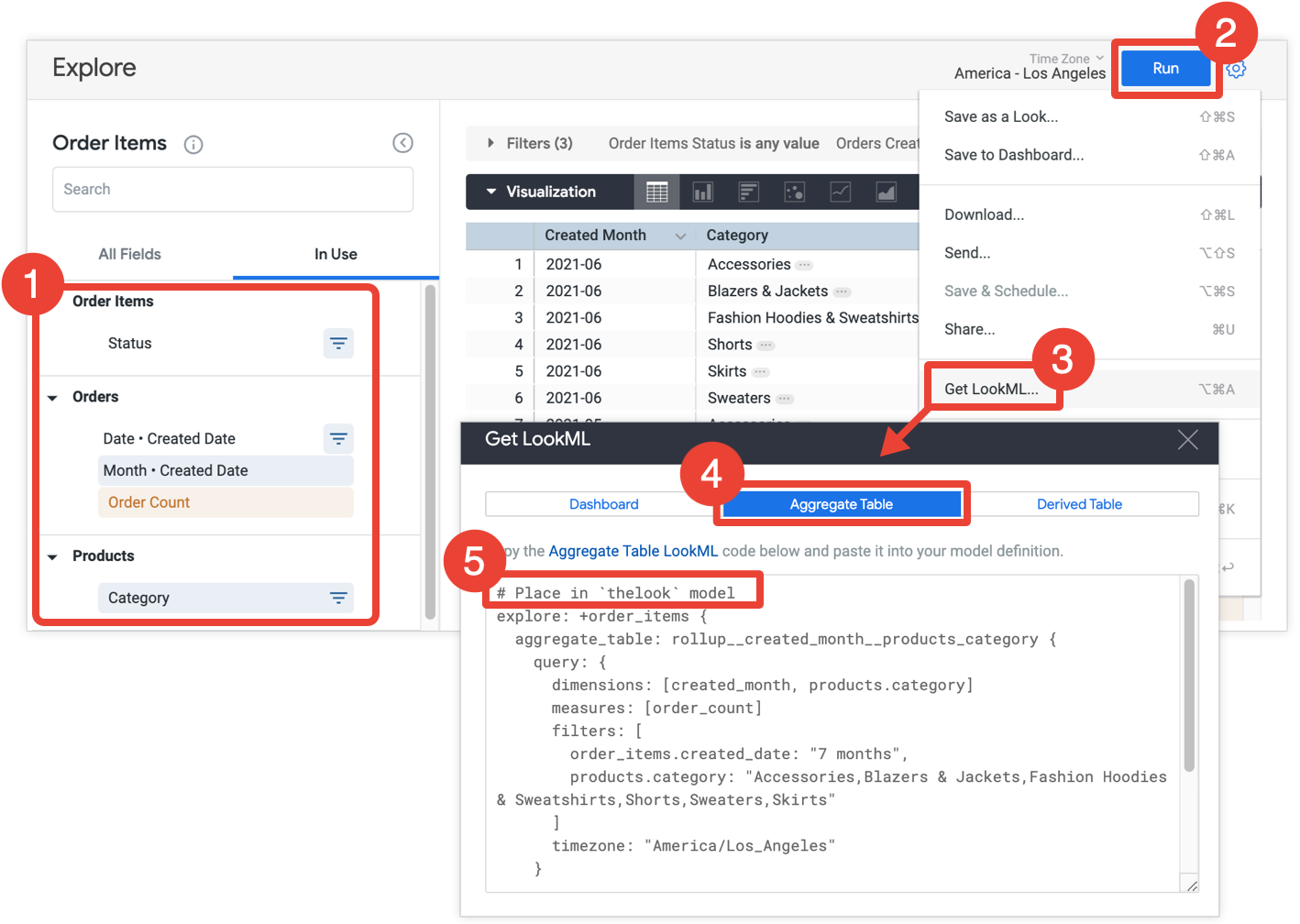
1. In your Explore, select all the fields and filters that you want to include in your aggregate table.
2. Click **Run** to get the results.
3. Select **Get LookML** from the Explore's gear menu. This option is available for Looker developers only.
4. Click the **Aggregate Table** tab.
5. Looker provides the LookML for an Explore [refinement](https://docs.cloud.google.com/looker/docs/lookml-refinements.md.txt) that will add the aggregate table to the Explore. Copy the LookML and paste it into the associated model file, which is indicated in the comment that precedes the Explore refinement. If the Explore is defined in a [separate Explore file](https://docs.cloud.google.com/looker/docs/other-project-files#explore_files), and not in a model file, you can add the refinement to the Explore's file instead of the model file. Either location will work.
> [!NOTE]
> **Note:** Looker gives the aggregate table a name based on the dimensions in the Explore. Looker will use the same name for the aggregate table every time it provides the aggregate table LookML for the Explore. Be mindful of other refinements to the same Explore that may have been added previously. If you or another developer has already gotten the aggregate table LookML from an Explore, Looker will give the same name for the aggregate table. If an Explore has multiple refinements, each with aggregate tables of the same name, one refinement will override the others, as described in the [Refinements are applied in order](https://docs.cloud.google.com/looker/docs/lookml-refinements.md.txt#refinements_are_applied_in_order) section of the **LookML refinements** documentation page.
If you need to modify the aggregate table LookML, you can do so with the parameters that are described in the [Defining an aggregate table in LookML](https://docs.cloud.google.com/looker/docs/reference/param-explore-aggregate-table.md.txt#write_lookml) section on this page. You can rename the aggregate table without changing its applicability to the original Explore query. However, any other changes to the aggregate table may affect the ability for Looker to use the aggregate table for the Explore query. See the [Designing aggregate tables](https://docs.cloud.google.com/looker/docs/aggregate_awareness.md.txt#designing_aggregate_tables) section of the **Aggregate awareness** documentation page for tips on optimizing your aggregate tables to ensure that they are used for aggregate awareness.
## Getting aggregate table LookML from a dashboard
Another option for Looker developers is to get the aggregate table LookML for all tiles on a dashboard and then copy the LookML into the LookML project.
Creating aggregate tables can drastically improve the performance of a dashboard, especially for tiles that query huge datasets.
If you have [`develop`](https://docs.cloud.google.com/looker/docs/admin-panel-users-roles.md.txt#develop) permission, you can get the LookML to create aggregate tables for a dashboard by opening the dashboard, selecting **Get LookML** from the dashboard's three-dot menu, and choosing the **Aggregate Tables** tab:
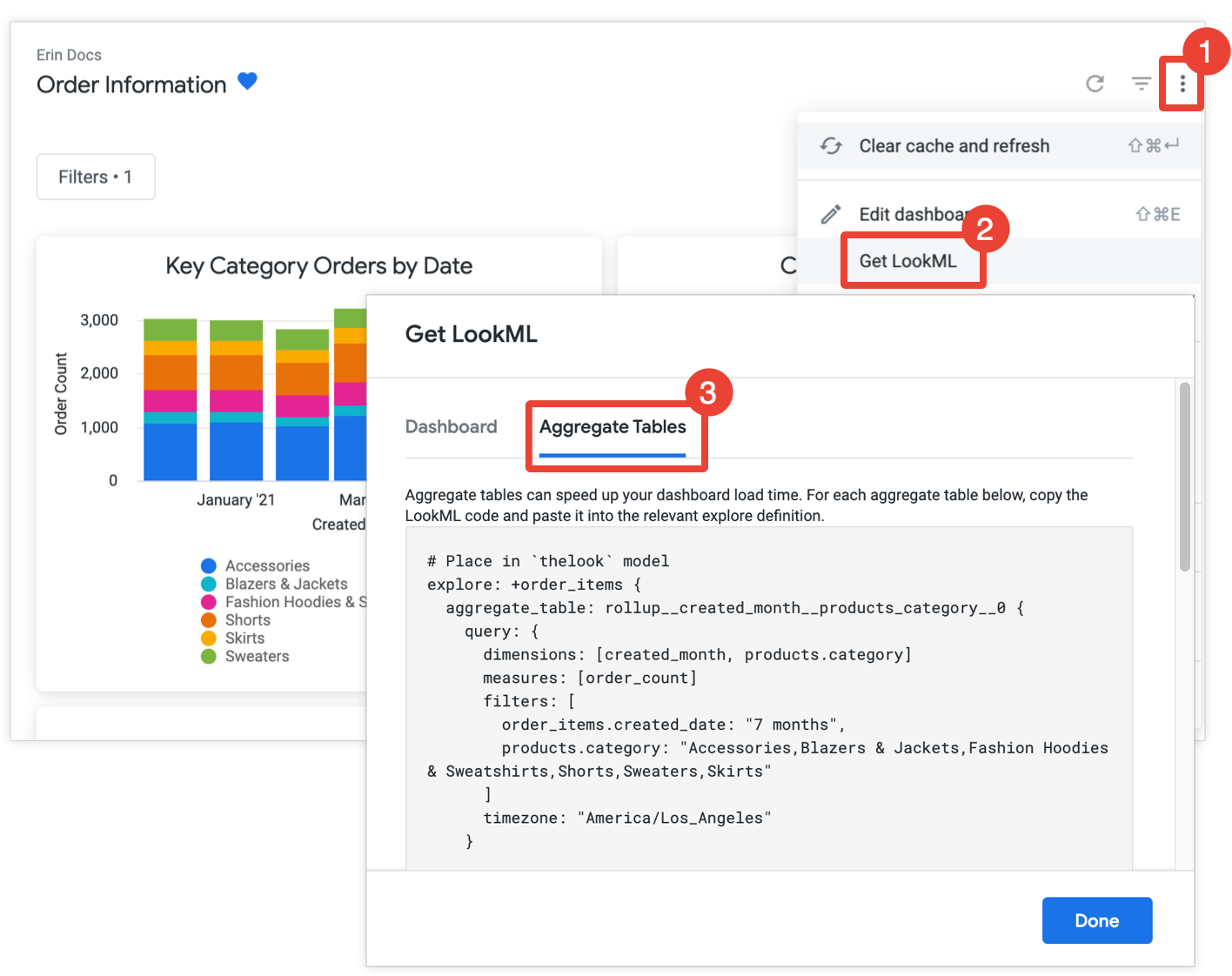
For each tile that isn't already optimized with aggregate awareness, Looker provides the LookML for an Explore [refinement](https://docs.cloud.google.com/looker/docs/lookml-refinements.md.txt) that will add the aggregate table to the Explore. If the dashboard includes multiple tiles from the same Explore, Looker puts all the aggregate tables in a single Explore refinement. To reduce the number of generated aggregate tables, Looker determines whether a generated aggregate table could be used for more than one tile and, if so, drops any redundant aggregate tables that can be used for fewer tiles.
Copy and paste each Explore refinement into the associated model file, which is indicated in the comment preceding the Explore refinement. If the Explore is defined in a [separate Explore file](https://docs.cloud.google.com/looker/docs/other-project-files#explore_files), and not in a model file, you can add the refinement to the Explore file instead of the model file. Either location will work.
> [!NOTE]
> **Note:** Looker gives each aggregate table a name that's based on the dimensions in the tile's query. Looker will use the same name for the aggregate table every time it provides the aggregate table LookML for tile query. Be sure to consider other refinements to the tile's Explore that may have been added previously. If you or another developer has already gotten the aggregate table LookML from dashboard tile's query, Looker will give the same name for the aggregate table. If an Explore has multiple refinements, each with aggregate tables of the same name, one refinement will override the others, as described in the [Refinements are applied in order](https://docs.cloud.google.com/looker/docs/lookml-refinements.md.txt#refinements_are_applied_in_order) section of the **LookML refinements** documentation page.
If a dashboard filter is applied to a tile, Looker will add the filter's dimension to the tile's aggregate table so that the aggregate table can be used for the tile. This is because aggregate tables can be used for a query only if the query's filters reference fields that are available as dimensions in the aggregate table. See the [Aggregate awareness](https://docs.cloud.google.com/looker/docs/aggregate_awareness.md.txt#designing_aggregate_tables) documentation page for information.
If you need to modify the aggregate table LookML, you can do so with the parameters that are described in the [Defining an aggregate table in LookML](https://docs.cloud.google.com/looker/docs/reference/param-explore-aggregate-table.md.txt#write_lookml) section on this page. You can rename the aggregate table without changing its applicability to the original dashboard tile, but any other changes to the aggregate table may affect the ability for Looker to use the aggregate table for the dashboard. See the [Designing aggregate tables](https://docs.cloud.google.com/looker/docs/aggregate_awareness.md.txt#designing_aggregate_tables) section of the **Aggregate awareness** documentation page for tips on optimizing your aggregate tables to ensure that they are used for aggregate awareness.
## Example
The following example creates a `monthly_orders` aggregate table for the `event` Explore. The aggregate table creates a monthly count of orders. Looker will use the aggregate table for order count queries that can leverage the monthly granularity, such as queries for yearly, quarterly, and monthly order counts.
The aggregate table is set up with persistence using the [datagroup](https://docs.cloud.google.com/looker/docs/reference/param-model-datagroup.md.txt) `orders_datagroup`. Also, the aggregate table is defined with [`publish_as_db_view: yes`](https://docs.cloud.google.com/looker/docs/reference/param-view-publish-as-db-view.md.txt), which means that Looker will create a stable database view on the database for the aggregate table.
The aggregate table definition looks like the following:
explore: event {
aggregate_table: monthly_orders {
materialization: {
datagroup_trigger: orders_datagroup
publish_as_db_view: yes
}
query: {
dimensions: [orders.created_month]
measures: [orders.count]
filters: [orders.created_date: "1 year", orders.status: "fulfilled"]
timezone: America/Los_Angeles
}
}
}
## Things to consider
See the [Designing aggregate tables](https://docs.cloud.google.com/looker/docs/aggregate_awareness.md.txt#designing_aggregate_tables) section of the **Aggregate awareness** documentation page for tips on strategically creating your aggregate tables:
- [Timeframe factors](https://docs.cloud.google.com/looker/docs/aggregate_awareness.md.txt#timeframe_factors)
- [Time zone factors](https://docs.cloud.google.com/looker/docs/aggregate_awareness.md.txt#time_zone_factors)
- [Filter factors](https://docs.cloud.google.com/looker/docs/aggregate_awareness.md.txt#filter_factors)
- [Field factors](https://docs.cloud.google.com/looker/docs/aggregate_awareness.md.txt#field_factors)
- [Measure type factors](https://docs.cloud.google.com/looker/docs/aggregate_awareness.md.txt#measure_type_factors)
## Dialect support for aggregate awareness
The ability to use aggregate awareness depends on the database dialect that your Looker connection is using. In the latest release of Looker, the following dialects support aggregate awareness:
| Dialect | Supported? |
|---|---|
| Actian Avalanche | Yes |
| Amazon Athena | Yes |
| Amazon Aurora MySQL | Yes |
| Amazon Redshift | Yes |
| Amazon Redshift 2.1+ | Yes |
| Amazon Redshift Serverless 2.1+ | Yes |
| Apache Druid | No |
| Apache Druid 0.13.x - 0.17.x | No |
| Apache Druid 0.18+ | No |
| Apache Hive 2.3+ | No |
| Apache Hive 3.1.2+ | No |
| Apache Spark 3+ | Yes |
| ClickHouse | No |
| ClickHouse 26+ | No |
| Cloudera Impala 3.1+ | Yes |
| Cloudera Impala 3.1+ with Native Driver | Yes |
| Cloudera Impala with Native Driver | No |
| DataVirtuality | No |
| Databricks | Yes |
| Denodo 7 | No |
| Denodo 8 \& 9 | No |
| Dremio | No |
| Dremio 11+ | No |
| Dremio 26+ with Arrow Flight SQL | No |
| Exasol | Yes |
| Google BigQuery Legacy SQL | Yes |
| Google BigQuery Standard SQL | Yes |
| Google Cloud AlloyDB for PostgreSQL | Yes |
| Google Cloud PostgreSQL | Yes |
| Google Cloud SQL | No |
| Google Spanner | No |
| Greenplum | Yes |
| HyperSQL | No |
| IBM Netezza | Yes |
| MariaDB | Yes |
| Microsoft Azure PostgreSQL | Yes |
| Microsoft Azure SQL Database | Yes |
| Microsoft Azure Synapse Analytics | Yes |
| Microsoft SQL Server 2008+ | Yes |
| Microsoft SQL Server 2012+ | Yes |
| Microsoft SQL Server 2016 | Yes |
| Microsoft SQL Server 2017+ | Yes |
| MongoBI | No |
| MongoSQL | No |
| MySQL | Yes |
| MySQL 8.0.12+ | Yes |
| Oracle | Yes |
| Oracle ADWC | Yes |
| PostgreSQL 9.5+ | Yes |
| PostgreSQL pre-9.5 | Yes |
| PrestoDB | Yes |
| PrestoSQL | Yes |
| SAP HANA | Yes |
| SAP HANA 2+ | Yes |
| SingleStore | Yes |
| SingleStore 7+ | Yes |
| Snowflake | Yes |
| Teradata | Yes |
| Trino | Yes |
| Vector | Yes |
| Vertica | Yes |