> This page refers to the `type` parameter that is part of a [measure](https://docs.cloud.google.com/looker/docs/2600/reference/param-field-measure).
>
> `type` can also be used as part of a [dimension](https://docs.cloud.google.com/looker/docs/2600/reference/param-field-dimension) or [filter](https://docs.cloud.google.com/looker/docs/2600/reference/param-field-filter), described on the [Dimension, filter, and parameter types](https://docs.cloud.google.com/looker/docs/2600/reference/param-dimension-filter-parameter-types) documentation page.
>
> `type` can also be used as part of a dimension group, described on the [`dimension_group`](https://docs.cloud.google.com/looker/docs/2600/reference/param-field-dimension-group) parameter documentation page.
## Usage
```
view: view_name {
measure: field_name {
type: measure_field_type
}
}
```
|---|---|
| Hierarchy [View File](https://docs.cloud.google.com/looker/docs/2600/reference/param-view) [`view`](https://docs.cloud.google.com/looker/docs/2600/reference/param-view-view) [Field Type](https://docs.cloud.google.com/looker/docs/2600/reference/param-field) `type` | Possible Field Types Measure
Accepts [A measure type](https://docs.cloud.google.com/looker/docs/2600/reference/param-measure-types#type_definitions)
|
This page includes details about the various types that can be assigned to a measure. A measure can only have one type, and it defaults to `string` if no type is specified.
Some measure types have supporting parameters, which are described within the appropriate section.
## Measure type categories
Each measure type falls into one of the following categories. These categories determine whether the measure type performs aggregations, the type of fields that the measure type can reference, and whether you can filter the measure type using the [`filters`](https://docs.cloud.google.com/looker/docs/2600/reference/param-field-filters) parameter:
- **Aggregate measures** : Aggregate measure types perform aggregations, such as `sum` and `average`. Aggregate measures can reference only dimensions, not other measures. This is the only measure type that works with the [`filters`](https://docs.cloud.google.com/looker/docs/2600/reference/param-field-filters) parameter.
- **Non-aggregate measures** : Non-aggregate measures are, as the name suggests, measure types that don't perform aggregations, such as `number` and `yesno`. These measure types perform basic transformations and, since they don't perform aggregations, can reference only aggregate measures or previously aggregated dimensions. You cannot use the [`filters`](https://docs.cloud.google.com/looker/docs/2600/reference/param-field-filters) parameter with these measure types.
- **Post-SQL measures** : Post-SQL measures are special measure types that perform specific calculations after Looker has generated query SQL. They can reference only numeric measures or numeric dimensions. You cannot use the [`filters`](https://docs.cloud.google.com/looker/docs/2600/reference/param-field-filters) parameter with these measure types.
## List of type definitions
| Type | Category | Description |
|---|---|---|
| [`average`](https://docs.cloud.google.com/looker/docs/2600/reference/param-measure-types#average) | Aggregate | Generates an average (mean) of values within a column |
| [`average_distinct`](https://docs.cloud.google.com/looker/docs/2600/reference/param-measure-types#average_distinct) | Aggregate | Properly generates an average (mean) of values when using denormalized data. *See the `average_distinct` section for a complete description.* |
| [`count`](https://docs.cloud.google.com/looker/docs/2600/reference/param-measure-types#count) | Aggregate | Generates a count of rows |
| [`count_distinct`](https://docs.cloud.google.com/looker/docs/2600/reference/param-measure-types#count_distinct) | Aggregate | Generates a count of unique values within a column |
| [`date`](https://docs.cloud.google.com/looker/docs/2600/reference/param-measure-types#date) | Non-aggregate | For measures that contain dates |
| [`list`](https://docs.cloud.google.com/looker/docs/2600/reference/param-measure-types#list) | Aggregate | Generates a list of the unique values within a column |
| [`max`](https://docs.cloud.google.com/looker/docs/2600/reference/param-measure-types#max) | Aggregate | Generates the maximum value within a column |
| [`median`](https://docs.cloud.google.com/looker/docs/2600/reference/param-measure-types#median) | Aggregate | Generates the median (midpoint value) of values within a column |
| [`median_distinct`](https://docs.cloud.google.com/looker/docs/2600/reference/param-measure-types#median_distinct) | Aggregate | Properly generates a median (midpoint value) of the values when a join causes a fanout. *See the `median_distinct` section for a complete description.* |
| [`min`](https://docs.cloud.google.com/looker/docs/2600/reference/param-measure-types#min) | Aggregate | Generates the minimum value within a column |
| [`number`](https://docs.cloud.google.com/looker/docs/2600/reference/param-measure-types#number) | Non-aggregate | For measures that contain numbers |
| [`percent_of_previous`](https://docs.cloud.google.com/looker/docs/2600/reference/param-measure-types#percent_of_previous) | Post-SQL | Generates the percent difference between displayed rows |
| [`percent_of_total`](https://docs.cloud.google.com/looker/docs/2600/reference/param-measure-types#percent_of_total) | Post-SQL | Generates the percent of total for each displayed row |
| [`percentile`](https://docs.cloud.google.com/looker/docs/2600/reference/param-measure-types#percentile) | Aggregate | Generates the value at the specified percentile within a column |
| [`percentile_distinct`](https://docs.cloud.google.com/looker/docs/2600/reference/param-measure-types#percentile_distinct) | Aggregate | Properly generates the value at the specified percentile when a join causes a fanout. *See the `percentile_distinct` section for a complete description.* |
| [`running_total`](https://docs.cloud.google.com/looker/docs/2600/reference/param-measure-types#running_total) | Post-SQL | Generates the running total for each displayed row |
| [`period_over_period`](https://docs.cloud.google.com/looker/docs/2600/reference/param-measure-types#period_over_period) | Aggregate | References an aggregation from an earlier time period |
| [`string`](https://docs.cloud.google.com/looker/docs/2600/reference/param-measure-types#string) | Non-aggregate | For measures that contain letters or special characters (as with MySQL's `GROUP_CONCAT` function) |
| [`sum`](https://docs.cloud.google.com/looker/docs/2600/reference/param-measure-types#sum) | Aggregate | Generates a sum of values within a column |
| [`sum_distinct`](https://docs.cloud.google.com/looker/docs/2600/reference/param-measure-types#sum_distinct) | Aggregate | Properly generates a sum of values when using denormalized data.
*See the `sum_distinct` section for a complete description.* |
| [`yesno`](https://docs.cloud.google.com/looker/docs/2600/reference/param-measure-types#yesno) | Non-aggregate | For fields that will show if something is true or false |
| `int` | Non-aggregate | Removed 5.4 Replaced by [`type: number`](https://docs.cloud.google.com/looker/docs/2600/reference/param-measure-types#number) |
## `average`
`type: average` averages the values in a given field. It is similar to SQL's `AVG` function. However, unlike with raw SQL, Looker will properly calculate averages even if your query's joins contain fanouts.
The [`sql`](https://docs.cloud.google.com/looker/docs/2600/reference/param-field-sql) parameter for `type: average` measures can take any valid SQL expression that results in a numeric table column, LookML dimension, or combination of LookML dimensions.
`type: average` fields can be formatted by using the [`value_format`](https://docs.cloud.google.com/looker/docs/2600/reference/param-field-value-format) or [`value_format_name`](https://docs.cloud.google.com/looker/docs/2600/reference/param-field-value-format-name) parameters.
For example, the following LookML creates a field called `avg_order` by averaging the `sales_price` dimension, then displays it in a money format ($1,234.56):
measure: avg_order {
type: average
sql: ${sales_price} ;;
value_format_name: usd
}
## `average_distinct`
`type: average_distinct` is for use with denormalized datasets. It averages the nonrepeated values in a given field, based on the unique values defined by the [`sql_distinct_key`](https://docs.cloud.google.com/looker/docs/2600/reference/param-field-sql-distinct-key) parameter.
This is an advanced concept which may be more clearly explained with an example. Consider a denormalized table like this:
| Order Item ID | Order ID | Order Shipping |
|---|---|---|
| 1 | 1 | 10.00 |
| 2 | 1 | 10.00 |
| 3 | 2 | 20.00 |
| 4 | 2 | 20.00 |
| 5 | 2 | 20.00 |
In this situation, you can see that there are multiple rows for each order. Consequently, if you added a basic `type: average` measure for the `order_shipping` column, you would get a value of 16.00, even though the actual average is 15.00.
# Will NOT calculate the correct average
measure: avg_shipping {
type: average
sql: ${order_shipping} ;;
}
To get an accurate result, you can define for Looker how it should identify each unique entity (in this case, each unique order) by using the `sql_distinct_key` parameter. This *will* calculate the correct 15.00 amount:
# Will calculate the correct average
measure: avg_shipping {
type: average_distinct
sql_distinct_key: ${order_id} ;;
sql: ${order_shipping} ;;
}
Every unique value of `sql_distinct_key` must have just one corresponding value in [`sql`](https://docs.cloud.google.com/looker/docs/2600/reference/param-field-sql). In other words, the preceding example works because *every* row with an `order_id` of 1 has the same `order_shipping` of 10.00, and *every* row with an `order_id` of 2 has the same `order_shipping` of 20.00.
`type: average_distinct` fields can be formatted by using the [`value_format`](https://docs.cloud.google.com/looker/docs/2600/reference/param-field-value-format) or [`value_format_name`](https://docs.cloud.google.com/looker/docs/2600/reference/param-field-value-format-name) parameters.
## `count`
`type: count` performs a table count, similar to SQL's `COUNT` function. However, unlike with raw SQL, Looker will properly calculate counts even if your query's joins contain fanouts.
`type: count` measures perform table counts that are based on the table's primary key, so `type: count` measures don't support the [`sql`](https://docs.cloud.google.com/looker/docs/2600/reference/param-field-sql) parameter.
If you want to perform a table count on a field other than the table's primary key, use a `type: count_distinct` measure. Or, if you don't want to use `count_distinct`, you can use a measure of [`type: number`](https://docs.cloud.google.com/looker/docs/2600/reference/param-measure-types#number) (see the Community post [How to count a non-primary key](https://www.googlecloudcommunity.com/gc/Technical-Tips-Tricks/How-to-count-a-non-primary-key/ta-p/587307) for more information).
For example, the following LookML creates a field `number_of_products`:
view: products {
measure: number_of_products {
type: count
drill_fields: [product_details*] # optional
}
}
It is very common to provide a [`drill_fields` (for fields)](https://docs.cloud.google.com/looker/docs/2600/reference/param-field-drill-fields) parameter when defining a `type: count` measure, so that users can see the individual records that make up a count when they click it.
> When you use a [measure](https://docs.cloud.google.com/looker/docs/2600/reference/param-measure-types#count) of `type: count` in an Explore, the visualization labels the resulting values with the view name rather than the word "Count." To avoid confusion, we recommend pluralizing your view name, selecting **Show Full Field Name** under **Series** in the visualization settings, or using a `view_label` with a pluralized version of your view name.
You can add a filter to a measure of `type: count` using the [`filters`](https://docs.cloud.google.com/looker/docs/2600/reference/param-field-filters) parameter.
## `count_distinct`
`type: count_distinct` calculates the number of distinct values in a given field. It makes use of SQL's `COUNT DISTINCT` function.
The [`sql`](https://docs.cloud.google.com/looker/docs/2600/reference/param-field-sql) parameter for `type: count_distinct` measures can take any valid SQL expression that results in a table column, LookML dimension, or combination of LookML dimensions.
For example, the following LookML creates a field `number_of_unique_customers`, which counts the number of unique customer IDs:
measure: number_of_unique_customers {
type: count_distinct
sql: ${customer_id} ;;
}
You can add a filter to a measure of `type: count_distinct` using the [`filters`](https://docs.cloud.google.com/looker/docs/2600/reference/param-field-filters) parameter.
## `date`
`type: date` is used with fields that contain dates.
The [`sql`](https://docs.cloud.google.com/looker/docs/2600/reference/param-field-sql) parameter for `type: date` measures can take any valid SQL expression that results in a date. In practice, this type is rarely used, because most SQL aggregate functions don't return dates. One common exception is a `MIN` or `MAX` of a date dimension.
### Creating a max or min date measure with `type: date`
If you want to create a measure of a maximum or minimum date, you might initially think it would work to use a measure of [`type: max`](https://docs.cloud.google.com/looker/docs/2600/reference/param-measure-types#max) or of [`type: min`](https://docs.cloud.google.com/looker/docs/2600/reference/param-measure-types#min). However, these measure types are compatible only with numerical fields. Instead, you can capture a maximum or minimum date by defining a measure of `type: date` and wrapping the date field that is referenced in the `sql` parameter in a `MIN()` or `MAX()` function.
Suppose you have a [dimension group](https://docs.cloud.google.com/looker/docs/2600/reference/param-field-dimension-group) of `type: time`, called `updated`:
dimension_group: updated {
type: time
timeframes: [time, date, week, month, raw]
sql: ${TABLE}.updated_at ;;
}
You can create a measure of `type: date` to capture the maximum date of this dimension group as follows:
measure: last_updated_date {
type: date
sql: MAX(${updated_raw}) ;;
convert_tz: no
}
In this example, instead of using a measure of `type: max` to create the `last_updated_date` measure, the `MAX()` function is applied in the `sql` parameter. The `last_updated_date` measure also has the `convert_tz` parameter set to **`no`** to prevent double time zone conversion in the measure, since time zone conversion has already occurred in the definition of the dimension group `updated`. For more information, see the documentation on the [`convert_tz`](https://docs.cloud.google.com/looker/docs/2600/reference/param-field-convert-tz) parameter.
In the example LookML for the `last_updated_date` measure, `type: date` could be omitted, and the value would be treated as a string, because `string` is the default value for `type`. However, you will get better filtering capability for users if you use `type: date`.
You may also notice that the `last_updated_date` measure definition references the `${updated_raw}` timeframe instead of the `${updated_date}` timeframe. Because the value returned from `${updated_date}` is a string, it is necessary to use `${updated_raw}` to reference the actual date value instead.
You can also use the [`datatype`](https://docs.cloud.google.com/looker/docs/2600/reference/param-field-datatype) parameter with `type: date` to enhance query performance by specifying the type of date data your database table uses.
### Creating a max or min measure for a datetime column
Computing the maximum for a `type: datetime` column is a little different. In this case, you want to create a measure without declaring the type, like this:
measure: last_updated_datetime {
sql: MAX(${TABLE}.datetime_string_field) ;;
}
## `list`
`type: list` creates a list of the distinct values in a given field. It is similar to MySQL's `GROUP_CONCAT` function.
You don't need to include a [`sql`](https://docs.cloud.google.com/looker/docs/2600/reference/param-field-sql) parameter for `type: list` measures. Instead, you can use the `list_field` parameter to specify the dimension from which you want to create lists.
The usage is as follows:
```
view: view_name {
measure: field_name {
type: list
list_field: my_field_name
}
}
```
For example, the following LookML creates a measure `name_list` based on the `name` dimension:
measure: name_list {
type: list
list_field: name
}
Note the following for `list`:
- The `list` measure type does not support filtering. You cannot use the [`filters`](https://docs.cloud.google.com/looker/docs/2600/reference/param-field-filters) parameter on a `type: list` measure.
- The `list` measure type cannot be referenced using the [substitution operator ($)](https://docs.cloud.google.com/looker/docs/2600/sql-and-referring-to-lookml#substitution_operator_($)). You cannot use the `${}` syntax to refer to a `type: list` measure.
### Supported database dialects for `list`
For Looker to support `type: list` in your Looker project, your database dialect must also support it. The following table shows which dialects support `type: list` in the latest release of Looker:
| Dialect | Supported? |
|---|---|
| Actian Avalanche | Yes |
| Amazon Athena | Yes |
| Amazon Aurora MySQL | Yes |
| Amazon Redshift | Yes |
| Amazon Redshift 2.1+ | Yes |
| Amazon Redshift Serverless 2.1+ | Yes |
| Apache Druid | No |
| Apache Druid 0.13+ | No |
| Apache Druid 0.18+ | No |
| Apache Hive 2.3+ | Yes |
| Apache Hive 3.1.2+ | Yes |
| Apache Spark 3+ | Yes |
| ClickHouse | Yes |
| Cloudera Impala 3.1+ | No |
| Cloudera Impala 3.1+ with Native Driver | No |
| Cloudera Impala with Native Driver | No |
| DataVirtuality | No |
| Databricks | Yes |
| Denodo 7 | No |
| Denodo 8 \& 9 | No |
| Dremio | No |
| Dremio 11+ | No |
| Exasol | Yes |
| Google BigQuery Legacy SQL | Yes |
| Google BigQuery Standard SQL | Yes |
| Google Cloud PostgreSQL | Yes |
| Google Cloud SQL | Yes |
| Google Spanner | No |
| Greenplum | Yes |
| HyperSQL | Yes |
| IBM Netezza | No |
| MariaDB | Yes |
| Microsoft Azure PostgreSQL | Yes |
| Microsoft Azure SQL Database | No |
| Microsoft Azure Synapse Analytics | No |
| Microsoft SQL Server 2008+ | No |
| Microsoft SQL Server 2012+ | No |
| Microsoft SQL Server 2016 | No |
| Microsoft SQL Server 2017+ | No |
| MongoBI | No |
| MySQL | Yes |
| MySQL 8.0.12+ | Yes |
| Oracle | Yes |
| Oracle ADWC | Yes |
| PostgreSQL 9.5+ | Yes |
| PostgreSQL pre-9.5 | Yes |
| PrestoDB | Yes |
| PrestoSQL | Yes |
| SAP HANA | No |
| SAP HANA 2+ | No |
| SingleStore | Yes |
| SingleStore 7+ | Yes |
| Snowflake | Yes |
| Teradata | No |
| Trino | Yes |
| Vector | Yes |
| Vertica | No |
## `max`
`type: max` finds the largest value in a given field. It makes use of SQL's `MAX` function.
The [`sql`](https://docs.cloud.google.com/looker/docs/2600/reference/param-field-sql) parameter for measures of `type: max` can take any valid SQL expression that results in a numeric table column, LookML dimension, or combination of LookML dimensions.
Since measures of `type: max` are compatible only with numerical fields, you cannot use a measure of `type: max` to find a maximum date. Instead, you can use the `MAX()` function in the `sql` parameter of a measure of `type: date` to capture a maximum date, as shown previously in the examples in the [`date`](https://docs.cloud.google.com/looker/docs/2600/reference/param-measure-types#date) section.
`type: max` fields can be formatted by using the [`value_format`](https://docs.cloud.google.com/looker/docs/2600/reference/param-field-value-format) or [`value_format_name`](https://docs.cloud.google.com/looker/docs/2600/reference/param-field-value-format-name) parameters.
For example, the following LookML creates a field called `largest_order` by looking at the `sales_price` dimension, then displays it in a money format ($1,234.56):
measure: largest_order {
type: max
sql: ${sales_price} ;;
value_format_name: usd
}
You cannot use `type: max` measures for strings or dates, but you can manually add the `MAX` function to create such a field, like this:
measure: latest_name_in_alphabet {
type: string
sql: MAX(${name}) ;;
}
## `median`
`type: median` returns the midpoint value for the values in a given field. This is especially useful when the data has a few very large or small outlier values that would skew a basic average (mean) of the data.
Consider a table like this:
| Order Item ID | Cost | Midpoint? |
|---|---|---|
| 2 | 10.00 | |
| 4 | 10.00 | |
| 3 | 20.00 | Midpoint value |
| 1 | 80.00 | |
| 5 | 90.00 | |
The table is sorted by cost, but that does not affect the result. While the `average` type would return 42 (adding all the values and dividing by 5), the `median` type would return the midpoint value: 20.00.
If there is an even number of values, then the median value is calculated by taking the mean of the two values closest to the midpoint. Consider a table like this with an even number of rows:
| Order Item ID | Cost | Midpoint? |
|---|---|---|
| 2 | 10 | |
| 3 | 20 | Closest before midpoint |
| 1 | 80 | Closest after midpoint |
| 4 | 90 | |
The median, the middle value, is `(20 + 80)/2 = 50`.
The median is also equal to the value at the 50th [percentile](https://docs.cloud.google.com/looker/docs/2600/reference/param-measure-types#percentile).
The [`sql`](https://docs.cloud.google.com/looker/docs/2600/reference/param-field-sql) parameter for `type: median` measures can take any valid SQL expression that results in a numeric table column, LookML dimension, or combination of LookML dimensions.
`type: median` fields can be formatted by using the [`value_format`](https://docs.cloud.google.com/looker/docs/2600/reference/param-field-value-format) or [`value_format_name`](https://docs.cloud.google.com/looker/docs/2600/reference/param-field-value-format-name) parameters.
### Example
For example, the following LookML creates a field called `median_order` by averaging the `sales_price` dimension, then displays it in a money format ($1,234.56):
measure: median_order {
type: median
sql: ${sales_price} ;;
value_format_name: usd
}
### Things to consider for `median`
If you're using `median` for a field that is involved in a [fanout](https://docs.cloud.google.com/looker/docs/2600/glossary#fanout), Looker will attempt to use [`median_distinct`](https://docs.cloud.google.com/looker/docs/2600/reference/param-measure-types#median_distinct) instead. However, `medium_distinct` is supported only for [certain dialects](https://docs.cloud.google.com/looker/docs/2600/reference/param-measure-types#supported_database_dialects_for_median_distinct). If `median_distinct` is not available for your dialect, Looker returns an error. Since the `median` can be considered the 50th percentile, the error states that the dialect does not support distinct percentiles.
### Supported database dialects for `median`
For Looker to support the `median` type in your Looker project, your database dialect must also support it. The following table shows which dialects support the `median` type in the latest release of Looker:
| Dialect | Supported? |
|---|---|
| Actian Avalanche | No |
| Amazon Athena | Yes |
| Amazon Aurora MySQL | Yes |
| Amazon Redshift | Yes |
| Amazon Redshift 2.1+ | Yes |
| Amazon Redshift Serverless 2.1+ | Yes |
| Apache Druid | No |
| Apache Druid 0.13+ | No |
| Apache Druid 0.18+ | No |
| Apache Hive 2.3+ | Yes |
| Apache Hive 3.1.2+ | Yes |
| Apache Spark 3+ | Yes |
| ClickHouse | Yes |
| Cloudera Impala 3.1+ | No |
| Cloudera Impala 3.1+ with Native Driver | No |
| Cloudera Impala with Native Driver | No |
| DataVirtuality | No |
| Databricks | Yes |
| Denodo 7 | No |
| Denodo 8 \& 9 | No |
| Dremio | No |
| Dremio 11+ | No |
| Exasol | Yes |
| Google BigQuery Legacy SQL | Yes |
| Google BigQuery Standard SQL | Yes |
| Google Cloud PostgreSQL | Yes |
| Google Cloud SQL | Yes |
| Google Spanner | No |
| Greenplum | Yes |
| HyperSQL | No |
| IBM Netezza | No |
| MariaDB | Yes |
| Microsoft Azure PostgreSQL | Yes |
| Microsoft Azure SQL Database | No |
| Microsoft Azure Synapse Analytics | No |
| Microsoft SQL Server 2008+ | No |
| Microsoft SQL Server 2012+ | No |
| Microsoft SQL Server 2016 | No |
| Microsoft SQL Server 2017+ | No |
| MongoBI | No |
| MySQL | Yes |
| MySQL 8.0.12+ | Yes |
| Oracle | Yes |
| Oracle ADWC | Yes |
| PostgreSQL 9.5+ | Yes |
| PostgreSQL pre-9.5 | Yes |
| PrestoDB | Yes |
| PrestoSQL | Yes |
| SAP HANA | No |
| SAP HANA 2+ | No |
| SingleStore | No |
| SingleStore 7+ | Yes |
| Snowflake | Yes |
| Teradata | No |
| Trino | Yes |
| Vector | No |
| Vertica | Yes |
When there is a fanout involved in a query, Looker tries to convert the `median` into `median_distinct`. This is only successful in [dialects that support `median_distinct`](https://docs.cloud.google.com/looker/docs/2600/reference/param-measure-types#supported_database_dialects_for_median_distinct).
## `median_distinct`
Use `type: median_distinct` when your join involves a fanout. It averages the nonrepeated values in a given field, based on the unique values defined by the [`sql_distinct_key`](https://docs.cloud.google.com/looker/docs/2600/reference/param-field-sql-distinct-key) parameter. If the measure does not have a `sql_distinct_key` parameter, then Looker tries to use the [`primary_key`](https://docs.cloud.google.com/looker/docs/2600/reference/param-field-primary-key) field.
Consider the result of a query joining the Order Item and Order tables:
| Order Item ID | Order ID | Order Shipping |
|---|---|---|
| 1 | 1 | 10 |
| 2 | 1 | 10 |
| 3 | 2 | 20 |
| 4 | 3 | 50 |
| 5 | 3 | 50 |
| 6 | 3 | 50 |
In this situation you can see that there are multiple rows for each order. This query involved a fanout because each order maps to several order items. The `median_distinct` takes this into consideration and finds the median between the distinct values 10, 20, and 50 so you would get a value of 20.
To get an accurate result, you can define for Looker how it should identify each unique entity (in this case, each unique order) by using the `sql_distinct_key` parameter. This will calculate the correct amount:
measure: median_shipping {
type: median_distinct
sql_distinct_key: ${order_id} ;;
sql: ${order_shipping} ;;
}
Every unique value of `sql_distinct_key` must have just one corresponding value in the measure's [`sql`](https://docs.cloud.google.com/looker/docs/2600/reference/param-field-sql) parameter. In other words, the preceding example works because *every* row with an `order_id` of 1 has the same `order_shipping` of 10, and *every* row with an `order_id` of 2 has the same `order_shipping` of 20.
`type: median_distinct` fields can be formatted by using the [`value_format`](https://docs.cloud.google.com/looker/docs/2600/reference/param-field-value-format) or [`value_format_name`](https://docs.cloud.google.com/looker/docs/2600/reference/param-field-value-format-name) parameters.
### Things to consider for `median_distinct`
The `medium_distinct` measure type is supported only for [certain dialects](https://docs.cloud.google.com/looker/docs/2600/reference/param-measure-types#supported_database_dialects_for_median_distinct). If `median_distinct` is not available for the dialect, Looker returns an error. Since the `median` can be considered the 50th percentile, the error states that the dialect does not support distinct percentiles.
### Supported database dialects for `median_distinct`
For Looker to support the `median_distinct` type in your Looker project, your database dialect must also support it. The following table shows which dialects support the `median_distinct` type in the latest release of Looker:
| Dialect | Supported? |
|---|---|
| Actian Avalanche | No |
| Amazon Athena | No |
| Amazon Aurora MySQL | Yes |
| Amazon Redshift | No |
| Amazon Redshift 2.1+ | No |
| Amazon Redshift Serverless 2.1+ | No |
| Apache Druid | No |
| Apache Druid 0.13+ | No |
| Apache Druid 0.18+ | No |
| Apache Hive 2.3+ | No |
| Apache Hive 3.1.2+ | No |
| Apache Spark 3+ | No |
| ClickHouse | No |
| Cloudera Impala 3.1+ | No |
| Cloudera Impala 3.1+ with Native Driver | No |
| Cloudera Impala with Native Driver | No |
| DataVirtuality | No |
| Databricks | No |
| Denodo 7 | No |
| Denodo 8 \& 9 | No |
| Dremio | No |
| Dremio 11+ | No |
| Exasol | No |
| Google BigQuery Legacy SQL | Yes |
| Google BigQuery Standard SQL | Yes |
| Google Cloud PostgreSQL | Yes |
| Google Cloud SQL | Yes |
| Google Spanner | No |
| Greenplum | Yes |
| HyperSQL | No |
| IBM Netezza | No |
| MariaDB | Yes |
| Microsoft Azure PostgreSQL | Yes |
| Microsoft Azure SQL Database | No |
| Microsoft Azure Synapse Analytics | No |
| Microsoft SQL Server 2008+ | No |
| Microsoft SQL Server 2012+ | No |
| Microsoft SQL Server 2016 | No |
| Microsoft SQL Server 2017+ | No |
| MongoBI | No |
| MySQL | Yes |
| MySQL 8.0.12+ | Yes |
| Oracle | No |
| Oracle ADWC | No |
| PostgreSQL 9.5+ | Yes |
| PostgreSQL pre-9.5 | Yes |
| PrestoDB | No |
| PrestoSQL | No |
| SAP HANA | No |
| SAP HANA 2+ | No |
| SingleStore | No |
| SingleStore 7+ | No |
| Snowflake | No |
| Teradata | No |
| Trino | No |
| Vector | No |
| Vertica | No |
## `min`
`type: min` finds the smallest value in a given field. It makes use of SQL's `MIN` function.
The [`sql`](https://docs.cloud.google.com/looker/docs/2600/reference/param-field-sql) parameter for measures of `type: min` can take any valid SQL expression that results in a numeric table column, LookML dimension, or combination of LookML dimensions.
Since measures of `type: min` are compatible only with numerical fields, you cannot use a measure of `type: min` to find a minimum date. Instead, you can use the `MIN()` function in the `sql` parameter of a measure of `type: date` to capture a minimum, just as you can use the `MAX()` function with a measure of `type: date` to capture a maximum date. This is shown previously on this page in the [`date`](https://docs.cloud.google.com/looker/docs/2600/reference/param-measure-types#date) section, which includes examples of using the `MAX()` function in the `sql` parameter to find a maximum date.
`type: min` fields can be formatted by using the [`value_format`](https://docs.cloud.google.com/looker/docs/2600/reference/param-field-value-format) or [`value_format_name`](https://docs.cloud.google.com/looker/docs/2600/reference/param-field-value-format-name) parameters.
For example, the following LookML creates a field called `smallest_order` by looking at the `sales_price` dimension, then displays it in a money format ($1,234.56):
measure: smallest_order {
type: min
sql: ${sales_price} ;;
value_format_name: usd
}
You cannot use `type: min` measures for strings or dates, but you can manually add the `MIN` function to create such a field, like this:
measure: earliest_name_in_alphabet {
type: string
sql: MIN(${name}) ;;
}
## `number`
`type: number` is used with numbers or integers. A measure of `type: number` does not perform any aggregation, and is meant to perform basic transformations on other measures. If you are defining a measure that is based on another measure, the new measure must be of `type: number` to avoid nested-aggregation errors.
The [`sql`](https://docs.cloud.google.com/looker/docs/2600/reference/param-field-sql) parameter for `type: number` measures can take any valid SQL expression that results in a number or an integer.
`type: number` fields can be formatted by using the [`value_format`](https://docs.cloud.google.com/looker/docs/2600/reference/param-field-value-format) or [`value_format_name`](https://docs.cloud.google.com/looker/docs/2600/reference/param-field-value-format-name) parameters.
For example, the following LookML creates a measure called `total_gross_margin_percentage` based on the `total_sale_price` and `total_gross_margin` aggregate measures, then displays it in a percentage format with two decimals (12.34%):
measure: total_sale_price {
type: sum
value_format_name: usd
sql: ${sale_price} ;;
}
measure: total_gross_margin {
type: sum
value_format_name: usd
sql: ${gross_margin} ;;
}
measure: total_gross_margin_percentage {
type: number
value_format_name: percent_2
sql: ${total_gross_margin}/ NULLIF(${total_sale_price},0) ;;
}
This example also uses the `NULLIF()` SQL function to remove the possibility of division-by-zero errors.
### Things to consider for `type: number`
There are several important things to keep in mind when using `type: number` measures:
- A measure of `type: number` can perform arithmetic only on other measures, not on other dimensions.
- Looker [symmetric aggregates](https://docs.cloud.google.com/looker/docs/2600/best-practices/understanding-symmetric-aggregates) won't protect aggregate functions in the SQL of a measure `type: number` when computed across a join.
- The [`filters`](https://docs.cloud.google.com/looker/docs/2600/reference/param-field-filters) parameter cannot be used with `type: number` measures, but the [`filters` documentation](https://docs.cloud.google.com/looker/docs/2600/reference/param-field-filters) explains a workaround.
- `type: number` measures won't provide suggestions to users.
## `percent_of_previous`
`type: percent_of_previous` calculates the percent difference between a cell and the previous cell in its column.
The [`sql`](https://docs.cloud.google.com/looker/docs/2600/reference/param-field-sql) parameter for `type: percent_of_previous` measures must reference another numeric measure.
`type: percent_of_previous` fields can be formatted by using the [`value_format`](https://docs.cloud.google.com/looker/docs/2600/reference/param-field-value-format) or [`value_format_name`](https://docs.cloud.google.com/looker/docs/2600/reference/param-field-value-format-name) parameters. However, the [percentage formats](https://docs.cloud.google.com/looker/docs/2600/reference/param-field-value-format-name#percentage_formats) of the `value_format_name` parameter don't work with `type: percent_of_previous` measures. These percentage formats multiply values by 100, which skews results of a percent of previous calculation.
This example LookML creates a `count_growth` measure that is based on the `count` measure:
measure: count_growth {
type: percent_of_previous
sql: ${count} ;;
}
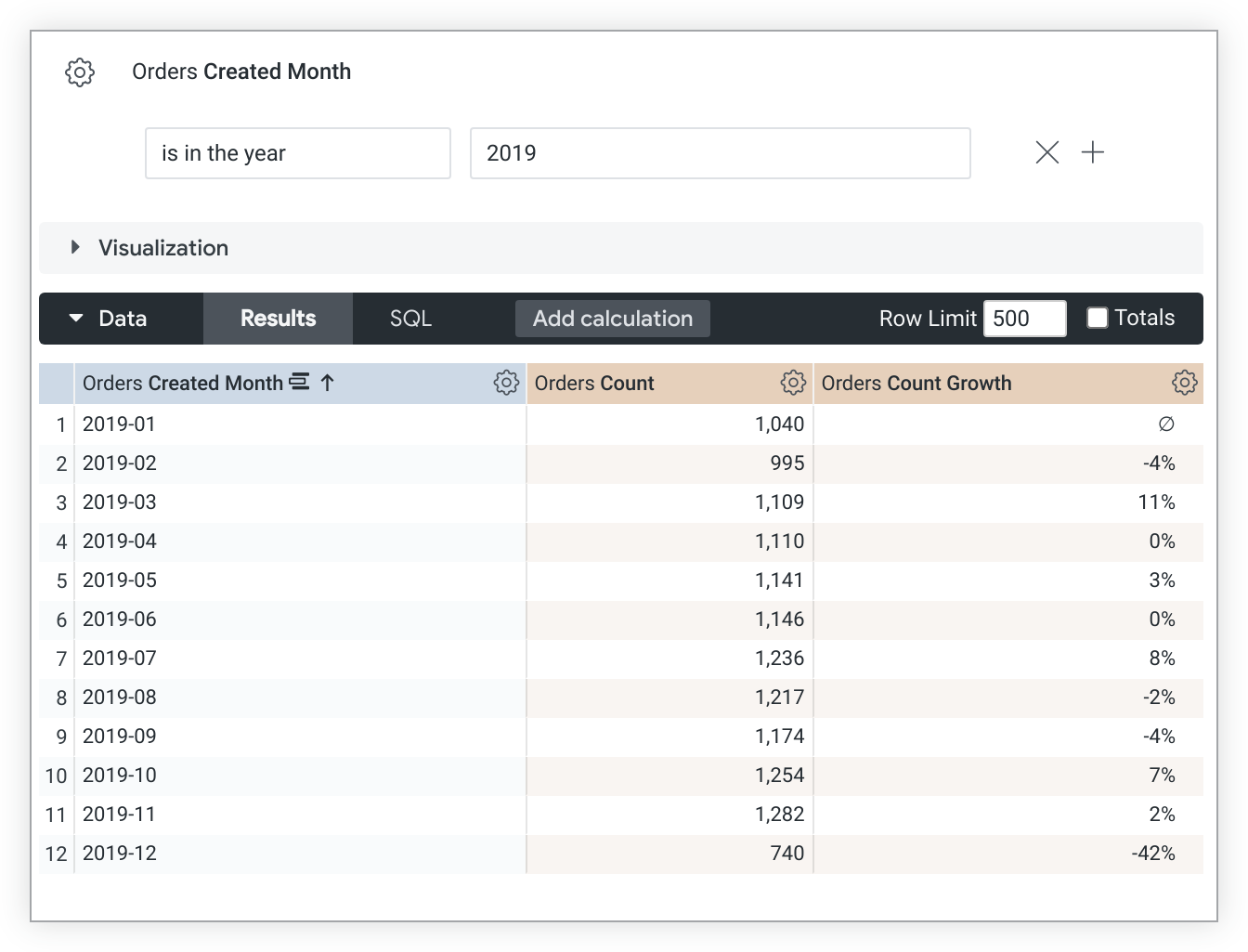
Note that `percent_of_previous` values depend on sort order. If you change the sort, you must rerun the query to recalculate the `percent_of_previous` values. In cases where a query is pivoted, `percent_of_previous` runs across the row instead of down the column. You cannot change this behavior.
Additionally, `percent_of_previous` measures are calculated *after* data is returned from your database. This means that you shouldn't reference a `percent_of_previous` measure within another measure; since they might be calculated at different times, you may not get accurate results. It also means that `percent_of_previous` measures cannot be filtered on.
One application for this type of measure is period-over-period (PoP) analysis, which is a pattern of analysis that measures something in the present and compares it to the same measurement in a comparable period of time in the past. For more information about PoP, see the Looker Community articles [How to do Period-over-Period Analysis](https://www.googlecloudcommunity.com/gc/Technical-Tips-Tricks/How-to-do-Period-over-Period-Analysis/ta-p/587592) and [Methods for Period Over Period (PoP) Analysis in Looker](https://www.googlecloudcommunity.com/gc/Technical-Tips-Tricks/Methods-for-Period-Over-Period-PoP-Analysis-in-Looker/ta-p/587538).
> [!NOTE]
> **Note:** For [dialects that support period-over-period measures](https://docs.cloud.google.com/looker/docs/2600/period-over-period#supported_dialects_for_period_over_period), you can create a LookML measure of `type: period_over_period` to create a PoP measure. See the [Period-over-period measures in Looker](https://docs.cloud.google.com/looker/docs/2600/period-over-period) documentation page for more information.
## `percent_of_total`
`type: percent_of_total` calculates a cell's portion of the column total. The percentage is calculated against the total of the rows returned by your query, and *not* the total of all possible rows. However, if the data returned by your query exceeds a row limit, the field's values will appear as nulls, since it needs the full results to calculate the percent of total.
The [`sql`](https://docs.cloud.google.com/looker/docs/2600/reference/param-field-sql) parameter for `type: percent_of_total` measures must reference another numeric measure.
`type: percent_of_total` fields can be formatted by using the [`value_format`](https://docs.cloud.google.com/looker/docs/2600/reference/param-field-value-format) or [`value_format_name`](https://docs.cloud.google.com/looker/docs/2600/reference/param-field-value-format-name) parameters. However, the [percentage formats](https://docs.cloud.google.com/looker/docs/2600/reference/param-field-value-format-name#percentage_formats) of the `value_format_name` parameter don't work with `type: percent_of_total` measures. These percentage formats multiply values by 100, which skews results of a `percent_of_total` calculation.
This example LookML creates a `percent_of_total_gross_margin` measure that is based on the `total_gross_margin` measure:
measure: percent_of_total_gross_margin {
type: percent_of_total
sql: ${total_gross_margin} ;;
}
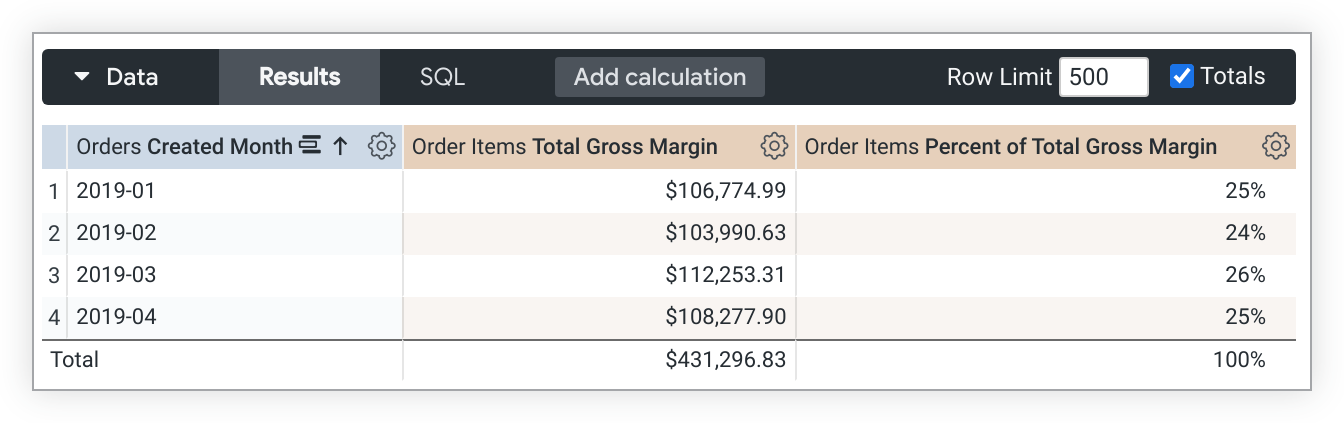
In cases where a query is pivoted, `percent_of_total` runs across the row instead of down the column. If this is not what you want, add [`direction: "column"`](https://docs.cloud.google.com/looker/docs/2600/reference/param-field-direction) to the measure definition.
Additionally, `percent_of_total` measures are calculated *after* data is returned from your database. This means that you shouldn't reference a `percent_of_total` measure within another measure; since they might be calculated at different times, you may not get accurate results. It also means that `percent_of_total` measures cannot be filtered on.
## `percentile`
`type: percentile` returns the value at the specified [percentile](https://en.wikipedia.org/wiki/Percentile) of values in a given field. For example, specifying the 75th percentile will return the value that is greater than 75% of the other values in the dataset.
To identify the value to return, Looker calculates the total number of data values and multiplies the specified percentile times the total number of data values. Regardless of how the data is actually sorted, Looker identifies the data values' relative order in increasing value. The data value that Looker returns depends on whether the calculation results in an integer or not, as discussed in the following two sections.
### If the calculated value is not an integer
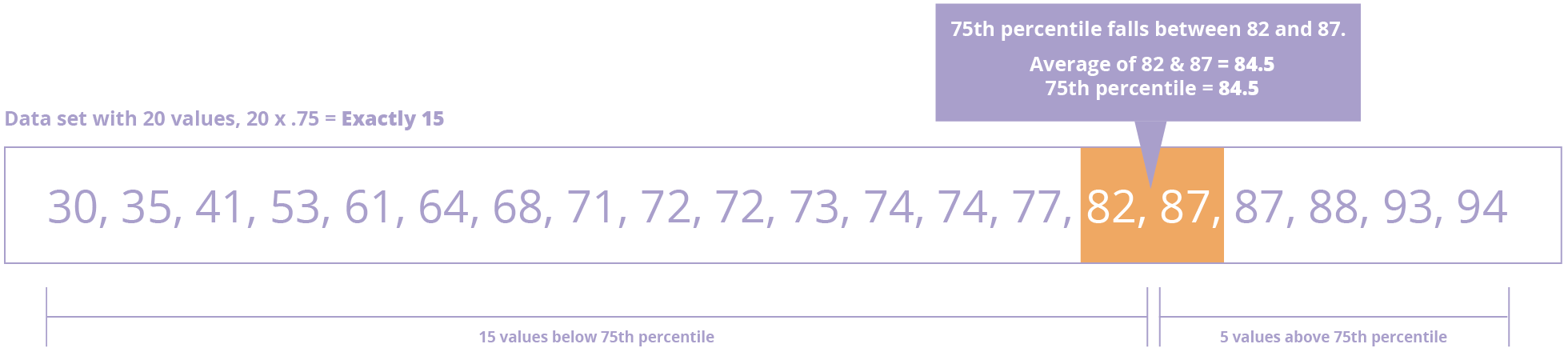
Looker rounds the calculated value up and uses it to identify the data value to return. In this example set of 19 test scores, the 75th percentile would be identified by 19 \* .75 = 14.25, which means that 75% of the values are in the first 14 data values -- below the 15th position. Thus, Looker returns the 15th data value (87) as being larger than 75% of the data values.

### If the calculated value is an integer
In this slightly more complex case, Looker returns an average of the data value at that position and the following data value. To understand this, consider a set of 20 test scores: The 75th percentile would be identified by 20 \* .75 = 15, which means that the data value at the 15th position is part of the 75th percentile, and we need to return a value that is *higher* than 75% of the data values. By returning the average of the values at the 15th position (82) and the 16th position (87), Looker ensures that 75%. That average (84.5) does not exist in the set of data values but would be larger than 75% of the data values.
### Required and optional parameters
Use the `percentile:` keyword to specify the fractional value, meaning the percent of the data that should be below the returned value. For example, use `percentile: 75` to specify the value at the 75th percentile in the order of data, or `percentile: 10` to return the value at the 10th percentile. If you want to find the value at the 50th percentile, you can specify `percentile: 50` or just use the [median](https://docs.cloud.google.com/looker/docs/2600/reference/param-measure-types#median) type.
The [`sql`](https://docs.cloud.google.com/looker/docs/2600/reference/param-field-sql) parameter for `type: percentile` measures can take any valid SQL expression that results in a numeric table column, LookML dimension, or combination of LookML dimensions.
`type: percentile` fields can be formatted by using the [`value_format`](https://docs.cloud.google.com/looker/docs/2600/reference/param-field-value-format) or [`value_format_name`](https://docs.cloud.google.com/looker/docs/2600/reference/param-field-value-format-name) parameters.
### Example
For example, the following LookML creates a field called `test_scores_75th_percentile` which returns the value at the 75th percentile in the `test_scores` dimension:
measure: test_scores_75th_percentile {
type: percentile
percentile: 75
sql: ${TABLE}.test_scores ;;
}
### Things to consider for `percentile`
If you're using `percentile` for a field that is involved in a fanout, Looker will attempt to use [`percentile_distinct`](https://docs.cloud.google.com/looker/docs/2600/reference/param-measure-types#percentile_distinct) instead. If `percentile_distinct` is not available for the dialect, Looker returns an error. For more information, see the [supported dialects for `percentile_distinct`](https://docs.cloud.google.com/looker/docs/2600/reference/param-measure-types#supported_database_dialects_for_percentile_distinct).
### Supported database dialects for `percentile`
For Looker to support the `percentile` type in your Looker project, your database dialect must also support it. The following table shows which dialects support the `percentile` type in the latest release of Looker:
| Dialect | Supported? |
|---|---|
| Actian Avalanche | No |
| Amazon Athena | Yes |
| Amazon Aurora MySQL | Yes |
| Amazon Redshift | Yes |
| Amazon Redshift 2.1+ | Yes |
| Amazon Redshift Serverless 2.1+ | Yes |
| Apache Druid | No |
| Apache Druid 0.13+ | No |
| Apache Druid 0.18+ | No |
| Apache Hive 2.3+ | Yes |
| Apache Hive 3.1.2+ | Yes |
| Apache Spark 3+ | Yes |
| ClickHouse | Yes |
| Cloudera Impala 3.1+ | No |
| Cloudera Impala 3.1+ with Native Driver | No |
| Cloudera Impala with Native Driver | No |
| DataVirtuality | No |
| Databricks | Yes |
| Denodo 7 | No |
| Denodo 8 \& 9 | No |
| Dremio | No |
| Dremio 11+ | No |
| Exasol | Yes |
| Google BigQuery Legacy SQL | Yes |
| Google BigQuery Standard SQL | Yes |
| Google Cloud PostgreSQL | Yes |
| Google Cloud SQL | Yes |
| Google Spanner | No |
| Greenplum | Yes |
| HyperSQL | No |
| IBM Netezza | No |
| MariaDB | Yes |
| Microsoft Azure PostgreSQL | Yes |
| Microsoft Azure SQL Database | No |
| Microsoft Azure Synapse Analytics | No |
| Microsoft SQL Server 2008+ | No |
| Microsoft SQL Server 2012+ | No |
| Microsoft SQL Server 2016 | No |
| Microsoft SQL Server 2017+ | No |
| MongoBI | No |
| MySQL | Yes |
| MySQL 8.0.12+ | Yes |
| Oracle | Yes |
| Oracle ADWC | Yes |
| PostgreSQL 9.5+ | Yes |
| PostgreSQL pre-9.5 | Yes |
| PrestoDB | Yes |
| PrestoSQL | Yes |
| SAP HANA | No |
| SAP HANA 2+ | No |
| SingleStore | No |
| SingleStore 7+ | Yes |
| Snowflake | Yes |
| Teradata | No |
| Trino | Yes |
| Vector | No |
| Vertica | Yes |
## `percentile_distinct`
The `type: percentile_distinct` is a specialized form of [percentile](https://docs.cloud.google.com/looker/docs/2600/reference/param-measure-types#percentile) and should be used when your join involves a fanout. It uses the nonrepeated values in a given field, based on the unique values defined by the [`sql_distinct_key`](https://docs.cloud.google.com/looker/docs/2600/reference/param-field-sql-distinct-key) parameter. If the measure does not have a `sql_distinct_key` parameter, then Looker tries to use the [`primary_key`](https://docs.cloud.google.com/looker/docs/2600/reference/param-field-primary-key) field.
Consider the result of a query joining the Order Item and Order tables:
| Order Item ID | Order ID | Order Shipping |
|---|---|---|
| 1 | 1 | 10 |
| 2 | 1 | 10 |
| 3 | 2 | 20 |
| 4 | 3 | 50 |
| 5 | 3 | 50 |
| 6 | 3 | 50 |
| 7 | 4 | 70 |
| 8 | 4 | 70 |
| 9 | 5 | 110 |
| 10 | 5 | 110 |
In this situation you can see that there are multiple rows for each order. This query involved a fanout because each order maps to several order items. The `percentile_distinct` takes this into consideration and finds the percentile value using the distinct values 10, 20, 50, 70, and 110. The 25th percentile will return the second distinct value, or 20, while the 80th percentile will return the average of the fourth and fifth distinct values, or 90.
### Required and optional parameters
Use the `percentile:` keyword to specify the fractional value. For example, use `percentile: 75` to specify the value at the 75th percentile in the order of data, or `percentile: 10` to return the value at the 10th percentile. If you are trying to find the value at the 50th percentile, you can use the [`median_distinct`](https://docs.cloud.google.com/looker/docs/2600/reference/param-measure-types#median_distinct) type instead.
To get an accurate result, specify how Looker should identify each unique entity (in this case, each unique order) by using the `sql_distinct_key` parameter.
Here's an example of using `percentile_distinct` to return the value at the 90th percentile:
measure: order_shipping_90th_percentile {
type: percentile_distinct
percentile: 90
sql_distinct_key: ${order_id} ;;
sql: ${order_shipping} ;;
}
Every unique value of `sql_distinct_key` must have just one corresponding value in the measure's [`sql`](https://docs.cloud.google.com/looker/docs/2600/reference/param-field-sql) parameter. In other words, the preceding example works because *every* row with `order_id` of 1 has the same `order_shipping` of 10, and *every* row with an `order_id` of 2 has the same `order_shipping` of 20.
`type: percentile_distinct` fields can be formatted by using the [`value_format`](https://docs.cloud.google.com/looker/docs/2600/reference/param-field-value-format) or [`value_format_name`](https://docs.cloud.google.com/looker/docs/2600/reference/param-field-value-format-name) parameters.
### Things to consider for `percentile_distinct`
If `percentile_distinct` is not available for the dialect, Looker returns an error. For more information, see the [supported dialects for `percentile_distinct`](https://docs.cloud.google.com/looker/docs/2600/reference/param-measure-types#supported_database_dialects_for_percentile_distinct).
### Supported database dialects for `percentile_distinct`
For Looker to support the `percentile_distinct` type in your Looker project, your database dialect must also support it. The following table shows which dialects support the `percentile_distinct` type in the latest release of Looker:
| Dialect | Supported? |
|---|---|
| Actian Avalanche | No |
| Amazon Athena | No |
| Amazon Aurora MySQL | Yes |
| Amazon Redshift | No |
| Amazon Redshift 2.1+ | No |
| Amazon Redshift Serverless 2.1+ | No |
| Apache Druid | No |
| Apache Druid 0.13+ | No |
| Apache Druid 0.18+ | No |
| Apache Hive 2.3+ | No |
| Apache Hive 3.1.2+ | No |
| Apache Spark 3+ | No |
| ClickHouse | No |
| Cloudera Impala 3.1+ | No |
| Cloudera Impala 3.1+ with Native Driver | No |
| Cloudera Impala with Native Driver | No |
| DataVirtuality | No |
| Databricks | No |
| Denodo 7 | No |
| Denodo 8 \& 9 | No |
| Dremio | No |
| Dremio 11+ | No |
| Exasol | No |
| Google BigQuery Legacy SQL | Yes |
| Google BigQuery Standard SQL | Yes |
| Google Cloud PostgreSQL | Yes |
| Google Cloud SQL | Yes |
| Google Spanner | No |
| Greenplum | Yes |
| HyperSQL | No |
| IBM Netezza | No |
| MariaDB | Yes |
| Microsoft Azure PostgreSQL | Yes |
| Microsoft Azure SQL Database | No |
| Microsoft Azure Synapse Analytics | No |
| Microsoft SQL Server 2008+ | No |
| Microsoft SQL Server 2012+ | No |
| Microsoft SQL Server 2016 | No |
| Microsoft SQL Server 2017+ | No |
| MongoBI | No |
| MySQL | Yes |
| MySQL 8.0.12+ | Yes |
| Oracle | No |
| Oracle ADWC | No |
| PostgreSQL 9.5+ | Yes |
| PostgreSQL pre-9.5 | Yes |
| PrestoDB | No |
| PrestoSQL | No |
| SAP HANA | No |
| SAP HANA 2+ | No |
| SingleStore | No |
| SingleStore 7+ | No |
| Snowflake | No |
| Teradata | No |
| Trino | No |
| Vector | No |
| Vertica | No |
## `period_over_period`
For [dialects that support period-over-period measures](https://docs.cloud.google.com/looker/docs/2600/period-over-period#supported_dialects_for_period_over_period), you can create a LookML measure of `type: period_over_period` to create a period-over-period (PoP) measure. A PoP measure references an aggregation from an earlier time period.
Here is an example PoP measure that provides the previous month's order count:
measure: orders_last_month {
type: period_over_period
based_on: orders.count
based_on_time: orders.created_month
period: month
kind: previous
}
Measures with `type: period_over_period` must also have the following subparameters:
- [`based_on`](https://docs.cloud.google.com/looker/docs/2600/period-over-period#based_on)
- [`based_on_time`](https://docs.cloud.google.com/looker/docs/2600/period-over-period#based_on_time)
- [`kind`](https://docs.cloud.google.com/looker/docs/2600/period-over-period#kind)
- [`period`](https://docs.cloud.google.com/looker/docs/2600/period-over-period#period)
See [Period-over-period measures in Looker](https://docs.cloud.google.com/looker/docs/2600/period-over-period) for more information and examples.
## `running_total`
`type: running_total` calculates a cumulative sum of the cells along a column. It cannot be used to calculate sums along a row, unless the row has resulted from a pivot.
The [`sql`](https://docs.cloud.google.com/looker/docs/2600/reference/param-field-sql) parameter for `type: running_total` measures must reference another numeric measure.
`type: running_total` fields can be formatted by using the [`value_format`](https://docs.cloud.google.com/looker/docs/2600/reference/param-field-value-format) or [`value_format_name`](https://docs.cloud.google.com/looker/docs/2600/reference/param-field-value-format-name) parameters.
The following LookML example creates a `cumulative_total_revenue` measure that is based on the `total_sale_price` measure:
measure: cumulative_total_revenue {
type: running_total
sql: ${total_sale_price} ;;
value_format_name: usd
}

Note that `running_total` values depend on sort order. If you change the sort, you must re-run the query to re-calculate the `running_total` values. In cases where a query is pivoted, `running_total` runs across the row instead of down the column. If this is not what you want, add [`direction: "column"`](https://docs.cloud.google.com/looker/docs/2600/reference/param-field-direction) to the measure definition.
Additionally, `running_total` measures are calculated *after* data is returned from your database. This means that you shouldn't reference a `running_total` measure within another measure; since they might be calculated at different times, you may not get accurate results. It also means that `running_total` measures cannot be filtered on.
## `string`
`type: string` is used with fields that contain letters or special characters.
The [`sql`](https://docs.cloud.google.com/looker/docs/2600/reference/param-field-sql) parameter for `type: string` measures can take any valid SQL expression that results in a string. In practice, this type is rarely used, because most SQL aggregate functions don't return strings. One common exception is MySQL's `GROUP_CONCAT` function, although Looker provides [`type: list`](https://docs.cloud.google.com/looker/docs/2600/reference/param-measure-types#list) for that use case.
For example, the following LookML creates a field `category_list` by combining the unique values of a field called `category`:
measure: category_list {
type: string
sql: GROUP_CONCAT(${category}) ;;
}
In this example `type: string` could be omitted, because `string` is the default value for `type`.
## `sum`
`type: sum` adds up the values in a given field. It is similar to SQL's `SUM` function. However, unlike with raw SQL, Looker will properly calculate sums even if your query's joins contain fanouts.
The [`sql`](https://docs.cloud.google.com/looker/docs/2600/reference/param-field-sql) parameter for `type: sum` measures can take any valid SQL expression that results in a numeric table column, LookML dimension, or combination of LookML dimensions.
`type: sum` fields can be formatted by using the [`value_format`](https://docs.cloud.google.com/looker/docs/2600/reference/param-field-value-format) or [`value_format_name`](https://docs.cloud.google.com/looker/docs/2600/reference/param-field-value-format-name) parameters.
For example, the following LookML creates a field called `total_revenue` by adding up the `sales_price` dimension, then displays it in a money format ($1,234.56):
measure: total_revenue {
type: sum
sql: ${sales_price} ;;
value_format_name: usd
}
## `sum_distinct`
`type: sum_distinct` is for use with denormalized datasets. It adds up the nonrepeated values in a given field, based on the unique values defined by the [`sql_distinct_key`](https://docs.cloud.google.com/looker/docs/2600/reference/param-field-sql-distinct-key) parameter.
This is an advanced concept which may be more clearly explained with an example. Consider a denormalized table like this:
| Order Item ID | Order ID | Order Shipping |
|---|---|---|
| 1 | 1 | 10.00 |
| 2 | 1 | 10.00 |
| 3 | 2 | 20.00 |
| 4 | 2 | 20.00 |
| 5 | 2 | 20.00 |
In this situation, you can see that there are multiple rows for each order. Consequently, if you added a `type: sum` measure for the `order_shipping` column, you would get a total of 80.00, even though the total shipping collected is actually 30.00.
# Will NOT calculate the correct shipping amount
measure: total_shipping {
type: sum
sql: ${order_shipping} ;;
}
To get an accurate result, you can define for Looker how it should identify each unique entity (in this case, each unique order) by using the `sql_distinct_key` parameter. This *will* calculate the correct 30.00 amount:
# Will calculate the correct shipping amount
measure: total_shipping {
type: sum_distinct
sql_distinct_key: ${order_id} ;;
sql: ${order_shipping} ;;
}
Every unique value of `sql_distinct_key` must have just one corresponding value in [`sql`](https://docs.cloud.google.com/looker/docs/2600/reference/param-field-sql). In other words, the preceding example works because *every* row with an `order_id` of 1 has the same `order_shipping` of 10.00, and *every* row with an `order_id` of 2 has the same `order_shipping` of 20.00.
`type: sum_distinct` fields can be formatted by using the [`value_format`](https://docs.cloud.google.com/looker/docs/2600/reference/param-field-value-format) or [`value_format_name`](https://docs.cloud.google.com/looker/docs/2600/reference/param-field-value-format-name) parameters.
## `yesno`
`type: yesno` creates a field that indicates if something is true or false. The values appear as **Yes** and **No** in the Explore UI.
The [`sql`](https://docs.cloud.google.com/looker/docs/2600/reference/param-field-sql) parameter for a `type: yesno` measure takes a valid SQL expression that evaluates to `TRUE` or `FALSE`. If the condition evaluates to `TRUE`, **Yes** is displayed to the user; otherwise, **No** is displayed.
The SQL expression for `type: yesno` measures must include only aggregations, which means SQL aggregations or references to LookML measures. If you want to create a `yesno` field that includes a reference to a LookML dimension or a SQL expression that is not an aggregation, use a *dimension* with [`type: yesno`](https://docs.cloud.google.com/looker/docs/2600/reference/param-dimension-filter-parameter-types#yesno), not a measure.
Similar to measures with [`type: number`](https://docs.cloud.google.com/looker/docs/2600/reference/param-measure-types#number), a measure with `type: yesno` doesn't do any aggregations; it just references other aggregations.
For example, the following `total_sale_price` measure example is a sum of the total sale price of order items in an order. A second measure called `is_large_total` is `type: yesno`. The `is_large_total` measure has a `sql` parameter that evaluates whether the `total_sale_price` value is greater than $1,000.
measure: total_sale_price {
type: sum
value_format_name: usd
sql: ${sale_price} ;;
drill_fields: [detail*]
}
measure: is_large_total {
description: "Is order total over $1000?"
type: yesno
sql: ${total_sale_price} > 1000 ;;
}
If you want to reference a `type: yesno` field in another field, you should treat the `type: yesno` field as a boolean (in other words, as if it contains a true or false value already). For example:
measure: is_large_total {
description: "Is order total over $1000?"
type: yesno
sql: ${total_sale_price} > 1000 ;;
}
# This is correct:
measure: reward_points {
type: number
sql: CASE WHEN ${is_large_total} THEN 200 ELSE 100 END ;;
}
# This is NOT correct:
measure: reward_points {
type: number
sql: CASE WHEN ${is_large_total} = 'Yes' THEN 200 ELSE 100 END ;;
}