You can use the Logs Explorer to find, filter, and exclude log entries that
belong to [error groups](https://docs.cloud.google.com/error-reporting/docs/grouping-errors.md.txt) to help
identify trends and recurring problems in your environment. Error groups
aggregate log entries that contain errors based on shared values such as
exception type, frames, or messages.
## Find error group details for a log entry
To track recurring errors across your application and to manage their resolution
status, use the **Error Reporting** page of the Google Cloud console.
The **Error Reporting** page lists error groups, including
information about the specific type of error, the number of error occurrences,
and the resolution status of each group.
Error Reporting automatically sets the value of the
`error_groups` ID field during the creation of an error group. The field
contains alphanumeric characters, `-` and `_`.
### From Error Reporting, find log entries for an error group
If you are viewing the Error Reporting page and want to find the
log entries associated with a specific error group, do the following:
1. In the Google Cloud console, go to the **Error Reporting** page:
[Go to **Error Reporting**](https://console.cloud.google.com/errors)
You can also find this page by using the search bar.
2. Click the error name.
3. In the **Recent samples** pane, click **View Logs** from any log entry.
The **Logs Explorer** page opens and displays log entries associated
with the error group. The query-editor field specifies the error group ID.
For example, this field might include something like
`errorGroups.id="ERROR_GROUP_ID"`, where ERROR_GROUP_ID
is the ID of your error group.
### Filter log entries by error group
If you are viewing the Logs Explorer page and want to find log entries
that are associated with a specific error or with any error group,
do the following:
1. In the Google Cloud console, go to the
**Logs Explorer** page:
[Go to **Logs Explorer**](https://console.cloud.google.com/logs/query)
If you use the search bar to find this page, then select the result whose subheading is
**Logging**.
2. Do one of the following:
- To find log entries that are associated with any error group, add the
following to the query pane:
errorGroups.id:*
- To find log entries that are associated with a specific error group,
add the following to the query pane:
errorGroups.id: "ERROR_GROUP_ID"
3. Run the query.
### Investigate a log entry's error group
To open the error group for a log entry, select
 **Error group** , and then select
**View error group details**:
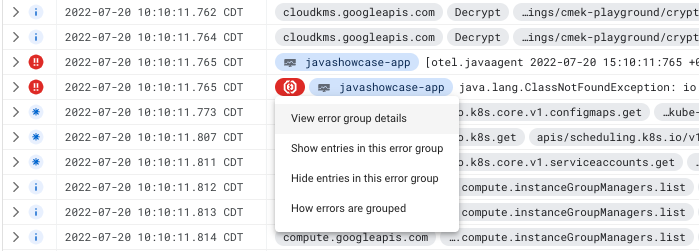
You can also use the options in the 
**Error group** button to change which log entries the Logs Explorer
displays:
- To investigate the error group in more detail, select
**Show entries in this error group**. Logs Explorer is refreshed and
displays only those log entries in the same error group. You can now apply
additional query parameters to the error group's log entries.
- To remove a specific error group from your query results,
select **Hide entries in this error group**. Logs Explorer is refreshed
and all log entries in this error group are hidden from the display.
## Monitor error groups
You can configure Error Reporting to notify you when it detects a
new error group. This service also lets you view the history of errors for
each error group and to manage those errors. For more information,
see the following documents:
- [Configure and manage notifications](https://docs.cloud.google.com/error-reporting/docs/notifications.md.txt)
- [View and filter errors](https://docs.cloud.google.com/error-reporting/docs/viewing-errors.md.txt)
You can't create log-based metrics that count the number of log entries with
error groups or configure a log-based alert to notify you when a log entry
contains an error group. Similarly, you can't extract values from the
`errorGroups` field into a label attached to a log-based metric or
log-based alert.