Cloud Load Balancing supports load-balancing traffic to endpoints that extend
beyond Google Cloud, such as on-premises data centers and other public clouds
that you can use [hybrid connectivity](https://cloud.google.com/hybrid-connectivity) to reach.
A hybrid strategy is a pragmatic solution for you to adapt to changing market
demands and incrementally modernize your applications. This could be a temporary
hybrid deployment to enable migration to a modern cloud-based
solution or a permanent fixture of your organization's IT infrastructure.
Setting up hybrid load balancing also lets you bring the benefits of
Cloud Load Balancing's networking capabilities to services running on
your existing infrastructure outside of Google Cloud.
Hybrid load balancing is supported on the following Google Cloud load balancers:
- [External Application Load Balancers](https://docs.cloud.google.com/load-balancing/docs/https.md.txt): global external Application Load Balancers, classic Application Load Balancers, and regional external Application Load Balancers
- [Internal Application Load Balancers](https://docs.cloud.google.com/load-balancing/docs/l7-internal.md.txt): cross-region internal Application Load Balancers and regional internal Application Load Balancers
- [External proxy Network Load Balancers](https://docs.cloud.google.com/load-balancing/docs/tcp.md.txt): global external proxy Network Load Balancers, classic proxy Network Load Balancers, and regional external proxy Network Load Balancers
- [Internal proxy Network Load Balancers](https://docs.cloud.google.com/load-balancing/docs/tcp/internal-proxy.md.txt): regional internal proxy Network Load Balancers and cross-region internal proxy Network Load Balancers
On-premises and other cloud services are treated like any other
Cloud Load Balancing backend. The key difference is that you use a
*hybrid connectivity NEG* to configure the endpoints of these backends. The
endpoints must be valid `IP:port` combinations that your load balancer can reach
by using hybrid connectivity products such as
[Cloud VPN](https://docs.cloud.google.com/network-connectivity/docs/vpn/concepts/overview.md.txt),
[Cloud Interconnect](https://docs.cloud.google.com/network-connectivity/docs/interconnect/concepts/overview.md.txt),
or [Router appliance
VMs](https://docs.cloud.google.com/network-connectivity/docs/network-connectivity-center/concepts/ra-overview).
## Use-case: Routing traffic to an on-premises location or another cloud
The simplest use case for using hybrid NEGs is routing traffic from a
Google Cloud load balancer to an on-premises location or to
another cloud environment. Clients can originate traffic either
from the public internet, from within Google Cloud,
or from an on-premises client.
> [!NOTE]
> **Note:** Hybrid connectivity NEGs are configured only within a specific zone. If you require regional availability, you can use a regional internet NEG as a workaround. By creating a regional internet NEG with an `INTERNET_FQDN_PORT` endpoint type, you can use a fully qualified domain name (FQDN) that resolves to a private IP address through a private Cloud DNS zone. This approach allows the load balancer to route traffic to your private on-premises or multi-cloud backends at a regional level, avoiding a single zonal dependency. For more details, see the documentation for [Internet NEGs](https://docs.cloud.google.com/load-balancing/docs/negs/internet-neg-concepts.md.txt#internet-neg).
### Public clients
You can use an external Application Load Balancer with a hybrid NEG backend to route traffic from
external clients to a backend on-premises or in another cloud network. You can
also enable the following value-added networking capabilities for your services
on-premises or in other cloud networks:
- **With the global external Application Load Balancer and classic Application Load Balancer**, you can:
- Use Google's global edge infrastructure to terminate user connections closer to the user, thus decreasing latency.
- Protect your service with [Google Cloud Armor](https://docs.cloud.google.com/armor), an edge DDoS defense/WAF security product available to all services accessed through an external Application Load Balancer.
- Enable your service to optimize delivery using [Cloud CDN](https://docs.cloud.google.com/cdn). With Cloud CDN, you can cache content close to your users. Cloud CDN provides capabilities like cache invalidation and Cloud CDN signed URLs.
- Use [Google-managed SSL
certificates](https://docs.cloud.google.com/load-balancing/docs/ssl-certificates/google-managed-certs). You can reuse certificates and private keys that you already use for other Google Cloud products. This eliminates the need to manage separate certificates.
The following diagram demonstrates a hybrid deployment with an external Application Load Balancer.
[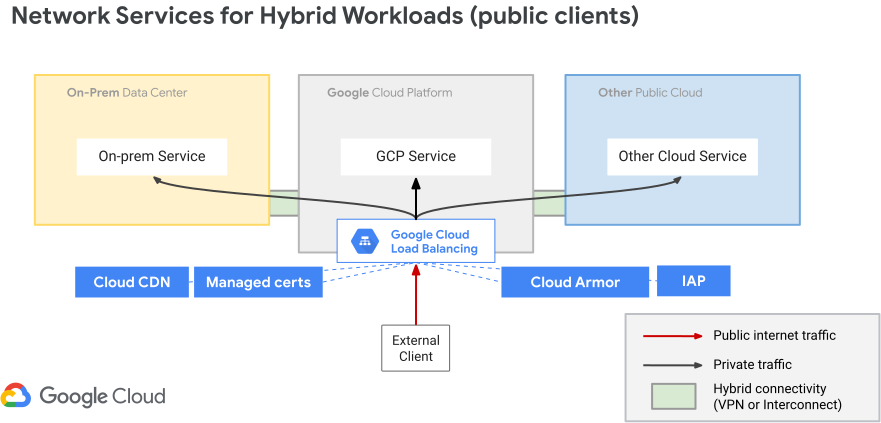](https://docs.cloud.google.com/static/load-balancing/images/ext-https-hybrid.svg) Hybrid connectivity with a global external Application Load Balancer (click to enlarge).
In this diagram, traffic from clients on the public internet enters
your private on-premise or cloud network through a Google Cloud load
balancer, such as the external Application Load Balancer. When traffic reaches the load
balancer, you can apply network edge services such as Cloud Armor DDoS
protection or Identity-Aware Proxy (IAP) user authentication.
- **With the regional external Application Load Balancer** , you can route external traffic to endpoints that are within the same Google Cloud region as the load balancer's resources. Use this load balancer if you need to serve content from only one geolocation (for example, to meet compliance regulations) or if you want to use the [Standard Network Service
Tier](https://docs.cloud.google.com/network-tiers/docs/overview).
How the request is routed (whether to a Google Cloud backend or to an
on-premises/cloud endpoint) depends on how your URL map is configured. Depending
on your URL map, the load balancer selects a [backend service](https://docs.cloud.google.com/load-balancing/docs/negs/hybrid-neg-concepts.md.txt#backend_service)
for the request. If the selected backend service has been configured with a
hybrid connectivity NEG (used for non-Google Cloud endpoints only), the
load balancer forwards the traffic across Cloud VPN,
Cloud Interconnect, or Router appliance VMs, to its intended external
destination.
### Internal clients (within Google Cloud or on-premises)
You can also set up a hybrid deployment for clients internal to
Google Cloud. In this case, client traffic originates from the
Google Cloud VPC network, your on-premises network, or from
another cloud, and is routed to endpoints on-premises or in other cloud
networks.
The regional internal Application Load Balancer is a regional load balancer, which means that it can
only route traffic to endpoints within the same Google Cloud region as the
load balancer's resources.
The cross-region internal Application Load Balancer is a multi-region load
balancer that can load balance traffic to backend services that are globally
distributed.
The following diagram demonstrates a hybrid deployment with a regional internal Application Load Balancer.
[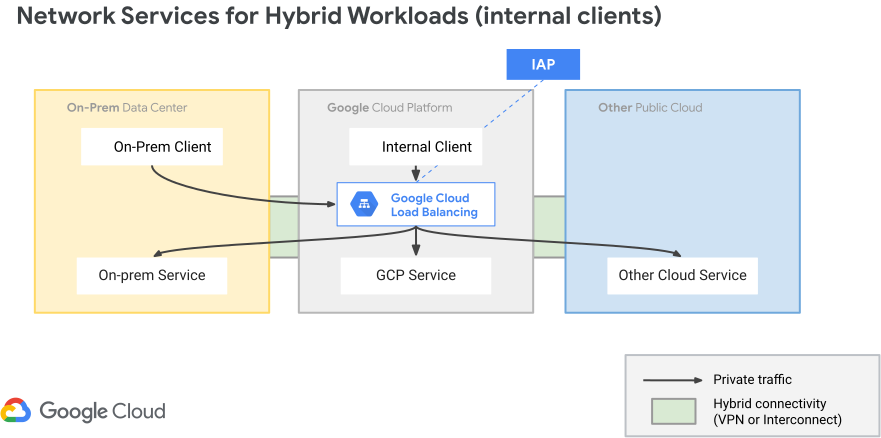](https://docs.cloud.google.com/static/load-balancing/images/int-https-hybrid.svg) Hybrid connectivity with regional internal Application Load Balancers (click to enlarge).
## Use-case: Migrate to Cloud
Migrating an existing service to cloud lets you free up on-premise
capacity and reduce the cost and burden of maintaining on-premise
infrastructure. You can temporarily set up a hybrid deployment that lets you
route traffic to both your current on-premises service and a corresponding
Google Cloud service endpoint.
The following diagram demonstrates this setup with an internal Application Load Balancer.
[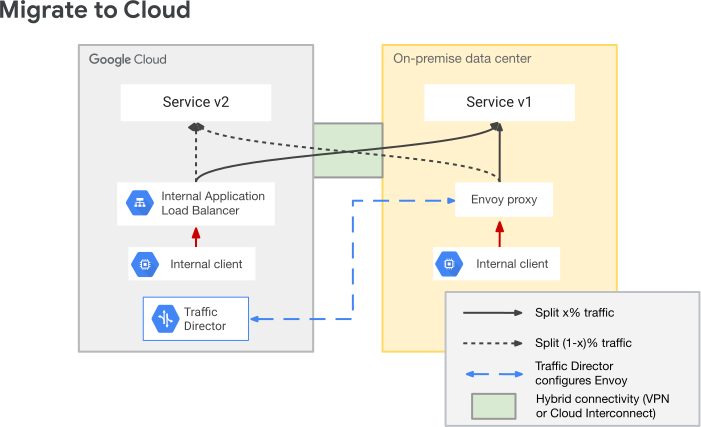](https://docs.cloud.google.com/static/load-balancing/images/migrate-hybrid.svg) Migrate to Google Cloud (click to enlarge).
If you are using an internal Application Load Balancer to handle internal clients, you can
configure the Google Cloud load balancer to use weight-based traffic
splitting to split traffic across the two services. Traffic splitting lets you
start by sending 0% of traffic to the Google Cloud service and 100% to the
on-premises service. You can then gradually increase the proportion of traffic
sent to the Google Cloud service. Eventually, you send 100% of traffic to
the Google Cloud service, and you can retire the on-premises service.
## Hybrid architecture
This section describes the load balancing architecture and resources required
to configure a hybrid load balancing deployment.
On-premises and other cloud services are like any other
Cloud Load Balancing backend. The key difference is that you use a
*hybrid connectivity NEG* to configure the endpoints of these backends. The
endpoints must be valid `IP:port` combinations that your clients can reach
through hybrid connectivity, such as Cloud VPN,
Cloud Interconnect, or a Router appliance VM.
The following diagrams show the Google Cloud resources required to enable hybrid load balancing for external Application Load Balancers and regional internal Application Load Balancers.
### Global external HTTP(S)
[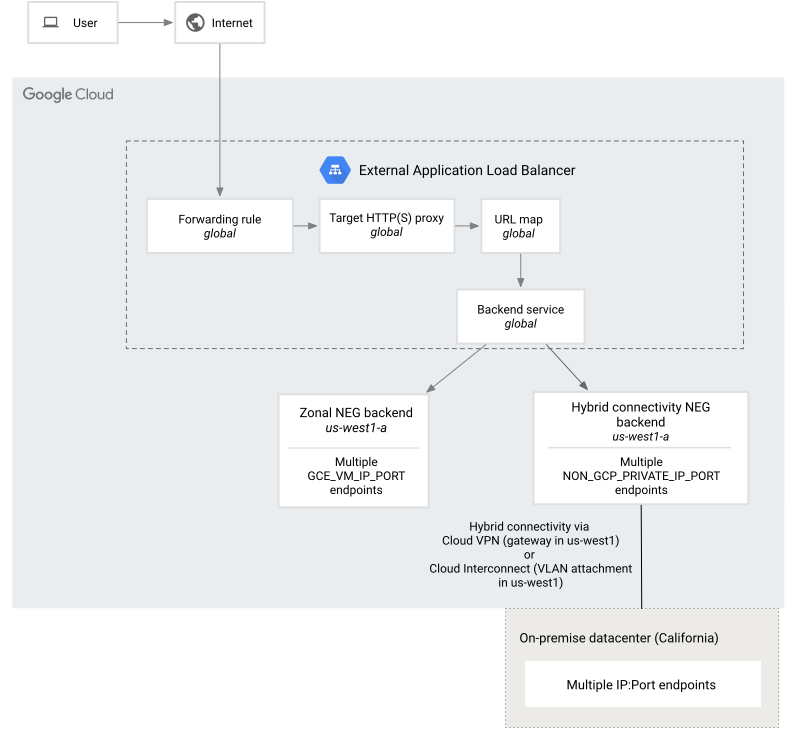](https://docs.cloud.google.com/static/load-balancing/images/hybrid-ext-https-lb.svg) Global external Application Load Balancer resources for hybrid connectivity (click to enlarge).
### Regional external HTTP(S)
[](https://docs.cloud.google.com/static/load-balancing/images/hybrid-reg-ext-https-lb-mixed.svg) Regional external Application Load Balancer resources for hybrid connectivity (click to enlarge).
### Regional internal HTTP(S)
[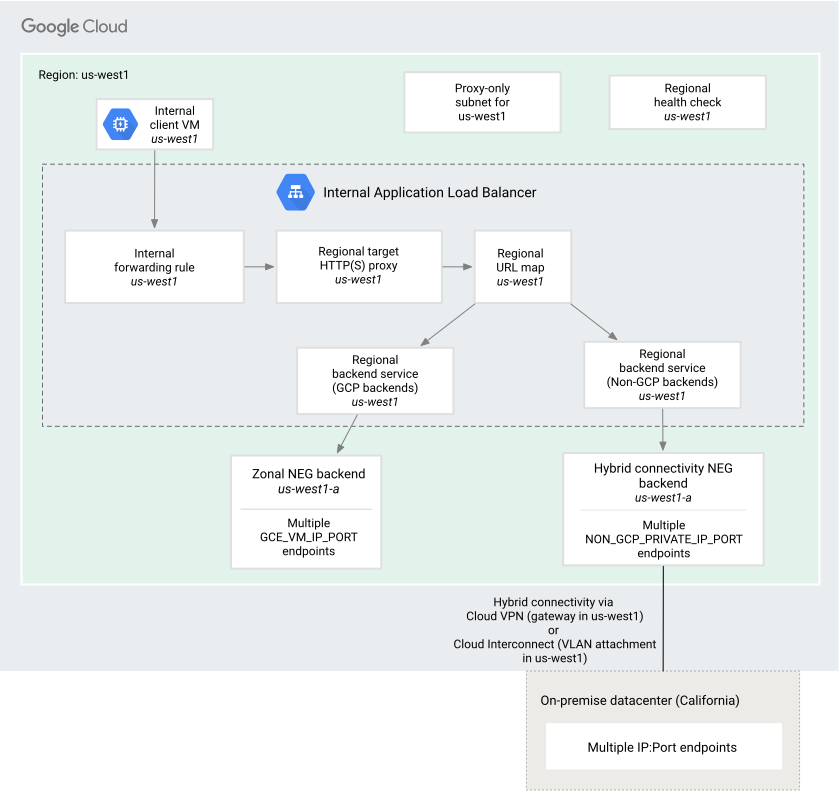](https://docs.cloud.google.com/static/load-balancing/images/hybrid-int-https-lb.svg) Regional internal Application Load Balancer resources for hybrid connectivity (click to enlarge).
### Regional internal proxy
[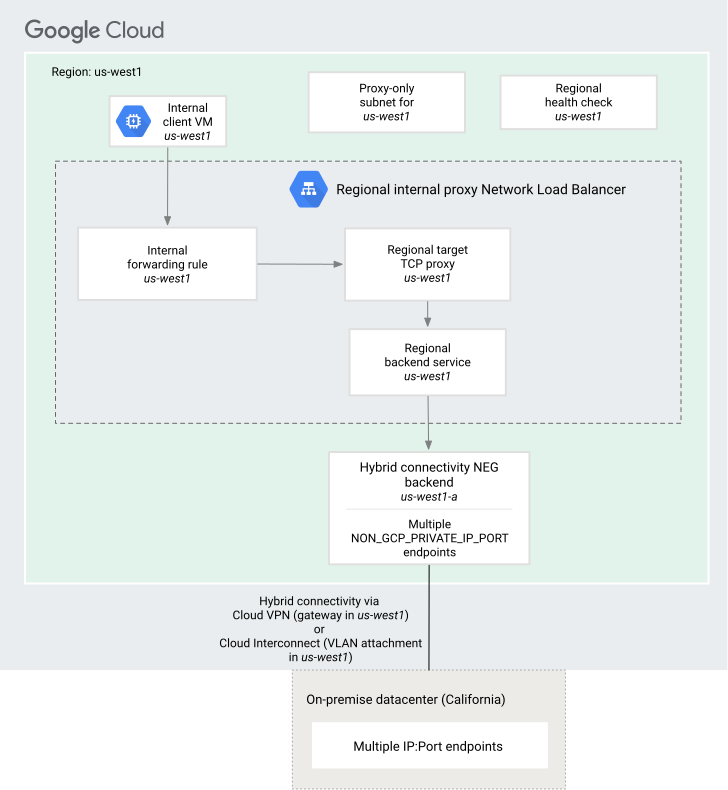](https://docs.cloud.google.com/static/load-balancing/images/int-tcp-proxy-hybrid-only.svg) Regional internal proxy Network Load Balancer resources for hybrid connectivity (click to enlarge).
### Regional versus global
Cloud Load Balancing routing depends on the scope of the configured load
balancer:
**External Application Load Balancer and external proxy Network Load Balancer.** These load balancers can be
configured for either global or regional routing depending on the network tier
that is used. You create the load balancer's hybrid NEG backends in the same
regions where hybrid connectivity has been configured.
Non-Google Cloud endpoints must also be configured accordingly to take
advantage of proximity-based load balancing.
**Cross-region internal Application Load Balancer and cross-region internal proxy Network Load Balancer.** This is a
multi-region load balancer that can load balance traffic to backend services that
are globally distributed. You create the load balancer's hybrid NEG backends in
the same regions where hybrid connectivity has been configured.
Non-Google Cloud endpoints must also be configured accordingly to take
advantage of proximity-based load balancing.
**Regional internal Application Load Balancer and regional internal proxy Network Load Balancer.** These are
regional load balancers. That is, they can only route traffic to endpoints
within the same region as the load balancer. The load balancer components *must
be configured in the same region* where hybrid connectivity has been configured.
By default, clients accessing the load balancer must also be in the same region.
However, if you
enable global access, clients from any region can access the
load balancer.
For example, if the Cloud VPN gateway or the Cloud Interconnect
VLAN attachment is configured in REGION_A, the resources required by
the load balancer (such as a backend service, hybrid NEG, or forwarding rule) *must
be* created in the REGION_A region. By default, clients accessing the load
balancer must also be in the REGION_A region. However, if you enable global
access, clients from any region can access the load balancer.
### Network connectivity requirements
Before you configure a hybrid load balancing deployment, you must have the
following resources set up:
- **Google Cloud VPC network.** A VPC
network configured inside Google Cloud. This is the VPC
network used to configure Cloud Interconnect/Cloud VPN and
Cloud Router. This is also the same network where you'll create the load
balancing resources (forwarding rule, target proxy, backend service, etc.).
On-premises, other cloud, and Google Cloud subnet IP addresses and IP
address ranges must not overlap. When IP addresses overlap, subnet routes are
prioritized over remote connectivity.
- **Hybrid connectivity.** Your Google Cloud and on-premises or other
cloud environments must be connected through [hybrid
connectivity](https://cloud.google.com/hybrid-connectivity), using either
Cloud Interconnect VLAN attachments, Cloud VPN tunnels with
Cloud Router, or Router appliance VMs. We recommend that you use a high
availability connection. A Cloud Router enabled with [global dynamic
routing](https://docs.cloud.google.com/network-connectivity/docs/router/concepts/overview#global_dynamic_routing_example)
learns about the specific endpoint by using BGP and programs it into your
Google Cloud VPC network. Regional dynamic routing is
not supported. Static routes are also not supported.
The Cloud Router must also [advertise the following
routes](https://docs.cloud.google.com/network-connectivity/docs/router/how-to/advertising-custom-ip) to
your on-premises environment:
- Ranges used by Google's health check probes: `35.191.0.0/16` and
`130.211.0.0/22`. This is required for global external Application Load Balancers,
classic Application Load Balancers, global external proxy Network Load Balancers, and
classic proxy Network Load Balancers.
- The range of the region's proxy-only subnet: for Envoy-based load
balancers---regional external Application Load Balancers, regional internal Application Load Balancers, cross-region internal Application Load Balancers,
regional external proxy Network Load Balancers, cross-region internal proxy Network Load Balancers, and regional internal proxy Network Load Balancers.
Advertising region's proxy-only subnet is also required for [distributed
Envoy health checks](https://docs.cloud.google.com/load-balancing/docs/negs/hybrid-neg-concepts#envoy-health-checks) to work. Distributed Envoy health
check is the default health check mechanism for zonal hybrid connectivity
NEGS (that is, `NON_GCP_PRIVATE_IP_PORT` endpoints) behind Envoy-based load
balancers.
You can use either the same network or a different VPC network
within the same project to configure both hybrid networking
(Cloud Interconnect or Cloud VPN) and the load balancer.
Note the following:
- If you use different VPC networks, the two networks must be
connected using either VPC Network Peering or they must be
[VPC
spokes](https://docs.cloud.google.com/network-connectivity/docs/network-connectivity-center/concepts/vpc-spokes-overview)
on the same [NCC
hub](https://docs.cloud.google.com/network-connectivity/docs/network-connectivity-center/concepts/overview).
- If you use the same VPC network, ensure that your
VPC network's subnet CIDR ranges don't conflict with your
remote CIDR ranges. When IP addresses overlap, subnet routes are prioritized
over remote connectivity.
- **Network endpoints (`IP:Port`) on-premises or in other clouds.** One or more
`IP:Port` network endpoints configured within your on-premises or other cloud
environments, routable using Cloud Interconnect
Cloud VPN, or a Router appliance VM. If there are multiple paths to
the IP endpoint, routing will follow the behavior described in the
[VPC routes overview](https://docs.cloud.google.com/vpc/docs/routes.md.txt#routeselection) and the
[Cloud Router overview](https://docs.cloud.google.com/network-connectivity/docs/router/concepts/overview.md.txt).
- **Firewall rules on your on-premises or other cloud.** The following firewall
rules must be created on your on-premises or other cloud environment:
- Ingress allow firewall rules to allow traffic from Google's health-checking probes to your endpoints. The ranges to be allowed are: `35.191.0.0/16` and `130.211.0.0/22`. Note that these ranges must also be advertised by Cloud Router to your on-premises network. For more details, see [Probe IP ranges and
firewall rules](https://docs.cloud.google.com/load-balancing/docs/health-check-concepts#ip-ranges).
- Ingress allow firewall rules to allow traffic that is being load-balanced to reach the endpoints.
- For Envoy-based load balancers---regional external Application Load Balancers, regional internal Application Load Balancers, cross-region internal Application Load Balancers, regional external proxy Network Load Balancers, cross-region internal proxy Network Load Balancer, and regional internal proxy Network Load Balancers, you also need to create a firewall rule to allow traffic from the region's [proxy-only subnet](https://docs.cloud.google.com/load-balancing/docs/l7-internal.md.txt#proxy-only_subnet) to reach the endpoints that are on-premises or in other cloud environments.
### Load balancer components
Depending on the type of load balancer, you can set up a hybrid load-balancing deployment by using either the Standard or the Premium Network Service Tiers.
A hybrid load balancer requires [special configuration only for the backend
service](https://docs.cloud.google.com/load-balancing/docs/negs/hybrid-neg-concepts#backend_service). The frontend configuration is the same as any other
load balancer. The Envoy-based load balancers---regional external Application Load Balancers,
regional internal Application Load Balancers, cross-region internal Application Load Balancers,
regional external proxy Network Load Balancers, cross-region internal proxy Network Load Balancer, and
regional internal proxy Network Load Balancers,---require an additional [proxy-only
subnet](https://docs.cloud.google.com/load-balancing/docs/proxy-only-subnets)
to run Envoy proxies on your behalf.
#### Frontend configuration
No special frontend configuration is required for hybrid load balancing.
[Forwarding rules](https://docs.cloud.google.com/load-balancing/docs/forwarding-rule-concepts.md.txt) are used to
route traffic by IP address, port, and protocol to a target proxy. The [target
proxy](https://docs.cloud.google.com/load-balancing/docs/target-proxies) then terminates connections from
clients.
[URL maps](https://docs.cloud.google.com/load-balancing/docs/url-map-concepts.md.txt) are used by HTTP(S) load
balancers to set up URL-based routing of requests to the appropriate backend
services.
For more details on each of these components, refer the architecture sections of
the specific load balancer overviews:
- [External Application Load Balancer](https://docs.cloud.google.com/load-balancing/docs/https.md.txt#component)
- [Internal Application Load Balancer](https://docs.cloud.google.com/load-balancing/docs/l7-internal.md.txt#components)
- [External proxy Network Load Balancer](https://docs.cloud.google.com/load-balancing/docs/tcp.md.txt#components)
#### Backend service
[Backend services](https://docs.cloud.google.com/load-balancing/docs/backend-service.md.txt) provide configuration
information to the load balancer. Load balancers use the information in a
backend service to direct incoming traffic to one or more attached backends.
To set up a hybrid load balancing deployment, you configure the load balancer
with backends that are both within Google Cloud, as well as
outside of Google Cloud.
- **Non-Google Cloud backends (on-premise or other cloud)**
Any destination that you can reach using Google's [hybrid
connectivity](https://cloud.google.com/hybrid-connectivity) products (either Cloud VPN or
Cloud Interconnect or Router appliance VMs), and that can be
reached with a valid `IP:Port` combination, can be configured as an endpoint
for the load balancer.
Configure your non-Google Cloud backends as follows:
1. Add each non-Google Cloud network endpoint's `IP:Port` combination to a *hybrid connectivity network endpoint group (NEG)* . Make sure this IP address and port is reachable from Google Cloud by using hybrid connectivity (either by Cloud VPN or Cloud Interconnect or Router appliance VMs). For hybrid connectivity NEGs, you set the *network endpoint type* to `NON_GCP_PRIVATE_IP_PORT`.
2. [While creating the NEG, specify a Google Cloud
*zone*](https://docs.cloud.google.com/compute/docs/regions-zones#locations) that minimizes the geographic distance between Google Cloud and your on-premises or other cloud environment. For example, if you are hosting a service in an on-premises environment in Frankfurt, Germany, you can specify the `europe-west3-a` Google Cloud zone when you create the NEG.
3. Add this hybrid connectivity NEG as a backend for the backend service.
A hybrid connectivity NEG must only include non-Google Cloud
endpoints. Traffic might be dropped if a hybrid NEG includes endpoints for
resources within a Google Cloud VPC network, such as
forwarding rule IP addresses for
internal passthrough Network Load Balancers. Configure Google Cloud endpoints as directed in
the next section.
- **Google Cloud backends**
Configure your Google Cloud endpoints as follows:
1. Create a separate backend service for the Google Cloud backends.
2. Configure multiple backends (either `GCE_VM_IP_PORT` zonal NEGs or instance groups) within the same region in which you have set up hybrid connectivity.
Additional points for consideration:
- Each hybrid connectivity NEG can only contain network endpoints of the same
type (`NON_GCP_PRIVATE_IP_PORT`).
- You can use a single backend service to reference both
Google Cloud-based backends (using zonal NEGs with `GCE_VM_IP_PORT`
endpoints) and on-premises or other cloud backends (using hybrid connectivity
NEGs with `NON_GCP_PRIVATE_IP_PORT` endpoints). No other combination of mixed
backend types is allowed. Cloud Service Mesh does not support mixed backend
types in a single backend service.
> [!NOTE]
> **Note:** For GKE deployments, mixed NEG backends are only supported with [standalone NEGs](https://docs.cloud.google.com/kubernetes-engine/docs/how-to/standalone-neg.md.txt).
- The backend service's load balancing scheme must be one of the following:
- `EXTERNAL_MANAGED` for global external Application Load Balancers, regional external Application Load Balancers,
global external proxy Network Load Balancers, and regional external proxy Network Load Balancers
- `EXTERNAL` for classic Application Load Balancers and classic proxy Network Load Balancers
- `INTERNAL_MANAGED` for internal Application Load Balancers and Internal proxy Network Load Balancers
`INTERNAL_SELF_MANAGED` is supported
for [Cloud Service Mesh multi-environment deployments with hybrid connectivity
NEGs](https://docs.cloud.google.com/service-mesh/docs/multi-environment-overview).
- The backend service protocol must be one of `HTTP`, `HTTPS`, or `HTTP2` for
the Application Load Balancers, and either `TCP` or `SSL` for the
proxy Network Load Balancers. For the list of backend service
protocols supported
by each load balancer, see [Protocols from the load balancer to the
backend](https://docs.cloud.google.com/load-balancing/docs/features#protocols_from_the_load_balancer_to_the_backend).
- The balancing mode for the hybrid NEG backend must be `RATE` for
Application Load Balancers, and `CONNECTION` for proxy Network Load Balancers. For details on balancing modes, see
[Backend services overview](https://docs.cloud.google.com/load-balancing/docs/backend-service.md.txt).
- To add more network endpoints, update the backends attached to your backend
service.
-
If you're using [distributed Envoy health
checks](https://docs.cloud.google.com/load-balancing/docs/negs/hybrid-neg-concepts#envoy-health-checks) with hybrid connectivity NEG backends (supported only for
[Envoy-based
load balancers](https://docs.cloud.google.com/load-balancing/docs/proxy-only-subnets)), make sure that you configure unique network
endpoints for all the NEGs attached to the same backend service. Adding
the same network endpoint to multiple NEGs results in undefined behavior.
#### Centralized health checks
Centralized health checks, when using hybrid NEGs, are required for global external Application Load Balancers,
classic Application Load Balancers, global external proxy Network Load Balancers, and classic proxy Network Load Balancers.
Other Envoy-based load balancers use [distributed Envoy health checks](https://docs.cloud.google.com/load-balancing/docs/negs/hybrid-neg-concepts.md.txt#envoy-health-checks)
as described in the following section.
For `NON_GCP_PRIVATE_IP_PORT` endpoints outside Google Cloud,
create firewall rules on your on-premises and other cloud networks. Contact your
network administrator for this. The Cloud Router used for hybrid
connectivity must also advertise the ranges used by Google's health check
probes. The ranges to be advertised are `35.191.0.0/16` and `130.211.0.0/22`.
For other types of backends within Google Cloud, create firewall rules on
Google Cloud as [demonstrated in this
example](https://docs.cloud.google.com/load-balancing/docs/https/setting-up-ext-https-hybrid#firewall-gcp).
Related documentation:
- [Set up a global external Application Load Balancer with hybrid
connectivity](https://docs.cloud.google.com/load-balancing/docs/https/setting-up-ext-global-https-hybrid)
- [Set up a classic Application Load Balancer with hybrid
connectivity](https://docs.cloud.google.com/load-balancing/docs/https/setting-up-ext-https-hybrid)
#### Distributed Envoy health checks
Your health check configuration varies depending on the type of load balancer:
- **Global external Application Load Balancer, classic Application Load Balancer,
global external proxy Network Load Balancer , and classic proxy Network Load Balancer.** These load balancers don't support distributed Envoy health checks. They use Google's centralized health checking mechanism as described in the section [Centralized
health checks](https://docs.cloud.google.com/load-balancing/docs/negs/hybrid-neg-concepts#google-health-checks).
- **Regional external Application Load Balancer, regional internal Application Load Balancer,
regional external proxy Network Load Balancer, regional internal proxy Network Load Balancer
,
cross-region internal proxy Network Load Balancer, and cross-region internal Application Load Balancer.**
These load
balancers use distributed Envoy health checks to check the health of hybrid
NEGs. The health check probes originate from the Envoy
proxy software itself. Each
backend service must be associated with a health check that checks the health
of the backends. Health check probes originate from the Envoy proxies in the
[proxy-only subnet](https://docs.cloud.google.com/load-balancing/docs/proxy-only-subnets.md.txt) in the region.
For the health check probes to function correctly, you must create firewall
rules in the external environment that allow traffic from the proxy-only
subnet to reach your external backends.
For `NON_GCP_PRIVATE_IP_PORT` endpoints outside Google Cloud,
you must create these firewall rules on your on-premises and other cloud
networks. Contact your network administrator for this. The
Cloud Router that you use for hybrid connectivity must also advertise the
region's proxy-only subnet range.
Distributed Envoy health checks are created by using the [same
Google Cloud console, gcloud CLI, and API
processes](https://docs.cloud.google.com/load-balancing/docs/health-checks) as centralized health checks.
No other configuration is required.
Points to note:
- gRPC health checks are not supported.
- Health checks with PROXY protocol v1 enabled are not supported.
- If you use mixed NEGs where a single backend service has a combination of zonal NEGs (`GCE_VM_IP_PORT` endpoints within Google Cloud) and hybrid NEGs (`NON_GCP_PRIVATE_IP_PORT` endpoints outside Google Cloud), you need to set up firewall rules to allow traffic from [Google health check probe IP
ranges](https://docs.cloud.google.com/load-balancing/docs/health-check-concepts#ip-ranges) (`130.211.0.0/22` and `35.191.0.0/16`) to the zonal NEG endpoints on Google Cloud. This is because zonal NEGs use Google's centralized health checking system.
- Because the Envoy data plane handles health checks, you cannot use the
Google Cloud console, the API, or the gcloud CLI to check the
health status of these external endpoints. For hybrid NEGs with Envoy-based
load balancers, the Google Cloud console shows the health check status as
`N/A`. This is expected.
- Every Envoy proxy assigned to the proxy-only subnet in the region in the
VPC network initiates health checks independently. Therefore,
you might see an increase in network traffic because of health checking. The
increase depends on the number of Envoy proxies assigned to your
VPC network in a region, the amount of traffic received by
these proxies, and the number of endpoints that each Envoy proxy needs to
health check. In the worst case scenario, network traffic because of health
checks increases at a quadratic `(O(n^2))` rate.
- Health check logs for distributed Envoy health checks don't include
detailed health states. For details about what is logged, see [Health check
logging](https://docs.cloud.google.com/load-balancing/docs/health-check-logging#log-entry). To further
troubleshoot connectivity from Envoy proxies to your NEG endpoints, you
should also check the respective load balancer logs.
- [Regional external Application Load Balancer logging](https://docs.cloud.google.com/load-balancing/docs/https/https-reg-logging-monitoring.md.txt)
- [Internal Application Load Balancer logging](https://docs.cloud.google.com/load-balancing/docs/l7-internal/monitoring.md.txt#how_to_view_logs)
- [Proxy Network Load Balancer logging](https://docs.cloud.google.com/load-balancing/docs/tcp/tcp-ssl-proxy-logging-monitoring.md.txt#view_logs)
Related documentation:
- [Set up a regional external Application Load Balancer with hybrid
connectivity](https://docs.cloud.google.com/load-balancing/docs/https/setting-up-reg-ext-https-hybrid)
- [Set up a regional internal Application Load Balancer with hybrid
connectivity](https://docs.cloud.google.com/load-balancing/docs/l7-internal/setting-up-int-https-hybrid)
- [Set up a cross-region internal proxy Network Load Balancer with hybrid
connectivity](https://docs.cloud.google.com/load-balancing/docs/tcp/setup-cross-reg-proxy-hybrid)
## Limitations
- The Cloud Router used for hybrid connectivity must be enabled with [global
dynamic
routing](https://docs.cloud.google.com/network-connectivity/docs/router/concepts/overview#global_dynamic_routing_example). Regional dynamic routing and static routes are not supported.
- For the Envoy-based *regional* load balancers---regional external Application Load Balancers, regional external proxy Network Load Balancers, regional internal proxy Network Load Balancers, and regional internal Application Load Balancers---hybrid connectivity must be configured in the same region as the load balancer. If they are configured in different regions, you might see backends as healthy but client requests won't be forwarded to the backends.
- The considerations for encrypted connections from the load balancer to
the backends [documented
here](https://docs.cloud.google.com/load-balancing/docs/ssl-certificates/encryption-to-the-backends#secure_backend_protocol_considerations)
also apply to non-Google Cloud backend endpoints configured in the
hybrid connectivity NEG.
Make sure that you also review the security settings on your hybrid connectivity
configuration. HA VPN connections are encrypted by
default (IPsec). Cloud Interconnect connections are not encrypted by
default. For more details, see the
[Encryption in transit](https://docs.cloud.google.com/docs/security/encryption-in-transit.md.txt) whitepaper.
## Logging
Requests proxied to an endpoint in a hybrid NEG are logged to Cloud Logging
in the same way that requests for other backends are logged. If you enable
Cloud CDN for your global external Application Load Balancer, cache hits are also logged.
For more information, see:
- [External Application Load Balancer logging and
monitoring](https://docs.cloud.google.com/load-balancing/docs/https/https-logging-monitoring)
- [Internal Application Load Balancer logging and
monitoring](https://docs.cloud.google.com/load-balancing/docs/l7-internal/monitoring)
## Quota
You can configure as many hybrid NEGs with network endpoints as permitted by
your existing network endpoint group quota. For more information, see
[NEG backends](https://docs.cloud.google.com/load-balancing/docs/quotas.md.txt#backends)
and [Endpoints per NEG](https://docs.cloud.google.com/load-balancing/docs/quotas.md.txt#endpoints_per_neg).
## What's next
- [Set up a classic Application Load Balancer with hybrid
connectivity](https://docs.cloud.google.com/load-balancing/docs/https/setting-up-ext-https-hybrid)
- [Set up a regional external Application Load Balancer with hybrid
connectivity](https://docs.cloud.google.com/load-balancing/docs/https/setting-up-reg-ext-https-hybrid)
- [Set up a regional internal Application Load Balancer with hybrid
connectivity](https://docs.cloud.google.com/load-balancing/docs/l7-internal/setting-up-int-https-hybrid)
- [Set up a regional internal proxy Network Load Balancer with hybrid connectivity](https://docs.cloud.google.com/load-balancing/docs/tcp/set-up-int-tcp-proxy-hybrid.md.txt)
- [Set up a cross-region internal proxy Network Load Balancer with hybrid connectivity](https://docs.cloud.google.com/load-balancing/docs/tcp/setup-cross-reg-proxy-hybrid.md.txt)
- [Set up a regional external proxy Network Load Balancer with hybrid connectivity](https://docs.cloud.google.com/load-balancing/docs/tcp/set-up-ext-reg-tcp-proxy-hybrid.md.txt)
- To learn more about hybrid connectivity with Cloud Service Mesh, see the [Cloud Service Mesh hybrid connectivity
overview](https://docs.cloud.google.com/service-mesh/docs/multi-environment-overview).
- To configure Cloud Service Mesh for hybrid deployments, see [Network edge services for multi-environment
deployments](https://docs.cloud.google.com/service-mesh/tutorials/network-edge-services-multi-environment).