A forwarding rule specifies how to route network traffic to the backend services
of a load balancer. A forwarding rule includes an IP address, an IP protocol,
and one or more ports on which the load balancer accepts traffic. Some
Google Cloud load balancers limit you to a [predefined set of
ports](https://docs.cloud.google.com/load-balancing/docs/forwarding-rule-concepts#port_specifications), and others let you specify arbitrary ports.
A forwarding rule and its corresponding IP address represent the frontend
configuration of a Google Cloud load balancer.
Depending on the load balancer type, the following is true:
- Forwarding rules specify either a [backend service](https://docs.cloud.google.com/load-balancing/docs/backend-service.md.txt), [target proxy](https://docs.cloud.google.com/load-balancing/docs/target-proxies.md.txt), or [target pool](https://docs.cloud.google.com/load-balancing/docs/target-pools.md.txt).
- Forwarding rules and their IP addresses are either internal or external.
- Forwarding rules are either [global](https://docs.cloud.google.com/compute/docs/reference/rest/v1/globalForwardingRules/insert.md.txt) or [regional](https://docs.cloud.google.com/compute/docs/reference/rest/v1/forwardingRules/insert.md.txt), depending on the load balancer and its [network tier](https://docs.cloud.google.com/load-balancing/docs/forwarding-rule-concepts.md.txt#network_tiers).
In addition, global and regional forwarding rules can be designated as services
in [App Hub applications](https://docs.cloud.google.com/app-hub/docs/overview.md.txt).
> [!NOTE]
> **Note:** Forwarding rules are also used for [protocol
> forwarding](https://docs.cloud.google.com/load-balancing/docs/protocol-forwarding), [Classic VPN gateways](https://docs.cloud.google.com/network-connectivity/docs/vpn/concepts/overview.md.txt), and [Cloud Service Mesh](https://docs.cloud.google.com/service-mesh/docs/forwarding-rules) to provide forwarding information in the control plane. This page only discusses forwarding rules in the context of Google Cloud load balancers.
## Internal forwarding rules
Internal forwarding rules forward traffic that
originates inside a Google Cloud network. The clients can be in the same
Virtual Private Cloud (VPC) network as the backends, or the clients can be in a
connected network.
Internal forwarding rules are used by the following Google Cloud load
balancers:
- Internal Application Load Balancer
- Internal proxy Network Load Balancer
- Internal passthrough Network Load Balancer
### Internal Application Load Balancer
The internal Application Load Balancer supports IPv4 and IPv6 traffic using either the HTTP, HTTPS, or HTTP/2
protocols.
The scope of the forwarding rule depends on the type of load balancer:
- Each **regional internal Application Load Balancer** has at least one regional internal forwarding rule. The regional internal forwarding rule points to the load balancer's regional target HTTP or HTTPS proxy. The forwarding rule is associated with a regional internal IPv4 or IPv6 address.
- Each **cross-region internal Application Load Balancer** has at least one global internal forwarding rule. The global internal forwarding rule points to the load balancer's global target HTTP or HTTPS proxy. The global forwarding rule is configured with a regional internal IPv4 or IPv6 address and associated with a regional subnet; whereas, a global external Application Load Balancer has a global forwarding rule that has a global anycast IP address.
Internal managed forwarding rules connected to a target HTTP(S) proxy support
any port number between 1 and 65535 inclusive.
As an example, the following diagram shows how a forwarding rule fits into the
regional internal Application Load Balancer architecture.
[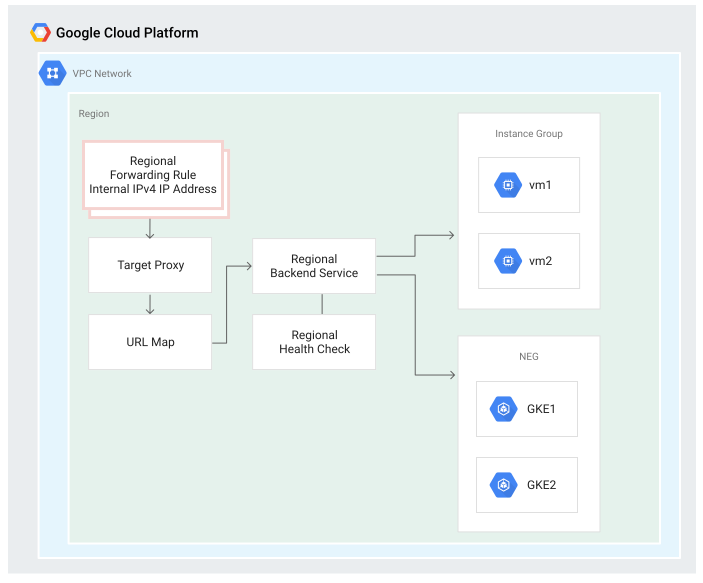](https://docs.cloud.google.com/static/load-balancing/images/internal-https-forwarding-rule.svg) Regional internal Application Load Balancer forwarding rule (click to enlarge).
For more information about internal Application Load Balancers, see the following pages:
- [Internal Application Load Balancer overview](https://docs.cloud.google.com/load-balancing/docs/l7-internal.md.txt)
- [Set up an
internal Application Load Balancer](https://docs.cloud.google.com/load-balancing/docs/l7-internal/setting-up-l7-internal)
- [Internal Application Load Balancers and connected
networks](https://docs.cloud.google.com/load-balancing/docs/l7-internal/internal-https-lb-and-other-networks)
### Internal proxy Network Load Balancer
With an internal proxy Network Load Balancer, the supported traffic types are IPv4 and
IPv6, and the supported protocol is TCP.
The scope of the forwarding rule depends on the type of load balancer:
- Each **regional internal proxy Network Load Balancer** has at least one regional internal forwarding rule. The forwarding rule specifies an internal IP address, port, and regional target TCP proxy. Clients use the IP address and port to connect to the load balancer's Envoy proxies---the forwarding rule's IP address is the IP address of the load balancer (sometimes called a virtual IP address or VIP).
- Each **cross-region internal proxy Network Load Balancer** has at least one global internal forwarding rule. The global internal forwarding rule points to the load balancer's global target TCP proxy. The global forwarding rule is configured with a regional internal IP address and associated with a regional subnet.
Internal managed forwarding rules connected to a target TCP proxy support
any port number between 1 and 65535 inclusive.
The following diagram shows how a forwarding rule fits into the
regional internal proxy Network Load Balancer architecture.
[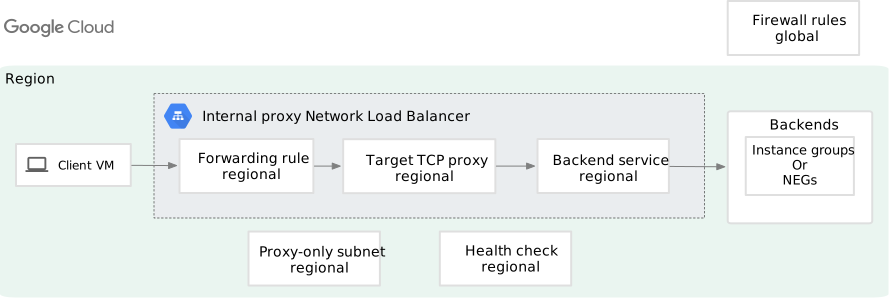](https://docs.cloud.google.com/static/load-balancing/images/int-tcp-proxy-simple.svg) Regional internal proxy Network Load Balancer forwarding rule (click to enlarge).
For more details about internal proxy Network Load Balancers, see the following pages:
- [Internal proxy Network Load Balancer
overview](https://docs.cloud.google.com/load-balancing/docs/tcp/internal-proxy)
- [Internal proxy Network Load Balancer and connected
networks](https://docs.cloud.google.com/load-balancing/docs/tcp/internal-proxy-lb-and-other-networks)
### Internal passthrough Network Load Balancer
With an internal passthrough Network Load Balancer, the supported traffic types are
[either IPv4 or IPv6](https://docs.cloud.google.com/load-balancing/docs/internal.md.txt#load_balancing_ip_address).
For information about the supported protocols, see
[Forwarding rule protocols](https://docs.cloud.google.com/load-balancing/docs/internal.md.txt#forwarding-rule-protocols).
Each internal passthrough Network Load Balancer has at least one regional internal
forwarding rule. The regional internal forwarding rules point to the load
balancer's regional internal backend service. The following diagram shows how a
forwarding rule fits into the internal passthrough Network Load Balancer architecture.
[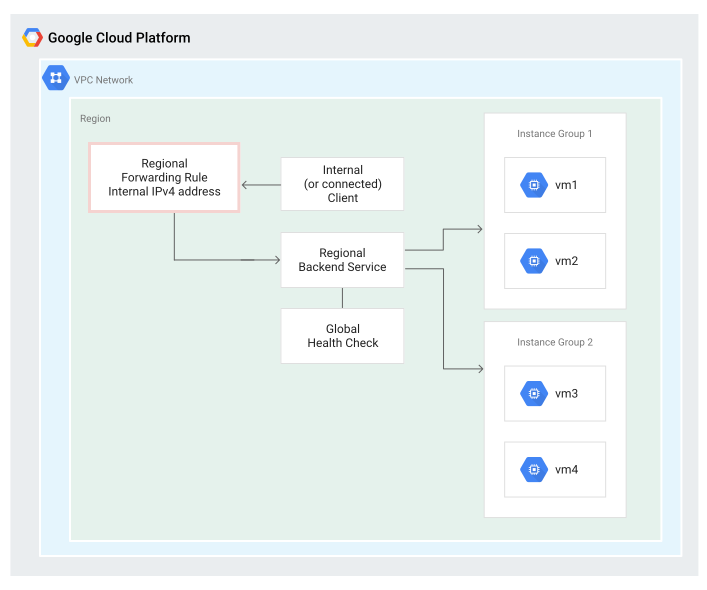](https://docs.cloud.google.com/static/load-balancing/images/internal-regional-forwarding-rule.svg) Internal passthrough Network Load Balancer forwarding rule (click to enlarge).
The following diagram shows how the load balancer components
fit within a subnet and region.
The internal forwarding rule must be defined in a region and a subnet.
The backend service only needs to correspond to that region.
[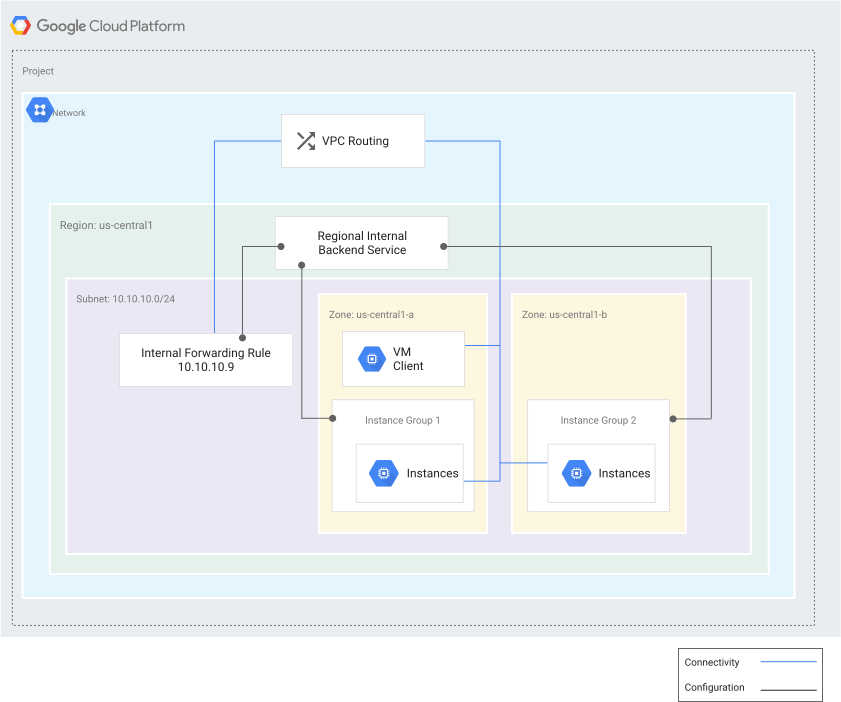](https://docs.cloud.google.com/static/load-balancing/images/ilb-high-level.svg) High-level internal passthrough Network Load Balancer example (click to enlarge).
For more information about internal passthrough Network Load Balancers, see the following pages:
- [Internal passthrough Network Load Balancer overview](https://docs.cloud.google.com/load-balancing/docs/internal.md.txt)
- [Set up an internal passthrough Network Load Balancer](https://docs.cloud.google.com/load-balancing/docs/internal/setting-up-internal.md.txt)
- [Internal passthrough Network Load Balancers and connected
networks](https://docs.cloud.google.com/load-balancing/docs/internal/internal-tcp-udp-lb-and-other-networks)
## External forwarding rules
External forwarding rules accept traffic from client systems that have internet
access, including:
- A client outside of Google Cloud
- A Google Cloud VM with an external IP address
- A Google Cloud VM without an external IP address using Cloud NAT or an instance-based NAT system
> [!NOTE]
> **Note:** For an on-premises network connected through Cloud VPN or Cloud Interconnect, use an [internal forwarding
> rule](https://docs.cloud.google.com/load-balancing/docs/forwarding-rule-concepts#internal_fr) with an internal passthrough Network Load Balancer or internal Application Load Balancer.
External forwarding rules are used by the following Google Cloud load
balancer types:
- External Application Load Balancer
- External proxy Network Load Balancer
- External passthrough Network Load Balancer
### External Application Load Balancer
For external Application Load Balancers, the forwarding rule and IP address depend on the
[load balancer mode](https://docs.cloud.google.com/load-balancing/docs/https.md.txt#load-balancer-mode), and the
Network Service Tiers that you select for the load balancer.
In an external Application Load Balancer, a forwarding rule points to a target HTTP(S) proxy.
External forwarding rules connected to a target HTTP(S) proxy support any port
number between 1 and 65535 inclusive.
- The global external Application Load Balancer supports only Premium Tier.
- Each classic Application Load Balancer can be Premium Tier or Standard Tier.
- The regional external Application Load Balancer supports both Premium and Standard Tier.
IP address and forwarding rule requirements change depending on the Network
Service Tier:
- **In Premium Tier, global external Application Load Balancers and classic Application Load Balancers** use a
global external IP address, which can be either IPv4 or IPv6, and a global
external forwarding rule. You can provide a globally accessible application
that directs end users to backends in the closest region and distributes
traffic among multiple regions. Because a global external forwarding rule uses
a single external IP address, you don't need to maintain separate DNS records
in different regions or wait for DNS changes to propagate.
You can have two different global external IP addresses pointing to the same
global external Application Load Balancer. For example, in Premium Tier, the global external IP address
for one forwarding rule can be IPv4, and the global external IP address for a
second forwarding rule can be IPv6. Both forwarding rules can point to the
same target proxy. As a result, you can provide both an IPv4 and an IPv6
address for the same external Application Load Balancer. For more information, see the [IPv6
termination](https://docs.cloud.google.com/load-balancing/docs/ipv6) documentation.
- **In Premium Tier, regional external Application Load Balancers** use a regional external IPv4 or
IPv6 address and a regional external forwarding rule.
- **In Standard Tier, regional external Application Load Balancers and
classic Application Load Balancers** use a regional external IPv4 or IPv6 ([Preview](https://cloud.google.com/products#product-launch-stages))
address and a regional external forwarding rule. A load balancer in Standard
Tier can only distribute traffic to backends within a single region.
The following diagram shows how a global forwarding rule fits into the
architecture for a global external Application Load Balancer. The same architecture also applies
to the classic Application Load Balancer in Premium Tier.
[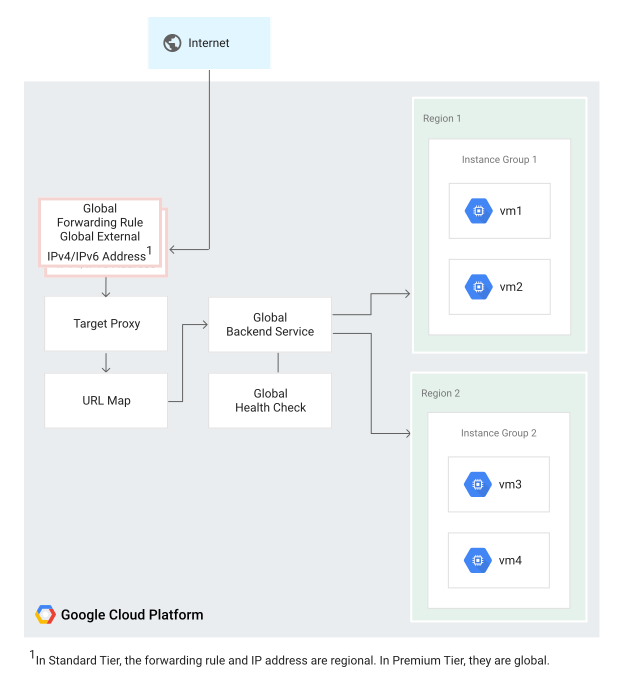](https://docs.cloud.google.com/static/load-balancing/images/https-forwarding-rule.svg) Global external Application Load Balancer forwarding rule (click to enlarge).
> [!NOTE]
> **Note** : It is possible to attach `EXTERNAL_MANAGED` backend services to `EXTERNAL` forwarding rules. However, `EXTERNAL` backend services cannot be attached to `EXTERNAL_MANAGED` forwarding rules. To take advantage of [new features available
> only with the global external Application Load Balancer](https://docs.cloud.google.com/load-balancing/docs/https#load-balancer-mode), we recommend that you migrate your existing `EXTERNAL` resources to `EXTERNAL_MANAGED` by using the migration process described at [Migrate
> resources from classic to global external Application Load Balancer](https://docs.cloud.google.com/load-balancing/docs/https/migrate-from-classic-global).
For more information about external Application Load Balancers, see the
[External Application Load Balancer overview](https://docs.cloud.google.com/load-balancing/docs/https.md.txt).
### External proxy Network Load Balancer
An external proxy Network Load Balancer offers TCP proxying capability, with optional SSL
offload. An external proxy Network Load Balancer is similar to an external Application Load Balancer because it can
terminate SSL (TLS) sessions. However, these load balancers don't support
path-based redirection like external Application Load Balancers, so they're better suited for
handling SSL for protocols other than HTTPS, such as IMAP or WebSockets over
SSL. In an external proxy Network Load Balancer, a forwarding rule points to either a TCP or an
SSL target proxy.
External proxy Network Load Balancers support both Premium Tier and Standard Tier. The
forwarding rule and IP address depend on the type of load balancer mode and the
Network Service Tiers that you select for the load balancer:
- The classic proxy Network Load Balancer can be Premium Tier or Standard Tier.
- The global external proxy Network Load Balancer supports only Premium Tier.
- The regional external proxy Network Load Balancer supports both Premium and Standard Tier.
IP address and forwarding rule requirements change depending on the Network
Service Tier:
- **In Premium Tier, global external proxy Network Load Balancers and
classic proxy Network Load Balancers** use a global external IP address, which can be
either IPv4 or IPv6, and a global external forwarding rule. You can provide a
globally accessible application that directs end users to backends in the
closest region and distributes traffic among multiple regions. Because a
global external forwarding rule uses a single external IP address, you don't
have to maintain separate DNS records in different regions or wait for DNS
changes to propagate.
It is possible to have two different global external IP addresses pointing to
the same external proxy Network Load Balancer. For example, in Premium Tier, the global
external IP address for one forwarding rule can be IPv4, and the global
external IP address for a second forwarding rule can be IPv6. Both forwarding
rules can point to the same target proxy. As a result, you can provide both an
IPv4 and an IPv6 address for the same external proxy Network Load Balancer. For more
information, see the [IPv6 termination](https://docs.cloud.google.com/load-balancing/docs/ipv6.md.txt)
documentation.
- **In Premium Tier, regional external proxy Network Load Balancers** use a regional external
IPv4 or IPv6
address and a regional external forwarding rule.
- **In Standard Tier, regional external proxy Network Load Balancers and
classic proxy Network Load Balancers** use a regional external IPv4 or IPv6 ([Preview](https://cloud.google.com/products#product-launch-stages))
address and a regional external forwarding rule. A load balancer in Standard
Tier can only distribute traffic to backends within a single region.
External forwarding rules connected to a target TCP or SSL proxy support
any port number between 1 and 65535 inclusive.
The following diagram shows how a forwarding rule fits into the
global external proxy Network Load Balancer architecture.
[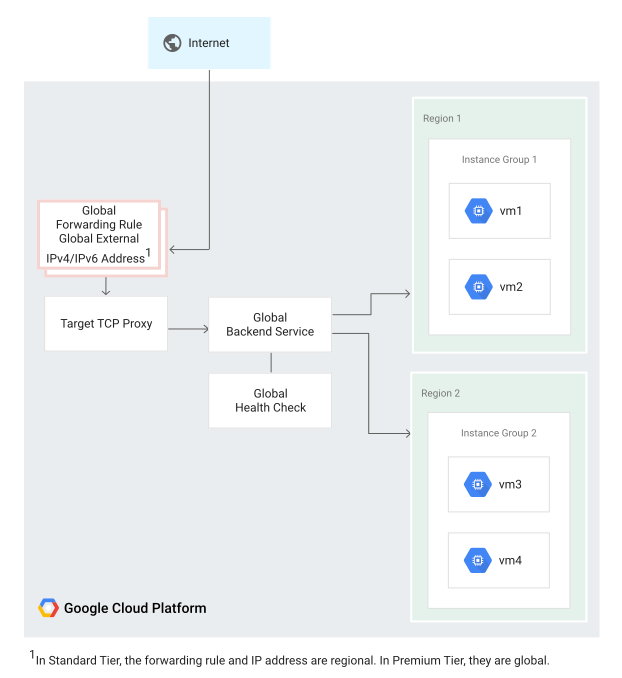](https://docs.cloud.google.com/static/load-balancing/images/tcp-forwarding-rule.svg) Global external proxy Network Load Balancer forwarding rule (click to enlarge).
For more information about external proxy Network Load Balancers, see the
[External proxy Network Load Balancer overview](https://docs.cloud.google.com/load-balancing/docs/tcp.md.txt).
For information about configuring external proxy Network Load Balancers, see
[Set up an external proxy Network Load Balancer](https://docs.cloud.google.com/load-balancing/docs/tcp/setting-up-tcp.md.txt).
### External passthrough Network Load Balancer
For external passthrough Network Load Balancers, the forwarding rule and its corresponding IP address(es)
depends on the type of the load balancer.
#### Global external passthrough Network Load Balancer
For each global external passthrough Network Load Balancer forwarding rule that you create
(a *parent* forwarding rule), Google Cloud generates
two read-only *child* forwarding rules.
The following diagram shows a global external passthrough Network Load Balancer distributing traffic to
backends in multiple Google Cloud regions. Each load balancer provides you
with two external IP addresses. Each IP address is served by disjoint
and isolated global load balancing control and data plane server
infrastructure (also known as *availability groups*, AG0 and AG1).
[](https://docs.cloud.google.com/static/load-balancing/images/global-netlb-architecture-overview.svg) A global external passthrough Network Load Balancer parent forwarding rule with two child forwarding rules for each availability group (click to enlarge).
For more information, see [Global external passthrough Network Load Balancer overview](https://docs.cloud.google.com/load-balancing/docs/network/global-networklb-architecture.md.txt).
#### Regional external passthrough Network Load Balancer
Regional external passthrough Network Load Balancers is a passthrough load balancer that distributes
traffic among backend instances in a single region.
A regional external passthrough Network Load Balancer uses a regional external forwarding rule and a regional
external IP address. The regional external IP address can be
accessed from anywhere on the internet and by Google Cloud VMs with
internet access.
For backend service-based regional external passthrough Network Load Balancers, the regional external forwarding
rule points to a [backend
service](https://docs.cloud.google.com/load-balancing/docs/network/networklb-backend-service).
Backend service-based regional external passthrough Network Load Balancers support
TCP, UDP, ESP, GRE, ICMP, and ICMPv6
traffic. For details, see [Forwarding rule protocols
for backend service-based
regional external passthrough Network Load Balancers](https://docs.cloud.google.com/load-balancing/docs/network/networklb-backend-service#forwarding-rule-protocols).
Forwarding rules for backend service-based load balancers can be
configured with [either IPv4 or IPv6
addresses](https://docs.cloud.google.com/load-balancing/docs/network/networklb-backend-service#ip-address).
Forwarding rules for backend service-based regional external passthrough Network Load Balancers support the
following advanced features:
- Direct traffic coming from a specific range of source IP addresses to a specific backend service. For more information, see [Traffic steering](https://docs.cloud.google.com/load-balancing/docs/network/networklb-backend-service.md.txt#traffic-steering).
- Distribute traffic across the load balancer's backend instances based on the weights reported by an HTTP health check using [Weighted load balancing](https://docs.cloud.google.com/load-balancing/docs/network/ext-netlb-traffic-distribution.md.txt#weighted-lb).
For target pool-based regional external passthrough Network Load Balancers, the forwarding rule points to a
[target pool](https://docs.cloud.google.com/load-balancing/docs/network/networklb-target-pools.md.txt). A target
pool-based regional external passthrough Network Load Balancer supports only TCP or UDP traffic. Forwarding rules
for target pool-based regional external passthrough Network Load Balancer support only IPv4 addresses.
For regional external IP addresses, the regional external passthrough Network Load Balancer supports both Premium Tier and Standard Tier ([Preview](https://cloud.google.com/products#product-launch-stages)).
To support backend instances in more than one region, you must create a
regional external passthrough Network Load Balancer in each region. This is the case regardless of
whether the IP address of the load balancer is in the Premium Tier or the
Standard Tier.
The following figure shows a regional external passthrough Network Load Balancer which has a regional external
forwarding rule with the IP address, `120.1.1.1`. The load balancer is serving
requests from backends in the `us-central1` region.
[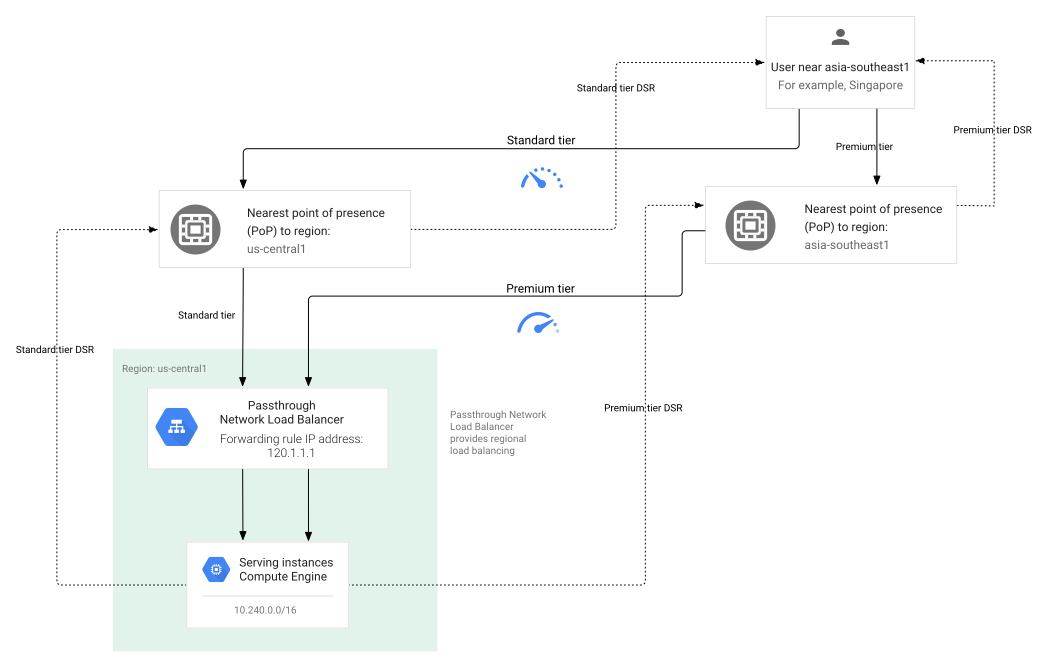](https://docs.cloud.google.com/static/load-balancing/images/network-load-balancer-1.svg) Regional external passthrough Network Load Balancer example (click to enlarge).
For more information about regional external passthrough Network Load Balancers, see the
[Regional external passthrough Network Load Balancer overview](https://docs.cloud.google.com/load-balancing/docs/network).
For information about configuring regional external passthrough Network Load Balancers, see one of the following:
- [Setting up a regional external passthrough Network Load Balancer with a backend
service (TCP or UDP traffic only)](https://docs.cloud.google.com/load-balancing/docs/network/setting-up-network-backend-service)
- [Setting up a regional external passthrough Network Load Balancer with a backend
service (multiple protocols)](https://docs.cloud.google.com/load-balancing/docs/network/setting-up-networklb-multiple-protocols)
- [Setting up a regional external passthrough Network Load Balancer with a target
pool](https://docs.cloud.google.com/load-balancing/docs/network/setting-up-network)
## How Network Service Tiers affect load balancers
In [Network Service Tiers](https://docs.cloud.google.com/network-tiers/docs/overview.md.txt), the distinction between
Standard Tier and Premium Tier depends on how far traffic is routed over the
public internet:
- **Standard Tier**: Offloads traffic as close as possible to the data center.
This means that traffic is typically routed over the public internet for a
longer distance, compared with Premium Tier.
- **Premium Tier**: Routes traffic through Google's production network as far as
possible before leaving Google Cloud to get to the end user.
| Load balancer | Supported Network Service Tiers |
|---|---|
| - Global external Application Load Balancer - Global external proxy Network Load Balancer | These load balancers are always Premium Tier. Their backend services, forwarding rules, and IP addresses are global. |
| - Classic Application Load Balancer - Classic proxy Network Load Balancer | These load balancers can be Premium Tier or Standard Tier. With Premium Tier, they are global. Their forwarding rules, IP addresses, and backend services are global. In Standard Tier, these load balancers are effectively regional. Their backend services *are global*, but their forwarding rules and IP addresses are regional. |
| - Regional external Application Load Balancer - Regional external proxy Network Load Balancer | These load balancers can be Premium or Standard Tier. Their backend services, forwarding rules, and IP addresses are always regional. |
| - Cross-region internal Application Load Balancer - Regional internal Application Load Balancer - Regional internal proxy Network Load Balancer - Cross-region internal proxy Network Load Balancer - Internal passthrough Network Load Balancer | These load balancers support traffic within a VPC network (including networks connected to it). Traffic is Premium Tier because it is within a VPC network. |
| Global external passthrough Network Load Balancer | These load balancers can be configured only in Premium Tier. |
| Regional external passthrough Network Load Balancer | These load balancers can be either Premium or Standard Tier. Only the [backend service-based regional external passthrough Network Load Balancers](https://docs.cloud.google.com/load-balancing/docs/network/networklb-backend-service.md.txt) can handle IPv6 traffic. |
## IP protocol specifications
Each forwarding rule has an associated IP protocol that the rule will serve.
The default protocol value is `TCP`.
> [!NOTE]
> **Note:**
>
> - For global external passthrough Network Load Balancers and regional external passthrough Network Load Balancers, you can use the `L3_DEFAULT` forwarding rule protocol to load balance TCP, UDP, ESP, GRE, ICMP, and ICMPv6 traffic.
> - For internal passthrough Network Load Balancers, you can use the `L3_DEFAULT` forwarding rule protocol to load balance the TCP, UDP, ICMP, ICMPv6, SCTP, ESP, AH, and GRE traffic.
| Product | Load balancing scheme | IP protocol options |
|---|---|---|
| Global external Application Load Balancer | EXTERNAL_MANAGED | TCP |
| Classic Application Load Balancer | EXTERNAL | TCP |
| Regional external Application Load Balancer | EXTERNAL_MANAGED | TCP |
| Cross-region internal Application Load Balancer | INTERNAL_MANAGED | TCP |
| Regional internal Application Load Balancer | INTERNAL_MANAGED | TCP |
| Global external proxy Network Load Balancer | EXTERNAL_MANAGED | TCP or SSL |
| Classic proxy Network Load Balancer | EXTERNAL | TCP or SSL |
| Regional external proxy Network Load Balancer | EXTERNAL_MANAGED | TCP |
| Regional internal proxy Network Load Balancer | INTERNAL_MANAGED | TCP |
| Cross-region internal proxy Network Load Balancer | INTERNAL_MANAGED | TCP |
| Global external passthrough Network Load Balancer | EXTERNAL_PASSTHROUGH | TCP, UDP, or [L3_DEFAULT](https://docs.cloud.google.com/load-balancing/docs/network/global-networklb-architecture.md.txt#forwarding-rule-protocols) |
| Regional external passthrough Network Load Balancer | EXTERNAL | TCP, UDP, or [L3_DEFAULT](https://docs.cloud.google.com/load-balancing/docs/network/networklb-backend-service.md.txt#forwarding-rule-protocols) |
| Internal passthrough Network Load Balancer | INTERNAL | TCP, UDP, or [L3_DEFAULT](https://docs.cloud.google.com/load-balancing/docs/internal.md.txt#forwarding_rule) |
| Cloud Service Mesh | INTERNAL_SELF_MANAGED | TCP |
## IP address specifications
The forwarding rule must have an IP address that your customers use to reach
your load balancer. The IP address can be static or ephemeral.
Use [reserved static IP addresses](https://docs.cloud.google.com/vpc/docs/reserve-static-external-ip-address.md.txt)
if you need to keep the
addresses associated with your project for reuse after you delete a forwarding
rule or if you need multiple forwarding rules to reference the same IP address.
An ephemeral IP address remains constant while the forwarding rule exists.
When you choose an ephemeral IP address, Google Cloud associates an IP
address with your load balancer's forwarding rule. If you need to delete the
forwarding rule and re-add it, the forwarding rule might receive a new IP
address.
Depending on the load balancer type, the IP address can have various
attributes. The following table summarizes the valid IP address configurations,
based on the load balancing scheme and the target of the forwarding rule.
| Product and scheme | Target | IP address type | IP address scope | IP address tier | Reservable IP address | Notes |
|---|---|---|---|---|---|---|
| Global external Application Load Balancer EXTERNAL_MANAGED | Target HTTP proxy Target HTTPS proxy | External | Global | Premium Tier: Global external IP address and forwarding rule | Yes, optional | IPv6 available |
| Classic Application Load Balancer EXTERNAL^\*^ | Target HTTP proxy Target HTTPS proxy | External | Regional or global, matching the forwarding rule | Premium Tier: Global external IPv4 or IPv6 address and forwarding rule
Standard Tier: Regional external IPv4 address and forwarding rule | Yes, optional | IPv6 available with a global external address (Premium Tier) |
| Regional external Application Load Balancer EXTERNAL_MANAGED | Target HTTP proxy Target HTTPS proxy | External | Regional | Premium Tier or Standard Tier | Yes, optional | External IPv6 addresses are supported in Premium Tier |
| Cross-region internal Application Load Balancer INTERNAL_MANAGED | Target HTTP proxy Target HTTPS proxy | Internal | Regional | Premium Tier | Yes, optional | Global forwarding rule is configured with a regional IPv4 or IPv6 address within the range of the associated regional subnet. This is different from the global external Application Load Balancer where the global forwarding rule has a global anycast IP address. For IPv6 address requirements, see [IPv6 address format](https://docs.cloud.google.com/load-balancing/docs/ipv6.md.txt#ipv6-address-format). |
| Regional internal Application Load Balancer INTERNAL_MANAGED | Target HTTP proxy Target HTTPS proxy | Internal | Regional | Premium Tier | Yes, optional | Forwarding rule address must be within the primary IPv4 address range of the associated subnet. For IPv6 address requirements, see [IPv6 address format](https://docs.cloud.google.com/load-balancing/docs/ipv6.md.txt#ipv6-address-format). |
| Global external proxy Network Load Balancer EXTERNAL_MANAGED | Target SSL proxy Target TCP proxy | External | Global | Premium Tier | Yes, optional | IPv6 available |
| Classic proxy Network Load Balancer EXTERNAL | Target SSL proxy Target TCP proxy | External | Regional or global, matching the forwarding rule | Premium Tier: Global external IPv4 or IPv6 address and forwarding rule
Standard Tier: Regional external IPv4 address and forwarding rule | Yes, optional | IPv6 available with a global external address (Premium Tier) |
| Regional external proxy Network Load Balancer EXTERNAL_MANAGED | Target TCP proxy | External | Regional | Premium Tier or Standard Tier | Yes, optional | External IPv6 addresses are supported in Premium Tier |
| Regional internal proxy Network Load Balancer INTERNAL_MANAGED | Target TCP proxy | Internal | Regional | Premium Tier | Yes, optional | Forwarding rule address must be within the primary IPv4 address range of the associated subnet. For IPv6 address requirements, see [IPv6 address format](https://docs.cloud.google.com/load-balancing/docs/ipv6.md.txt#ipv6-address-format). |
| Cross-region internal proxy Network Load Balancer INTERNAL_MANAGED | Target TCP proxy | Internal | Regional | Premium Tier | Yes, optional | Forwarding rule address must be within the primary IPv4 address range of the associated subnet. For IPv6 address requirements, see [IPv6 address format](https://docs.cloud.google.com/load-balancing/docs/ipv6.md.txt#ipv6-address-format). |
| Global external passthrough Network Load Balancer EXTERNAL_PASSTHROUGH | Backend service | External | Global | Premium (IPv4 or IPv6 addresses) | Yes, optional | Each parent forwarding rule is assigned two IP addresses. Each IP address is served from a distinct load balancing control and data plane server infrastructure (availability groups `AG0` and `AG1`) for high availability. Both IP addresses must have the same IP version---IPv4 or IPv6. For IPv6 traffic, the forwarding rule must reference a `/96` range of external IPv6 addresses from a Google-owned IP address pool. |
| Regional external passthrough Network Load Balancer EXTERNAL | Backend service Target pool | External | Regional | Standard (IPv4 or IPv6 addresses) Premium (IPv4 or IPv6 addresses) | Yes, optional | IPv6 support requires a backend service-based regional external passthrough Network Load Balancer. Forwarding rule IPv6 address must be within a subnet's external IPv6 address range. The external IPv6 address is sourced from the subnet's external IPv6 address range. Your forwarding rule's network tier must match the IPv6 network tier of the subnet that the forwarding rule belongs to. |
| Internal passthrough Network Load Balancer INTERNAL | Backend service | Internal | Regional | Premium Tier | Yes, optional | For IPv4 traffic, the forwarding rule must reference an IPv4 address from the primary IPv4 subnet range. For IPv6 traffic, the forwarding rule must reference a `/96` range of internal IPv6 addresses from a dual-stack or single-stack (IPv6-only) subnet's `/64` internal IPv6 address range. |
| Cloud Service Mesh INTERNAL_SELF_MANAGED | Target HTTP proxy Target gRPC proxy | Internal | Global | Not applicable | No | 0.0.0.0, 127.0.0.1, or any RFC 1918 address is allowed |
| Classic VPN EXTERNAL | See the [Classic VPN documentation](https://docs.cloud.google.com/network-connectivity/docs/vpn/concepts/classic-topologies.md.txt) | External | Regional | Cloud VPN doesn't have Network Service Tiers | Yes, required | IPv6 not supported |
^\*^ It is possible to attach `EXTERNAL_MANAGED` backend services to `EXTERNAL` forwarding rules. However, `EXTERNAL` backend services cannot be attached to `EXTERNAL_MANAGED` forwarding rules. To take advantage of [new features available
only with the global external Application Load Balancer](https://docs.cloud.google.com/load-balancing/docs/https#load-balancer-mode), we recommend that you migrate your existing `EXTERNAL` resources to `EXTERNAL_MANAGED` by using the migration process described at [Migrate
resources from classic to global external Application Load Balancer](https://docs.cloud.google.com/load-balancing/docs/https/migrate-from-classic-global).
### Multiple forwarding rules with a common IP address
Two or more forwarding rules can use the same IP address if they adhere to
the following rules:
- **Unique protocol and port** : No two forwarding rules can consume the same
protocol and port combinations. If multiple forwarding rules configure a
particular IP protocol (`TCP` or `UDP`), their configured ports must be
unique. Additionally, passthrough Network Load Balancers can configure a single forwarding rule
using `L3_DEFAULT` protocol option, which serves as a *catch-all* rule that
can coexist with protocol specific forwarding rules.
- **Same scope**: The forwarding rules and IP address must all be regional
or all be global. (An exception exists for cross-region internal Application Load Balancers and
cross-region internal proxy Network Load Balancers because they use global internal forwarding
rules referencing regional internal IP addresses.)
- **Same Network Service Tiers**: Applicable only to external forwarding
rules. The forwarding rules and IP address must use the same
Network Service Tiers.
- **Load balancing scheme**: The forwarding rules must have the same load
balancing scheme, with the following exceptions:
- The same regional external IP address can be used by forwarding rules
for the following load balancers:
- Regional external passthrough Network Load Balancers (`EXTERNAL` load balancing scheme)
- Regional external Application Load Balancers (`EXTERNAL_MANAGED`)
- Regional external proxy Network Load Balancers (`EXTERNAL_MANAGED`)
- The same regional internal IP address with purpose `SHARED_LOADBALANCER_VIP`
can be used by forwarding rules for the following load balancers:
- Internal passthrough Network Load Balancers (`INTERNAL` load balancing scheme)
- Regional internal Application Load Balancers (`INTERNAL_MANAGED`)
- Regional internal proxy Network Load Balancers (`INTERNAL_MANAGED`)
Examples:
- Two global external passthrough Network Load Balancer forwarding rules can share the same IP address pair
as long as they use unique protocol and port combinations. For example:
- one forwarding rule for `TCP:80` and another for `UDP:80`, or
- one forwarding rule for `TCP:79` and another for `TCP:80`.
- You can share an IP address between a regional external passthrough Network Load Balancer and a
regional external Application Load Balancer---for example, a forwarding rule for the
regional external passthrough Network Load Balancer using
the `L3_DEFAULT` protocol and another forwarding rule for the
regional external Application Load Balancer using `TCP:80`.
- You can use the same global external IP address for an external Application Load Balancer
(HTTP and HTTPS).
If the forwarding rule's load balancing scheme is `INTERNAL_SELF_MANAGED` for Cloud Service Mesh, it must have a unique IP address.
For more information, see the following:
- For internal Application Load Balancers, see [Use a common IP address between multiple internal
forwarding rules](https://docs.cloud.google.com/load-balancing/docs/l7-internal/setting-up-l7-internal#common_ip)
- For internal proxy Network Load Balancers, see [Forwarding rules and IP
addresses](https://docs.cloud.google.com/load-balancing/docs/tcp/internal-proxy#forwarding-rule)
- For global external passthrough Network Load Balancers, see [Multiple forwarding rules](https://docs.cloud.google.com/load-balancing/docs/network/global-networklb-architecture.md.txt#multiple-forwarding-rules).
- For regional external passthrough Network Load Balancers, see [Multiple forwarding rules](https://docs.cloud.google.com/load-balancing/docs/network/networklb-backend-service.md.txt#multiple-forwarding-rules).
- For internal passthrough Network Load Balancers, see [Internal passthrough Network Load Balancer forwarding rules that use a
common IP address](https://docs.cloud.google.com/load-balancing/docs/internal/multiple-forwarding-rules-same-ip)
## Port specifications
The following table summarizes the valid port configurations, based
on the load balancing scheme and the target of the forwarding rule.
| Product | Load balancing scheme | Target | Port requirements |
|---|---|---|---|
| Global external Application Load Balancer Regional external Application Load Balancer | EXTERNAL_MANAGED | Target HTTP proxy Target HTTPS proxy | Can reference exactly one port from 1-65535 |
| Classic Application Load Balancer | EXTERNAL | Target HTTP proxy Target HTTPS proxy | Can reference exactly one port from 1-65535 |
| Cross-region internal Application Load Balancer Regional internal Application Load Balancer | INTERNAL_MANAGED | Target HTTP proxy Target HTTPS proxy | Can reference exactly one port from 1-65535 |
| Global external proxy Network Load Balancer | EXTERNAL_MANAGED | Target TCP proxy Target SSL proxy | Can reference exactly one port from 1-65535 |
| Classic proxy Network Load Balancer | EXTERNAL | Target TCP proxy Target SSL proxy | Can reference exactly one port from 1-65535 |
| Regional external proxy Network Load Balancer | EXTERNAL_MANAGED | Target TCP proxy | Can reference exactly one port from 1-65535 |
| Regional internal proxy Network Load Balancer | INTERNAL_MANAGED | Target TCP proxy | Can reference exactly one port from 1-65535 |
| Cross-region internal proxy Network Load Balancer | INTERNAL_MANAGED | Target TCP proxy | Can reference exactly one port from 1-65535 |
| Global external passthrough Network Load Balancer | EXTERNAL_PASSTHROUGH | Backend service | If the forwarding rule protocol is `TCP` or `UDP`, you can configure: - A list of up to five (contiguous or non-contiguous) ports, or, - A single port range (contiguous), or, - All ports. To configure all ports, either set `--ports=ALL` using the `gcloud` command line tool, or set `allPorts` to `True` using the API.
If the forwarding rule protocol is `L3_DEFAULT`, you must configure all ports. - To configure all ports, either set `--ports=ALL` using the `gcloud` command line tool, or set `allPorts` to `True` using the API. |
| Regional external passthrough Network Load Balancer | EXTERNAL | Backend service | If the forwarding rule protocol is `TCP` or `UDP`, you can configure: - A list of up to five (contiguous or non-contiguous) ports, or, - A single port range (contiguous), or, - All ports. To configure all ports, either set `--ports=ALL` using the `gcloud` command line tool, or set `allPorts` to `True` using the API.
If the forwarding rule protocol is `L3_DEFAULT`, you must configure all ports. - To configure all ports, either set `--ports=ALL` using the `gcloud` command line tool, or set `allPorts` to `True` using the API. |
| Regional external passthrough Network Load Balancer | EXTERNAL | Target pool | Must be a single port range (contiguous) Specifying a port is optional for forwarding rules used with target pool-based regional external passthrough Network Load Balancers. If no port is specified, traffic from all ports (1-65535) is forwarded. |
| Internal passthrough Network Load Balancer | INTERNAL | Backend service | If the forwarding rule protocol is `TCP` or `UDP`, you can configure: - A list of up to five (contiguous or non-contiguous) ports, or, - A single port range (contiguous), or, - All ports. To configure all ports, either set `--ports=ALL` using the `gcloud` command line tool, or set `allPorts` to `True` using the API.
If the forwarding rule protocol is `L3_DEFAULT`, you must configure all ports. - To configure all ports, either set `--ports=ALL` using the `gcloud` command line tool, or set `allPorts` to `True` using the API. |
| Cloud Service Mesh | INTERNAL_SELF_MANAGED | Target HTTP proxy Target HTTPS proxy | Must be a single value. Within a VPC network, no two forwarding rules for Cloud Service Mesh can have the same IP address and port specification. |
| Classic VPN | EXTERNAL | Target VPN gateway | Can reference exactly one of the following ports: 500, 4500 |
## Telemetry policies
> [!WARNING]
>
> **Preview
> --- Telemetry policies for forwarding rules**
>
>
> This feature is
>
> subject to the "Pre-GA Offerings Terms" in the General Service Terms section of the
> [Service Specific
> Terms](https://docs.cloud.google.com/terms/service-terms#1).
>
> Pre-GA features are available "as is" and might have limited support.
>
> For more information, see the
> [launch stage descriptions](https://cloud.google.com/products/#product-launch-stages).
A telemetry policy is a Network Services API resource (`TelemetryPolicy`) that
configures distributed tracing with Cloud Trace for the forwarding rules
that it targets. Telemetry policies are separate from the load balancer's
routing configuration, and a single telemetry policy can target multiple
forwarding rules.
Telemetry policies support forwarding rules for the following load balancers:
- Global external Application Load Balancer
- Regional external Application Load Balancer
- Regional internal Application Load Balancer
- Cross-region internal Application Load Balancer
For more information, see
[Distributed tracing overview](https://docs.cloud.google.com/load-balancing/docs/distributed-tracing-overview.md.txt).
## IAM conditions
With Identity and Access Management (IAM) conditions, you can set conditions
to control which roles are granted to principals. This feature lets you grant
permissions to principals if configured conditions are met.
An IAM condition checks the load balancing scheme (for example,
`INTERNAL` or `EXTERNAL`) in the forwarding rule and allows (or disallows)
creation of the forwarding rule. If a principal tries to create a forwarding
rule without permission, an error message appears.
For more information, see [IAM
Conditions](https://docs.cloud.google.com/load-balancing/docs/access-control).
## Use forwarding rules
If you're using the Google Cloud console to set up a load balancer, the
forwarding rule is set up implicitly as part of your frontend configuration. If
you're using the Google Cloud CLI or the API, you need to configure the
forwarding rule explicitly.
After creating a forwarding rule, you can make limited changes to it. For
example, after a forwarding rule is defined, you can't change its IP address,
port number, or protocol. However, you can update certain settings for
forwarding rules by editing the frontend configuration of the load balancer they
are associated with. Use either the gcloud CLI or the API to make any other
changes.
### Change the IP address of a forwarding rule
You cannot change the IP address of an existing forwarding rule.
To update the IP address of a forwarding rule, you must delete
and recreate the rule as follows:
1. Delete the forwarding rule using the
[`gcloud compute forwarding-rules delete` command](https://docs.cloud.google.com/sdk/gcloud/reference/compute/forwarding-rules/delete.md.txt)
or the [`forwardingRules.delete` method](https://docs.cloud.google.com/compute/docs/reference/rest/v1/forwardingRules/delete.md.txt).
2. Recreate the forwarding rule using the
[`gcloud compute forwarding-rules create` command](https://docs.cloud.google.com/sdk/gcloud/reference/compute/forwarding-rules/create.md.txt)
or the [`forwardingRules.insert` method](https://docs.cloud.google.com/compute/docs/reference/rest/v1/forwardingRules/insert.md.txt).
### APIs
For descriptions of the properties and methods available to you when working
with forwarding rules through the REST API, see the following:
- Global: [globalForwardingRules](https://docs.cloud.google.com/compute/docs/reference/rest/v1/globalForwardingRules.md.txt)
- Regional: [forwardingRules](https://docs.cloud.google.com/compute/docs/reference/rest/v1/forwardingRules.md.txt)
### Google Cloud CLI
For the gcloud CLI reference documentation, see the following:
[gcloud compute forwarding-rules](https://docs.cloud.google.com/sdk/gcloud/reference/compute/forwarding-rules)
- Global: `--global`
- Regional: `--region=[REGION]`
## What's next
- To learn more about protocol forwarding, see [Protocol forwarding
overview](https://docs.cloud.google.com/load-balancing/docs/protocol-forwarding).