A backend service defines how Cloud Load Balancing distributes traffic.
The backend service configuration contains a set of values, such as the
protocol used to connect to backends, various distribution and session
settings, health checks, and timeouts. These settings provide fine-grained
control over how your load balancer behaves. To get you started,
most of the settings have default values that allow for fast
configuration. A backend service is either global or
regional in scope.
Load balancers, Envoy proxies, and proxyless gRPC clients use the configuration
information in the backend service resource to do the following:
- Direct traffic to the correct *backends*, which are instance groups or network endpoint groups (NEGs).
- Distribute traffic according to a *balancing mode*, which is a setting for each backend.
- Determine which [health check](https://docs.cloud.google.com/load-balancing/docs/backend-service.md.txt#health-checks) is monitoring the health of the backends.
- Specify *session affinity*.
- Determine whether other services are enabled, including the following services that are only available for [certain load
balancers](https://docs.cloud.google.com/load-balancing/docs/features):
- Cloud CDN
- Google Cloud Armor security policies
- Identity-Aware Proxy
- Designate global and regional backend services as a service in [App Hub applications](https://docs.cloud.google.com/app-hub/docs/overview.md.txt).
You set these values when you create a backend service or add a backend to the
backend service.
> [!NOTE]
> **Note:** If you're using either the global external Application Load Balancer or the classic Application Load Balancer, and your backends serve *static* content, consider using backend buckets instead of backend services. See [backend buckets for global external Application Load Balancer](https://docs.cloud.google.com/load-balancing/docs/https/setup-global-ext-https-buckets.md.txt) or [backend buckets for classic Application Load Balancer](https://docs.cloud.google.com/load-balancing/docs/https/ext-load-balancer-backend-buckets.md.txt).
The following table summarizes which load balancers use backend services. The
product that you are using also determines the maximum number of backend
services, the scope of a backend service, the type of backends supported, and the
backend service's *load balancing scheme*. The load balancing scheme is an
identifier that Google uses to classify forwarding rules and backend services. Each
load balancing product uses one load balancing scheme for its forwarding rules
and backend services. Some schemes are shared among products.
| Product | Maximum number of backend services | Scope of backend service | Supported backend types | Load balancing scheme |
|---|---|---|---|---|
| Global external Application Load Balancer | Multiple | Global | Each backend service supports one of the following backend combinations: - All instance group backends: One or more managed, unmanaged, or a combination of managed and unmanaged instance group backends [^1^](https://docs.cloud.google.com/load-balancing/docs/backend-service.md.txt#dual-stack) - All zonal NEGs: One or more `GCE_VM_IP_PORT` type zonal NEGs[^1^](https://docs.cloud.google.com/load-balancing/docs/backend-service.md.txt#dual-stack) - All hybrid connectivity NEGs: One or more `NON_GCP_PRIVATE_IP_PORT` type NEGs - A combination of zonal and hybrid NEGs: `GCE_VM_IP_PORT` and `NON_GCP_PRIVATE_IP_PORT` type NEGs [^2^](https://docs.cloud.google.com/load-balancing/docs/backend-service.md.txt#gke-mixed-negs) - All serverless NEGs: One or more App Engine, Cloud Run, or Cloud Run functions resources - One global internet NEG for an external backend - Private Service Connect NEGs: - Google APIs: a single Private Service Connect NEG - Managed services: one or more Private Service Connect NEGs | EXTERNAL_MANAGED |
| Classic Application Load Balancer | Multiple | Global[^3^](https://docs.cloud.google.com/load-balancing/docs/backend-service.md.txt#bes-global-all-tiers) | Each backend service supports one of the following backend combinations: - All instance group backends: One or more managed, unmanaged, or a combination of managed and unmanaged instance group backends - All zonal NEGs: One or more `GCE_VM_IP_PORT` type zonal NEGs - All hybrid connectivity NEGs: One or more `NON_GCP_PRIVATE_IP_PORT` type NEGs - A combination of zonal and hybrid NEGs: `GCE_VM_IP_PORT` and `NON_GCP_PRIVATE_IP_PORT` type NEGs [^2^](https://docs.cloud.google.com/load-balancing/docs/backend-service.md.txt#gke-mixed-negs) - All serverless NEGs: One or more App Engine, Cloud Run, or Cloud Run functions resources - One global internet NEG for an external backend | EXTERNAL^4^ |
| Regional external Application Load Balancer | Multiple | Regional | Each backend service supports one of the following backend combinations: - All instance group backends: One or more managed, unmanaged, or a combination of managed and unmanaged instance group backends [^1^](https://docs.cloud.google.com/load-balancing/docs/backend-service.md.txt#dual-stack) - All zonal NEGs: One or more `GCE_VM_IP_PORT` type zonal NEGs [^1^](https://docs.cloud.google.com/load-balancing/docs/backend-service.md.txt#dual-stack) - All hybrid connectivity NEGs: One or more `NON_GCP_PRIVATE_IP_PORT` type NEGs - A combination of zonal and hybrid NEGs: `GCE_VM_IP_PORT` and `NON_GCP_PRIVATE_IP_PORT` type NEGs [^2^](https://docs.cloud.google.com/load-balancing/docs/backend-service.md.txt#gke-mixed-negs) - A single serverless NEG (for Cloud Run or Cloud Run functions 2nd gen only) - A single Private Service Connect NEG - All regional internet NEGs for an external backend - All published service backends ([Preview](https://cloud.google.com/products#product-launch-stages)) | EXTERNAL_MANAGED |
| Cross-region internal Application Load Balancer | Multiple | Global | Each backend service supports one of the following backend combinations: - All instance group backends: One or more managed, unmanaged, or a combination of managed and unmanaged instance group backends [^1^](https://docs.cloud.google.com/load-balancing/docs/backend-service.md.txt#dual-stack) - All zonal NEGs: One or more `GCE_VM_IP_PORT` type zonal NEGs [^1^](https://docs.cloud.google.com/load-balancing/docs/backend-service.md.txt#dual-stack) - All hybrid connectivity NEGs: One or more `NON_GCP_PRIVATE_IP_PORT` type NEGs - A combination of zonal and hybrid NEGs: `GCE_VM_IP_PORT` and `NON_GCP_PRIVATE_IP_PORT` type NEGs [^2^](https://docs.cloud.google.com/load-balancing/docs/backend-service.md.txt#gke-mixed-negs) - A single serverless NEG (for Cloud Run or Cloud Run functions 2nd gen only) - Private Service Connect NEGs: - Google APIs: a single Private Service Connect NEG - Managed services: one or more Private Service Connect NEGs | INTERNAL_MANAGED |
| Regional internal Application Load Balancer | Multiple | Regional | Each backend service supports one of the following backend combinations: - All instance group backends: One or more managed, unmanaged, or a combination of managed and unmanaged instance group backends [^1^](https://docs.cloud.google.com/load-balancing/docs/backend-service.md.txt#dual-stack) - All zonal NEGs: One or more `GCE_VM_IP_PORT` type zonal NEGs [^1^](https://docs.cloud.google.com/load-balancing/docs/backend-service.md.txt#dual-stack) - All hybrid connectivity NEGs: One or more `NON_GCP_PRIVATE_IP_PORT` type NEGs - A combination of zonal and hybrid NEGs: `GCE_VM_IP_PORT` and `NON_GCP_PRIVATE_IP_PORT` type NEGs [^2^](https://docs.cloud.google.com/load-balancing/docs/backend-service.md.txt#gke-mixed-negs) - A single serverless NEG (for Cloud Run or Cloud Run functions 2nd gen only) - A single Private Service Connect NEG - All regional internet NEGs for an external backend - All published service backends ([Preview](https://cloud.google.com/products#product-launch-stages)) | INTERNAL_MANAGED |
| Global external proxy Network Load Balancer | 1 | Global[^3^](https://docs.cloud.google.com/load-balancing/docs/backend-service.md.txt#bes-global-all-tiers) | The backend service supports one of the following backend combinations: - All instance group backends: One or more managed, unmanaged, or a combination of managed and unmanaged instance group backends [^1^](https://docs.cloud.google.com/load-balancing/docs/backend-service.md.txt#dual-stack) - All zonal NEGs: One or more `GCE_VM_IP_PORT` type zonal NEGs[^1^](https://docs.cloud.google.com/load-balancing/docs/backend-service.md.txt#dual-stack) - All hybrid connectivity NEGs: One or more `NON_GCP_PRIVATE_IP_PORT` type NEGs - A combination of zonal and hybrid NEGs: `GCE_VM_IP_PORT` and `NON_GCP_PRIVATE_IP_PORT` type NEGs [^2^](https://docs.cloud.google.com/load-balancing/docs/backend-service.md.txt#gke-mixed-negs) - Private Service Connect NEGs: - Google APIs: a single Private Service Connect NEG - Managed services: one or more Private Service Connect NEGs | EXTERNAL_MANAGED |
| Classic proxy Network Load Balancer | 1 | Global[^3^](https://docs.cloud.google.com/load-balancing/docs/backend-service.md.txt#bes-global-all-tiers) | The backend service supports one of the following backend combinations: - All instance group backends: One or more managed, unmanaged, or a combination of managed and unmanaged instance group backends - All zonal NEGs: One or more `GCE_VM_IP_PORT` type zonal NEGs - All hybrid connectivity NEGs: One or more `NON_GCP_PRIVATE_IP_PORT` type NEGs - A combination of zonal and hybrid NEGs: `GCE_VM_IP_PORT` and `NON_GCP_PRIVATE_IP_PORT` type NEGs [^2^](https://docs.cloud.google.com/load-balancing/docs/backend-service.md.txt#gke-mixed-negs) | EXTERNAL |
| Regional external proxy Network Load Balancer | Without [TLS routes](https://cloud.google.com/load-balancing/docs/tcp#tls-routes): 1 With [TLS routes](https://cloud.google.com/load-balancing/docs/tcp#tls-routes): Multiple | Regional | The backend service supports one of the following backend combinations: - All instance group backends: One or more managed, unmanaged, or a combination of managed and unmanaged instance group backends [^1^](https://docs.cloud.google.com/load-balancing/docs/backend-service.md.txt#dual-stack) - All zonal NEGs: One or more `GCE_VM_IP_PORT` type zonal NEGs [^1^](https://docs.cloud.google.com/load-balancing/docs/backend-service.md.txt#dual-stack) - All hybrid connectivity NEGs: One or more `NON_GCP_PRIVATE_IP_PORT` type NEGs - A combination of zonal and hybrid NEGs: `GCE_VM_IP_PORT` and `NON_GCP_PRIVATE_IP_PORT` type NEGs - All regional internet NEGs for an external backend - A single Private Service Connect NEG - All published service backends ([Preview](https://cloud.google.com/products#product-launch-stages)) | EXTERNAL_MANAGED |
| Regional internal proxy Network Load Balancer | Without [TLS routes](https://cloud.google.com/load-balancing/docs/tcp#tls-routes): 1 With [TLS routes](https://cloud.google.com/load-balancing/docs/tcp#tls-routes): Multiple | Regional | The backend service supports one of the following backend combinations: - All instance group backends: One or more managed, unmanaged, or a combination of managed and unmanaged instance group backends [^1^](https://docs.cloud.google.com/load-balancing/docs/backend-service.md.txt#dual-stack) - All zonal NEGs: One or more `GCE_VM_IP_PORT` type zonal NEGs [^1^](https://docs.cloud.google.com/load-balancing/docs/backend-service.md.txt#dual-stack) - All hybrid connectivity NEGs: One or more `NON_GCP_PRIVATE_IP_PORT` type NEGs - A combination of zonal and hybrid NEGs: `GCE_VM_IP_PORT` and `NON_GCP_PRIVATE_IP_PORT` type NEGs - All regional internet NEGs for an external backend - A single Private Service Connect NEG - All published service backends ([Preview](https://cloud.google.com/products#product-launch-stages)) | INTERNAL_MANAGED |
| Cross-region internal proxy Network Load Balancer | Without [TLS routes](https://cloud.google.com/load-balancing/docs/tcp#tls-routes): 1 With [TLS routes](https://cloud.google.com/load-balancing/docs/tcp#tls-routes): Multiple | Global | The backend service supports one of the following backend combinations: - All instance group backends: One or more managed, unmanaged, or a combination of managed and unmanaged instance group backends [^1^](https://docs.cloud.google.com/load-balancing/docs/backend-service.md.txt#dual-stack) - All zonal NEGs: One or more `GCE_VM_IP_PORT` type zonal NEGs [^1^](https://docs.cloud.google.com/load-balancing/docs/backend-service.md.txt#dual-stack) - All hybrid connectivity NEGs: One or more `NON_GCP_PRIVATE_IP_PORT` type NEGs - A combination of zonal and hybrid NEGs: `GCE_VM_IP_PORT` and `NON_GCP_PRIVATE_IP_PORT` type NEGs - Private Service Connect NEGs: - Google APIs: a single Private Service Connect NEG - Managed services: one or more Private Service Connect NEGs | INTERNAL_MANAGED |
| Global external passthrough Network Load Balancer | 1 | Global | The backend service supports one of the following backend combinations: - All instance group backends: One or more managed, unmanaged, or a combination of managed and unmanaged instance group backends - All zonal NEGs: One or more `GCE_VM_IP` type zonal NEGs | EXTERNAL_PASSTHROUGH |
| Regional external passthrough Network Load Balancer | 1 | Regional | The backend service supports one of the following backend combinations: - All instance group backends: One or more managed, unmanaged, or a combination of managed and unmanaged instance group backends - All zonal NEGs: One or more `GCE_VM_IP` type zonal NEGs | EXTERNAL |
| Internal passthrough Network Load Balancer | 1 | Regional, but configurable to be globally accessible | The backend service supports one of the following backend combinations: - All instance group backends: One or more managed, unmanaged, or a combination of managed and unmanaged instance group backends - All zonal NEGs: One or more `GCE_VM_IP` type zonal NEGs - One port mapping NEG | INTERNAL |
| Cloud Service Mesh | Multiple | Global | Each backend service supports one of the following backend combinations: - All instance group backends: One or more managed, unmanaged, or a combination of managed and unmanaged instance group backends - All zonal NEGs: One or more `GCE_VM_IP_PORT` or `NON_GCP_PRIVATE_IP_PORT` type zonal NEGs - One internet NEG of type `INTERNET_FQDN_PORT` - One or more Service Directory service bindings ([Preview](https://cloud.google.com/products#product-launch-stages)) - All published service backends ([Preview](https://cloud.google.com/products#product-launch-stages)) | INTERNAL_SELF_MANAGED |
[**Table:** Backend services and supported backend types]
^1^ These load balancers support IPv4-only and dual-stack (IPv4 and IPv6) instance groups and zonal NEG backends. ^2^ For GKE deployments, mixed NEG backends are only supported with [standalone NEGs](https://docs.cloud.google.com/kubernetes-engine/docs/how-to/standalone-neg.md.txt). ^3^ Backend services used by classic Application Load Balancers and classic proxy Network Load Balancers are always global in scope, in either Standard or Premium Network Tier. However, in Standard Tier the following restrictions apply:
- The [forwarding
rule and its external IP address are regional](https://docs.cloud.google.com/load-balancing/docs/forwarding-rule-concepts#ip_address_specifications).
- All backends connected to the backend service must be located in the same region as the forwarding rule.
^4^ It is possible to attach `EXTERNAL_MANAGED` backend services to `EXTERNAL` forwarding rules. However, `EXTERNAL` backend services cannot be attached to `EXTERNAL_MANAGED` forwarding rules. To take advantage of [new features available
only with the global external Application Load Balancer](https://docs.cloud.google.com/load-balancing/docs/https#load-balancer-mode), we recommend that you migrate your existing `EXTERNAL` resources to `EXTERNAL_MANAGED` by using the migration process described at [Migrate
resources from classic to global external Application Load Balancer](https://docs.cloud.google.com/load-balancing/docs/https/migrate-from-classic-global).
## Load balancer naming
For Proxy Network Load Balancers and Passthrough Network Load Balancers, the name of the load
balancer is always the same as the name of the backend service. The behavior for
each Google Cloud interface is as follows:
- **Google Cloud console**. If you create either a proxy Network Load Balancer or a passthrough Network Load Balancer by using the Google Cloud console, the backend service is automatically assigned the same name that you entered for the load balancer name.
- **Google Cloud CLI or API**. If you create either a proxy Network Load Balancer or a passthrough Network Load Balancer by using the gcloud CLI or the API, you enter a name of your choice while creating the backend service. This backend service name is then reflected in the Google Cloud console as the name of the load balancer.
To learn about how naming works for Application Load Balancers, see [URL maps
overview: Load balancer naming](https://docs.cloud.google.com/load-balancing/docs/url-map-concepts#naming).
## Backends
A backend is one or more endpoints that receive traffic from a Google Cloud
load balancer, a Cloud Service Mesh-configured Envoy proxy, or a proxyless gRPC
client. There are several types of backends:
- *Instance group* containing virtual machine (VM) instances. An instance group can be a [managed instance
group (MIG)](https://docs.cloud.google.com/compute/docs/instance-groups/creating-groups-of-managed-instances), with or without [autoscaling](https://docs.cloud.google.com/compute/docs/autoscaler.md.txt), or it can be an [unmanaged instance
group](https://docs.cloud.google.com/compute/docs/instance-groups/creating-groups-of-unmanaged-instances). More than one backend service can reference an instance group, but all backend services that reference the instance group *must* use compatible balancing modes. For more information, in this document, see [Restrictions and guidance for instance groups](https://docs.cloud.google.com/load-balancing/docs/backend-service.md.txt#restrictions_and_guidance).
- [Zonal NEG](https://docs.cloud.google.com/load-balancing/docs/negs/zonal-neg-concepts.md.txt)
- [Serverless NEG](https://docs.cloud.google.com/load-balancing/docs/negs/serverless-neg-concepts.md.txt)
- [Private Service Connect NEG](https://docs.cloud.google.com/vpc/docs/private-service-connect.md.txt)
- [Internet NEG](https://docs.cloud.google.com/load-balancing/docs/negs/internet-neg-concepts.md.txt)
- [Hybrid connectivity NEG](https://docs.cloud.google.com/load-balancing/docs/negs.md.txt)
- [Port mapping NEG](https://docs.cloud.google.com/load-balancing/docs/negs.md.txt#port-mapping-neg)
- [Service Directory service bindings](https://docs.cloud.google.com/service-mesh/docs/service-directory-integration) ([Preview](https://cloud.google.com/products#product-launch-stages))
- [Published service backends](https://docs.cloud.google.com/vpc/docs/about-accessing-vpc-hosted-services-endpoints.md.txt#published-service-backends) ([Preview](https://cloud.google.com/products#product-launch-stages))
You cannot delete a backend instance group or NEG that is associated with a
backend service. Before you delete an instance group or NEG, you must first
remove it as a backend from all backend services that reference it.
### Instance groups
This section discusses how instance groups work with the backend service.
#### Backend VMs and external IP addresses
Backend VMs in backend services don't need external IP addresses:
- **For global external Application Load Balancers and external proxy Network Load Balancers**: Clients communicate
with a first-layer Google Front End (GFE) which hosts your load balancer's
external IP address. The first-layer GFE communicates with a second-layer GFE,
located in the same region as the backend VM or endpoint. Each second-layer GFE
communicates with backend VMs or endpoints according to the following rules:
- *Load-balanced network interface*: The network interface that the
second-layer GFE sends request traffic to depends on the type of backend
group:
- For instance group backends, the load balancer always delivers packets to
the `nic0` interface of each backend VM. This rule is true even if the VM
has multiple network interfaces in the same or in different
VPC networks.
- For `GCE_VM_IP_PORT` zonal NEG backends, the load balancer delivers packets
to a [load balancer target
interface](https://docs.cloud.google.com/vpc/docs/multiple-interfaces-concepts#load-balancers).
- *Destination IP address on the load-balanced interface*: The second-layer GFE
sends request traffic whose packets have the following destination IP addresses:
- For instance group backends, the packet destination is either the primary
internal IPv4 address of the `nic0` network interface or the first `/128`
IPv6 address from the `/96` IPv6 range assigned to the `nic0` interface,
depending on the [IP address selection policy](https://docs.cloud.google.com/load-balancing/docs/backend-service.md.txt#ip-address-selection-policy)
of the backend service and network interface stack type.
- For `GCE_VM_IP_PORT` zonal NEG backends, the packet destination matches an
endpoint IP address specified in the NEG, depending on the [IP address
selection policy](https://docs.cloud.google.com/load-balancing/docs/backend-service#ip-address-selection-policy) of the backend service and
network interface stack type. For valid endpoint IP addresses, see [NEGs with
`GCE_VM_IP_PORT`
endpoints](https://docs.cloud.google.com/load-balancing/docs/negs/zonal-neg-concepts#gce-vm-ip-port).
Communication between second-layer GFEs and backends is facilitated through
[special
routes](https://docs.cloud.google.com/vpc/docs/routes#return_paths_for_https_ssl_proxy_and_tcp_proxy_load_balancers).
- **For regional external Application Load Balancers and regional external proxy Network Load Balancers:** Clients
communicate with a managed Envoy proxy that hosts your load balancer's external
IP address. The Envoy proxy is located in a [proxy-only
subnet](https://docs.cloud.google.com/load-balancing/docs/proxy-only-subnets). Each Envoy proxy communicates
with backend VMs or endpoints according to the following rules:
- *Load-balanced network interface*: The network interface to which the
Envoy proxy sends request traffic depends on the type of backend group:
- For instance group backends, the load balancer always delivers packets to
the `nic0` interface of each backend VM. This rule is true even if the VM
has multiple network interfaces in the same or in different
VPC networks.
- For `GCE_VM_IP_PORT` zonal NEG backends, the load balancer delivers packets
to a [load balancer target
interface](https://docs.cloud.google.com/vpc/docs/multiple-interfaces-concepts#load-balancers).
- *Destination IP address on the load-balanced interface*: The Envoy proxy sends
request traffic whose packets have the following destination IP addresses:
- For instance group backends, the packet destination is either the primary
internal IPv4 address of the `nic0` network interface or the first `/128`
IPv6 address from the `/96` IPv6 range assigned to the `nic0` interface,
depending on the [IP address selection policy](https://docs.cloud.google.com/load-balancing/docs/backend-service.md.txt#ip-address-selection-policy)
of the backend service and network interface stack type.
- For `GCE_VM_IP_PORT` zonal NEG backends, the packet destination matches an
endpoint IP address specified in the NEG, depending on the [IP address
selection policy](https://docs.cloud.google.com/load-balancing/docs/backend-service#ip-address-selection-policy) of the backend service and
network interface stack type. For valid endpoint IP addresses, see [NEGs with
`GCE_VM_IP_PORT`
endpoints](https://docs.cloud.google.com/load-balancing/docs/negs/zonal-neg-concepts#gce-vm-ip-port).
- **For global external passthrough Network Load Balancers and regional external passthrough Network Load Balancers** : Clients
communicate directly with backends by using
Google [Maglev](https://research.google/pubs/maglev-a-fast-and-reliable-software-network-load-balancer/)
infrastructure. Packets are routed and delivered to backends with the original
source and destination IP addresses preserved. The load balancer delivers
packets to one of the following network interfaces:
- For global external passthrough Network Load Balancers with instance group backends, the load balancer
always delivers packets to the `nic0` interface. For more information,
see [Instance group backends and network interfaces](https://docs.cloud.google.com/load-balancing/docs/network/global-networklb-architecture.md.txt#ig-nic-net).
- For global external passthrough Network Load Balancers with `GCE_VM_IP` NEG backends, the load balancer
delivers packets to a [load balancer target
interface](https://docs.cloud.google.com/vpc/docs/multiple-interfaces-concepts#load-balancers).
- For backend service-based regional external passthrough Network Load Balancers with instance group
backends, the load balancer always delivers packets to the `nic0` interface.
For more information, see [Instance group backends and network interfaces](https://docs.cloud.google.com/load-balancing/docs/network/networklb-backend-service.md.txt#ig-nic-net).
- For backend service-based regional external passthrough Network Load Balancers with `GCE_VM_IP` NEG
backends, the load balancer delivers packets to a [load balancer target
interface](https://docs.cloud.google.com/vpc/docs/multiple-interfaces-concepts#load-balancers).
- For target pool-based regional external passthrough Network Load Balancers, the load balancer always
delivers packets to the `nic0` interface.
- **For internal passthrough Network Load Balancers** : Clients communicate directly with backends by using the
[Andromeda network virtualization
stack](https://www.usenix.org/system/files/conference/nsdi18/nsdi18-dalton.pdf).
Packets are routed and delivered to backends with the original source and
destination IP addresses preserved. For instance group backends and `GCE_VM_IP`
NEG backends, the load balancer delivers packets to a network interface in the
backend service's VPC network:
- The backend service's VPC network can be specified explicitly, or it can be inherited from the first backend instance group or NEG added to the backend service or the first forwarding rule that references the backend service. For more information, see [Backend service network
specification](https://docs.cloud.google.com/load-balancing/docs/internal#backend-service-network-spec).
#### Named ports
The backend service's *named port* attribute is only applicable to proxy-based
load balancers (Application Load Balancers and Proxy Network Load Balancers) using
instance group backends. The named port defines the destination port used for
the TCP connection between the proxy (GFE or Envoy) and the backend instance.
Named ports are configured as follows:
- On each instance group backend, you must configure one or more *named ports*
using key-value pairs. The key represents a meaningful port name that you
choose, and the value represents the port number you assign to the name. The
mapping of names to numbers is done individually for each instance group
backend.
- On the backend service, you specify a single named port using just the port
name (`--port-name`).
On a per-instance group backend basis, the backend service translates the port
name to a port number. When an instance group's named port matches the backend
service's `--port-name`, the backend service uses this port number for
communication with the instance group's VMs.
For example, you might set the named port on an instance group with the name
`my-service-name` and the port `8888`:
```
gcloud compute instance-groups unmanaged set-named-ports my-unmanaged-ig \
--named-ports=my-service-name:8888
```
Then you refer to the named port in the backend service configuration with the
`--port-name` on the backend service set to `my-service-name`:
```
gcloud compute backend-services update my-backend-service \
--port-name=my-service-name
```
A backend service can use a different port number when communicating with VMs
in different instance groups if each instance group specifies a different port
number for the same port name.
The resolved port number used by the proxy load balancer's backend service
doesn't need to match the port number used by the load balancer's forwarding
rules. A proxy load balancer listens for TCP connections sent to the IP address
and destination port of its forwarding rules. Because the proxy opens a second
TCP connection to its backends, the second TCP connection's destination port can
be different.
Named ports are only applicable to instance group backends. Zonal NEGs with
`GCE_VM_IP_PORT` endpoints, hybrid NEGs with `NON_GCP_PRIVATE_IP_PORT`
endpoints, and internet NEGs define ports using a different mechanism, namely,
on the endpoints themselves. Serverless NEGs reference Google services and PSC
NEGs reference service attachments using abstractions that don't involve
specifying a destination port.
Internal passthrough Network Load Balancers and regional external passthrough Network Load Balancers don't
use named ports. This is because they are pass-through load balancers that route
connections directly to backends instead of creating new connections. Packets
are delivered to the backends preserving the destination IP address and port of
the load balancer's forwarding rule.
To learn how to create named ports, see the following instructions:
- Unmanaged instance groups: [Working with named
ports](https://docs.cloud.google.com/compute/docs/instance-groups/creating-groups-of-unmanaged-instances#assign_named_ports)
- Managed instance groups: [Assigning named ports to managed instance
groups](https://docs.cloud.google.com/compute/docs/instance-groups/adding-an-instance-group-to-a-load-balancer#assign_named_ports)
#### Restrictions and guidance for instance groups
Keep the following in mind when you use instance group backends:
- **A VM instance can only belong to a single load-balanced instance group**. For
example, a VM can be a member of two unmanaged instance groups, or a VM can
be a member of one managed instance group and one unmanaged instance group.
When a VM is a member of two or more instance groups, only one of the instance
groups can be referenced by one or more load balancer backend services.
- **The same instance group can be used by two or more backend services**. Each
mapping between an instance group and a backend service can use a different
balancing mode except for the incompatible balancing mode combinations.
- The incompatible balancing mode combinations are as follows:
- The `UTILIZATION` balancing mode is incompatible with all other
balancing modes. If an instance group is a backend of multiple backend
services, the instance group must use the `UTILIZATION` balancing mode
on every backend service.
- The `CUSTOM_METRICS` balancing mode is incompatible with all other
balancing modes. If an instance group is a backend of multiple backend
services, the instance group must use the `CUSTOM_METRICS` balancing mode
on every backend service.
- As a consequence of the incompatible balancing mode combinations, if an
instance group uses either the `UTILIZATION` or `CUSTOM_METRICS` balancing
mode as a backend for at least one backend service, the same instance group
can't be used as a backend for internal passthrough Network Load Balancer and regional external passthrough Network Load Balancer.
This is because instance group backends of regional passthrough Network Load Balancers
(internal passthrough Network Load Balancer and regional external passthrough Network Load Balancer) use `CONNECTION`
as their balancing mode.
- **There's no single command that can change the balancing mode of the same
instance group on multiple backend services**. If an instance group is a
backend for two or more backends services, and their balancing modes need to
be updated to a new mode that is incompatible with their current mode, you can
use the following technique:
- Remove the instance group as a backend from all backend services except for one backend service.
- Change the instance group's balancing mode for the one remaining backend service.
- Re-add the instance group as a backend to the other backend services.
Consider the following best practices, which provide more flexible options:
- Avoid using the same instance group as a backend for two or more backend
services. Instead, use multiple NEGs.
- Unlike instance groups, a VM can have an endpoint in two or more
load-balanced NEGs.
- For example, if a VM needs to simultaneously be a backend of both a
passthrough Network Load Balancer and either a proxy Network Load Balancer or an Application Load Balancer,
use multiple load-balanced NEGs. Place a VM endpoint in a unique NEG
compatible with each load balancer type. Then associate each NEG with the
corresponding load balancer backend service.
- Don't add an autoscaled managed instance group to more than one backend
service when using the **HTTP Load Balancing Utilization** autoscaling
metric. Two or more backend services referencing the same autoscaled
managed instance group can contradict with one another unless the autoscaling
metric is unrelated to load balancer activity.
### Zonal network endpoint groups
*Network endpoints* represent services by their IP address or an IP address and
port combination, rather than referring to a VM in an instance group. A *network
endpoint group* (NEG) is a logical grouping of network endpoints.
Zonal NEGs are [zonal](https://docs.cloud.google.com/compute/docs/regions-zones.md.txt) resources that represent
collections of either IP addresses or IP address and port combinations for
Google Cloud resources within a single
[subnet](https://docs.cloud.google.com/vpc/docs/vpc.md.txt#vpc_networks_and_subnets).
A backend service that uses zonal NEGs as its backends
distributes traffic among applications or containers running *within* VMs.
There are two types of network endpoints available for zonal NEGs:
- `GCE_VM_IP` endpoints that are supported by all passthrough load balancers,
except target pool-based regional external passthrough Network Load Balancers.
- `GCE_VM_IP_PORT` endpoints that are supported by all proxy-based
load balancers (Application Load Balancers and Proxy Network Load Balancers)
and Cloud Service Mesh.
To see which products support zonal NEG backends,
see [Table: Backend services and supported backend
types](https://docs.cloud.google.com/load-balancing/docs/backend-service#supported-backends-scheme).
For details, see [Zonal NEGs
overview](https://docs.cloud.google.com/load-balancing/docs/negs/zonal-neg-concepts).
### Internet network endpoint groups
Internet NEGs are resources that define external backends.
An external backend is a backend that is hosted within on-premises
infrastructure or on infrastructure provided by third parties.
An internet NEG is a combination of a hostname or an IP address, plus an
optional port. There are two types of network endpoints available for internet
NEGs: `INTERNET_FQDN_PORT`and `INTERNET_IP_PORT`.
Internet NEGs are available in two scopes: global and regional. To see which products support internet NEG backends in each scope, see [Table: Backend
services and supported backend types](https://docs.cloud.google.com/load-balancing/docs/backend-service#supported-backends-scheme).
For details, see [Internet network endpoint group
overview](https://docs.cloud.google.com/load-balancing/docs/negs/internet-neg-concepts).
### Serverless network endpoint groups
A network endpoint group (NEG) specifies a group of backend endpoints or
services for a load balancer. A *serverless NEG* is a backend that points to a
serverless application, letting you connect serverless workloads to
Application Load Balancers. When you configure an Application Load Balancer for your
serverless application, you can use load balancer features such as a dedicated
frontend IP address, URL map routing and shared SSL certificates across backend
types, [Cloud CDN](https://docs.cloud.google.com/cdn/docs/overview.md.txt), and [Google Cloud Armor](https://docs.cloud.google.com/armor).
A serverless NEG points to a [Cloud Run](https://docs.cloud.google.com/run/docs.md.txt),
[App Engine](https://docs.cloud.google.com/appengine/docs.md.txt), [Cloud Run functions](https://docs.cloud.google.com/functions/docs.md.txt), or
[API Gateway](https://docs.cloud.google.com/api-gateway/docs.md.txt) resource and can represent one of the
following:
- A Cloud Run resource or a group of resources.
- A Cloud Run function or group of functions (formerly Cloud Run functions 2nd gen).
- A Cloud Run function (1st gen) or group of functions.
- An App Engine standard environment or App Engine flexible environment app, a specific service within an app, a specific version of an app, or a group of services.
- An API Gateway that provides access to your services through a [REST API](https://docs.cloud.google.com/compute/docs/reference/rest/beta/globalNetworkEndpointGroups.md.txt) consistent across all services, regardless of service implementation. This capability is in **Preview**.
> [!IMPORTANT]
> **Important:** For a group of resources to be in the same serverless NEG, they must have a common URL pattern.
To set up a serverless NEG for serverless applications that share a URL
pattern, you use a [URL
mask](https://docs.cloud.google.com/load-balancing/docs/negs/serverless-neg-concepts#url_masks). A URL mask
is a template of your URL schema (for example, `example.com/`). The
serverless NEG will use this template to extract the `` name from the
incoming request's URL and route the request to the matching
Cloud Run, Cloud Run functions, or App Engine
service with the same name.
To see which load balancers support serverless NEG backends,
see [Table: Backend services and supported backend
types](https://docs.cloud.google.com/load-balancing/docs/backend-service#supported-backends-scheme).
For more information about serverless NEGs, see the [Serverless network endpoint
groups overview](https://docs.cloud.google.com/load-balancing/docs/negs/serverless-neg-concepts).
### Service Directory service bindings
> [!WARNING]
>
> **Preview**
>
>
> This product or feature is
>
> subject to the "Pre-GA Offerings Terms" in the General Service Terms section
> of the [Service Specific
> Terms](https://docs.cloud.google.com/terms/service-terms#1).
>
> Pre-GA products and features are available "as is" and might have limited support.
>
> For more information, see the
> [launch stage descriptions](https://cloud.google.com/products/#product-launch-stages).
> [!CAUTION]
> **Caution:** You can't create new Service Directory service binding resources. Cloud Service Mesh's integration with Service Directory will be deprecated.
A Service Directory service binding is a backend resource that establishes
a connection between a backend service in Cloud Service Mesh and a service
registered in Service Directory. A backend service can reference
several Service Directory service bindings. However, a backend service
with a Service Directory service binding can't reference any
other type of backend resource. For more information, see
[Cloud Service Mesh integration with Service Directory](https://docs.cloud.google.com/service-mesh/docs/service-directory-integration).
### Published service backends
> [!WARNING]
>
> **Preview**
>
>
> This product or feature is
>
> subject to the "Pre-GA Offerings Terms" in the General Service Terms section
> of the [Service Specific
> Terms](https://docs.cloud.google.com/terms/service-terms#1).
>
> Pre-GA products and features are available "as is" and might have limited support.
>
> For more information, see the
> [launch stage descriptions](https://cloud.google.com/products/#product-launch-stages).
If both the producer and consumer VPC networks belong to the same
[organization](https://docs.cloud.google.com/resource-manager/docs/cloud-platform-resource-hierarchy.md.txt#organizations),
you can access a published service by using published service backends.
Published service backends let you configure
[supported load balancers](https://docs.cloud.google.com/vpc/docs/about-accessing-vpc-hosted-services-endpoints.md.txt#published-service-backend-support)
or Cloud Service Mesh to route traffic to published services
through Private Service Connect endpoints. To route traffic to
the published service, you associate a regional backend service with a service
attachment. This configuration is known as a published service backend.
These backends provide unified connectivity by allowing supported load balancers
and Cloud Service Mesh to share Private Service Connect
endpoints. You establish this connection by providing a reference to
the producer's service attachment. Published service backends also enable
advanced traffic management and observability, such as enforcing centralized
security policies and collecting centralized metrics.
For more information on how to configure published service
backends for load balancers, see
[Access published services through published service backends and endpoints](https://docs.cloud.google.com/vpc/docs/configure-published-service-backends.md.txt).
### Mixed backends
The following usage considerations apply when you add different types of
backends to a single backend service:
- A single backend service cannot simultaneously use both instance groups and zonal NEGs.
- You can use a combination of different *types of instance groups* on the same backend service. For example, a single backend service can reference a combination of both managed and unmanaged instance groups. For complete information about which backends are compatible with which backend services, see the table in the previous section.
- With certain proxy load balancers, you can use a combination of zonal NEGs (with `GCE_VM_IP_PORT` endpoints) and hybrid connectivity NEGs (with `NON_GCP_PRIVATE_IP_PORT` endpoints) to configure [hybrid load balancing](https://docs.cloud.google.com/load-balancing/docs/hybrid). To see which load balancers have this capability, refer [Table: Backend
services and supported backend types](https://docs.cloud.google.com/load-balancing/docs/backend-service#supported-backends-scheme).
### Protocol to the backends
When you create a backend service, you must specify the protocol used to
communicate with the backends. You can specify only one protocol per backend
service --- you cannot specify a secondary protocol to use as a fallback.
Which protocols are valid depends on the type of load balancer or whether you
are using Cloud Service Mesh.
| Product family | Backend service protocol options |
|---|---|
| Application Load Balancer | HTTP, HTTPS, HTTP/2 |
| Proxy Network Load Balancer | TCP or SSL The regional proxy Network Load Balancers support only TCP. |
| Global external passthrough Network Load Balancer | UNSPECIFIED |
| Regional passthrough Network Load Balancer | TCP, UDP, or UNSPECIFIED |
| Cloud Service Mesh | HTTP, HTTPS, HTTP/2, gRPC, TCP |
[**Table:** Protocol to the backends]
Changing a backend service's protocol makes the backends inaccessible through
load balancers for a few minutes.
### IP address selection policy
This field is applicable to proxy load balancers.
You must use the IP address selection policy to specify the traffic type that is
sent from the backend service to your backends.
When you select the IP address selection policy, ensure that your backends
support the selected traffic type. For more information,
see [Table: Backend services and supported backend
types](https://docs.cloud.google.com/load-balancing/docs/backend-service#supported-backends-scheme).
IP address selection policy is used when you want to convert your load balancer
backend service to support a different traffic type.
For more information, see [Convert from single-stack to dual-stack](https://docs.cloud.google.com/load-balancing/docs/ipv6.md.txt#convert-dual-stack).
You can specify the following values for the IP address selection policy:
| IP address selection policy | Description |
|---|---|
| **Only IPv4** | Only send IPv4 traffic to the backends of the backend service, regardless of traffic from the client to the GFE. Only IPv4 health checks are used to check the health of the backends. |
| **Prefer IPv6** | Prioritize the backend's IPv6 connection over the IPv4 connection (provided there is a healthy backend with IPv6 addresses). The health checks periodically monitor the backends' IPv6 and IPv4 connections. The GFE first attempts the IPv6 connection; if the IPv6 connection is broken or slow, the GFE uses [happy eyeballs](https://datatracker.ietf.org/doc/html/rfc6555) to fall back and connect to IPv4. Even if one of the IPv6 or IPv4 connections is unhealthy, the backend is still treated as healthy, and both connections can be tried by the GFE, with happy eyeballs ultimately selecting which one to use. |
| **Only IPv6** | Only send IPv6 traffic to the backends of the backend service, regardless of traffic from the client to the proxy. Only IPv6 health checks are used to check the health of the backends. There is no validation to check if the backend traffic type matches the IP address selection policy. For example, if you have IPv4-only backends and select `Only IPv6` as the IP address selection policy, the configuration results in unhealthy backends because traffic fails to reach those backends and the HTTP `503` response code is returned to the clients. |
### Encryption between the load balancer and backends
For information about encryption between the load balancer and backends, see
[Encryption to the
backends](https://docs.cloud.google.com/load-balancing/docs/ssl-certificates/encryption-to-the-backends).
## Balancing mode, target capacity, and capacity scaler
For Application Load Balancers, Cloud Service Mesh, proxy Network Load Balancers, and
global external passthrough Network Load Balancers the balancing mode, target capacity, and capacity scaler
are parameters you provide when you add a
[supported backend](https://docs.cloud.google.com/load-balancing/docs/backend-service.md.txt#bmtc-supported-backends) to a backend service.
The load balancers use
these parameters to manage the distribution of *new requests*
(for HTTP load balancing), or *new connections* (for TCP proxy load balancing
and global passthrough load balancing) to zones
that contain supported backends:
- The *balancing mode* defines how the load balancer measures capacity.
In other words, the balancing mode is the unit by which capacity is defined.
Google Cloud has the following balancing modes:
- `CONNECTION`: defines capacity based on the number of new TCP connections.
- `RATE`: defines capacity based on the rate of new HTTP requests per second (for Application Load Balancers) or packets per second (for global external passthrough Network Load Balancers).
- `IN-FLIGHT`: defines capacity based on the number of in-flight HTTP requests instead of the rate of HTTP requests. Use this balancing mode instead of `RATE` if requests take more than a second to complete.
- `UTILIZATION`: defines capacity based on the approximated CPU utilization of VMs in a zone of an instance group.
- `CUSTOM_METRICS`: defines capacity based on [user-defined
custom metrics](https://docs.cloud.google.com/load-balancing/docs/https/applb-custom-metrics).
- The *target capacity* defines the target capacity number.
- The target capacity isn't a circuit breaker.
- When capacity usage reaches the target capacity, the load balancer directs new requests or new connections to a different zone if backends are configured in two or more zones.
- Global and cross-region load balancers also use capacity to direct requests or new connections to zones in different regions, if you've configured backends in more than one region.
- When all zones have reached target capacity, new requests or new connections are distributed by overfilling proportionally.
- The *capacity scaler* provides a way to scale the target capacity manually.
The values for the capacity scaler are as follows:
- `0`: indicates that the backend is completely drained. You can't use a value of `0` if a backend service has only one backend.
- `0.1` (10%) - `1.0` (100%): indicates the percentage of backend capacity that is in use.
> [!NOTE]
> **Note:** Even though the backends of regional passthrough Network Load Balancers are set to the `CONNECTION` balancing mode, the load balancer doesn't support a target capacity or a capacity scaler.
### Supported backends
For proxy-based load balancers (Application Load Balancers and proxy Network Load Balancers)
and Cloud Service Mesh, the following types of backends support
the balancing mode, target capacity, and capacity scaler parameters:
- [Instance group backends](https://docs.cloud.google.com/load-balancing/docs/backend-service.md.txt#instance_groups)
- [Zonal NEGs with `GCE_VM_IP_PORT` endpoints](https://docs.cloud.google.com/load-balancing/docs/negs/zonal-neg-concepts.md.txt#gce-vm-ip-port)
- [Zonal hybrid connectivity NEGs](https://docs.cloud.google.com/load-balancing/docs/negs/hybrid-neg-concepts.md.txt)
For global external passthrough Network Load Balancers, the following types of backends support the
balancing mode, target capacity, and capacity scaler parameters:
- [Instance group backends](https://docs.cloud.google.com/load-balancing/docs/backend-service.md.txt#instance_groups)
- [Zonal NEGs with `GCE_VM_IP` endpoints](https://docs.cloud.google.com/load-balancing/docs/negs/zonal-neg-concepts.md.txt#gce-vm-ip)
Internet NEGs, serverless NEGs, and Private Service Connect NEGs don't
support the balancing mode, target capacity, and capacity scaler parameters.
### Balancing modes for Application Load Balancers and Cloud Service Mesh
Available balancing modes for Application Load Balancer and Cloud Service Mesh
backends depend on the type of supported backend and a traffic duration
setting.
#### Traffic duration setting
For Application Load Balancer and Cloud Service Mesh backends, you can optionally
specify a traffic duration setting. This setting is unique to the mapping
between a supported backend and a backend service. The traffic duration setting
has two valid values:
- `SHORT`: recommended for HTTP requests answered with responses from backends in less than one second. If you don't explicitly specify a traffic duration, the load balancer operates as if you'd specified `SHORT`.
- `LONG`: recommended for HTTP requests for which the backend needs more than one second to generate responses.
To explicitly set the traffic duration when you add a backend to a backend
service, do one of the following:
- Run the `gcloud compute backend-services add-backend` command with the [`--traffic-duration` flag](https://docs.cloud.google.com/sdk/gcloud/reference/compute/backend-services/add-backend.md.txt#--traffic-duration).
- Create a backend service or update a backend service with the [`trafficDuration` attribute](https://docs.cloud.google.com/compute/docs/reference/rest/v1/backendServices.md.txt).
#### Balancing modes for short traffic duration
When the traffic duration setting isn't specified or is set to
`SHORT`, the available balancing modes for Application Load Balancer and
Cloud Service Mesh backends depend on the type of supported backend.
| Supported backend | Balancing mode |||||
| Supported backend | [`CONNECTION`](https://docs.cloud.google.com/load-balancing/docs/backend-service.md.txt#connection_balancing_mode) | [`RATE`](https://docs.cloud.google.com/load-balancing/docs/backend-service.md.txt#rate_balancing_mode) | [`IN_FLIGHT`](https://docs.cloud.google.com/load-balancing/docs/backend-service.md.txt#bmtc-inflight) | [`UTILIZATION`](https://docs.cloud.google.com/load-balancing/docs/backend-service.md.txt#utilization_balancing_mode) | [`CUSTOM_METRICS`](https://docs.cloud.google.com/load-balancing/docs/backend-service.md.txt#custom_metrics_balancing_mode) |
|---|---|---|---|---|---|
| Instance groups | No | Yes | No | Yes | Yes |
| Zonal NEGs with `GCE_VM_IP_PORT` endpoints | No | Yes | No | No | Yes |
| Zonal hybrid connectivity NEGs | No | Yes | No | No | Yes |
[**Table:** Balancing modes for Application Load Balancer and
Cloud Service Mesh backends using the short traffic duration setting]
#### Balancing modes for long traffic duration
When the traffic duration setting is `LONG`, the available balancing modes for
Application Load Balancer and Cloud Service Mesh backends depend on the type of
supported backend.
| Supported backend | Balancing mode |||||
| Supported backend | [`CONNECTION`](https://docs.cloud.google.com/load-balancing/docs/backend-service.md.txt#connection_balancing_mode) | [`RATE`](https://docs.cloud.google.com/load-balancing/docs/backend-service.md.txt#rate_balancing_mode) | [`IN_FLIGHT`](https://docs.cloud.google.com/load-balancing/docs/backend-service.md.txt#bmtc-inflight) | [`UTILIZATION`](https://docs.cloud.google.com/load-balancing/docs/backend-service.md.txt#utilization_balancing_mode) | [`CUSTOM_METRICS`](https://docs.cloud.google.com/load-balancing/docs/backend-service.md.txt#custom_metrics_balancing_mode) |
|---|---|---|---|---|---|
| Instance groups | No | No | Yes | Yes | Yes |
| Zonal NEGs with `GCE_VM_IP_PORT` endpoints | No | No | Yes | No | Yes |
| Zonal hybrid connectivity NEGs | No | No | Yes | No | Yes |
[**Table**: Balancing modes for Application Load Balancer and
Cloud Service Mesh backends using the long traffic duration setting]
### Balancing modes for Proxy Network Load Balancers
Available balancing modes for proxy Network Load Balancer backends depend on the type of
supported backend.
| Supported backend | Balancing mode |||||
| Supported backend | [`CONNECTION`](https://docs.cloud.google.com/load-balancing/docs/backend-service.md.txt#connection_balancing_mode) | [`RATE`](https://docs.cloud.google.com/load-balancing/docs/backend-service.md.txt#rate_balancing_mode) | [`IN_FLIGHT`](https://docs.cloud.google.com/load-balancing/docs/backend-service.md.txt#bmtc-inflight) | [`UTILIZATION`](https://docs.cloud.google.com/load-balancing/docs/backend-service.md.txt#utilization_balancing_mode) | [`CUSTOM_METRICS`](https://docs.cloud.google.com/load-balancing/docs/backend-service.md.txt#custom_metrics_balancing_mode) |
|---|---|---|---|---|---|
| Instance groups | Yes | No | No | Yes | No |
| Zonal NEGs with `GCE_VM_IP_PORT` endpoints | Yes | No | No | No | No |
| Zonal hybrid connectivity NEGs | Yes | No | No | No | No |
[**Table:** Balancing modes for Proxy Network Load Balancers]
### Balancing modes for passthrough Network Load Balancers
The following tables outline the balancing modes for global
and regional passthrough Network Load Balancers.
#### Balancing modes for global external passthrough Network Load Balancers
Available balancing modes for global external passthrough Network Load Balancer backends depend on the
type of supported backend.
| Supported backend | Balancing mode ||
| Supported backend | [`RATE`](https://docs.cloud.google.com/load-balancing/docs/backend-service.md.txt#target-capacity-passthrough-rate) | [`UTILIZATION`](https://docs.cloud.google.com/load-balancing/docs/backend-service.md.txt#target-capacity-passthrough-utilization) |
|---|---|---|
| Instance groups | Yes | Yes |
| Zonal NEGs with `GCE_VM_IP` endpoints | Yes | No |
[**Table:** Balancing modes for global external passthrough Network Load Balancers]
#### Balancing modes for regional passthrough Network Load Balancers
The following table shows the balancing modes for regional
passthrough Network Load Balancers---regional external passthrough Network Load Balancer and internal passthrough Network Load Balancer.
| Supported backend | Balancing mode |
| Supported backend | `CONNECTION` |
|---|---|
| Instance groups | Yes |
| Zonal NEGs with `GCE_VM_IP` endpoints | Yes |
[**Table:** Balancing modes for regional passthrough Network Load Balancers]
> [!NOTE]
> **Note:** Even though the backends of regional passthrough Network Load Balancers are set to the `CONNECTION` balancing mode, the load balancer doesn't support a target capacity or a capacity scaler.
## Target capacity specifications for proxy-based load balancers
This section covers target capacity specifications for Application Load Balancer,
Cloud Service Mesh, and proxy Network Load Balancer backends that support [balancing
mode, target capacity, and capacity scaler](https://docs.cloud.google.com/load-balancing/docs/backend-service#traffic_distribution) settings.
To learn more about target capacity specifications for global external passthrough Network Load Balancers,
see [Target capacity specifications for global external passthrough Network Load Balancers](https://docs.cloud.google.com/load-balancing/docs/backend-service.md.txt#target-capacity-global-netlb).
### Connection balancing mode
Proxy Network Load Balancer backends can use the `CONNECTION` balancing mode with one
of the following required target capacity parameters:
| Target capacity parameter | Supported backend ||||
| Target capacity parameter | Zonal (managed or unmanaged) instance groups | Regional managed instance groups | Zonal NEGs with `GCE_VM_IP_PORT` endpoints | Zonal hybrid connectivity NEGs |
|---|---|---|---|---|
| `max-connections` Target TCP connections per backend zone | Yes | No | Yes | Yes |
| `max-connections-per-instance` Target TCP connections per VM instance. Cloud Load Balancing uses this parameter to calculate target TCP connections per backend zone. | Yes | Yes | No | No |
| `max-connections-per-endpoint` Target TCP connections per NEG endpoint. Cloud Load Balancing uses this parameter to calculate target TCP connections per backend zone. | No | No | Yes | Yes |
[**Target capacity parameters for the `CONNECTION`
balancing mode**]
#### Using the `max-connections` parameter
When you specify the `max-connections` parameter, the value you provide defines
the capacity for an entire zone.
- For a zonal instance group with `N` total instances and `h` healthy instances
(where `h` ≤ `N`), the calculations are as follows:
- If you set `max-connections` to `X`, the zonal target capacity is `X`.
- The average connections per instance is `X / h`.
- Regional managed instance groups don't support the `max-connections` parameter
because they consist of multiple zones. Instead, use the
`max-connections-per-instance` parameter.
- For a zonal NEG with `N` total endpoints and `h` healthy endpoints
(where `h` ≤ `N`), the calculations are as follows:
- If you set `max-connections` to `X`, the zonal target capacity is `X`.
- The average connections per endpoint is `X / h`.
#### Using the `max-connections-per-instance` or `max-connections-per-endpoint` parameter
When you specify either the `max-connections-per-instance` or
`max-connections-per-endpoint` parameter, the load balancer uses the value you
provide to calculate a per-zone capacity:
- For a zonal instance group with `N` total instances and `h` healthy instances
(where `h` ≤ `N`), the calculations are as follows:
- If you set `max-connections-per-instance` to `X`, the zonal target capacity is `N * X`. This is equivalent to setting `max-connections` to `N * X`.
- The average connections per instance is `(N * X) / h`.
- For a regional managed instance group, if you set
`max-connections-per-instance` to `X`, Google Cloud calculates a
per-zone target capacity for each zone of the instance group. In each zone, if
there are `K` total instances and `h` healthy instances (where `h`≤ `K`), the
calculations are as follows:
- The zone's target capacity is `K * X`.
- The average connections per instance in the zone is `(K * X) / h`.
- For a zonal NEG with `N` total endpoints and `h` healthy endpoints
(where `h` ≤ `N`), the calculations are as follows:
- If you set `max-connections-per-endpoint` to `X`, the zonal target capacity is `N * X`. This is equivalent to setting `max-connections` to `N * X`.
- The average connections per endpoint is `(N * X) / h`.
### Rate balancing mode
Application Load Balancer and Cloud Service Mesh backends with an unspecified or
short [traffic duration setting](https://docs.cloud.google.com/load-balancing/docs/backend-service.md.txt#applb-csm-traffic-duration)
can use the `RATE` balancing mode with one of the following required target
capacity parameters:
| Target capacity parameter | Supported backend ||||
| Target capacity parameter | Zonal (managed or unmanaged) instance groups | Regional managed instance groups | Zonal NEGs with `GCE_VM_IP_PORT` endpoints | Zonal hybrid connectivity NEGs |
|---|---|---|---|---|
| `max-rate` Target HTTP request rate per backend zone | Yes | No | Yes | Yes |
| `max-rate-per-instance` Target HTTP request rate per VM instance. Cloud Load Balancing uses this parameter to calculate target HTTP request rate per backend zone. | Yes | Yes | No | No |
| `max-rate-per-endpoint` Target HTTP request rate per NEG endpoint. Cloud Load Balancing uses this parameter to calculate target HTTP request rate per backend zone. | No | No | Yes | Yes |
[**Table:** Target capacity parameters for the `RATE`
balancing mode]
#### Using the `max-rate` parameter
When you specify the `max-rate` parameter, the value you provide defines the
capacity for an entire zone.
- For a zonal instance group with `N` total instances and `h` healthy instances
(where `h` ≤ `N`), the calculations are as follows:
- If you set `max-rate` to `X`, the zonal target capacity is `X` requests per second.
- The average requests per second per instance is `X / h`.
- Regional managed instance groups don't support the `max-rate` parameter
because they consist of multiple zones. Instead, use the
`max-rate-per-instance` parameter.
- For a zonal NEG with `N` total endpoints and `h` healthy endpoints
(where `h` ≤ `N`), the calculations are as follows:
- If you set `max-rate` to `X`, the zonal target capacity is `X` requests per second.
- The average requests per second per endpoint is `X / h`.
#### Using the `max-rate-per-instance` or `max-rate-per-endpoint` parameter
When you specify either the `max-rate-per-instance` or `max-rate-per-endpoint`
parameter, the load balancer uses the value you provide to calculate a per-zone
capacity:
- For a zonal instance group with `N` total instances and `h` healthy instances
(where `h` ≤ `N`), the calculations are as follows:
- If you set `max-rate-per-instance` to `X`, the zonal target capacity is `N * X` requests per second. This is equivalent to setting `max-rate` to `N * X`.
- The average requests per second per instance is `(N * X) / h`.
- For a regional managed instance group, if you set `max-rate-per-instance` to
`X`, Google Cloud calculates a per-zone target capacity for each zone of
the instance group. In each zone, if there are `K` total instances and `h`
healthy instances (where `h`≤ `K`), the calculations are as follows:
- The zone's target capacity is `K * X` requests per second.
- The average requests per second per instance in the zone is `(K * X) / h`.
- For a zonal NEG with `N` total endpoints and `h` healthy endpoints (where `h`
≤ `N`), the calculations are as follows:
- If you set `max-rate-per-endpoint` to `X`, the zonal target capacity is `N * X` requests per second. This is equivalent to setting `max-rate` to `N * X`.
- The average requests per second per endpoint is `(N * X) / h`.
### In-flight balancing mode
Application Load Balancers (except classic Application Load Balancers) and Cloud Service Mesh
backends with a long [traffic duration setting](https://docs.cloud.google.com/load-balancing/docs/backend-service.md.txt#applb-csm-traffic-duration) can
use the `IN_FLIGHT` balancing mode with one of the following required target
capacity parameters:
| Target capacity parameter | Supported backend ||||
| Target capacity parameter | Zonal (managed or unmanaged) instance groups | Regional managed instance groups | Zonal NEGs with `GCE_VM_IP_PORT` endpoints | Zonal hybrid connectivity NEGs |
|---|---|---|---|---|
| `max-in-flight-requests` Target number of in-progress HTTP requests per backend zone | Yes | No | Yes | Yes |
| `max-in-flight-requests-per-instance` Target number of in-progress HTTP requests per VM instance. Cloud Load Balancing uses this parameter to calculate target number of in-progress HTTP requests per backend zone. | Yes | Yes | No | No |
| `max-in-flight-requests-per-endpoint` Target number of in-progress HTTP requests per NEG endpoint. Load balancing uses this parameter, to calculate target number of in-progress HTTP requests per backend zone. | No | No | Yes | Yes |
[**Table** : Target capacity parameters for the
`IN_FLIGHT` balancing mode]
#### Using the `max-in-flight-requests` parameter
When you specify the `max-in-flight-requests` parameter, the value you provide
defines the capacity for an entire zone.
- For a zonal instance group with `N` total instances and `h` healthy instances
(where `h` ≤ `N`), the calculations are as follows:
- If you set `max-in-flight-requests` to `X`, the zonal target capacity is `X` in-progress HTTP requests.
- The average number of in-progress HTTP requests per instance is `X / h`.
- Regional managed instance groups don't support the `max-in-flight-requests`
parameter because they consist of multiple zones. Instead, use the
`max-in-flight-requests-per-instance` parameter.
- For a zonal NEG with `N` total endpoints and `h` healthy endpoints (where `h`
≤ `N`), the calculations are as follows:
- If you set `max-in-flight-requests` to `X`, the zonal target capacity is `X` in-progress HTTP requests.
- The average number of in-progress HTTP requests per endpoint is `X / h`.
#### Using the `max-in-flight-requests-per-instance` or `max-in-flight-requests-per-endpoint` parameters
When you specify either the `max-in-flight-requests-per-instance` or
`max-in-flight-requests-per-endpoint` parameter, the load balancer uses the
value you provide to calculate a per-zone capacity:
- For a zonal instance group with `N` total instances and `h` healthy instances
(where `h` ≤ `N`), the calculations are as follows:
- If you set `max-in-flight-requests-per-instance` to `X`, the zonal target capacity is `N * X` in-progress HTTP requests. This is equivalent to setting `max-in-flight-requests` to `N * X`.
- The average in-progress HTTP requests per instance is `(N * X) / h`.
- For a regional managed instance group, if you set
`max-in-flight-requests-per-instance` to `X`, Google Cloud calculates a
per-zone target capacity for each zone of the instance group. In each zone, if
there are `K` total instances and `h` healthy instances (where `h`≤ `K`), the
calculations are as follows:
- The zone's target capacity is `K * X` in-progress HTTP requests.
- The average in-progress HTTP requests per instance in the zone is `(K * X) / h`.
- For a zonal NEG with `N` total endpoints and `h` healthy endpoints (where `h`
≤ `N`), the calculations are as follows:
- If you set `max-in-flight-requests-per-endpoint` to `X`, the zonal target capacity is `N * X` in-progress HTTP requests. This is equivalent to setting `max-in-flight-requests` to `N * X`.
- The average in-progress HTTP requests per endpoint is `(N * X) / h`.
### Utilization balancing mode
Application Load Balancer, Cloud Service Mesh, and proxy Network Load Balancer instance group
backends can use the `UTILIZATION` balancing mode. NEG backends don't support
this balancing mode.
The `UTILIZATION` balancing mode depends on VM CPU utilization along with other
factors. When these factors fluctuate, the load balancer might calculate
utilization in a way that leads to some VMs receiving more requests or
connections than others. Therefore, keep the following in mind:
- Only use the `UTILIZATION` balancing mode with session affinity set to `NONE`.
If your backend service uses a session affinity that's different from `NONE`,
then use the `RATE`, `IN-FLIGHT`, or `CONNECTION` balancing modes instead.
- If the average utilization of all VMs that are associated with a backend
service is less than 10%, the load balancer becomes highly sensitive
to minor traffic variations. Consequently, some traffic imbalance is expected,
and small shifts in load can cause traffic distribution to shift
between different backends.
The `UTILIZATION` balancing mode has no mandatory target capacity setting, but
you can optionally define a target capacity by using one of the target capacity
parameters or combinations of target capacity parameters described in the
following sections.
#### Utilization target capacity parameters for Application Load Balancer and Cloud Service Mesh backends with an unspecified or short traffic duration setting
Application Load Balancer and Cloud Service Mesh backends with an unspecified or
short [traffic duration setting](https://docs.cloud.google.com/load-balancing/docs/backend-service.md.txt#applb-csm-traffic-duration) can use the
`UTILIZATION` balancing mode with one of the following target capacity
parameters or combinations of parameters:
| Target capacity parameter or parameter combination | Supported backend ||||
| Target capacity parameter or parameter combination | Zonal (managed or unmanaged) instance groups | Regional managed instance groups | Zonal NEGs with `GCE_VM_IP_PORT` endpoints | Zonal hybrid connectivity NEGs |
|---|---|---|---|---|
| `max-utilization` Target utilization per backend zone | Yes | Yes | No | No |
| `max-rate` Target HTTP request rate per backend zone | Yes | No | No | No |
| `max-rate` and `max-utilization` Backend zone capacity is determined by whichever metric reaches its target first: - Zone's target utilization - Zone's target HTTP request rate | Yes | No | No | No |
| `max-rate-per-instance` Target HTTP request rate per VM instance. Cloud Load Balancing uses this parameter to calculate target HTTP request rate per backend zone. | Yes | Yes | No | No |
| `max-rate-per-instance` and `max-utilization` Backend zone capacity is determined by whichever metric reaches its target first: - Zone's target utilization - Zone's target HTTP request rate (calculated from the target HTTP request rate per VM instance of the VMs in the zone) | Yes | Yes | No | No |
[**Table:** `UTILIZATION` balancing mode target capacity
parameters and parameter combinations for Application Load Balancer and
Cloud Service Mesh backends with an unspecified or short traffic duration
setting]
For more information about the `max-rate` and `max-rate-per-instance` target
capacity parameters, in this document, see [Rate balancing mode](https://docs.cloud.google.com/load-balancing/docs/backend-service.md.txt#rate_balancing_mode).
#### Utilization target capacity parameters for Application Load Balancer and Cloud Service Mesh backends with a long traffic duration setting
Application Load Balancer and Cloud Service Mesh backends with a long [traffic
duration setting](https://docs.cloud.google.com/load-balancing/docs/backend-service#applb-csm-traffic-duration) can use the `UTILIZATION`
balancing mode with one of the following target capacity parameters or
combinations of parameters:
| Target capacity parameter or parameter combination | Supported backend ||||
| Target capacity parameter or parameter combination | Zonal (managed or unmanaged) instance groups | Regional managed instance groups | Zonal NEGs with `GCE_VM_IP_PORT` endpoints | Zonal hybrid connectivity NEGs |
|---|---|---|---|---|
| `max-utilization` Target utilization per backend zone | Yes | Yes | No | No |
| `max-in-flight-requests` Target number of in-progress HTTP requests per backend zone | Yes | No | No | No |
| `max-in-flight-requests` and `max-utilization` Backend zone capacity is determined by whichever metric reaches its target first: - Zone's target utilization - Zone's target number of in-progress HTTP requests | Yes | No | No | No |
| `max-in-flight-requests-per-instance` Target number of in-progress HTTP requests per VM instance. Cloud Load Balancing uses this parameter to calculate target number of in-progress HTTP requests per backend zone. | Yes | Yes | No | No |
| `max-in-flight-requests-per-instance` and `max-utilization` Backend zone capacity is determined by whichever metric reaches its target first: - Zone's target utilization - Zone's target number of in-progress HTTP requests (calculated from the target number of in-progress HTTP requests per VM instance of the VMs in the zone) | Yes | Yes | No | No |
[**Table:** `UTILIZATION` balancing mode target capacity
parameters and parameter combinations for Application Load Balancer and
Cloud Service Mesh backends with a long traffic duration
setting]
For more information about the `max-in-flight-requests` and `max-in-flight-requests-per-instance` target capacity parameters, in this document, see [In-flight balancing mode](https://docs.cloud.google.com/load-balancing/docs/backend-service.md.txt#bmtc-inflight).
#### Utilization target capacity parameters for proxy Network Load Balancers
Instance group backends of proxy Network Load Balancers can use the `UTILIZATION` balancing
mode with one of the following target capacity parameters or combinations of
parameters.
| Target capacity parameter or parameter combination | Supported backend ||||
| Target capacity parameter or parameter combination | Zonal (managed or unmanaged) instance groups | Regional managed instance groups | Zonal NEGs with `GCE_VM_IP_PORT` endpoints | Zonal hybrid connectivity NEGs |
|---|---|---|---|---|
| `max-utilization` Target utilization per backend zone | Yes | Yes | No | No |
| `max-connections` Target TCP connections per backend zone | Yes | No | No | No |
| `max-connections` and `max-utilization` Backend zone capacity is determined by whichever metric reaches its target first: - Zone's target utilization - Zone's target TCP connections | Yes | No | No | No |
| `max-connections-per-instance` Target TCP connections per VM instance. Cloud Load Balancing uses this parameter to calculate target TCP connections per backend zone. | Yes | Yes | No | No |
| `max-connections-per-instance` and `max-utilization` Backend zone capacity is determined by whichever metric reaches its target first: - Zone's target utilization - Zone's target TCP connections (calculated from the target TCP connections per VM instance of the VMs in the zone) | Yes | Yes | No | No |
[**Table** : `UTILIZATION` balancing mode target capacity
parameters and parameter combinations for proxy Network Load Balancer backends]
For more information about the `max-connections` and
`max-connections-per-instance` target capacity parameters, in this document, see
[Connection balancing mode](https://docs.cloud.google.com/load-balancing/docs/backend-service.md.txt#connection_balancing_mode).
### Custom metrics balancing mode
Application Load Balancer and proxy Network Load Balancer backends can
use the `CUSTOM_METRICS` balancing mode. Custom metrics let you define target
capacity based on application or infrastructure data that's most important to
you. For more information, see [Custom metrics for
Application Load Balancers](https://docs.cloud.google.com/load-balancing/docs/https/applb-custom-metrics).
The `CUSTOM_METRICS` balancing mode has no mandatory target capacity setting,
but you can optionally define a target capacity by using one of the target
capacity parameters or combinations of target capacity parameters described in
the following sections.
#### Custom metrics target capacity parameters for Application Load Balancer backends with an unspecified or short traffic duration setting
Application Load Balancer backends with an unspecified or
short [traffic duration setting](https://docs.cloud.google.com/load-balancing/docs/backend-service.md.txt#applb-csm-traffic-duration)
can use the `CUSTOM_METRICS` balancing mode with one of the following target
capacity parameters or combinations of parameters:
| Target capacity parameter or parameter combination | Supported backend ||||
| Target capacity parameter or parameter combination | Zonal (managed or unmanaged) instance groups | Regional managed instance groups | Zonal NEGs with `GCE_VM_IP_PORT` endpoints | Zonal hybrid connectivity NEGs |
|---|---|---|---|---|
| `backends[].customMetrics[].maxUtilization` Target custom metric utilization per backend zone | Yes | Yes | Yes | Yes |
| `max-rate` Target HTTP request rate per backend zone | Yes | No | Yes | Yes |
| `max-rate` and `backends[].customMetrics[].maxUtilization` Backend zone capacity is determined by whichever metric reaches its target first: - Zone's target custom metric utilization - Zone's target HTTP request rate | Yes | No | Yes | Yes |
| `max-rate-per-instance` Target HTTP request rate per VM instance. Cloud Load Balancing uses this parameter to calculate target HTTP request rate per backend zone. | Yes | Yes | No | No |
| `max-rate-per-instance` and `backends[].customMetrics[].maxUtilization` Backend zone capacity is determined by whichever metric reaches its target first: - Zone's target custom metric utilization - Zone's target HTTP request rate (calculated from the target HTTP request rate per VM instance of the VMs in the zone) | Yes | Yes | No | No |
| `max-rate-per-endpoint` Target HTTP request rate per NEG endpoint. Cloud Load Balancing uses this parameter to calculate target HTTP request rate per backend zone. | No | No | Yes | Yes |
| `max-rate-per-endpoint` and `backends[].customMetrics[].maxUtilization` Backend zone capacity is determined by whichever metric reaches its target first: - Zone's target custom metric utilization - Zone's target HTTP request rate (calculated from the target HTTP request rate per NEG endpoint of the endpoints in the zone) | No | No | Yes | Yes |
[**Table** : `CUSTOM_METRICS` balancing mode target
capacity parameters and parameter combinations for Application Load Balancer
backends with an unspecified or short traffic duration
setting]
For more information about the `max-rate`, `max-rate-per-instance`, and
`max-rate-per-endpoint` target capacity parameters, in this document, see
[Rate balancing mode](https://docs.cloud.google.com/load-balancing/docs/backend-service.md.txt#rate_balancing_mode).
#### Custom metrics target capacity parameters for Application Load Balancer backends with a long traffic duration setting
Application Load Balancer backends with a long [traffic
duration setting](https://docs.cloud.google.com/load-balancing/docs/backend-service#applb-csm-traffic-duration) can use the `CUSTOM_METRICS`
balancing mode with one of the following target capacity parameters or
combinations of parameters:
| Target capacity parameter or parameter combination | Supported backend ||||
| Target capacity parameter or parameter combination | Zonal (managed or unmanaged) instance groups | Regional managed instance groups | Zonal NEGs with `GCE_VM_IP_PORT` endpoints | Zonal hybrid connectivity NEGs |
|---|---|---|---|---|
| `backends[].customMetrics[].maxUtilization` Target custom metric utilization per backend zone | Yes | Yes | Yes | Yes |
| `max-in-flight-requests` Target number of in-progress HTTP requests per backend zone | Yes | No | Yes | Yes |
| `max-in-flight-requests` and `backends[].customMetrics[].maxUtilization` Backend zone capacity is determined by whichever metric reaches its target first: - Zone's target custom metric utilization - Zone's target number of in-progress HTTP requests | Yes | No | Yes | Yes |
| `max-in-flight-requests-per-instance` Target number of in-progress HTTP requests per VM instance. Cloud Load Balancing uses this parameter to calculate target number of in-progress HTTP requests per backend zone. | Yes | Yes | No | No |
| `max-in-flight-requests-per-instance` and `backends[].customMetrics[].maxUtilization` Backend zone capacity is determined by whichever metric reaches its target first: - Zone's target custom metric utilization - Zone's target number of in-progress HTTP requests (calculated from the target number of in-progress HTTP requests per VM instance of the VMs in the zone) | Yes | Yes | No | No |
| `max-in-flight-requests-per-endpoint` Target number of in-progress HTTP requests per NEG endpoint. Load balancing uses this parameter to calculate target number of in-progress HTTP requests per backend zone. | No | No | Yes | Yes |
| `max-in-flight-requests-per-endpoint` and `backends[].customMetrics[].maxUtilization` Backend zone capacity is determined by whichever metric reaches its target first: - Zone's target custom metric utilization - Zone's target number of in-progress HTTP requests (calculated from the target number of in-progress HTTP requests per NEG endpoint of the endpoints in the zone) | No | No | Yes | Yes |
[**Table:** `CUSTOM_METRICS` balancing mode target
capacity parameters and parameter combinations for Application Load Balancer
backends with a long traffic duration setting ([Preview](https://cloud.google.com/products#product-launch-stages))]
For more information about the `max-in-flight-requests`, `max-in-flight-requests-per-instance`, and `max-flight-requests-per-endpoint` target capacity parameters, see the [In-flight balancing mode](https://docs.cloud.google.com/load-balancing/docs/backend-service.md.txt#bmtc-inflight).
## Target capacity specifications for global external passthrough Network Load Balancers
Target capacity specifications are only relevant to backends for
global external passthrough Network Load Balancers. They aren't relevant to backends for regional
passthrough Network Load Balancers.
### Rate balancing mode
Backends for a global external passthrough Network Load Balancer can use the `RATE` balancing mode
with one of the following required target capacity parameters:
| Target capacity parameter | Supported backend ||
| Target capacity parameter | Zonal (managed or unmanaged) instance groups | Zonal NEGs with `GCE_VM_IP` endpoints |
|---|---|---|
| `max-rate` | No | No |
| `max-rate-per-instance` Specifies the target packet rate per VM instance. Cloud Load Balancing uses this parameter to calculate target packet rate per backend zone. | Yes | No |
| `max-rate-per-endpoint` Specifies the target packet rate per NEG endpoint. Cloud Load Balancing uses this parameter to calculate target packet rate per backend zone. | No | Yes |
[**Table:** Target capacity parameters for the `RATE`
balancing mode]
### Utilization balancing mode
Global external passthrough Network Load Balancers with instance group backends can use the
`UTILIZATION` balancing mode. NEG backends don't support this balancing mode.
The `UTILIZATION` balancing mode has no mandatory target capacity setting,
but you can optionally define a target capacity by using one of the
target capacity parameters or combinations of target capacity parameters,
as described in this section.
If you omit both `max-utilization` and
`max-rate-per-instance`, the backend zone capacity is determined
only by the zone's target utilization (`max-utilization`)
using the default value of 0.8 (80%), with no target packet rate.
| Target capacity parameter or parameter combination | Supported backend ||
| Target capacity parameter or parameter combination | Zonal (managed or unmanaged) instance groups | Zonal NEGs with `GCE_VM_IP` endpoints |
|---|---|---|
| `max-utilization` Backend zone capacity is determined only by the zone's target utilization (`max-utilization`), with no target packet rate. | Yes | No |
| `max-rate-per-instance` Backend zone capacity is determined by whichever metric reaches its target first: - Zone's target utilization (`max-utilization`) using the default value of 0.8 (80%) - Zone's target packet rate (`max-rate-per-instance`) | Yes | No |
| `max-rate-per-instance` and `max-utilization` Backend zone capacity is determined by whichever metric reaches its target first: - Zone's target utilization (`max-utilization`) - Zone's target packet rate (`max-rate-per-instance`) | Yes | No |
[**Table:** Target capacity parameters for the `UTILIZATION`
balancing mode]
## Preferred backends
You can designate specific backends as *preferred backends*. These backends must
be used to capacity (that is, the target capacity specified by the backend's
balancing mode) before requests are sent to the remaining backends.
To learn more about which load balancers support preferred backends,
see [Advanced load balancing optimizations](https://docs.cloud.google.com/load-balancing/docs/service-lb-policy.md.txt).
## Service load balancing policy
A *service load balancing policy* (`serviceLbPolicy`) is a resource associated
with the backend service of an Application Load Balancer, proxy Network Load Balancer, or
Cloud Service Mesh. For more information, see:
- [Advanced load balancing optimizations](https://docs.cloud.google.com/load-balancing/docs/service-lb-policy.md.txt)
for Application Load Balancers and proxy Network Load Balancers
- [Advanced load balancing overview](https://docs.cloud.google.com/service-mesh/docs/service-routing/advanced-load-balancing-overview.md.txt)
for Cloud Service Mesh.
## Load balancing locality policy
For all load balancers except regional passthrough Network Load Balancers, traffic distribution is
based on a *load balancing mode* and a *load balancing locality policy* . The
load balancing mode determines the fraction of traffic that should be sent to
each backend (instance group or NEG). The load balancing locality policy
(`LocalityLbPolicy`) then determines how traffic is distributed across instances
or endpoints within each zone. For regional managed instance groups, the
locality policy applies to each constituent zone.
For regional external passthrough Network Load Balancers, traffic distribution is based only on *load
balancing locality policy*. It determines how traffic is distributed across all
backend instances or endpoints (of all backend instance groups or NEGs of the
backend service).
The load balancing locality policy is configured per-backend service. The
following settings are available:
- `ROUND_ROBIN` (default): This is the default load balancing locality policy
setting in which the load balancer selects a healthy backend in round robin
order.
- `LEAST_REQUEST`: An `O(1)` algorithm in which the load balancer selects two
random healthy hosts and picks the host which has fewer active requests.
- `RING_HASH`: This algorithm implements consistent hashing to backends. The
algorithm has the property that the addition or removal of a host from a set
of N hosts only affects 1/N of the requests.
- `RANDOM`: The load balancer selects a random healthy host.
- `ORIGINAL_DESTINATION`: The load balancer selects a backend based on the
client connection metadata. Connections are opened to the original destination
IP address specified in the incoming client request, before the request was
redirected to the load balancer.
- `MAGLEV`: Implements consistent hashing to backends and can be used as a
replacement for the `RING_HASH` policy. Maglev is not as stable as `RING_HASH`
but has faster table lookup build times and backend selection times. For more
information about Maglev, see the [Maglev
whitepaper](https://research.google/pubs/maglev-a-fast-and-reliable-software-network-load-balancer/).
- `WEIGHTED_MAGLEV`: Implements per-instance weighted load balancing for
regional external passthrough Network Load Balancers by using weights reported by health checks. If this policy is
used, the backend service must configure a non legacy HTTP-based health check,
and health check replies are expected to contain the non-standard HTTP
response header field, `X-Load-Balancing-Endpoint-Weight`, to specify the
per-instance weights. Load balancing decisions are made based on the
per-instance weights reported in the last processed health check replies, as
long as every instance reports a valid weight or reports `UNAVAILABLE_WEIGHT`.
Otherwise, load balancing will remain equal-weight.
For an example, see [Set up weighted load balancing for
regional external passthrough Network Load Balancers](https://docs.cloud.google.com/load-balancing/docs/network/configure-weighted-netlb).
- `WEIGHTED_ROUND_ROBIN`: The load balancer uses [user-defined custom
metrics](https://docs.cloud.google.com/load-balancing/docs/https/applb-custom-metrics) to select the
optimal instance or endpoint within the backend to serve the request.
| Load balancer | Load balancing locality policy options |
|---|---|
| Global external Application Load Balancer Regional external Application Load Balancer Cross-region internal Application Load Balancer Regional internal Application Load Balancer | Supported options: - `ROUND_ROBIN` - `LEAST_REQUEST` - `RING_HASH` - `RANDOM` - `ORIGINAL_DESTINATION` (not supported for global external Application Load Balancers) - `MAGLEV` - `WEIGHTED_ROUND_ROBIN` |
| Global external proxy Network Load Balancer Regional external proxy Network Load Balancer Cross-region internal proxy Network Load Balancer Regional internal proxy Network Load Balancer | Supported options: - `ROUND_ROBIN` - `LEAST_REQUEST` - `RING_HASH` - `RANDOM` - `MAGLEV` - `ORIGINAL_DESTINATION` (not supported for global external proxy Network Load Balancers) |
| Global external passthrough Network Load Balancer | Supported options: - `MAGLEV` |
| Regional external passthrough Network Load Balancer | Supported options: - `MAGLEV` - `WEIGHTED_MAGLEV` |
| Internal passthrough Network Load Balancer Classic Application Load Balancer Classic proxy Network Load Balancer | Not supported |
[**Table**: Supported load balancing locality policy settings]
For proxy-based load balancers (Application Load Balancers and
Proxy Network Load Balancers), the effective default value of
the load balancing locality policy
(`localityLbPolicy`) changes according to your session affinity
settings. If session affinity is not configured---that is, if session
affinity remains at the default value of `NONE`---then the
default value for `localityLbPolicy` is `ROUND_ROBIN`. If
session affinity is set to a value other than `NONE`, then the
default value for `localityLbPolicy` is `MAGLEV`.
For passthrough Network Load Balancers, `MAGLEV` is the default value of the
load balancing locality policy (`localityLbPolicy`).
To configure a load balancing locality policy, you can use the
Google Cloud console, gcloud
([`--locality-lb-policy`](https://docs.cloud.google.com/sdk/gcloud/reference/compute/backend-services/create.md.txt#--locality-lb-policy))
or the API
([`localityLbPolicy`](https://docs.cloud.google.com/compute/docs/reference/rest/v1/backendServices.md.txt)).
## Backend subsetting
*Backend subsetting* is an optional feature that improves performance and
scalability by assigning a subset of backends to each of the load balancer
instances.
Backend subsetting is supported for the following:
- Regional internal Application Load Balancer
- Internal passthrough Network Load Balancer
### Backend subsetting for regional internal Application Load Balancers
> [!WARNING]
>
> **Preview**
>
>
> This product or feature is
>
> subject to the "Pre-GA Offerings Terms" in the General Service Terms section
> of the [Service Specific
> Terms](https://docs.cloud.google.com/terms/service-terms#1).
>
> Pre-GA products and features are available "as is" and might have limited support.
>
> For more information, see the
> [launch stage descriptions](https://cloud.google.com/products/#product-launch-stages).
*The cross-region internal Application Load Balancer doesn't support backend subsetting.*
For regional internal Application Load Balancers, backend subsetting automatically assigns only a
subset of the backends within the regional backend service to each proxy
instance. By default, each proxy instance opens connections to all
the backends within a backend service. When the number of proxy instances and
the backends are both large, opening connections to all the backends can lead to
performance issues.
By enabling subsetting, each proxy only opens connections to a subset
of the backends, reducing the number of connections which are kept open to each
backend. Reducing the number of simultaneously open connections to each backend
can improve performance for both the backends and the proxies.
The following diagram shows a load balancer with two proxies. Without backend
subsetting, traffic from both proxies is distributed to all the backends in the
backend service 1. With backend subsetting enabled, traffic from each proxy is
distributed to a subset of the backends. Traffic from proxy 1 is distributed to
backends 1 and 2, and traffic from proxy 2 is distributed to backends 3 and 4.
[](https://docs.cloud.google.com/static/load-balancing/images/ilb-l7-subsetting.svg) Comparing internal Application Load Balancer without and with backend subsetting (click to enlarge).
You can additionally refine the load balancing traffic to the backends by setting the
`localityLbPolicy` policy.
For more information, see [Traffic policies](https://docs.cloud.google.com/load-balancing/docs/l7-internal/traffic-management.md.txt#traffic_policies).
To read about setting up backend subsetting for internal Application Load Balancers, see
[Configure backend subsetting](https://docs.cloud.google.com/load-balancing/docs/l7-internal/setting-up-l7-internal.md.txt#config_lbsubsetting).
#### Caveats related to backend subsetting for internal Application Load Balancer
- Although backend subsetting is designed to ensure that all backend instances remain well utilized, it can introduce some bias in the amount of traffic that each backend receives. Setting the `localityLbPolicy` to `LEAST_REQUEST` is recommended for backend services that are sensitive to the balance of backend load.
- Enabling or disabling subsetting breaks existing connections.
- Backend subsetting requires that the session affinity is `NONE` (a 5-tuple hash). Other session affinity options can only be used if backend subsetting is disabled. The default values of the `--subsetting-policy` and `--session-affinity` flags are both `NONE`, and only one of them at a time can be set to a different value.
### Backend subsetting for internal passthrough Network Load Balancer
Backend subsetting for internal passthrough Network Load Balancers lets you scale your internal passthrough Network Load Balancer
to support a larger number of backend VM instances per internal backend
service.
For information about how subsetting affects this limit, see the
**Quotas and limits** column in [Backend
services](https://docs.cloud.google.com/load-balancing/docs/quotas#backend_services).
By default, subsetting is disabled, which limits the backend service to
distributing to up to 250 backend instances or endpoints. If your backend
service needs to support more than 250 backends, you can enable subsetting. When
subsetting is enabled, a subset of backend instances is selected for each client
connection.
The following diagram shows a scaled-down model of the difference between these
two modes of operation.
[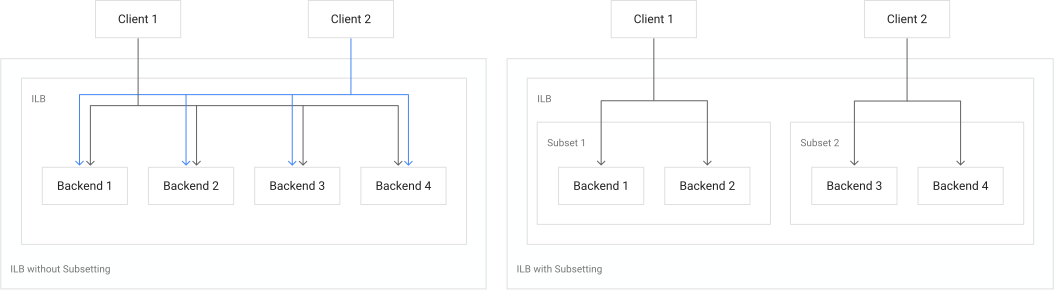](https://docs.cloud.google.com/static/load-balancing/images/subsetting.svg) Comparing an internal passthrough Network Load Balancer without and with subsetting (click to enlarge).
Without subsetting, the complete set of healthy backends is better utilized, and
new client connections are distributed among all healthy backends according
to [traffic distribution](https://docs.cloud.google.com/load-balancing/docs/backend-service.md.txt#traffic_distribution). Subsetting
imposes load balancing restrictions but allows the load balancer to support more
than 250 backends.
For configuration instructions, see
[Subsetting](https://docs.cloud.google.com/load-balancing/docs/internal/setting-up-internal.md.txt#subsetting).
#### Caveats related to backend subsetting for internal passthrough Network Load Balancer
- When subsetting is enabled, not all backends will receive traffic from a given sender even when the number of backends is small.
- For the maximum number of backend instances when subsetting is enabled, see [the quotas page](https://docs.cloud.google.com/load-balancing/docs/quotas.md.txt#backend_services) .
- Only 5-tuple [session affinity](https://docs.cloud.google.com/load-balancing/docs/internal.md.txt#session_affinity) is supported with subsetting.
- Packet Mirroring is not supported with subsetting.
- Enabling or disabling subsetting breaks existing connections.
- If on-premises clients need for to access an internal passthrough Network Load Balancer, subsetting can substantially reduce the number of backends that receive connections from your on-premises clients. This is because the region of the Cloud VPN tunnel or Cloud Interconnect VLAN attachment determines the subset of the load balancer's backends. All Cloud VPN and Cloud Interconnect endpoints in a specific region use the same subset. Different subsets are used in different regions.
### Backend subsetting pricing
There is no charge for using backend subsetting.
For more information, see [All networking pricing](https://docs.cloud.google.com/vpc/network-pricing#lb).
## Session affinity
*Session affinity* lets you control how the load balancer selects backends
for new connections in a predictable way as long as the number of healthy
backends remains constant. This is useful for applications that need multiple
requests from a given user to be directed to the same backend or endpoint. Such
applications usually include stateful servers used by ads serving, games, or
services with heavy internal caching.
Google Cloud load balancers provide session affinity on a best-effort
basis. Factors such as changing backend health check states, adding or removing
backends, changes in backend weights (including enabling or disabling weighted
balancing), or changes to backend fullness, as measured by the balancing mode,
can break session affinity.
Load balancing with session affinity works well when there is a *reasonably large*
distribution of unique connections. Reasonably large means at least several
times the number of backends. Testing a load balancer with a small number of
connections won't result in an accurate representation of the distribution of
client connections among backends.
By default, all Google Cloud load balancers select backends by using a
five-tuple hash (`--session-affinity=NONE`), as follows:
- Packet's source IP address
- Packet's source port (if present in the packet's header)
- Packet's destination IP address
- Packet's destination port (if present in the packet's header)
- Packet's protocol
To learn more about session affinity for passthrough Network Load Balancers, see the following
documents:
- [Traffic distribution for regional external passthrough Network Load Balancers](https://docs.cloud.google.com/load-balancing/docs/network/ext-netlb-traffic-distribution.md.txt)
- [Traffic distribution for internal passthrough Network Load Balancers](https://docs.cloud.google.com/load-balancing/docs/internal/int-netlb-traffic-distribution.md.txt)
To learn more about session affinity for Application Load Balancers, see the
following documents:
- [Session affinity for external Application Load Balancers](https://docs.cloud.google.com/load-balancing/docs/https/request-distribution.md.txt#session_affinity)
- [Session affinity for internal Application Load Balancers](https://docs.cloud.google.com/load-balancing/docs/l7-internal.md.txt#session_affinity)
To learn more about session affinity for proxy Network Load Balancers, see the
following documents:
- [Session affinity for external proxy Network Load Balancers](https://docs.cloud.google.com/load-balancing/docs/tcp.md.txt#session_affinity)
- [Session affinity for internal proxy Network Load Balancers](https://docs.cloud.google.com/load-balancing/docs/tcp/internal-proxy.md.txt#session_affinity)
## Backend service timeout
Most Google Cloud load balancers have a *backend service timeout*. The
default value is 30 seconds. The full range of timeout values allowed is
1 - 2,147,483,647 seconds.
- **For external Application Load Balancers and internal Application Load Balancers** using the HTTP, HTTPS, or
HTTP/2 protocol, the backend service timeout is a request and response timeout
for HTTP(S) traffic.
For more details about the backend service timeout for each load balancer, see
the following:
- For global external Application Load Balancers and regional external Application Load Balancers, see [Timeouts and retries](https://docs.cloud.google.com/load-balancing/docs/https/request-distribution.md.txt#timeouts_and_retries).
- For internal Application Load Balancers, see [Timeouts and retries](https://docs.cloud.google.com/load-balancing/docs/l7-internal.md.txt#timeouts_and_retries).
- **For external proxy Network Load Balancers and internal proxy Network Load Balancers**, the configured
backend service timeout is the length of time the load balancer keeps the TCP
connection open in the absence of any data transmitted from either the client
or the backend. After this time has passed without any data transmitted, the
proxy closes the connection.
- Default value: 30 seconds
- Configurable range: 1 to 2,147,483,647 seconds
- **For passthrough Network Load Balancers** , you can set the value of
the backend service timeout using `gcloud` or the API, but the value is
ignored. Backend service timeout has no meaning for these passthrough
load balancers.
- **For Cloud Service Mesh** , the backend service timeout field (specified using `timeoutSec`) is not supported with proxyless gRPC services. For such services, configure the backend service timeout using the `maxStreamDuration` field. This is because gRPC does not support the semantics of `timeoutSec` that specifies the amount of time to wait for a backend to return a full response after the request is sent. gRPC's timeout specifies the amount of time to wait from the beginning of the stream until the response has been completely processed, including all retries.
## Health checks
Each backend service whose backends are instance groups or zonal NEGs must
have an associated
[health check](https://docs.cloud.google.com/load-balancing/docs/health-checks.md.txt). Backend
services using a serverless NEG or a global internet NEG as a backend must *not*
reference a health check.
When you create a load balancer using the Google Cloud console, you can create the
health check, if it is required, when you create the load balancer, or you can
reference an existing health check.
When you create a backend service using either instance group or zonal NEG
backends using the Google Cloud CLI or the API, you must reference an
existing health check. Refer to the [load balancer
guide](https://docs.cloud.google.com/load-balancing/docs/health-check-concepts#lb_guide) in the *Health
Checks Overview* for details about the type and scope of health check required.
For more information, read the following documents:
- [Health checks overview](https://docs.cloud.google.com/load-balancing/docs/health-check-concepts.md.txt)
- [Creating health checks](https://docs.cloud.google.com/load-balancing/docs/health-checks.md.txt)
- [`gcloud` health check page](https://docs.cloud.google.com/sdk/gcloud/reference/compute/health-checks.md.txt)
- [REST API health check page](https://docs.cloud.google.com/compute/docs/reference/rest/v1/healthChecks.md.txt)
## Additional features enabled on the backend service resource
The following optional features are supported by some backend services.
### Cloud CDN
Cloud CDN uses Google's global edge network to serve content closer to
users, which accelerates your websites and applications. Cloud CDN is
enabled on backend services used by
[global external Application Load Balancers](https://docs.cloud.google.com/load-balancing/docs/https.md.txt). The load balancer
provides the frontend IP addresses and ports that receive requests, and the
backends that respond to the requests.
For more details, see the [Cloud CDN documentation](https://docs.cloud.google.com/cdn/docs/overview.md.txt).
Cloud CDN is incompatible with IAP. They can't be
enabled on the same backend service.
### Cloud Armor
If you use one of the following load balancers, you can add additional
protection to your applications by enabling Cloud Armor on the backend
service during load balancer creation:
- [Global external Application Load Balancer](https://docs.cloud.google.com/load-balancing/docs/https.md.txt)
- [Classic Application Load Balancer](https://docs.cloud.google.com/load-balancing/docs/https.md.txt)
- [Global external proxy Network Load Balancer](https://docs.cloud.google.com/load-balancing/docs/tcp.md.txt)
- [Classic proxy Network Load Balancer](https://docs.cloud.google.com/load-balancing/docs/tcp.md.txt)
- [Regional external passthrough Network Load Balancer](https://docs.cloud.google.com/armor/docs/network-edge-policies.md.txt)
If you use the Google Cloud console, you can do one of the following:
- Select an existing [Cloud Armor security policy](https://docs.cloud.google.com/armor/docs/security-policy-overview.md.txt#policy-types).
- Accept the configuration of a default Cloud Armor rate-limiting security policy with a customizable name, request count, interval, key, and rate limiting parameters. If you use Cloud Armor with an upstream proxy service, such as a CDN provider, `Enforce_on_key` should be set as an XFF IP address.
- Choose to opt out of Cloud Armor protection by selecting **None**.
### IAP
[IAP](https://docs.cloud.google.com/iap/docs/concepts-overview.md.txt) lets you establish a central
authorization layer for applications accessed by HTTPS, so you can use an
application-level access control model instead of relying on network-level
firewalls. IAP is supported by [certain
Application Load Balancers](https://docs.cloud.google.com/load-balancing/docs/features#security).
IAP is incompatible with Cloud CDN. They can't be
enabled on the same backend service.
## Advanced traffic management features for Application Load Balancers
To learn about advanced traffic management features that are configured on the
backend services and URL maps associated with Application Load Balancers,
see the following:
- [Traffic management overview for
internal Application Load Balancers](https://docs.cloud.google.com/load-balancing/docs/l7-internal/traffic-management)
- [Traffic management overview for
global external Application Load Balancers](https://docs.cloud.google.com/load-balancing/docs/https/traffic-management-global)
- [Traffic management overview for
regional external Application Load Balancers](https://docs.cloud.google.com/load-balancing/docs/https/traffic-management-regional)
## API and `gcloud` reference
For more information about the properties of the backend service resource,
see the following references:
- [Global backend service API](https://docs.cloud.google.com/compute/docs/reference/rest/v1/backendServices.md.txt) resource
- [Regional backend service API](https://docs.cloud.google.com/compute/docs/reference/rest/v1/regionBackendServices.md.txt)
resource
- [`gcloud compute backend-services`
page, for both
global and regional backend services](https://docs.cloud.google.com/sdk/gcloud/reference/compute/backend-services)
## What's next
For related documentation and information about how backend services are used in
load balancing, review the following:
- [Create custom headers](https://docs.cloud.google.com/load-balancing/docs/https/custom-headers.md.txt)
- [Create an external Application Load Balancer](https://docs.cloud.google.com/load-balancing/docs/https/setting-up-https.md.txt)
- [External Application Load Balancer overview](https://docs.cloud.google.com/load-balancing/docs/https.md.txt)
- [Enable connection draining](https://docs.cloud.google.com/load-balancing/docs/enabling-connection-draining.md.txt)
- [Encryption in transit in Google Cloud](https://docs.cloud.google.com/docs/security/encryption-in-transit.md.txt)
- [Backend services in external proxy Network Load Balancers](https://docs.cloud.google.com/load-balancing/docs/tcp.md.txt#backend_services)
- [Backend services in global external passthrough Network Load Balancers](https://docs.cloud.google.com/load-balancing/docs/network/global-networklb-architecture.md.txt#backend-services)
For related videos:
- [How to configure backend services for global external Application Load Balancers](https://www.youtube.com/watch?v=rknxoOyMRSY)