When you deploy to a service or change the configuration of a service, an
immutable revision is created.
The following considerations apply to revisions:
- You can specify whether a new revision receives all, none, or some of the
traffic, you can gradually roll out a new revision, you can split traffic
between several revisions, and you can roll back from a revision. For more
information, refer to
[Rollbacks, gradual rollouts, and traffic migration](https://docs.cloud.google.com/kubernetes-engine/enterprise/knative-serving/docs/rollouts-rollbacks-traffic-migration.md.txt).
- You can optionally use [revision tags](https://docs.cloud.google.com/kubernetes-engine/enterprise/knative-serving/docs/rollouts-rollbacks-traffic-migration.md.txt#tags)
to test a revision that is not serving traffic.
- You don't need to [manually delete revisions](https://docs.cloud.google.com/kubernetes-engine/enterprise/knative-serving/docs/managing/revisions.md.txt#delete), although you can if you want.
- Non-serving revisions do not consume any resources and are not billed.
- There is a maximum of 1000 revisions per service: If you exceed that limit, older revisions are automatically deleted.
- The revision suffix is assigned automatically. If you want to use your own
version suffix, you can do so using the Google Cloud CLI parameter
[--revision-suffix](https://docs.cloud.google.com/sdk/gcloud/reference/run/deploy.md.txt#--revision-suffix).
## Viewing the list of revisions for a service
### Console
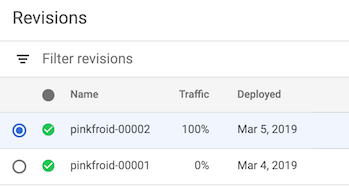
To view the list of revisions in your project:
1. Go to Knative serving in the Google Cloud console:
[Go to Knative serving](https://console.cloud.google.com/kubernetes/run)
2. Locate the service in the services list, and click
on it.
3. Click the *Revisions* tab to show the list of current revisions for that
service.
### Command line
To view the list of revisions for a given service:
1. Find your service name from the list of services available in your
project:
```bash
gcloud run services list
```
2. List all the revisions for a service by specifying the name of that
service in the following command:
```bash
gcloud run revisions list --service SERVICE
```
Replace SERVICE with the name of your service.
## Viewing revision details
### Console
To view the details of a revision in your project:
1. Go to Knative serving in the Google Cloud console:
[Go to Knative serving](https://console.cloud.google.com/kubernetes/run)
2. Locate the service in the services list, and click
on it.
3. Click the *Revisions* tab to show the list of current revisions for that
service.
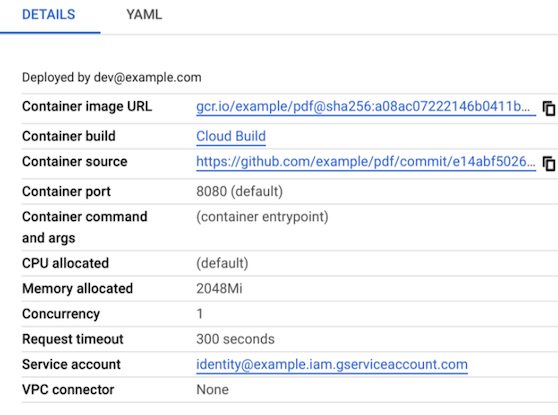
4. Select the service revision you are interested in:
5. Examine the *DETAILS* panel at the far right for revision-specific
information such as the URL of the deployed container image, amount of
memory allocated, environment variables, and possibly
[build and source repository information](https://docs.cloud.google.com/kubernetes-engine/enterprise/knative-serving/docs/managing/revisions.md.txt#build-source).
### Command line
To view the details of a revision in your project:
1. Find your service name from the list of services available in your
project:
```bash
gcloud run services list
```
2. List all the revisions for a service by specifying the name of that
service in the following command:
```bash
gcloud run revisions list --service SERVICE
```
Replace SERVICE with the name of your service.
3. Display details of a revision by specifying the name of that revision
in the following command:
```bash
gcloud run revisions describe REVISION
```
Replace REVISION with the name of the revision you want to
learn more about.
> [!TIP]
> **Tip:** You can use the [`--format` flag](https://docs.cloud.google.com/sdk/gcloud/reference.md.txt#--format) to format the output. For example as YAML:
```bash
gcloud run revisions describe REVISION --format yaml
```
Note that a non-current revision may have the status of `RETIRED`, which means
that Knative serving has retired the infrastructure needed for that
particular revision.
### About build and source repository information in the *Details* panel
If the
[Artifact Analysis API](https://docs.cloud.google.com/container-registry/docs/container-analysis)
is enabled and the container was built with [Cloud Build](https://docs.cloud.google.com/build),
build information is displayed in the *Details* panel.
Additionally, if a
[Cloud Build trigger](https://docs.cloud.google.com/build/docs/running-builds/create-manage-triggers)
was used to build the container, source repository information is also displayed
in the *Details* panel.
## Deleting revisions
A common use case for deleting a revision is when you want to make sure a
particular revision won't be accidentally used.
You cannot delete a revision if:
- it is able to receive traffic,
- it is the only revision of the service,
- it is the latest revision of the service.
When you delete a revision, the container image used by this revision is not
deleted automatically from Container Registry or Artifact Registry. To delete a
container image from a registry, see the deletion instructions for
[Container Registry](https://docs.cloud.google.com/container-registry/docs/managing#deleting_images) or
[Artifact Registry](https://docs.cloud.google.com/artifact-registry/docs/docker/manage-images.md.txt#deleting_images).
You cannot undo a revision deletion.
You can use either the console or the command line:
### Console
To delete a revision:
1. Go to Knative serving in the Google Cloud console:
[Go to Knative serving](https://console.cloud.google.com/kubernetes/run)
2. Locate the service in the services list, and click
on it.
3. Click the *Revisions* tab to show the list of current revisions for that
service.
4. Locate the service revision you want to delete.
5. Click the three-dot vertical ellipse to the left of the revision to show
the *Delete* menu.
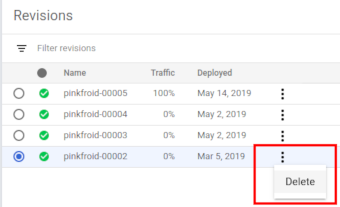
6. Click **Delete** to delete the revision.
### Command line
To delete a revision, use the following command:
```bash
gcloud run revisions delete REVISION
```
Replace REVISION with the name of the revision you want to delete.
## What's next
After you deploy a revision, you can do the following:
- [Gradual rollouts, rollback revisions, traffic migration](https://docs.cloud.google.com/kubernetes-engine/enterprise/knative-serving/docs/rollouts-rollbacks-traffic-migration.md.txt)