This reference architecture provides you with a method and initial
infrastructure to build a modern continuous integration/continuous delivery
(CI/CD) system using tools such as
[Google Kubernetes Engine](https://cloud.google.com/kubernetes-engine),
[Cloud Build](https://docs.cloud.google.com/build),
[Skaffold](https://skaffold.dev),
[`kustomize`](https://github.com/kubernetes-sigs/kustomize#kustomize),
[Config Sync](https://docs.cloud.google.com/anthos-config-management/docs/config-sync-overview),
[Policy Controller](https://docs.cloud.google.com/anthos-config-management/docs/concepts/policy-controller),
[Artifact Registry](https://docs.cloud.google.com/artifact-registry),
and
[Cloud Deploy](https://docs.cloud.google.com/deploy).
This document is part of a series:
- [Modern CI/CD with GKE: A software delivery framework](https://docs.cloud.google.com/kubernetes-engine/docs/tutorials/modern-cicd-gke-user-guide.md.txt)
- Modern CI/CD with GKE: Build a CI/CD system (this document)
- [Modern CI/CD with GKE: Apply the developer workflow](https://docs.cloud.google.com/kubernetes-engine/docs/tutorials/modern-cicd-gke-developer-workflow.md.txt)
This document is intended for enterprise architects and application developers,
as well as IT security, DevOps, and Site Reliability Engineering teams. Some
experience with automated deployment tools and processes is useful for
understanding the concepts in this document.
> [!CAUTION]
> **Caution** : Skaffold
> [will be removed](https://groups.google.com/g/skaffold-users/c/FTR3xLJpePY)
> from gcloud CLI releases after January 15, 2027. Going forward, Skaffold can be installed
> following the instructions in the
> [Installing Skaffold documentation](https://skaffold.dev/docs/install/).
>
>
>
> On January 29, 2027 the Skaffold GitHub repository will be archived. All
> existing releases will remain available to users.
## CI/CD workflow
To build out a modern CI/CD system, you first need to choose tools and services
that perform the main functions of the system. This reference architecture
focuses on implementing the core functions of a CI/CD system that are shown in
the following diagram:
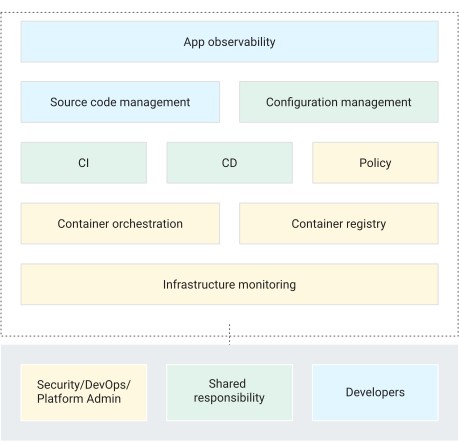
This reference implementation uses the following tools for each component:
- For source code management: GitHub
- Stores application and configuration code.
- Lets you review changes.
- For application configuration management: `kustomize`
- Defines the intended configuration of an application.
- Lets you reuse and extend configuration primitives or blueprints.
- For continuous integration: Cloud Build
- Tests and validates source code.
- Builds artifacts that the deployment environment consumes.
- For continuous delivery: Cloud Deploy
- Defines the rollout process of code across environments.
- Provides rollback for failed changes.
- For the infrastructure configuration: Config Sync
- Consistently applies the cluster and policy configuration.
- For policy enforcement: Policy Controller
- Provides a mechanism that you can use to define what is allowed to run in a given environment based on the policies of the organization.
- For container orchestration: Google Kubernetes Engine
- Runs the artifacts that are built during CI.
- Provides scaling, health checking, and rollout methodologies for workloads.
- For container artifacts: Artifact Registry
- Stores the artifacts (container images) that are built during CI.
## Architecture
This section describes the CI/CD components that you implement by using this
reference architecture: infrastructure, pipelines, code repositories and landing zones.
For a general discussion of these aspects of the CI/CD system, see
[Modern CI/CD with GKE: A software delivery framework](https://docs.cloud.google.com/kubernetes-engine/docs/tutorials/modern-cicd-gke-user-guide.md.txt).
### Reference Architecture variants
The reference architecture has two deployment models:
- A multi-project variant that is more like a production deployment with improved isolation boundaries
- A single-project variant, which is useful for demonstrations
> [!NOTE]
> **Note:** The diagrams in this document are based on multi-project reference architecture. They're applicable to single-project reference architecture. The exception is that all the Google Cloud resources are created in a single Google Cloud project in single-project architecture.
#### Multi-project reference architecture
The [`multi-project`](https://github.com/GoogleCloudPlatform/software-delivery-blueprint) version of the reference architecture simulates production-like scenarios. In these scenarios, different personas create infrastructure, CI/CD pipelines, and applications with proper isolation boundaries. These personas or teams can only access required resources.
For more information, see
[Modern CI/CD with GKE: A software delivery framework](https://docs.cloud.google.com/kubernetes-engine/docs/tutorials/modern-cicd-gke-user-guide.md.txt#isolation_boundaries).
For details on how to install and apply this version of the reference architecture, see the [software delivery blueprint](https://github.com/GoogleCloudPlatform/software-delivery-blueprint/blob/main/README.md)
#### Single-project reference architecture
The [`single-project`](https://github.com/GoogleCloudPlatform/software-delivery-blueprint/tree/single-project-blueprint) version of the reference architecture demonstrates how to set up the entire software delivery platform in a single Google Cloud project. This version can help any users who don't have elevated IAM roles install and try the reference architecture with just the owner role on a project. This document demonstrates the single-project version of the reference architecture.
### Platform infrastructure
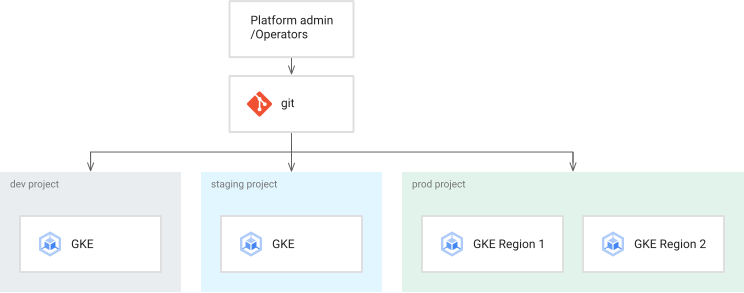
The infrastructure for this reference architecture consists of Kubernetes
clusters to support development, staging, and production application environments.
The following diagram shows the logical layout of the clusters:
### Code repositories
Using this reference architecture, you set up repositories for
operators, developers, platform, and security engineers.
The following diagram shows the reference architecture implementation of the
different code repositories and how the operations, development, and security
teams interact with the repositories:
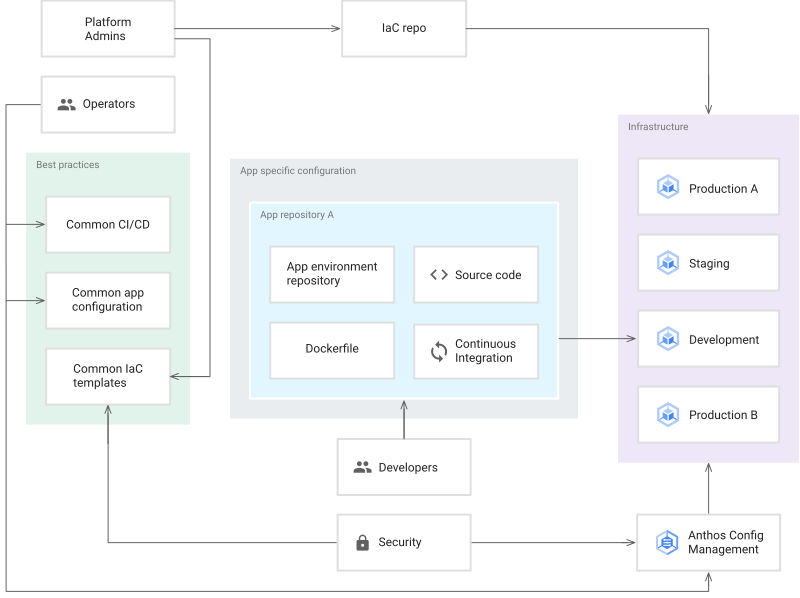
In this workflow, your operators can manage best practices for CI/CD and
application configuration in the operator repository. When your developers
onboard applications in the development repository, they automatically get best
practices, business logic for the application, and any specialized configuration
necessary for their application to properly operate. Meanwhile, your operations
and security team can manage the consistency and security of the platform in the
configuration and policy repositories.
### Application landing zones
In this reference architecture, the landing zone for an application is created when the application is provisioned. In the next document in this
series,
[Modern CI/CD with GKE: Apply the developer workflow](https://docs.cloud.google.com/kubernetes-engine/docs/tutorials/modern-cicd-gke-developer-workflow.md.txt),
you provision a new application that creates its own landing zone. The following diagram illustrates the important components of the landing zones
used in this reference architecture:
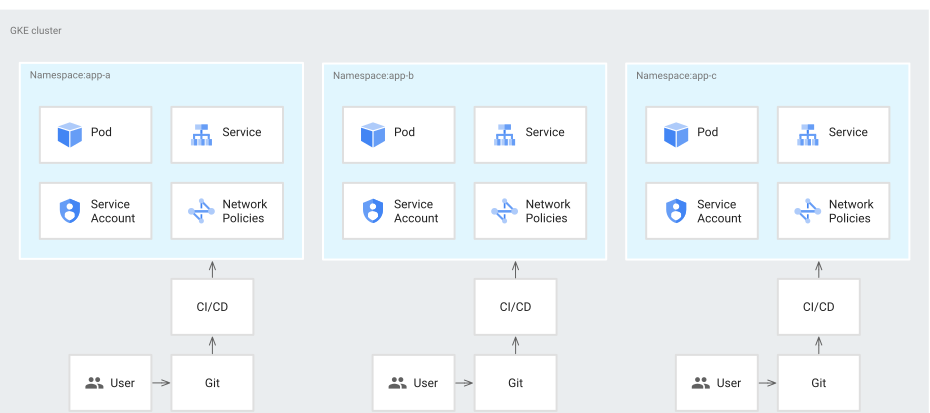
Each namespace includes a service account that is used for Workload Identity Federation for GKE to access services outside of the Kubernetes container, like a Cloud Storage or Spanner. The namespace also includes other resources like network policies to isolate or share boundaries with other namespaces or applications.
The namespace is created by the CD execution service account. We recommend that teams follow the principle of least privilege to help ensure that a CD execution service account can only access required namespaces.
You can define service account access in
Config Sync and implement it by using Kubernetes role-based
access control (RBAC) roles and role bindings. With this model in place, teams
can deploy any resources directly into the namespaces they manage but are
prevented from overwriting or deleting resources from other namespaces.
## Objectives
- Deploy the single-project reference architecture.
- Explore the code repositories.
- Explore the pipeline and infrastructure.
## Costs
In this document, you use the following billable components of Google Cloud:
- [Google Kubernetes Engine (GKE)](https://docs.cloud.google.com/kubernetes-engine/pricing)
- [Cloud Build](https://docs.cloud.google.com/build/pricing)
- [Artifact Registry](https://docs.cloud.google.com/artifact-registry/pricing)
- [Cloud Deploy](https://docs.cloud.google.com/deploy/pricing)
To generate a cost estimate based on your projected usage,
use the [pricing calculator](https://docs.cloud.google.com/products/calculator).
New Google Cloud users might be eligible for a [free trial](https://docs.cloud.google.com/free).
When you finish the tasks that are described in this document, you can avoid
continued billing by deleting the resources that you created. For more information, see
[Clean up](https://docs.cloud.google.com/kubernetes-engine/docs/tutorials/modern-cicd-gke-reference-architecture.md.txt#clean-up).
## Before you begin
1. In the Google Cloud console, on the project selector page,
select or create a Google Cloud project.
**Roles required to select or create a project**
- **Select a project**: Selecting a project doesn't require a specific IAM role---you can select any project that you've been granted a role on.
- **Create a project** : To create a project, you need the Project Creator role (`roles/resourcemanager.projectCreator`), which contains the `resourcemanager.projects.create` permission. [Learn how to grant
roles](https://docs.cloud.google.com/iam/docs/granting-changing-revoking-access).
> [!NOTE]
> **Note**: If you don't plan to keep the resources that you create in this procedure, create a project instead of selecting an existing project. After you finish these steps, you can delete the project, removing all resources associated with the project.
[Go to project selector](https://console.cloud.google.com/projectselector2/home/dashboard)
2.
[Verify that billing is enabled for your Google Cloud project](https://docs.cloud.google.com/billing/docs/how-to/verify-billing-enabled.md.txt#confirm_billing_is_enabled_on_a_project).
3. In the Google Cloud console, activate Cloud Shell.
[Activate Cloud Shell](https://console.cloud.google.com/?cloudshell=true)
## Deploy the reference architecture
1. In Cloud Shell, set the project:
```bash
gcloud config set core/project PROJECT_ID
```
Replace `PROJECT_ID` with your Google Cloud project ID.
2. In Cloud Shell, clone the Git repository:
```bash
git clone https://github.com/GoogleCloudPlatform/software-delivery-blueprint.git
cd software-delivery-blueprint/launch-scripts
git checkout single-project-blueprint
```
3. Create a [personal access token](https://docs.github.com/en/authentication/keeping-your-account-and-data-secure/managing-your-personal-access-tokens#creating-a-personal-access-token-classic) in GitHub with the following scopes:
- `repo`
- `delete_repo`
- `admin:org`
- `admin:repo_hook`
4. There is an empty file named `vars.sh` under `software-delivery-bluprint/launch-scripts` folder. Add the following content to the file:
```bash
cat << EOF >vars.sh
export INFRA_SETUP_REPO="gke-infrastructure-repo"
export APP_SETUP_REPO="application-factory-repo"
export GITHUB_USER=GITHUB_USER
export TOKEN=TOKEN
export GITHUB_ORG=GITHUB_ORG
export REGION="us-central1"
export SEC_REGION="us-west1"
export TRIGGER_TYPE="webhook"
EOF
```
Replace `GITHUB_USER` with the GitHub username.
Replace `TOKEN` with the GitHub personal access token.
Replace `GITHUB_ORG` with the name of the GitHub organization.
5. Run the `bootstrap.sh` script. If Cloud Shell prompts you for authorization, click **Authorize**:
```bash
./bootstrap.sh
```
The script bootstraps the software delivery platform.
## Explore the code repositories
In this section, you explore the code repositories.
### Sign in to GitHub
1. In a web browser, go to [github.com](https://github.com/) and sign in to your account.
2. Click the picture icon at the top of the interface.
3. Click **Your organizations**.
4. Choose the organization that you provided as input in the `vars.sh` file.
5. Click the **Repositories** tab.
### Explore the starter, operator, configuration, and infrastructure repositories
The starter, operator, configuration, and infrastructure repositories are where operators and
platform administrators define the common best practices for building on and
operating the platform. These repositories are created under your GitHub organization
when the reference architecture is bootstrapped.

#### Starter repositories
Starter repositories aid the adoption of CI/CD, infrastructure, and development best practices across the platform. For more information, see [Modern CI/CD with GKE: A software delivery framework](https://docs.cloud.google.com/kubernetes-engine/docs/tutorials/modern-cicd-gke-user-guide.md.txt#starter_repositories)
##### Applications starter repositories
In the application starter repositories, your operators can codify and document best
practices such as CI/CD, metrics collection, logging, container steps, and security for
applications. Included in the reference architecture are examples of starter repositories for
Go, Python, and Java applications.
The `app-template-python`, `app-template-java` and
`app-template-golang` application starter repositories contain
[boilerplate code](https://wikipedia.org/wiki/Boilerplate_code)
that you can use to create new applications. In addition to creating new applications, you can create new templates based on application requirements. The application starter repositories provided by the reference architecture contain:
- `kustomize` base and patches under the folder `k8s`.
- Application source code.
- A `Dockerfile` that describes how to build and run the application.
- A `cloudbuild.yaml` file that describes the best practices for CI steps.
- A `skaffold.yaml` file that describes the deployment steps.
In the next document in this series,
[Modern CI/CD with GKE: Apply the developer workflow](https://docs.cloud.google.com/kubernetes-engine/docs/tutorials/modern-cicd-gke-developer-workflow.md.txt),
you use the `app-template-python` repository to create a
new application.
##### Infrastructure starter repositories
In the infrastructure starter repositories, your operators and infrastructure administrators can codify and document best
practices such as, CI/CD pipelines, IaC, metrics collection, logging, and security for
infrastructure. Included in the reference architecture are examples of infrastructure starter repositories using Terraform. The `infra-template` infrastructure starter repository contains boilerplate code for Terraform that you can use to create the infrastructure resources that an application requires, like Cloud Storage bucket, or Spanner database, or others.
##### Shared templates repositories
In shared template repostories, infrastructure administrators and operators provide standard templates to perform tasks. There is a repository named `terraform-modules` provided with the reference architecture. The repository includes templated Terraform code to create various infrastructure resources.
#### Operator repositories
In the reference architecture, the operator repositories are the same as the application starter repositories. The operators manage the files required for both CI and CD in the application starter repositories.
The reference architecture includes the `app-template-python`, `app-template-java`, and
`app-template-golang` repositories.
- These are starter templates and contain the base Kubernetes manifests for the applications running in Kubernetes on the platform. Operators can update the manifests in the starter templates as needed. Updates are picked up when an application is created.
- The `cloudbuild.yaml` and `skaffold.yaml` files in these repositories store the best practices for running CI and CD respectively on the platform. Similar to the application configurations, operators can update and add steps to the best practices. Individual application pipelines are created using the latest steps.
In this reference implementation, operators use
[`kustomize`](https://github.com/kubernetes-sigs/kustomize)
to manage base configurations in the `k8s` folder of the starter repositories.
Developers are then free to extend the manifests with application-specific
changes such as resource names and configuration files. The `kustomize` tool supports configuration as data. With this
methodology, `kustomize` inputs and outputs are Kubernetes resources. You can
use the outputs from one modification of the manifests for another modification.
The following diagram illustrates a base configuration for a Spring Boot
application:
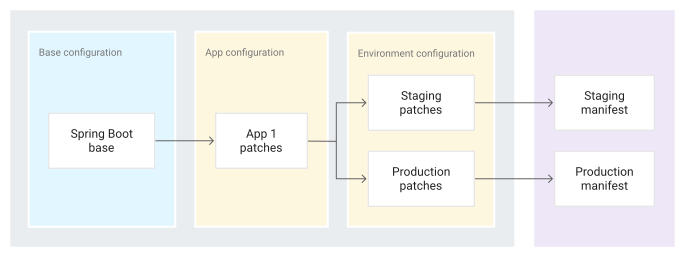
The configuration as data model in `kustomize` has a major benefit: when
operators update the base configuration, the updates are automatically consumed
by the developer's deployment pipeline on its next run without any changes on
the developer's end.
For more information about using `kustomize` to manage Kubernetes manifests,
see the
[`kustomize` documentation](https://kubectl.docs.kubernetes.io/references/kustomize/).
#### Configuration and policy repositories
Included in the reference architecture is an implementation of a configuration and policy
repository that uses Config Sync and Policy Controller. The
`acm-gke-infrastructure-repo` repository contains the configuration and policies
that you deploy across the application environment clusters. The configuration
defined and stored by platform admins in these repositories is important to
ensuring the platform has a consistent look and feel to the operations and
development teams.
The following sections discuss how the reference architecture implements
configuration and policy repositories in more detail.
##### Configuration
In this reference implementation, you use
[Config Sync](https://docs.cloud.google.com/kubernetes-engine/config-sync/docs/overview.md.txt)
to centrally manage the configuration of clusters in the platform and enforce
policies. Centralized management lets you propagate configuration changes
throughout the system.
Using Config Sync, your organization can register its
clusters to sync their configuration from
[a Git repository](https://docs.cloud.google.com/kubernetes-engine/config-sync/docs/tutorials/config-sync-multi-repo.md.txt),
a process known as *GitOps*. When you add new clusters, the clusters
automatically sync to the latest configuration and continually reconcile the
state of the cluster with the configuration in case anyone introduces
out-of-band changes.
##### Policy
In this reference implementation, you use Policy Controller, which is based on
[Open Policy Agent](https://www.openpolicyagent.org/),
to intercept and validate each request to the Kubernetes clusters in the
platform. You can create policies by using the
[Rego policy language](https://www.openpolicyagent.org/docs/latest/policy-language/),
which lets you fully control not only the types of resources submitted to the
cluster but also their configuration.
The architecture in the following diagram shows a request flow for using
Policy Controller to create a resource:

You create and define rules in the Config Sync repository,
and these changes are applied to the cluster. After that, new resource requests
from either the CLI or API clients are validated against the constraints by the
Policy Controller.
For more information about managing policies, see the
[Policy Controller overview](https://docs.cloud.google.com/anthos-config-management/docs/concepts/policy-controller).
#### Infrastructure repositories
Included in the reference is an implementation of infrastructure
repository using [Terraform](https://www.terraform.io/). The `gke-infrastructure-repo` repository contains infrastructure as code to create GKE clusters for dev, staging, and production environments and configure Config Sync on them using the `acm-gke-infrastructure-repo` repository. `gke-infrastructure-repo` contains three branches, one for each dev, staging, and production environment. It also contains dev, staging, and production folders on each branch.
## Explore the pipeline and infrastructure
The reference architecture creates a pipeline in the Google Cloud project. This pipeline is responsible for creating the shared infrastructure.
### Pipeline
In this section, you explore the infrastructure-as-code pipeline and run it to create the shared infrastructure including GKE clusters. The pipeline is a Cloud Build trigger named `create-infra` in the Google Cloud project that is linked to the infrastructure repository `gke-infrastructure-repo`. You follow GitOps methodology to create infrastructure as explained in the [Repeatable GCP Environments at Scale With Cloud Build Infra-As-Code Pipelines video](https://www.youtube.com/watch?v=3vfXQxWJazM).
`gke-infrastructure-repo` has dev, staging, and production branches. In the repository, there are also dev, staging, and production folders that correspond to these branches. There are branch protection rules on the repository ensuring that the code can only be pushed to the dev branch. To push the code to the staging and production branches you need to create a [pull request](https://docs.github.com/en/pull-requests/collaborating-with-pull-requests/proposing-changes-to-your-work-with-pull-requests/about-pull-requests).
Typically, someone who has access to the repository reviews the changes and then merges the pull request to make sure only the intended changes are being promoted to the higher branch. To let the individuals try out the blueprint, the branch protection rules have been relaxed in the reference architecture so that the repository administrator is be able to bypass the review and merge the pull request.
When a push is made to `gke-infrastructure-repo`, it invokes the `create-infra` trigger. That trigger identifies the branch where the push happened and goes to the corresponding folder in the repository on that branch. Once it finds the corresponding folder, it runs Terraform using the files the folder contains. For example, if the code is pushed to the dev branch, the trigger runs Terraform on the dev folder of the dev branch to create a dev GKE cluster. Similarly, when a push happens to the `staging` branch, the trigger runs Terraform on the staging folder of the staging branch to create a staging GKE cluster.
Run the pipeline to create GKE clusters:
1. In the Google Cloud console, go to the Cloud Build page.
[Go to the Cloud Build page](https://console.cloud.google.com/cloud-build/triggers)
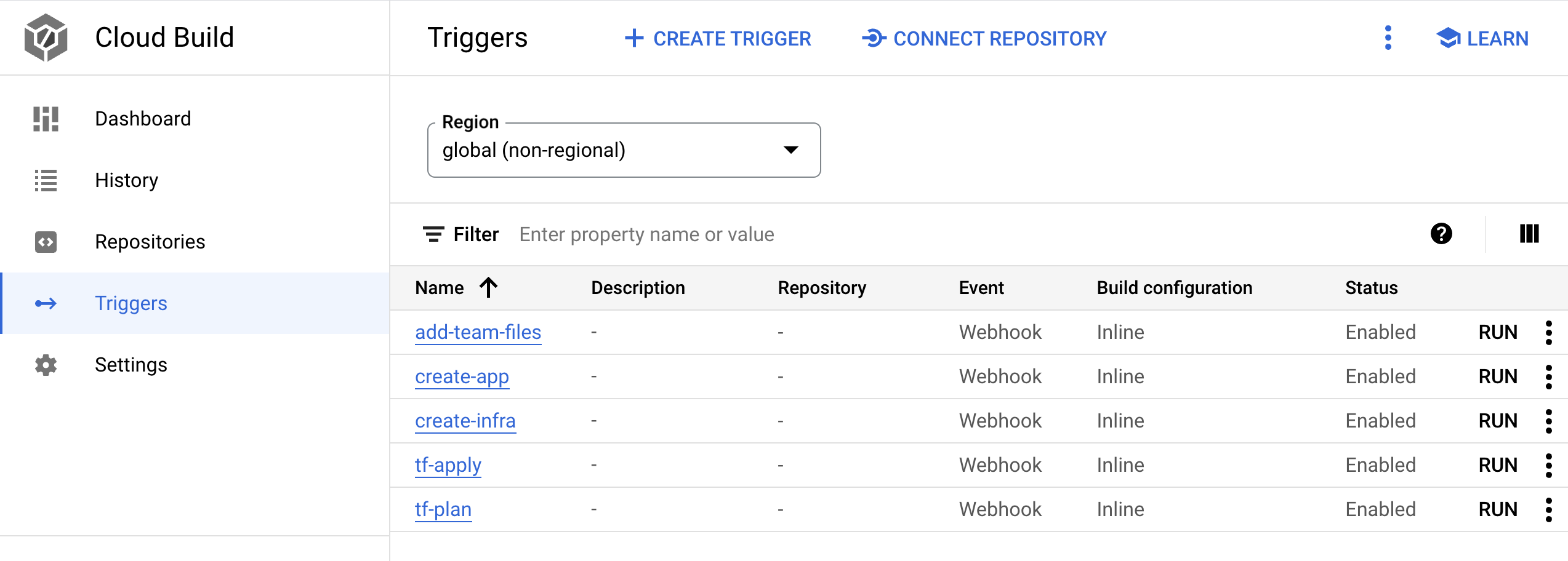
- There are five Cloud Build webhook triggers. Look for the trigger with the name `create-infra`. This trigger creates the shared infrastructure including GKE clusters.
2. Click the trigger name. The trigger definition opens.
3. Click **OPEN EDITOR** to view the steps that the trigger runs.
The other triggers are used when you onboard an application in [Modern CI/CD with GKE: Apply the developer workflow](https://docs.cloud.google.com/kubernetes-engine/docs/tutorials/modern-cicd-gke-developer-workflow.md.txt)
4. In the Google Cloud console, go to the Cloud Build page.
[Go to the Cloud Build history page](https://console.cloud.google.com/cloud-build/builds)
Review the pipeline present on the history page. When you deployed software delivery platform using `bootstrap.sh`, the script pushed the code to the dev branch of the `gke-infrastructure-repo` repository that kicked-off this pipeline and created the dev GKE cluster.
> [!NOTE]
> **Note:** If you don't see a pipeline already in Cloud Build history page, it means the webhook on `gke-infrastructure-repo` didn't invoke the Cloud Build trigger. This is rare but can happen if there are any issues going on with GitHub APIs. Go ahead and make a commit on the dev branch of the `gke-infrastructure-repo` repository when the issues are resolved and the webhook should invoke the Cloud Build trigger. Now, you should see a pipeline in Cloud Build history page. This pipeline creates dev GKE cluster.
5. To create a staging GKE cluster, submit a pull request from the dev branch to the staging branch:
1. Go to GitHub and navigate to the repository `gke-infrastructure-repo`.
2. Click **Pull requests** and then **New pull request**.
3. In the **Base** menu, choose **staging** and in the **Compare** menu, choose **dev**.
4. Click **Create pull request**.
6. If you are an administrator on the repository, merge the pull request. Otherwise, get the administrator to merge the pull request.
7. In the Google Cloud console, go to the **Cloud Build history page**.
[Go to the Cloud Build history page](https://console.cloud.google.com/cloud-build/builds)
A second Cloud Build pipeline starts in the project. This pipeline creates the staging GKE cluster.
8. To create prod GKE clusters, submit a `pull request` from staging to prod branch:
1. Go to GitHub and navigate to the repository `gke-infrastructure-repo`.
2. Click **Pull requests** and then **New pull request**.
3. In the **Base** menu, choose **prod** and in the **Compare** menu, choose **staging**.
4. Click **Create pull request**.
9. If you are an administrator on the repository, merge the pull request. Otherwise, get the administrator to merge the pull request.
10. In the Google Cloud console, go to the **Cloud Build history page**.
[Go to the Cloud Build history page](https://console.cloud.google.com/cloud-build/builds)
A third Cloud Build pipeline starts in the project. This pipeline creates the production GKE cluster.
### Infrastructure
In this section, you explore the infrastructure that was created by the pipelines.
- In the Google Cloud console, go to the **Kubernetes clusters** page.
[Go to the Kubernetes clusters page](https://console.cloud.google.com/kubernetes/list)
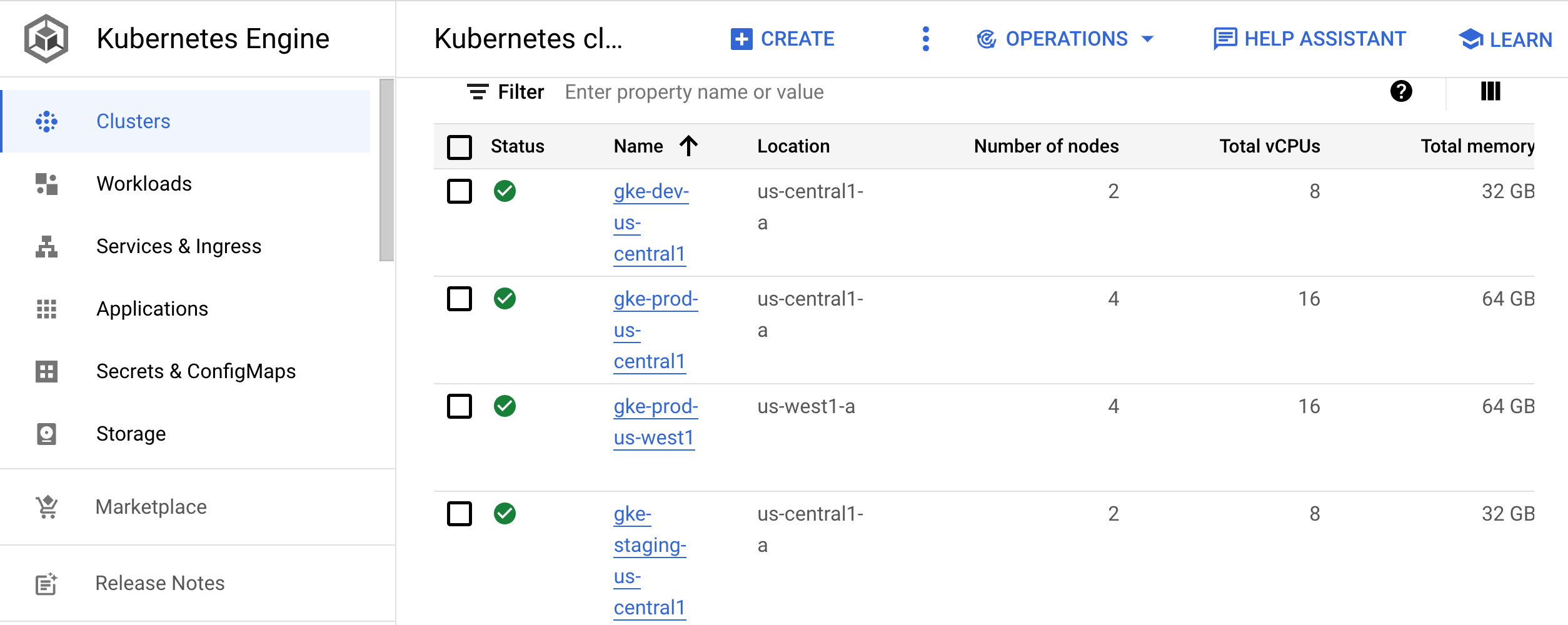
This page lists the clusters that are used for development (`gke-dev-us-central1`), staging (`gke-staging-us-central1`), and production ( `gke-prod-us-central1`, `gke-prod-us-west1`):
#### Development cluster
The development cluster (`gke-dev-us-central1`) gives your developers access to a
namespace that they can use to iterate on their applications. We recommend that
teams use tools like
[Skaffold](https://skaffold.dev/)
that provide an iterative workflow by actively monitoring the code in
development and reapplying it to the development environments as changes are
made. This iteration loop is similar to
[hot reloading](https://reactnative.dev/blog/2016/03/24/introducing-hot-reloading#hot-reloading).
Instead of being programming language-specific, however, the loop works with any
application that you can build with a Docker image. You can run the loop inside a Kubernetes cluster.
Alternatively, your developers can follow the CI/CD loop for a development environment. That loop makes the code changes ready for promotion to higher environments.
In the next document in this series,
[Modern CI/CD with GKE: Apply the developer workflow](https://docs.cloud.google.com/kubernetes-engine/docs/tutorials/modern-cicd-gke-developer-workflow.md.txt),
you use both Skaffold and CI/CD to create the development loop.
#### Staging cluster
This cluster runs the staging environment of your applications. In this reference architecture, you create one GKE cluster for staging. Typically, a staging environment is an exact replica of the production environment.
#### Production cluster
In the reference architecture, you have two GKE clusters for your production environments. For geo-redundancy or
high-availability (HA) systems, we recommend that you add multiple clusters to
each environment. For all clusters where applications are deployed, it's ideal
to use
[regional clusters](https://docs.cloud.google.com/kubernetes-engine/docs/concepts/regional-clusters.md.txt).
This approach insulates your applications from zone-level failures and any
interruptions caused by cluster or node pool upgrades.
To sync the
configuration of cluster resources, such as namespaces, quotas, and RBAC, we recommend that you use Config Sync. For
more information on how to manage those resources, see
[Configuration and policy repositories](https://docs.cloud.google.com/kubernetes-engine/docs/tutorials/modern-cicd-gke-reference-architecture.md.txt#configuration_and_policy_repositories).
## Apply the reference architecture
Now that you've explored the reference architecture, you can explore a developer
workflow that is based on this implementation. In the next document in this
series,
[Modern CI/CD with GKE: Apply the developer workflow](https://docs.cloud.google.com/kubernetes-engine/docs/tutorials/modern-cicd-gke-developer-workflow.md.txt),
you create a new application, add a feature, and then deploy the application to
the staging and production environments.
## Clean up
If you want to try the next document in this series,
[Modern CI/CD with GKE: Applying the developer workflow](https://docs.cloud.google.com/kubernetes-engine/docs/tutorials/modern-cicd-gke-developer-workflow.md.txt),
don't delete the project or resources associated with this reference
architecture. Otherwise, to avoid incurring charges to your Google Cloud
account for the resources that you used in the reference architecture, you can
delete the project or manually remove the resources.
### Delete the project
> [!CAUTION]
> **Caution** : Deleting a project has the following effects:
>
> - **Everything in the project is deleted.** If you used an existing project for the tasks in this document, when you delete it, you also delete any other work you've done in the project.
> - **Custom project IDs are lost.** When you created this project, you might have created a custom project ID that you want to use in the future. To preserve the URLs that use the project ID, such as an `appspot.com` URL, delete selected resources inside the project instead of deleting the whole project.
1. In the Google Cloud console, go to the **Manage resources** page.
[Go to Manage resources](https://console.cloud.google.com/iam-admin/projects)
2. In the project list, select the project that you want to delete, and then click **Delete**.
3. In the dialog, type the project ID, and then click **Shut down** to delete the project.
### Manually remove the resources
- In Cloud Shell, remove the infrastructure:
```bash
gcloud container clusters delete gke-dev-us-central1
gcloud container clusters delete gke-staging-us-central1
gcloud container clusters delete gke-prod-us-central1
gcloud container clusters delete gke-prod-us-west1
gcloud beta builds triggers delete create-infra
gcloud beta builds triggers delete add-team-files
gcloud beta builds triggers delete create-app
gcloud beta builds triggers delete tf-plan
gcloud beta builds triggers delete tf-apply
```
## What's next
- Create a new application by following the steps in [Modern CI/CD with GKE: Applying the developer workflow](https://docs.cloud.google.com/kubernetes-engine/docs/tutorials/modern-cicd-gke-developer-workflow.md.txt).
- Learn about [best practices for setting up identity federation](https://docs.cloud.google.com/solutions/migrating-consumer-accounts-to-cloud-identity-or-g-suite-best-practices-federation).
- Read [Kubernetes and the challenges of continuous software deployment](https://docs.cloud.google.com/solutions/addressing-continuous-delivery-challenges-in-a-kubernetes-world).
-
Explore reference architectures, diagrams, and best practices about Google Cloud.
Take a look at our
[Cloud Architecture Center](https://docs.cloud.google.com/architecture).