> [!NOTE]
> **Note:** Although multi-cluster Gateways are enabled by using the Fleet `multiclusteringress` feature flag, this architecture is distinctly different from the previous [Multi-cluster Ingress](https://docs.cloud.google.com/kubernetes-engine/docs/how-to/multi-cluster-ingress-setup.md.txt) product. Ensure that your automated provisioning pipelines reference this page specifically, because Gateway API requires strict installation ordering and explicit API dependencies (such as the Traffic Director API) that do not exist in the previous product.
This document shows you how to prepare your Google Kubernetes Engine (GKE)
environment to enable the multi-cluster [GKE Gateway
controller](https://docs.cloud.google.com/kubernetes-engine/docs/concepts/gateway-api). This controller is a
Google-hosted controller that provisions external and internal load balancers
for your GKE clusters. To learn how to use Gateway resources for container
load balancing, see [Deploying
Gateways](https://docs.cloud.google.com/kubernetes-engine/docs/how-to/deploying-gateways) or [Deploying
multi-cluster
Gateways](https://docs.cloud.google.com/kubernetes-engine/docs/how-to/deploying-multi-cluster-gateways).
The multi-cluster GKE Gateway Controller installs the following
multi-cluster GatewayClasses in your clusters:
- `gke-l7-global-external-managed-mc` for global external multi-cluster Gateways
- `gke-l7-regional-external-managed-mc` for regional external multi-cluster
- `gke-l7-cross-regional-internal-managed-mc` for cross-regional internal multi-cluster Gateways
- `gke-l7-rilb-mc` for regional internal multi-cluster Gateways
- `gke-l7-gxlb-mc` for global external Classic multi-cluster Gateways
Learn more about the capabilities of the various [GatewayClasses in GKE](https://docs.cloud.google.com/kubernetes-engine/docs/how-to/gatewayclass-capabilities.md.txt).
## Pricing
All Compute Engine resources deployed through the Gateway controllers are charged
against the project in which your GKE clusters reside. The
single-cluster Gateway controller is offered at no additional charge as a part of
GKE Standard and Autopilot pricing. Pricing for
multi-cluster Gateways is described in the
[Multi Cluster Gateway and Multi Cluster Ingress pricing page](https://cloud.google.com/kubernetes-engine/pricing#multi-cluster-gateway-and-multi-cluster-ingress).
## Before you begin
Before you start, make sure that you have performed the following tasks:
- Enable the Google Kubernetes Engine API.
[Enable Google Kubernetes Engine API](https://console.cloud.google.com/apis/enableflow?apiid=container.googleapis.com)
- To use the Google Cloud CLI for this task, [install](https://docs.cloud.google.com/sdk/docs/install) and then [initialize](https://docs.cloud.google.com/sdk/docs/initialize.md.txt) the gcloud CLI. If you previously installed the gcloud CLI, get the latest version by running the `gcloud components update` command. Earlier gcloud CLI versions might not support running the commands in this document.
> [!NOTE]
> **Note:** For existing gcloud CLI installations, make sure to set the `compute/region` [property](https://docs.cloud.google.com/sdk/docs/properties.md.txt#setting_properties). If you use primarily zonal clusters, set the `compute/zone` instead. By setting a default location, you can avoid errors in the gcloud CLI like the following: `One of [--zone, --region] must be supplied: Please specify location`. You might need to specify the location in certain commands if the location of your cluster differs from the default that you set.
### GKE Gateway controller requirements
- Gateway API is supported on [VPC-native](https://docs.cloud.google.com/kubernetes-engine/docs/concepts/alias-ips.md.txt) clusters only.
- If you are using the regional or cross-region GatewayClasses, you must enable a [proxy-only subnet](https://docs.cloud.google.com/load-balancing/docs/proxy-only-subnets.md.txt).
- Your cluster must have the `HttpLoadBalancing` add-on enabled.
- If you are using Istio, you must upgrade Istio to one of the following versions:
- 1.15.2 or later
- 1.14.5 or later
- 1.13.9 or later.
- If you are using Shared VPC, then in the host project, you need to assign the `Compute Network User` role to the GKE Service account for the service project.
### Multi-cluster Gateway requirements
In addition to the GKE Gateway controller requirements, for
multi-cluster Gateway deployments, make sure you have performed the following tasks:
- [Enable the Gateway
API](https://docs.cloud.google.com/kubernetes-engine/docs/how-to/deploying-gateways#enable-gateway-existing-cluster) on your clusters.
- Enable [Workload Identity Federation for GKE](https://docs.cloud.google.com/kubernetes-engine/docs/how-to/workload-identity.md.txt#enable-existing-cluster) on your clusters.
- Complete the [fleet general prerequisites](https://docs.cloud.google.com/kubernetes-engine/fleet-management/docs/before-you-begin.md.txt#enable_apis) for registering your clusters.
- Enable the following multi-cluster Gateways required APIs in your project:
- Cloud Service Mesh API
- Multi Cluster Ingress API
- Cloud DNS API
- GKE Hub (fleet) API
- Resource Manager API
- Multi-cluster Service Discovery API
Run this command to enable the required APIs if they are not already enabled:
```bash
gcloud services enable \
trafficdirector.googleapis.com \
multiclusteringress.googleapis.com \
dns.googleapis.com \
gkehub.googleapis.com \
cloudresourcemanager.googleapis.com \
multiclusterservicediscovery.googleapis.com \
--project=PROJECT_ID
```
Replace `PROJECT_ID` with the project ID where your
GKE clusters are running.
> [!NOTE]
> **Note:** Cloud Service Mesh is used as the backend infrastructure to propagate endpoints for [multi-cluster Services](https://docs.cloud.google.com/kubernetes-engine/docs/how-to/multi-cluster-services.md.txt), however the Cloud Service Mesh resources created by the MCS controller are not charged against your project because MCS is included in the cost of GKE.
### Restrictions and limitations
The same [limitations and known issues](https://docs.cloud.google.com/kubernetes-engine/docs/how-to/deploying-gateways.md.txt#limitations)
for single-cluster Gateways also apply to multi-cluster Gateways.
In addition to the single-cluster Gateway limitations, the following limitations
apply to multi-cluster Gateways:
- Load balancing to backends in different regions is not supported with the
regional internal GatewayClass `gke-l7-rilb-mc`. To learn more about the
different features supported with each GatewayClass,
see [GatewayClass capabilities](https://docs.cloud.google.com/kubernetes-engine/docs/how-to/gatewayclass-capabilities.md.txt).
- A `Service` is not supported as a `backendRefs` with multi-cluster Gateway.
Multi-cluster Gateway only supports `ServiceImport` as a valid `backendRefs`.
- All clusters in the fleet must exist in the [fleet host project](https://docs.cloud.google.com/kubernetes-engine/fleet-management/docs/fleet-concepts.md.txt#fleet-host-project).
- Cross-project load balancing is not supported. All clusters (config cluster and
target clusters) attached to the same multi-cluster Gateway must be deployed
in the same Shared VPC host project or service project. For more
information on supported Shared VPC topologies with multi-cluster
Gateway, see [Use multi-cluster Gateway with Shared VPC](https://docs.cloud.google.com/kubernetes-engine/docs/how-to/prepare-environment-multi-cluster-gateways.md.txt#mcg-shared-vpc).
- Cross-VPC load balancing is not supported. All clusters (config cluster and
target clusters) attached to the same multi-cluster Gateway must be deployed
in the same VPC.
- Multi-cluster Gateway depends on MCS for handling cross-cluster service
discovery. As such, services multi-cluster Gateway exposes are subject to
all the [Multi-cluster Service
requirements](https://docs.cloud.google.com/kubernetes-engine/docs/how-to/multi-cluster-services#requirements).
- Multi-cluster Gateways can leak load balancer resources under the following
scenarios:
- The Fleet ingress feature is updated with a new config cluster which does not have all `Gateway` resources which exist on the current config cluster.
- The Fleet ingress feature is disabled while `Gateway` resources which reference a multi-cluster `GatewayClass` exist on the config cluster.
- Multi-cluster Gateway runs as a global service. If the multi-cluster Gateway
controller encounters a regional Fleet (Hub) control plane failure, it
responds by failing statically and making no further load balancer changes
until the region returns to service.
#### Quotas
GKE Gateway uses [Cloud Load Balancing quotas](https://docs.cloud.google.com/load-balancing/docs/quotas.md.txt) to
limit the number of resources that the Gateway controller can create to manage
ingress traffic routed to GKE clusters.
## Set up your environment for multi-cluster Gateways
It requires multiple GKE clusters to complete the examples in
[Deploying multi-cluster Gateways](https://docs.cloud.google.com/kubernetes-engine/docs/how-to/deploying-multi-cluster-gateways).
All of the clusters are registered to the same [fleet](https://docs.cloud.google.com/kubernetes-engine/fleet-management/docs.md.txt) so that multi-cluster
Gateways and Services can operate across them.
The following steps will deploy
three GKE clusters across two different regions in your project:
- `us-west1-a/gke-west-1`
- `us-west1-a/gke-west-2`
- `us-east1-b/gke-east-1`
This will create the following cluster topology:
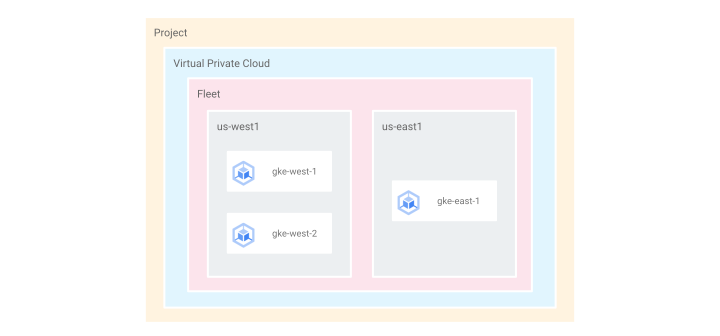
These GKE clusters are used to demonstrate [multi-region load balancing](https://docs.cloud.google.com/kubernetes-engine/docs/how-to/deploying-multi-cluster-gateways#external-gateway) and [blue-green, multi-cluster traffic splitting](https://docs.cloud.google.com/kubernetes-engine/docs/how-to/deploying-multi-cluster-gateways#blue-green)
using external and internal Gateways.
### Deploy clusters
In these steps you will deploy three GKE clusters into regions
`us-east1` and `us-west1`.
Clusters will be registered to your project's [fleet](https://docs.cloud.google.com/kubernetes-engine/fleet-management/docs.md.txt).
Grouping your GKE clusters together in a fleet allows them to be targeted by a multi-cluster Gateway.
1. Create a GKE cluster in `us-west1`
named `gke-west-1`:
```bash
gcloud container clusters create gke-west-1 \
--gateway-api=standard \
--location=us-west1-a \
--workload-pool=PROJECT_ID.svc.id.goog \
--cluster-version=VERSION \
--enable-fleet \
--project=PROJECT_ID
```
Replace the following:
- `PROJECT_ID`: the project ID where your GKE clusters are running.
- `VERSION`: the GKE version, 1.24 or later.
2. Create another GKE cluster in `us-west1` (or the same region as the previous cluster)
named `gke-west-2`:
```bash
gcloud container clusters create gke-west-2 \
--gateway-api=standard \
--location=us-west1-a \
--workload-pool=PROJECT_ID.svc.id.goog \
--cluster-version=VERSION \
--enable-fleet \
--project=PROJECT_ID
```
3. Create a GKE cluster in `us-east1` (or a region that is
different than the previous one) named `gke-east-1`
```bash
gcloud container clusters create gke-east-1 \
--gateway-api=standard \
--location=us-east1-b \
--workload-pool=PROJECT_ID.svc.id.goog \
--cluster-version=VERSION \
--enable-fleet \
--project=PROJECT_ID
```
4. Confirm that the clusters have been successfully registered to the fleet:
```bash
gcloud container fleet memberships list --project=PROJECT_ID
```
The output will be similar to the following:
NAME EXTERNAL_ID LOCATION
gke-east-1 45a80b37-4b00-49aa-a68b-b430fce1e3f0 us-east1
gke-west-2 ac7087a5-f5ee-401e-b430-57f3af141239 us-west1
gke-west-1 549efe3a-b18e-4eb9-8796-e50b7967cde2 us-west1
> [!NOTE]
> **Note:** If you are using an existing cluster, see [Enable Gateway API on an existing cluster](https://docs.cloud.google.com/kubernetes-engine/docs/how-to/deploying-gateways.md.txt#enable-gateway).
### Configure cluster credentials
This step configures cluster credentials with memorable names. This makes it
easier to switch between clusters when deploying resources across several
clusters.
1. Fetch the credentials for cluster `gke-west-1`, `gke-west-2`, and `gke-east-1`:
```bash
gcloud container clusters get-credentials gke-west-1 --location=us-west1-a --project=PROJECT_ID
gcloud container clusters get-credentials gke-west-2 --location=us-west1-a --project=PROJECT_ID
gcloud container clusters get-credentials gke-east-1 --location=us-east1-b --project=PROJECT_ID
```
This stores the credentials locally so that you can use your kubectl client
to access the cluster API servers. By default an auto-generated name is
created for the credential.
2. Rename the cluster contexts so they are easier to reference later:
```bash
kubectl config rename-context gke_PROJECT_ID_us-west1-a_gke-west-1 gke-west-1
kubectl config rename-context gke_PROJECT_ID_us-west1-a_gke-west-2 gke-west-2
kubectl config rename-context gke_PROJECT_ID_us-east1-b_gke-east-1 gke-east-1
```
Replace `PROJECT_ID` with the project ID where your
clusters are deployed.
### Enable multi-cluster Services in the fleet
1. Enable multi-cluster Services in your fleet for the registered clusters.
This enables the MCS controller for the three clusters that are registered to
your fleet so that it can start listening to and exporting Services.
```bash
gcloud container fleet multi-cluster-services enable \
--project PROJECT_ID
```
2. Grant Identity and Access Management (IAM) permissions required by the MCS controller:
```bash
gcloud projects add-iam-policy-binding PROJECT_ID \
--member "principal://iam.googleapis.com/projects/PROJECT_NUMBER/locations/global/workloadIdentityPools/PROJECT_ID.svc.id.goog/subject/ns/gke-mcs/sa/gke-mcs-importer" \
--role "roles/compute.networkViewer" \
--project=PROJECT_ID
```
Replace `PROJECT_ID` and
`PROJECT_NUMBER` with the project ID and project
number where your clusters are deployed.
3. Create an IAM binding in the fleet host project that assigns the MCS Service Agent role to the project's MCS service account:
```bash
gcloud projects add-iam-policy-binding PROJECT_ID \
--member "serviceAccount:service-PROJECT_ID@gcp-sa-mcsd.iam.gserviceaccount.com" \
--role roles/multiclusterservicediscovery.serviceAgent \
--project=PROJECT_ID
```
4. Confirm that MCS is enabled for the registered clusters. You will see the
memberships for the three registered clusters. It may take several minutes
for all of the clusters to show.
```bash
gcloud container fleet multi-cluster-services describe --project=PROJECT_ID
```
The output is similar to the following:
createTime: '2023-10-12T06:14:33.466903587Z'
membershipStates:
projects/441323991697/locations/us-east1/memberships/gke-east-1:
state:
code: OK
description: Firewall successfully updated
updateTime: '2023-10-12T06:15:28.395318091Z'
projects/441323991697/locations/us-west1/memberships/gke-west-1:
state:
code: OK
description: Firewall successfully updated
updateTime: '2023-10-12T06:15:30.534594027Z'
projects/441323991697/locations/us-west1/memberships/gke-west-2:
state:
code: OK
description: Firewall successfully updated
updateTime: '2023-10-12T06:15:29.110582109Z'
name: projects/pierre-louis-playground/locations/global/features/multiclusterservicediscovery
resourceState:
state: ACTIVE
spec: {}
updateTime: '2023-10-12T06:15:31.027276757Z'
### Enable multi-cluster Gateway in the fleet
The [multi-cluster GKE Gateway controller](https://docs.cloud.google.com/kubernetes-engine/docs/concepts/gateway-api.md.txt#gateway_controller)
governs the deployment of multi-cluster Gateways.
> [!NOTE]
> **Note:** the multi-cluster Gateway controller is also responsible for the instrumentation of `MulticlusterIngress` resources.
When enabling the multi-cluster Gateway controller, you must select your config
cluster. The config cluster is the GKE cluster in which your
Gateway resources ([Gateway](https://docs.cloud.google.com/kubernetes-engine/docs/concepts/gateway-api.md.txt#gateway),
[Routes](https://docs.cloud.google.com/kubernetes-engine/docs/concepts/gateway-api.md.txt#httproute),
[Policies](https://docs.cloud.google.com/kubernetes-engine/docs/concepts/gateway-api.md.txt#policy)) are deployed.
It is a central place that controls routing across your clusters.
See [Config cluster design](https://docs.cloud.google.com/kubernetes-engine/docs/concepts/multi-cluster-ingress.md.txt#config_cluster_design)
to help you decide which cluster to choose as your config cluster.
1. Enable multi-cluster Gateway and specify your config cluster in your fleet.
Note that you can always update the config cluster at a later time.
This example specifies `gke-west-1` as the config cluster that will host the
resources for multi-cluster Gateways.
```bash
gcloud container fleet ingress enable \
--config-membership=projects/PROJECT_ID/locations/us-west1/memberships/gke-west-1 \
--project=PROJECT_ID
```
2. Grant Identity and Access Management (IAM) permissions that the multi-cluster
Gateway controller requires:
```bash
gcloud projects add-iam-policy-binding PROJECT_ID \
--member "serviceAccount:service-PROJECT_NUMBER@gcp-sa-multiclusteringress.iam.gserviceaccount.com" \
--role "roles/container.admin" \
--project=PROJECT_ID
```
Replace `PROJECT_ID` and `PROJECT_NUMBER` with the project ID and project number where your
clusters are deployed.
> [!NOTE]
> **Note:** Ensure that the Multi-Cluster Ingress service agent retains the default `roles/multiclusteringress.serviceAgent` role on your project, especially when you manage IAM permissions by using Terraform. If this role was removed, see [Connect Gateway reports "ERROR:
> Lost connection"](https://docs.cloud.google.com/kubernetes-engine/docs/how-to/prepare-environment-multi-cluster-gateways#lost-connection-service-agent) for instructions to restore it.
3. If the project for your cluster's network differs from your fleet project
(for example, you are using a [shared VPC](https://docs.cloud.google.com/vpc/docs/shared-vpc.md.txt)), you must
allow the multi-cluster Gateway controller service account in the fleet
project to access the network project.
Grant the multi-cluster Gateway controller service account in the fleet
project permission to access the network project:
```bash
gcloud projects add-iam-policy-binding NETWORK_PROJECT_ID \
--member "serviceAccount:service-PROJECT_NUMBER@gcp-sa-multiclusteringress.iam.gserviceaccount.com" \
--role "roles/compute.networkUser" \
--project=NETWORK_PROJECT_ID
```
4. Confirm that the GKE Gateway controller is enabled for your
fleet:
```bash
gcloud container fleet ingress describe --project=PROJECT_ID
```
The output is similar to the following:
createTime: '2023-10-12T06:23:06.732858524Z'
membershipStates:
projects/441323991697/locations/us-east1/memberships/gke-east-1:
state:
code: OK
updateTime: '2023-10-12T06:30:08.815839024Z'
projects/441323991697/locations/us-west1/memberships/gke-west-1:
state:
code: OK
updateTime: '2023-10-12T06:30:08.815837031Z'
projects/441323991697/locations/us-west1/memberships/gke-west-2:
state:
code: OK
updateTime: '2023-10-12T06:30:08.815840985Z'
name: projects/pierre-louis-playground/locations/global/features/multiclusteringress
resourceState:
state: ACTIVE
spec:
multiclusteringress:
configMembership: projects/pierre-louis-playground/locations/us-west1/memberships/gke-west-1
state:
state:
code: OK
description: Ready to use
updateTime: '2023-10-12T06:23:51.317464415Z'
updateTime: '2023-10-12T06:30:09.439319551Z'
5. Confirm that the GatewayClasses exist in your config cluster:
```bash
kubectl get gatewayclasses --context=gke-west-1
```
The output is similar to the following:
NAME CONTROLLER ACCEPTED AGE
gke-l7-global-external-managed networking.gke.io/gateway True 78m
gke-l7-global-external-managed-mc networking.gke.io/gateway True 4m22s
gke-l7-gxlb networking.gke.io/gateway True 78m
gke-l7-gxlb-mc networking.gke.io/gateway True 4m23s
gke-l7-regional-external-managed networking.gke.io/gateway True 78m
gke-l7-regional-external-managed-mc networking.gke.io/gateway True 4m22s
gke-l7-rilb networking.gke.io/gateway True 78m
gke-l7-rilb-mc networking.gke.io/gateway True 4m22s
This output includes the GatewayClass gke-l7-global-external-managed-mc,
gke-l7-regional-external-managed-mc, gke-l7-gxlb-mc for external multi-cluster
Gateways and the GatewayClass gke-l7-rilb-mc for internal multi-cluster Gateways.
6. Switch your kubectl context to the config cluster:
```bash
kubectl config use-context gke-west-1
```
You are now ready to begin deploying multi-cluster Gateways in the config cluster.
## Use multi-cluster Gateway with Shared VPC
A multi-cluster Gateway can also be deployed in a Shared VPC environment,
with different topologies, depending on the use case.
The following table describes the supported multi-cluster Gateway topologies
within a Shared VPC environment:
| Scenario | Fleet host project | Config cluster | Workload clusters |
| **1** | Shared VPC host project | Shared VPC host project | Shared VPC host project |
| **2** | Shared VPC service project | Shared VPC service project (Same as fleet service project) | Shared VPC service project (Same as fleet service project) |
|:---:|---|---|---|
> [!NOTE]
> **Note:** Multi-cluster Services can be deployed in [different scenarios](https://docs.cloud.google.com/kubernetes-engine/docs/how-to/msc-setup-with-shared-vpc-networks.md.txt#scenarios) with a mix of Shared VPC host project and service projects. Multi-cluster Gateway does not support all topologies and requires all clusters to be created in the same Shared VPC host project or service project.
To create multi-cluster Gateways in a Shared VPC environment, use the
following steps based on the chosen scenario:
### Scenario 1
In this scenario, the fleet host project, the config cluster, and workload clusters are created and configured in the Shared VPC host project. To create multi-cluster Gateways in this setup, follow the instructions in this document to [set up your environment for multi-cluster Gateways](https://docs.cloud.google.com/kubernetes-engine/docs/how-to/prepare-environment-multi-cluster-gateways.md.txt#setup-environment), and use the Shared VPC host project ID for the `PROJECT_ID`.
### Scenario 2
In this scenario, the fleet host project, the config cluster, and workload clusters are created and configured in the same Shared VPC service project. The config and workload clusters must be deployed in the same VPC.
1. **Enable the required APIs.** The output of the Google Cloud CLI shows you if an API has already been enabled.
1. Enable Cloud DNS API in the Shared VPC host project only:
```bash
gcloud services enable dns.googleapis.com \
--project=SHARED_VPC_HOST_PROJECT_ID
```
In this scenario, the fleet host project is a service project connected to
Shared VPC host project. The Cloud DNS API must be enabled in
the Shared VPC host project because that's where the
Shared VPC network is located. GKE creates
Cloud DNS managed private zones in the host project and authorizes them
for the Shared VPC network.
2. Enable all other APIs in the Shared VPC service project, which is also the fleet host project:
```bash
gcloud services enable \
trafficdirector.googleapis.com \
multiclusterservicediscovery.googleapis.com \
multiclusteringress.googleapis.com \
gkehub.googleapis.com \
cloudresourcemanager.googleapis.com \
--project=FLEET_HOST_PROJECT_ID
```
2. **Enable multi-cluster Services in the fleet.**
1. Enable multi-cluster Services in your fleet host project for the registered clusters. This step enables the MCS controller clusters that are registered to your fleet so that they can start listening to and exporting Services.
```bash
gcloud container fleet multi-cluster-services enable \
--project FLEET_HOST_PROJECT_ID
```
Enabling multi-cluster services in the fleet host project creates or helps to ensure
that the following service account exists:
`service-FLEET_HOST_PROJ_NUMBER@gcp-sa-mcsd.iam.gserviceaccount.com`.
2. To grant the MCS Service Agent role to the fleet host project's MCS service account, create an IAM binding on the Shared VPC host project.
```bash
gcloud projects add-iam-policy-binding SHARED_VPC_HOST_PROJECT_ID \
--member "serviceAccount:service-FLEET_HOST_PROJECT_NUMBER@gcp-sa-mcsd.iam.gserviceaccount.com" \
--role roles/multiclusterservicediscovery.serviceAgent
```
3. To grant the Compute Network Viewer role to the fleet host project's MCS importer Kubernetes ServiceAccount, create an IAM binding on the fleet host project.
```bash
gcloud projects add-iam-policy-binding FLEET_HOST_PROJECT_ID \
--member "principal://iam.googleapis.com/projects/FLEET_HOST_PROJECT_NUMBER/locations/global/workloadIdentityPools/FLEET_HOST_PROJECT_ID.svc.id.goog/subject/ns/gke-mcs/sa/gke-mcs-importer" \
--role roles/compute.networkViewer
```
3. **Enable multi-cluster Gateway in the fleet.**
1. Enable multi-cluster Gateway and specify your config cluster in your fleet. Note that you can always update the config cluster at a later time. This example specifies `gke-west-1` as the config cluster that will host the resources for multi-cluster Gateways.
```bash
gcloud container fleet ingress enable \
--config-membership=projects/FLEET_HOST_PROJECT_ID/locations/us-west1/memberships/gke-west-1 \
--project=FLEET_HOST_PROJECT_ID
```
2. Grant Identity and Access Management (IAM) permissions that the multi-cluster Gateway controller requires:
```bash
gcloud projects add-iam-policy-binding FLEET_HOST_PROJECT_ID \
--member "serviceAccount:service-FLEET_HOST_PROJECT_NUMBER@gcp-sa-multiclusteringress.iam.gserviceaccount.com" \
--role "roles/container.admin" \
--project=FLEET_HOST_PROJECT_ID
```
> [!NOTE]
> **Note:** Ensure that the Multi-Cluster Ingress service agent retains the default `roles/multiclusteringress.serviceAgent` role on the fleet host project, especially when you manage IAM permissions by using Terraform. If this role was removed, see [Connect Gateway reports
> "ERROR: Lost connection"](https://docs.cloud.google.com/kubernetes-engine/docs/how-to/prepare-environment-multi-cluster-gateways#lost-connection-service-agent) for instructions to restore it.
4. **If you plan to use an multi-cluster internal Gateway, [create a proxy-only subnet](https://docs.cloud.google.com/kubernetes-engine/docs/how-to/deploy-gateway-traffic-splitting.md.txt#configuring_a_proxy-only_subnet).**
5. **Create a firewall rule in the Shared VPC host project.**
In a Shared VPC network, a host project administrator must manually create the firewall rules for load balancer traffic on behalf of the Multi Cluster Ingress controller:
```bash
gcloud compute firewall-rules create FIREWALL_RULE_NAME \
--project=HOST_PROJECT \
--network=SHARED_VPC \
--direction=INGRESS \
--allow=tcp:0-65535 \
--source-ranges=130.211.0.0/22,35.191.0.0/16
```
6. **[Create and export your services](https://docs.cloud.google.com/kubernetes-engine/docs/how-to/deploy-external-multi-cluster-gateway.md.txt#service-export) to the config cluster**.
After you complete the preceding steps, you can validate your deployment, depending
on your topology.
## Troubleshooting
This section shows you how to resolve issues related to the multi-cluster
Gateway controller enablement.
### GatewayClasses are not available in the config cluster
The following error might occur when you run the command
`kubectl get gatewayclasses`:
error: the server doesn't have a resource type "gatewayclasses"
To resolve this issue, install the Gateway API on your cluster:
```bash
gcloud container clusters update CLUSTER_NAME \
--gateway-api=standard \
--location=CONTROL_PLANE_LOCATION
```
Replace the following:
- `CLUSTER_NAME`: the name of your cluster.
- `CONTROL_PLANE_LOCATION`: the Compute Engine [location](https://docs.cloud.google.com/compute/docs/regions-zones.md.txt#available) of the control plane of your cluster. Provide a region for regional clusters, or a zone for zonal clusters.
If the Gateway API is enabled on your config cluster, but running the `kubectl
get gatewayclasses` command still doesn't list multi-cluster GatewayClasses such
as `gke-l7-gxlb-mc`, complete the following next steps:
- If you enabled the Gateway API after you enabled Fleet ingress, restart Fleet
ingress as described in [Multi-cluster Gateway controller doesn't
start](https://docs.cloud.google.com/kubernetes-engine/docs/how-to/prepare-environment-multi-cluster-gateways#gateway-controller-doesn't-start).
- Check the Fleet ingress status by running the `gcloud container fleet ingress
describe` command. If the output reports `ERROR: Lost connection`, restore the
service agent role as described in [Connect Gateway reports "ERROR: Lost
connection"](https://docs.cloud.google.com/kubernetes-engine/docs/how-to/prepare-environment-multi-cluster-gateways#lost-connection-service-agent).
### Multi-cluster Gateway controller doesn't start
When you enable the
[Gateway API](https://docs.cloud.google.com/kubernetes-engine/docs/how-to/deploying-gateways.md.txt#enable-gateway)
on the config cluster and include the CRDs *after* the Fleet ingress
feature is enabled, the multi-cluster Gateway controller might
fail to start.
You can avoid this issue by enabling the Gateway API before you enable Fleet
ingress. However, if you've already enabled Fleet ingress, resolve this
issue by disabling and then re-enabling Fleet ingress:
1. Disable Fleet ingress:
```bash
gcloud container fleet ingress disable
```
2. Enable Fleet ingress:
```bash
gcloud container fleet ingress enable \
--config-membership=CONFIG_MEMBERSHIP \
--project=PROJECT_ID
```
Replace the following:
- CONFIG_MEMBERSHIP: the ID of the membership or fully qualified identifier for the membership. For example, `projects/PROJECT_ID/locations/us-west1/memberships/gke-west-1`.
- PROJECT_ID: the project ID where your GKE clusters are running.
### Connect Gateway reports "ERROR: Lost connection"
The following error might occur in the output when you run the
`gcloud container fleet ingress describe` command:
state:
code: ERROR
description: 'ERROR: Lost connection'
You might also find that running the `kubectl get gatewayclasses` command does
not list multi-cluster GatewayClasses such as `gke-l7-gxlb-mc` in your config
cluster, even after you [enable the Gateway API on the config
cluster](https://docs.cloud.google.com/kubernetes-engine/docs/how-to/prepare-environment-multi-cluster-gateways#missing-gateway-classes).
In these cases, the Multi-Cluster Ingress service agent might be missing the
`roles/multiclusteringress.serviceAgent` role. This issue occurs when default
service agent roles are removed, which commonly happens when authoritative IAM
resources in Terraform (`google_project_iam_binding` or
`google_project_iam_policy`) overwrite the project's IAM policy, removing
default service agent role grants that are not declared in the Terraform
configuration.
To resolve this issue, complete the following steps:
1. Grant the `roles/multiclusteringress.serviceAgent` role to the Multi-Cluster
Ingress service agent in your fleet host project:
```bash
gcloud projects add-iam-policy-binding PROJECT_ID \
--member "serviceAccount:service-PROJECT_NUMBER@gcp-sa-multiclusteringress.iam.gserviceaccount.com" \
--role "roles/multiclusteringress.serviceAgent" \
--project=PROJECT_ID
```
Replace the following:
- `PROJECT_ID`: the project ID where your clusters are
deployed.
- `PROJECT_NUMBER`: the project number where your
clusters are deployed.
2. Ensure that the `roles/container.admin` role is also granted to the service
agent by re-running the `gcloud projects add-iam-policy-binding` command in
[Enable multi-cluster Gateway in the
fleet](https://docs.cloud.google.com/kubernetes-engine/docs/how-to/prepare-environment-multi-cluster-gateways#enable_multi-cluster_gateway_in_the_fleet).
3. If you manage IAM permissions with Terraform, update your configuration to
use non-authoritative `google_project_iam_member` resources to prevent
future Terraform deployments from removing the service agent role again.
4. Verify that the controller connection is restored and multi-cluster
GatewayClasses are available by running the verification commands in
[Enable multi-cluster Gateway in the
fleet](https://docs.cloud.google.com/kubernetes-engine/docs/how-to/prepare-environment-multi-cluster-gateways#enable_multi-cluster_gateway_in_the_fleet). If the `kubectl get
gatewayclasses` command returns the
`error: the server doesn't have a resource type "gatewayclasses"` message,
see [GatewayClasses are not available in the config
cluster](https://docs.cloud.google.com/kubernetes-engine/docs/how-to/prepare-environment-multi-cluster-gateways#missing-gateway-classes).
## What's next
- Learn how to [deploy an external multi-cluster Gateway](https://docs.cloud.google.com/kubernetes-engine/docs/how-to/deploy-external-multi-cluster-gateway.md.txt).
- [Deploy an internal multi-cluster Gateway](https://docs.cloud.google.com/kubernetes-engine/docs/how-to/deploy-internal-multi-cluster-gateway.md.txt).
- [Deploy a multi-cluster Gateway for weighted traffic splitting](https://docs.cloud.google.com/kubernetes-engine/docs/how-to/deploy-gateway-traffic-splitting.md.txt).
- [Deploy a multi-cluster Gateway for capacity-based load balancing](https://docs.cloud.google.com/kubernetes-engine/docs/how-to/deploy-capacity-based-load-balancing.md.txt).