This document guides you through a practical example to deploy an external
multi-cluster Gateway to route internet traffic to an application that runs in
two different GKE clusters by using HTTPRoute. To pass encrypted
TLS traffic directly to multi-cluster backends by using TLSRoute without
terminating TLS at the Gateway, see [Deploy a TLS passthrough
Gateway](https://docs.cloud.google.com/kubernetes-engine/docs/how-to/deploy-tls-passthrough-gateway).
Multi-cluster Gateways provide a powerful way to manage traffic for services deployed across multiple GKE clusters. By using Google's global load-balancing infrastructure, you can create a single entry point for your applications, which simplifies management and improves reliability.
In this tutorial, you use a sample `store` application to simulate a real-world
scenario where an online shopping service is owned and operated by separate
teams and deployed across a [fleet](https://docs.cloud.google.com/kubernetes-engine/fleet-management/docs.md.txt) of
shared GKE clusters.
This example shows you how to set up path-based routing to direct traffic to different clusters.
## Before you begin
Multi-cluster Gateways require some environmental preparation before they can be
deployed. Before you proceed, follow the steps in [Prepare your environment for multi-cluster
Gateways](https://docs.cloud.google.com/kubernetes-engine/docs/how-to/prepare-environment-multi-cluster-gateways):
1. [Deploy](https://docs.cloud.google.com/kubernetes-engine/docs/how-to/prepare-environment-multi-cluster-gateways.md.txt#deploy-clusters) GKE clusters.
2. [Register](https://docs.cloud.google.com/kubernetes-engine/fleet-management/docs/register/gke.md.txt#register_your_cluster_on) your clusters to a fleet (if they aren't already).
3. [Enable](https://docs.cloud.google.com/kubernetes-engine/docs/how-to/prepare-environment-multi-cluster-gateways.md.txt#enable_multi-cluster_services_in_the_fleet) the multi-cluster Service and multi-cluster Gateway controllers.
Finally, review the GKE Gateway controller
[limitations and known issues](https://docs.cloud.google.com/kubernetes-engine/docs/how-to/deploying-gateways.md.txt#limitations)
before you use the controller in your environment.
## Multi-cluster, multi-region, external Gateway
In this tutorial, you create an external multi-cluster Gateway that serves
external traffic across an application running in two GKE
clusters.
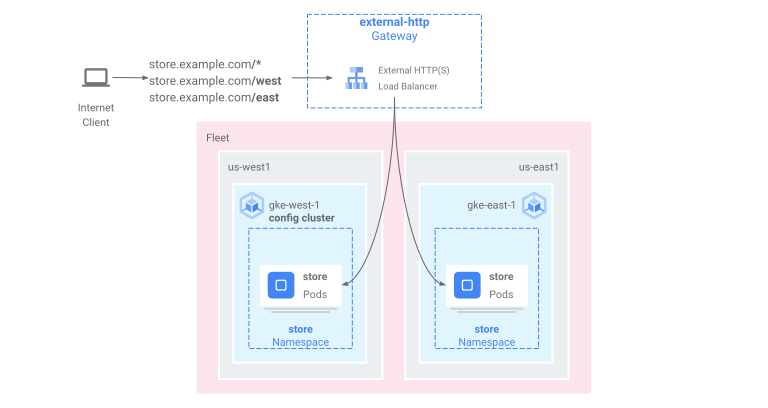
In the following steps you:
1. [Deploy the sample `store` application](https://docs.cloud.google.com/kubernetes-engine/docs/how-to/deploy-external-multi-cluster-gateway.md.txt#demo-app) to the `gke-west-1` and `gke-east-1` clusters.
2. [Configure Services on each cluster to be exported](https://docs.cloud.google.com/kubernetes-engine/docs/how-to/deploy-external-multi-cluster-gateway.md.txt#service-export) into your fleet (multi-cluster Services).
3. [Deploy an external multi-cluster Gateway and an HTTPRoute](https://docs.cloud.google.com/kubernetes-engine/docs/how-to/deploy-external-multi-cluster-gateway.md.txt#deploy-gateway) to your config cluster (`gke-west-1`).
After the application and Gateway resources are deployed, you can control traffic across the two
GKE clusters using path-based routing:
- Requests to `/west` are routed to `store` Pods in the `gke-west-1` cluster.
- Requests to `/east` are routed to `store` Pods in the`gke-east-1` cluster.
- Requests to any other path are routed to either cluster, according to its health, capacity, and proximity to the requesting client.
### Deploying the demo application
1. Create the `store` Deployment and Namespace in all three of the clusters
that were deployed in [Prepare your environment for multi-cluster Gateways](https://docs.cloud.google.com/kubernetes-engine/docs/how-to/prepare-environment-multi-cluster-gateways.md.txt#deploy-clusters):
```bash
kubectl apply --context gke-west-1 -f https://raw.githubusercontent.com/GoogleCloudPlatform/gke-networking-recipes/main/gateway/gke-gateway-controller/multi-cluster-gateway/store.yaml
kubectl apply --context gke-west-2 -f https://raw.githubusercontent.com/GoogleCloudPlatform/gke-networking-recipes/main/gateway/gke-gateway-controller/multi-cluster-gateway/store.yaml
kubectl apply --context gke-east-1 -f https://raw.githubusercontent.com/GoogleCloudPlatform/gke-networking-recipes/main/gateway/gke-gateway-controller/multi-cluster-gateway/store.yaml
```
It deploys the following resources to each cluster:
namespace/store created
deployment.apps/store created
All examples in this page use the app deployed in this step. Make sure that
the app is deployed across all three clusters before trying any of the
remaining steps. This example uses only clusters `gke-west-1` and `gke-east-1`
, and `gke-west-2` is used in another example.
### Multi-cluster Services
Services are how Pods are exposed to clients. Because the GKE
[Gateway controller](https://docs.cloud.google.com/kubernetes-engine/docs/concepts/gateway-api.md.txt#gateway_controller)
uses container-native load balancing, it does not use the ClusterIP or Kubernetes
load balancing to reach Pods. Traffic is sent directly from the load balancer to
the Pod IP addresses. However, Services still play a critical role as a logical
identifier for Pod grouping.
[Multi-cluster Services (MCS)](https://docs.cloud.google.com/kubernetes-engine/docs/concepts/multi-cluster-services.md.txt)
is an API standard for Services that span clusters and its GKE
controller provides service discovery across GKE clusters.
The multi-cluster Gateway controller uses MCS API resources to group Pods into a
Service that is addressable across or spans multiple clusters.
The multi-cluster Services API defines the following custom resources:
- *ServiceExports* map to a Kubernetes Service, exporting the endpoints of that Service to all clusters registered to the fleet. When a Service has a corresponding ServiceExport it means that the Service can be addressed by a multi-cluster Gateway.
- *ServiceImports* are automatically generated by the multi-cluster Service controller. ServiceExport and ServiceImport come in pairs. If a ServiceExport exists in the fleet, then a corresponding ServiceImport is created to allow the Service mapped to the ServiceExport to be accessed from across clusters.
Exporting Services works in the following way. A store Service exists in
`gke-west-1` which selects a group of Pods in that cluster. A ServiceExport is
created in the cluster which lets the Pods in `gke-west-1` become accessible
from the other clusters in the fleet. The ServiceExport maps to and exposes
Services that have the same name and Namespace as the ServiceExport resource.
```yaml
apiVersion: v1
kind: Service
metadata:
name: store
namespace: store
spec:
selector:
app: store
ports:
- port: 8080
targetPort: 8080
---
kind: ServiceExport
apiVersion: net.gke.io/v1
metadata:
name: store
namespace: store
```
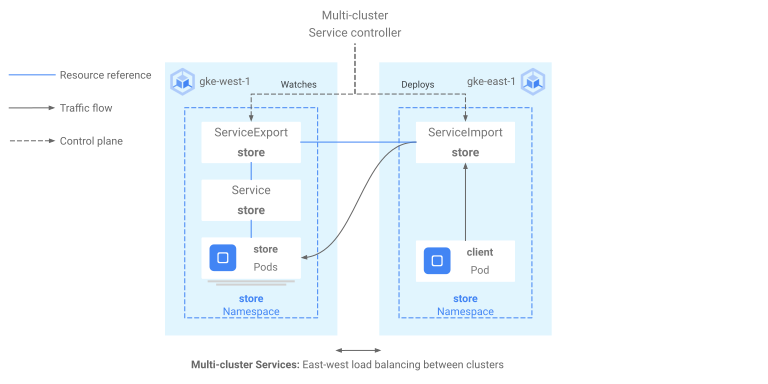
The following diagram shows what happens after a ServiceExport is deployed. If a
ServiceExport and Service pair exist then the multi-cluster Service controller
deploys a corresponding ServiceImport to every GKE cluster in
the fleet. The ServiceImport is the local representation of the `store` Service
in every cluster. This enables the `client` Pod in `gke-east-1` to use ClusterIP or
headless Services to reach the `store` Pods in `gke-west-1`. When used in this manner
multi-cluster Services provide east-west load balancing between clusters without
requiring an internal LoadBalancer Service.
To use multi-cluster Services for cluster-to-cluster load balancing, see
[Configuring multi-cluster Services](https://docs.cloud.google.com/kubernetes-engine/docs/how-to/multi-cluster-services.md.txt).
Multi-cluster Gateways also use ServiceImports, but not for cluster-to-cluster
load balancing. Instead, Gateways use ServiceImports as logical identifiers for a
Service that exists in another cluster or that stretches across multiple
clusters. The following HTTPRoute references a ServiceImport instead of a
Service resource. By referencing a ServiceImport, this indicates that it is
forwarding traffic to a group of backend Pods that run across one or more
clusters.
```yaml
kind: HTTPRoute
apiVersion: gateway.networking.k8s.io/v1
metadata:
name: store-route
namespace: store
labels:
gateway: multi-cluster-gateway
spec:
parentRefs:
- kind: Gateway
namespace: store
name: external-http
hostnames:
- "store.example.com"
rules:
- backendRefs:
- group: net.gke.io
kind: ServiceImport
name: store
port: 8080
```
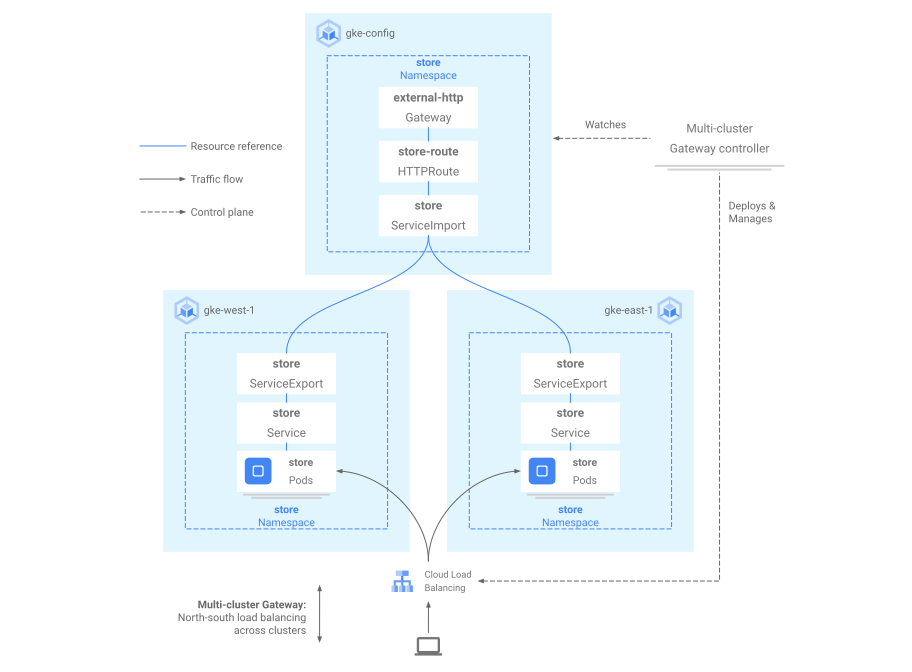
The following diagram shows how the HTTPRoute routes `store.example.com` traffic to
`store` Pods on `gke-west-1` and `gke-east-1`. The load balancer treats them as one
pool of backends. If the Pods from one of the clusters becomes unhealthy,
unreachable, or has no traffic capacity, then traffic load is balanced to the
remaining Pods on the other cluster. New clusters can be added or removed with
the `store` Service and ServiceExport. This transparently adds or removes
backend Pods without any explicit routing configuration changes.
### Exporting Services
At this point, the application is running across both clusters. Next, you
expose and export the applications by deploying Services and ServiceExports to
each cluster.
1. Apply the following manifest to the `gke-west-1` cluster to create your `store`
and `store-west-1` Services and ServiceExports:
```yaml
cat << EOF | kubectl apply --context gke-west-1 -f -
apiVersion: v1
kind: Service
metadata:
name: store
namespace: store
spec:
selector:
app: store
ports:
- port: 8080
targetPort: 8080
---
kind: ServiceExport
apiVersion: net.gke.io/v1
metadata:
name: store
namespace: store
---
apiVersion: v1
kind: Service
metadata:
name: store-west-1
namespace: store
spec:
selector:
app: store
ports:
- port: 8080
targetPort: 8080
---
kind: ServiceExport
apiVersion: net.gke.io/v1
metadata:
name: store-west-1
namespace: store
EOF
```
2. Apply the following manifest to the `gke-east-1` cluster to create your `store`
and `store-east-1` Services and ServiceExports:
```yaml
cat << EOF | kubectl apply --context gke-east-1 -f -
apiVersion: v1
kind: Service
metadata:
name: store
namespace: store
spec:
selector:
app: store
ports:
- port: 8080
targetPort: 8080
---
kind: ServiceExport
apiVersion: net.gke.io/v1
metadata:
name: store
namespace: store
---
apiVersion: v1
kind: Service
metadata:
name: store-east-1
namespace: store
spec:
selector:
app: store
ports:
- port: 8080
targetPort: 8080
---
kind: ServiceExport
apiVersion: net.gke.io/v1
metadata:
name: store-east-1
namespace: store
EOF
```
3. Verify that the correct ServiceExports have been created in the clusters.
```bash
kubectl get serviceexports --context CLUSTER_NAME --namespace store
```
Replace CLUSTER_NAME with `gke-west-1` and
`gke-east-1`. The output resembles the following:
```bash
# gke-west-1
NAME AGE
store 2m40s
store-west-1 2m40s
# gke-east-1
NAME AGE
store 2m25s
store-east-1 2m25s
```
The output demonstrates that the `store` Service contains `store` Pods across both
clusters, and the `store-west-1` and `store-east-1` Services only contain
`store` Pods on their respective clusters. These overlapping Services are
used to target the Pods across multiple clusters or a subset of Pods on a
single cluster.
4. After a few minutes verify that the accompanying ServiceImports have been
automatically created by the multi-cluster Services controller across all
clusters in the fleet.
> [!NOTE]
> **Note:** The first MCS you create in your fleet can take up to 20 min to be fully operational. Exporting new services after the first one is created or adding endpoints to existing Multi-cluster Services is faster (up to a few minutes in some cases).
```bash
kubectl get serviceimports --context CLUSTER_NAME --namespace store
```
Replace CLUSTER_NAME with `gke-west-1` and
`gke-east-1`. The output should resemble the following:
```bash
# gke-west-1
NAME TYPE IP AGE
store ClusterSetIP ["10.112.31.15"] 6m54s
store-east-1 ClusterSetIP ["10.112.26.235"] 5m49s
store-west-1 ClusterSetIP ["10.112.16.112"] 6m54s
# gke-east-1
NAME TYPE IP AGE
store ClusterSetIP ["10.72.28.226"] 5d10h
store-east-1 ClusterSetIP ["10.72.19.177"] 5d10h
store-west-1 ClusterSetIP ["10.72.28.68"] 4h32m
```
This demonstrates that all three Services are accessible from both clusters in
the fleet. However, because there is only a single active config cluster per
fleet, you can only deploy Gateways and HTTPRoutes that reference these
ServiceImports in `gke-west-1`. When an HTTPRoute in the config cluster
references these ServiceImports as backends, the Gateway can forward
traffic to these Services no matter which cluster they are exported from.
> [!NOTE]
> **Note:** The Gateway controller does not use ServiceImports or the ClusterSetIP to perform routing, even though the ClusterSetIP can be used to load balance traffic directly between clusters for east-west use cases. ServiceImports are only used by Gateways for their service discovery information. All Gateway traffic flows directly from the load balancer to the Pod IP addresses without any kube-proxy load balancing.
### Deploying the Gateway and HTTPRoute
Once the applications have been deployed, you can then configure a Gateway using
the `gke-l7-global-external-managed-mc` GatewayClass. This Gateway creates an
external Application Load Balancer configured to distribute traffic across your target clusters.
1. Apply the following Gateway manifest to the config cluster, `gke-west-1`
in this example:
```yaml
cat << EOF | kubectl apply --context gke-west-1 -f -
kind: Gateway
apiVersion: gateway.networking.k8s.io/v1
metadata:
name: external-http
namespace: store
spec:
gatewayClassName: gke-l7-global-external-managed-mc
listeners:
- name: http
protocol: HTTP
port: 80
allowedRoutes:
kinds:
- kind: HTTPRoute
EOF
```
> [!NOTE]
> **Note:** It might take several minutes (up to 10) for the Gateway to fully deploy and serve traffic.
This Gateway configuration deploys external Application Load Balancer resources with the following
naming convention: `gkemcg1-NAMESPACE-GATEWAY_NAME-HASH`.
The default resources created with this configuration are:
- 1 load balancer: `gkemcg1-store-external-http-HASH`
- 1 public IP address: `gkemcg1-store-external-http-HASH`
- 1 forwarding rule: `gkemcg1-store-external-http-HASH`
- 2 backend services:
- Default 404 backend service: `gkemcg1-store-gw-serve404-HASH`
- Default 500 backend service: `gkemcg1-store-gw-serve500-HASH`
- 1 Health check:
- Default 404 health check: `gkemcg1-store-gw-serve404-HASH`
- 0 routing rules (URLmap is empty)
At this stage, any request to the GATEWAY_IP:80
results in a default page displaying the following message: `fault filter abort`.
> [!WARNING]
> **Warning:** In this example, we are deploying an external multi-cluster Gateway listening on port 80. If you are deploying an external multi-cluster Gateway for a production environment, you should ensure that you configure a set of features to properly secure your Gateway, depending on your context and your environment. To learn more about how to secure a multi-cluster Gateway, see [Secure a Gateway](https://docs.cloud.google.com/kubernetes-engine/docs/how-to/secure-gateway.md.txt), or how to apply Policies to a multi-cluster Gateway, see [Configure Gateway resources using Policies](https://docs.cloud.google.com/kubernetes-engine/docs/how-to/configure-gateway-resources.md.txt).
2. Apply the following HTTPRoute manifest to the config cluster, `gke-west-1`
in this example:
```yaml
cat << EOF | kubectl apply --context gke-west-1 -f -
kind: HTTPRoute
apiVersion: gateway.networking.k8s.io/v1
metadata:
name: public-store-route
namespace: store
labels:
gateway: external-http
spec:
hostnames:
- "store.example.com"
parentRefs:
- name: external-http
rules:
- matches:
- path:
type: PathPrefix
value: /west
backendRefs:
- group: net.gke.io
kind: ServiceImport
name: store-west-1
port: 8080
- matches:
- path:
type: PathPrefix
value: /east
backendRefs:
- group: net.gke.io
kind: ServiceImport
name: store-east-1
port: 8080
- backendRefs:
- group: net.gke.io
kind: ServiceImport
name: store
port: 8080
EOF
```
At this stage, any request to the GATEWAY_IP:80
results in a default page displaying the following message: `fault filter abort`.
After deployment, this HTTPRoute configures the following routing behavior:
- Requests to `/west` are routed to `store` Pods in the `gke-west-1` cluster, because Pods selected by the `store-west-1` ServiceExport only exist in the `gke-west-1` cluster.
- Requests to `/east` are routed to `store` Pods in the`gke-east-1` cluster, because Pods selected by the `store-east-1` ServiceExport only exist in the `gke-east-1` cluster.
- Requests to any other path are routed to `store` Pods in either cluster, according to its health, capacity, and proximity to the requesting client.
- Requests to the GATEWAY_IP:80 results in a default page displaying the following message: `fault filter abort`.
Note that if all the Pods on a given cluster are unhealthy (or don't exist)
then traffic to the `store` Service would only be sent to clusters that actually
have `store` Pods. The existence of a ServiceExport and Service on a given
cluster does not guarantee that traffic is sent to that cluster. Pods must
exist and respond affirmatively to the load balancer health check or else
the load balancer just sends traffic to healthy `store` Pods in other clusters.
New resources are created with this configuration:
- 3 backend services:
- The `store` backend service: `gkemcg1-store-store-8080-HASH`
- The `store-east-1` backend service: `gkemcg1-store-store-east-1-8080-HASH`
- The `store-west-1` backend service: `gkemcg1-store-store-west-1-8080-HASH`
- 3 Health checks:
- The `store` health check: `gkemcg1-store-store-8080-HASH`
- The `store-east-1` health check: `gkemcg1-store-store-east-1-8080-HASH`
- The `store-west-1` health check: `gkemcg1-store-store-west-1-8080-HASH`
- 1 routing rule in the URLmap:
- The `store.example.com` routing rule:
- 1 Host: `store.example.com`
- Multiple `matchRules` to route to the new backend services
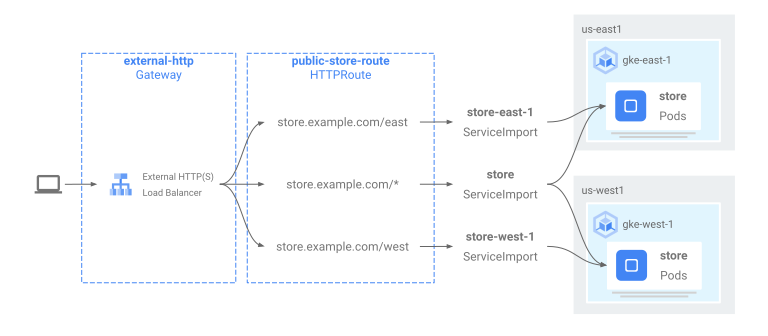
The following diagram shows the resources you've deployed across both clusters.
Because `gke-west-1` is the Gateway config cluster, it
is the cluster in which our Gateway, HTTPRoutes, and ServiceImports are watched
by the Gateway controller. Each cluster has a `store` ServiceImport and another
ServiceImport specific to that cluster. Both point at the same Pods. This lets
the HTTPRoute specify exactly where traffic should go - to the `store` Pods
on a specific cluster or to the `store` Pods across all clusters.
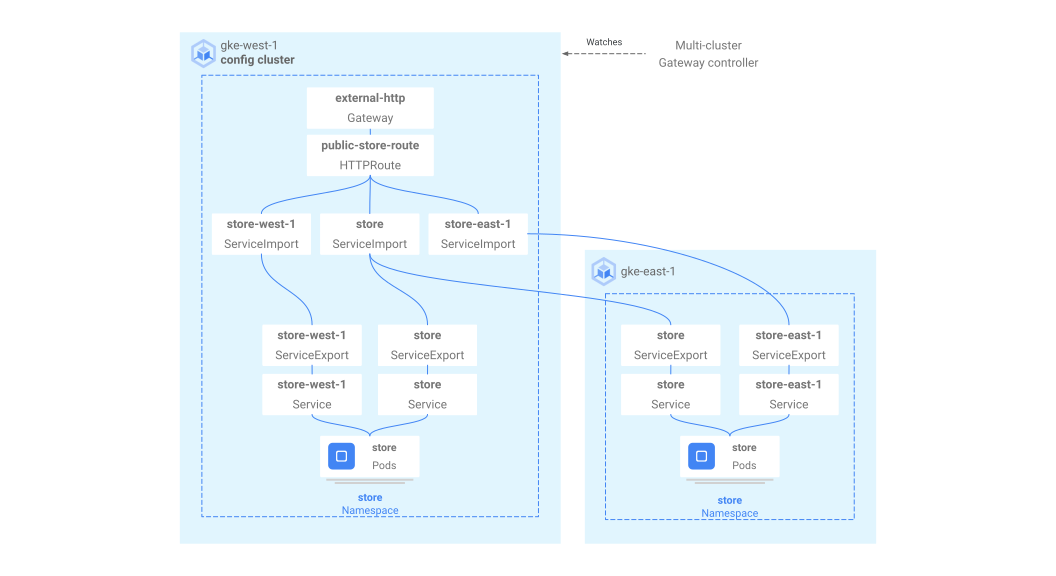
Note that this is a logical resource model, not a depiction of the traffic
flow. The traffic path goes directly from the load balancer to backend Pods
and has no direct relation to whichever cluster is the config cluster.
### Validating deployment
You can now issue requests to our multi-cluster Gateway and distribute traffic
across both GKE clusters.
1. Validate that the Gateway and HTTPRoute have been deployed successfully by
inspecting the Gateway status and events.
```bash
kubectl describe gateways.gateway.networking.k8s.io external-http --context gke-west-1 --namespace store
```
Your output should look similar to the following:
Name: external-http
Namespace: store
Labels:
Annotations: networking.gke.io/addresses: /projects/PROJECT_NUMBER/global/addresses/gkemcg1-store-external-http-laup24msshu4
networking.gke.io/backend-services:
/projects/PROJECT_NUMBER/global/backendServices/gkemcg1-store-gw-serve404-80-n65xmts4xvw2, /projects/PROJECT_NUMBER/global/backendServices/gke...
networking.gke.io/firewalls: /projects/PROJECT_NUMBER/global/firewalls/gkemcg1-l7-default-global
networking.gke.io/forwarding-rules: /projects/PROJECT_NUMBER/global/forwardingRules/gkemcg1-store-external-http-a5et3e3itxsv
networking.gke.io/health-checks:
/projects/PROJECT_NUMBER/global/healthChecks/gkemcg1-store-gw-serve404-80-n65xmts4xvw2, /projects/PROJECT_NUMBER/global/healthChecks/gkemcg1-s...
networking.gke.io/last-reconcile-time: 2023-10-12T17:54:24Z
networking.gke.io/ssl-certificates:
networking.gke.io/target-http-proxies: /projects/PROJECT_NUMBER/global/targetHttpProxies/gkemcg1-store-external-http-94oqhkftu5yz
networking.gke.io/target-https-proxies:
networking.gke.io/url-maps: /projects/PROJECT_NUMBER/global/urlMaps/gkemcg1-store-external-http-94oqhkftu5yz
API Version: gateway.networking.k8s.io/v1
Kind: Gateway
Metadata:
Creation Timestamp: 2023-10-12T06:59:32Z
Finalizers:
gateway.finalizer.networking.gke.io
Generation: 1
Resource Version: 467057
UID: 1dcb188e-2917-404f-9945-5f3c2e907b4c
Spec:
Gateway Class Name: gke-l7-global-external-managed-mc
Listeners:
Allowed Routes:
Kinds:
Group: gateway.networking.k8s.io
Kind: HTTPRoute
Namespaces:
From: Same
Name: http
Port: 80
Protocol: HTTP
Status:
Addresses:
Type: IPAddress
Value: 34.36.127.249
Conditions:
Last Transition Time: 2023-10-12T07:00:41Z
Message: The OSS Gateway API has deprecated this condition, do not depend on it.
Observed Generation: 1
Reason: Scheduled
Status: True
Type: Scheduled
Last Transition Time: 2023-10-12T07:00:41Z
Message:
Observed Generation: 1
Reason: Accepted
Status: True
Type: Accepted
Last Transition Time: 2023-10-12T07:00:41Z
Message:
Observed Generation: 1
Reason: Programmed
Status: True
Type: Programmed
Last Transition Time: 2023-10-12T07:00:41Z
Message: The OSS Gateway API has altered the "Ready" condition semantics and reservedit for future use. GKE Gateway will stop emitting it in a future update, use "Programmed" instead.
Observed Generation: 1
Reason: Ready
Status: True
Type: Ready
Listeners:
Attached Routes: 1
Conditions:
Last Transition Time: 2023-10-12T07:00:41Z
Message:
Observed Generation: 1
Reason: Programmed
Status: True
Type: Programmed
Last Transition Time: 2023-10-12T07:00:41Z
Message: The OSS Gateway API has altered the "Ready" condition semantics and reservedit for future use. GKE Gateway will stop emitting it in a future update, use "Programmed" instead.
Observed Generation: 1
Reason: Ready
Status: True
Type: Ready
Name: http
Supported Kinds:
Group: gateway.networking.k8s.io
Kind: HTTPRoute
Events:
Type Reason Age From Message
--- --- --- --- ---
Normal UPDATE 35m (x4 over 10h) mc-gateway-controller store/external-http
Normal SYNC 4m22s (x216 over 10h) mc-gateway-controller SYNC on store/external-http was a success
2. Once the Gateway has deployed successfully retrieve the external IP address
from `external-http` Gateway.
```bash
kubectl get gateways.gateway.networking.k8s.io external-http -o=jsonpath="{.status.addresses[0].value}" --context gke-west-1 --namespace store
```
Replace `VIP` in the following steps with the IP
address you receive as output.
3. Send traffic to the root path of the domain. This load balances traffic
to the `store` ServiceImport which is across cluster `gke-west-1` and
`gke-east-1`. The load balancer sends your traffic to the closest region to
you and you might not see responses from the other region.
```bash
curl -H "host: store.example.com" http://VIP
```
The output confirms that the request was served by Pod from the `gke-east-1`
cluster:
```json
{
"cluster_name": "gke-east-1",
"zone": "us-east1-b",
"host_header": "store.example.com",
"node_name": "gke-gke-east-1-default-pool-7aa30992-t2lp.c.agmsb-k8s.internal",
"pod_name": "store-5f5b954888-dg22z",
"pod_name_emoji": "⏭",
"project_id": "agmsb-k8s",
"timestamp": "2021-06-01T17:32:51"
}
```
4. Next send traffic to the `/west` path. This routes traffic to the
`store-west-1` ServiceImport which only has Pods running on the `gke-west-1`
cluster. A cluster-specific ServiceImport, like `store-west-1`, enables an
application owner to explicitly send traffic to a specific cluster, rather
than letting the load balancer make the decision.
```bash
curl -H "host: store.example.com" http://VIP/west
```
The output confirms that the request was served by Pod from the `gke-west-1`
cluster:
```json
{
"cluster_name": "gke-west-1",
"zone": "us-west1-a",
"host_header": "store.example.com",
"node_name": "gke-gke-west-1-default-pool-65059399-2f41.c.agmsb-k8s.internal",
"pod_name": "store-5f5b954888-d25m5",
"pod_name_emoji": "🍾",
"project_id": "agmsb-k8s",
"timestamp": "2021-06-01T17:39:15",
}
```
5. Finally, send traffic to the `/east` path.
```bash
curl -H "host: store.example.com" http://VIP/east
```
The output confirms that the request was served by Pod from the `gke-east-1`
cluster:
```json
{
"cluster_name": "gke-east-1",
"zone": "us-east1-b",
"host_header": "store.example.com",
"node_name": "gke-gke-east-1-default-pool-7aa30992-7j7z.c.agmsb-k8s.internal",
"pod_name": "store-5f5b954888-hz6mw",
"pod_name_emoji": "🧜🏾",
"project_id": "agmsb-k8s",
"timestamp": "2021-06-01T17:40:48"
}
```
## Clean up
After completing the exercises on this document, follow these steps to remove
resources and prevent unwanted charges incurring on your account:
1. [Delete the clusters](https://docs.cloud.google.com/kubernetes-engine/docs/how-to/deleting-a-cluster.md.txt).
2. [Unregister the clusters](https://docs.cloud.google.com/kubernetes-engine/fleet-management/docs/unregister.md.txt)
from the fleet if they don't need to be registered for another purpose.
3. Disable the `multiclusterservicediscovery` feature:
```bash
gcloud container fleet multi-cluster-services disable
```
4. Disable Multi Cluster Ingress:
```bash
gcloud container fleet ingress disable
```
5. Disable the APIs:
```bash
gcloud services disable \
multiclusterservicediscovery.googleapis.com \
multiclusteringress.googleapis.com \
trafficdirector.googleapis.com \
--project=PROJECT_ID
```
## Troubleshooting
### No healthy upstream
**Symptom:**
The following issue might occur when you create a Gateway but
cannot access the backend services (503 response code):
no healthy upstream
**Reason:**
This error message indicates that the health check prober cannot find healthy
backend services. It is possible that your backend services are healthy
but you might need to customize the health checks.
**Workaround:**
To resolve this issue, [customize your health check](https://docs.cloud.google.com/kubernetes-engine/docs/how-to/configure-gateway-resources.md.txt#configure_health_check) based on your application's
requirements (for example, `/health`) using a `HealthCheckPolicy`.
## What's next
- Learn how to [Deploy a TLS passthrough Gateway](https://docs.cloud.google.com/kubernetes-engine/docs/how-to/deploy-tls-passthrough-gateway.md.txt).
- Learn how to [Deploy an internal multi-cluster Gateway](https://docs.cloud.google.com/kubernetes-engine/docs/how-to/deploy-internal-multi-cluster-gateway.md.txt).
- Learn more about the [Gateway controller](https://docs.cloud.google.com/kubernetes-engine/docs/concepts/gateway-api.md.txt).
- To configure backend TLS for your multi-cluster Gateway, see [Configure backend TLS](https://docs.cloud.google.com/kubernetes-engine/docs/how-to/secure-gateway.md.txt#configure-backend-tls).