This document explains how to configure Pods in Google Kubernetes Engine (GKE) with
multiple network interfaces by using the Multus CNI, the IPVLAN CNI plugin, and
the Whereabouts IPAM plugin.
The *IPVLAN CNI plugin* provides Layer 2 connectivity for additional Pod
interfaces, and the *Whereabouts IPAM plugin* dynamically assigns IP addresses
to them.
This setup enables advanced networking configurations, such as separating
control plane and data plane traffic for enhanced network isolation and
segmentation.
This document is for Cloud architects and Networking specialists who
design and architect the network for their organization. To learn more about
common roles and example tasks that we reference in Google Cloud content, see
[Common GKE user roles and tasks](https://docs.cloud.google.com/kubernetes-engine/enterprise/docs/concepts/roles-tasks.md.txt).
Before reading this document, ensure that you are familiar with the following
concepts:
- [GKE networking](https://docs.cloud.google.com/kubernetes-engine/docs/concepts/network-overview).
- [Kubernetes networking](https://kubernetes.io/docs/concepts/services-networking/).
- [Container Network Interface (CNI)](https://www.cni.dev/).
- [IPVLAN](https://www.cni.dev/plugins/current/main/ipvlan/).
- [IP Address Management (IPAM)](https://en.wikipedia.org/wiki/IP_address_management).
## Benefits of using Multus with IPVLAN
Configuring your Pods with multiple network interfaces by using this solution
provides several key advantages. The primary use cases for configuring Multus
with IPVLAN in Layer 2 mode are for network segmentation that requires Layer 2
adjacency:
- **Traffic isolation:** isolate different types of traffic for enhanced security and performance. For example, you can separate sensitive management traffic from application data traffic.
- **Control and data plane separation:** dedicate the primary network interface for control plane traffic while directing high-throughput data plane traffic through a secondary IPVLAN interface.
- **Layer 2 adjacency:** fulfill requirements for applications that need direct Layer 2 connectivity between Pods on the same secondary network.
## Limitations
Multus with IPVLAN and Whereabouts has the following limitations:
- Pods configured with Multus interfaces can't simultaneously use GKE's built-in multi-networking capabilities. A Pod's network configuration must use either Multus or the cluster's built-in multi-networking.
- Multus with IPVLAN and Whereabouts requires intra-Pod Layer 2 ARP resolution to function correctly.
- By default, VPC subnets don't allow ARP resolution on secondary interfaces of Compute Engine VMs. To allow this ARP resolution, you can enroll in the Private Preview of the `resolve-subnet-mask` feature by opening a support case.
## How Multus works with IPVLAN and Whereabouts
Multus is a CNI meta-plugin that enables Pods to attach to multiple networks. Multus
acts as a dispatcher, calling other CNI plugins to configure network interfaces
based on `NetworkAttachmentDefinition` resources. You define each additional
network by using a `NetworkAttachmentDefinition`, which specifies which CNI plugin
(such as IPVLAN) and IPAM plugin (such as Whereabouts) to use for that network.
The following diagram illustrates the Multus architecture with IPVLAN and
Whereabouts plugins.The Whereabouts plugin works with Multus and IPVLAN to
handle IP address management (IPAM) for the Pods' additional network interfaces.
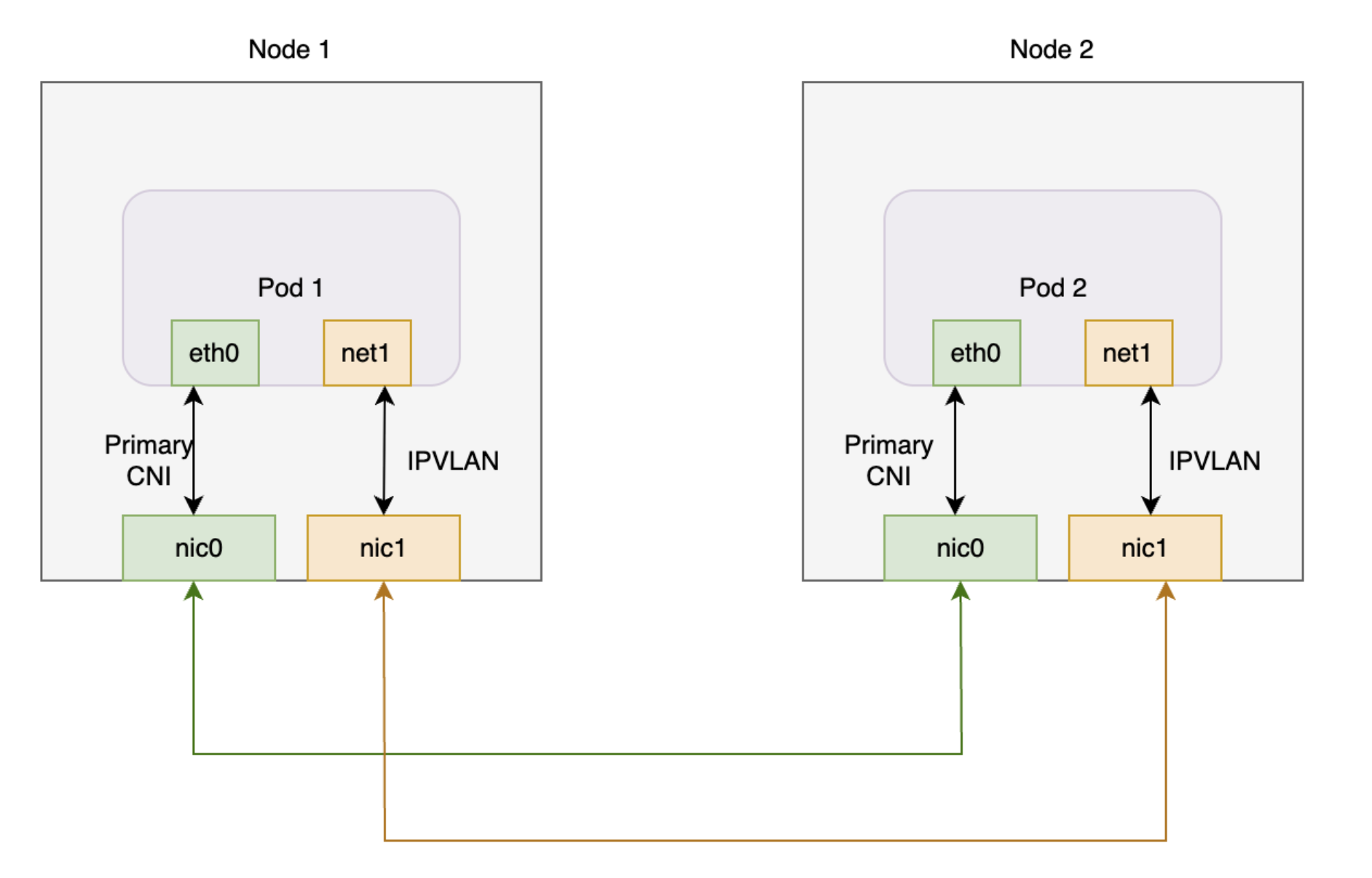 Figure 1. Multus architecture with IPVLAN and Whereabouts plugins.
This diagram shows two nodes that each have one Pod. Each Pod has a primary
interface and an additional interface. The two primary interfaces connect to a
shared network interface card, and the two additional interfaces connect to a
different shared network interface card.
When using Multus with IPVLAN and Whereabouts on GKE, Pods
typically have the following interface configuration:
- **Primary interface (`eth0`)**: GKE Dataplane V2 manages this interface, providing default cluster connectivity.
- **Additional interfaces (`net1`, etc.)** : Multus manages these interfaces. Multus invokes the IPVLAN CNI plugin in Layer 2 mode for each `NetworkAttachmentDefinition` that you specify in a Pod's annotations. This configuration provides Layer 2 connectivity to a secondary VPC network.
- **IP Address Management (IPAM)** : you configure the Whereabouts IPAM plugin within the `NetworkAttachmentDefinition`. The Whereabouts IPAM plugin dynamically assigns IP addresses to the additional IPVLAN interfaces from a predefined range.
### Pod scheduling with multiple networks
When you create a Pod and specify a `NetworkAttachmentDefinition` in its
annotations, the GKE scheduler places the Pod only on a node
that can satisfy the network requirements. The scheduler identifies nodes
within a node pool that have the necessary secondary network interface
configured. This node identification process helps ensure that the scheduler
schedules the Pod on a node that can connect to the additional network and
receive an IP address from the specified range.
The following sections guide you through configuring Multus with IPVLAN and
Whereabouts plugins on your GKE cluster.
## Before you begin
Before you start, make sure that you have performed the following tasks:
- Enable the Google Kubernetes Engine API.
[Enable Google Kubernetes Engine API](https://console.cloud.google.com/apis/enableflow?apiid=container.googleapis.com)
- To use the Google Cloud CLI for this task, [install](https://docs.cloud.google.com/sdk/docs/install) and then [initialize](https://docs.cloud.google.com/sdk/docs/initialize.md.txt) the gcloud CLI. If you previously installed the gcloud CLI, get the latest version by running the `gcloud components update` command. Earlier gcloud CLI versions might not support running the commands in this document.
> [!NOTE]
> **Note:** For existing gcloud CLI installations, make sure to set the `compute/region` [property](https://docs.cloud.google.com/sdk/docs/properties.md.txt#setting_properties). If you use primarily zonal clusters, set the `compute/zone` instead. By setting a default location, you can avoid errors in the gcloud CLI like the following: `One of [--zone, --region] must be supplied: Please specify location`. You might need to specify the location in certain commands if the location of your cluster differs from the default that you set.
- Install the `kubectl` command-line tool.
- Set up a GKE cluster running version 1.28 or later with Dataplane V2, IP Alias, and multi-networking enabled. To learn how, see [Set
up multi-network support for
Pods](https://docs.cloud.google.com/kubernetes-engine/docs/how-to/setup-multinetwork-support-for-pods). Enabling multi-networking also enables the Multi-IP-Subnet and Persistent-IP HA Policy features, which eliminate the need for manual inter-node connectivity setup.
- Use a GKE-validated version of Multus CNI (such as v4.2.1) for compatibility.
## Set up VPC
To set up the Virtual Private Cloud (VPC) to use with Multus, including creating
a subnet for node networking and secondary ranges for Pod networking, complete
the following steps:
1. Create a new VPC or use an existing one:
```bash
gcloud compute networks create VPC_NAME \
--subnet-mode=custom
```
Replace `VPC_NAME` with the name of the VPC.
2. Create a new subnet within this VPC:
```bash
gcloud compute networks subnets create SUBNET_NAME \
--range=PRIMARY_RANGE \
--network=VPC_NAME \
--region=REGION \
--secondary-range=SECONDARY_RANGE_NAME=SECONDARY_RANGE_CIDR
```
Replace the following:
- `SUBNET_NAME`: the name of the new subnet.
- `PRIMARY_RANGE`: the primary CIDR range for the subnet, such as `10.0.1.0/24`. This command uses this range for node interfaces.
- `VPC_NAME`: the name of the VPC.
- `REGION`: the region for the subnet, such as `us-central1`.
- `SECONDARY_RANGE_NAME`: the name of the secondary IP address range for Pods in the subnet.
- `SECONDARY_RANGE_CIDR`: the secondary CIDR range for Pods, such as `172.16.1.0/24`. Additional interfaces on Pods use this range.
This command creates a subnet with a primary CIDR range for an additional
node interface and a secondary range for the additional Pod interfaces.
## Create a GKE Standard cluster
Create a GKE Standard cluster with multi-networking enabled:
```bash
gcloud container clusters create CLUSTER_NAME \
--cluster-version=CLUSTER_VERSION \
--enable-dataplane-v2 \
--enable-ip-alias \
--enable-multi-networking
```
Replace the following:
- `CLUSTER_NAME`: the name of the new cluster.
- `CLUSTER_VERSION`: the version of your GKE cluster. You must use version 1.28 or later.
Enabling multi-networking lets you create node pools with multiple network
interfaces, which Multus CNI requires.
## Create a GKE Standard node pool
Create a GKE Standard node pool connected to additional VPC networks:
```bash
gcloud container node-pools create NODEPOOL_NAME \
--cluster CLUSTER_NAME \
--zone "ZONE" \
--additional-node-network network=VPC_NAME,subnetwork=SUBNET_NAME \
--additional-pod-network subnetwork=SUBNET_NAME,pod-ipv4-range=SECONDARY_RANGE_NAME,max-pods-per-node=8
```
Replace the following:
- `NODEPOOL_NAME`: the name of the new node pool.
- `CLUSTER_NAME`: the name of your cluster.
- `ZONE`: the zone for the node pool, such as `us-central1-c`.
- `VPC_NAME`: the name of the additional VPC.
- `SUBNET_NAME`: the name of the subnet.
- `SECONDARY_RANGE_NAME`: the name of the secondary IP address range for Pods in the subnet.
This command creates a node pool where nodes have an additional network
interface in SUBNET_NAME, and Pods on these nodes can use
IP addresses from SECONDARY_RANGE_NAME. You can optionally specify a `stack-type` parameter ([Preview](https://cloud.google.com/products#product-launch-stages)) to the `--additional-node-network` flag. For more information, see [Set up multi-network support for Pods](https://docs.cloud.google.com/kubernetes-engine/docs/how-to/setup-multinetwork-support-for-pods.md.txt#create-gke-node-pool).
For more information about creating GKE clusters with multi-networking
capabilities, see [Set up multi-network support for
pods](https://docs.cloud.google.com/kubernetes-engine/docs/how-to/setup-multinetwork-support-for-pods).
## Apply the Multus deployment
To enable multiple network interfaces for your Pods, install the Multus CNI
plugin. Save the following manifest, which includes the required DaemonSet and
Custom Resource Definition (CRD), as `multus-manifest.yaml`:
```yaml
apiVersion: apiextensions.k8s.io/v1
kind: CustomResourceDefinition
metadata:
name: ippools.whereabouts.cni.cncf.io
spec:
group: whereabouts.cni.cncf.io
names:
kind: IPPool
listKind: IPPoolList
plural: ippools
singular: ippool
scope: Namespaced
versions:
- name: v1alpha1
schema:
openAPIV3Schema:
description: IPPool is the Schema for the ippools API
properties:
apiVersion:
description: 'APIVersion defines the versioned schema of this representation
of an object. Servers should convert recognized schemas to the latest
internal value, and may reject unrecognized values. More info: https://git.k8s.io/community/contributors/devel/api-conventions.md#resources'
type: string
kind:
description: 'Kind is a string value representing the REST resource this
object represents. Servers may infer this from the endpoint the client
submits requests to. Cannot be updated. In CamelCase. More info: https://git.k8s.io/community/contributors/devel/api-conventions.md#types-kinds'
type: string
metadata:
type: object
spec:
description: IPPoolSpec defines the desired state of IPPool
properties:
allocations:
additionalProperties:
description: IPAllocation represents metadata about the pod/container
owner of a specific IP
properties:
id:
type: string
podref:
type: string
required:
- id
type: object
description: Allocations is the set of allocated IPs for the given
range. Its indices are a direct mapping to the IP with the same
index/offset for the pools range.
type: object
range:
description: Range is a RFC 4632/4291-style string that represents
an IP address and prefix length in CIDR notation
type: string
required:
- allocations
- range
type: object
type: object
served: true
storage: true
status:
acceptedNames:
kind: ""
plural: ""
conditions: []
storedVersions: []
---
apiVersion: apiextensions.k8s.io/v1
kind: CustomResourceDefinition
metadata:
annotations:
controller-gen.kubebuilder.io/version: v0.4.1
name: overlappingrangeipreservations.whereabouts.cni.cncf.io
spec:
group: whereabouts.cni.cncf.io
names:
kind: OverlappingRangeIPReservation
listKind: OverlappingRangeIPReservationList
plural: overlappingrangeipreservations
singular: overlappingrangeipreservation
scope: Namespaced
versions:
- name: v1alpha1
schema:
openAPIV3Schema:
description: OverlappingRangeIPReservation is the Schema for the OverlappingRangeIPReservations
API
properties:
apiVersion:
description: 'APIVersion defines the versioned schema of this representation of an object. Servers should convert recognized schemas to the latest internal value, and may reject unrecognized values. More info: https://git.k8s.io/community/contributors/devel/sig-architecture/api-conventions.md#resources'
type: string
kind:
description: 'Kind is a string value representing the REST resource this object represents. Servers may infer this from the endpoint the client submits requests to. Cannot be updated. In CamelCase. More info: https://git.k8s.io/community/contributors/devel/sig-architecture/api-conventions.md#types-kinds'
type: string
metadata:
type: object
spec:
description: OverlappingRangeIPReservationSpec defines the desired state
of OverlappingRangeIPReservation
properties:
containerid:
type: string
podref:
type: string
required:
- containerid
type: object
required:
- spec
type: object
served: true
storage: true
status:
acceptedNames:
kind: ""
plural: ""
conditions: []
storedVersions: []
---
kind: ConfigMap
apiVersion: v1
metadata:
name: multus-cni-config
namespace: kube-system
labels:
app: gke-multinet
data:
cni-conf.json: |
{
"name": "multus-cni-network",
"type": "multus",
"confDir": "/etc/cni/net.d",
"namespaceIsolation": true,
"logLevel": "verbose",
"logFile": "/var/log/multus.log",
"kubeconfig": "/var/lib/kubelet/kubeconfig",
"clusterNetwork": "gke-pod-network"
}
---
apiVersion: apiextensions.k8s.io/v1
kind: CustomResourceDefinition
metadata:
name: network-attachment-definitions.k8s.cni.cncf.io
spec:
group: k8s.cni.cncf.io
scope: Namespaced
names:
plural: network-attachment-definitions
singular: network-attachment-definition
kind: NetworkAttachmentDefinition
shortNames:
- net-attach-def
versions:
- name: v1
served: true
storage: true
schema:
openAPIV3Schema:
description: 'NetworkAttachmentDefinition is a CRD schema specified by the Network Plumbing
Working Group to express the intent for attaching pods to one or more logical or physical
networks. More information available at: https://github.com/k8snetworkplumbingwg/multi-net-spec'
type: object
properties:
apiVersion:
description: 'APIVersion defines the versioned schema of this represen
tation of an object. Servers should convert recognized schemas to the
latest internal value, and may reject unrecognized values. More info:
https://git.k8s.io/community/contributors/devel/sig-architecture/api-conventions.md#resources'
type: string
kind:
description: 'Kind is a string value representing the REST resource this
object represents. Servers may infer this from the endpoint the client
submits requests to. Cannot be updated. In CamelCase. More info: https://git.k8s.io/community/contributors/devel/sig-architecture/api-conventions.md#types-kinds'
type: string
metadata:
type: object
spec:
description: 'NetworkAttachmentDefinition spec defines the desired state of a network attachment'
type: object
properties:
config:
description: 'NetworkAttachmentDefinition config is a JSON-formatted CNI configuration'
type: string
---
apiVersion: rbac.authorization.k8s.io/v1
kind: ClusterRole
metadata:
name: multus-role
rules:
- apiGroups: ["k8s.cni.cncf.io"]
resources:
- '*'
verbs:
- '*'
---
kind: ClusterRole
apiVersion: rbac.authorization.k8s.io/v1
metadata:
name: whereabouts
rules:
- apiGroups:
- whereabouts.cni.cncf.io
resources:
- ippools
- overlappingrangeipreservations
verbs:
- get
- list
- watch
- create
- update
- patch
- delete
- apiGroups:
- coordination.k8s.io
resources:
- leases
verbs:
- create
- apiGroups:
- coordination.k8s.io
resources:
- leases
resourceNames:
- whereabouts
verbs:
- '*'
- apiGroups: [""]
resources:
- pods
verbs:
- list
- get
---
kind: ClusterRoleBinding
apiVersion: rbac.authorization.k8s.io/v1
metadata:
name: multus-role-binding
subjects:
- kind: Group
name: system:nodes
roleRef:
kind: ClusterRole
name: multus-role
apiGroup: rbac.authorization.k8s.io
---
apiVersion: rbac.authorization.k8s.io/v1
kind: ClusterRoleBinding
metadata:
name: whereabouts-role-binding
roleRef:
apiGroup: rbac.authorization.k8s.io
kind: ClusterRole
name: whereabouts
subjects:
- kind: ServiceAccount
name: whereabouts-sa
namespace: kube-system
---
apiVersion: v1
kind: ServiceAccount
metadata:
name: whereabouts-sa
namespace: kube-system
---
apiVersion: apps/v1
kind: DaemonSet
metadata:
name: gke-multinet
namespace: kube-system
labels:
app: gke-multinet
spec:
selector:
matchLabels:
app: gke-multinet
template:
metadata:
labels:
app: gke-multinet
spec:
priorityClassName: system-node-critical
hostNetwork: true
tolerations:
- operator: Exists
serviceAccountName: whereabouts-sa
containers:
- name: whereabouts-gc
command: [/ip-control-loop]
args:
- "--log-level=debug"
- "--enable-pod-watch=false"
- "--cron-schedule=* * * * *"
image: gcr.io/gke-release/whereabouts:v0.7.0-gke.3@sha256:2bb8450a99d86c73b262f5ccd8c433d3e3abf17d36ee5c3bf1056a1fe479e8c2
env:
- name: NODENAME
valueFrom:
fieldRef:
apiVersion: v1
fieldPath: spec.nodeName
- name: WHEREABOUTS_NAMESPACE
valueFrom:
fieldRef:
fieldPath: metadata.namespace
resources:
requests:
cpu: "100m"
memory: "50Mi"
limits:
cpu: "100m"
memory: "50Mi"
initContainers:
- name: install-multus-config
image: gcr.io/gke-release/multus-cni:v4.2.1-gke.6@sha256:25b48b8dbbf6c78a10452836f52dee456514783565b70633a168a39e6d322310
args:
- "--cni-conf-dir=/host/etc/cni/net.d"
- "--multus-conf-file=/tmp/multus-conf/00-multus.conf"
- "--multus-log-level=verbose"
- "--multus-kubeconfig-file-host=/var/lib/kubelet/kubeconfig"
- "--skip-multus-binary-copy=true"
- "--skip-config-watch=true"
resources:
requests:
cpu: "100m"
memory: "50Mi"
limits:
cpu: "100m"
memory: "50Mi"
securityContext:
privileged: true
volumeMounts:
- name: cni
mountPath: /host/etc/cni/net.d
- name: multus-cfg
mountPath: /tmp/multus-conf
- name: install-whereabouts
command: ["/bin/sh"]
args:
- -c
- >
SLEEP=false /install-cni.sh
image: gcr.io/gke-release/whereabouts:v0.7.0-gke.3@sha256:2bb8450a99d86c73b262f5ccd8c433d3e3abf17d36ee5c3bf1056a1fe479e8c2
env:
- name: NODENAME
valueFrom:
fieldRef:
apiVersion: v1
fieldPath: spec.nodeName
- name: WHEREABOUTS_NAMESPACE
valueFrom:
fieldRef:
fieldPath: metadata.namespace
resources:
requests:
cpu: "100m"
memory: "50Mi"
limits:
cpu: "100m"
memory: "50Mi"
securityContext:
privileged: true
volumeMounts:
- name: cni
mountPath: /host/etc/cni/net.d
- name: cnibin
mountPath: /host/opt/cni/bin
- name: install-binary
image: gcr.io/gke-release/multus-cni:v4.2.1-gke.6@sha256:25b48b8dbbf6c78a10452836f52dee456514783565b70633a168a39e6d322310
command: ["/gkecmd"]
args:
- "-operation=copy"
- "-cni-bin-dir=/host/opt/cni/bin"
resources:
requests:
cpu: "10m"
memory: "100Mi"
limits:
cpu: "10m"
memory: "100Mi"
securityContext:
privileged: true
volumeMounts:
- name: cnibin
mountPath: /host/opt/cni/bin
volumes:
- hostPath:
path: /var/lib/kubelet/kubeconfig
type: File
name: kubelet-credentials
- name: cni
hostPath:
path: /etc/cni/net.d
type: DirectoryOrCreate
- name: cnibin
hostPath:
path: /home/kubernetes/bin
type: DirectoryOrCreate
- name: multus-cfg
configMap:
name: multus-cni-config
items:
- key: cni-conf.json
path: 00-multus.conf
updateStrategy:
rollingUpdate:
maxUnavailable: 2
type: RollingUpdate
```
Then, apply the manifest to your cluster:
```bash
kubectl apply -f multus-manifest.yaml
```
## Create a `NetworkAttachmentDefinition` manifest
To enable Pods to connect to additional networks, create a
`NetworkAttachmentDefinition` manifest. This manifest defines how Pods connect
to a network and specifies the IP address range that an IPAM plugin, such as
Whereabouts, assigns. This range must be part of the subnet that connects your
nodes' additional network interfaces.
1. Save this manifest as `nad.yaml`. This manifest uses IPVLAN and Whereabouts
plugins.
```yaml
apiVersion: "k8s.cni.cncf.io/v1"
kind: NetworkAttachmentDefinition
metadata:
name: NAD_NAME
spec:
config: '{
"cniVersion": "0.3.1",
"plugins": [
{
"type": "ipvlan",
"master": "eth1",
"mode": "l2",
"ipam": {
"type": "whereabouts",
"range": SECONDARY_RANGE_NAME
}
}
]
}'
```
The manifest includes the following fields:
- `NAD_NAME`: the name of your `NetworkAttachmentDefinition`.
- `master`: the name of the node's secondary network interface, which acts as the `master` interface for IPVLAN. On GKE, secondary network interfaces typically start with `eth1` and are named sequentially. To confirm the interface name, connect to a node using SSH and run the `ip addr` command.
- `range`: the IP address range for Pod interfaces, which is the same as the secondary IPv4 range that you created for the Pods (`SECONDARY_RANGE_NAME`). For example, `172.16.1.0/24`.
2. Apply the manifest to your cluster:
```bash
kubectl apply -f nad.yaml
```
## Attach Pods to additional networks
To attach a Pod to an additional network, add the `k8s.v1.cni.cncf.io/networks`
annotation to the Pod manifest. For multiple networks, provide a
comma-separated list of `NetworkAttachmentDefinition` names in the following format:
`/`.
The following example shows a Pod manifest that attaches to the
`NetworkAttachmentDefinition` named `NAD_NAME` in the
`default` namespace:
```yaml
apiVersion: v1
kind: Pod
metadata:
name: samplepod
annotations:
k8s.v1.cni.cncf.io/networks: default/NAD_NAME
spec:
containers:
- name: sample-container
image: nginx
```
Replace `NAD_NAME` with the name of the `NetworkAttachmentDefinition`
you created.
When you apply this manifest, Kubernetes creates the Pod with an additional
network interface (`net1`) connected to the network that the
`NetworkAttachmentDefinition` specifies.
## Verify the Pod's additional IP address
To verify that the Pod receives an additional IP address after you attach the
Pod to an additional network, inspect the network interfaces within the Pod:
1. To inspect the `samplepod` and verify the additional IP address, use the
following command:
```bash
$kubectl describe pod PODNAME
```
Replace the `PODNAME` with the name of your Pod, such
as `samplepod`.
2. Examine the output. The `eth0` interface has the Pod's primary IP address.
The Whereabouts plugin assigns the additional IP address to another
interface, such as `net1`.
The output is similar to the following:
k8s.v1.cni.cncf.io/network-status:
[{
"name": "gke-pod-network",
"interface": "eth0",
"ips": [
"10.104.3.4"
],
"mac": "ea:e2:f6:ce:18:b5",
"default": true,
"dns": {},
"gateway": [
"\u003cnil\u003e"
]
},{
"name": "default/my-nad",
"interface": "net1",
"ips": [
"10.200.1.1"
],
"mac": "42:01:64:c8:c8:07",
"dns": {}
}]
k8s.v1.cni.cncf.io/networks: default/my-nad
In this example, `10.104.5.19` is the primary IP address on `eth0`, and
`10.200.1.1` is the additional IP address on `net1`.
## What's next
- Learn more about [Multus CNI](https://github.com/k8snetworkplumbingwg/multus-cni).
- Learn more about [IPVLAN CNI](https://www.cni.dev/plugins/current/ipvlan/).
- Learn more about [Whereabouts IPAM](https://github.com/k8snetworkplumbingwg/whereabouts).